DO MORE.
WRITE LESS.
Eugene Nor
SoftServe
What is LESS?
 Less – preprocessor language that extends usual
CSS to make it more readable and maintainable.
 Outputs the code to pure CSS
 Adds semantic and structure to stylesheets
 Makes coding slightly faster
 …and fun (most of the time)
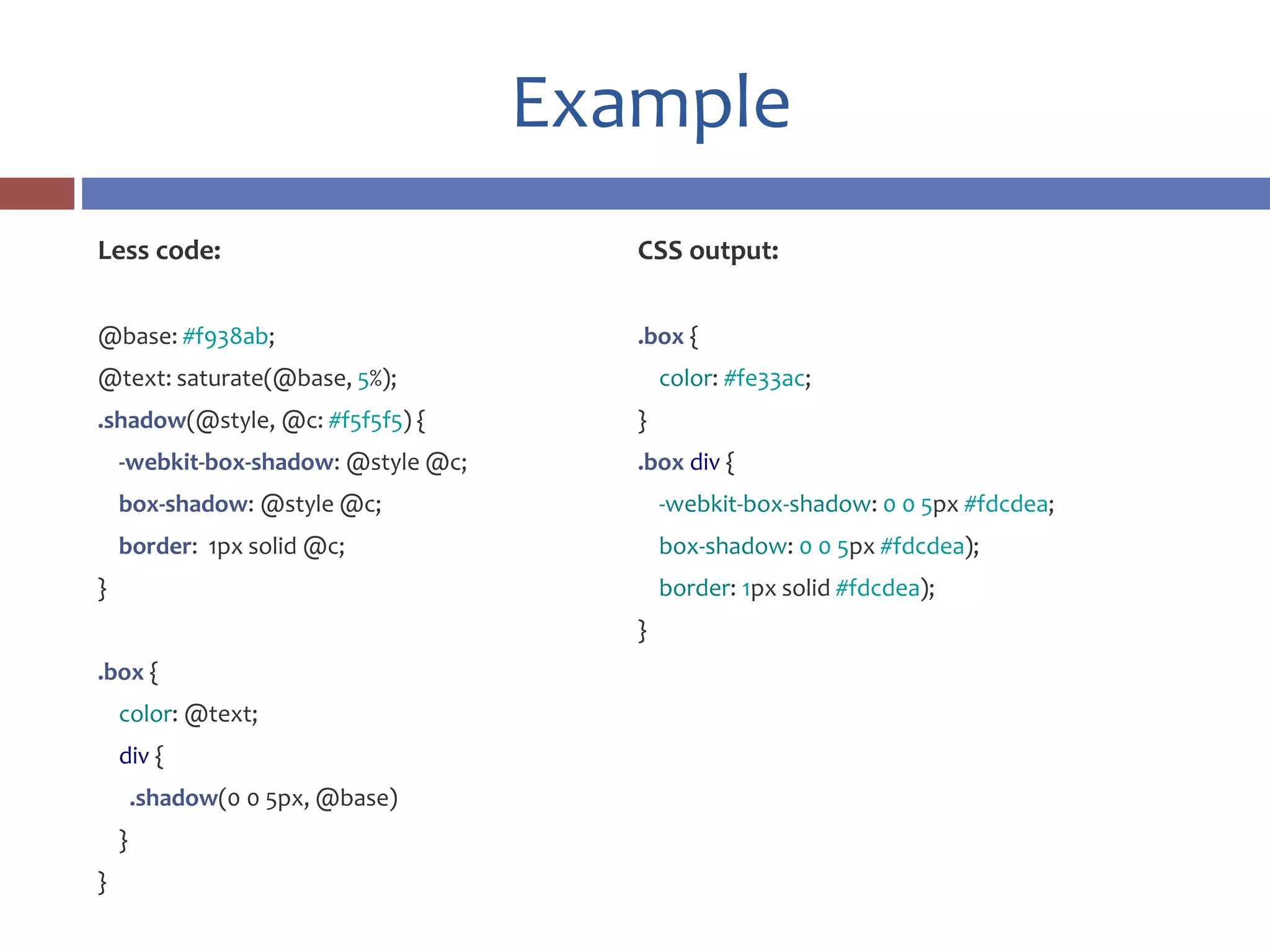
Example
Less code:
@base: #f938ab;
@text: saturate(@base, 5%);
.shadow(@style, @c: #f5f5f5) {
-webkit-box-shadow: @style @c;
box-shadow: @style @c;
border: 1px solid @c;
}
.box {
color: @text;
div {
.shadow(0 0 5px, @base)
}
}
CSS output:
.box {
color: #fe33ac;
}
.box div {
-webkit-box-shadow: 0 0 5px #fdcdea;
box-shadow: 0 0 5px #fdcdea);
border: 1px solid #fdcdea);
}
Some history
 Less was created in 2009 by Alexis Sellier, more commonly
known as @cloudhead. Originally written in Ruby, it was
then ported to JavaScript.
 In May 2012 Alexis relinquished control and development
over to a core team of contributors who now manage, fix
and extend the language.
 Less is maintained by a group of invaluable core
contributors, with the massive support and involvement of
our community.
Installation & usage
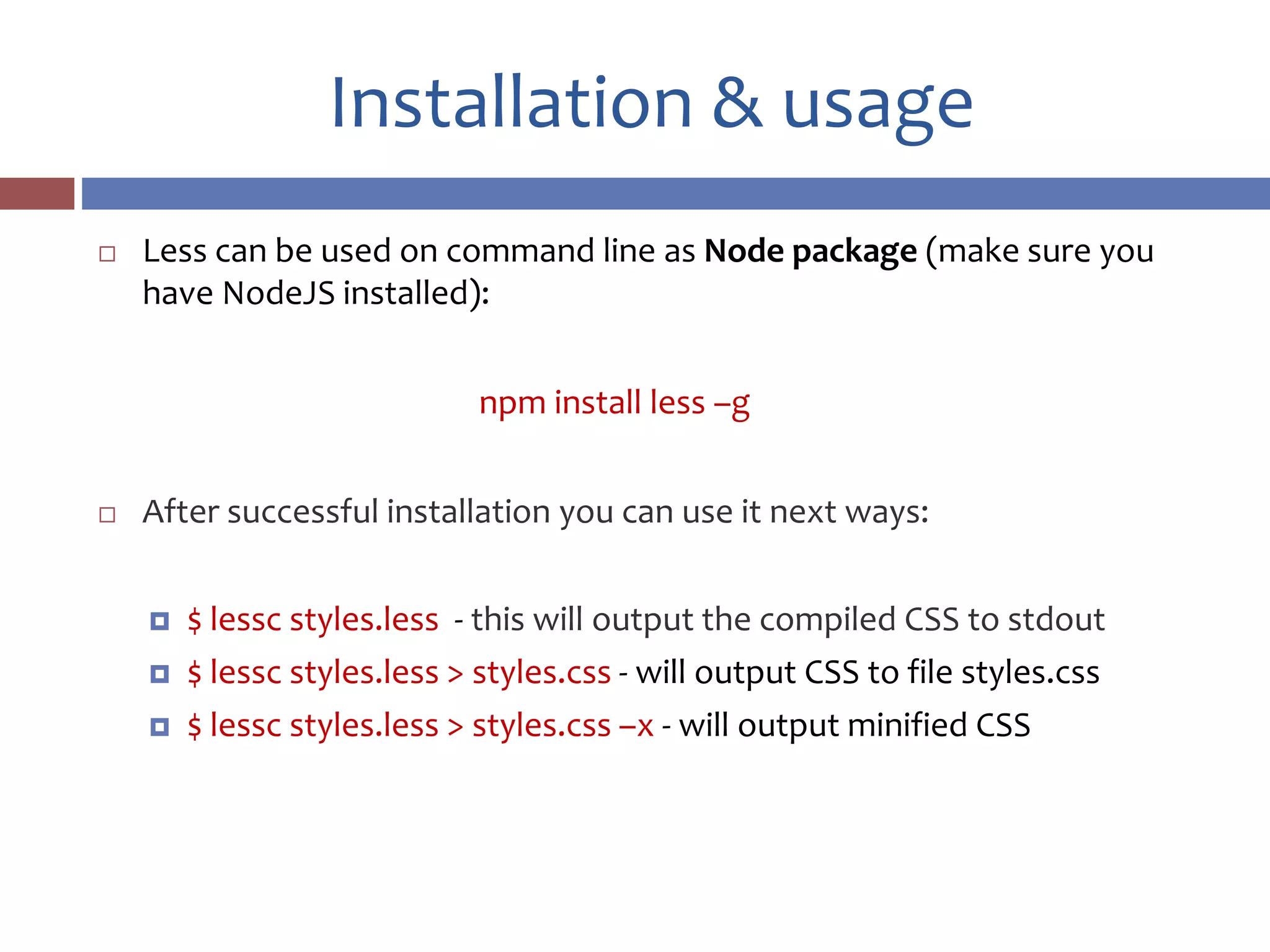
 Less can be used on command line as Node package (make sure you
have NodeJS installed):
npm install less –g
 After successful installation you can use it next ways:
 $ lessc styles.less - this will output the compiled CSS to stdout
 $ lessc styles.less > styles.css - will output CSS to file styles.css
 $ lessc styles.less > styles.css –x - will output minified CSS
Installation & usage
 Also it’s possible to use LESS as a Grunt task:
npm install grunt-contrib-less --save-dev
 Gruntfile:
less: {
development: {
options: {
paths: ["assets/css"]
},
files: {
"path/to/result.css": "path/to/source.less"
}
}
grunt.loadNpmTasks('grunt-contrib-less');
Installation & usage
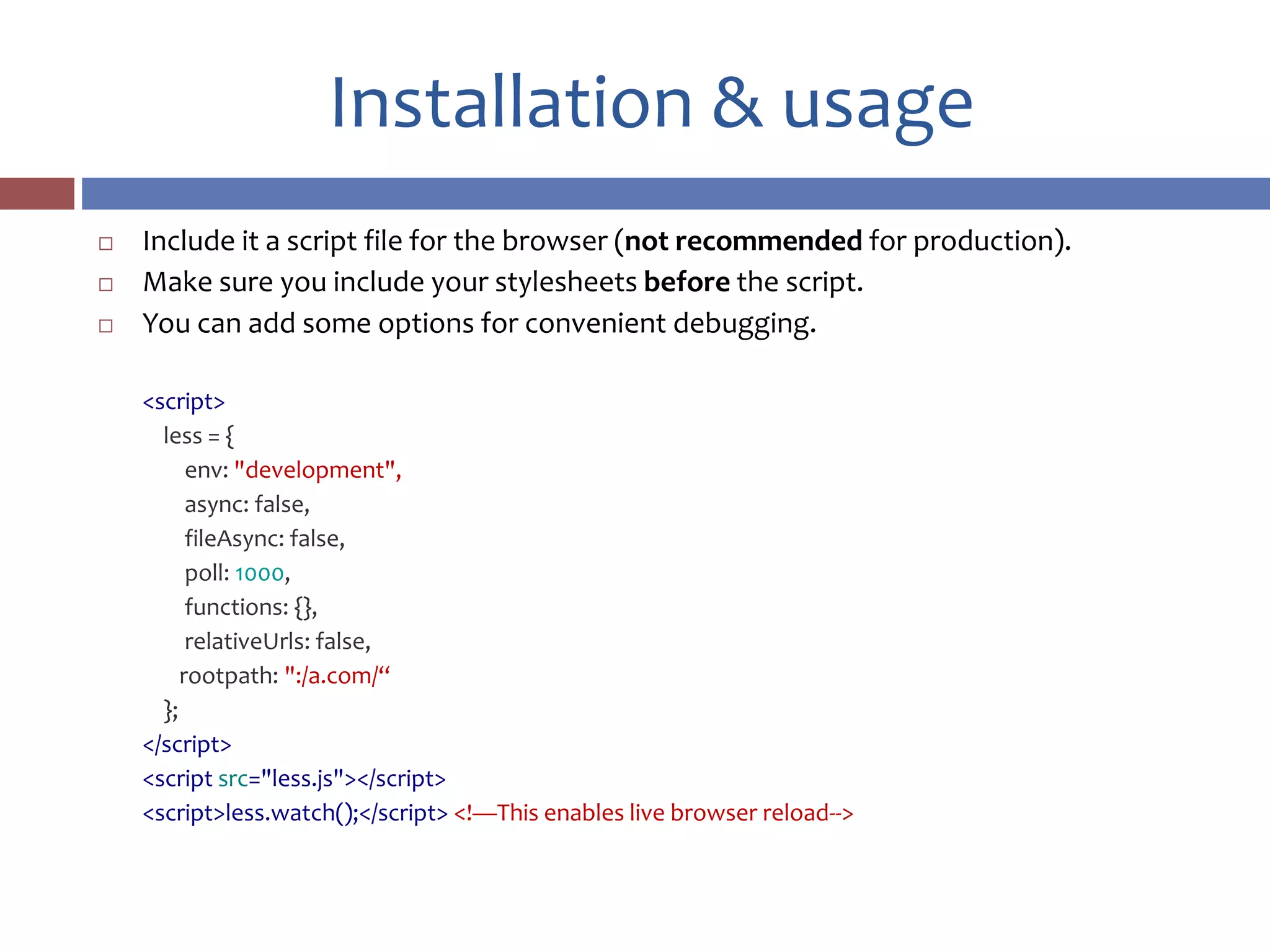
 Include it a script file for the browser (not recommended for production).
 Make sure you include your stylesheets before the script.
 You can add some options for convenient debugging.
<script>
less = {
env: "development",
async: false,
fileAsync: false,
poll: 1000,
functions: {},
relativeUrls: false,
rootpath: ":/a.com/“
};
</script>
<script src="less.js"></script>
<script>less.watch();</script> <!—This enables live browser reload-->
Nested rules
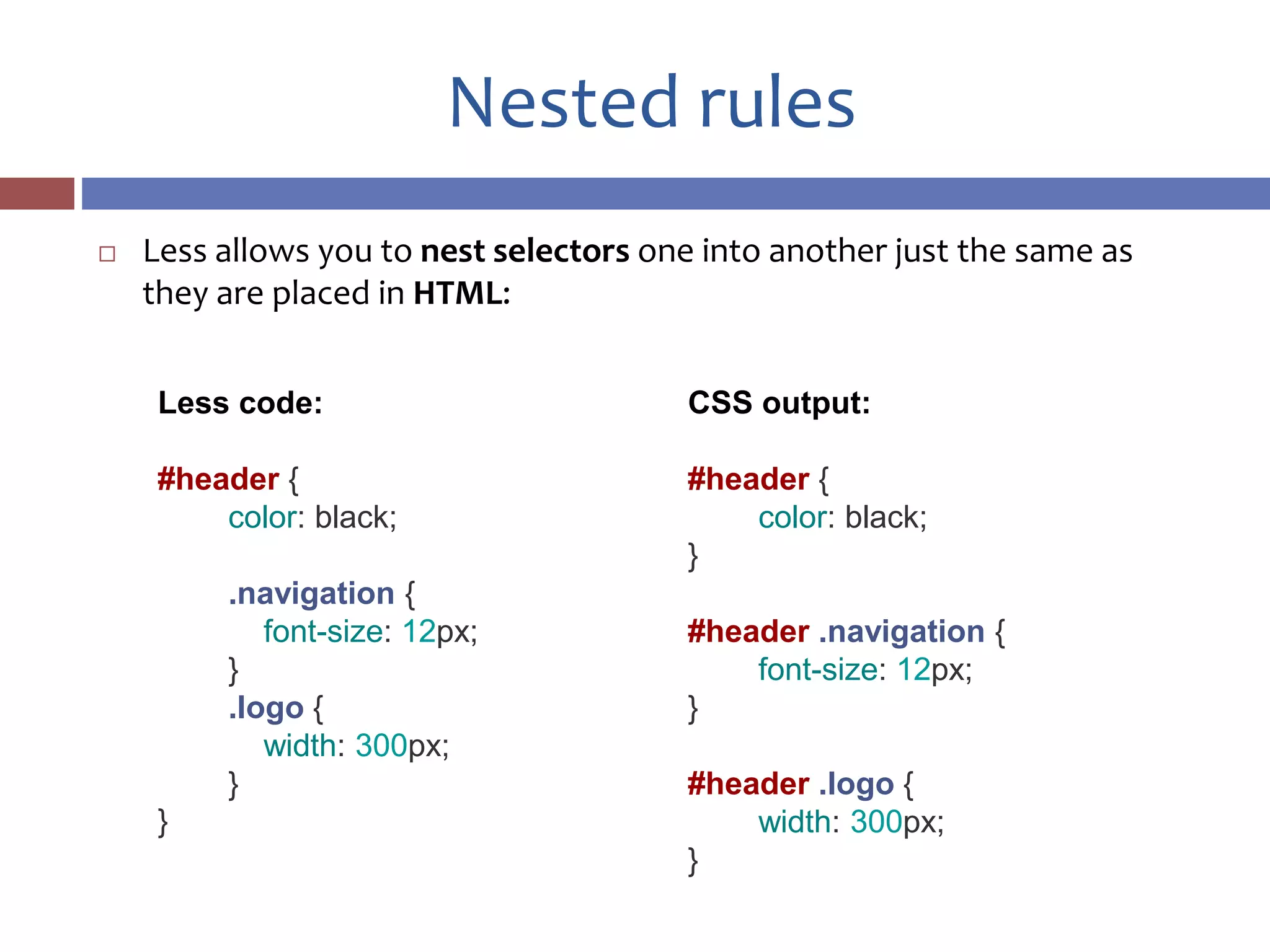
 Less allows you to nest selectors one into another just the same as
they are placed in HTML:
Less code:
#header {
color: black;
.navigation {
font-size: 12px;
}
.logo {
width: 300px;
}
}
CSS output:
#header {
color: black;
}
#header .navigation {
font-size: 12px;
}
#header .logo {
width: 300px;
}
Variables
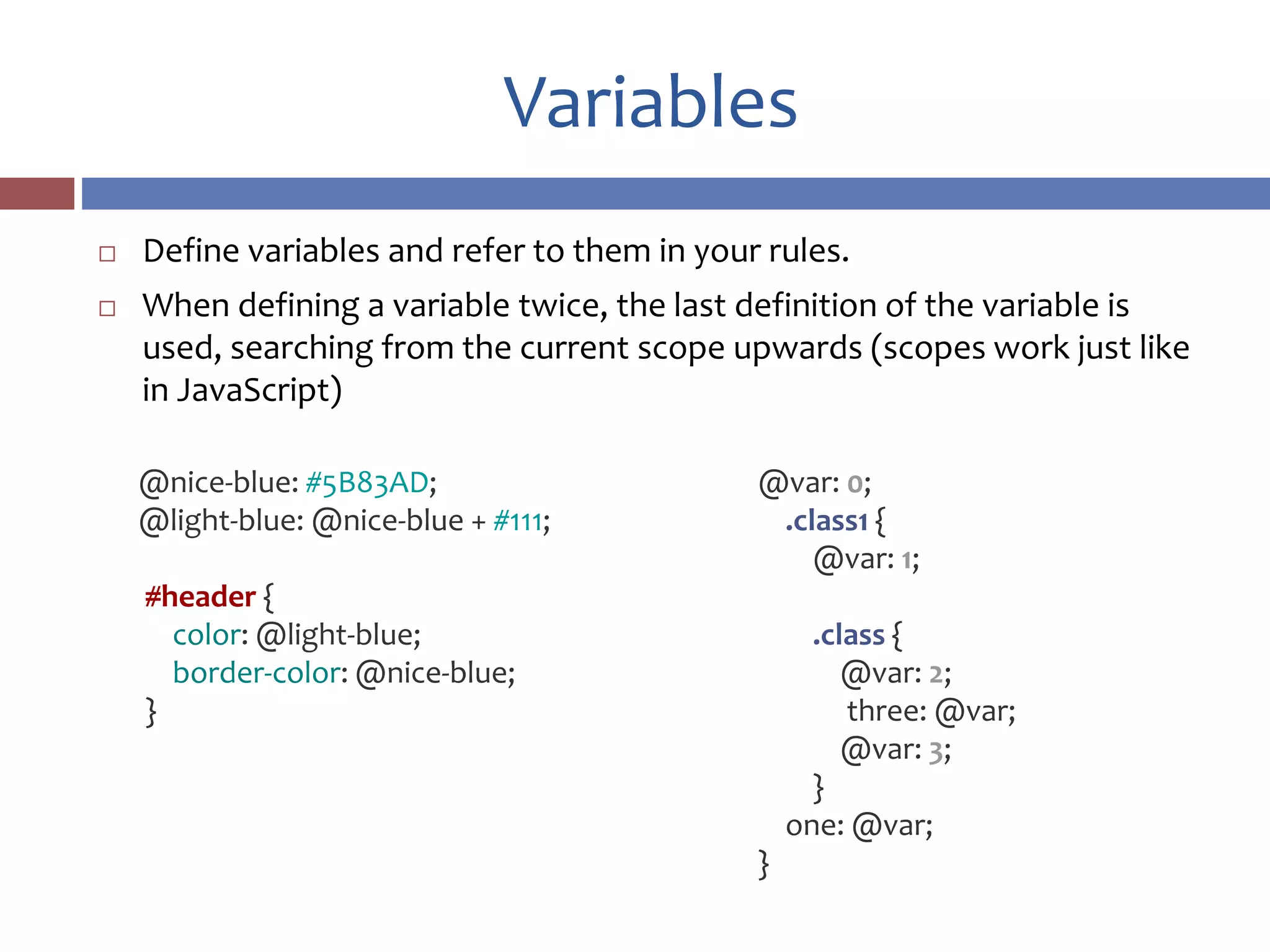
 Define variables and refer to them in your rules.
 When defining a variable twice, the last definition of the variable is
used, searching from the current scope upwards (scopes work just like
in JavaScript)
@var: 0;
.class1 {
@var: 1;
.class {
@var: 2;
three: @var;
@var: 3;
}
one: @var;
}
@nice-blue: #5B83AD;
@light-blue: @nice-blue + #111;
#header {
color: @light-blue;
border-color: @nice-blue;
}
Arithmetic
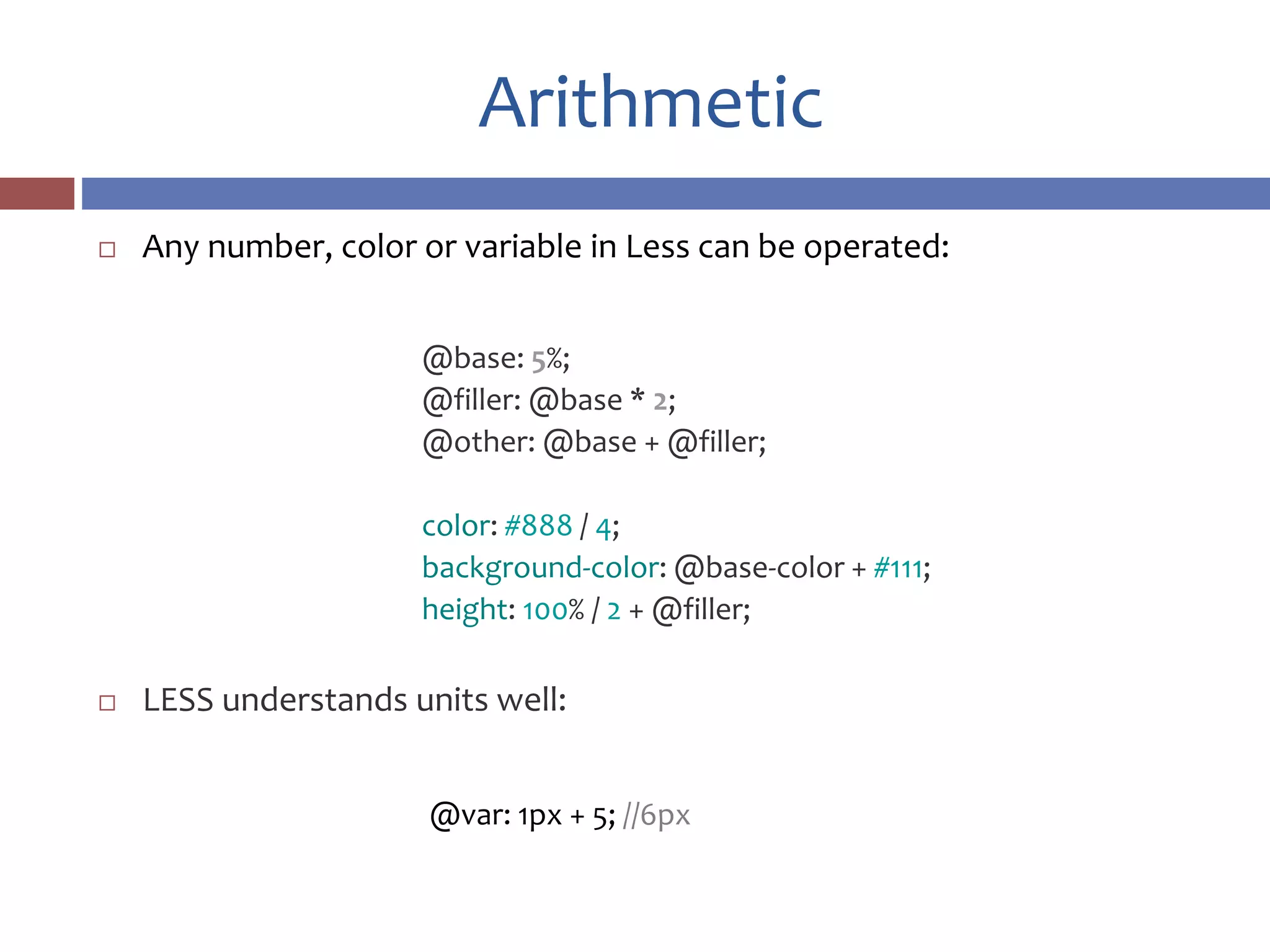
 Any number, color or variable in Less can be operated:
@base: 5%;
@filler: @base * 2;
@other: @base + @filler;
color: #888 / 4;
background-color: @base-color + #111;
height: 100% / 2 + @filler;
 LESS understands units well:
@var: 1px + 5; //6px
Mixins
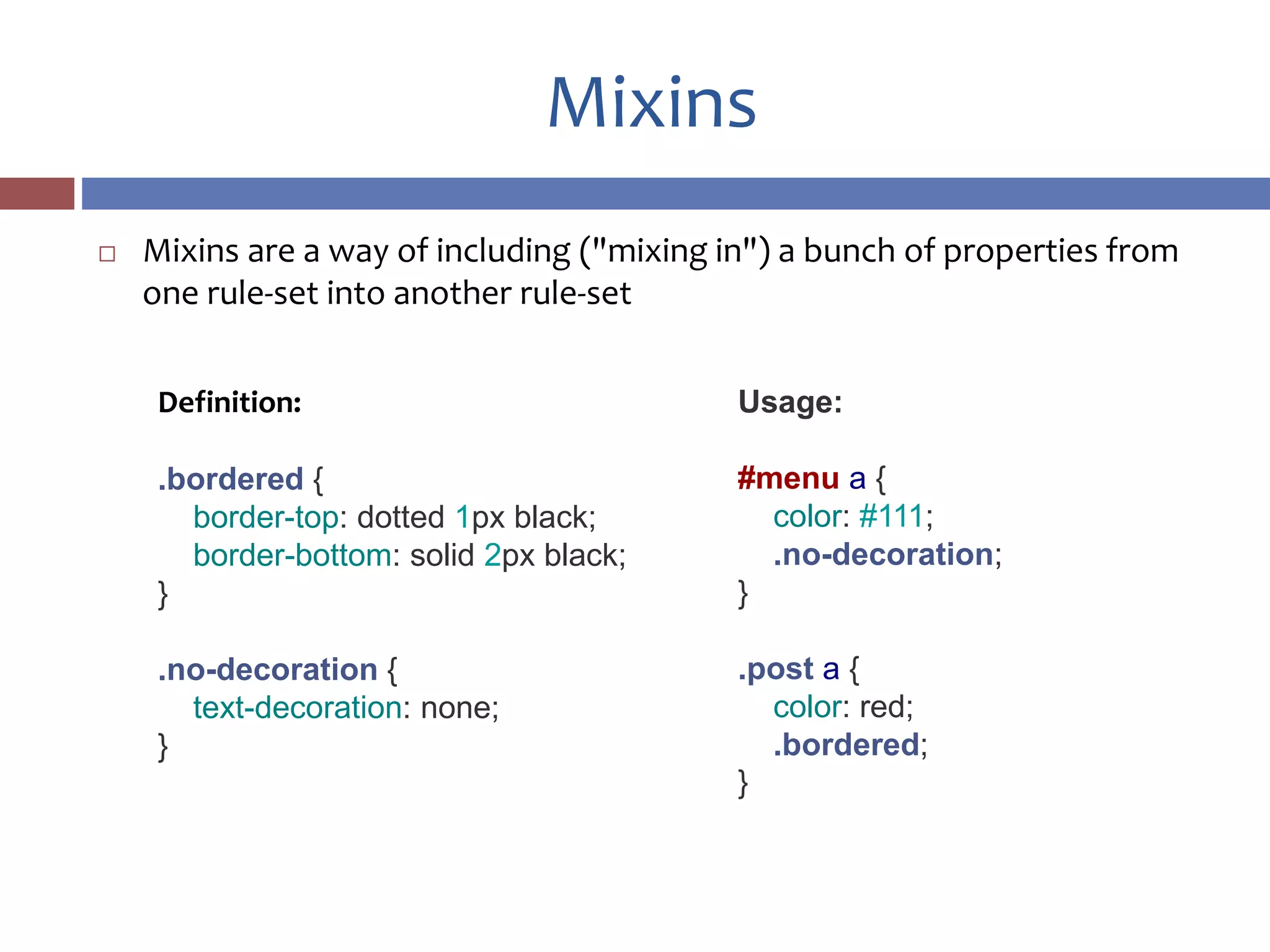
 Mixins are a way of including ("mixing in") a bunch of properties from
one rule-set into another rule-set
Definition:
.bordered {
border-top: dotted 1px black;
border-bottom: solid 2px black;
}
.no-decoration {
text-decoration: none;
}
Usage:
#menu a {
color: #111;
.no-decoration;
}
.post a {
color: red;
.bordered;
}
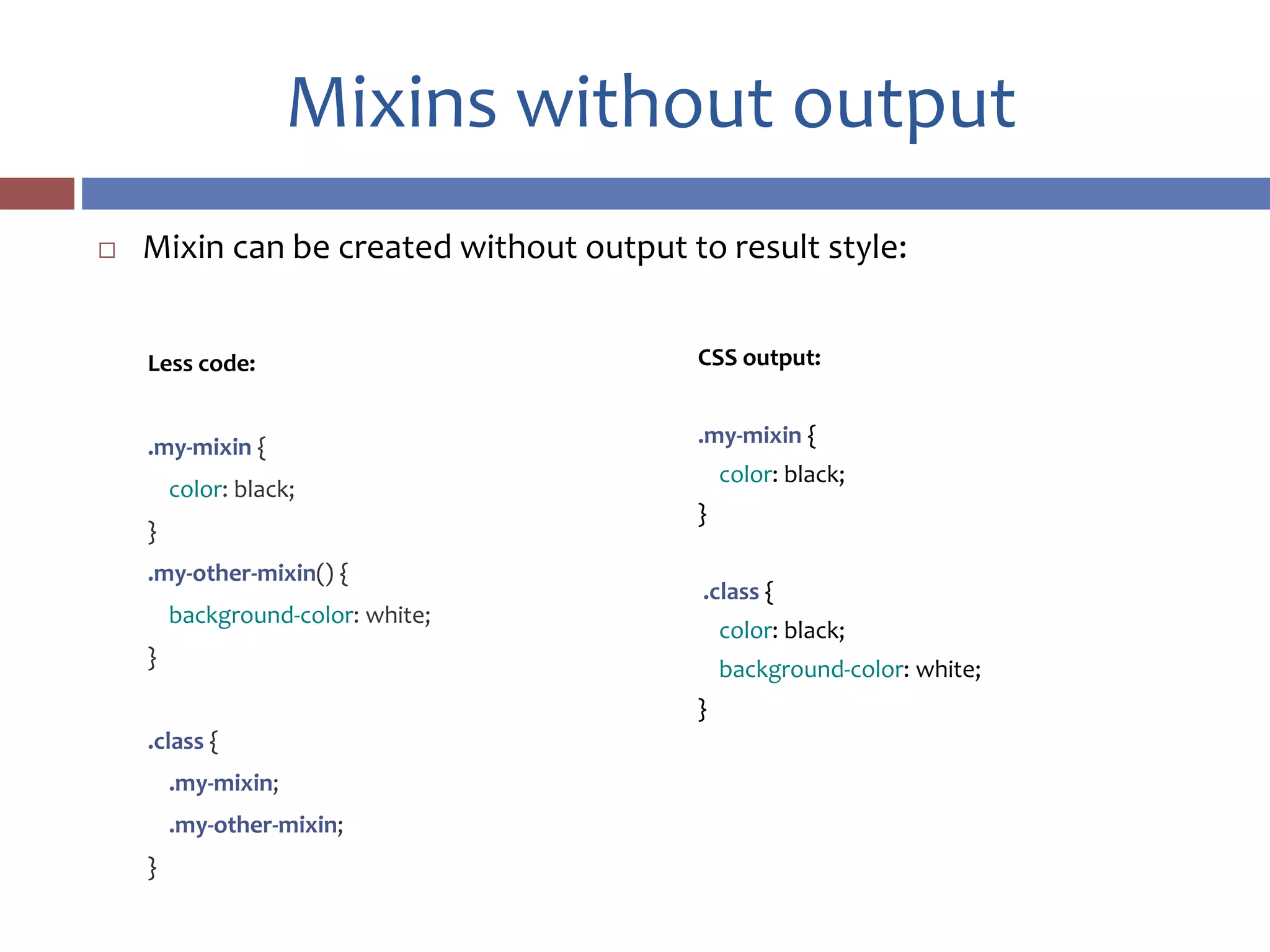
Mixins without output
 Mixin can be created without output to result style:
CSS output:
.my-mixin {
color: black;
}
.class {
color: black;
background-color: white;
}
Less code:
.my-mixin {
color: black;
}
.my-other-mixin() {
background-color: white;
}
.class {
.my-mixin;
.my-other-mixin;
}
This!
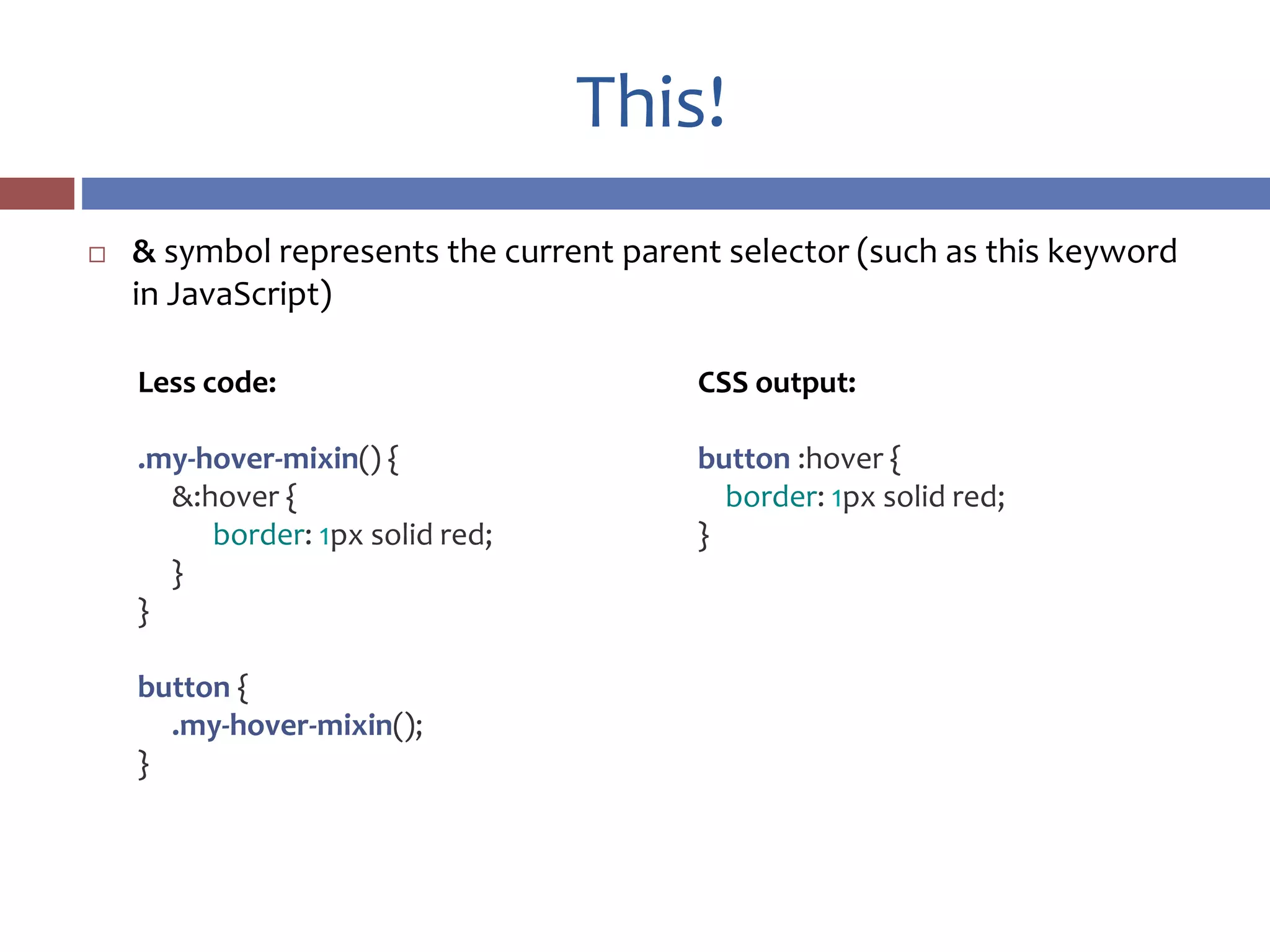
 & symbol represents the current parent selector (such as this keyword
in JavaScript)
CSS output:
button :hover {
border: 1px solid red;
}
Less code:
.my-hover-mixin() {
&:hover {
border: 1px solid red;
}
}
button {
.my-hover-mixin();
}
Parametric mixins
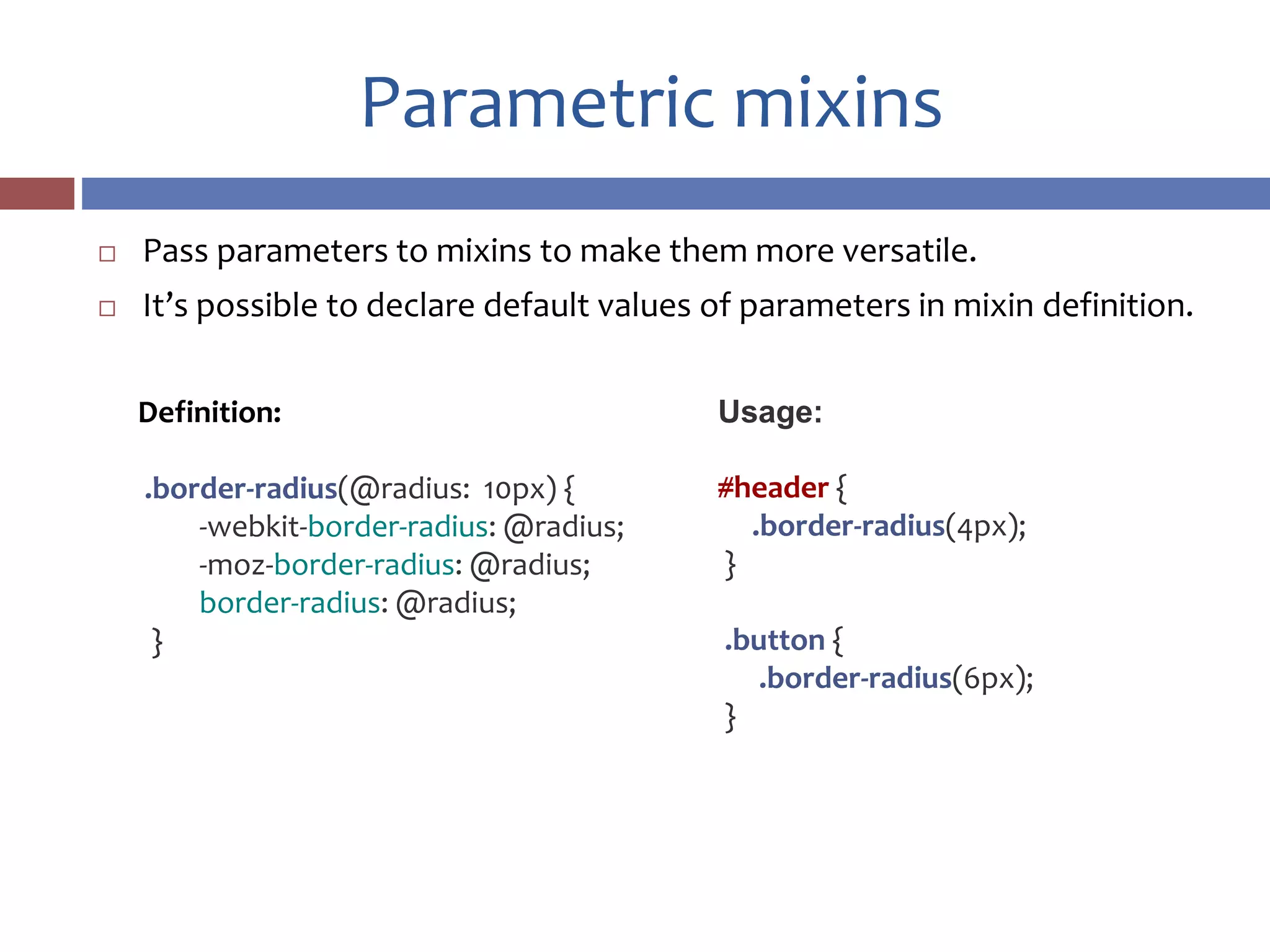
 Pass parameters to mixins to make them more versatile.
 It’s possible to declare default values of parameters in mixin definition.
Definition:
.border-radius(@radius: 10px) {
-webkit-border-radius: @radius;
-moz-border-radius: @radius;
border-radius: @radius;
}
Usage:
#header {
.border-radius(4px);
}
.button {
.border-radius(6px);
}
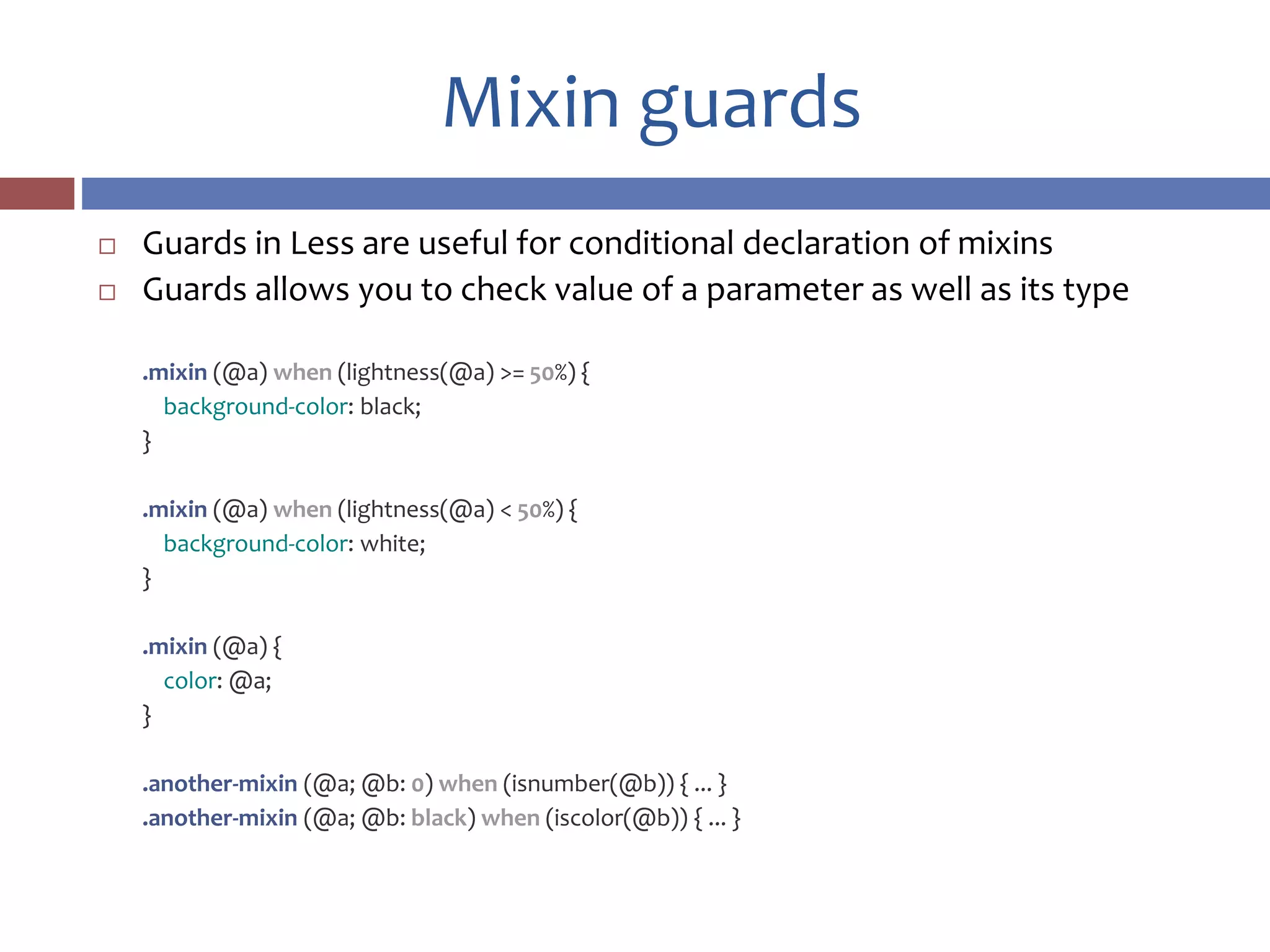
Mixin guards
 Guards in Less are useful for conditional declaration of mixins
 Guards allows you to check value of a parameter as well as its type
.mixin (@a) when (lightness(@a) >= 50%) {
background-color: black;
}
.mixin (@a) when (lightness(@a) < 50%) {
background-color: white;
}
.mixin (@a) {
color: @a;
}
.another-mixin (@a; @b: 0) when (isnumber(@b)) { ... }
.another-mixin (@a; @b: black) when (iscolor(@b)) { ... }
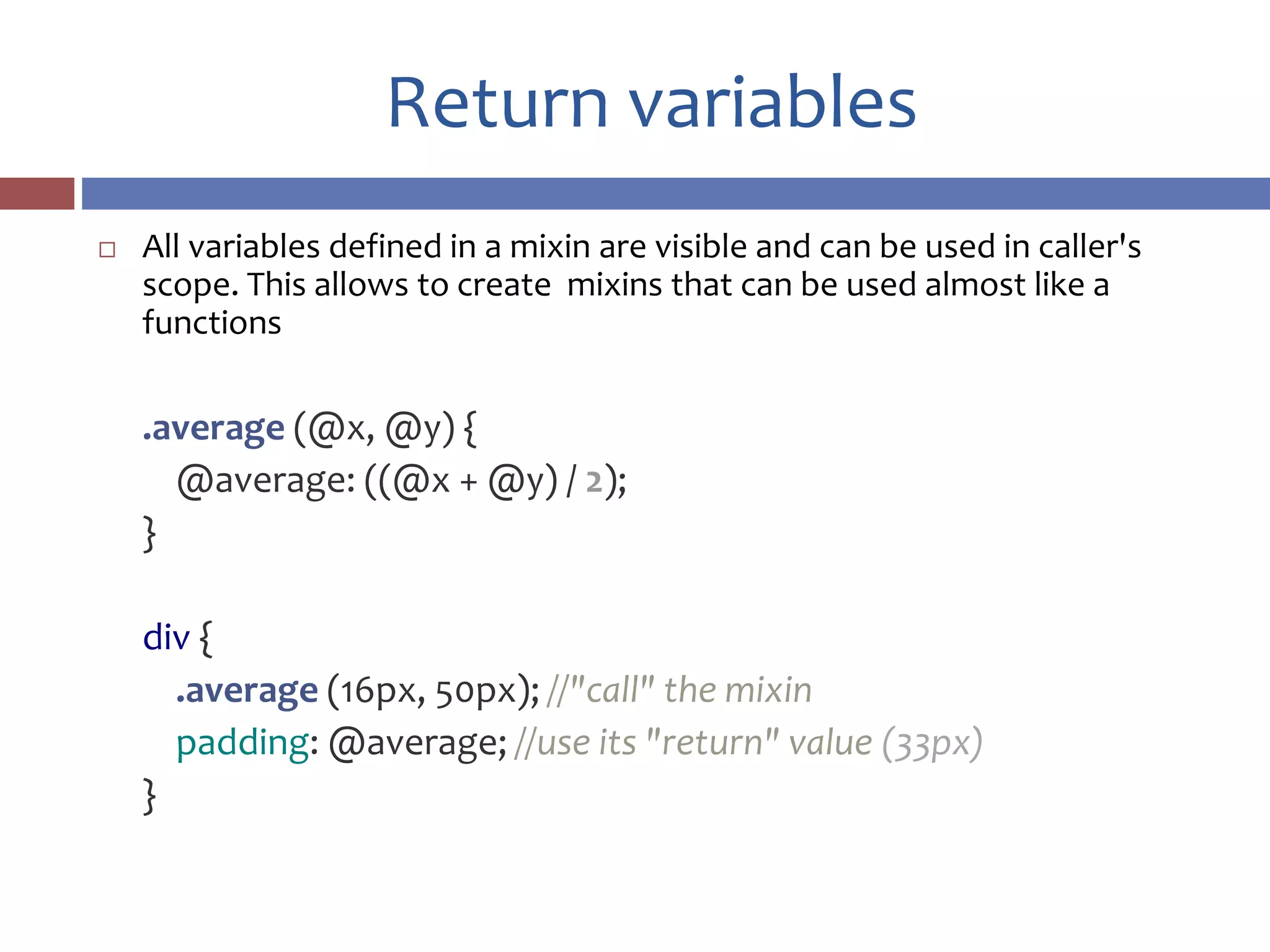
Return variables
 All variables defined in a mixin are visible and can be used in caller's
scope. This allows to create mixins that can be used almost like a
functions
.average (@x, @y) {
@average: ((@x + @y) / 2);
}
div {
.average (16px, 50px); //"call" the mixin
padding: @average; //use its "return" value (33px)
}
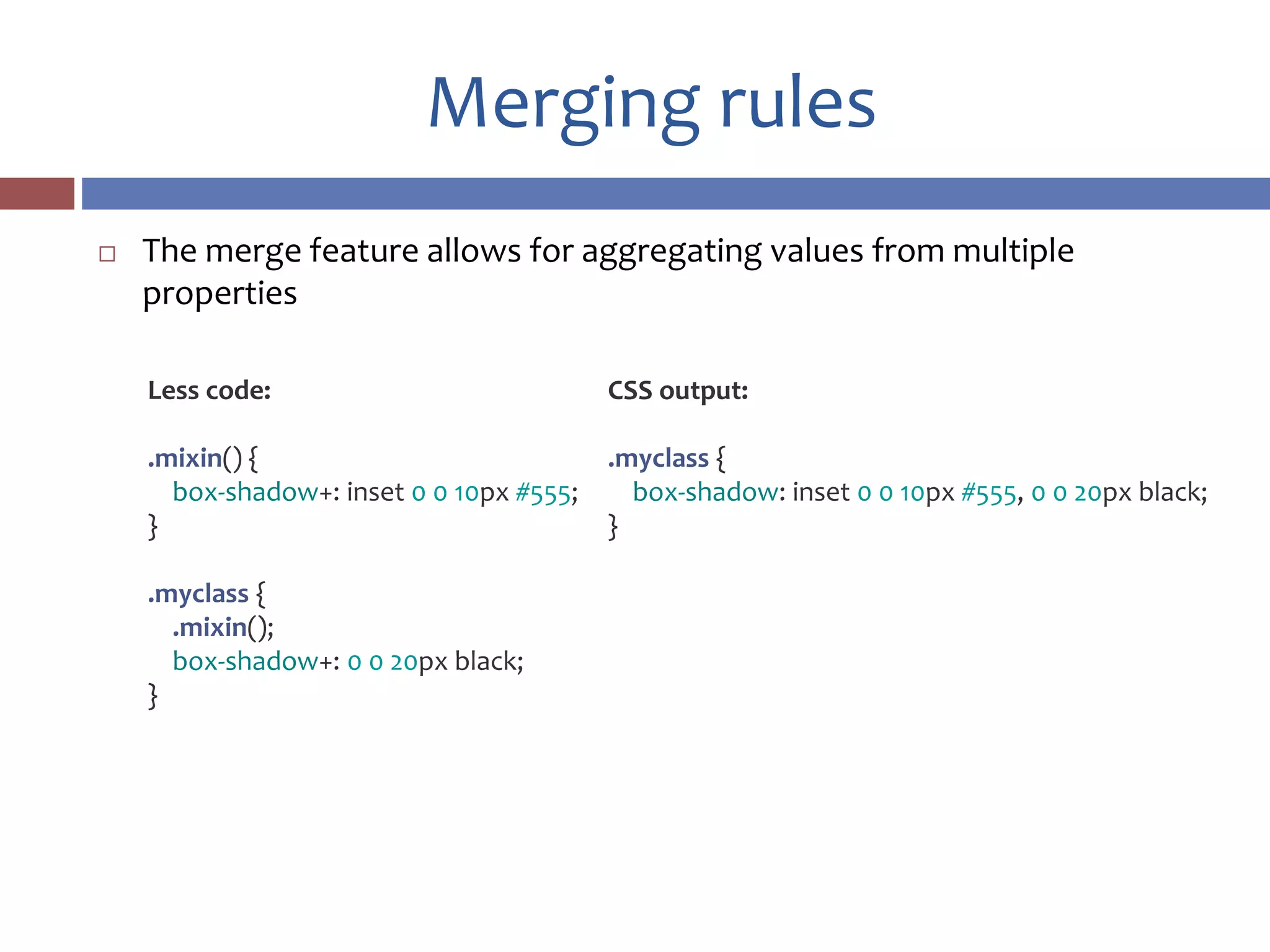
Merging rules
 The merge feature allows for aggregating values from multiple
properties
CSS output:
.myclass {
box-shadow: inset 0 0 10px #555, 0 0 20px black;
}
Less code:
.mixin() {
box-shadow+: inset 0 0 10px #555;
}
.myclass {
.mixin();
box-shadow+: 0 0 20px black;
}
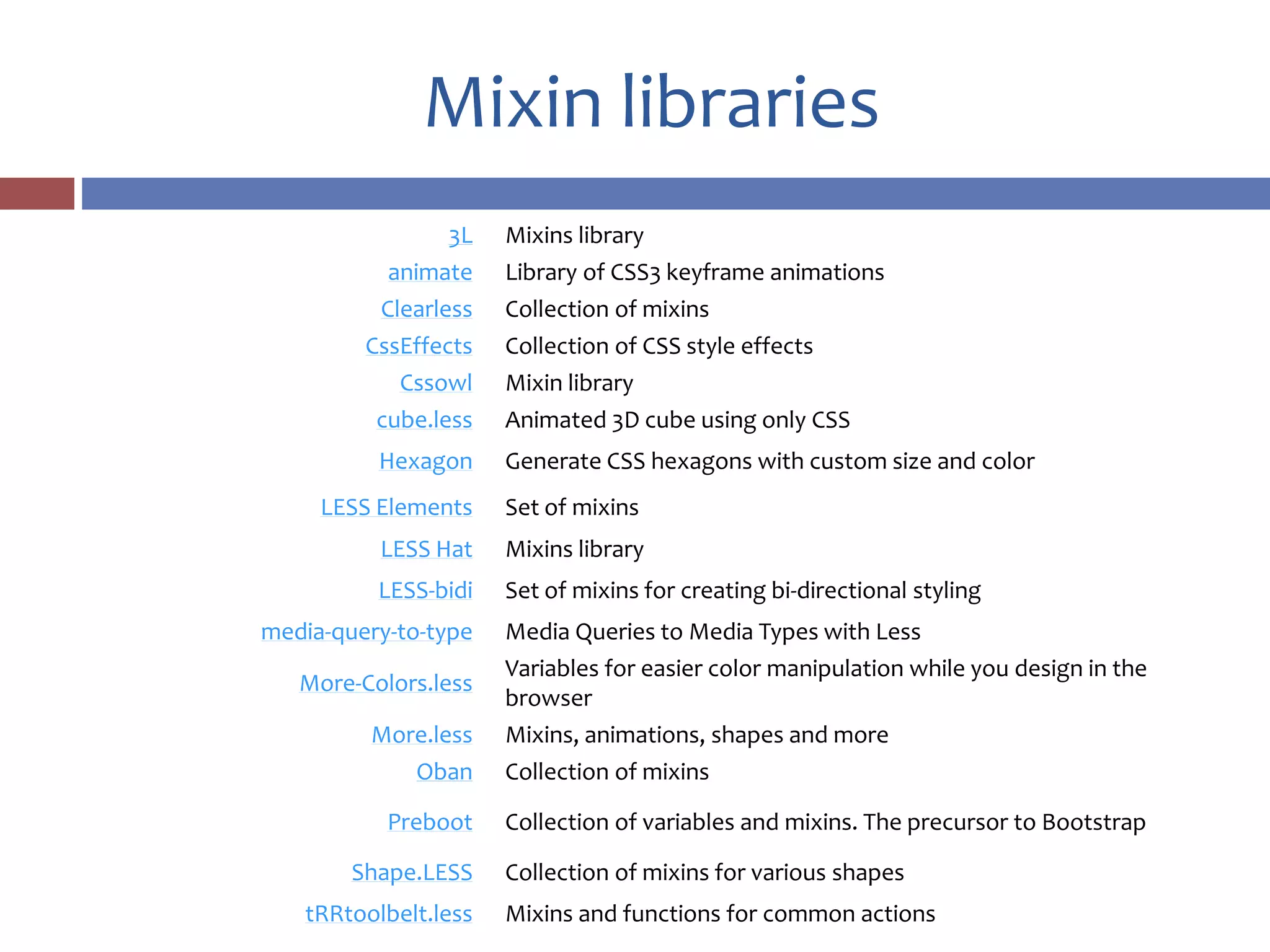
Mixin libraries
3L Mixins library
animate Library of CSS3 keyframe animations
Clearless Collection of mixins
CssEffects Collection of CSS style effects
Cssowl Mixin library
cube.less Animated 3D cube using only CSS
Hexagon Generate CSS hexagons with custom size and color
LESS Elements Set of mixins
LESS Hat Mixins library
LESS-bidi Set of mixins for creating bi-directional styling
media-query-to-type Media Queries to Media Types with Less
More-Colors.less
Variables for easier color manipulation while you design in the
browser
More.less Mixins, animations, shapes and more
Oban Collection of mixins
Preboot Collection of variables and mixins. The precursor to Bootstrap
Shape.LESS Collection of mixins for various shapes
tRRtoolbelt.less Mixins and functions for common actions
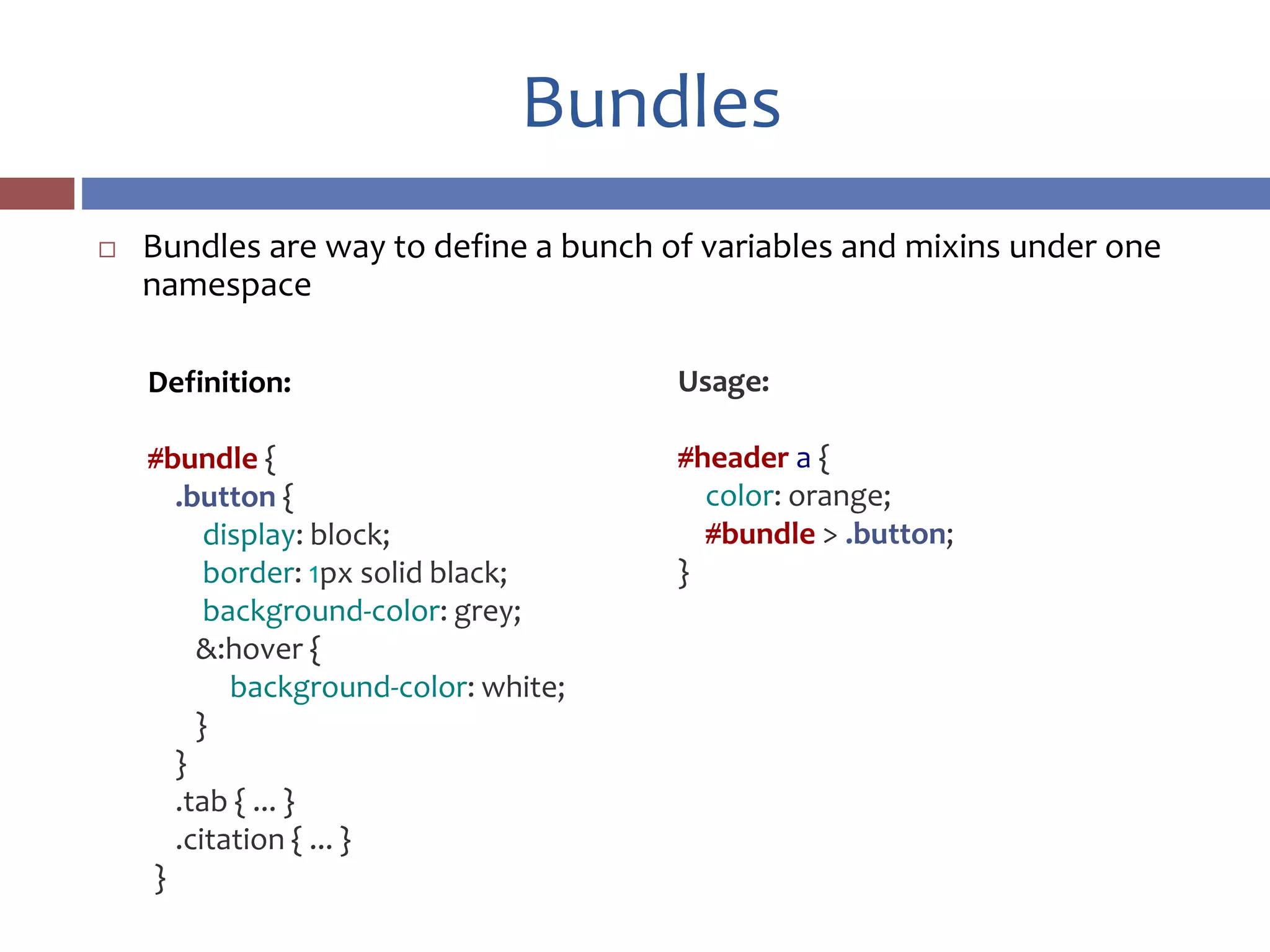
Bundles
 Bundles are way to define a bunch of variables and mixins under one
namespace
Usage:
#header a {
color: orange;
#bundle > .button;
}
Definition:
#bundle {
.button {
display: block;
border: 1px solid black;
background-color: grey;
&:hover {
background-color: white;
}
}
.tab { ... }
.citation { ... }
}
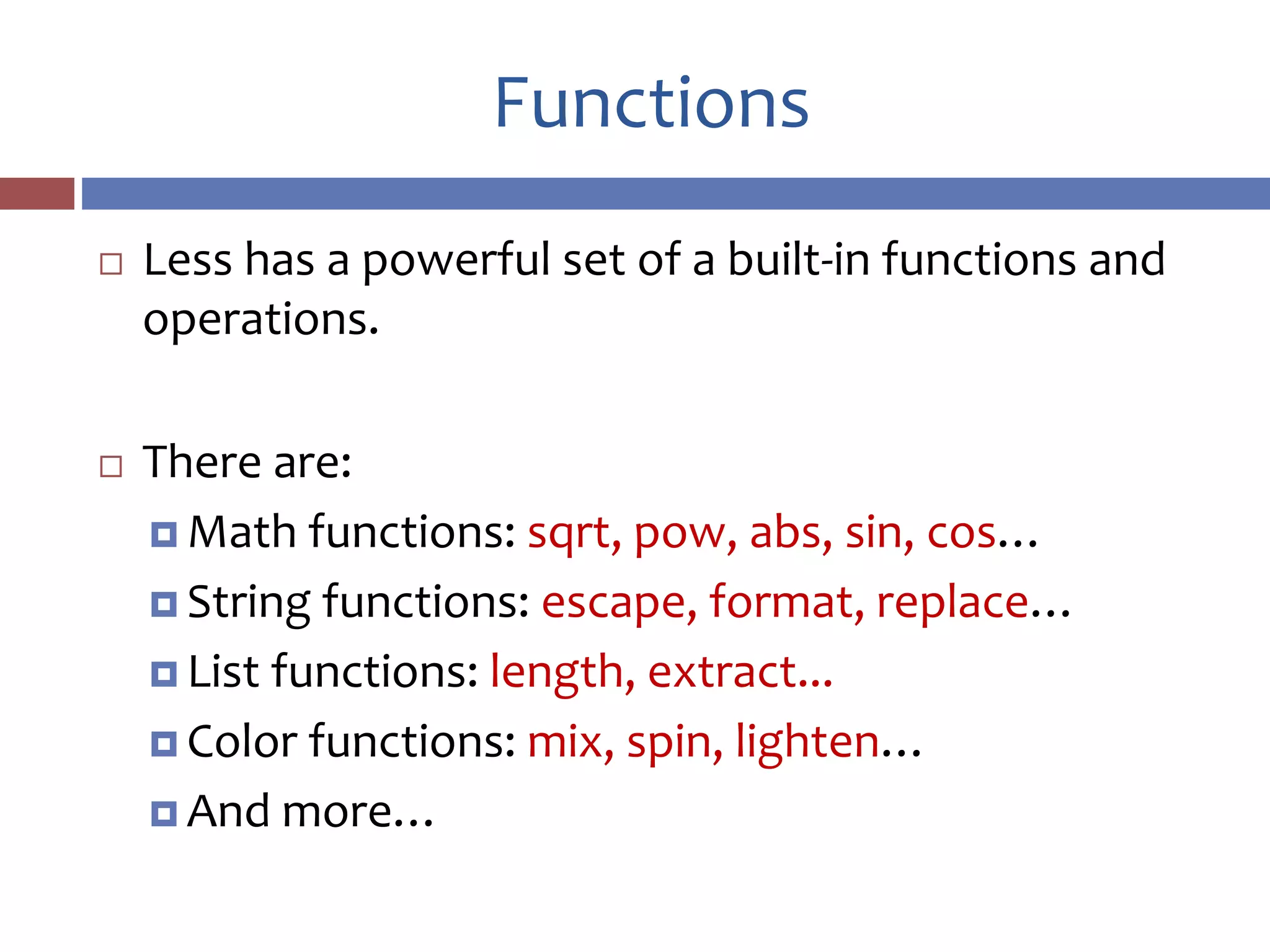
Functions
 Less has a powerful set of a built-in functions and
operations.
 There are:
 Math functions: sqrt, pow, abs, sin, cos…
 String functions: escape, format, replace…
 List functions: length, extract...
 Color functions: mix, spin, lighten…
 And more…
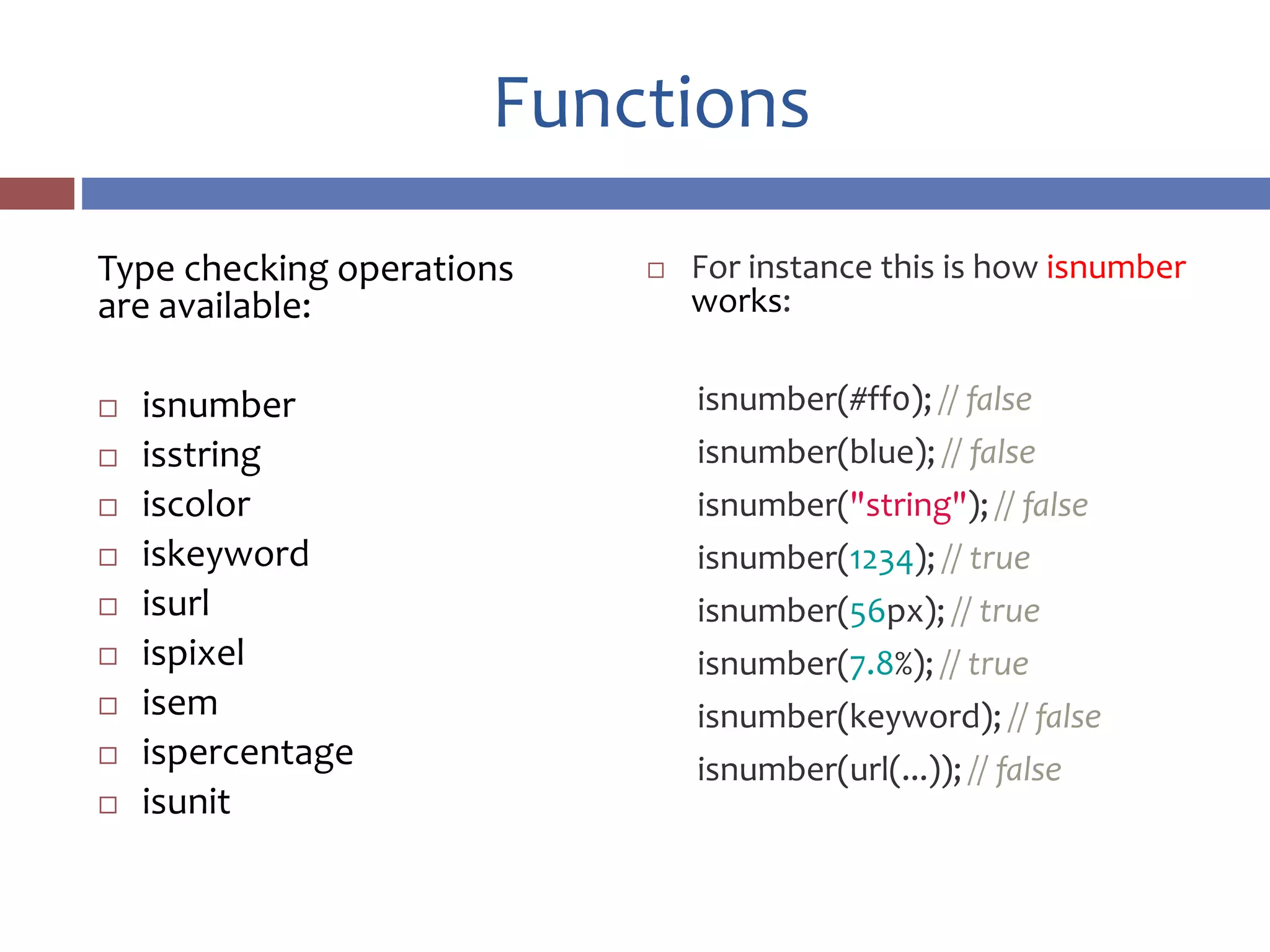
Functions
Type checking operations
are available:
 isnumber
 isstring
 iscolor
 iskeyword
 isurl
 ispixel
 isem
 ispercentage
 isunit
 For instance this is how isnumber
works:
isnumber(#ff0); // false
isnumber(blue); // false
isnumber("string"); // false
isnumber(1234); // true
isnumber(56px); // true
isnumber(7.8%); // true
isnumber(keyword); // false
isnumber(url(...)); // false
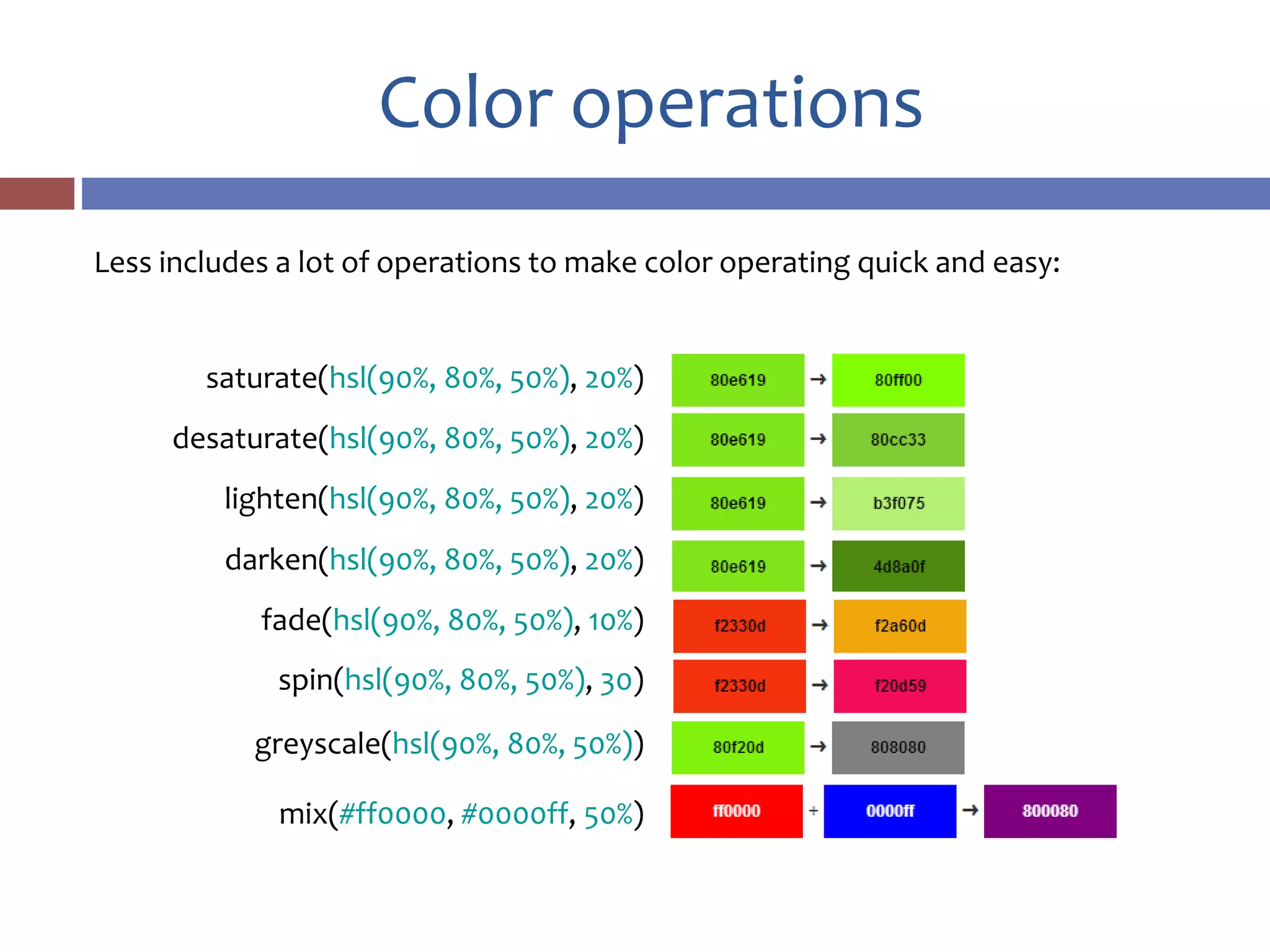
Color operations
saturate(hsl(90%, 80%, 50%), 20%)
desaturate(hsl(90%, 80%, 50%), 20%)
lighten(hsl(90%, 80%, 50%), 20%)
darken(hsl(90%, 80%, 50%), 20%)
fade(hsl(90%, 80%, 50%), 10%)
spin(hsl(90%, 80%, 50%), 30)
greyscale(hsl(90%, 80%, 50%))
mix(#ff0000, #0000ff, 50%)
Less includes a lot of operations to make color operating quick and easy:
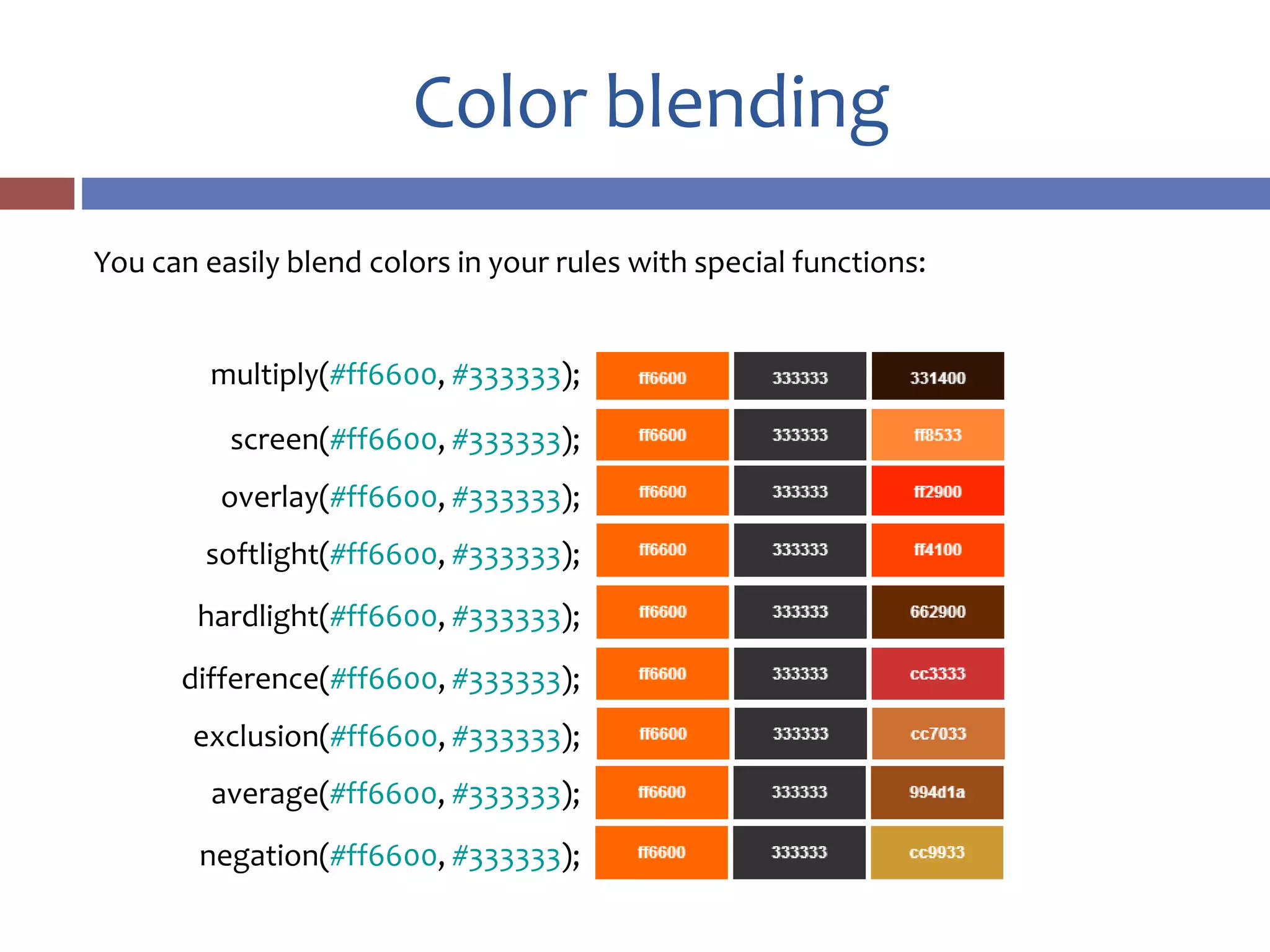
Color blending
multiply(#ff6600, #333333);
screen(#ff6600, #333333);
overlay(#ff6600, #333333);
softlight(#ff6600, #333333);
hardlight(#ff6600, #333333);
difference(#ff6600, #333333);
exclusion(#ff6600, #333333);
average(#ff6600, #333333);
negation(#ff6600, #333333);
You can easily blend colors in your rules with special functions:
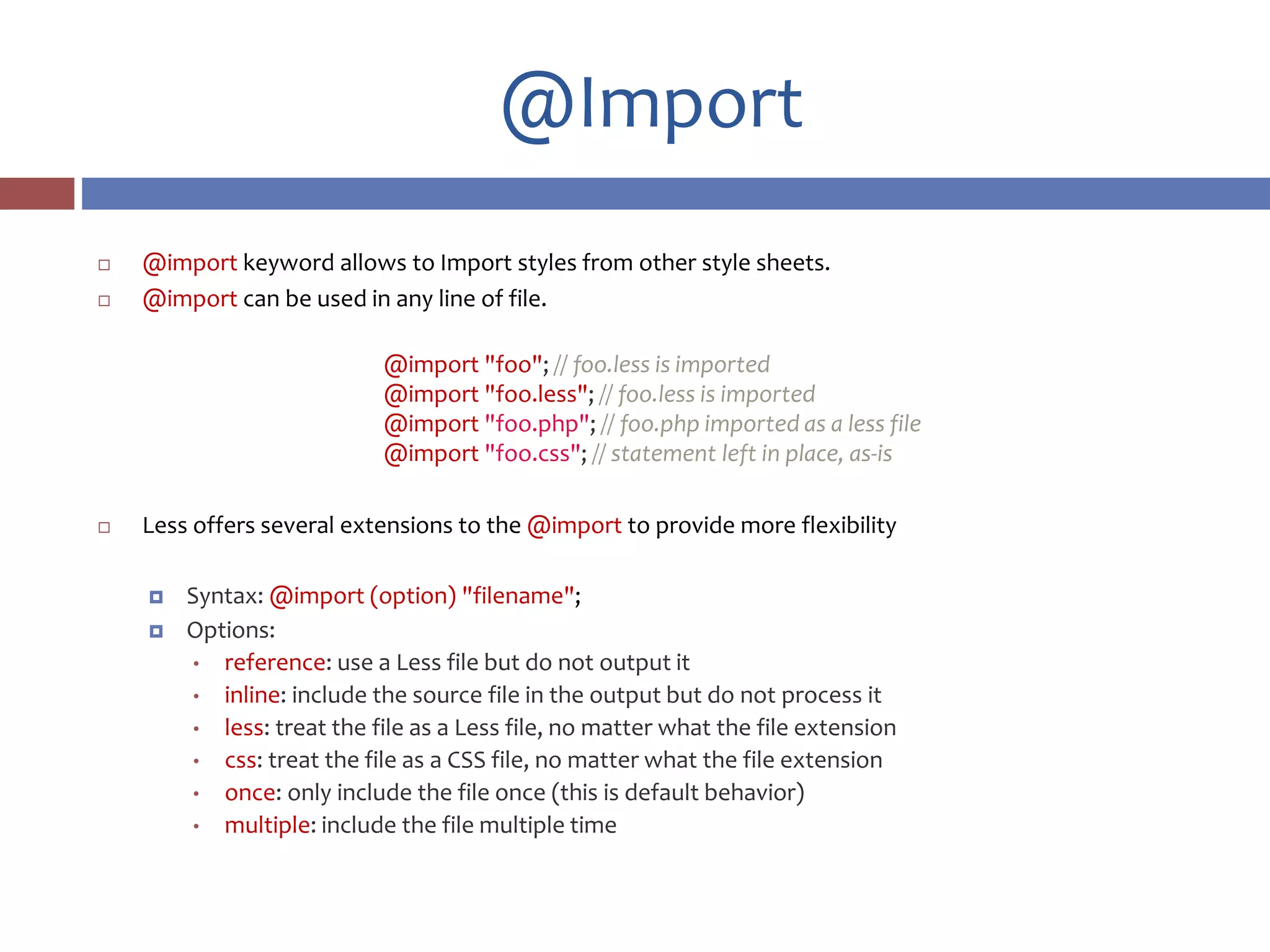
@Import
 @import keyword allows to Import styles from other style sheets.
 @import can be used in any line of file.
@import "foo"; // foo.less is imported
@import "foo.less"; // foo.less is imported
@import "foo.php"; // foo.php imported as a less file
@import "foo.css"; // statement left in place, as-is
 Less offers several extensions to the @import to provide more flexibility
 Syntax: @import (option) "filename";
 Options:
• reference: use a Less file but do not output it
• inline: include the source file in the output but do not process it
• less: treat the file as a Less file, no matter what the file extension
• css: treat the file as a CSS file, no matter what the file extension
• once: only include the file once (this is default behavior)
• multiple: include the file multiple time
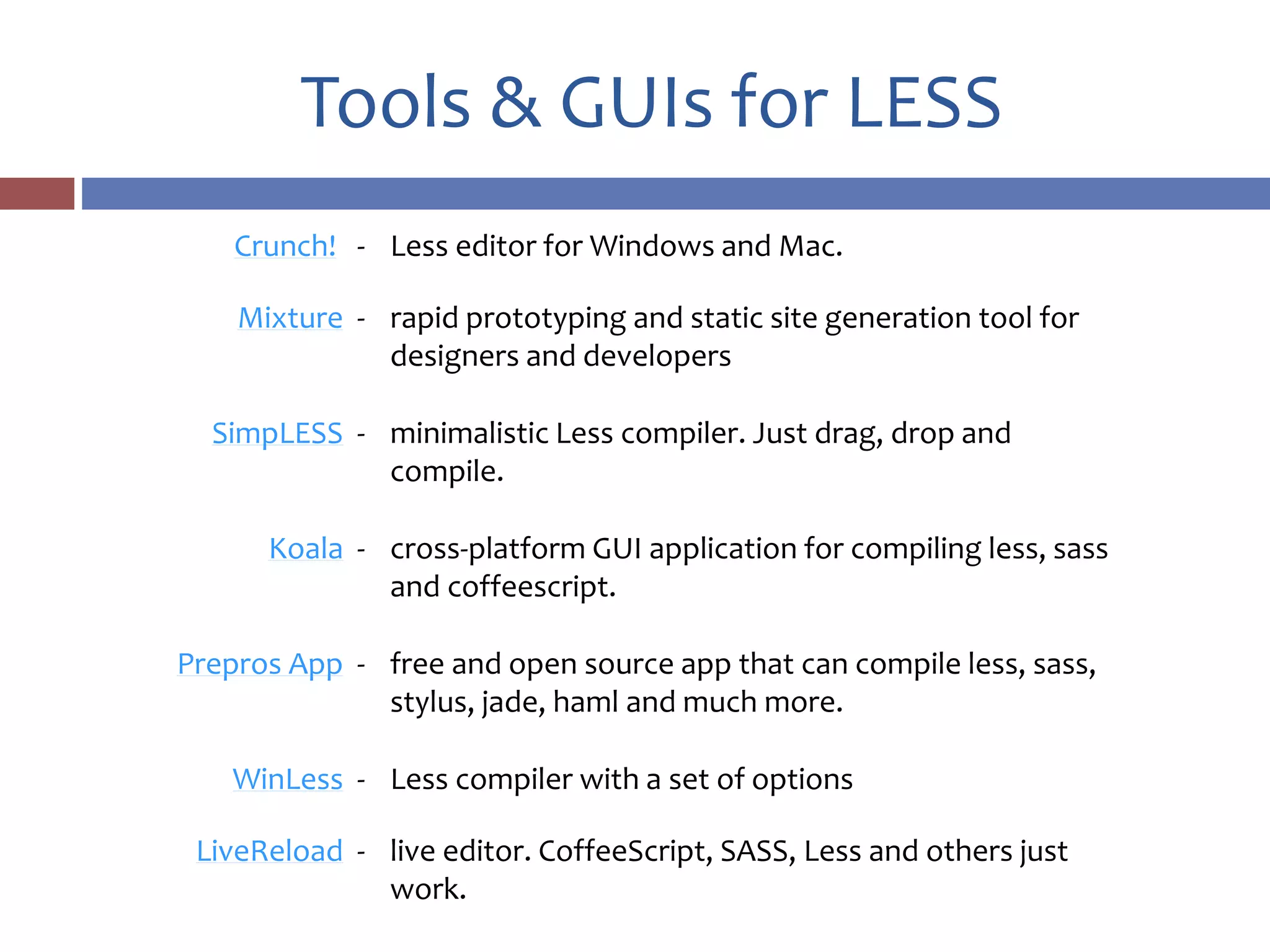
Tools & GUIs for LESS
Crunch! - Less editor for Windows and Mac.
Mixture - rapid prototyping and static site generation tool for
designers and developers
SimpLESS - minimalistic Less compiler. Just drag, drop and
compile.
Koala - cross-platform GUI application for compiling less, sass
and coffeescript.
Prepros App - free and open source app that can compile less, sass,
stylus, jade, haml and much more.
WinLess - Less compiler with a set of options
LiveReload - live editor. CoffeeScript, SASS, Less and others just
work.
Support in IDEs
 LESS is supported by all popular editors and IDE’s (natively or with
plugins help), including:
 Visual Studio
 Eclipse
 Sublime Text 2 & 3
 TextMate
 Vim
 NetBeans (built-in syntax highlighting)
 jetBrains WebStorm and PhpStorm (built-in support)
 CodeLobster (built-in syntax highlighting)
 Dreamweaver
 Notepad++ 6.x
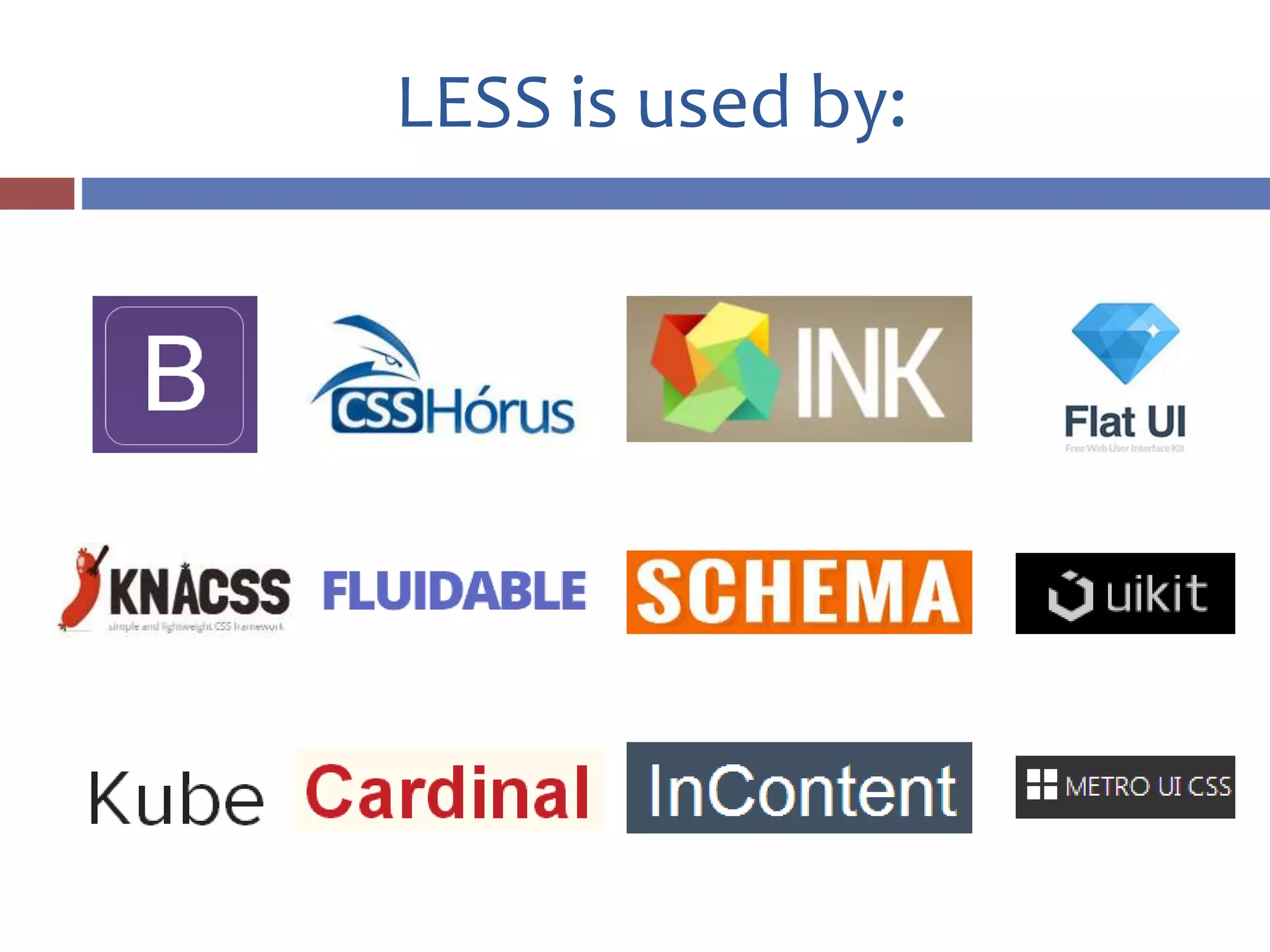
LESS is used by:
Alternatives
 Stylus - Expressive, dynamic,
robust CSS
 SASS - CSS with superpowers
Links
lesscss.org official LESS website
https://github.com/less/less.js GitHub repo
https://www.npmjs.org/package/grunt-
contrib-less
Grunt plugin
http://winless.org/online-less-compiler Online compiler
https://github.com/Asual/lesscss-engine Java LESS port
http://www.dotlesscss.org .NET LESS port
http://crunchapp.net Crunch! editor website
http://learnboost.github.io/stylus/ Stylus website
http://sass-lang.com/ SASS website
Any questions?

Write LESS. DO more.

  • 1.
  • 2.
    What is LESS? Less – preprocessor language that extends usual CSS to make it more readable and maintainable.  Outputs the code to pure CSS  Adds semantic and structure to stylesheets  Makes coding slightly faster  …and fun (most of the time)
  • 3.
    Example Less code: @base: #f938ab; @text:saturate(@base, 5%); .shadow(@style, @c: #f5f5f5) { -webkit-box-shadow: @style @c; box-shadow: @style @c; border: 1px solid @c; } .box { color: @text; div { .shadow(0 0 5px, @base) } } CSS output: .box { color: #fe33ac; } .box div { -webkit-box-shadow: 0 0 5px #fdcdea; box-shadow: 0 0 5px #fdcdea); border: 1px solid #fdcdea); }
  • 4.
    Some history  Lesswas created in 2009 by Alexis Sellier, more commonly known as @cloudhead. Originally written in Ruby, it was then ported to JavaScript.  In May 2012 Alexis relinquished control and development over to a core team of contributors who now manage, fix and extend the language.  Less is maintained by a group of invaluable core contributors, with the massive support and involvement of our community.
  • 5.
    Installation & usage Less can be used on command line as Node package (make sure you have NodeJS installed): npm install less –g  After successful installation you can use it next ways:  $ lessc styles.less - this will output the compiled CSS to stdout  $ lessc styles.less > styles.css - will output CSS to file styles.css  $ lessc styles.less > styles.css –x - will output minified CSS
  • 6.
    Installation & usage Also it’s possible to use LESS as a Grunt task: npm install grunt-contrib-less --save-dev  Gruntfile: less: { development: { options: { paths: ["assets/css"] }, files: { "path/to/result.css": "path/to/source.less" } } grunt.loadNpmTasks('grunt-contrib-less');
  • 7.
    Installation & usage Include it a script file for the browser (not recommended for production).  Make sure you include your stylesheets before the script.  You can add some options for convenient debugging. <script> less = { env: "development", async: false, fileAsync: false, poll: 1000, functions: {}, relativeUrls: false, rootpath: ":/a.com/“ }; </script> <script src="less.js"></script> <script>less.watch();</script> <!—This enables live browser reload-->
  • 8.
    Nested rules  Lessallows you to nest selectors one into another just the same as they are placed in HTML: Less code: #header { color: black; .navigation { font-size: 12px; } .logo { width: 300px; } } CSS output: #header { color: black; } #header .navigation { font-size: 12px; } #header .logo { width: 300px; }
  • 9.
    Variables  Define variablesand refer to them in your rules.  When defining a variable twice, the last definition of the variable is used, searching from the current scope upwards (scopes work just like in JavaScript) @var: 0; .class1 { @var: 1; .class { @var: 2; three: @var; @var: 3; } one: @var; } @nice-blue: #5B83AD; @light-blue: @nice-blue + #111; #header { color: @light-blue; border-color: @nice-blue; }
  • 10.
    Arithmetic  Any number,color or variable in Less can be operated: @base: 5%; @filler: @base * 2; @other: @base + @filler; color: #888 / 4; background-color: @base-color + #111; height: 100% / 2 + @filler;  LESS understands units well: @var: 1px + 5; //6px
  • 11.
    Mixins  Mixins area way of including ("mixing in") a bunch of properties from one rule-set into another rule-set Definition: .bordered { border-top: dotted 1px black; border-bottom: solid 2px black; } .no-decoration { text-decoration: none; } Usage: #menu a { color: #111; .no-decoration; } .post a { color: red; .bordered; }
  • 12.
    Mixins without output Mixin can be created without output to result style: CSS output: .my-mixin { color: black; } .class { color: black; background-color: white; } Less code: .my-mixin { color: black; } .my-other-mixin() { background-color: white; } .class { .my-mixin; .my-other-mixin; }
  • 13.
    This!  & symbolrepresents the current parent selector (such as this keyword in JavaScript) CSS output: button :hover { border: 1px solid red; } Less code: .my-hover-mixin() { &:hover { border: 1px solid red; } } button { .my-hover-mixin(); }
  • 14.
    Parametric mixins  Passparameters to mixins to make them more versatile.  It’s possible to declare default values of parameters in mixin definition. Definition: .border-radius(@radius: 10px) { -webkit-border-radius: @radius; -moz-border-radius: @radius; border-radius: @radius; } Usage: #header { .border-radius(4px); } .button { .border-radius(6px); }
  • 15.
    Mixin guards  Guardsin Less are useful for conditional declaration of mixins  Guards allows you to check value of a parameter as well as its type .mixin (@a) when (lightness(@a) >= 50%) { background-color: black; } .mixin (@a) when (lightness(@a) < 50%) { background-color: white; } .mixin (@a) { color: @a; } .another-mixin (@a; @b: 0) when (isnumber(@b)) { ... } .another-mixin (@a; @b: black) when (iscolor(@b)) { ... }
  • 16.
    Return variables  Allvariables defined in a mixin are visible and can be used in caller's scope. This allows to create mixins that can be used almost like a functions .average (@x, @y) { @average: ((@x + @y) / 2); } div { .average (16px, 50px); //"call" the mixin padding: @average; //use its "return" value (33px) }
  • 17.
    Merging rules  Themerge feature allows for aggregating values from multiple properties CSS output: .myclass { box-shadow: inset 0 0 10px #555, 0 0 20px black; } Less code: .mixin() { box-shadow+: inset 0 0 10px #555; } .myclass { .mixin(); box-shadow+: 0 0 20px black; }
  • 18.
    Mixin libraries 3L Mixinslibrary animate Library of CSS3 keyframe animations Clearless Collection of mixins CssEffects Collection of CSS style effects Cssowl Mixin library cube.less Animated 3D cube using only CSS Hexagon Generate CSS hexagons with custom size and color LESS Elements Set of mixins LESS Hat Mixins library LESS-bidi Set of mixins for creating bi-directional styling media-query-to-type Media Queries to Media Types with Less More-Colors.less Variables for easier color manipulation while you design in the browser More.less Mixins, animations, shapes and more Oban Collection of mixins Preboot Collection of variables and mixins. The precursor to Bootstrap Shape.LESS Collection of mixins for various shapes tRRtoolbelt.less Mixins and functions for common actions
  • 19.
    Bundles  Bundles areway to define a bunch of variables and mixins under one namespace Usage: #header a { color: orange; #bundle > .button; } Definition: #bundle { .button { display: block; border: 1px solid black; background-color: grey; &:hover { background-color: white; } } .tab { ... } .citation { ... } }
  • 20.
    Functions  Less hasa powerful set of a built-in functions and operations.  There are:  Math functions: sqrt, pow, abs, sin, cos…  String functions: escape, format, replace…  List functions: length, extract...  Color functions: mix, spin, lighten…  And more…
  • 21.
    Functions Type checking operations areavailable:  isnumber  isstring  iscolor  iskeyword  isurl  ispixel  isem  ispercentage  isunit  For instance this is how isnumber works: isnumber(#ff0); // false isnumber(blue); // false isnumber("string"); // false isnumber(1234); // true isnumber(56px); // true isnumber(7.8%); // true isnumber(keyword); // false isnumber(url(...)); // false
  • 22.
    Color operations saturate(hsl(90%, 80%,50%), 20%) desaturate(hsl(90%, 80%, 50%), 20%) lighten(hsl(90%, 80%, 50%), 20%) darken(hsl(90%, 80%, 50%), 20%) fade(hsl(90%, 80%, 50%), 10%) spin(hsl(90%, 80%, 50%), 30) greyscale(hsl(90%, 80%, 50%)) mix(#ff0000, #0000ff, 50%) Less includes a lot of operations to make color operating quick and easy:
  • 23.
    Color blending multiply(#ff6600, #333333); screen(#ff6600,#333333); overlay(#ff6600, #333333); softlight(#ff6600, #333333); hardlight(#ff6600, #333333); difference(#ff6600, #333333); exclusion(#ff6600, #333333); average(#ff6600, #333333); negation(#ff6600, #333333); You can easily blend colors in your rules with special functions:
  • 24.
    @Import  @import keywordallows to Import styles from other style sheets.  @import can be used in any line of file. @import "foo"; // foo.less is imported @import "foo.less"; // foo.less is imported @import "foo.php"; // foo.php imported as a less file @import "foo.css"; // statement left in place, as-is  Less offers several extensions to the @import to provide more flexibility  Syntax: @import (option) "filename";  Options: • reference: use a Less file but do not output it • inline: include the source file in the output but do not process it • less: treat the file as a Less file, no matter what the file extension • css: treat the file as a CSS file, no matter what the file extension • once: only include the file once (this is default behavior) • multiple: include the file multiple time
  • 25.
    Tools & GUIsfor LESS Crunch! - Less editor for Windows and Mac. Mixture - rapid prototyping and static site generation tool for designers and developers SimpLESS - minimalistic Less compiler. Just drag, drop and compile. Koala - cross-platform GUI application for compiling less, sass and coffeescript. Prepros App - free and open source app that can compile less, sass, stylus, jade, haml and much more. WinLess - Less compiler with a set of options LiveReload - live editor. CoffeeScript, SASS, Less and others just work.
  • 26.
    Support in IDEs LESS is supported by all popular editors and IDE’s (natively or with plugins help), including:  Visual Studio  Eclipse  Sublime Text 2 & 3  TextMate  Vim  NetBeans (built-in syntax highlighting)  jetBrains WebStorm and PhpStorm (built-in support)  CodeLobster (built-in syntax highlighting)  Dreamweaver  Notepad++ 6.x
  • 27.
  • 28.
    Alternatives  Stylus -Expressive, dynamic, robust CSS  SASS - CSS with superpowers
  • 29.
    Links lesscss.org official LESSwebsite https://github.com/less/less.js GitHub repo https://www.npmjs.org/package/grunt- contrib-less Grunt plugin http://winless.org/online-less-compiler Online compiler https://github.com/Asual/lesscss-engine Java LESS port http://www.dotlesscss.org .NET LESS port http://crunchapp.net Crunch! editor website http://learnboost.github.io/stylus/ Stylus website http://sass-lang.com/ SASS website
  • 30.