SASS and SCSS
This document is confidential and contains proprietary information, including trade secrets of CitiusTech. Neither the document nor any of the information
contained in it may be reproduced or disclosed to any unauthorized person under any circumstances without the express written permission of CitiusTech.
Author : Amey Parab
Date of Release :
2
• One of the buzz-words of web design today is CSS-Preprocessors. Many designers and developers are wondering
if they should make the switch over to using a Pre-Processor like SASS instead of just plain CSS.
• Web Applications are getting Bigger and complex today, it’s stylesheets are getting even more complex and
harder to maintain. This is where a pre-processor can help.
• SASS is (Syntactically Awesome Stylesheet) is a CSS pre-processor, which helps to reduce the repetition with CSS
and save time. It is more stable and powerful CSS extension language that describes the style of document
structurally.
• SASS essentially gives lot of the benefits of working with code for stylesheets.
• It has variables, functions and modules that can be imported and re-used. You can iterate, use conditional logic,
extend existing selector styles.
• Best of all, you can nest your CSS. It contains a surprisingly deep feature set but you'll get good value out of just
the half-dozen main features that they advertise on their website.​
• SCSS or Sassy Cascading Style Sheet is the next generation of SASS.
• Both SASS and SCSS are similar and do same thing, but written in different style. SCSS is latest one and considered
better than SASS.​
Introduction of SASS and SCSS
3
Benefits of using SASS/SCSS over traditional CSS
1. Fewer HTTP Requests by using the @import
attribute
2. Keep your responsive design project more organized
3. Reusable Color Scheming
4. Don’t have to repeat similar CSS statements
throughout your project
Pre-requisites
Knowledge of CSS
Knowledge of package managers like Npm
Webpack knowledge will be added advantage
Recipe Description
WorkFlow
CSS vs SASS/SCSS
4
Features of SASS/SCSS
 Fully CSS-compatible
 Many useful functions for manipulating colors and other values:
• Some of the Built-In functions are for Plain CSS, Numbers, Strings, Colors, Lists, Maps, etc.
 Advanced features like control directives for libraries
 Well-formatted, customizable output
 Nesting, Variables
• SASS variable are simple: assign a value to a name begin with $, and then refer to that name instead of a
value itself.
• Variable are most useful tools SASS brings.
• Variable makes it possible to reduce the repetition, do complex math, configure libraries, and much
more.
 Combining CSS files with @import
• Sass imports have the same syntax as CSS imports, except that they allow multiple imports to be
separated by commas.
 Re-using Styles with Mixins
• Mixins allows to define styles that can be re-used throughout stylesheet.
 Extending Styles with Inheritance
5
SASS vs SCSS
 “Sass has two syntaxes. The most commonly used syntax is known as “SCSS” (for “Sassy CSS”), and is a superset
of CSS3’s syntax. This means that every valid CSS3 stylesheet is valid SCSS as well. SCSS files use the extension
.scss.
 The second, older syntax is known as the indented syntax (or just “.sass”). Inspired by Haml’s terseness, it’s
intended for people who prefer conciseness over similarity to CSS. Instead of brackets and semicolons, it uses
the indentation of lines to specify blocks. Files in the indented syntax use the extension .sass.”
 SCSS style is a lot more similar to regular CSS than the older SASS approach. Below is the sample code snippet
/* SASS */
$blue: #3bbfce
$margin: 16px
.content-navigation
border-color: $blue
color: darken($blue, 9%)
.border
padding: $margin / 2
margin: $margin / 2
border-color: $blue
Above code snippet represents SASS approach. It uses line indentations
instead of traditional CSS approach of brackets and semicolons.
/* SCSS */
$blue: #3bbfce;
$margin: 16px;
.content-navigation {
border-color: $blue; color: darken($blue, 9%);
}
.border {
padding: $margin / 2; margin: $margin / 2; border-color: $blue;
}
In the above code snippet we use semi-colon to separate the declarations.
Added all the declarations for .border onto a single line to illustrate this point
further.
6
Steps for Configuration of SCSS with Webpack
Step1: Install sass-loader
npm i sass-loader node-sass webpack --save-
dev
We will also need style-loader and css-loader:
npm i style-loader css-loader --save-dev
Install sass-
loader
Include sass-
loader in your
Webpack config
file
Include the
SASS file in a
container
component
Step 2. Include sass-loader in your
Webpack config file
How It Works:
module: { rules: [{ test: /.scss$/ }] }
Webpack uses a regular expression to
determine which files it should look for
and serve to a specific loader.
In this case any file that ends with .scss
will be served to sass-loader first (sass to
css), then css-loader, and finally style-
loader.
Step 3. Include the SASS file in a
container component
Usually, include the SASS file in the
entry component for your app.
import React from 'react'
import './style.scss'
class App extends React.Component {
render() {
return(<div>Hello World</div>)
}
}
/* Webpack configurations */
module.exports = {
entry: "./app/entry",
output: {
path: path.resolve(__dirname, "dist"),
filename: "bundle.js",
},
module: {
rules: [{
test: /.scss$/,
use: [{
loader: "style-loader"
}, {
loader: "css-loader"
}, {
loader: "sass-loader"
}]
}]
}
7
Mixins
A mixin lets you make groups of CSS declarations that
you want to reuse throughout your site.
You can even pass in values to make your mixin more
flexible.
A good use of a mixin is for vendor prefixes.
To create a mixin:
1. Use the @mixin directive and give it a name.
2. Pass the parameter inside parentheses so that,
reuse of the mixin function can be possible.
3. Use the mixin, as a CSS declaration starting with
@include followed by the name of the mixin.
Here's an example for transform.
/* mixin example */
@mixin transform($property) {
-webkit-transform: $property;
-ms-transform: $property;
transform: $property;
}
.box { @include transform(rotate(30deg)); }
 Doing math in your CSS is very helpful.
 Sass has a handful of standard math operators
like +, -, *, /, and %.
Operators
8
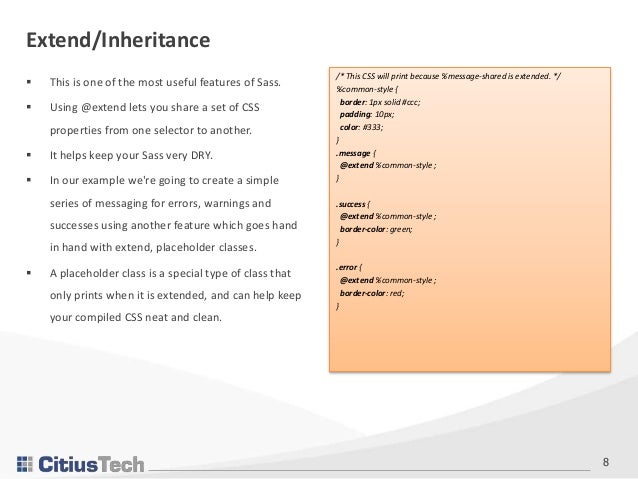
 This is one of the most useful features of Sass.
 Using @extend lets you share a set of CSS
properties from one selector to another.
 It helps keep your Sass very DRY.
 In our example we're going to create a simple
series of messaging for errors, warnings and
successes using another feature which goes hand
in hand with extend, placeholder classes.
 A placeholder class is a special type of class that
only prints when it is extended, and can help keep
your compiled CSS neat and clean.
Extend/Inheritance
/* This CSS will print because %message-shared is extended. */
%common-style {
border: 1px solid #ccc;
padding: 10px;
color: #333;
}
.message {
@extend %common-style ;
}
.success {
@extend %common-style ;
border-color: green;
}
.error {
@extend %common-style ;
border-color: red;
}
9
Advantages and Disadvantages of SCSS
Advantages:
 Sass facilitates you to write clean, easy and less CSS in a programming construct.
 It contains fewer codes so you can write CSS quicker.
 It is more stable, powerful, and elegant because it is an extension of CSS. Hence, it is easy for designers and
developers to work more efficiently and quickly.
 It is compatible with all versions of CSS. So, you can use any available CSS libraries.
 It provides nesting so you can use nested syntax and useful functions like color manipulation, math functions
and other values.
Disadvantages:
 The developer must have enough time to learn new features present in this preprocessor before using it.
 By using preprocessor, you will lose the benefits of browser's built-in element inspector (particularly on
Chrome’s inspector). You have to trace your steps back through the generated CSS.
10
SASS/SCSS Best Practices
While SASS makes your style sheets awesome it doesn't do all the work for you. You'll still have to avoid pitfalls that
will make your SASS more difficult to manage. Here are a few to remember:
 Structure your SASS projects: Use sub folders and partial files to organize code semantically.
 Avoid vague variable names: Use variable names that are meaningful to your project. For example, $color-
primary instead of $blue (this also prepares you in case the colors will change in the future).
 Use nesting and looping to your advantage: It can be very useful to use nesting to visually make your style
sheets easier to read. Looping can help reduce otherwise repetitive code for creating increasing and
decreasing sizes in widths, heights and fonts.
 Keep your @include and @extend statements above the CSS: When you write SASS write any raw CSS below
the @include and @extend statements in the selector.
 Use $kebab-case when naming variables, functions and mixins: Stick with the convention of CSS. CSS doesn't
use camelCase so don't use it in your SASS!
11
Annexure (as needed)
12
Annexure: External References (Library)
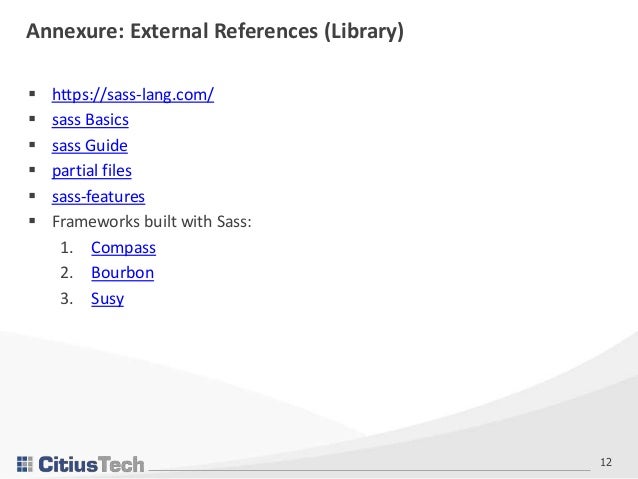
 https://sass-lang.com/
 sass Basics
 sass Guide
 partial files
 sass-features
 Frameworks built with Sass:
1. Compass
2. Bourbon
3. Susy
13
Thank You

SCSS Implementation

  • 1.
    SASS and SCSS Thisdocument is confidential and contains proprietary information, including trade secrets of CitiusTech. Neither the document nor any of the information contained in it may be reproduced or disclosed to any unauthorized person under any circumstances without the express written permission of CitiusTech. Author : Amey Parab Date of Release :
  • 2.
    2 • One ofthe buzz-words of web design today is CSS-Preprocessors. Many designers and developers are wondering if they should make the switch over to using a Pre-Processor like SASS instead of just plain CSS. • Web Applications are getting Bigger and complex today, it’s stylesheets are getting even more complex and harder to maintain. This is where a pre-processor can help. • SASS is (Syntactically Awesome Stylesheet) is a CSS pre-processor, which helps to reduce the repetition with CSS and save time. It is more stable and powerful CSS extension language that describes the style of document structurally. • SASS essentially gives lot of the benefits of working with code for stylesheets. • It has variables, functions and modules that can be imported and re-used. You can iterate, use conditional logic, extend existing selector styles. • Best of all, you can nest your CSS. It contains a surprisingly deep feature set but you'll get good value out of just the half-dozen main features that they advertise on their website.​ • SCSS or Sassy Cascading Style Sheet is the next generation of SASS. • Both SASS and SCSS are similar and do same thing, but written in different style. SCSS is latest one and considered better than SASS.​ Introduction of SASS and SCSS
  • 3.
    3 Benefits of usingSASS/SCSS over traditional CSS 1. Fewer HTTP Requests by using the @import attribute 2. Keep your responsive design project more organized 3. Reusable Color Scheming 4. Don’t have to repeat similar CSS statements throughout your project Pre-requisites Knowledge of CSS Knowledge of package managers like Npm Webpack knowledge will be added advantage Recipe Description WorkFlow CSS vs SASS/SCSS
  • 4.
    4 Features of SASS/SCSS Fully CSS-compatible  Many useful functions for manipulating colors and other values: • Some of the Built-In functions are for Plain CSS, Numbers, Strings, Colors, Lists, Maps, etc.  Advanced features like control directives for libraries  Well-formatted, customizable output  Nesting, Variables • SASS variable are simple: assign a value to a name begin with $, and then refer to that name instead of a value itself. • Variable are most useful tools SASS brings. • Variable makes it possible to reduce the repetition, do complex math, configure libraries, and much more.  Combining CSS files with @import • Sass imports have the same syntax as CSS imports, except that they allow multiple imports to be separated by commas.  Re-using Styles with Mixins • Mixins allows to define styles that can be re-used throughout stylesheet.  Extending Styles with Inheritance
  • 5.
    5 SASS vs SCSS “Sass has two syntaxes. The most commonly used syntax is known as “SCSS” (for “Sassy CSS”), and is a superset of CSS3’s syntax. This means that every valid CSS3 stylesheet is valid SCSS as well. SCSS files use the extension .scss.  The second, older syntax is known as the indented syntax (or just “.sass”). Inspired by Haml’s terseness, it’s intended for people who prefer conciseness over similarity to CSS. Instead of brackets and semicolons, it uses the indentation of lines to specify blocks. Files in the indented syntax use the extension .sass.”  SCSS style is a lot more similar to regular CSS than the older SASS approach. Below is the sample code snippet /* SASS */ $blue: #3bbfce $margin: 16px .content-navigation border-color: $blue color: darken($blue, 9%) .border padding: $margin / 2 margin: $margin / 2 border-color: $blue Above code snippet represents SASS approach. It uses line indentations instead of traditional CSS approach of brackets and semicolons. /* SCSS */ $blue: #3bbfce; $margin: 16px; .content-navigation { border-color: $blue; color: darken($blue, 9%); } .border { padding: $margin / 2; margin: $margin / 2; border-color: $blue; } In the above code snippet we use semi-colon to separate the declarations. Added all the declarations for .border onto a single line to illustrate this point further.
  • 6.
    6 Steps for Configurationof SCSS with Webpack Step1: Install sass-loader npm i sass-loader node-sass webpack --save- dev We will also need style-loader and css-loader: npm i style-loader css-loader --save-dev Install sass- loader Include sass- loader in your Webpack config file Include the SASS file in a container component Step 2. Include sass-loader in your Webpack config file How It Works: module: { rules: [{ test: /.scss$/ }] } Webpack uses a regular expression to determine which files it should look for and serve to a specific loader. In this case any file that ends with .scss will be served to sass-loader first (sass to css), then css-loader, and finally style- loader. Step 3. Include the SASS file in a container component Usually, include the SASS file in the entry component for your app. import React from 'react' import './style.scss' class App extends React.Component { render() { return(<div>Hello World</div>) } } /* Webpack configurations */ module.exports = { entry: "./app/entry", output: { path: path.resolve(__dirname, "dist"), filename: "bundle.js", }, module: { rules: [{ test: /.scss$/, use: [{ loader: "style-loader" }, { loader: "css-loader" }, { loader: "sass-loader" }] }] }
  • 7.
    7 Mixins A mixin letsyou make groups of CSS declarations that you want to reuse throughout your site. You can even pass in values to make your mixin more flexible. A good use of a mixin is for vendor prefixes. To create a mixin: 1. Use the @mixin directive and give it a name. 2. Pass the parameter inside parentheses so that, reuse of the mixin function can be possible. 3. Use the mixin, as a CSS declaration starting with @include followed by the name of the mixin. Here's an example for transform. /* mixin example */ @mixin transform($property) { -webkit-transform: $property; -ms-transform: $property; transform: $property; } .box { @include transform(rotate(30deg)); }  Doing math in your CSS is very helpful.  Sass has a handful of standard math operators like +, -, *, /, and %. Operators
  • 8.
    8  This isone of the most useful features of Sass.  Using @extend lets you share a set of CSS properties from one selector to another.  It helps keep your Sass very DRY.  In our example we're going to create a simple series of messaging for errors, warnings and successes using another feature which goes hand in hand with extend, placeholder classes.  A placeholder class is a special type of class that only prints when it is extended, and can help keep your compiled CSS neat and clean. Extend/Inheritance /* This CSS will print because %message-shared is extended. */ %common-style { border: 1px solid #ccc; padding: 10px; color: #333; } .message { @extend %common-style ; } .success { @extend %common-style ; border-color: green; } .error { @extend %common-style ; border-color: red; }
  • 9.
    9 Advantages and Disadvantagesof SCSS Advantages:  Sass facilitates you to write clean, easy and less CSS in a programming construct.  It contains fewer codes so you can write CSS quicker.  It is more stable, powerful, and elegant because it is an extension of CSS. Hence, it is easy for designers and developers to work more efficiently and quickly.  It is compatible with all versions of CSS. So, you can use any available CSS libraries.  It provides nesting so you can use nested syntax and useful functions like color manipulation, math functions and other values. Disadvantages:  The developer must have enough time to learn new features present in this preprocessor before using it.  By using preprocessor, you will lose the benefits of browser's built-in element inspector (particularly on Chrome’s inspector). You have to trace your steps back through the generated CSS.
  • 10.
    10 SASS/SCSS Best Practices WhileSASS makes your style sheets awesome it doesn't do all the work for you. You'll still have to avoid pitfalls that will make your SASS more difficult to manage. Here are a few to remember:  Structure your SASS projects: Use sub folders and partial files to organize code semantically.  Avoid vague variable names: Use variable names that are meaningful to your project. For example, $color- primary instead of $blue (this also prepares you in case the colors will change in the future).  Use nesting and looping to your advantage: It can be very useful to use nesting to visually make your style sheets easier to read. Looping can help reduce otherwise repetitive code for creating increasing and decreasing sizes in widths, heights and fonts.  Keep your @include and @extend statements above the CSS: When you write SASS write any raw CSS below the @include and @extend statements in the selector.  Use $kebab-case when naming variables, functions and mixins: Stick with the convention of CSS. CSS doesn't use camelCase so don't use it in your SASS!
  • 11.
  • 12.
    12 Annexure: External References(Library)  https://sass-lang.com/  sass Basics  sass Guide  partial files  sass-features  Frameworks built with Sass: 1. Compass 2. Bourbon 3. Susy
  • 13.