
Simple class and object examples
in Java
Presented By Harish Gyanani
What is class?
A class is a blue print from which individual
objects are created.
Class naming convention
• By convention, class names capitalize the
initial of each word.
• For example:
Employee, Boss, DateUtility, PostOffice, Regula
rRateCalculator.
What are members of Class?
• Field:
– field is nothing but the property of the class or object
which we are going to create .
– Example if we are creating a class called computer then
they have property like model, memSize, hdSize, osType
etc.

• Method:
– method is nothing but the operation that an object can
perform it define the behavior of object how an object can
interact with outside world.
– Example startMethod (), shutdownMethod ().
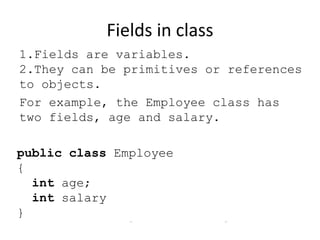
Fields in class
1.Fields are variables.
2.They can be primitives or references
to objects.
For example, the Employee class has
two fields, age and salary.

public class Employee
{
int age;
int salary
}
Fields Naming Conventions
1.Field names should follow the camel naming
convention.
Fields Naming Conventions
1.Field names should follow the camel naming
convention.
2.The initial of each word in the field, except for
the first word, is written with a capital letter.
Fields Naming Conventions
1.Field names should follow the camel naming
convention.
2.The initial of each word in the field, except for
the first word, is written with a capital letter.
3.For example: age, maxAge, address,
validAddress, numberOfRows.
Instance variables
Variables within a class but outside any method.
Instance Methods
Methods defined in a class which is only
accessible through the Object of the class are
called Instance methods.
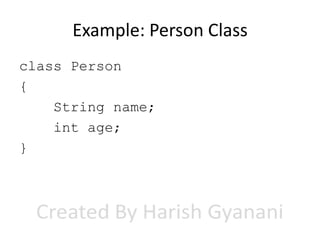
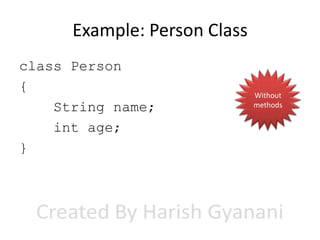
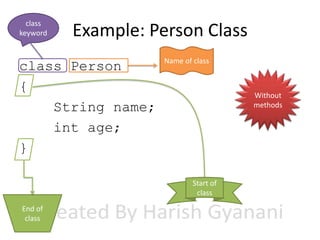
Example: Person Class
class Person
{
String name;
int age;
}
Example: Person Class
class Person
{
String name;
int age;
}

Without
methods
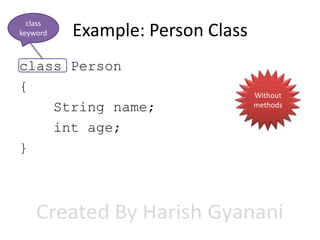
class
keyword

Example: Person Class

class Person
{
String name;
int age;
}

Without
methods
class
keyword

Example: Person Class

class Person
{
String name;
int age;
}

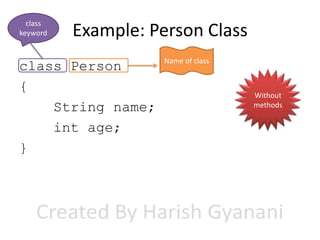
Name of class

Without
methods
class
keyword

Example: Person Class

class Person
{
String name;
int age;
}

Name of class

Without
methods

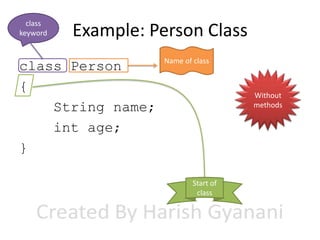
Start of
class
class
keyword

Example: Person Class

class Person
{
String name;
int age;
}

Name of class

Without
methods

Start of
class
End of
class
class
keyword

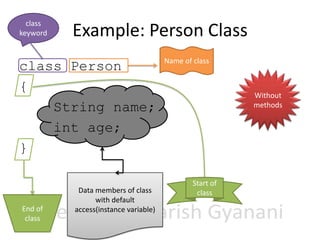
Example: Person Class

class Person
{
String name;
int age;
}

End of
class

Data members of class
with default
access(instance variable)

Name of class

Without
methods

Start of
class
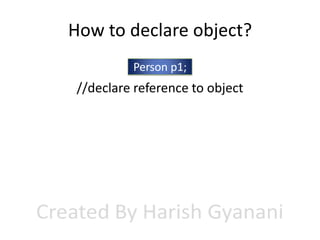
How to declare object?
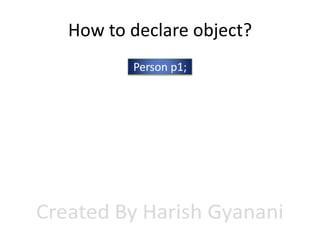
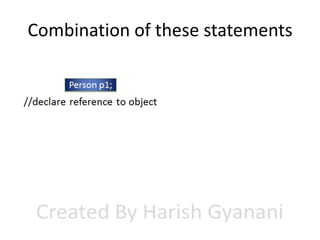
Person p1;
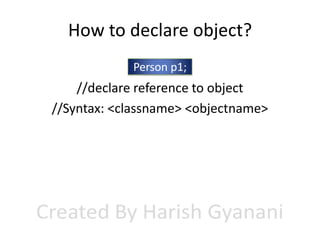
How to declare object?
Person p1;

//declare reference to object
How to declare object?
Person p1;

//declare reference to object
//Syntax: <classname> <objectname>
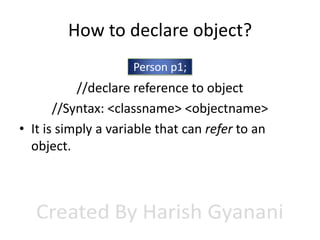
How to declare object?
Person p1;

//declare reference to object
//Syntax: <classname> <objectname>
• It is simply a variable that can refer to an
object.
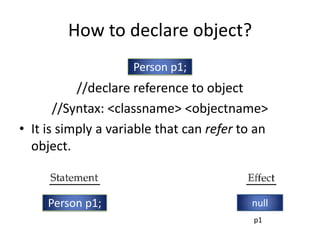
How to declare object?
Person p1;

//declare reference to object
//Syntax: <classname> <objectname>
• It is simply a variable that can refer to an
object.

Person p1;

null
p1
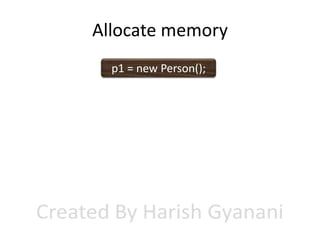
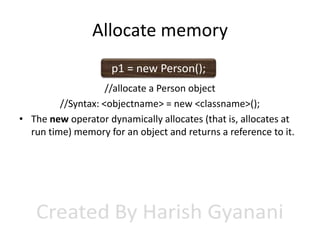
Allocate memory
Allocate memory
p1 = new Person();
Allocate memory
p1 = new Person();
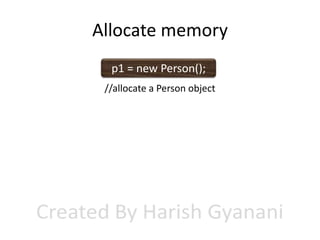
//allocate a Person object
Allocate memory
p1 = new Person();
//allocate a Person object
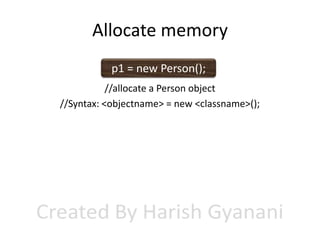
//Syntax: <objectname> = new <classname>();
Allocate memory
p1 = new Person();
//allocate a Person object
//Syntax: <objectname> = new <classname>();
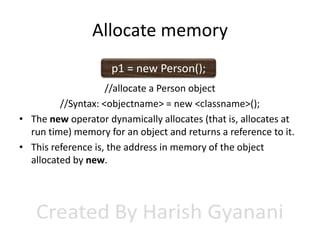
• The new operator dynamically allocates (that is, allocates at
run time) memory for an object and returns a reference to it.
Allocate memory
p1 = new Person();
//allocate a Person object
//Syntax: <objectname> = new <classname>();
• The new operator dynamically allocates (that is, allocates at
run time) memory for an object and returns a reference to it.
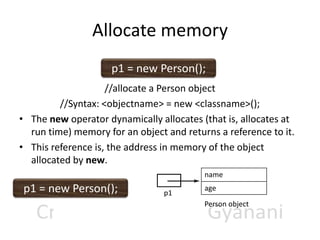
• This reference is, the address in memory of the object
allocated by new.
Allocate memory
p1 = new Person();
//allocate a Person object
//Syntax: <objectname> = new <classname>();
• The new operator dynamically allocates (that is, allocates at
run time) memory for an object and returns a reference to it.
• This reference is, the address in memory of the object
allocated by new.
name

p1 = new Person();

p1

age
Person object
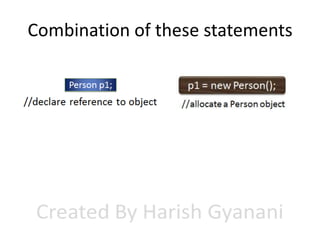
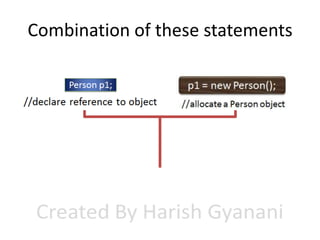
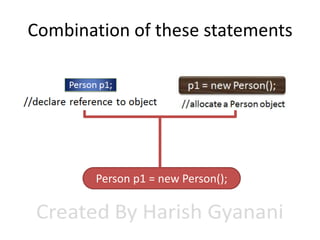
Combination of these statements

Person p1 = new Person();
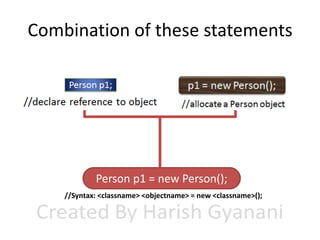
Combination of these statements

Person p1 = new Person();
//Syntax: <classname> <objectname> = new <classname>();
public class for Person class
public class NewClass1
{
public static void main(String args[])
{
Person obj1 = new Person();
obj1.name=“ramesh";
obj1.age=22;
int a=obj1.age;
System.out.println(a);
System.out.println(obj1.name);
}
}
public class for Person class
public class NewClass1
{
public static void main(String args[])
{
Person obj1 = new Person();
obj1.name=“ramesh";
obj1.age=22;
int a=obj1.age;
System.out.println(a);
System.out.println(obj1.name);
}
}

Instance variables
are initialized with
object name
qualifier
public class for Person class
Instance variables
are initialized with
object name
qualifier

public class NewClass1
{
public static void main(String args[])
{
Person obj1 = new Person();
obj1.name=“ramesh";
obj1.age=22;
int a=obj1.age;
System.out.println(a);
Syntax to set value in
System.out.println(obj1.name);
instance variable:}
}
<objectname>.<variablename> = <value>;
public class for Person class
Instance variables
are initialized with
object name
qualifier

public class NewClass1
{
public static void main(String args[])
{
Person obj1 = new Person();
obj1.name=“ramesh";
obj1.age=22;
int a=obj1.age;
System.out.println(a);
Syntax to set value in
System.out.println(obj1.name);
instance variable:}
} Syntax to get value
<objectname>.<variablename> = <value>;

from instance
variable:<variable> = <objectname>.<instance_variable_name>
Complete Program
public class NewClass1
{
public static void main(String args[])
{
Person obj1 = new Person();
obj1.name=“ramesh";
obj1.age=22;
int a=obj1.age;
System.out.println(a);
System.out.println(obj1.name);
}
}
class Person
{
String name;
int age;
}
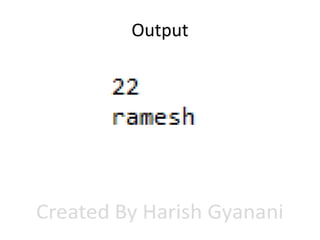
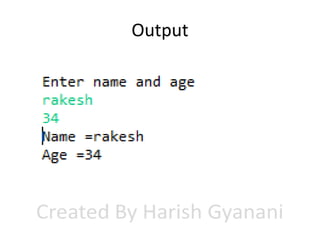
Output
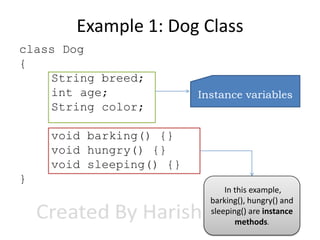
Example 1: Dog Class
class Dog
{
String breed;
int age;
String color;

Instance variables

void barking() {}
void hungry() {}
void sleeping() {}
}
In this example,
barking(), hungry() and
sleeping() are instance
methods.
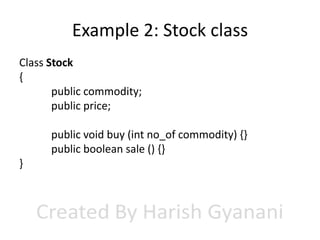
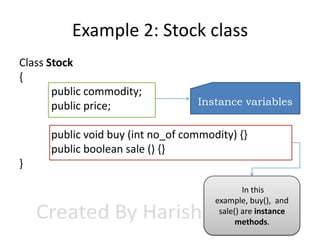
Example 2: Stock class
Class Stock
{
public commodity;
public price;

public void buy (int no_of commodity) {}
public boolean sale () {}
}
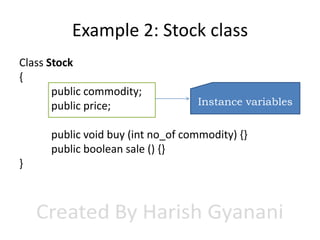
Example 2: Stock class
Class Stock
{
public commodity;
public price;

Instance variables

public void buy (int no_of commodity) {}
public boolean sale () {}
}
Example 2: Stock class
Class Stock
{
public commodity;
public price;

Instance variables

public void buy (int no_of commodity) {}
public boolean sale () {}
}
In this
example, buy(), and
sale() are instance
methods.
Example 2: Stock class
Class Stock
{
public commodity;
public price;

Instance variables

public void buy (int no_of commodity) {}
public boolean sale () {}
}
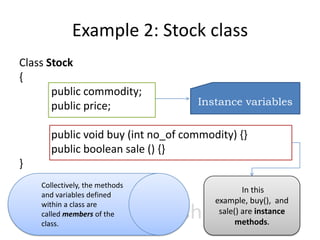
Collectively, the methods
and variables defined
within a class are
called members of the
class.

In this
example, buy(), and
sale() are instance
methods.
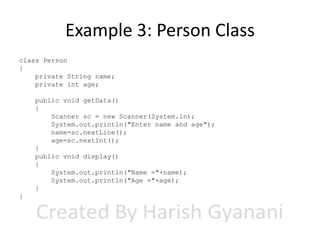
Example 3: Person Class
class Person
{
private String name;
private int age;
public void getData()
{
Scanner sc = new Scanner(System.in);
System.out.println("Enter name and age");
name=sc.nextLine();
age=sc.nextInt();
}
public void display()
{
System.out.println("Name ="+name);
System.out.println("Age ="+age);
}
}
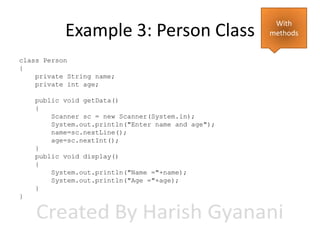
Example 3: Person Class
class Person
{
private String name;
private int age;
public void getData()
{
Scanner sc = new Scanner(System.in);
System.out.println("Enter name and age");
name=sc.nextLine();
age=sc.nextInt();
}
public void display()
{
System.out.println("Name ="+name);
System.out.println("Age ="+age);
}
}

With
methods
Example 3: Person Class
class Person
{
private String name;
private int age;

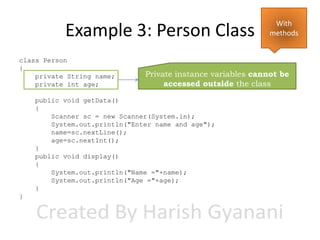
Private instance variables cannot be
accessed outside the class

public void getData()
{
Scanner sc = new Scanner(System.in);
System.out.println("Enter name and age");
name=sc.nextLine();
age=sc.nextInt();
}
public void display()
{
System.out.println("Name ="+name);
System.out.println("Age ="+age);
}
}

With
methods
Example 3: Person Class
class Person
{
private String name;
private int age;

Private instance variables cannot be
accessed outside the class

public void getData()
{
Scanner sc = new Scanner(System.in);
System.out.println("Enter name and age");
name=sc.nextLine();
age=sc.nextInt();
}
public void display()
{
System.out.println("Name ="+name);
System.out.println("Age ="+age);
}
}

With
methods

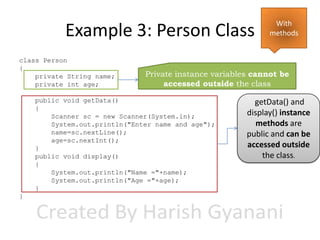
getData() and
display() instance
methods are
public and can be
accessed outside
the class.
Example 3: Person Class
class Person
{
private String name;
private int age;

Private instance variables cannot be
accessed outside the class

public void getData()
{
Scanner sc = new Scanner(System.in);
System.out.println("Enter name and age");
name=sc.nextLine();
age=sc.nextInt();
}
public void display()
{
System.out.println("Name ="+name);
System.out.println("Age ="+age);
}
}

With
methods

getData() and
display() instance
methods are
public and can be
accessed outside
the class.

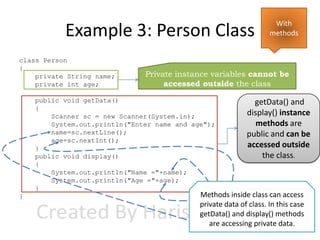
Methods inside class can access
private data of class. In this case
getData() and display() methods
are accessing private data.
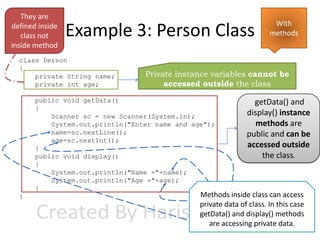
They are
defined inside
class not
inside method

Example 3: Person Class

class Person
{
private String name;
private int age;

Private instance variables cannot be
accessed outside the class

public void getData()
{
Scanner sc = new Scanner(System.in);
System.out.println("Enter name and age");
name=sc.nextLine();
age=sc.nextInt();
}
public void display()
{
System.out.println("Name ="+name);
System.out.println("Age ="+age);
}
}

With
methods

getData() and
display() instance
methods are
public and can be
accessed outside
the class.

Methods inside class can access
private data of class. In this case
getData() and display() methods
are accessing private data.
public class code for Person class
public class abc
{
public static void main(String args[])
{
Person p1 = new Person();
p1.getData();
p1.display();

}
}

NOTE: getData()
and Display()
method cannot be
called without
object qualifier.
public class code for Person class
public class abc
{
public static void main(String args[])
{
Person p1 = new Person();
p1.getData();
p1.display();

}
}

Qualifier
: Object
name

NOTE: getData()
and Display()
method cannot be
called without
object qualifier.
public class code for Person class
public class abc
{
public static void main(String args[])
{
Person p1 = new Person();
p1.getData();
p1.display();

}
}

Dot operator

NOTE: getData()
and Display()
method cannot be
called without
object qualifier.
public class code for Person class
public class abc
{
public static void main(String args[])
{
Person p1 = new Person();
p1.getData();
p1.display();

}
}

Instance method
because it is called
using object

NOTE: getData()
and Display()
method cannot be
called without
object qualifier.
public class code for Person class
public class abc
{
public static void main(String args[])
{
Person p1 = new Person();
p1.getData();
p1.display();

}
}

Qualifier
: Object
name

Instance method
because it is called
using object

Dot operator

NOTE: getData()
and Display()
method cannot be
called without
object qualifier.
Complete program
import java.util.Scanner;
class Person
{
private String name;
private int age;

public class abc
{
public static void main(String args[])
{
Person p1 = new Person();

}
public void getData()
}
{
Scanner sc = new Scanner(System.in);
System.out.println("Enter name and age");
name=sc.nextLine();
age=sc.nextInt();
}
public void display()
{
System.out.println("Name ="+name);
System.out.println("Age ="+age);
}
}

p1.getData();
p1.display();
Complete program
import java.util.Scanner;
class Person
{
private String name;
private int age;

public class abc
{
public static void main(String args[])
{
Person p1 = new Person();

}
public void getData()
}
{
Scanner sc = new Scanner(System.in);
System.out.println("Enter name and age");
name=sc.nextLine();
age=sc.nextInt();
}
public void display()
{
System.out.println("Name ="+name);
System.out.println("Age ="+age);
}
}

p1.getData();
p1.display();

A program can contain multiple
classes but only one public
class(same name as file name)
and contains main method
Complete program
import java.util.Scanner;
class Person
{
private String name;
private int age;

public class abc
{
public static void main(String args[])
{
Person p1 = new Person();
p1.getData();
p1.display();

}
public void getData()
}
{
Scanner sc = new Scanner(System.in);
System.out.println("Enter name and age");
name=sc.nextLine();
age=sc.nextInt();
}
public void display()
{
System.out.println("Name ="+name);
System.out.println("Age ="+age);
}
}

Creating and instantiating
Person class object p1.

A program can contain multiple
classes but only one public
class(same name as file name)
and contains main method
Complete program
import java.util.Scanner;
class Person
{
private String name;
private int age;

public class abc
{
public static void main(String args[])
{
Person p1 = new Person();
p1.getData();
p1.display();

}
public void getData()
}
{
Scanner sc = new Scanner(System.in);
System.out.println("Enter name and age");
name=sc.nextLine();
age=sc.nextInt();
}
public void display()
{
System.out.println("Name ="+name);
System.out.println("Age ="+age);
}
}

Creating and instantiating
Person class object p1.

A program can contain multiple
classes but only one public
class(same name as file name)
and contains main method
Calling instance
methods of
Person Class using
p1 object.
Output
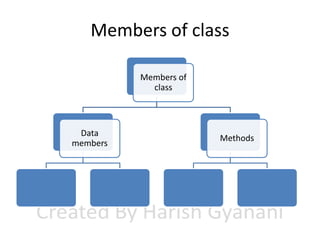
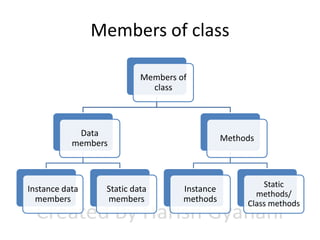
Members of class
Members of class
Members of
class
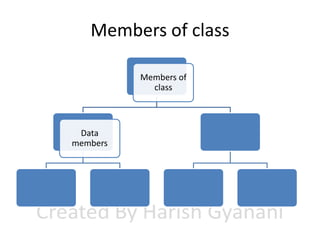
Members of class
Members of
class

Data
members
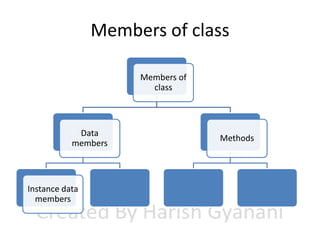
Members of class
Members of
class

Data
members

Methods
Members of class
Members of
class

Data
members

Instance data
members

Methods
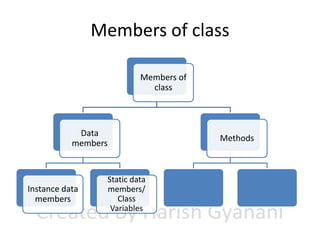
Members of class
Members of
class

Data
members

Instance data
members

Static data
members/
Class
Variables

Methods
Members of class
Members of
class

Data
members

Instance data
members

Static data
members

Methods

Instance
methods
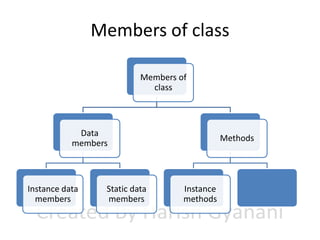
Members of class
Members of
class

Data
members

Instance data
members

Static data
members

Methods

Instance
methods

Static
methods/
Class methods
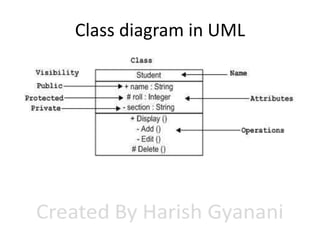
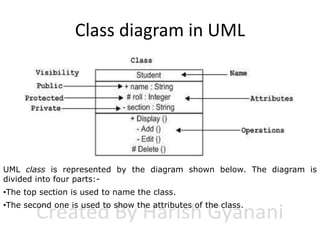
Class diagram in UML

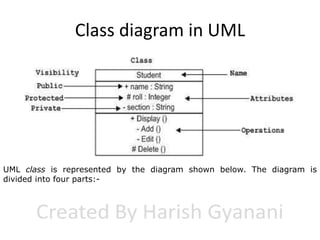
UML class is represented by the diagram shown below. The diagram is
divided into four parts:-
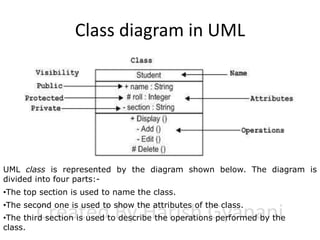
Class diagram in UML

UML class is represented by the diagram shown below. The diagram is
divided into four parts:•The top section is used to name the class.
Class diagram in UML

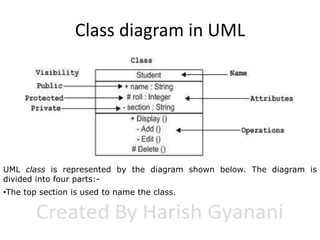
UML class is represented by the diagram shown below. The diagram is
divided into four parts:•The top section is used to name the class.
•The second one is used to show the attributes of the class.
Class diagram in UML

UML class is represented by the diagram shown below. The diagram is
divided into four parts:•The top section is used to name the class.
•The second one is used to show the attributes of the class.
•The third section is used to describe the operations performed by the
class.
Variable Types
A class can contain any of the following variable types.
• Local variables: Variables defined inside
methods, constructors or blocks are called local variables.
The variable will be declared and initialized within the
method and the variable will be destroyed when the
method has completed.
• Instance variables: Instance variables are variables within a
class but outside any method. These variables are
instantiated when the class is loaded. Instance variables
can be accessed from inside any method, constructor or
blocks of that particular class.
• Class variables: Class variables are variables declared with
in a class, outside any method, with the static keyword.

Simple class and object examples in java

  • 1.
    Simple class andobject examples in Java Presented By Harish Gyanani
  • 2.
    What is class? Aclass is a blue print from which individual objects are created.
  • 3.
    Class naming convention •By convention, class names capitalize the initial of each word. • For example: Employee, Boss, DateUtility, PostOffice, Regula rRateCalculator.
  • 4.
    What are membersof Class? • Field: – field is nothing but the property of the class or object which we are going to create . – Example if we are creating a class called computer then they have property like model, memSize, hdSize, osType etc. • Method: – method is nothing but the operation that an object can perform it define the behavior of object how an object can interact with outside world. – Example startMethod (), shutdownMethod ().
  • 5.
    Fields in class 1.Fieldsare variables. 2.They can be primitives or references to objects. For example, the Employee class has two fields, age and salary. public class Employee { int age; int salary }
  • 6.
  • 7.
    Fields Naming Conventions 1.Fieldnames should follow the camel naming convention.
  • 8.
    Fields Naming Conventions 1.Fieldnames should follow the camel naming convention. 2.The initial of each word in the field, except for the first word, is written with a capital letter.
  • 9.
    Fields Naming Conventions 1.Fieldnames should follow the camel naming convention. 2.The initial of each word in the field, except for the first word, is written with a capital letter. 3.For example: age, maxAge, address, validAddress, numberOfRows.
  • 10.
    Instance variables Variables withina class but outside any method.
  • 11.
    Instance Methods Methods definedin a class which is only accessible through the Object of the class are called Instance methods.
  • 12.
    Example: Person Class classPerson { String name; int age; }
  • 13.
    Example: Person Class classPerson { String name; int age; } Without methods
  • 14.
    class keyword Example: Person Class classPerson { String name; int age; } Without methods
  • 15.
    class keyword Example: Person Class classPerson { String name; int age; } Name of class Without methods
  • 16.
    class keyword Example: Person Class classPerson { String name; int age; } Name of class Without methods Start of class
  • 17.
    class keyword Example: Person Class classPerson { String name; int age; } Name of class Without methods Start of class End of class
  • 18.
    class keyword Example: Person Class classPerson { String name; int age; } End of class Data members of class with default access(instance variable) Name of class Without methods Start of class
  • 19.
  • 20.
    How to declareobject? Person p1;
  • 21.
    How to declareobject? Person p1; //declare reference to object
  • 22.
    How to declareobject? Person p1; //declare reference to object //Syntax: <classname> <objectname>
  • 23.
    How to declareobject? Person p1; //declare reference to object //Syntax: <classname> <objectname> • It is simply a variable that can refer to an object.
  • 24.
    How to declareobject? Person p1; //declare reference to object //Syntax: <classname> <objectname> • It is simply a variable that can refer to an object. Person p1; null p1
  • 25.
  • 26.
    Allocate memory p1 =new Person();
  • 27.
    Allocate memory p1 =new Person(); //allocate a Person object
  • 28.
    Allocate memory p1 =new Person(); //allocate a Person object //Syntax: <objectname> = new <classname>();
  • 29.
    Allocate memory p1 =new Person(); //allocate a Person object //Syntax: <objectname> = new <classname>(); • The new operator dynamically allocates (that is, allocates at run time) memory for an object and returns a reference to it.
  • 30.
    Allocate memory p1 =new Person(); //allocate a Person object //Syntax: <objectname> = new <classname>(); • The new operator dynamically allocates (that is, allocates at run time) memory for an object and returns a reference to it. • This reference is, the address in memory of the object allocated by new.
  • 31.
    Allocate memory p1 =new Person(); //allocate a Person object //Syntax: <objectname> = new <classname>(); • The new operator dynamically allocates (that is, allocates at run time) memory for an object and returns a reference to it. • This reference is, the address in memory of the object allocated by new. name p1 = new Person(); p1 age Person object
  • 32.
  • 33.
  • 34.
  • 35.
  • 36.
    Combination of thesestatements Person p1 = new Person();
  • 37.
    Combination of thesestatements Person p1 = new Person(); //Syntax: <classname> <objectname> = new <classname>();
  • 38.
    public class forPerson class public class NewClass1 { public static void main(String args[]) { Person obj1 = new Person(); obj1.name=“ramesh"; obj1.age=22; int a=obj1.age; System.out.println(a); System.out.println(obj1.name); } }
  • 39.
    public class forPerson class public class NewClass1 { public static void main(String args[]) { Person obj1 = new Person(); obj1.name=“ramesh"; obj1.age=22; int a=obj1.age; System.out.println(a); System.out.println(obj1.name); } } Instance variables are initialized with object name qualifier
  • 40.
    public class forPerson class Instance variables are initialized with object name qualifier public class NewClass1 { public static void main(String args[]) { Person obj1 = new Person(); obj1.name=“ramesh"; obj1.age=22; int a=obj1.age; System.out.println(a); Syntax to set value in System.out.println(obj1.name); instance variable:} } <objectname>.<variablename> = <value>;
  • 41.
    public class forPerson class Instance variables are initialized with object name qualifier public class NewClass1 { public static void main(String args[]) { Person obj1 = new Person(); obj1.name=“ramesh"; obj1.age=22; int a=obj1.age; System.out.println(a); Syntax to set value in System.out.println(obj1.name); instance variable:} } Syntax to get value <objectname>.<variablename> = <value>; from instance variable:<variable> = <objectname>.<instance_variable_name>
  • 42.
    Complete Program public classNewClass1 { public static void main(String args[]) { Person obj1 = new Person(); obj1.name=“ramesh"; obj1.age=22; int a=obj1.age; System.out.println(a); System.out.println(obj1.name); } } class Person { String name; int age; }
  • 43.
  • 44.
    Example 1: DogClass class Dog { String breed; int age; String color; Instance variables void barking() {} void hungry() {} void sleeping() {} } In this example, barking(), hungry() and sleeping() are instance methods.
  • 45.
    Example 2: Stockclass Class Stock { public commodity; public price; public void buy (int no_of commodity) {} public boolean sale () {} }
  • 46.
    Example 2: Stockclass Class Stock { public commodity; public price; Instance variables public void buy (int no_of commodity) {} public boolean sale () {} }
  • 47.
    Example 2: Stockclass Class Stock { public commodity; public price; Instance variables public void buy (int no_of commodity) {} public boolean sale () {} } In this example, buy(), and sale() are instance methods.
  • 48.
    Example 2: Stockclass Class Stock { public commodity; public price; Instance variables public void buy (int no_of commodity) {} public boolean sale () {} } Collectively, the methods and variables defined within a class are called members of the class. In this example, buy(), and sale() are instance methods.
  • 49.
    Example 3: PersonClass class Person { private String name; private int age; public void getData() { Scanner sc = new Scanner(System.in); System.out.println("Enter name and age"); name=sc.nextLine(); age=sc.nextInt(); } public void display() { System.out.println("Name ="+name); System.out.println("Age ="+age); } }
  • 50.
    Example 3: PersonClass class Person { private String name; private int age; public void getData() { Scanner sc = new Scanner(System.in); System.out.println("Enter name and age"); name=sc.nextLine(); age=sc.nextInt(); } public void display() { System.out.println("Name ="+name); System.out.println("Age ="+age); } } With methods
  • 51.
    Example 3: PersonClass class Person { private String name; private int age; Private instance variables cannot be accessed outside the class public void getData() { Scanner sc = new Scanner(System.in); System.out.println("Enter name and age"); name=sc.nextLine(); age=sc.nextInt(); } public void display() { System.out.println("Name ="+name); System.out.println("Age ="+age); } } With methods
  • 52.
    Example 3: PersonClass class Person { private String name; private int age; Private instance variables cannot be accessed outside the class public void getData() { Scanner sc = new Scanner(System.in); System.out.println("Enter name and age"); name=sc.nextLine(); age=sc.nextInt(); } public void display() { System.out.println("Name ="+name); System.out.println("Age ="+age); } } With methods getData() and display() instance methods are public and can be accessed outside the class.
  • 53.
    Example 3: PersonClass class Person { private String name; private int age; Private instance variables cannot be accessed outside the class public void getData() { Scanner sc = new Scanner(System.in); System.out.println("Enter name and age"); name=sc.nextLine(); age=sc.nextInt(); } public void display() { System.out.println("Name ="+name); System.out.println("Age ="+age); } } With methods getData() and display() instance methods are public and can be accessed outside the class. Methods inside class can access private data of class. In this case getData() and display() methods are accessing private data.
  • 54.
    They are defined inside classnot inside method Example 3: Person Class class Person { private String name; private int age; Private instance variables cannot be accessed outside the class public void getData() { Scanner sc = new Scanner(System.in); System.out.println("Enter name and age"); name=sc.nextLine(); age=sc.nextInt(); } public void display() { System.out.println("Name ="+name); System.out.println("Age ="+age); } } With methods getData() and display() instance methods are public and can be accessed outside the class. Methods inside class can access private data of class. In this case getData() and display() methods are accessing private data.
  • 55.
    public class codefor Person class public class abc { public static void main(String args[]) { Person p1 = new Person(); p1.getData(); p1.display(); } } NOTE: getData() and Display() method cannot be called without object qualifier.
  • 56.
    public class codefor Person class public class abc { public static void main(String args[]) { Person p1 = new Person(); p1.getData(); p1.display(); } } Qualifier : Object name NOTE: getData() and Display() method cannot be called without object qualifier.
  • 57.
    public class codefor Person class public class abc { public static void main(String args[]) { Person p1 = new Person(); p1.getData(); p1.display(); } } Dot operator NOTE: getData() and Display() method cannot be called without object qualifier.
  • 58.
    public class codefor Person class public class abc { public static void main(String args[]) { Person p1 = new Person(); p1.getData(); p1.display(); } } Instance method because it is called using object NOTE: getData() and Display() method cannot be called without object qualifier.
  • 59.
    public class codefor Person class public class abc { public static void main(String args[]) { Person p1 = new Person(); p1.getData(); p1.display(); } } Qualifier : Object name Instance method because it is called using object Dot operator NOTE: getData() and Display() method cannot be called without object qualifier.
  • 60.
    Complete program import java.util.Scanner; classPerson { private String name; private int age; public class abc { public static void main(String args[]) { Person p1 = new Person(); } public void getData() } { Scanner sc = new Scanner(System.in); System.out.println("Enter name and age"); name=sc.nextLine(); age=sc.nextInt(); } public void display() { System.out.println("Name ="+name); System.out.println("Age ="+age); } } p1.getData(); p1.display();
  • 61.
    Complete program import java.util.Scanner; classPerson { private String name; private int age; public class abc { public static void main(String args[]) { Person p1 = new Person(); } public void getData() } { Scanner sc = new Scanner(System.in); System.out.println("Enter name and age"); name=sc.nextLine(); age=sc.nextInt(); } public void display() { System.out.println("Name ="+name); System.out.println("Age ="+age); } } p1.getData(); p1.display(); A program can contain multiple classes but only one public class(same name as file name) and contains main method
  • 62.
    Complete program import java.util.Scanner; classPerson { private String name; private int age; public class abc { public static void main(String args[]) { Person p1 = new Person(); p1.getData(); p1.display(); } public void getData() } { Scanner sc = new Scanner(System.in); System.out.println("Enter name and age"); name=sc.nextLine(); age=sc.nextInt(); } public void display() { System.out.println("Name ="+name); System.out.println("Age ="+age); } } Creating and instantiating Person class object p1. A program can contain multiple classes but only one public class(same name as file name) and contains main method
  • 63.
    Complete program import java.util.Scanner; classPerson { private String name; private int age; public class abc { public static void main(String args[]) { Person p1 = new Person(); p1.getData(); p1.display(); } public void getData() } { Scanner sc = new Scanner(System.in); System.out.println("Enter name and age"); name=sc.nextLine(); age=sc.nextInt(); } public void display() { System.out.println("Name ="+name); System.out.println("Age ="+age); } } Creating and instantiating Person class object p1. A program can contain multiple classes but only one public class(same name as file name) and contains main method Calling instance methods of Person Class using p1 object.
  • 64.
  • 65.
  • 66.
  • 67.
    Members of class Membersof class Data members
  • 68.
    Members of class Membersof class Data members Methods
  • 69.
    Members of class Membersof class Data members Instance data members Methods
  • 70.
    Members of class Membersof class Data members Instance data members Static data members/ Class Variables Methods
  • 71.
    Members of class Membersof class Data members Instance data members Static data members Methods Instance methods
  • 72.
    Members of class Membersof class Data members Instance data members Static data members Methods Instance methods Static methods/ Class methods
  • 73.
  • 74.
    Class diagram inUML UML class is represented by the diagram shown below. The diagram is divided into four parts:-
  • 75.
    Class diagram inUML UML class is represented by the diagram shown below. The diagram is divided into four parts:•The top section is used to name the class.
  • 76.
    Class diagram inUML UML class is represented by the diagram shown below. The diagram is divided into four parts:•The top section is used to name the class. •The second one is used to show the attributes of the class.
  • 77.
    Class diagram inUML UML class is represented by the diagram shown below. The diagram is divided into four parts:•The top section is used to name the class. •The second one is used to show the attributes of the class. •The third section is used to describe the operations performed by the class.
  • 78.
    Variable Types A classcan contain any of the following variable types. • Local variables: Variables defined inside methods, constructors or blocks are called local variables. The variable will be declared and initialized within the method and the variable will be destroyed when the method has completed. • Instance variables: Instance variables are variables within a class but outside any method. These variables are instantiated when the class is loaded. Instance variables can be accessed from inside any method, constructor or blocks of that particular class. • Class variables: Class variables are variables declared with in a class, outside any method, with the static keyword.