www.codewithc.com
www.codewithc.com
Project Abstract
 The calendar application presented here is a very
simple console application developed using C
programming language.
 It is built without using graphics properties; instead, it
utilizes many windows properties to give the
application a colorful look and feel.
 It is compiled in Code::Blocks using GCC compiler.
www.codewithc.com
Features
The key features of this Calendar application are:
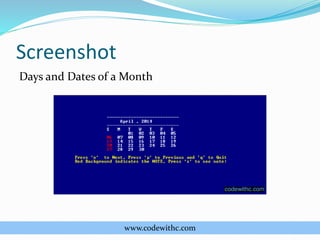
 Windows properties have been used to make the
overall application colorful. Background color is blue,
the days of the month are white, and the vacations are
red in color.
 File handling has been used in this application.
 It provides a very simple interface and displays days,
dates, months, and years based on the input given by
the user.
www.codewithc.com
Working
 At first, the user needs to provide month and year as
input. Example: 04 2014. This displays the April
calendar for year 2014.
 The application displays day corresponding to a given
date.
 It also displays days and dates corresponding to a
particular month and year.
 Months can be navigated using arrow keys. Also, ‘n’
and ‘p’ keys can be used to go to next and previous
month respectively.
www.codewithc.com
Screenshot
Days and Dates of a Month
www.codewithc.com
Thank You!
This project is available for free download at:
http://www.codewithc.com/mini-project-in-c-calendar/

Simple Calendar Application using C

  • 1.
  • 2.
    www.codewithc.com Project Abstract  Thecalendar application presented here is a very simple console application developed using C programming language.  It is built without using graphics properties; instead, it utilizes many windows properties to give the application a colorful look and feel.  It is compiled in Code::Blocks using GCC compiler.
  • 3.
    www.codewithc.com Features The key featuresof this Calendar application are:  Windows properties have been used to make the overall application colorful. Background color is blue, the days of the month are white, and the vacations are red in color.  File handling has been used in this application.  It provides a very simple interface and displays days, dates, months, and years based on the input given by the user.
  • 4.
    www.codewithc.com Working  At first,the user needs to provide month and year as input. Example: 04 2014. This displays the April calendar for year 2014.  The application displays day corresponding to a given date.  It also displays days and dates corresponding to a particular month and year.  Months can be navigated using arrow keys. Also, ‘n’ and ‘p’ keys can be used to go to next and previous month respectively.
  • 5.
  • 6.
    www.codewithc.com Thank You! This projectis available for free download at: http://www.codewithc.com/mini-project-in-c-calendar/