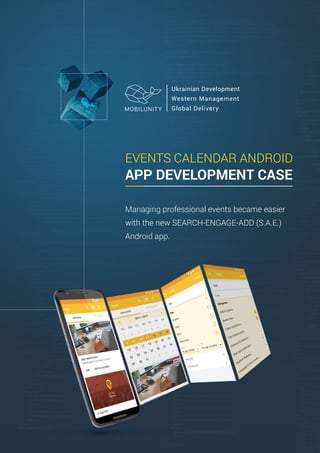
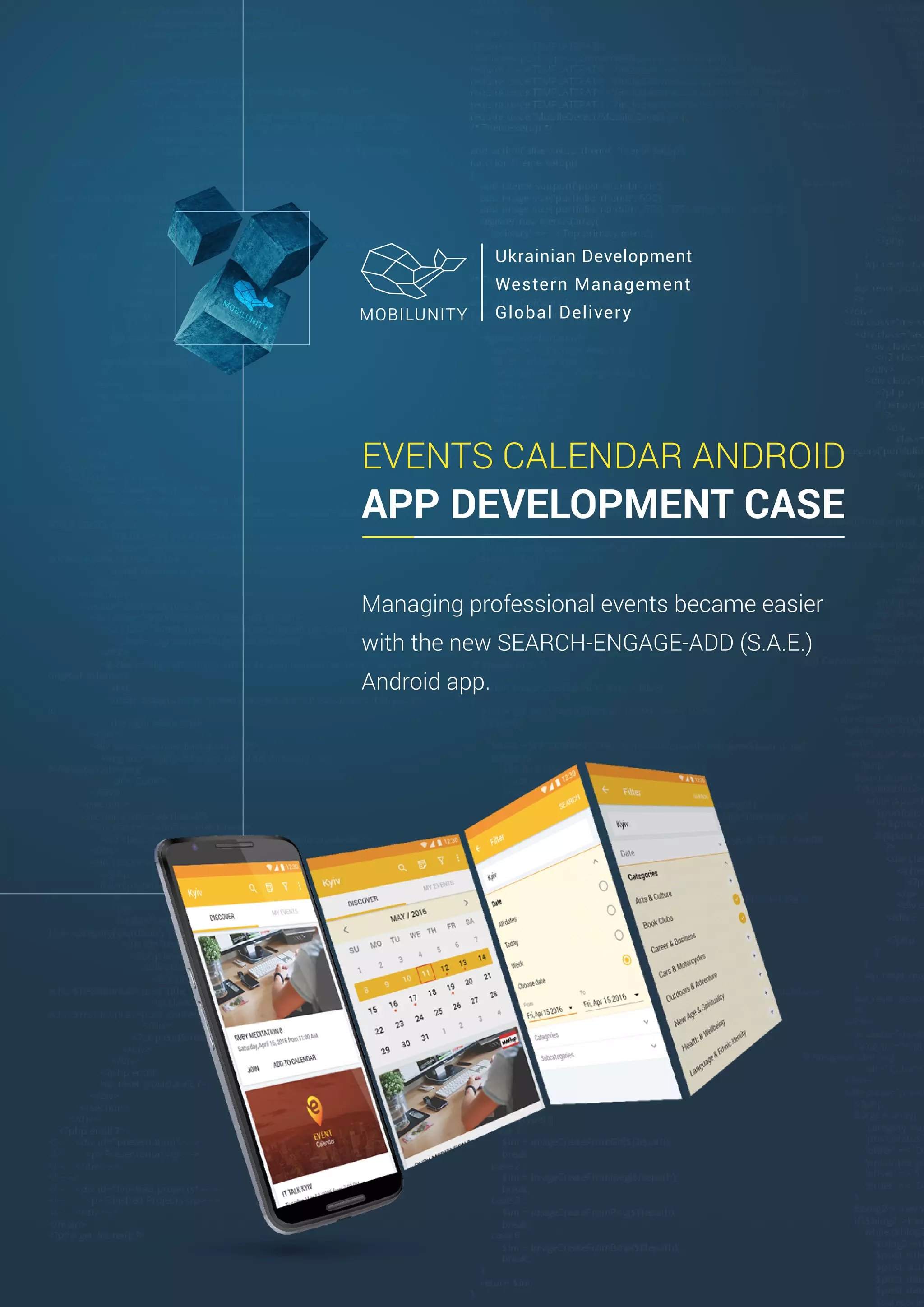
EVENTS CALENDAR ANDROID
APP DEVELOPMENT CASE
Managing professional events became easier
with the new SEARCH-ENGAGE-ADD (S.A.E.)
Android app.
PROBLEM
1
Project Team
Project Manager
UI/UX Designer
Android Developer
QA Engineer
https://play.google.com/store/apps/details?id=com.mobilunity.professionaleventscalendar&hl=en
Having an active social life full of relevant events, is
an important part of any ambitious entrepreneurs
life. The problem lies in managing those events, so
that you can attend the events that are relevant to
you and your business, while not neglecting others
that you may be interested in. Various conferences,
meetups and seminars help to build the brand and
improve its visibility so it's no surprise that business
professionals and marketers alike, find it beneficial to
participate in these events often. Event search
services like Eventbrite.com and Meetup.com
partially solve the problem of finding the most
interesting events, but they don’t allow you to keep
an entire list of events in one system. The Mobilunity
team decided to take things a step further and has
provided the ultimate solution for your planning
needs, by creating the app S.E.A. Events Calendar.
Our Android mobile development team worked on
the app, which would allow:
Searching for the relevant events on all platforms
ever existing (for v1 we did only 2 platforms -
using Meetup API and Eventbrite API integration)
Filter the events by location, date, topic
Add events to the personal calendar on a phone
Notify user on upcoming event
The new app got a simple abbreviation because of
its functions: Search, Engage, Add with events
delivered by the app.
“Visiting events is a powerful tool for
the growth in any sphere of activity. It
may be workshops, lectures,
exhibitions or just meeting. We have
tried to make an application that will
help you not to miss any of the
events of your interest in any corner
of the world.”
Aleksandr
Project Manager
2
THE CASE STUDY
Before our Project Management team started to
compose the business logic of the events app, the team
conducted thorough market research on possible
solutions already available on the market to identify key
problems they face and features they are lacking. Our
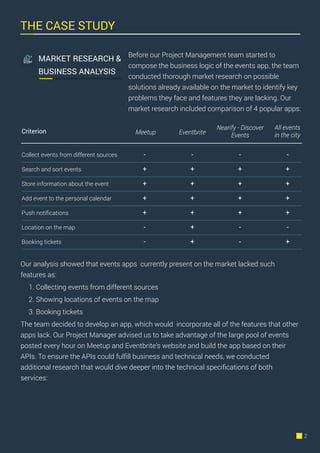
market research included comparison of 4 popular apps:
Our analysis showed that events apps currently present on the market lacked such
features as:
1. Collecting events from different sources
2. Showing locations of events on the map
3. Booking tickets
The team decided to develop an app, which would incorporate all of the features that other
apps lack. Our Project Manager advised us to take advantage of the large pool of events
posted every hour on Meetup and Eventbrite’s website and build the app based on their
APIs. To ensure the APIs could fulfill business and technical needs, we conducted
additional research that would dive deeper into the technical specifications of both
services:
MARKET RESEARCH &
BUSINESS ANALYSIS
Criterion Meetup Eventbrite
All events
in the city
Nearify - Discover
Events
Collect events from different sources
Search and sort events
Store information about the event
Add event to the personal calendar
Push notifications
Location on the map
Booking tickets
-
+
+
+
+
-
-
-
+
+
+
+
+
+
-
+
+
+
+
-
-
-
+
+
+
+
-
+
As the limitations on the number of API calls allowed, met our projected load on the
system, we decided to proceed with building the app based on the integration of both APIs.
Feature Meetup API Eventbrite API
Events search
Local search
Event information
Number of events in response
Response limitations
Limitations of frequency of
requests
Search by GPS coordinates
Search by city and country
Ability to get the list of cities
Title of event in text, description
in html or text
Max (and default) number of
events is 200.
-
Max 30 requests within 10
seconds
Search by GPS coordinates
Search by city, region and country
Ability to get list of countries and
regions
Title and description of event in
text and html
Max number of events is 50.
No information on event location.
Should be requested through a
separate "venue_id" request:
"13786978"
The default limit is 24,000 calls per
day and 1,000 calls per hour
TECHNICAL
REQUIREMENTS
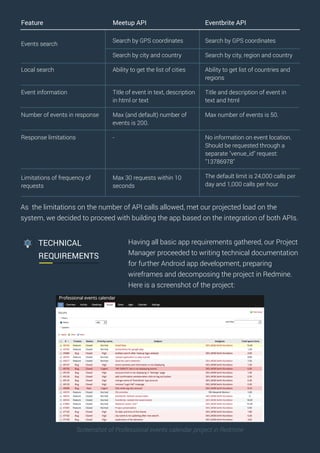
Having all basic app requirements gathered, our Project
Manager proceeded to writing technical documentation
for further Android app development, preparing
wireframes and decomposing the project in Redmine.
Here is a screenshot of the project:
Screenshot of Professional events calendar project in Redmine
UI/UX DESIGN
https://www.invisionapp.com/
Having clear requirements and user stories defined, our
mobile UI/UX designers were able to prepare the
prototypes, UX designs and UI map. The Apps design
was done according to the requested Android screen
sizes in 3:4:6:8 scaling ratio: for medium-density (MDPI),
high-density (HDPI), extra high-density (XHDPI) and extra
extra high-density (XXHDPI).
https://www.invisionapp.com/
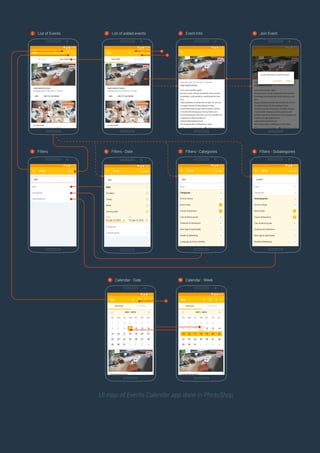
The UI map was drawn for the following user story:
User sees a list of available locations
User enters their preferred location
App generates list of events pulled by APIs
User filters events by date, category and subcategory
User gets full information about the event
User joins event and adds it to the list of own events in the app
User sees events in the calendar selecting the date or week in the month view
All designs were added to InVision to deliver true user experience of interacting with the
app. Traditionally we use invisionapp.com to show mockups and prototypes to our clients.
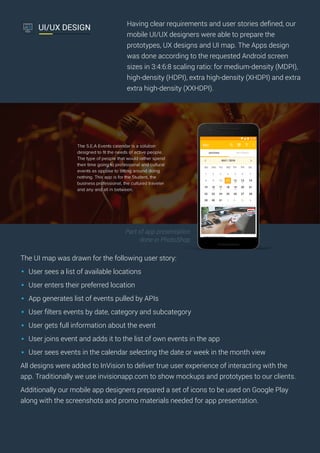
Additionally our mobile app designers prepared a set of icons to be used on Google Play
along with the screenshots and promo materials needed for app presentation.
Part of app presentation
done in PhotoShop
UI map of Events Calendar app done in PhotoShop
List of Events1 List of added events2 Event Info3 Join Event4
Filters5
5
Filters - Date6
Calendar - Date9
9
Calendar - Week10
Filters - Categories7 Filters - Subategories8
1
ANDROID APP
DEVELOPMENT
According to the plan, the first version of the app covered
the functionality of pulling events through EventBrite and
Meetup APIs, while the 2nd version would already show
locations on the map and implement tickets booking
logic.
Our Android developers built the app MVP, which met all
the functions below:
Collect events from different sources through
Eventbrite API and Meetup API integration.
Search through the events, and ability to sort them.
All the events are displayed as a list, with ability to
search, and sort them by city, by date, by topic, etc.
Store information about the event: location, subject,
description, etc.
Add an event to the user's personal calendar. The
System has a personal calendar for every user, with
all the data about interesting events. If the user ‘likes’
any event the event is added to their personal
calendar.
Send push notifications. System sends push
notification about start date (time) of the event 1 hour
in advance.
The development for the Events app was done in
Android Studio, plugging in third-party libraries for image
processing and database querying such as Retrofit,
Android Sliding Up Panel, Material Calendar View,
OrmLite and Picasso. Crashlytics was integrated for app
monitoring and crash reporting.
TESTING & BUGFIX
Once development was finished, the app was passed to
our QA team for thorough testing. Our Project Manager
defined the use cases and each of them were tested
manually on several Android devices with different
screen resolutions.
A QA Engineer tested the app for the ability to:
Register a user
Log in with existing account
Search through events from Meetup and Eventbrite
Filter events
Add and remove events to personal calendar
Receive push notifications
Map categories
Logout
17 bugs were detected and fixed during the initial testing
and then the app underwent regression QA confirming
that the app was bug-free within the set of defined user
stories.
On the 27th of June the new Android app was uploaded
to Google Play, and it’s now available for free download
for all users. At the same time Mobilunity’s marketing
team began planning promotion of the new app. The
team came up and executed the following plan:
Analyze competition and define app keywords
Optimize the Google Play description
Create app demo video explaining key features of
event app
Create portfolio item showcasing results of the team
work
Launch the app demo site eventscalendarapp.com
Prepare content for the app landing page and suggest
a design concept
Find and approach news portals dedicated to events
management
Thanks to these additional activities Android users
found out about the new app and learned the key
benefits of using it from the explainer video below:
https://youtu.be/cBqs2qY0-90
PROMOTION
CHALLENGES & SOLUTIONS
As in any development project, we faced a number of technical problems that our Android
developers were able to solve, while building S.E.A. These challenges included:
Getting information from different sources
Since the app receives information from multiple sources, developers unified all data and merge categories,
types, groups, etc. This allowed us to show the user a detailed list without duplicates and junk information.
Receiving data in different formats
Different APIs send source data in different formats and to avoid displaying information in 2 different
formats we came up with our own template for the event. When the system receives the data from the
source, it transfers all the information to the proper format, so the user doesn’t even notice that information
comes from 2 sources.
Services authorization
Authorization on meetup.com and eventbrite.com needs to be done on the web page, which creates a
distraction for mobile users. So we implemented the WebView: a View that displays web pages in apps. This
class uses the WebKit rendering engine to display web pages and includes methods to navigate forward and
backward through the history, zoom in and out, perform text searches and more. It allows the system to
provide all the needed actions without using a browser.
Refreshing events list with new records
The System gathers information about the events within the available API records limit in one request. Some
sources have more records for the time period, some of them - less. But on the user side the system was
designed to display all events and have them ordered by date. Our team implemented a feature, which sorts
events by date and cuts duplicates, which were previously loaded.
TECHNOLOGIES USED
This event search app provides a mixture of integrations based on the powerful Android
SDK. To bring this app to life, our team dealt with:
IDE - Android Studio
Programming language – Java
Meetup.com API and Eventbrite.com API
Third party libraries:
Retrofit - a type-safe REST client for Android;
Android Sliding Up Panel - a draggable sliding up panel;
Material Calendar View - a Material design back port of Android's CalendarView;
OrmLite - provides simple and lightweight functionality for optimizing injection of Java
objects to SQL databases, while avoiding the complexity and overhead of more
standard ORM packages;
Picasso - a powerful image downloading and caching library for Android;
Crashlytics - the most powerful, yet lightest weight crash reporting solution.
Google Analytics - mobile analytics
InvisionApp.com and Adobe Photoshop for app UI/UX design
https://mobilunity.com sales@mobilunity.com
Are you dreaming about an app with complex API integrations?
Let’s build it together with Mobilunity team!

Event Calendar - Android App Development

  • 1.
    EVENTS CALENDAR ANDROID APPDEVELOPMENT CASE Managing professional events became easier with the new SEARCH-ENGAGE-ADD (S.A.E.) Android app.
  • 2.
    PROBLEM 1 Project Team Project Manager UI/UXDesigner Android Developer QA Engineer https://play.google.com/store/apps/details?id=com.mobilunity.professionaleventscalendar&hl=en Having an active social life full of relevant events, is an important part of any ambitious entrepreneurs life. The problem lies in managing those events, so that you can attend the events that are relevant to you and your business, while not neglecting others that you may be interested in. Various conferences, meetups and seminars help to build the brand and improve its visibility so it's no surprise that business professionals and marketers alike, find it beneficial to participate in these events often. Event search services like Eventbrite.com and Meetup.com partially solve the problem of finding the most interesting events, but they don’t allow you to keep an entire list of events in one system. The Mobilunity team decided to take things a step further and has provided the ultimate solution for your planning needs, by creating the app S.E.A. Events Calendar. Our Android mobile development team worked on the app, which would allow: Searching for the relevant events on all platforms ever existing (for v1 we did only 2 platforms - using Meetup API and Eventbrite API integration) Filter the events by location, date, topic Add events to the personal calendar on a phone Notify user on upcoming event The new app got a simple abbreviation because of its functions: Search, Engage, Add with events delivered by the app. “Visiting events is a powerful tool for the growth in any sphere of activity. It may be workshops, lectures, exhibitions or just meeting. We have tried to make an application that will help you not to miss any of the events of your interest in any corner of the world.” Aleksandr Project Manager
  • 3.
    2 THE CASE STUDY Beforeour Project Management team started to compose the business logic of the events app, the team conducted thorough market research on possible solutions already available on the market to identify key problems they face and features they are lacking. Our market research included comparison of 4 popular apps: Our analysis showed that events apps currently present on the market lacked such features as: 1. Collecting events from different sources 2. Showing locations of events on the map 3. Booking tickets The team decided to develop an app, which would incorporate all of the features that other apps lack. Our Project Manager advised us to take advantage of the large pool of events posted every hour on Meetup and Eventbrite’s website and build the app based on their APIs. To ensure the APIs could fulfill business and technical needs, we conducted additional research that would dive deeper into the technical specifications of both services: MARKET RESEARCH & BUSINESS ANALYSIS Criterion Meetup Eventbrite All events in the city Nearify - Discover Events Collect events from different sources Search and sort events Store information about the event Add event to the personal calendar Push notifications Location on the map Booking tickets - + + + + - - - + + + + + + - + + + + - - - + + + + - +
  • 4.
    As the limitationson the number of API calls allowed, met our projected load on the system, we decided to proceed with building the app based on the integration of both APIs. Feature Meetup API Eventbrite API Events search Local search Event information Number of events in response Response limitations Limitations of frequency of requests Search by GPS coordinates Search by city and country Ability to get the list of cities Title of event in text, description in html or text Max (and default) number of events is 200. - Max 30 requests within 10 seconds Search by GPS coordinates Search by city, region and country Ability to get list of countries and regions Title and description of event in text and html Max number of events is 50. No information on event location. Should be requested through a separate "venue_id" request: "13786978" The default limit is 24,000 calls per day and 1,000 calls per hour TECHNICAL REQUIREMENTS Having all basic app requirements gathered, our Project Manager proceeded to writing technical documentation for further Android app development, preparing wireframes and decomposing the project in Redmine. Here is a screenshot of the project: Screenshot of Professional events calendar project in Redmine
  • 5.
    UI/UX DESIGN https://www.invisionapp.com/ Having clearrequirements and user stories defined, our mobile UI/UX designers were able to prepare the prototypes, UX designs and UI map. The Apps design was done according to the requested Android screen sizes in 3:4:6:8 scaling ratio: for medium-density (MDPI), high-density (HDPI), extra high-density (XHDPI) and extra extra high-density (XXHDPI). https://www.invisionapp.com/ The UI map was drawn for the following user story: User sees a list of available locations User enters their preferred location App generates list of events pulled by APIs User filters events by date, category and subcategory User gets full information about the event User joins event and adds it to the list of own events in the app User sees events in the calendar selecting the date or week in the month view All designs were added to InVision to deliver true user experience of interacting with the app. Traditionally we use invisionapp.com to show mockups and prototypes to our clients. Additionally our mobile app designers prepared a set of icons to be used on Google Play along with the screenshots and promo materials needed for app presentation. Part of app presentation done in PhotoShop
  • 6.
    UI map ofEvents Calendar app done in PhotoShop List of Events1 List of added events2 Event Info3 Join Event4 Filters5 5 Filters - Date6 Calendar - Date9 9 Calendar - Week10 Filters - Categories7 Filters - Subategories8 1
  • 7.
    ANDROID APP DEVELOPMENT According tothe plan, the first version of the app covered the functionality of pulling events through EventBrite and Meetup APIs, while the 2nd version would already show locations on the map and implement tickets booking logic. Our Android developers built the app MVP, which met all the functions below: Collect events from different sources through Eventbrite API and Meetup API integration. Search through the events, and ability to sort them. All the events are displayed as a list, with ability to search, and sort them by city, by date, by topic, etc. Store information about the event: location, subject, description, etc. Add an event to the user's personal calendar. The System has a personal calendar for every user, with all the data about interesting events. If the user ‘likes’ any event the event is added to their personal calendar. Send push notifications. System sends push notification about start date (time) of the event 1 hour in advance. The development for the Events app was done in Android Studio, plugging in third-party libraries for image processing and database querying such as Retrofit, Android Sliding Up Panel, Material Calendar View, OrmLite and Picasso. Crashlytics was integrated for app monitoring and crash reporting. TESTING & BUGFIX Once development was finished, the app was passed to our QA team for thorough testing. Our Project Manager defined the use cases and each of them were tested manually on several Android devices with different screen resolutions.
  • 8.
    A QA Engineertested the app for the ability to: Register a user Log in with existing account Search through events from Meetup and Eventbrite Filter events Add and remove events to personal calendar Receive push notifications Map categories Logout 17 bugs were detected and fixed during the initial testing and then the app underwent regression QA confirming that the app was bug-free within the set of defined user stories. On the 27th of June the new Android app was uploaded to Google Play, and it’s now available for free download for all users. At the same time Mobilunity’s marketing team began planning promotion of the new app. The team came up and executed the following plan: Analyze competition and define app keywords Optimize the Google Play description Create app demo video explaining key features of event app Create portfolio item showcasing results of the team work Launch the app demo site eventscalendarapp.com Prepare content for the app landing page and suggest a design concept Find and approach news portals dedicated to events management Thanks to these additional activities Android users found out about the new app and learned the key benefits of using it from the explainer video below: https://youtu.be/cBqs2qY0-90 PROMOTION
  • 9.
    CHALLENGES & SOLUTIONS Asin any development project, we faced a number of technical problems that our Android developers were able to solve, while building S.E.A. These challenges included: Getting information from different sources Since the app receives information from multiple sources, developers unified all data and merge categories, types, groups, etc. This allowed us to show the user a detailed list without duplicates and junk information. Receiving data in different formats Different APIs send source data in different formats and to avoid displaying information in 2 different formats we came up with our own template for the event. When the system receives the data from the source, it transfers all the information to the proper format, so the user doesn’t even notice that information comes from 2 sources. Services authorization Authorization on meetup.com and eventbrite.com needs to be done on the web page, which creates a distraction for mobile users. So we implemented the WebView: a View that displays web pages in apps. This class uses the WebKit rendering engine to display web pages and includes methods to navigate forward and backward through the history, zoom in and out, perform text searches and more. It allows the system to provide all the needed actions without using a browser. Refreshing events list with new records The System gathers information about the events within the available API records limit in one request. Some sources have more records for the time period, some of them - less. But on the user side the system was designed to display all events and have them ordered by date. Our team implemented a feature, which sorts events by date and cuts duplicates, which were previously loaded.
  • 10.
    TECHNOLOGIES USED This eventsearch app provides a mixture of integrations based on the powerful Android SDK. To bring this app to life, our team dealt with: IDE - Android Studio Programming language – Java Meetup.com API and Eventbrite.com API Third party libraries: Retrofit - a type-safe REST client for Android; Android Sliding Up Panel - a draggable sliding up panel; Material Calendar View - a Material design back port of Android's CalendarView; OrmLite - provides simple and lightweight functionality for optimizing injection of Java objects to SQL databases, while avoiding the complexity and overhead of more standard ORM packages; Picasso - a powerful image downloading and caching library for Android; Crashlytics - the most powerful, yet lightest weight crash reporting solution. Google Analytics - mobile analytics InvisionApp.com and Adobe Photoshop for app UI/UX design https://mobilunity.com sales@mobilunity.com Are you dreaming about an app with complex API integrations? Let’s build it together with Mobilunity team!