Siemens BACnet
Actuating
Terminal
Equipment
Controller (ATEC)
Installation
Instructions…
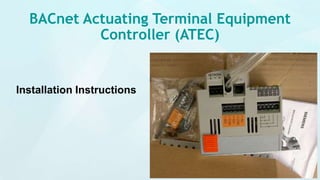
BACnet Actuating Terminal Equipment
Controller (ATEC)
Installation Instructions
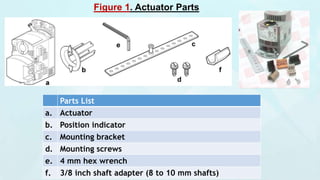
Figure 1. Actuator Parts
Parts List
a. Actuator
b. Position indicator
c. Mounting bracket
d. Mounting screws
e. 4 mm hex wrench
f. 3/8 inch shaft adapter (8 to 10 mm shafts)
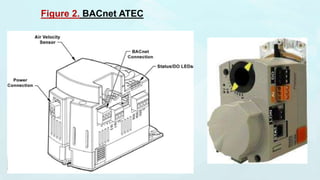
Figure 2. BACnet ATEC
Product Description
 These installation instructions describe mounting of the Siemens
BACnet ATEC (a combination BACnet Equipment Controller and
OpenAir® GDE131 Non-spring Return Rotary Electronic Damper
Actuator).
 A version using the GLB gear train is also available and provides 88 in.
lbs. of torque.
 The Siemens BACnet ATEC is designed to work with a new series of
Room Units (QAA2281) only.
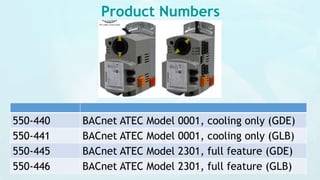
Product Numbers
550-440 BACnet ATEC Model 0001, cooling only (GDE)
550-441 BACnet ATEC Model 0001, cooling only (GLB)
550-445 BACnet ATEC Model 2301, full feature (GDE)
550-446 BACnet ATEC Model 2301, full feature (GLB)
Required Tools  1/4-inch Hex driver
 Small flat-blade screwdriver
 Marker or pencil
 Torque wrench
Control
Applications
2860 through 2867
WARNING Personal injury/loss of life may occur if you do not
follow a procedure as specified.
CAUTION Equipment damage or loss of data may occur if you
do not follow a procedure as specified.
Estimated
Installation Time
25 minutes
Instructions
Do not open the actuator.
1 Determine the size of the damper shaft.
If the damper shaft is 1/2-inch, proceed to Step 2.
The ATEC actuator comes with a factory installed 1/2-inch
damper shaft guide.
If the damper shaft is 5/8-inch:
a. Remove the 1/2-inch shaft guide, (Figure 3).
b. Proceed to Step 2.
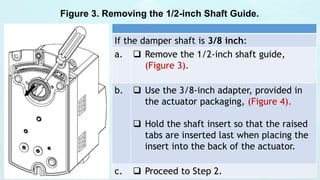
Figure 3. Removing the 1/2-inch Shaft Guide.
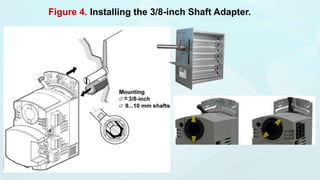
If the damper shaft is 3/8 inch:
a.  Remove the 1/2-inch shaft guide,
(Figure 3).
b.  Use the 3/8-inch adapter, provided in
the actuator packaging, (Figure 4).
 Hold the shaft insert so that the raised
tabs are inserted last when placing the
insert into the back of the actuator.
c.  Proceed to Step 2.
Figure 4. Installing the 3/8-inch Shaft Adapter.
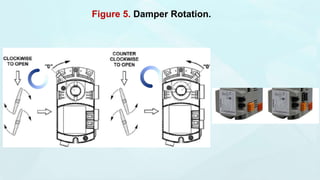
Figure 5. Damper Rotation.
2.  Determine the damper blade rotation, clockwise or
counterclockwise to open, (Figure 5).
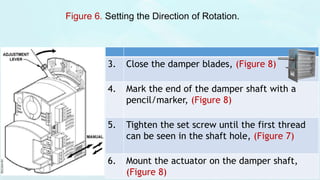
 If the blades rotate counterclockwise to open, slide the manual
override switch to manual, and move the adjustment lever to the
right. Return the switch to automatic, (Figure 6).
 If the blades rotate clockwise to open, slide the manual override
switch to manual, and move the adjustment lever to the left.
Return the switch to automatic, (Figure 6).
 Changes to MTR SETUP (in the application) may be necessary
during start-up/commissioning if dampers open
counterclockwise.
Figure 6. Setting the Direction of Rotation.
3. Close the damper blades, (Figure 8)
4. Mark the end of the damper shaft with a
pencil/marker, (Figure 8)
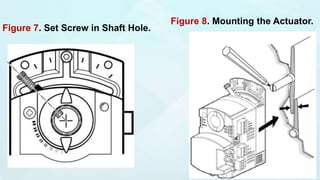
5. Tighten the set screw until the first thread
can be seen in the shaft hole, (Figure 7)
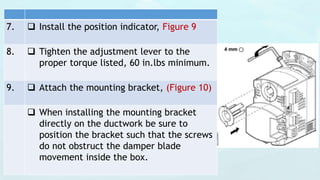
6. Mount the actuator on the damper shaft,
(Figure 8)
Figure 7. Set Screw in Shaft Hole.
Figure 8. Mounting the Actuator.
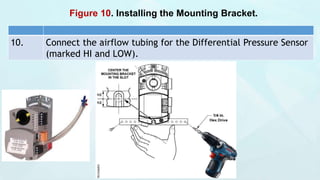
7.  Install the position indicator, Figure 9
8.  Tighten the adjustment lever to the
proper torque listed, 60 in.lbs minimum.
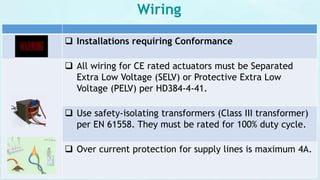
9.  Attach the mounting bracket, (Figure 10)
 When installing the mounting bracket
directly on the ductwork be sure to
position the bracket such that the screws
do not obstruct the damper blade
movement inside the box.
Figure 10. Installing the Mounting Bracket.
10. Connect the airflow tubing for the Differential Pressure Sensor
(marked HI and LOW).
Wiring
 Installations requiring Conformance
 All wiring for CE rated actuators must be Separated
Extra Low Voltage (SELV) or Protective Extra Low
Voltage (PELV) per HD384-4-41.
 Use safety-isolating transformers (Class III transformer)
per EN 61558. They must be rated for 100% duty cycle.
 Over current protection for supply lines is maximum 4A.
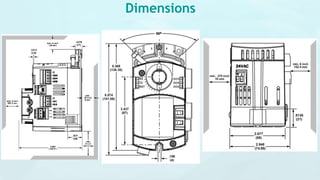
Dimensions
Wiring Instructions
Figure 12. Power Wiring.
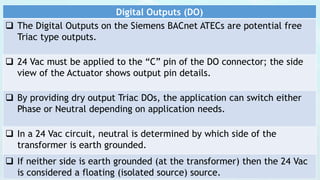
Digital Outputs (DO)
 The Digital Outputs on the Siemens BACnet ATECs are potential free
Triac type outputs.
 24 Vac must be applied to the “C” pin of the DO connector; the side
view of the Actuator shows output pin details.
 By providing dry output Triac DOs, the application can switch either
Phase or Neutral depending on application needs.
 In a 24 Vac circuit, neutral is determined by which side of the
transformer is earth grounded.
 If neither side is earth grounded (at the transformer) then the 24 Vac
is considered a floating (isolated source) source.
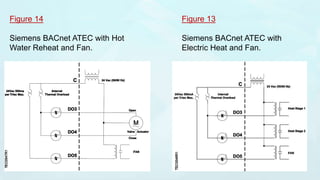
Figure 14
Siemens BACnet ATEC with Hot
Water Reheat and Fan.
Figure 13
Siemens BACnet ATEC with
Electric Heat and Fan.
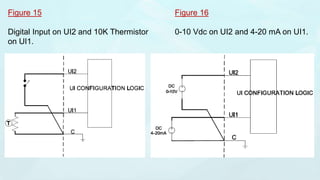
Figure 15
Digital Input on UI2 and 10K Thermistor
on UI1.
Figure 16
0-10 Vdc on UI2 and 4-20 mA on UI1.
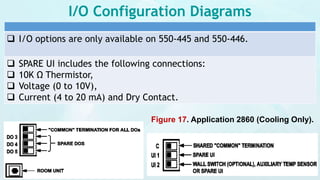
I/O Configuration Diagrams
 I/O options are only available on 550-445 and 550-446.
 SPARE UI includes the following connections:
 10K Ω Thermistor,
 Voltage (0 to 10V),
 Current (4 to 20 mA) and Dry Contact.
Figure 17. Application 2860 (Cooling Only).
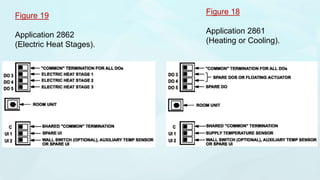
Figure 19
Application 2862
(Electric Heat Stages).
Figure 18
Application 2861
(Heating or Cooling).
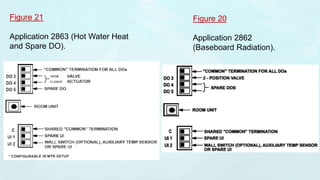
Figure 21
Application 2863 (Hot Water Heat
and Spare DO).
Figure 20
Application 2862
(Baseboard Radiation).
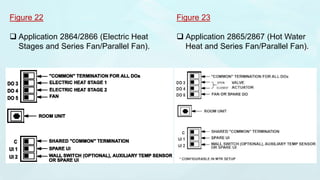
Figure 22
 Application 2864/2866 (Electric Heat
Stages and Series Fan/Parallel Fan).
Figure 23
 Application 2865/2867 (Hot Water
Heat and Series Fan/Parallel Fan).

Siemens BACnet Actuating Terminal Equipment Controller (ATEC) Installation Instructions

  • 1.
  • 2.
    BACnet Actuating TerminalEquipment Controller (ATEC) Installation Instructions
  • 3.
    Figure 1. ActuatorParts Parts List a. Actuator b. Position indicator c. Mounting bracket d. Mounting screws e. 4 mm hex wrench f. 3/8 inch shaft adapter (8 to 10 mm shafts)
  • 4.
  • 5.
    Product Description  Theseinstallation instructions describe mounting of the Siemens BACnet ATEC (a combination BACnet Equipment Controller and OpenAir® GDE131 Non-spring Return Rotary Electronic Damper Actuator).  A version using the GLB gear train is also available and provides 88 in. lbs. of torque.  The Siemens BACnet ATEC is designed to work with a new series of Room Units (QAA2281) only.
  • 6.
    Product Numbers 550-440 BACnetATEC Model 0001, cooling only (GDE) 550-441 BACnet ATEC Model 0001, cooling only (GLB) 550-445 BACnet ATEC Model 2301, full feature (GDE) 550-446 BACnet ATEC Model 2301, full feature (GLB)
  • 7.
    Required Tools 1/4-inch Hex driver  Small flat-blade screwdriver  Marker or pencil  Torque wrench Control Applications 2860 through 2867 WARNING Personal injury/loss of life may occur if you do not follow a procedure as specified. CAUTION Equipment damage or loss of data may occur if you do not follow a procedure as specified. Estimated Installation Time 25 minutes
  • 8.
    Instructions Do not openthe actuator. 1 Determine the size of the damper shaft. If the damper shaft is 1/2-inch, proceed to Step 2. The ATEC actuator comes with a factory installed 1/2-inch damper shaft guide. If the damper shaft is 5/8-inch: a. Remove the 1/2-inch shaft guide, (Figure 3). b. Proceed to Step 2.
  • 9.
    Figure 3. Removingthe 1/2-inch Shaft Guide. If the damper shaft is 3/8 inch: a.  Remove the 1/2-inch shaft guide, (Figure 3). b.  Use the 3/8-inch adapter, provided in the actuator packaging, (Figure 4).  Hold the shaft insert so that the raised tabs are inserted last when placing the insert into the back of the actuator. c.  Proceed to Step 2.
  • 10.
    Figure 4. Installingthe 3/8-inch Shaft Adapter.
  • 11.
  • 12.
    2.  Determinethe damper blade rotation, clockwise or counterclockwise to open, (Figure 5).  If the blades rotate counterclockwise to open, slide the manual override switch to manual, and move the adjustment lever to the right. Return the switch to automatic, (Figure 6).  If the blades rotate clockwise to open, slide the manual override switch to manual, and move the adjustment lever to the left. Return the switch to automatic, (Figure 6).  Changes to MTR SETUP (in the application) may be necessary during start-up/commissioning if dampers open counterclockwise.
  • 13.
    Figure 6. Settingthe Direction of Rotation. 3. Close the damper blades, (Figure 8) 4. Mark the end of the damper shaft with a pencil/marker, (Figure 8) 5. Tighten the set screw until the first thread can be seen in the shaft hole, (Figure 7) 6. Mount the actuator on the damper shaft, (Figure 8)
  • 14.
    Figure 7. SetScrew in Shaft Hole. Figure 8. Mounting the Actuator.
  • 15.
    7.  Installthe position indicator, Figure 9 8.  Tighten the adjustment lever to the proper torque listed, 60 in.lbs minimum. 9.  Attach the mounting bracket, (Figure 10)  When installing the mounting bracket directly on the ductwork be sure to position the bracket such that the screws do not obstruct the damper blade movement inside the box.
  • 16.
    Figure 10. Installingthe Mounting Bracket. 10. Connect the airflow tubing for the Differential Pressure Sensor (marked HI and LOW).
  • 17.
    Wiring  Installations requiringConformance  All wiring for CE rated actuators must be Separated Extra Low Voltage (SELV) or Protective Extra Low Voltage (PELV) per HD384-4-41.  Use safety-isolating transformers (Class III transformer) per EN 61558. They must be rated for 100% duty cycle.  Over current protection for supply lines is maximum 4A.
  • 18.
  • 19.
  • 20.
    Digital Outputs (DO) The Digital Outputs on the Siemens BACnet ATECs are potential free Triac type outputs.  24 Vac must be applied to the “C” pin of the DO connector; the side view of the Actuator shows output pin details.  By providing dry output Triac DOs, the application can switch either Phase or Neutral depending on application needs.  In a 24 Vac circuit, neutral is determined by which side of the transformer is earth grounded.  If neither side is earth grounded (at the transformer) then the 24 Vac is considered a floating (isolated source) source.
  • 21.
    Figure 14 Siemens BACnetATEC with Hot Water Reheat and Fan. Figure 13 Siemens BACnet ATEC with Electric Heat and Fan.
  • 22.
    Figure 15 Digital Inputon UI2 and 10K Thermistor on UI1. Figure 16 0-10 Vdc on UI2 and 4-20 mA on UI1.
  • 23.
    I/O Configuration Diagrams I/O options are only available on 550-445 and 550-446.  SPARE UI includes the following connections:  10K Ω Thermistor,  Voltage (0 to 10V),  Current (4 to 20 mA) and Dry Contact. Figure 17. Application 2860 (Cooling Only).
  • 24.
    Figure 19 Application 2862 (ElectricHeat Stages). Figure 18 Application 2861 (Heating or Cooling).
  • 25.
    Figure 21 Application 2863(Hot Water Heat and Spare DO). Figure 20 Application 2862 (Baseboard Radiation).
  • 26.
    Figure 22  Application2864/2866 (Electric Heat Stages and Series Fan/Parallel Fan). Figure 23  Application 2865/2867 (Hot Water Heat and Series Fan/Parallel Fan).