 To produce software which manage the activities done in a
Super-Market.
 To maintain the records of the sales done for a particular
month.
 To maintain the stock details.
 To reduce time in calculation of Sales activities.
 To store large amount of data in the database which will
reduce clumsiness.
 To reduce paper work; so that users can spend more time on
monitoring the Super-Market.
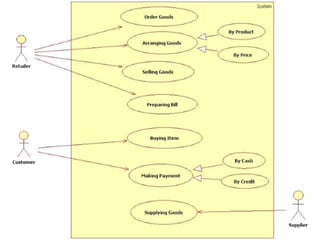
 Based on the transactions in a Super-Market.
 First activity is adding the items to the system along with
their rates and names of the items which will be up for sale in
the Super-Market. This authority is given only to Admin.
 Any modification to be done in the item name or item rate can
be done only by Admin.
 Right to delete any item details rest with the Admin too.
 As the customer buys the products and comes to the billing
counter, the user is supposed to enter the item name
purchased.
 The system will display all the items a customer wants to
purchase.
 If the stock is not available, the supermarket orders and buys
from a prescribed vendor.
 The amount can be paid either in cash or via online according
to customer preference.
 Admin provides a unique username and password for each
employee through which they can login.
 Manual system faces a lot of inefficiencies.
 Hinders smooth flow of work.
 Lack of security of data.
 Although more man power, but less efficiency.
 Time consuming.
 Consumes large volume of paper work.
 Needs manual calculations which are prone to errors.
 Poor communication may lead to serious inadvertent errors.
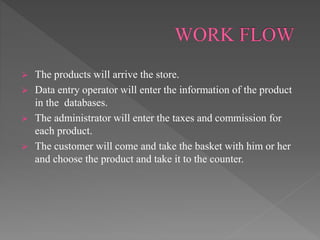
 The products will arrive the store.
 Data entry operator will enter the information of the product
in the databases.
 The administrator will enter the taxes and commission for
each product.
 The customer will come and take the basket with him or her
and choose the product and take it to the counter.
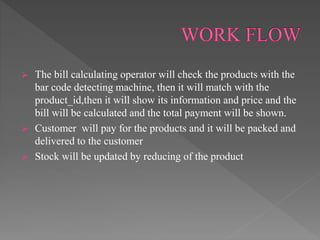
 The bill calculating operator will check the products with the
bar code detecting machine, then it will match with the
product_id,then it will show its information and price and the
bill will be calculated and the total payment will be shown.
 Customer will pay for the products and it will be packed and
delivered to the customer
 Stock will be updated by reducing of the product
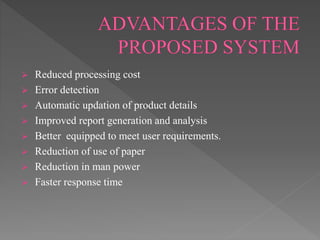
 Reduced processing cost
 Error detection
 Automatic updation of product details
 Improved report generation and analysis
 Better equipped to meet user requirements.
 Reduction of use of paper
 Reduction in man power
 Faster response time
 LIST OF ATTRIBUTES:
 customer-customer name,customerId,Address line1,Address
line 2,Address line 2,city,District,State,PIN,Contact no.,E-
MAIL ID,Membership card no.
 Ordered product: Product name, Product type, Product Brand
,Product model ID,Product Price, Product manufacturing
descriptions.
 Billing counter: bill no., bill date ,customer Id details, bill
amount
 Product Shelves: product category, product type, product
brand, product mail Id.
 Accounts: user designation, user Id,user password, login time.
 Payment: payment receipt no. payment amount ,payment
mode
 Stock: product name, product Id,Product Type, product price
,manufacturing details, product model.
 Employee details: employee name, employee details, date of
joining, designation.
 Login: employee id,password,login,logout.
 Supplier details: supplier name, supplier Id ,contact no. ,E-
mail Id,address line 1,address line 2,address line
3,city,district,pin,state
 Order placed for the suyppplier:order no, product type,
product brand ,date of order, ordered quantity.
 With business opportunities increasing as never before ,
companies are in dire need of efficient management. One
such key area is to maintain a methodical way of managing
large databases , especially in the Retail Sector.
 DBMS is a vital tool for future growth of business
organisations.
 It offers a simple , efficient and reliable way of storing ,
managing and accessing data.
 To churn profits , companies need to have a good plan along
with affective DBMS.
 Abdul–Muhmin, Alhassan G. (2010). “Transaction Size
Effects on Consumers’ Retail Payment Mode Choice”,
International Journal of Retail & Distribution Management,
Vol 38 (6), pp 460–478.
 http://www.scribd.com/doc/140997151/Supermarket-
Management-System-Project-Report
GROUP 4 :
. SUMAN BASU(1541017045)
. GAYATRI PATEL(1541017048)
. PRIYANSHU BAKSHI(1541017068)
. SHUBHAM SETU(1541017108)

Grocery store management

  • 3.
     To producesoftware which manage the activities done in a Super-Market.  To maintain the records of the sales done for a particular month.  To maintain the stock details.  To reduce time in calculation of Sales activities.  To store large amount of data in the database which will reduce clumsiness.  To reduce paper work; so that users can spend more time on monitoring the Super-Market.
  • 4.
     Based onthe transactions in a Super-Market.  First activity is adding the items to the system along with their rates and names of the items which will be up for sale in the Super-Market. This authority is given only to Admin.  Any modification to be done in the item name or item rate can be done only by Admin.  Right to delete any item details rest with the Admin too.  As the customer buys the products and comes to the billing counter, the user is supposed to enter the item name purchased.
  • 5.
     The systemwill display all the items a customer wants to purchase.  If the stock is not available, the supermarket orders and buys from a prescribed vendor.  The amount can be paid either in cash or via online according to customer preference.  Admin provides a unique username and password for each employee through which they can login.
  • 6.
     Manual systemfaces a lot of inefficiencies.  Hinders smooth flow of work.  Lack of security of data.  Although more man power, but less efficiency.  Time consuming.  Consumes large volume of paper work.  Needs manual calculations which are prone to errors.  Poor communication may lead to serious inadvertent errors.
  • 8.
     The productswill arrive the store.  Data entry operator will enter the information of the product in the databases.  The administrator will enter the taxes and commission for each product.  The customer will come and take the basket with him or her and choose the product and take it to the counter.
  • 9.
     The billcalculating operator will check the products with the bar code detecting machine, then it will match with the product_id,then it will show its information and price and the bill will be calculated and the total payment will be shown.  Customer will pay for the products and it will be packed and delivered to the customer  Stock will be updated by reducing of the product
  • 10.
     Reduced processingcost  Error detection  Automatic updation of product details  Improved report generation and analysis  Better equipped to meet user requirements.  Reduction of use of paper  Reduction in man power  Faster response time
  • 11.
     LIST OFATTRIBUTES:  customer-customer name,customerId,Address line1,Address line 2,Address line 2,city,District,State,PIN,Contact no.,E- MAIL ID,Membership card no.  Ordered product: Product name, Product type, Product Brand ,Product model ID,Product Price, Product manufacturing descriptions.
  • 12.
     Billing counter:bill no., bill date ,customer Id details, bill amount  Product Shelves: product category, product type, product brand, product mail Id.  Accounts: user designation, user Id,user password, login time.
  • 13.
     Payment: paymentreceipt no. payment amount ,payment mode  Stock: product name, product Id,Product Type, product price ,manufacturing details, product model.  Employee details: employee name, employee details, date of joining, designation.  Login: employee id,password,login,logout.  Supplier details: supplier name, supplier Id ,contact no. ,E- mail Id,address line 1,address line 2,address line 3,city,district,pin,state  Order placed for the suyppplier:order no, product type, product brand ,date of order, ordered quantity.
  • 14.
     With businessopportunities increasing as never before , companies are in dire need of efficient management. One such key area is to maintain a methodical way of managing large databases , especially in the Retail Sector.  DBMS is a vital tool for future growth of business organisations.  It offers a simple , efficient and reliable way of storing , managing and accessing data.  To churn profits , companies need to have a good plan along with affective DBMS.
  • 15.
     Abdul–Muhmin, AlhassanG. (2010). “Transaction Size Effects on Consumers’ Retail Payment Mode Choice”, International Journal of Retail & Distribution Management, Vol 38 (6), pp 460–478.  http://www.scribd.com/doc/140997151/Supermarket- Management-System-Project-Report
  • 16.
    GROUP 4 : .SUMAN BASU(1541017045) . GAYATRI PATEL(1541017048) . PRIYANSHU BAKSHI(1541017068) . SHUBHAM SETU(1541017108)