602: INTO THE WILD
THE CHALLENGES OF CUSTOMIZED
SHAREPOINT APPS IN RELEASE


SPTechCon
2009-01-29, dynaTrace software Inc
Andreas Grabner, andreas.grabner@dynatrace.com
Technology Strategist
Agenda

    This class will examine the real-world challenges of
    customized SharePoint applications when they are
    released “into the wild.” We will consider why such
    applications almost always work on the developer's
    machine—and why they often fail in production. Web
    parts and lists are the main focus in this advanced
    class


                                                           © 2008 dynaTrace software GmbH
    LOTS OF DEMOS!!


2                                                          2
Why do we end up with performance problems?

    TOO MUCH data is requested
    Data is REQUESTED in an INEFFICIENT way
    INEFFICIENT use of RESOURCES
    INEFFICIENT data RENDERING
    NEVER TESTED with REAL WORLD data


                                              © 2008 dynaTrace software GmbH
    NEVER TESTED UNDER LOAD


3                                             3
TOO MUCH data is requested

    SharePoint Lists
    • Only display the data that the user really needs to see
        • Limit the number of rows that are displayed in the ListWebPart
        • Use Views to limit the number of columns that are displayed
    • Use alternative WebParts
        • Sometimes the ListWebView is not the right way to go
    • Check the size of returned html page
        • Consider the overhead on the network/browser rendering time


                                                                           © 2008 dynaTrace software GmbH
4                                                                          4
TOO MUCH data is requested

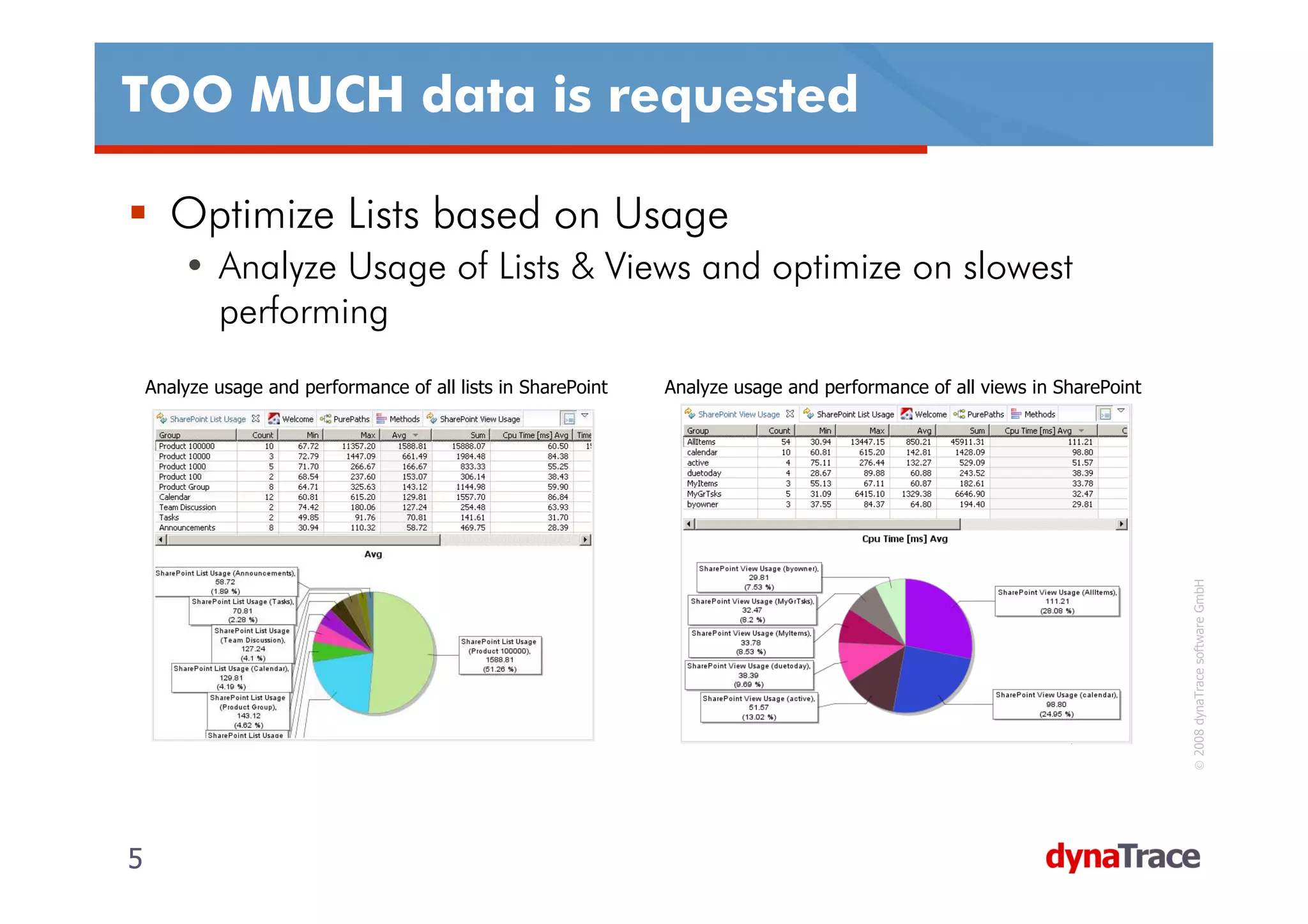
      Optimize Lists based on Usage
        • Analyze Usage of Lists & Views and optimize on slowest
          performing
    Analyze usage and performance of all lists in SharePoint   Analyze usage and performance of all views in SharePoint


                                                                                                                          © 2008 dynaTrace software GmbH
5                                                                                                                         5
TOO MUCH data is requested

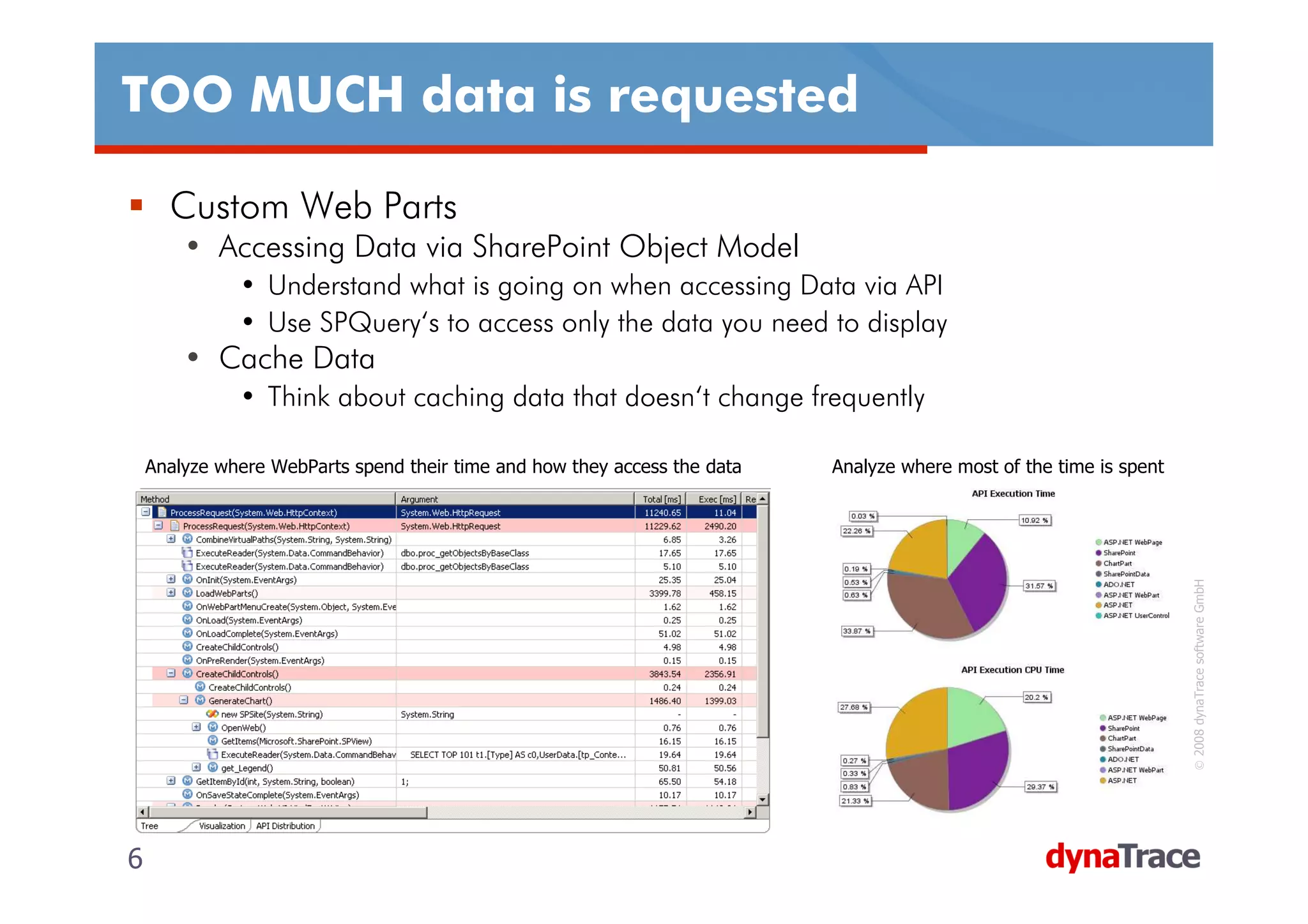
      Custom Web Parts
        • Accessing Data via SharePoint Object Model
              • Understand what is going on when accessing Data via API
              • Use SPQuery‘s to access only the data you need to display
        • Cache Data
              • Think about caching data that doesn‘t change frequently

    Analyze where WebParts spend their time and how they access the data   Analyze where most of the time is spent


                                                                                                                     © 2008 dynaTrace software GmbH
6                                                                                                                    6
TOO MUCH data is requested


                    DEMO
    How to analyze current list usage behavior?
    How to analyze WebPart data access?
    Comparing Performance Impact when changing Views


                                                       © 2008 dynaTrace software GmbH
7                                                      7
Data is REQUESTED in an INEFFICIENT way

    SharePoint Object Model
    •    DO NOT iterate through all items in the list
    •    DO NOT access the Items property multiple times
    •    AVOID using the Count property
    •    Use CAML Queries and SPQuery‘s to select certain data
                                 SPQuery‘
    •    Use the RowLimit and ListItemCollectionPosition Feature of SPQuery

    Example: Query the Product Name of a certain Product identified by the Product ID
    DO NOT
    String productName = productList.Items.GetItemById(“1234“)[“ProductName“].ToString();


                                                                                                    © 2008 dynaTrace software GmbH
    DO
    String productName = productList. GetItemById(“1234“)[“ProductName“].ToString();

    or DO
    SPQuery query = new SPQuery();
    query.Query = "<Where><Eq><FieldRef Name='ID'/><Value Type='Text'>1234</Value></Eq></Where>";
    String productName = productList.GetItems(query)[0][“ProductName“].ToString();
    DO BEST
    query.ViewFields = “<FieldRef Name=‘ProductName‘/>“;
8                                                                                                   8
Data is REQUESTED in an INEFFICIENT way


                   DEMO
    Whats going on „under the hood“ when using the
    SharePoint Object Model?
    How to improve SharePoint Data Access?


                                                     © 2008 dynaTrace software GmbH
9                                                    9
INEFFICIENT use of RESOURCES

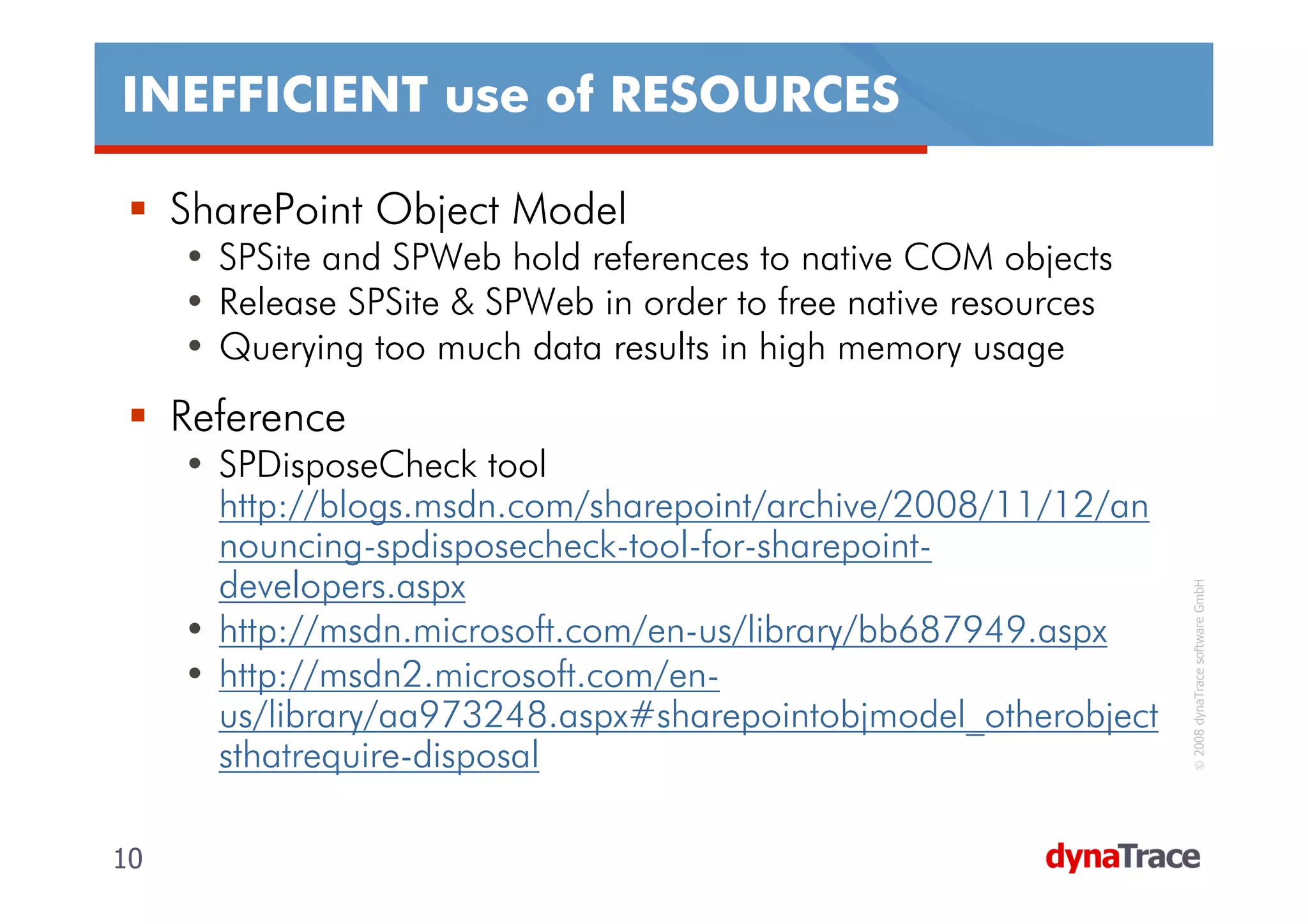
     SharePoint Object Model
     • SPSite and SPWeb hold references to native COM objects
     • Release SPSite & SPWeb in order to free native resources
     • Querying too much data results in high memory usage
     Reference
     • SPDisposeCheck tool
       http://blogs.msdn.com/sharepoint/archive/2008/11/12/an
       nouncing-spdisposecheck-tool-for-sharepoint-
       developers.aspx


                                                                   © 2008 dynaTrace software GmbH
     • http://msdn.microsoft.com/en-us/library/bb687949.aspx
     • http://msdn2.microsoft.com/en-
       us/library/aa973248.aspx#sharepointobjmodel_otherobject
       sthatrequire-disposal

10                                                                10
INEFFICIENT use of RESOURCES

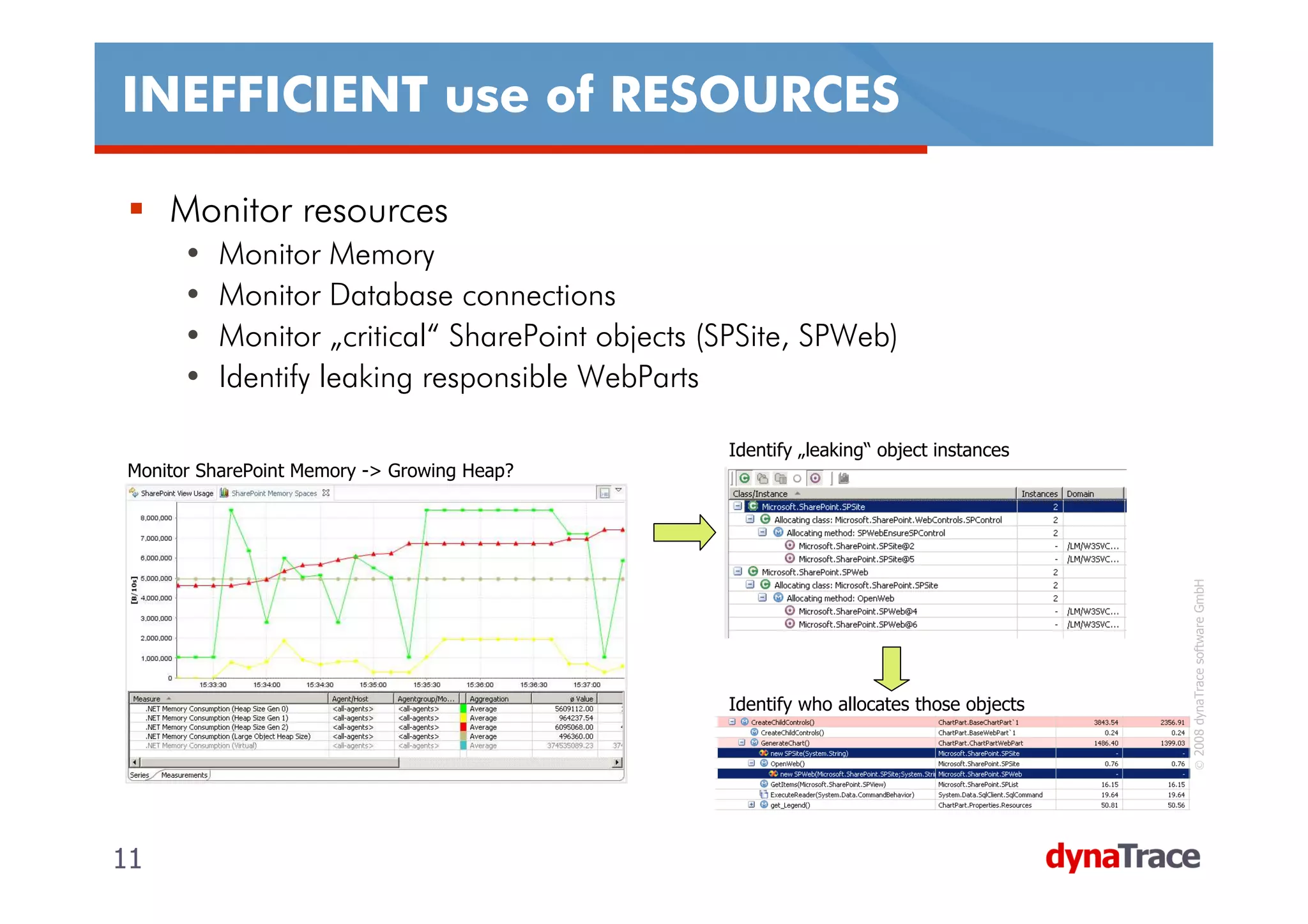
     Monitor resources
      •   Monitor Memory
      •   Monitor Database connections
      •   Monitor „critical“ SharePoint objects (SPSite, SPWeb)
      •   Identify leaking responsible WebParts

                                                 Identify „leaking“ object instances
Monitor SharePoint Memory -> Growing Heap?


                                                                                         © 2008 dynaTrace software GmbH
                                                 Identify who allocates those objects


11                                                                                      11
Data is REQUESTED in an INEFFICIENT way


                     DEMO
     How to identify a SPSite/SPWeb Resource Leak?
     How to identify resource intensive WebParts?
     How to monitor SharePoint Memory Issues down to


                                                        © 2008 dynaTrace software GmbH
     the Object Model‘s Data Access classes?


12                                                     12
INEFFICIENT data RENDERING

     How to render data
     • StringBuilder vs. String concatenations
     • Use HtmlTextWriter for custom WebParts

     How to access data
     • Follow the rules discussed earlier

     Size matters
     • Minimize generated HTML


                                                                     © 2008 dynaTrace software GmbH
     • Use style sheets instead of inline style definitions
     • Enable content compression in IIS
        • http://planetmoss.blogspot.com/2007/06/dont-forget-iis-
          compression-colleague.html


13                                                                  13
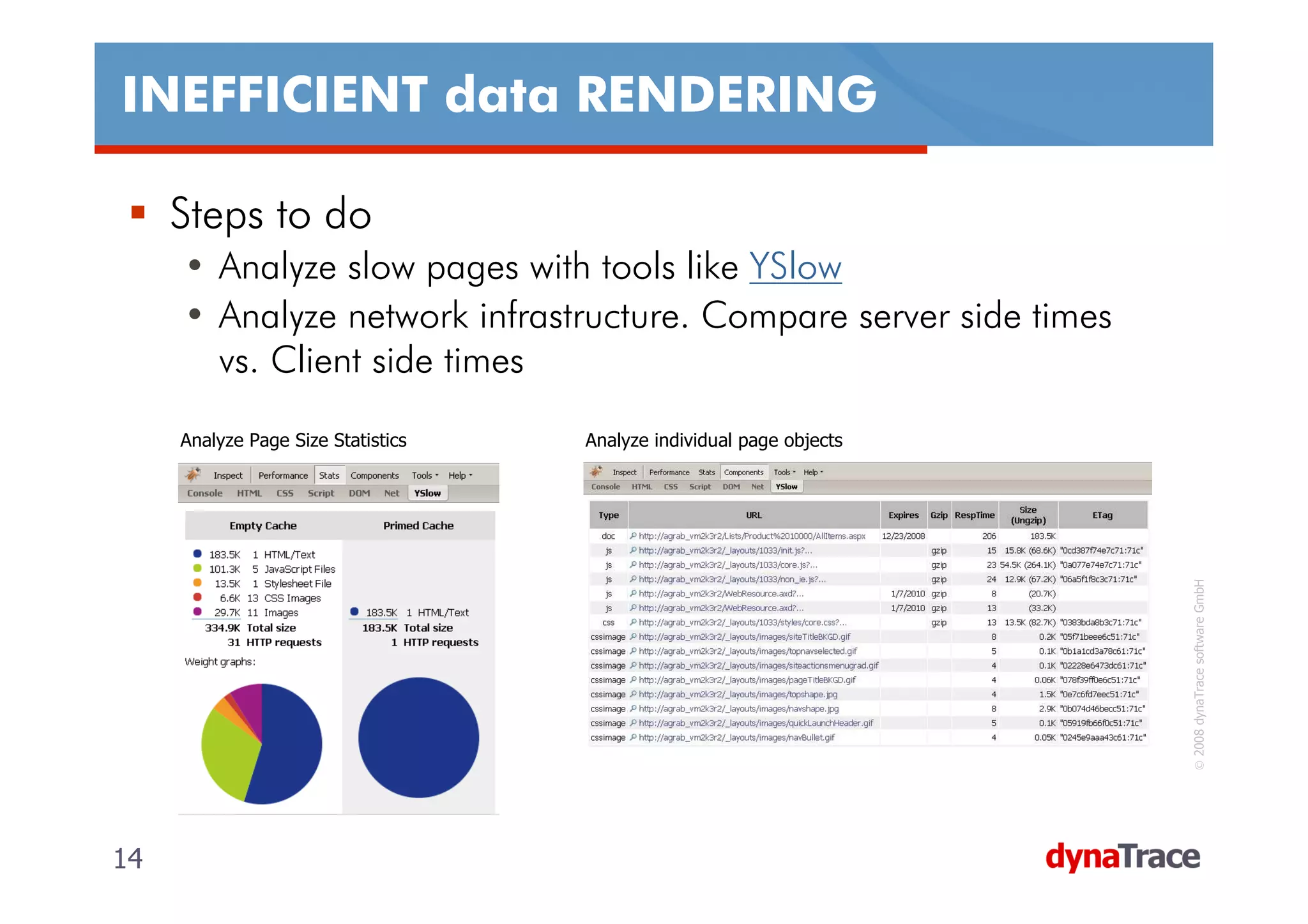
INEFFICIENT data RENDERING

     Steps to do
     • Analyze slow pages with tools like YSlow
     • Analyze network infrastructure. Compare server side times
       vs. Client side times
     Analyze Page Size Statistics   Analyze individual page objects


                                                                       © 2008 dynaTrace software GmbH
14                                                                    14
NEVER TESTED with REAL WORLD data

     Importance of Test Data
     •   10 records in a table are not enough
     •   Invest time to generate Test Data
     •   „Random“ data is good -> „Realistic“ data is best
     •   Test Data must be used by developers
     •   Many data access problems can be identified on the developers
         machine with appropriate test data
     Problems that can be identified
     •   Performance problems for data retrieval
     •   Index problems
     •   Memory issues


                                                                            © 2008 dynaTrace software GmbH
     •   Resource bottlenecks
     Resources
     • http://www.sharepointblogs.com/ethan/archive/2007/09/27/generatin
       g-test-data.aspx
     • http://www.idevfactory.com/
     • http://www.codeplex.com/sptdatapop

15                                                                         15
NEVER TESTED UNDER LOAD

     Importance of Load Testing
     • Small load tests already on developers machine
     • Test as early as possible
     • Test main use case scenarios

     Visual Studio Team System for Tester
     • Pre-configured Web&Load Tests from the SharePoint Team
     • dynaTrace Integration with VSTS to analyze performance and
       scalability issues


                                                                     © 2008 dynaTrace software GmbH
     Resources
     • http://www.codeplex.com/sptdatapop


16                                                                  16
NEVER TESTED UNDER LOAD


                     DEMO
     Load Testing SharePoint with Visual Studio Team
     System


                                                        © 2008 dynaTrace software GmbH
17                                                     17
Contact me for follow up

     Andreas Grabner
     Mail: andreas.grabner@dynatrace.com
     Blog: http://blog.dynatrace.com
     Web: http://www.dynatrace.com


                                            © 2008 dynaTrace software GmbH
18                                         18

SharePoint TechCon 2009 - 602

  • 1.
    602: INTO THEWILD THE CHALLENGES OF CUSTOMIZED SHAREPOINT APPS IN RELEASE SPTechCon 2009-01-29, dynaTrace software Inc Andreas Grabner, andreas.grabner@dynatrace.com Technology Strategist
  • 2.
    Agenda This class will examine the real-world challenges of customized SharePoint applications when they are released “into the wild.” We will consider why such applications almost always work on the developer's machine—and why they often fail in production. Web parts and lists are the main focus in this advanced class © 2008 dynaTrace software GmbH LOTS OF DEMOS!! 2 2
  • 3.
    Why do weend up with performance problems? TOO MUCH data is requested Data is REQUESTED in an INEFFICIENT way INEFFICIENT use of RESOURCES INEFFICIENT data RENDERING NEVER TESTED with REAL WORLD data © 2008 dynaTrace software GmbH NEVER TESTED UNDER LOAD 3 3
  • 4.
    TOO MUCH datais requested SharePoint Lists • Only display the data that the user really needs to see • Limit the number of rows that are displayed in the ListWebPart • Use Views to limit the number of columns that are displayed • Use alternative WebParts • Sometimes the ListWebView is not the right way to go • Check the size of returned html page • Consider the overhead on the network/browser rendering time © 2008 dynaTrace software GmbH 4 4
  • 5.
    TOO MUCH datais requested Optimize Lists based on Usage • Analyze Usage of Lists & Views and optimize on slowest performing Analyze usage and performance of all lists in SharePoint Analyze usage and performance of all views in SharePoint © 2008 dynaTrace software GmbH 5 5
  • 6.
    TOO MUCH datais requested Custom Web Parts • Accessing Data via SharePoint Object Model • Understand what is going on when accessing Data via API • Use SPQuery‘s to access only the data you need to display • Cache Data • Think about caching data that doesn‘t change frequently Analyze where WebParts spend their time and how they access the data Analyze where most of the time is spent © 2008 dynaTrace software GmbH 6 6
  • 7.
    TOO MUCH datais requested DEMO How to analyze current list usage behavior? How to analyze WebPart data access? Comparing Performance Impact when changing Views © 2008 dynaTrace software GmbH 7 7
  • 8.
    Data is REQUESTEDin an INEFFICIENT way SharePoint Object Model • DO NOT iterate through all items in the list • DO NOT access the Items property multiple times • AVOID using the Count property • Use CAML Queries and SPQuery‘s to select certain data SPQuery‘ • Use the RowLimit and ListItemCollectionPosition Feature of SPQuery Example: Query the Product Name of a certain Product identified by the Product ID DO NOT String productName = productList.Items.GetItemById(“1234“)[“ProductName“].ToString(); © 2008 dynaTrace software GmbH DO String productName = productList. GetItemById(“1234“)[“ProductName“].ToString(); or DO SPQuery query = new SPQuery(); query.Query = "<Where><Eq><FieldRef Name='ID'/><Value Type='Text'>1234</Value></Eq></Where>"; String productName = productList.GetItems(query)[0][“ProductName“].ToString(); DO BEST query.ViewFields = “<FieldRef Name=‘ProductName‘/>“; 8 8
  • 9.
    Data is REQUESTEDin an INEFFICIENT way DEMO Whats going on „under the hood“ when using the SharePoint Object Model? How to improve SharePoint Data Access? © 2008 dynaTrace software GmbH 9 9
  • 10.
    INEFFICIENT use ofRESOURCES SharePoint Object Model • SPSite and SPWeb hold references to native COM objects • Release SPSite & SPWeb in order to free native resources • Querying too much data results in high memory usage Reference • SPDisposeCheck tool http://blogs.msdn.com/sharepoint/archive/2008/11/12/an nouncing-spdisposecheck-tool-for-sharepoint- developers.aspx © 2008 dynaTrace software GmbH • http://msdn.microsoft.com/en-us/library/bb687949.aspx • http://msdn2.microsoft.com/en- us/library/aa973248.aspx#sharepointobjmodel_otherobject sthatrequire-disposal 10 10
  • 11.
    INEFFICIENT use ofRESOURCES Monitor resources • Monitor Memory • Monitor Database connections • Monitor „critical“ SharePoint objects (SPSite, SPWeb) • Identify leaking responsible WebParts Identify „leaking“ object instances Monitor SharePoint Memory -> Growing Heap? © 2008 dynaTrace software GmbH Identify who allocates those objects 11 11
  • 12.
    Data is REQUESTEDin an INEFFICIENT way DEMO How to identify a SPSite/SPWeb Resource Leak? How to identify resource intensive WebParts? How to monitor SharePoint Memory Issues down to © 2008 dynaTrace software GmbH the Object Model‘s Data Access classes? 12 12
  • 13.
    INEFFICIENT data RENDERING How to render data • StringBuilder vs. String concatenations • Use HtmlTextWriter for custom WebParts How to access data • Follow the rules discussed earlier Size matters • Minimize generated HTML © 2008 dynaTrace software GmbH • Use style sheets instead of inline style definitions • Enable content compression in IIS • http://planetmoss.blogspot.com/2007/06/dont-forget-iis- compression-colleague.html 13 13
  • 14.
    INEFFICIENT data RENDERING Steps to do • Analyze slow pages with tools like YSlow • Analyze network infrastructure. Compare server side times vs. Client side times Analyze Page Size Statistics Analyze individual page objects © 2008 dynaTrace software GmbH 14 14
  • 15.
    NEVER TESTED withREAL WORLD data Importance of Test Data • 10 records in a table are not enough • Invest time to generate Test Data • „Random“ data is good -> „Realistic“ data is best • Test Data must be used by developers • Many data access problems can be identified on the developers machine with appropriate test data Problems that can be identified • Performance problems for data retrieval • Index problems • Memory issues © 2008 dynaTrace software GmbH • Resource bottlenecks Resources • http://www.sharepointblogs.com/ethan/archive/2007/09/27/generatin g-test-data.aspx • http://www.idevfactory.com/ • http://www.codeplex.com/sptdatapop 15 15
  • 16.
    NEVER TESTED UNDERLOAD Importance of Load Testing • Small load tests already on developers machine • Test as early as possible • Test main use case scenarios Visual Studio Team System for Tester • Pre-configured Web&Load Tests from the SharePoint Team • dynaTrace Integration with VSTS to analyze performance and scalability issues © 2008 dynaTrace software GmbH Resources • http://www.codeplex.com/sptdatapop 16 16
  • 17.
    NEVER TESTED UNDERLOAD DEMO Load Testing SharePoint with Visual Studio Team System © 2008 dynaTrace software GmbH 17 17
  • 18.
    Contact me forfollow up Andreas Grabner Mail: andreas.grabner@dynatrace.com Blog: http://blog.dynatrace.com Web: http://www.dynatrace.com © 2008 dynaTrace software GmbH 18 18