Seamless Integrations Between
WebCenter SITES and CONTENT

Brian “Bex” Huff – Bezzotech
Tony Field – Function1
Agenda


  Overview of SITES and CONTENT
    Why should they be integrated?


  Rendering CONTENT assets in SITES
    Existing and forthcoming approaches


  Recommendations


  For the latest version of this presentation, go to SlideShare:
                     http://slideshare.com/bexmex

                                                                    2
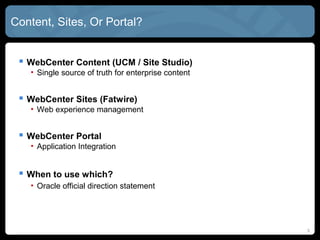
CONTENT, SITES, or PORTAL?


  WebCenter CONTENT (UCM / Site Studio)
   • Single source of truth for enterprise content


  WebCenter SITES (FatWire)
   • Web experience management


  WebCenter PORTAL
   • Application Integration


  When to use which?
   • Oracle official direction statement
   • Practical considerations: Where is your biggest investment?


                                                                   33
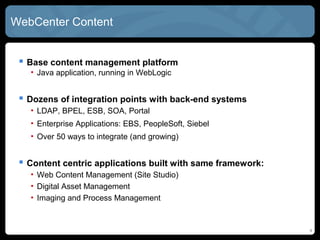
WebCenter CONTENT


  Base content management platform
   • Java application, running in WebLogic


  Dozens of integration points with back-end systems
   • LDAP, BPEL, ESB, SOA, Portal
   • Enterprise Applications: EBS, PeopleSoft, Siebel
   • Over 50 ways to integrate (and growing)


  Content centric applications built with same framework:
   • Web Content Management (Site Studio)
   • Digital Asset Management
   • Imaging and Process Management


                                                             4
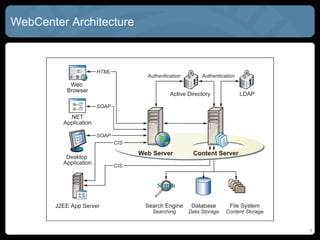
WebCenter CONTENT Architecture


                                 5
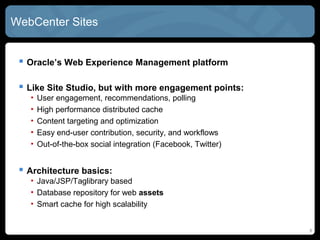
WebCenter SITES


  Oracle’s Web Experience Management platform

  Like Site Studio, but with more engagement points:
   •   User engagement, recommendations, polling
   •   High performance distributed cache
   •   Content targeting and optimization
   •   Easy end-user contribution, security, and workflows
   •   Out-of-the-box social integration (Facebook, Twitter)


  Architecture basics:
   • Java/JSP/Taglibrary based
   • Database repository for web assets
   • Smart cache for high scalability


                                                               6
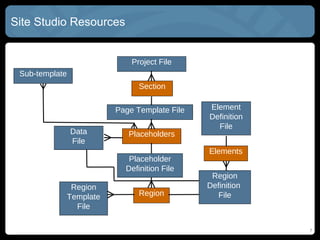
Site Studio Resources


                               Project File
 Sub-template
                                 Section

                           Page Template File   Element
                                                Definition
                                                  File
                Data          Placeholders
                File
                                                Elements
                              Placeholder
                             Definition File
                                                 Region
                 Region                         Definition
                Template         Region           File
                  File

                                                             7
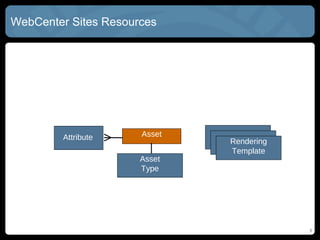
WebCenter SITES Resources


        Attribute    Asset
                             Rendering
                             Template
                     Asset
                     Type


                                         8
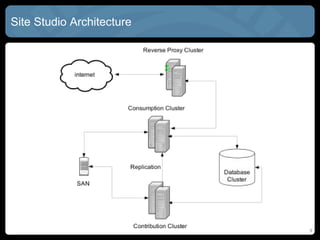
Site Studio Architecture


                           9
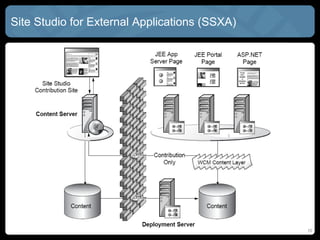
Site Studio for External Applications (SSXA)


                                               10
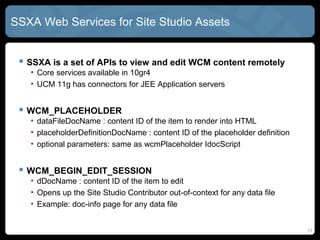
SSXA Web Services for Site Studio Assets


  SSXA is a set of APIs to view and edit WCM content remotely
   • Core services available in 10gR4
   • CONTENT 11g has connectors for JEE Application servers


  WCM_PLACEHOLDER
   • dataFileDocName : content ID of the item to render into HTML
   • placeholderDefinitionDocName : content ID of the placeholder definition
   • optional parameters: same as wcmPlaceholder IdocScript


  WCM_BEGIN_EDIT_SESSION
   • dDocName : content ID of the item to edit
   • Opens up the Site Studio Contributor out-of-context for any data file
   • Example: doc-info page for any data file


                                                                               11
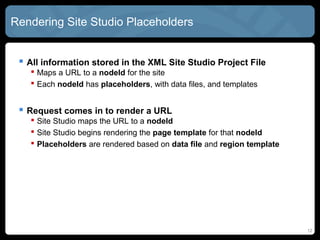
Rendering Site Studio Placeholders


  All information stored in the XML Site Studio Project File
    Maps a URL to a nodeId for the site
    Each nodeId has placeholders, with data files, and templates


  Request comes in to render a URL
    Site Studio maps the URL to a nodeId
    Site Studio begins rendering the page template for that nodeId
    Placeholders are rendered based on data file and region template


  To render a page, you only need Project File and Page Template
   • All else handled via WCM_PLACEHODLER service
   • Or wcmPlacehodler IdcoScript


                                                                        12
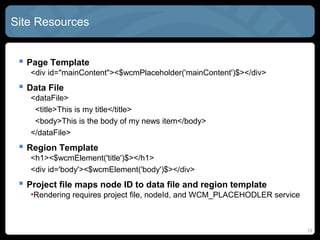
Site Studio Resources


  Page Template with placeholders
   <div id="mainContent"><!--$wcmPlaceholder('mainContent')--></div>


  Data File for the placeholder
   <dataFile>
    <title>This is my title</title>
    <body>This is the body of my news item</body>
   </dataFile>


  Region Template for the placeholder
   <h1><!--$wcmElement('title')--></h1>
   <div id='body'><!--$wcmElement('body')--></div>


                                                                       13
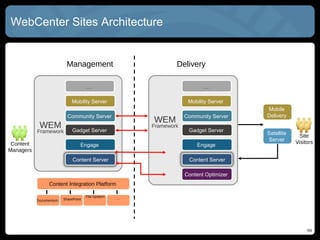
WebCenter SITES Architecture


                         Management                            Delivery

                                     …                                    …

                            Mobility Server                         Mobility Server
                                                                                       Mobile
                          Community Server                         Community Server    Delivery
                                                       WEM
            WEM              Gadget Server
                                                       Framework
                                                                    Gadget Server
           Framework                                                                   Satellite    Site
                                                                                       Server      Visitors
 Content                         Engage                                Engage
Managers
                             Content Server                         Content Server

                                                                   Content Optimizer
                Content Integration Platform

                                     File System   …
           Documentum   SharePoint


                                                                                                       14
                                                                                                       14
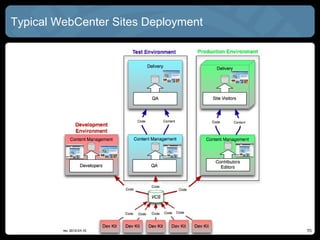
Typical WebCenter SITES Deployment


                                     15
                                     15
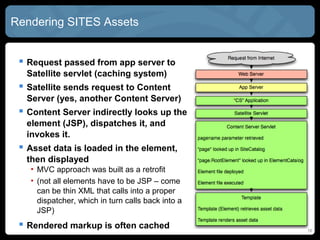
Rendering SITES Assets


  Request passed from app server to
  Satellite servlet (caching system)
  Satellite sends request to Content
  Server (yes, another Content Server)
  Content Server indirectly looks up the
  element (JSP), dispatches it, and
  invokes it.
  Asset data is loaded in the element,
  then displayed
   • MVC approach was built as a retrofit
   • (not all elements have to be JSP – come
     can be thin XML that calls into a proper
     dispatcher, which in turn calls back into a
     JSP)
  Rendered markup is often cached                 16
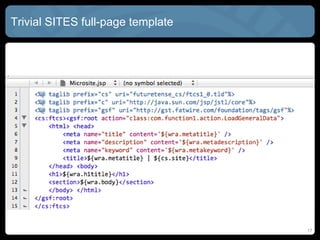
Trivial SITES full-page template


                                   17
Current Integration Options


  Good news: CONTENT has many integration options

  WebCenter SITES is Java/JSP based

  Multiple integration options with CONTENT
   • RIDC or SOAP
   • Tag libraries based on RIDC/SOAP
   • Scheduled migration of content into SITES database as assets


  Still not many common patterns
   • Management of synched content requires business rules
   • Where should my content live?
   • How do I keep it up to date?

                                                                    18
Roll-Your-Own SSXA


  Front-end Java controller (Spring, Struts, ADF, etc.)
   • Parses project file, maps URL paths into nodeId
   • Uses nodeId to find placeholders, data files, and templates


  Use JSP-based page templates
   • Very simplistic tags / attributes for placeholders


  Use OpenWCM web services to render existing assets
   • WCM_PLACEHODLER
   • Use EHCache to guarantee performance


  Link back to WebCenter content for editing assets


                                                                   19
Render SSXA Content Through SITES!


  Using controller infrastructure (like GSF), can plug in custom
  SSXA controller
   •   Map a friendly URL to a Site Studio Section
   •   Call WCM_PLACEHODLER to render placeholders
   •   Display them on a SITES template!
   •   Only valid for placeholders, not fragments


  What about editing the content?
   • Just have a link to WCM_BEGIN_EDIT_SESSION
   • Visible upon Ctrl-Shift-F5 of course


  Use built-in ehCache for optimum performance

  Be sure to do URL forwarding for link management
                                                                    20
New Feature: WebCenter CONTENT Connector


  Assets tagged in CONTENT can be synched to SITES

  Synched content is treated like a regular asset in SITES
   • Read-only
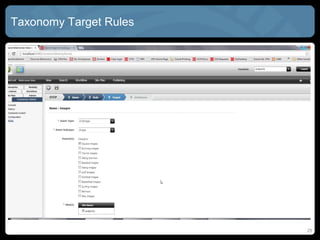
   • Loaded into hard-coded taxonomy based on rules


  Sync is scheduled to search WebCenter CONTENT periodically
    Detailed logging, exception handling, and reporting all provided


  Available in 11.1.1.8 (summer-ish hopefully)

  Screenshots!

                                                                        21
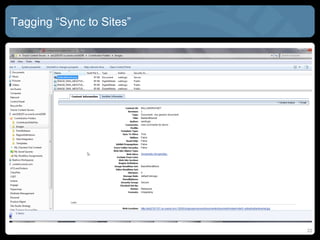
Tagging “Sync to Sites”


                          22
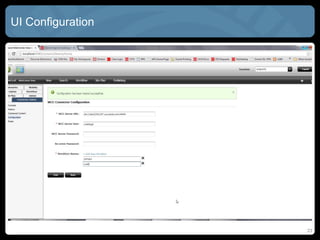
UI Configuration


                   23
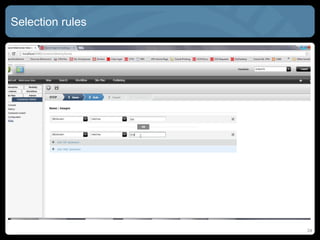
Selection Rules


                  24
Taxonomy Target Rules


                        25
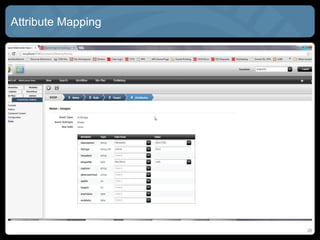
Attribute Mapping


                    26
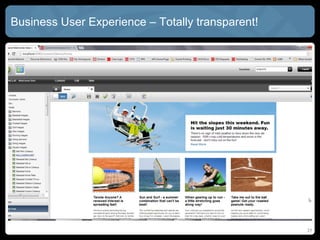
Business User Experience – Totally Transparent!


                                                  27
New SITES Feature: External Repositories!


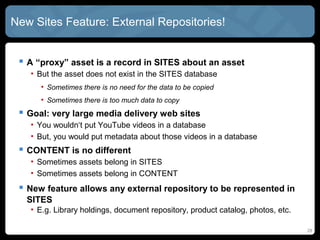
  A “proxy” asset is a record in SITES about an asset
   • But the asset does not exist in the SITES database
      • Sometimes there is no need for the data to be copied
      • Sometimes there is too much data to copy
  Goal: very large media delivery web sites
   • You wouldn‘t put YouTube videos in a database
   • But, you would put metadata about those videos in a database
  CONTENT is no different
   • Sometimes assets belong in SITES
   • Sometimes assets belong in CONTENT
  Allows external repositories to be represented in SITES
   • E.g. Library holdings, document repository, product catalog, photos, etc.


                                                                                 28
Migration In Stages


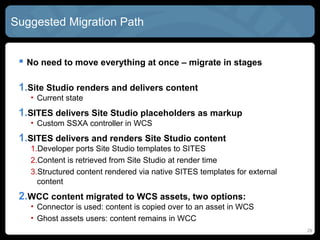
 1.Site Studio renders and delivers content
   •   Current state


 1.SITES delivers Site Studio placeholders as markup
   •   Custom SSXA controller in SITES


 1.SITES delivers and renders Site Studio content
   •   Developer ports Site Studio Region Templates to SITES
   •   Content is retrieved from Site Studio at render time
   •   Data Files rendered via native SITES templates


 1. CONTENT Data Files migrated to SITES assets, two options:
   •   Connector is used: content is copied over to an asset in SITES
   •   External Repository: content remains in CONTENT
                                                                        29
Additional Bonus Integrations


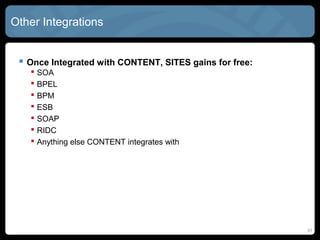
  Once Integrated with CONTENT, SITES gains for free:
      SOA
      BPEL
      BPM
      ESB
      SOAP
      RIDC
      Anything else CONTENT integrates with


  SITES connector via Content Integration Platform
    Will External Repository Support supersede this?


                                                         30
Questions?


             Bex Huff


             My Company: http://bezzotech.com
             My Blog: http://bexhuff.com
             My Self: bex@bezzotech.com

             Tony Field


             My Company: http://function1.com
             Our Blog: http://www.function1.com/blog/
             My Self: tony@function1.com

                                                     31

Seamless Integrations between WebCenter Content, Site Studio, and WebCenter Sites

  • 1.
    Seamless Integrations Between WebCenterSITES and CONTENT Brian “Bex” Huff – Bezzotech Tony Field – Function1
  • 2.
    Agenda  Overviewof SITES and CONTENT  Why should they be integrated?  Rendering CONTENT assets in SITES  Existing and forthcoming approaches  Recommendations  For the latest version of this presentation, go to SlideShare:  http://slideshare.com/bexmex 2
  • 3.
    CONTENT, SITES, orPORTAL?  WebCenter CONTENT (UCM / Site Studio) • Single source of truth for enterprise content  WebCenter SITES (FatWire) • Web experience management  WebCenter PORTAL • Application Integration  When to use which? • Oracle official direction statement • Practical considerations: Where is your biggest investment? 33
  • 4.
    WebCenter CONTENT Base content management platform • Java application, running in WebLogic  Dozens of integration points with back-end systems • LDAP, BPEL, ESB, SOA, Portal • Enterprise Applications: EBS, PeopleSoft, Siebel • Over 50 ways to integrate (and growing)  Content centric applications built with same framework: • Web Content Management (Site Studio) • Digital Asset Management • Imaging and Process Management 4
  • 5.
  • 6.
    WebCenter SITES Oracle’s Web Experience Management platform  Like Site Studio, but with more engagement points: • User engagement, recommendations, polling • High performance distributed cache • Content targeting and optimization • Easy end-user contribution, security, and workflows • Out-of-the-box social integration (Facebook, Twitter)  Architecture basics: • Java/JSP/Taglibrary based • Database repository for web assets • Smart cache for high scalability 6
  • 7.
    Site Studio Resources Project File Sub-template Section Page Template File Element Definition File Data Placeholders File Elements Placeholder Definition File Region Region Definition Template Region File File 7
  • 8.
    WebCenter SITES Resources Attribute Asset Rendering Template Asset Type 8
  • 9.
  • 10.
    Site Studio forExternal Applications (SSXA) 10
  • 11.
    SSXA Web Servicesfor Site Studio Assets  SSXA is a set of APIs to view and edit WCM content remotely • Core services available in 10gR4 • CONTENT 11g has connectors for JEE Application servers  WCM_PLACEHOLDER • dataFileDocName : content ID of the item to render into HTML • placeholderDefinitionDocName : content ID of the placeholder definition • optional parameters: same as wcmPlaceholder IdocScript  WCM_BEGIN_EDIT_SESSION • dDocName : content ID of the item to edit • Opens up the Site Studio Contributor out-of-context for any data file • Example: doc-info page for any data file 11
  • 12.
    Rendering Site StudioPlaceholders  All information stored in the XML Site Studio Project File  Maps a URL to a nodeId for the site  Each nodeId has placeholders, with data files, and templates  Request comes in to render a URL  Site Studio maps the URL to a nodeId  Site Studio begins rendering the page template for that nodeId  Placeholders are rendered based on data file and region template  To render a page, you only need Project File and Page Template • All else handled via WCM_PLACEHODLER service • Or wcmPlacehodler IdcoScript 12
  • 13.
    Site Studio Resources  Page Template with placeholders <div id="mainContent"><!--$wcmPlaceholder('mainContent')--></div>  Data File for the placeholder <dataFile> <title>This is my title</title> <body>This is the body of my news item</body> </dataFile>  Region Template for the placeholder <h1><!--$wcmElement('title')--></h1> <div id='body'><!--$wcmElement('body')--></div> 13
  • 14.
    WebCenter SITES Architecture Management Delivery … … Mobility Server Mobility Server Mobile Community Server Community Server Delivery WEM WEM Gadget Server Framework Gadget Server Framework Satellite Site Server Visitors Content Engage Engage Managers Content Server Content Server Content Optimizer Content Integration Platform File System … Documentum SharePoint 14 14
  • 15.
    Typical WebCenter SITESDeployment 15 15
  • 16.
    Rendering SITES Assets  Request passed from app server to Satellite servlet (caching system)  Satellite sends request to Content Server (yes, another Content Server)  Content Server indirectly looks up the element (JSP), dispatches it, and invokes it.  Asset data is loaded in the element, then displayed • MVC approach was built as a retrofit • (not all elements have to be JSP – come can be thin XML that calls into a proper dispatcher, which in turn calls back into a JSP)  Rendered markup is often cached 16
  • 17.
  • 18.
    Current Integration Options  Good news: CONTENT has many integration options  WebCenter SITES is Java/JSP based  Multiple integration options with CONTENT • RIDC or SOAP • Tag libraries based on RIDC/SOAP • Scheduled migration of content into SITES database as assets  Still not many common patterns • Management of synched content requires business rules • Where should my content live? • How do I keep it up to date? 18
  • 19.
    Roll-Your-Own SSXA Front-end Java controller (Spring, Struts, ADF, etc.) • Parses project file, maps URL paths into nodeId • Uses nodeId to find placeholders, data files, and templates  Use JSP-based page templates • Very simplistic tags / attributes for placeholders  Use OpenWCM web services to render existing assets • WCM_PLACEHODLER • Use EHCache to guarantee performance  Link back to WebCenter content for editing assets 19
  • 20.
    Render SSXA ContentThrough SITES!  Using controller infrastructure (like GSF), can plug in custom SSXA controller • Map a friendly URL to a Site Studio Section • Call WCM_PLACEHODLER to render placeholders • Display them on a SITES template! • Only valid for placeholders, not fragments  What about editing the content? • Just have a link to WCM_BEGIN_EDIT_SESSION • Visible upon Ctrl-Shift-F5 of course  Use built-in ehCache for optimum performance  Be sure to do URL forwarding for link management 20
  • 21.
    New Feature: WebCenterCONTENT Connector  Assets tagged in CONTENT can be synched to SITES  Synched content is treated like a regular asset in SITES • Read-only • Loaded into hard-coded taxonomy based on rules  Sync is scheduled to search WebCenter CONTENT periodically  Detailed logging, exception handling, and reporting all provided  Available in 11.1.1.8 (summer-ish hopefully)  Screenshots! 21
  • 22.
    Tagging “Sync toSites” 22
  • 23.
  • 24.
  • 25.
  • 26.
  • 27.
    Business User Experience– Totally Transparent! 27
  • 28.
    New SITES Feature:External Repositories!  A “proxy” asset is a record in SITES about an asset • But the asset does not exist in the SITES database • Sometimes there is no need for the data to be copied • Sometimes there is too much data to copy  Goal: very large media delivery web sites • You wouldn‘t put YouTube videos in a database • But, you would put metadata about those videos in a database  CONTENT is no different • Sometimes assets belong in SITES • Sometimes assets belong in CONTENT  Allows external repositories to be represented in SITES • E.g. Library holdings, document repository, product catalog, photos, etc. 28
  • 29.
    Migration In Stages 1.Site Studio renders and delivers content • Current state 1.SITES delivers Site Studio placeholders as markup • Custom SSXA controller in SITES 1.SITES delivers and renders Site Studio content • Developer ports Site Studio Region Templates to SITES • Content is retrieved from Site Studio at render time • Data Files rendered via native SITES templates 1. CONTENT Data Files migrated to SITES assets, two options: • Connector is used: content is copied over to an asset in SITES • External Repository: content remains in CONTENT 29
  • 30.
    Additional Bonus Integrations  Once Integrated with CONTENT, SITES gains for free:  SOA  BPEL  BPM  ESB  SOAP  RIDC  Anything else CONTENT integrates with  SITES connector via Content Integration Platform  Will External Repository Support supersede this? 30
  • 31.
    Questions? Bex Huff My Company: http://bezzotech.com My Blog: http://bexhuff.com My Self: bex@bezzotech.com Tony Field My Company: http://function1.com Our Blog: http://www.function1.com/blog/ My Self: tony@function1.com 31