801: BUILDING SCALABLE, HIGH-
PERFORMANCE SHAREPOINT
APPLICATIONS


SPTechCon
2009-01-29, dynaTrace software Inc
Andreas Grabner, andreas.grabner@dynatrace.com
Technology Strategist
Agenda

    While the development of SharePoint-based services is
    relatively easy, making them perform and scale can be
    a real challenge. This class will show you code in the
    SharePoint Component Model, so you can learn
    about what the framework is doing under the hood
    when it is used by a WebPart or an external
    application. This insight is vital in order to build high-
    performing and scalable applications based on


                                                                 © 2008 dynaTrace software GmbH
    SharePoint
    LOTS OF DEMOS!!


2                                                                2
Agenda

    SharePoint Object Model
    •   Considerations when working with lists
    •   Differnt ways to access list content
    •   Batch updating lists
    •   Memory Considerations & Native Resources

    WebParts
    • Design Guidelines
    • Performance Considerations


                                                   © 2008 dynaTrace software GmbH
    • How to debug/analyze/profile

    Tips & Tricks


3                                                  3
Working with SharePoint Lists (1)

    Do not treat SharePoint Lists as database tables
    • Use database tables for transient or transactional data.

    The 2000 Items per List Myth
    • What you read on blogs/articles/...
        • Consider the restriction of a maximum of 2000 items per list container in
          document libraries and lists
        • Create containers (folders) in your list to overcome the 2000 item limit
    • What I think
        • > 2000 is not a problem at all


                                                                                            © 2008 dynaTrace software GmbH
        • If you only request those items in a list that the user needs in the particular
          use case
        • Use Row Limits, Paging, queries, ... to selectively retrieve list items

    Maximum number of items supported in a list with recursive
    containers (folders) is 5 million items

4                                                                                           4
Working with SharePoint Lists (2)

    Consider caching the contents of a list to a DataTable
    or DataSet if the list will be queried multiple times in
    your application
    Consider using PortalSiteMapProvider which
    implements a result cache based on SPQuery‘s
    Use Views to limit the number of columns that are
    retrieved


                                                               © 2008 dynaTrace software GmbH
5                                                              5
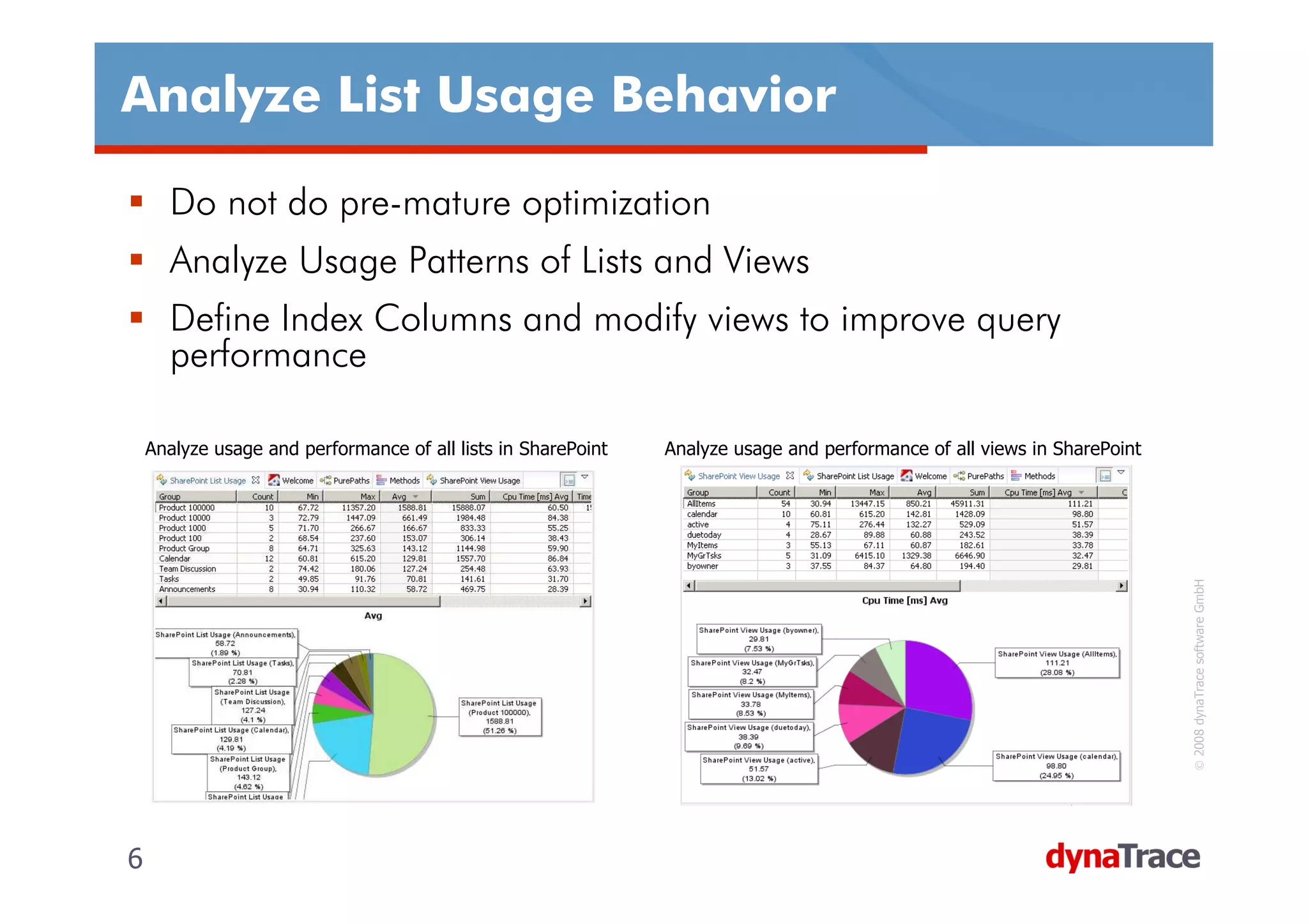
Analyze List Usage Behavior

      Do not do pre-mature optimization
      Analyze Usage Patterns of Lists and Views
      Define Index Columns and modify views to improve query
      performance

    Analyze usage and performance of all lists in SharePoint   Analyze usage and performance of all views in SharePoint


                                                                                                                          © 2008 dynaTrace software GmbH
6                                                                                                                         6
Access SharePoint Lists from Code (1)

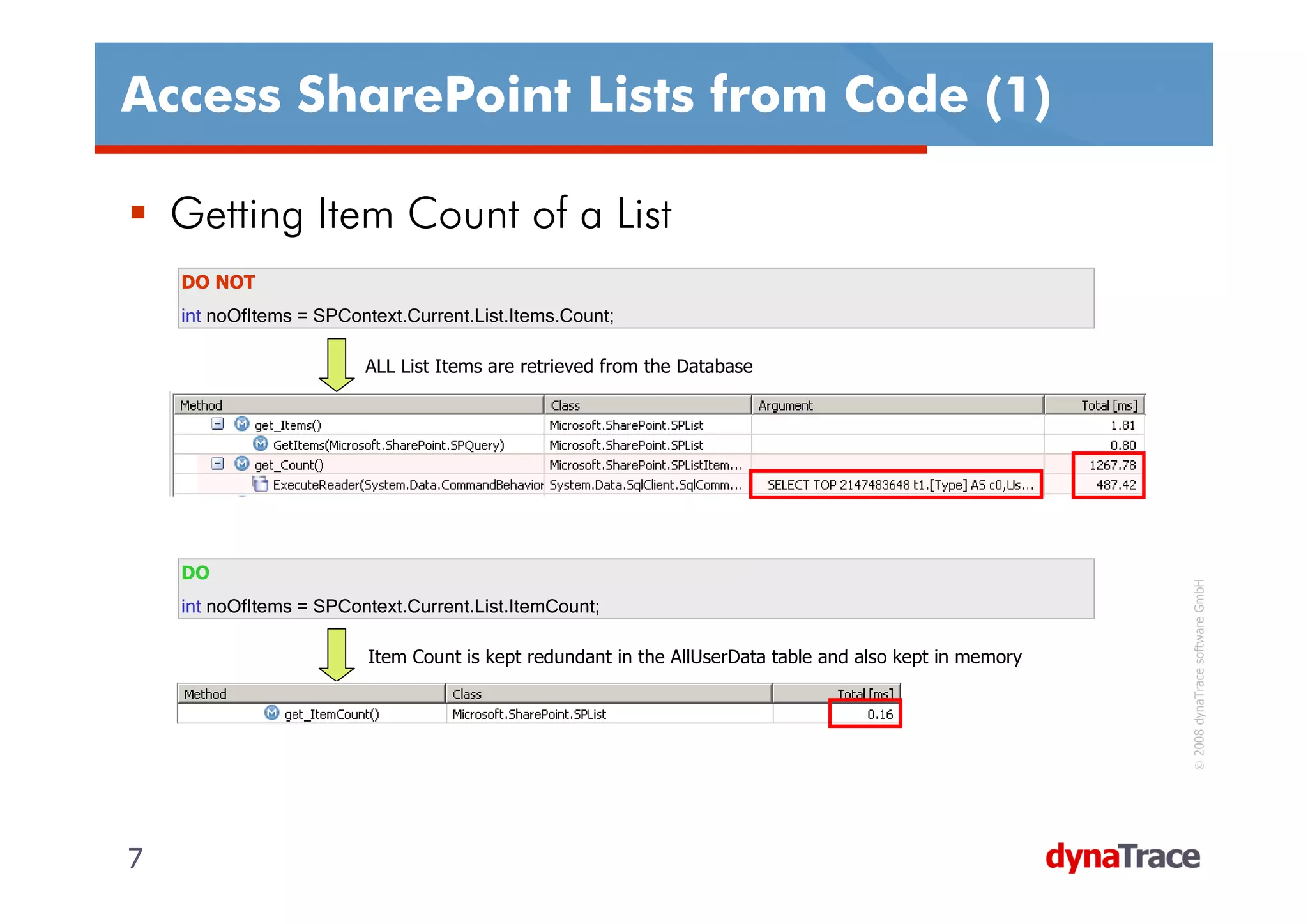
    Getting Item Count of a List
    DO NOT
    int noOfItems = SPContext.Current.List.Items.Count;

                         ALL List Items are retrieved from the Database


    DO


                                                                                                          © 2008 dynaTrace software GmbH
    int noOfItems = SPContext.Current.List.ItemCount;

                          Item Count is kept redundant in the AllUserData table and also kept in memory


7                                                                                                         7
Access SharePoint Lists from Code (2)

    Iterating through List Items – THE WRONG WAY
    DO NOT
    for (int itemIx=0;itemIx< SPContext.Current.List.Items.Count;itemIx++) {
        SPListItem listItem = SPContext.Current.List.Items[itemIx];
        // do something ...
    }

                      Every access to Count and Items Property queries the whole SharePoint list


                                                                                                   © 2008 dynaTrace software GmbH
                      We end up with 202 SQL Executions with a total exec time of > 1s


8                                                                                                  8
Access SharePoint Lists from Code (3)

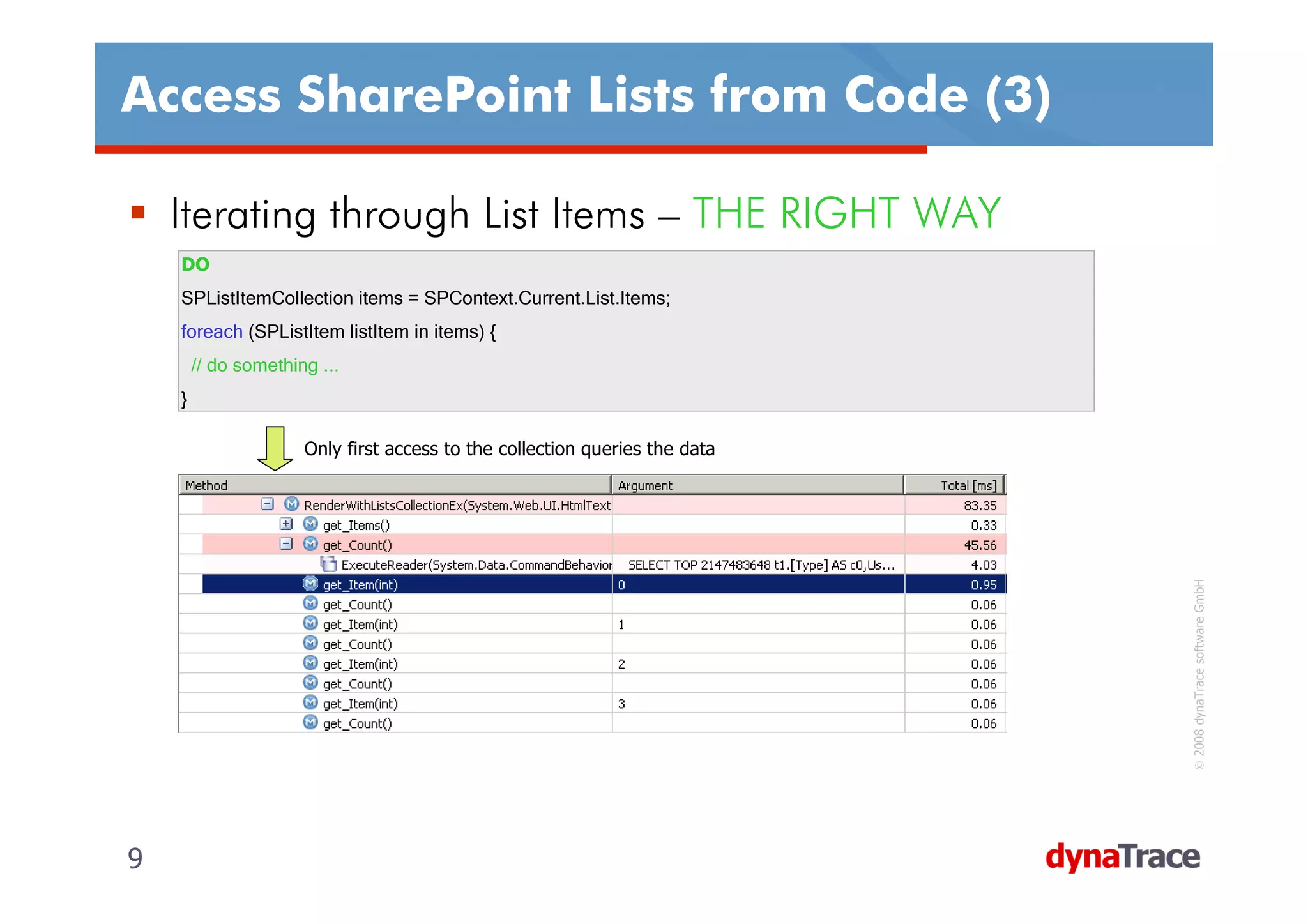
    Iterating through List Items – THE RIGHT WAY
    DO
    SPListItemCollection items = SPContext.Current.List.Items;
    foreach (SPListItem listItem in items) {
        // do something ...
    }

                      Only first access to the collection queries the data


                                                                             © 2008 dynaTrace software GmbH
9                                                                            9
Access SharePoint Lists from Code (4)

     Limit Rows by using SPQuery
     • Accessing the SPList object always requests ALL items in the list
     • Use SPQuery and the RowLimit property to only query a certain amount
       of elements
     DO
     SPQuery query = new SPQuery();
     query.RowLimit = 100;
     SPListItemCollection items = SPContext.Current.List.GetItems(query);
     for (int itemIx=0;itemIx<items.Count;itemIx++) {
         SPListItem listItem = items[itemIx];
         // do something ...
     }


                                                                                                                     © 2008 dynaTrace software GmbH
                 SPQuery properties are taken into the generated SQL Statment. Only the first X rows are selected


10                                                                                                                  10
Access SharePoint Lists from Code (5)

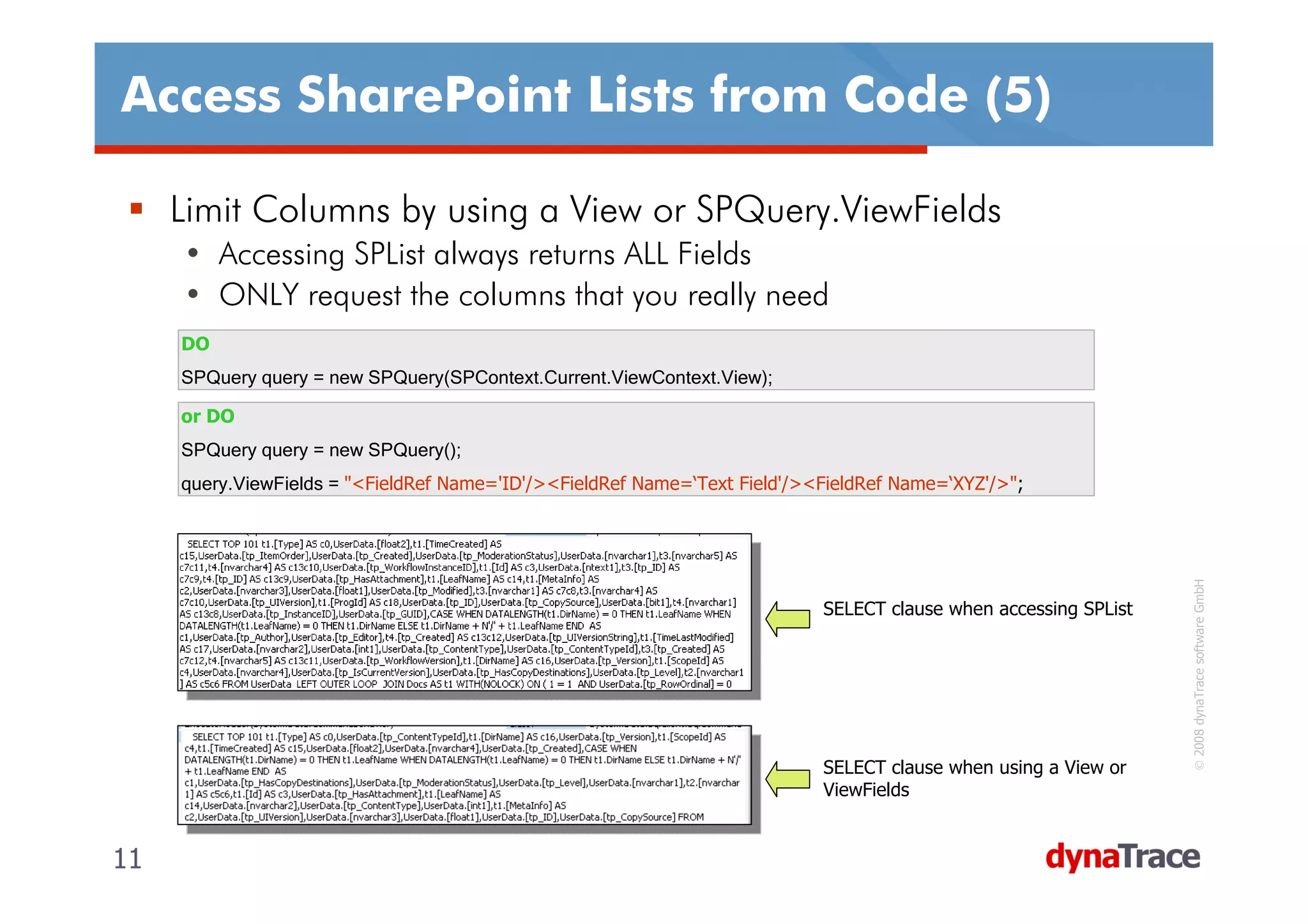
     Limit Columns by using a View or SPQuery.ViewFields
     • Accessing SPList always returns ALL Fields
     • ONLY request the columns that you really need
     DO
     SPQuery query = new SPQuery(SPContext.Current.ViewContext.View);

     or DO
     SPQuery query = new SPQuery();
     query.ViewFields = "<FieldRef Name='ID'/><FieldRef Name=‘Text Field'/><FieldRef Name=‘XYZ'/>";


                                                                                                                   © 2008 dynaTrace software GmbH
                                                                            SELECT clause when accessing SPList


                                                                            SELECT clause when using a View or
                                                                            ViewFields


11                                                                                                                11
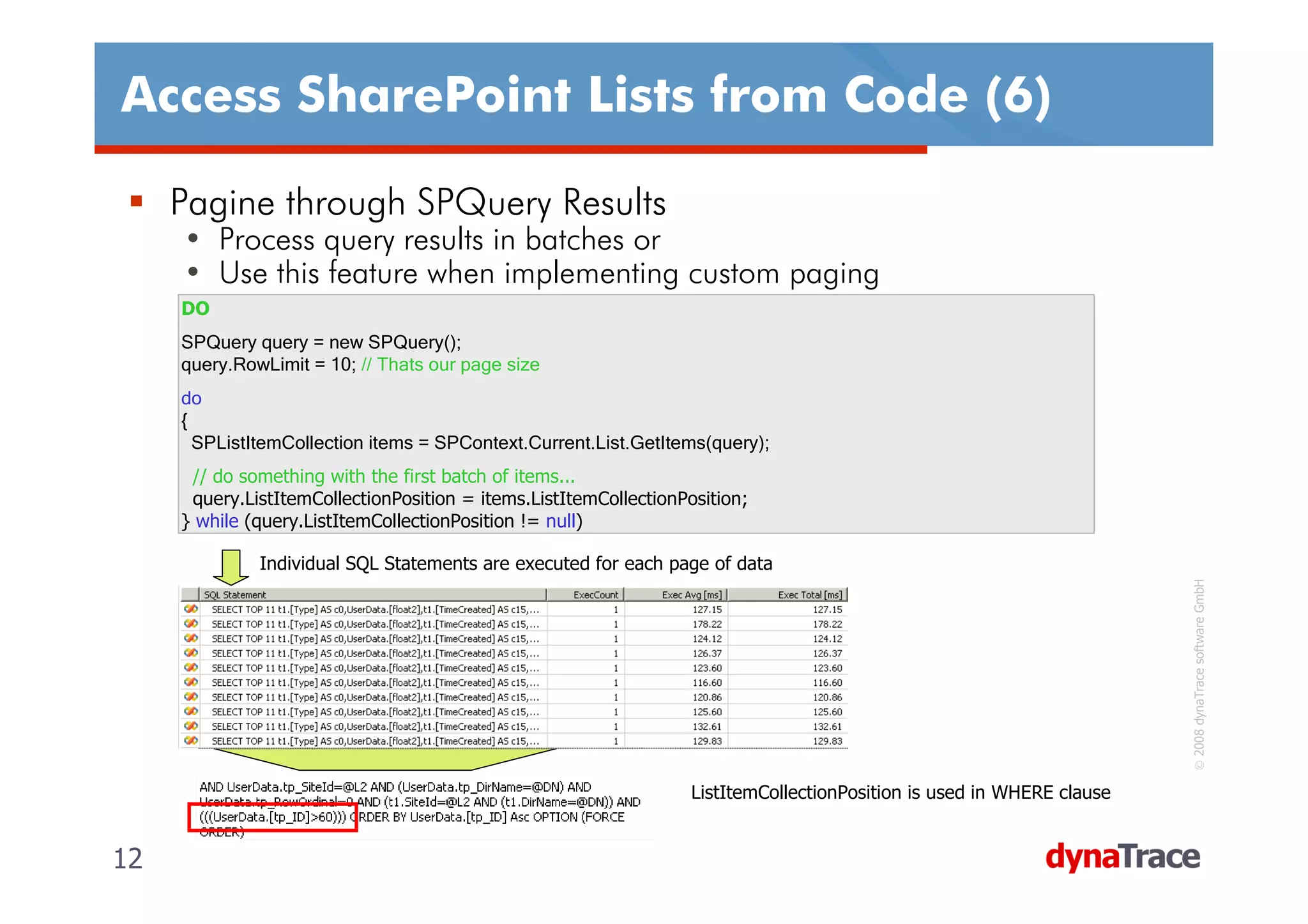
Access SharePoint Lists from Code (6)

     Pagine through SPQuery Results
     • Process query results in batches or
     • Use this feature when implementing custom paging
     DO
     SPQuery query = new SPQuery();
     query.RowLimit = 10; // Thats our page size
     do
     {
       SPListItemCollection items = SPContext.Current.List.GetItems(query);
      // do something with the first batch of items...
      query.ListItemCollectionPosition = items.ListItemCollectionPosition;
     } while (query.ListItemCollectionPosition != null)

              Individual SQL Statements are executed for each page of data


                                                                                                                         © 2008 dynaTrace software GmbH
                                                                   ListItemCollectionPosition is used in WHERE clause


12                                                                                                                      12
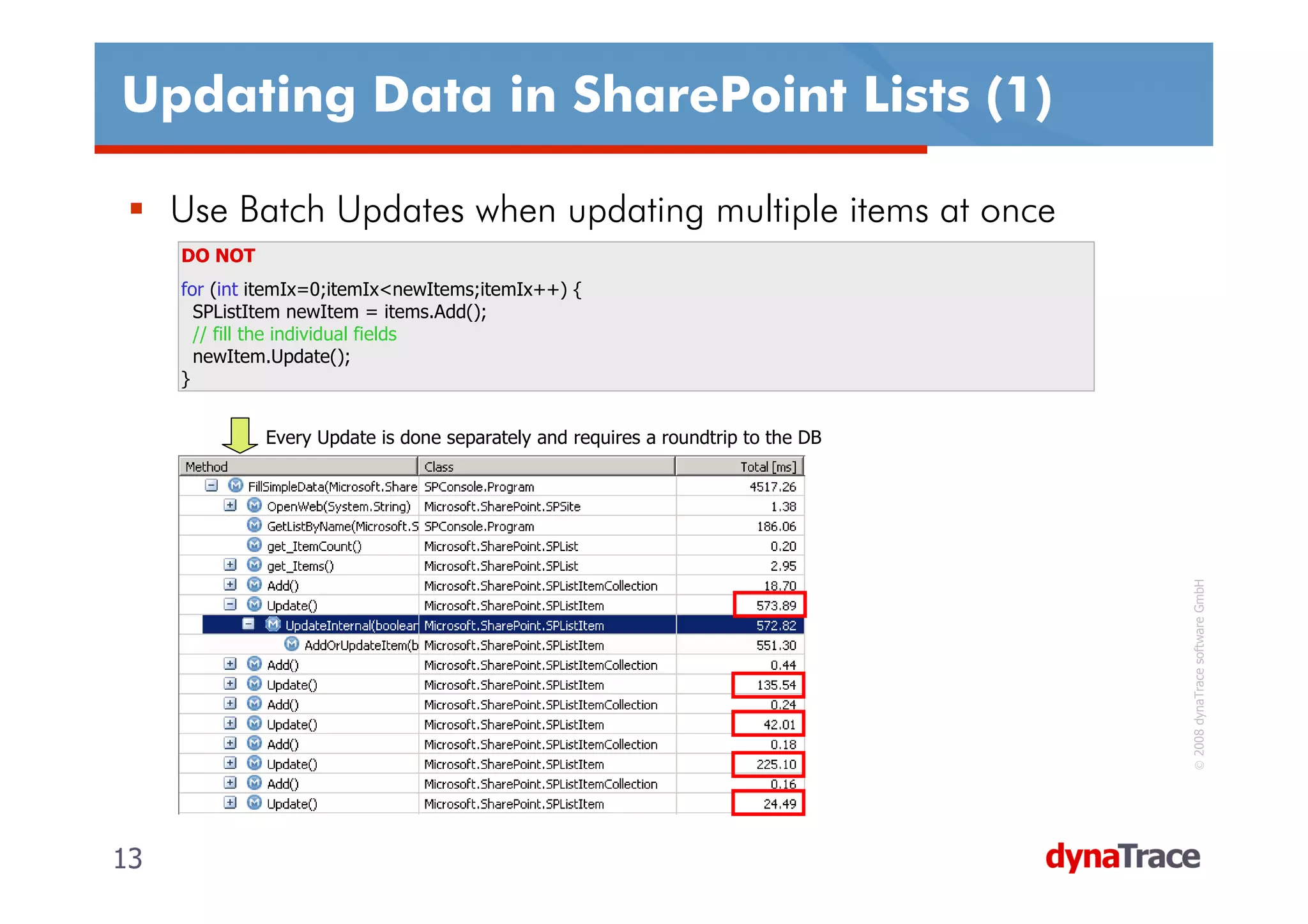
Updating Data in SharePoint Lists (1)

     Use Batch Updates when updating multiple items at once
     DO NOT
     for (int itemIx=0;itemIx<newItems;itemIx++) {
       SPListItem newItem = items.Add();
       // fill the individual fields
       newItem.Update();
     }


              Every Update is done separately and requires a roundtrip to the DB


                                                                                    © 2008 dynaTrace software GmbH
13                                                                                 13
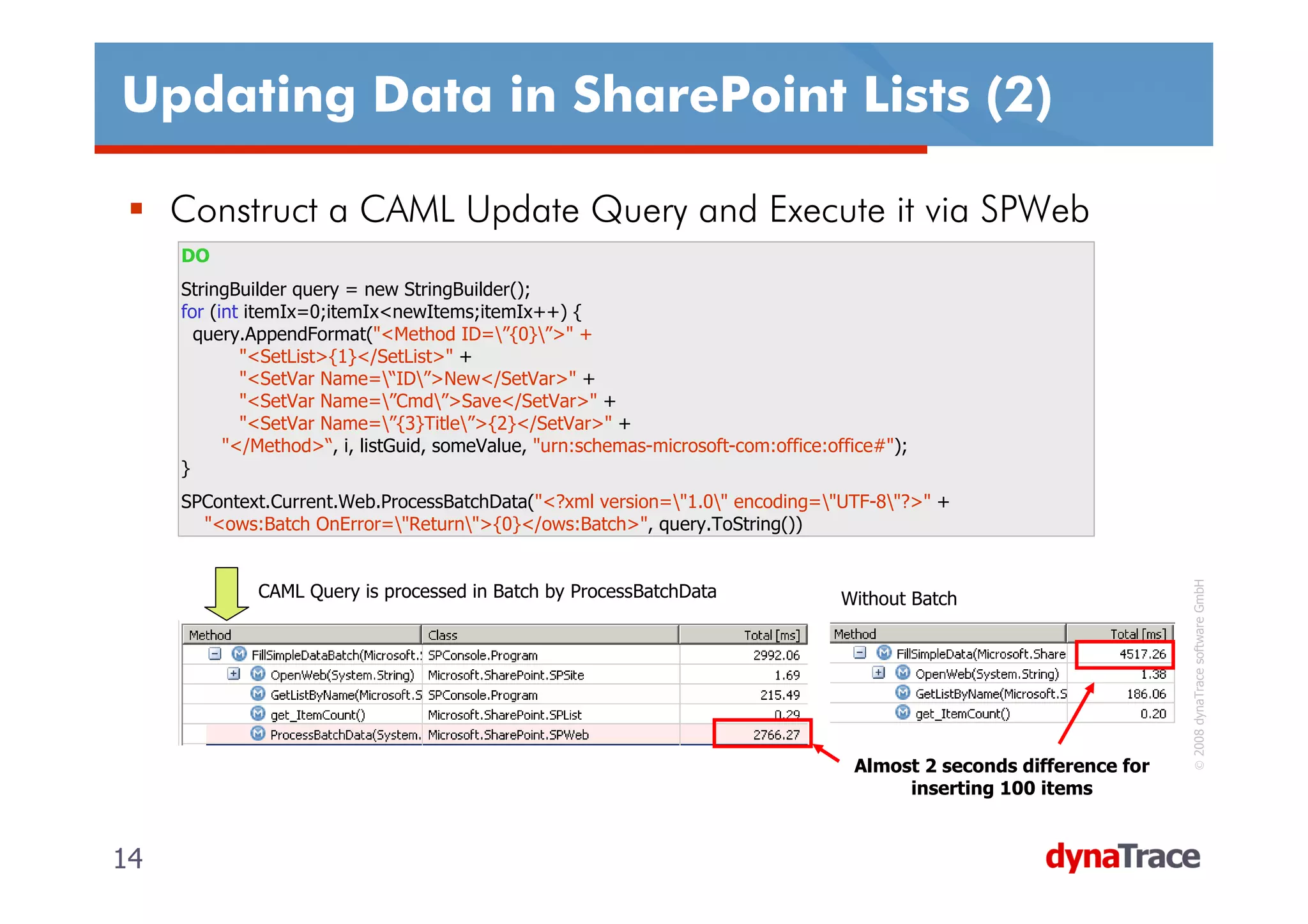
Updating Data in SharePoint Lists (2)

     Construct a CAML Update Query and Execute it via SPWeb
     DO
     StringBuilder query = new StringBuilder();
     for (int itemIx=0;itemIx<newItems;itemIx++) {
       query.AppendFormat("<Method ID=”{0}”>" +
             "<SetList>{1}</SetList>" +
             "<SetVar Name=“ID”>New</SetVar>" +
             "<SetVar Name=”Cmd”>Save</SetVar>" +
             "<SetVar Name=”{3}Title”>{2}</SetVar>" +
           "</Method>“, i, listGuid, someValue, "urn:schemas-microsoft-com:office:office#");
     }
     SPContext.Current.Web.ProcessBatchData("<?xml version="1.0" encoding="UTF-8"?>" +
       "<ows:Batch OnError="Return">{0}</ows:Batch>", query.ToString())


                                                                                                                        © 2008 dynaTrace software GmbH
              CAML Query is processed in Batch by ProcessBatchData                  Without Batch


                                                                                     Almost 2 seconds difference for
                                                                                          inserting 100 items


14                                                                                                                     14
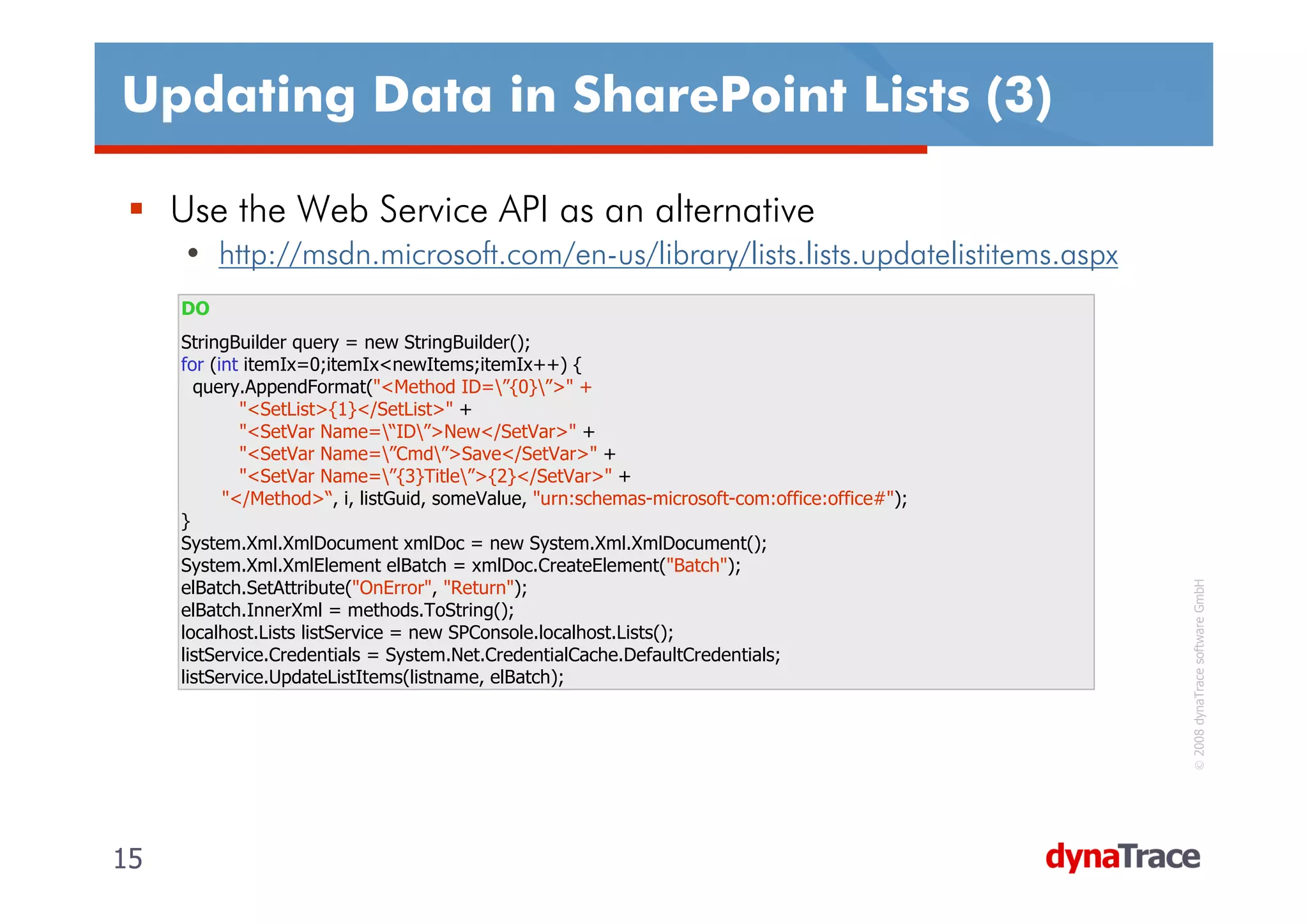
Updating Data in SharePoint Lists (3)

     Use the Web Service API as an alternative
     • http://msdn.microsoft.com/en-us/library/lists.lists.updatelistitems.aspx
     DO
     StringBuilder query = new StringBuilder();
     for (int itemIx=0;itemIx<newItems;itemIx++) {
       query.AppendFormat("<Method ID=”{0}”>" +
             "<SetList>{1}</SetList>" +
             "<SetVar Name=“ID”>New</SetVar>" +
             "<SetVar Name=”Cmd”>Save</SetVar>" +
             "<SetVar Name=”{3}Title”>{2}</SetVar>" +
           "</Method>“, i, listGuid, someValue, "urn:schemas-microsoft-com:office:office#");
     }
     System.Xml.XmlDocument xmlDoc = new System.Xml.XmlDocument();
     System.Xml.XmlElement elBatch = xmlDoc.CreateElement("Batch");


                                                                                                © 2008 dynaTrace software GmbH
     elBatch.SetAttribute("OnError", "Return");
     elBatch.InnerXml = methods.ToString();
     localhost.Lists listService = new SPConsole.localhost.Lists();
     listService.Credentials = System.Net.CredentialCache.DefaultCredentials;
     listService.UpdateListItems(listname, elBatch);


15                                                                                             15
Summary on SharePoint Object Model
     Count List Items
      • SPList.ItemCount instead of SPListItemCollection.Count
     Iterating through SPList
      • Store SPListItemCollection in variable instead of accessing List property in loop
      • Limit the number of Items retrieved by using SPQuery and RowLimit
     Limit Columns
      • Use a View or SPQuery to limit the number of columns and rows that will be
        retrieved
     Paging through data
      • Make use of SPQuery ListItemCollectionPosition feature to page through data
      • Use an appropriate RowLimit value to define the page size


                                                                                             © 2008 dynaTrace software GmbH
     List Updates
      • Do batch updates via WebService Lists.UpdateListItems or
        SPWeb.ProcessBatchData
     List Item Collections
      • Store myList.Items in a SPListItemCollection variable when accessed multiple
        times


16                                                                                          16
Interesting Links on SharePoint Lists

     SharePoint List Performance
     • http://blog.solanite.com/keith/Lists/Posts/Post.aspx?ID=15
     • http://blog.thekid.me.uk/archive/2007/02/24/deleting-a-
       considerable-number-of-items-from-a-list-in-sharepoint.aspx
     • http://blog.solanite.com/keith/Lists/Posts/Post.aspx?ID=15

     Link Collection about Performance
     • http://blogs.msdn.com/joelo/archive/2007/07/09/capacity
       -planning-key-links-and-info.aspx


                                                                      © 2008 dynaTrace software GmbH
     Information about Row Limit and Paging
     • http://msdn.microsoft.com/en-us/library/cc404818.aspx


17                                                                   17
SharePoint Object Model


                    DEMO
     Whats going on „under the hood“ when using the
     SharePoint Object Model?
     How to improve SharePoint Data Access?


                                                       © 2008 dynaTrace software GmbH
18                                                    18
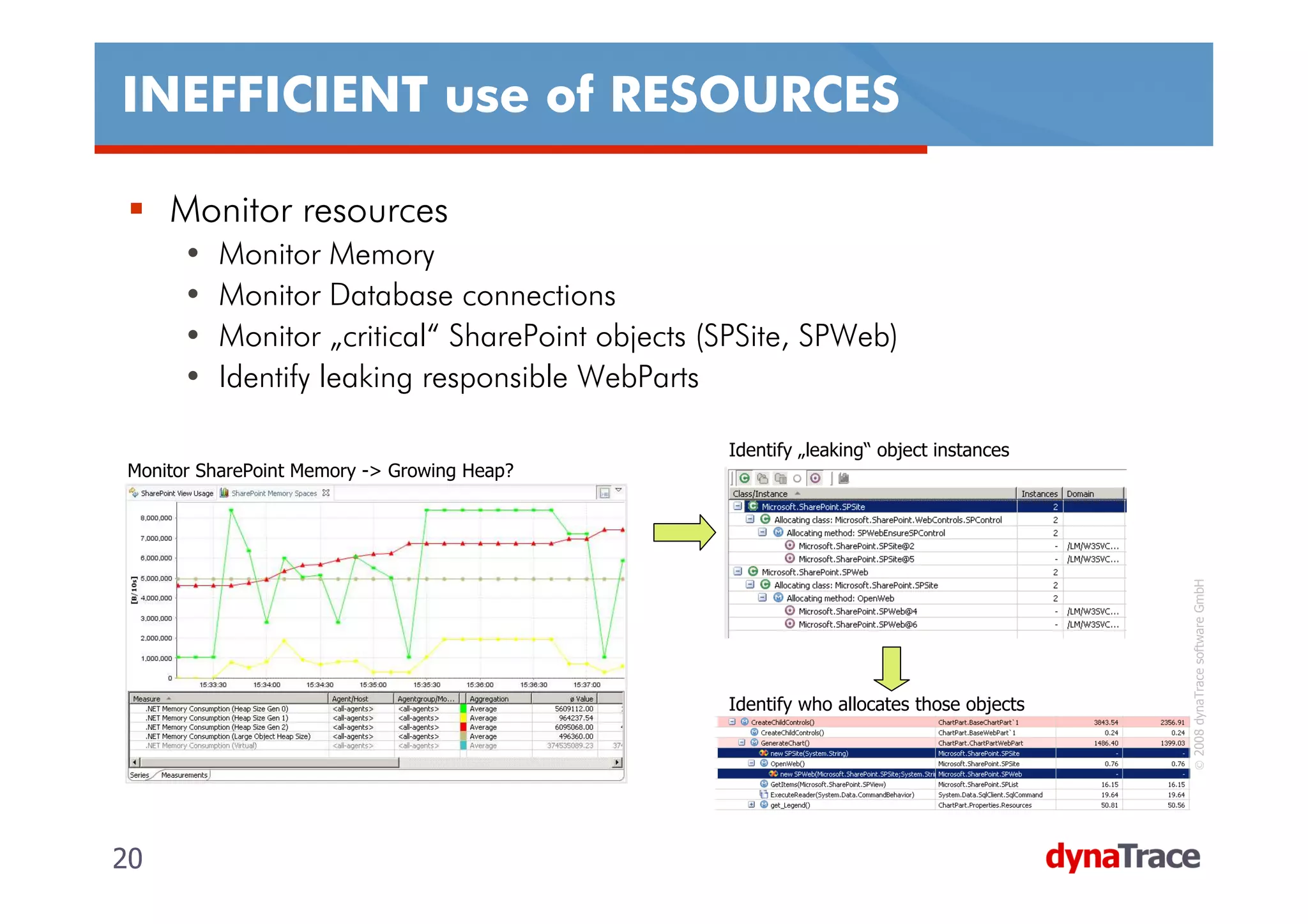
INEFFICIENT use of RESOURCES

     SharePoint Object Model
     • SPSite and SPWeb hold references to native COM objects
     • Release SPSite & SPWeb in order to free native resources
     • Querying too much data results in high memory usage
     Reference
     • SPDisposeCheck tool
       http://blogs.msdn.com/sharepoint/archive/2008/11/12/an
       nouncing-spdisposecheck-tool-for-sharepoint-
       developers.aspx


                                                                   © 2008 dynaTrace software GmbH
     • http://msdn.microsoft.com/en-us/library/bb687949.aspx
     • http://msdn2.microsoft.com/en-
       us/library/aa973248.aspx#sharepointobjmodel_otherobject
       sthatrequire-disposal

19                                                                19
INEFFICIENT use of RESOURCES

     Monitor resources
      •   Monitor Memory
      •   Monitor Database connections
      •   Monitor „critical“ SharePoint objects (SPSite, SPWeb)
      •   Identify leaking responsible WebParts

                                                 Identify „leaking“ object instances
Monitor SharePoint Memory -> Growing Heap?


                                                                                         © 2008 dynaTrace software GmbH
                                                 Identify who allocates those objects


20                                                                                      20
Data is REQUESTED in an INEFFICIENT way


                     DEMO
     How to identify a SPSite/SPWeb Resource Leak?
     How to identify resource intensive WebParts?
     How to monitor SharePoint Memory Issues down to


                                                        © 2008 dynaTrace software GmbH
     the Object Model‘s Data Access classes?


21                                                     21
Web Parts Design Guidelines

     Design Web Parts to perform only a single function in order to
     improve reuse
     Design Web Parts to be configurable or customizable by users
     Include a Web Part Manager in custom master pages that will
     be used by Web Part pages
     Consider using Web Part verbs to allow users to perform
     discrete actions
     Consider categorizing your properties to distinguish them from


                                                                       © 2008 dynaTrace software GmbH
     Web Part properties
     Dispose properly of any SharePoint objects and unmanaged
     resources that you create in your Web Parts
     • Many SharePoint Objects hold references to unmanaged objects


22                                                                    22
WebPart Troubleshooting

     Attach to w3wp.exe process
     • Use Process Explorer to find correct w3wp (-ap parameter)
     Understand ASP.NET Page Execution LifeCycle
     • ASP.NET is the underlying technology
     • Understand where your custom code fits in
     Be careful with VIEWSTATE
     • Easy to use but comes with many side-effects
     Memory Management
     • Be careful with allocating too many small short living objects


                                                                         © 2008 dynaTrace software GmbH
     • Make sure to free references
     Resource Management
     • Dispose/Release objects
     • Hold on to resources only as long as you need it


23                                                                      23
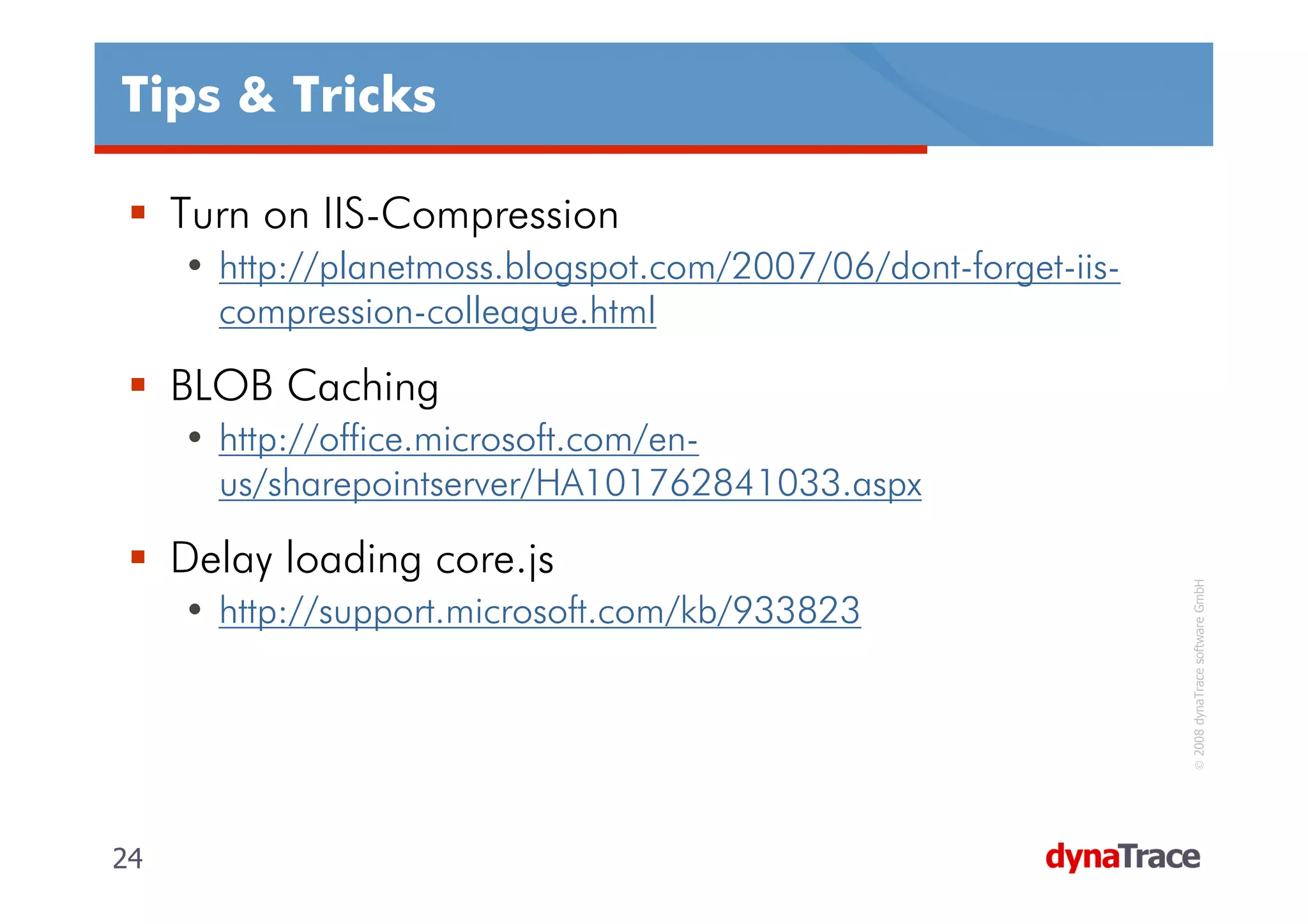
Tips & Tricks

     Turn on IIS-Compression
     • http://planetmoss.blogspot.com/2007/06/dont-forget-iis-
       compression-colleague.html

     BLOB Caching
     • http://office.microsoft.com/en-
       us/sharepointserver/HA101762841033.aspx

     Delay loading core.js


                                                                  © 2008 dynaTrace software GmbH
     • http://support.microsoft.com/kb/933823


24                                                               24
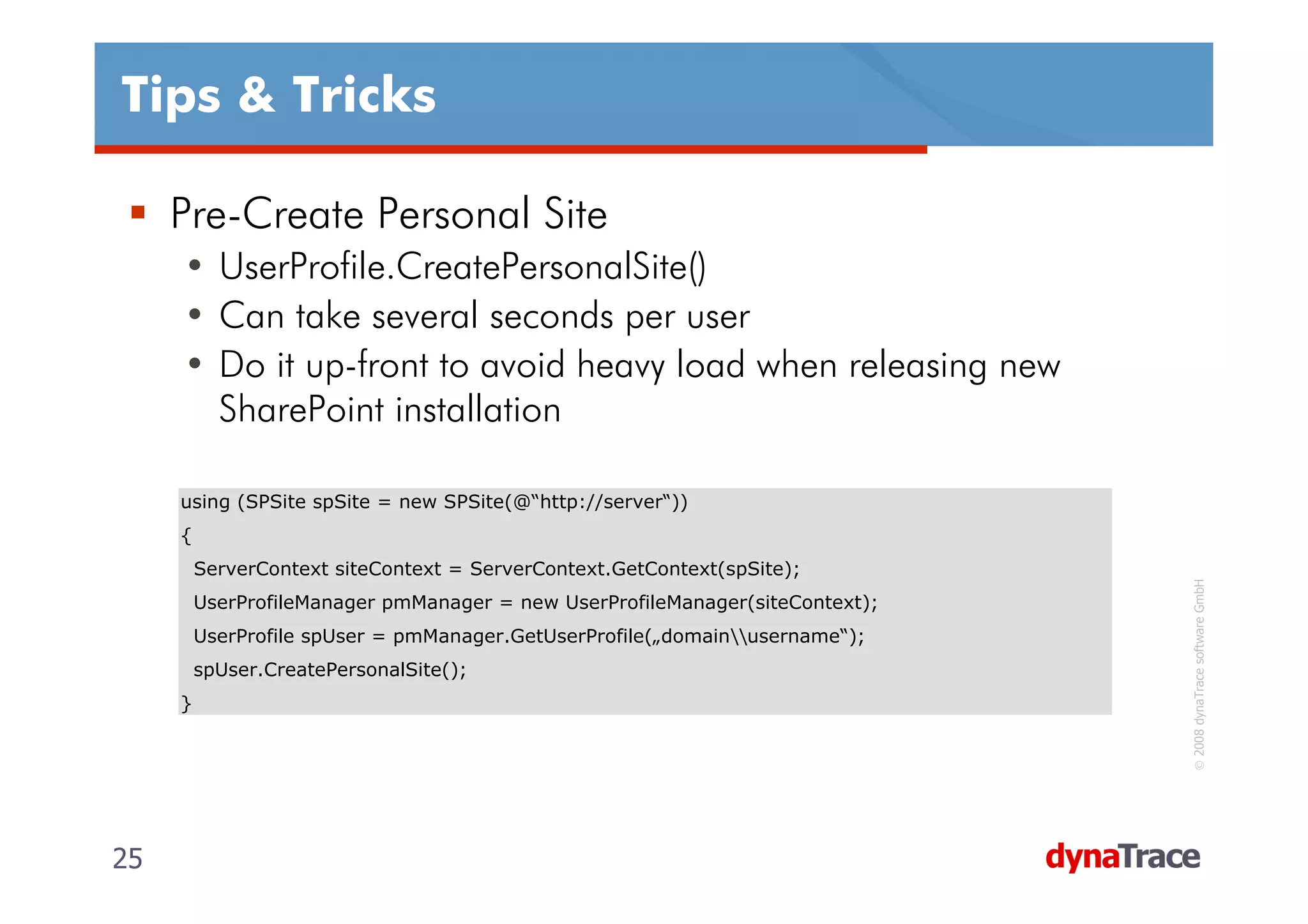
Tips & Tricks

     Pre-Create Personal Site
     • UserProfile.CreatePersonalSite()
     • Can take several seconds per user
     • Do it up-front to avoid heavy load when releasing new
       SharePoint installation

     using (SPSite spSite = new SPSite(@“http://server“))
     {
         ServerContext siteContext = ServerContext.GetContext(spSite);


                                                                                © 2008 dynaTrace software GmbH
         UserProfileManager pmManager = new UserProfileManager(siteContext);
         UserProfile spUser = pmManager.GetUserProfile(„domainusername“);
         spUser.CreatePersonalSite();
     }


25                                                                             25
References & Contact

     MS SharePoint Team Blog
     • http://blogs.msdn.com/sharepoint/default.aspx
     • http://blogs.msdn.com/sharepoint/archive/2006/02/27/53
       9689.aspx

     Contact me for follow up
     •   Andreas Grabner
     •   Mail: andreas.grabner@dynatrace.com
     •   Blog: http://blog.dynatrace.com


                                                                 © 2008 dynaTrace software GmbH
     •   Web: http://www.dynatrace.com


26                                                              26

SharePoint TechCon 2009 - 801

  • 1.
    801: BUILDING SCALABLE,HIGH- PERFORMANCE SHAREPOINT APPLICATIONS SPTechCon 2009-01-29, dynaTrace software Inc Andreas Grabner, andreas.grabner@dynatrace.com Technology Strategist
  • 2.
    Agenda While the development of SharePoint-based services is relatively easy, making them perform and scale can be a real challenge. This class will show you code in the SharePoint Component Model, so you can learn about what the framework is doing under the hood when it is used by a WebPart or an external application. This insight is vital in order to build high- performing and scalable applications based on © 2008 dynaTrace software GmbH SharePoint LOTS OF DEMOS!! 2 2
  • 3.
    Agenda SharePoint Object Model • Considerations when working with lists • Differnt ways to access list content • Batch updating lists • Memory Considerations & Native Resources WebParts • Design Guidelines • Performance Considerations © 2008 dynaTrace software GmbH • How to debug/analyze/profile Tips & Tricks 3 3
  • 4.
    Working with SharePointLists (1) Do not treat SharePoint Lists as database tables • Use database tables for transient or transactional data. The 2000 Items per List Myth • What you read on blogs/articles/... • Consider the restriction of a maximum of 2000 items per list container in document libraries and lists • Create containers (folders) in your list to overcome the 2000 item limit • What I think • > 2000 is not a problem at all © 2008 dynaTrace software GmbH • If you only request those items in a list that the user needs in the particular use case • Use Row Limits, Paging, queries, ... to selectively retrieve list items Maximum number of items supported in a list with recursive containers (folders) is 5 million items 4 4
  • 5.
    Working with SharePointLists (2) Consider caching the contents of a list to a DataTable or DataSet if the list will be queried multiple times in your application Consider using PortalSiteMapProvider which implements a result cache based on SPQuery‘s Use Views to limit the number of columns that are retrieved © 2008 dynaTrace software GmbH 5 5
  • 6.
    Analyze List UsageBehavior Do not do pre-mature optimization Analyze Usage Patterns of Lists and Views Define Index Columns and modify views to improve query performance Analyze usage and performance of all lists in SharePoint Analyze usage and performance of all views in SharePoint © 2008 dynaTrace software GmbH 6 6
  • 7.
    Access SharePoint Listsfrom Code (1) Getting Item Count of a List DO NOT int noOfItems = SPContext.Current.List.Items.Count; ALL List Items are retrieved from the Database DO © 2008 dynaTrace software GmbH int noOfItems = SPContext.Current.List.ItemCount; Item Count is kept redundant in the AllUserData table and also kept in memory 7 7
  • 8.
    Access SharePoint Listsfrom Code (2) Iterating through List Items – THE WRONG WAY DO NOT for (int itemIx=0;itemIx< SPContext.Current.List.Items.Count;itemIx++) { SPListItem listItem = SPContext.Current.List.Items[itemIx]; // do something ... } Every access to Count and Items Property queries the whole SharePoint list © 2008 dynaTrace software GmbH We end up with 202 SQL Executions with a total exec time of > 1s 8 8
  • 9.
    Access SharePoint Listsfrom Code (3) Iterating through List Items – THE RIGHT WAY DO SPListItemCollection items = SPContext.Current.List.Items; foreach (SPListItem listItem in items) { // do something ... } Only first access to the collection queries the data © 2008 dynaTrace software GmbH 9 9
  • 10.
    Access SharePoint Listsfrom Code (4) Limit Rows by using SPQuery • Accessing the SPList object always requests ALL items in the list • Use SPQuery and the RowLimit property to only query a certain amount of elements DO SPQuery query = new SPQuery(); query.RowLimit = 100; SPListItemCollection items = SPContext.Current.List.GetItems(query); for (int itemIx=0;itemIx<items.Count;itemIx++) { SPListItem listItem = items[itemIx]; // do something ... } © 2008 dynaTrace software GmbH SPQuery properties are taken into the generated SQL Statment. Only the first X rows are selected 10 10
  • 11.
    Access SharePoint Listsfrom Code (5) Limit Columns by using a View or SPQuery.ViewFields • Accessing SPList always returns ALL Fields • ONLY request the columns that you really need DO SPQuery query = new SPQuery(SPContext.Current.ViewContext.View); or DO SPQuery query = new SPQuery(); query.ViewFields = "<FieldRef Name='ID'/><FieldRef Name=‘Text Field'/><FieldRef Name=‘XYZ'/>"; © 2008 dynaTrace software GmbH SELECT clause when accessing SPList SELECT clause when using a View or ViewFields 11 11
  • 12.
    Access SharePoint Listsfrom Code (6) Pagine through SPQuery Results • Process query results in batches or • Use this feature when implementing custom paging DO SPQuery query = new SPQuery(); query.RowLimit = 10; // Thats our page size do { SPListItemCollection items = SPContext.Current.List.GetItems(query); // do something with the first batch of items... query.ListItemCollectionPosition = items.ListItemCollectionPosition; } while (query.ListItemCollectionPosition != null) Individual SQL Statements are executed for each page of data © 2008 dynaTrace software GmbH ListItemCollectionPosition is used in WHERE clause 12 12
  • 13.
    Updating Data inSharePoint Lists (1) Use Batch Updates when updating multiple items at once DO NOT for (int itemIx=0;itemIx<newItems;itemIx++) { SPListItem newItem = items.Add(); // fill the individual fields newItem.Update(); } Every Update is done separately and requires a roundtrip to the DB © 2008 dynaTrace software GmbH 13 13
  • 14.
    Updating Data inSharePoint Lists (2) Construct a CAML Update Query and Execute it via SPWeb DO StringBuilder query = new StringBuilder(); for (int itemIx=0;itemIx<newItems;itemIx++) { query.AppendFormat("<Method ID=”{0}”>" + "<SetList>{1}</SetList>" + "<SetVar Name=“ID”>New</SetVar>" + "<SetVar Name=”Cmd”>Save</SetVar>" + "<SetVar Name=”{3}Title”>{2}</SetVar>" + "</Method>“, i, listGuid, someValue, "urn:schemas-microsoft-com:office:office#"); } SPContext.Current.Web.ProcessBatchData("<?xml version="1.0" encoding="UTF-8"?>" + "<ows:Batch OnError="Return">{0}</ows:Batch>", query.ToString()) © 2008 dynaTrace software GmbH CAML Query is processed in Batch by ProcessBatchData Without Batch Almost 2 seconds difference for inserting 100 items 14 14
  • 15.
    Updating Data inSharePoint Lists (3) Use the Web Service API as an alternative • http://msdn.microsoft.com/en-us/library/lists.lists.updatelistitems.aspx DO StringBuilder query = new StringBuilder(); for (int itemIx=0;itemIx<newItems;itemIx++) { query.AppendFormat("<Method ID=”{0}”>" + "<SetList>{1}</SetList>" + "<SetVar Name=“ID”>New</SetVar>" + "<SetVar Name=”Cmd”>Save</SetVar>" + "<SetVar Name=”{3}Title”>{2}</SetVar>" + "</Method>“, i, listGuid, someValue, "urn:schemas-microsoft-com:office:office#"); } System.Xml.XmlDocument xmlDoc = new System.Xml.XmlDocument(); System.Xml.XmlElement elBatch = xmlDoc.CreateElement("Batch"); © 2008 dynaTrace software GmbH elBatch.SetAttribute("OnError", "Return"); elBatch.InnerXml = methods.ToString(); localhost.Lists listService = new SPConsole.localhost.Lists(); listService.Credentials = System.Net.CredentialCache.DefaultCredentials; listService.UpdateListItems(listname, elBatch); 15 15
  • 16.
    Summary on SharePointObject Model Count List Items • SPList.ItemCount instead of SPListItemCollection.Count Iterating through SPList • Store SPListItemCollection in variable instead of accessing List property in loop • Limit the number of Items retrieved by using SPQuery and RowLimit Limit Columns • Use a View or SPQuery to limit the number of columns and rows that will be retrieved Paging through data • Make use of SPQuery ListItemCollectionPosition feature to page through data • Use an appropriate RowLimit value to define the page size © 2008 dynaTrace software GmbH List Updates • Do batch updates via WebService Lists.UpdateListItems or SPWeb.ProcessBatchData List Item Collections • Store myList.Items in a SPListItemCollection variable when accessed multiple times 16 16
  • 17.
    Interesting Links onSharePoint Lists SharePoint List Performance • http://blog.solanite.com/keith/Lists/Posts/Post.aspx?ID=15 • http://blog.thekid.me.uk/archive/2007/02/24/deleting-a- considerable-number-of-items-from-a-list-in-sharepoint.aspx • http://blog.solanite.com/keith/Lists/Posts/Post.aspx?ID=15 Link Collection about Performance • http://blogs.msdn.com/joelo/archive/2007/07/09/capacity -planning-key-links-and-info.aspx © 2008 dynaTrace software GmbH Information about Row Limit and Paging • http://msdn.microsoft.com/en-us/library/cc404818.aspx 17 17
  • 18.
    SharePoint Object Model DEMO Whats going on „under the hood“ when using the SharePoint Object Model? How to improve SharePoint Data Access? © 2008 dynaTrace software GmbH 18 18
  • 19.
    INEFFICIENT use ofRESOURCES SharePoint Object Model • SPSite and SPWeb hold references to native COM objects • Release SPSite & SPWeb in order to free native resources • Querying too much data results in high memory usage Reference • SPDisposeCheck tool http://blogs.msdn.com/sharepoint/archive/2008/11/12/an nouncing-spdisposecheck-tool-for-sharepoint- developers.aspx © 2008 dynaTrace software GmbH • http://msdn.microsoft.com/en-us/library/bb687949.aspx • http://msdn2.microsoft.com/en- us/library/aa973248.aspx#sharepointobjmodel_otherobject sthatrequire-disposal 19 19
  • 20.
    INEFFICIENT use ofRESOURCES Monitor resources • Monitor Memory • Monitor Database connections • Monitor „critical“ SharePoint objects (SPSite, SPWeb) • Identify leaking responsible WebParts Identify „leaking“ object instances Monitor SharePoint Memory -> Growing Heap? © 2008 dynaTrace software GmbH Identify who allocates those objects 20 20
  • 21.
    Data is REQUESTEDin an INEFFICIENT way DEMO How to identify a SPSite/SPWeb Resource Leak? How to identify resource intensive WebParts? How to monitor SharePoint Memory Issues down to © 2008 dynaTrace software GmbH the Object Model‘s Data Access classes? 21 21
  • 22.
    Web Parts DesignGuidelines Design Web Parts to perform only a single function in order to improve reuse Design Web Parts to be configurable or customizable by users Include a Web Part Manager in custom master pages that will be used by Web Part pages Consider using Web Part verbs to allow users to perform discrete actions Consider categorizing your properties to distinguish them from © 2008 dynaTrace software GmbH Web Part properties Dispose properly of any SharePoint objects and unmanaged resources that you create in your Web Parts • Many SharePoint Objects hold references to unmanaged objects 22 22
  • 23.
    WebPart Troubleshooting Attach to w3wp.exe process • Use Process Explorer to find correct w3wp (-ap parameter) Understand ASP.NET Page Execution LifeCycle • ASP.NET is the underlying technology • Understand where your custom code fits in Be careful with VIEWSTATE • Easy to use but comes with many side-effects Memory Management • Be careful with allocating too many small short living objects © 2008 dynaTrace software GmbH • Make sure to free references Resource Management • Dispose/Release objects • Hold on to resources only as long as you need it 23 23
  • 24.
    Tips & Tricks Turn on IIS-Compression • http://planetmoss.blogspot.com/2007/06/dont-forget-iis- compression-colleague.html BLOB Caching • http://office.microsoft.com/en- us/sharepointserver/HA101762841033.aspx Delay loading core.js © 2008 dynaTrace software GmbH • http://support.microsoft.com/kb/933823 24 24
  • 25.
    Tips & Tricks Pre-Create Personal Site • UserProfile.CreatePersonalSite() • Can take several seconds per user • Do it up-front to avoid heavy load when releasing new SharePoint installation using (SPSite spSite = new SPSite(@“http://server“)) { ServerContext siteContext = ServerContext.GetContext(spSite); © 2008 dynaTrace software GmbH UserProfileManager pmManager = new UserProfileManager(siteContext); UserProfile spUser = pmManager.GetUserProfile(„domainusername“); spUser.CreatePersonalSite(); } 25 25
  • 26.
    References & Contact MS SharePoint Team Blog • http://blogs.msdn.com/sharepoint/default.aspx • http://blogs.msdn.com/sharepoint/archive/2006/02/27/53 9689.aspx Contact me for follow up • Andreas Grabner • Mail: andreas.grabner@dynatrace.com • Blog: http://blog.dynatrace.com © 2008 dynaTrace software GmbH • Web: http://www.dynatrace.com 26 26