Brian Culver ● @spsutah ● Feb 9, 2019
Thank You #SPSUTAH 2019 Sponsors!
PLATINUM
• Lucidworks
• ZAACT
GOLD
• JourneyTEAM
• Sovereign SP
SILVER
• SkySync
ShareSki & SharePint
About Brian Culver
 SharePoint Solutions Architect for Expert Point Solutions in Houston,
Texas.
 Microsoft Certified Master (MCM) in SharePoint
 Brian has worked in the Information Technology industry for since 1998
and he has been working with SharePoint since 2005. His deep
expertise includes Azure, Office365, SharePoint, ASP.Net, SQL Server
and Project Server. He has been involved in many large SharePoint
implementations including Internet and Intranet sites, Partner Portals,
Enterprise Content Management and Governance, and much custom
application integration and development.
 Author, Speaker and Blogger
 Email : brian.culver(at)expertpointsolutions.com
 Twitter : @spbrianculver
 LinkedIn : https://www.linkedin.com/in/bculver
 Blog : http://blog.expertpointsolutions.com
Session Agenda
 What are we doing today?
 SharePoint Framework (SPFx)
 Azure Functions
 Event Grids
 Azure Web Jobs
 Azure Services
 Conclusion
What are we doing today?
 Discussing how to convert Full Trust Solutions (FTS) to Cloud Ready Solutions (CRS).
 Common examples:
 Site Provisioning
 Updating SharePoint data from external systems
 Completing tasks which took longer than 90 seconds (WF limitation)
 Long running event handlers
 Updating lists
 Generating unique IDs
 Updating external systems with IDs
 User Permission Reports
 Global Site Map (for large environments)
What is the SharePoint Framework (SPFx)
 Latest release is 1.6
 New client-side framework for building Modern UI
customizations
 https://docs.microsoft.com/en-
us/sharepoint/dev/spfx/enterprise-guidance
 Built on the well-known web stack
 Open model, not tied to Microsoft tools
 Works great on the cloud
 Available on-premises for SP2016 with Feature Pack 2 (
and newer)
 Enterprise-ready when used with back-end services
 REST API and micro-services, Azure Functions, etc.
 Build client-side Web Parts or client-side Extensions
 Some key features of the SharePoint Framework:
 Runs in the context of the current user and the connection in
the browser. No IFRAMEs for the customization (JavaScript is
embedded directly to the page).
 The controls are rendered within the page DOM.
 The controls are responsive, accessible and mobile friendly.
 Developers are able to access the page lifecycle fully, including
rendering, loading, serializing and deserializing, configuration
changes, and more.
 Framework-agnostic. Use any JavaScript framework: React,
Knockout, Angular, Bootstrap and more.
 The toolchain is based on common open source client
development tools such as npm, nvm, TypeScript, Yeoman,
Yarn, webpack, and gulp.
 Performance is reliable.
 End users can use SPFx client-side solutions that are approved
by the tenant administrators (or their delegates) on all sites,
including self-service team, group, or personal sites.
 SPFx web parts can be added to both classic and modern
pages. Modern pages can only use client-side web parts.
Where does each solution framework fit?
 Full Trust Solutions
 Server-side code
 Full server side API
 Only supported on-premise
 Visual Studio Only
 Farm Scoped
 Webparts, Timers Jobs, Event Receivers (Feature, Web, Site,
List, etc.)
 Sandbox Solutions
 Restricted Server-side code
 Declarative Solutions only supported in SPO
 Visual Studio Only
 Site Collection Scoped
 Features & Declarative Solutions
 Site columns, content types, Lists, List instances, File
Resources, etc.
 SharePoint Add-in / Apps
 Client-side or Server-side code
 Client-side API
 Execution context was externalized from SharePoint and
displayed via IFRAMEs
 Visual Studio Only
 Tenant and Site Scoped
 SharePoint Framework (SPFx)
 Client-side code only
 Client-side web parts and extensions (custom actions, menus
and other UI enhancements)
 Execution context is in the page (yeah Baby!!)
 Open source and cross-platform tooling
 Tenant Scoped
 Responsive, accessible and mobile friendly
Where does each solution framework fit?
 Full Trust Solutions
 Server-side code
 Full server side API
 Only supported on-premise
 Visual Studio Only
 Farm Scoped
 Webparts, Timers Jobs, Event Receivers (Feature, Web,
Site, List, etc.)
 Cloud Ready Solutions
 Server-side code [outside of SharePoint]
 Full server side API [outside of SharePoint]
 Supported by SharePoint Online and SharePoint On-Prem
 IDE Agnostic
 Tenant or Farm Scoped
 PowerApps and MS Flow
 PnP PowerShell, Core and Provisioning Engine
 SPFx, Web Jobs, Azure Functions, Web Services, etc.
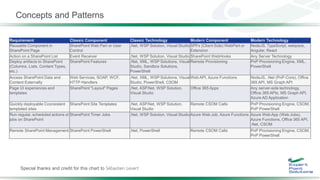
Concepts and Patterns
Special thanks and credit for this chart to Sébastien Levert
Requirement Classic Component Classic Technology Modern Component Modern Technology
Reusable Component in
SharePoint Page
SharePoint Web Part or User
Control
.Net, WSP Solution, Visual Studio SPFx (Client Side) WebPart or
Extension
NodeJS, TypeScript, webpack,
Angular, React
Action on a SharePoint List Event Receiver .Net, WSP Solution, Visual Studio SharePoint WebHooks Any Server Technology
Deploy artifacts to SharePoint
(Columns, Lists, Content Types,
etc.)
SharePoint Features .Net, XML, WSP Solutions, Visual
Studio, Sandbox Solutions,
PowerShell
Remote Provisioning PnP Provisioning Engine, XML,
PowerShell
Access SharePoint Data and
Content Externally
Web Services, SOAP, WCF,
HTTP Handlers
.Net, XML, WSP Solutions, Visual
Studio, PowerShell, CSOM
Web API, Azure Functions NodeJS, .Net (PnP-Core), Office
365 API, MS Graph API
Page UI experiences and
templates
SharePoint "Layout" Pages .Net, ASP.Net, WSP Solution,
Visual Studio
Office 365 Apps Any server-side technology,
Office 365 APIs, MS Graph API,
Azure AD Application
Quickly deployable Cconsistent
templated sites
SharePoint Site Templates .Net, ASP.Net, WSP Solution,
Visual Studio
Remote CSOM Calls PnP Provisioning Engine, CSOM,
PnP PowerShell
Run regular, scheduled actions or
jobs on SharePoint
SharePoint Timer Jobs .Net, WSP Solution, Visual Studio Azure Web Job, Azure Functions Azure Web App (Web Jobs),
Azure Functions, Office 365 API,
.Net, CSOM
Remote SharePoint Management SharePoint PowerShell .Net, PowerShell Remote CSOM Calls PnP Provisioning Engine, CSOM,
PnP PowerShell
IIS Express
Project Templates
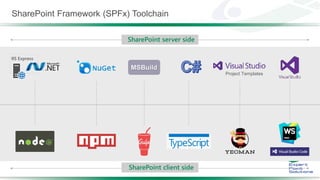
SharePoint Framework (SPFx) Toolchain
SharePoint server side
SharePoint client side
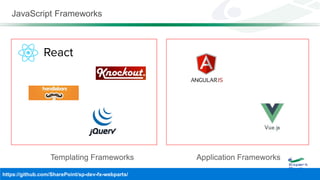
JavaScript Frameworks
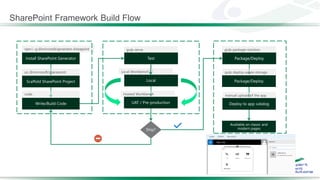
SharePoint Framework Build Flow
SPFx Developer Environment
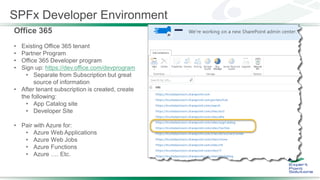
Office 365
• Existing Office 365 tenant
• Partner Program
• Office 365 Developer program
• Sign up: https://dev.office.com/devprogram
• Separate from Subscription but great
source of information
• After tenant subscription is created, create
the following:
• App Catalog site
• Developer Site
• Pair with Azure for:
• Azure Web Applications
• Azure Web Jobs
• Azure Functions
• Azure …. Etc.
Node.js, NPM, Typescript
• Installing Node.js LTS (8.11.1 w/ NPM 5.6.0)
• https://nodejs.org/en/download
• Run install
• node -v
NPM
• Installed with Node.js
• https://www.npmjs.com/
• Used to install just about everything
• npm -v
Yarn
• npm install -g yarn
TypeScript
• Strongly typed Language
• Interpreted language that is a cross between C# and
JavaScript
• Generates clean JavaScript
Chocolatey (Optional … now with Node.js)
• You can use Chocolatey and/or Homebrew
• https://chocolatey.org/
NVM (Node Version Manager)
• Choco install nvm
Yeoman
• npm install -g yo
Gulp
• Make sure Node,js and npm are installed
• Install Gulp
• npm install -g gulp
• npm install -g gulp-cli
• Configure SSL for localhost testing environment
• gulp trust-dev-cert
SPFx Developer Environment
 Console for Node.js
 PowerShell
 CMDER for Windows - http://cmder.net/
 Etc.
 Code Editor
 Visual Studio Code
 https://code.visualstudio.com/docs?start=true
 Visual Studio 2015/2017
 https://marketplace.visualstudio.com/items?
itemName=SharePointPnP.SPFxProjectTemplate
 Atom
 Storm
 Sublime
 Notepad or Notepad++
 Etc.
 Source control system and Project management
 GitHub
 VSTS
 Etc.
 Additional tooling
 Fiddler - http://www.telerik.com/fiddler
 Postman - https://www.getpostman.com/
SPFx Developer Environment
Code Editors
 Open source code editor
 Windows, Mac and Linux
 Built-in support for JavaScript,
TypeScript and Node.js
 Powered by rich ecosystem of
extensions for Visual Studio Code
 Extensions for other languages
 Debugger extensions
 Source code repository extensions
 And more…
•
•
•
•

Community-driven SPFx extensionPreferred SPFx code editor
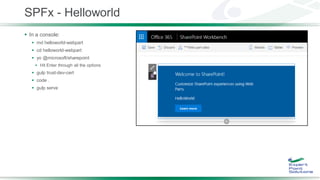
SPFx - Helloworld
 In a console:
 md helloworld-webpart
 cd helloworld-webpart
 yo @microsoft/sharepoint
 Hit Enter through all the options
 gulp trust-dev-cert
 code .
 gulp serve
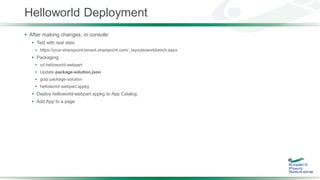
Helloworld Deployment
 After making changes, in console:
 Test with real data:
 https://your-sharepoint-tenant.sharepoint.com/_layouts/workbench.aspx
 Packaging:
 cd helloworld-webpart
 Update package-solution.json
 gulp package-solution
 helloworld-webpart.sppkg
 Deploy helloworld-webpart.sppkg to App Catalog
 Add App to a page
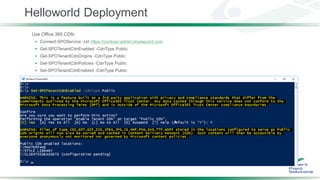
Helloworld Deployment
Use Office 365 CDN:
 Connect-SPOService -Url https://contoso-admin.sharepoint.com
 Get-SPOTenantCdnEnabled -CdnType Public
 Get-SPOTenantCdnOrigins -CdnType Public
 Get-SPOTenantCdnPolicies -CdnType Public
 Set-SPOTenantCdnEnabled -CdnType Public
Beyond Helloworld
 Patterns and Practices Group - https://github.com/SharePoint
 PnP
 SharePoint / Office 365 Developer Patterns and Practices
 PnP-PowerShell
 SharePoint PnP PowerShell CmdLets
 PnP-JS-Core
 Repository for the PnP JavaScript Core component development together with community members
 sp-dev-docs
 SharePoint Developer Documentation
 sp-dev-fx-webparts
 Code samples and developer content targeted towards SharePoint Framework client-side web parts.
 sp-dev-fx-extensions
 Code samples and developer content targeted towards SharePoint Framework client-side extensions.
http://dev.office.com/sharepoint
What are Azure Web Jobs
 Web jobs are effectively background processes that need to either run periodically or run for a long time.
 Web Jobs are hosted within an App Service Plan either stand-alone or along side a Web App (or API App, or
Mobile App).
 Web Jobs can be executed as any command-line executable or script (.ps1, bash, executable, etc).
 Web Jobs can be configured to be manually triggered or run on a schedule.
 Web Jobs can be configured to be Continuously running (aka running constantly, all the time)
 Web Jobs can be setup to be Triggered based on events in other Azure Services, such as a new messaged
added to a Storage Queue or Service Buss Queue or Topic
 Web Jobs can be long running and/or short running
 Full capability set available including:
 .NET, Node.js, Java, PHP, and Python
 Integrated VS publish, remote debug…
 CI with GitHub, BitBucket, VSO
 Auto-load balance, Autoscale, Geo DR
 Virtual networking and hybrid connections
 Site slots for staged deployments
What are Azure Functions
 Azure Functions are (generally) small and quick executions that run as a serverless feature.
 Azure Functions are effectively built on top of Azure Web Jobs. Thus, the same features above apply to Azure
Functions. They technically have the same capabilities.
 Azure Functions are also, webhooks. A webhook is simply an addressable HTTP endpoint that allows external
applications to communicate with your system. This avoids Azure polling SharePoint. Instead, SharePoint tells the
function when to fire … for example, as a list event. Currently, SharePoint only supports list events with webhooks.
 Azure Functions can be hosted as a Consumption Plan or an App Service Plan.
 With the Azure Functions Consumption Plan you only pay for your functions when they are actually executing.
This helps save significant cost over paying for an entire VM or App Service Plan. If you have an Azure Function
that’s only executed a few times per week, as example, this could be extremely cheap.
 Ideal for short running and intermittent running processes.
 A timeout threshold of 5 minutes is implemented.
 With the Azure Functions App Service Plan pricing an App Service Plan (just as Web Apps, API Apps, or Mobile
Apps) is utilized to host Azure Functions. This is a more costly option than Consumption Plan.. With App Service
Plan pricing you don’t pay for only when the Function is executing, but rather for the reserved resources of the
underlying VM.
 Ideal for sharing resources with a Web App, API App, or Mobile App by running within the same App Service Plan.
 Reserve dedicated resources for Azure Functions that are either longer running, executed more frequently, or both.
 Azure Functions do not have to be changed to work on either plan.
When to pick Azure Web Jobs vs Azure Functions
 Pricing is really the driving factor.
 Azure Functions are newer features for PaaS and Serverless.
 Consumption pricing is the cheapest, only paying for when the Azure Functions are actually executed. Yet, it
does have a fairly big limitation which is the timeout threshold (5 minutes).
 A possible solution is to break up the Function into smaller separate functions. These separate smaller functions would then
be implemented using one or more message queues to communicate.
 Once the consumption plan is exceeded, the App Service plan is the next option. Azure Functions do not have to
be changed to work on either plan.
 Beyond this, there are always exceptions …
and It Depends …
In Summary
 Tools today have far out grown or ability to limit the scope to a couple simple tools.
 In the new Cloud paradigm, cost savings, supportability and manageability will likely lead to some clear winners.
 In my opinion, Azure Functions over Azure Web Jobs as discussed earlier.
 There is no real straight path for any solution. Cloud technologies continue to change at an almost blinding rate.
 Current best of breed frameworks for SharePoint Online include:
 PnP PoweShell and PnP Core
 SharePoint Framework (SPFx)
 Azure Functions
Useful Resources
 Tutorials:
 Tutorial 1 - https://www.youtube.com/watch?v=YqUIX2pMUzg
 Tutorial 2 - https://www.youtube.com/watch?v=hYrP6D4FaaU
 Tutorial 3 - https://www.youtube.com/watch?v=BpJ01ahxbiY
 Tutorial 4 - https://www.youtube.com/watch?v=MEZMs8VMVQ0
 http://dev.office.com/sharepoint
 https://dev.office.com/devprogram
 https://docs.microsoft.com/en-us/sharepoint/dev/spfx/sharepoint-framework-overview
 https://github.com/SharePoint/sp-dev-docs/wiki
 https://github.com/SharePoint/sp-dev-docs
 https://github.com/SharePoint/sp-dev-fx-webparts
 https://github.com/SharePoint/PnP-JS-Core
 https://dev.office.com/sharepoint/docs/spfx/web-parts/get-started/build-a-hello-world-web-part
 https://www.youtube.com/playlist?list=PLR9nK3mnD-OXvSWvS2zglCzz4iplhVrKq
 https://chocolatey.org/
 https://developer.microsoft.com/en-us/office/events

Useful Resources – More …
 https://github.com/SharePoint/PnP-Partner-Pack
 https://www.youtube.com/watch?v=D98jqzPkfj0
 https://docs.microsoft.com/en-us/rest/api/apimanagement/
 https://msdn.microsoft.com/en-us/pnp_articles/pnp-provisioning-engine-and-the-core-library
 https://msdn.microsoft.com/en-us/pnp_articles/introducing-the-pnp-provisioning-engine
 https://dev.office.com
 https://graph.microsoft.io
 https://github.com/SharePoint/sp-dev-docs
 https://mva.microsoft.com/product-training/office-development
 https://github.com/officedev
 https://github.com/microsoftgraph
 https://github.com/sharepoint
 https://docs.microsoft.com/en-us/azure/azure-functions/supported-languages
Questions
??
?
?
Thank you!
Brian Culver, MCM
Twitter:
@spbrianculver
E-mail:
brian.culver(at)expertpointsolutions.com
Blog:
http://blog.expertpointsolutions.com/
Slides:
http://www.slideshare.net/bculver

Real World SharePoint Framework and Azure Services

  • 1.
    Brian Culver ●@spsutah ● Feb 9, 2019
  • 2.
    Thank You #SPSUTAH2019 Sponsors! PLATINUM • Lucidworks • ZAACT GOLD • JourneyTEAM • Sovereign SP SILVER • SkySync ShareSki & SharePint
  • 3.
    About Brian Culver SharePoint Solutions Architect for Expert Point Solutions in Houston, Texas.  Microsoft Certified Master (MCM) in SharePoint  Brian has worked in the Information Technology industry for since 1998 and he has been working with SharePoint since 2005. His deep expertise includes Azure, Office365, SharePoint, ASP.Net, SQL Server and Project Server. He has been involved in many large SharePoint implementations including Internet and Intranet sites, Partner Portals, Enterprise Content Management and Governance, and much custom application integration and development.  Author, Speaker and Blogger  Email : brian.culver(at)expertpointsolutions.com  Twitter : @spbrianculver  LinkedIn : https://www.linkedin.com/in/bculver  Blog : http://blog.expertpointsolutions.com
  • 4.
    Session Agenda  Whatare we doing today?  SharePoint Framework (SPFx)  Azure Functions  Event Grids  Azure Web Jobs  Azure Services  Conclusion
  • 5.
    What are wedoing today?  Discussing how to convert Full Trust Solutions (FTS) to Cloud Ready Solutions (CRS).  Common examples:  Site Provisioning  Updating SharePoint data from external systems  Completing tasks which took longer than 90 seconds (WF limitation)  Long running event handlers  Updating lists  Generating unique IDs  Updating external systems with IDs  User Permission Reports  Global Site Map (for large environments)
  • 6.
    What is theSharePoint Framework (SPFx)  Latest release is 1.6  New client-side framework for building Modern UI customizations  https://docs.microsoft.com/en- us/sharepoint/dev/spfx/enterprise-guidance  Built on the well-known web stack  Open model, not tied to Microsoft tools  Works great on the cloud  Available on-premises for SP2016 with Feature Pack 2 ( and newer)  Enterprise-ready when used with back-end services  REST API and micro-services, Azure Functions, etc.  Build client-side Web Parts or client-side Extensions  Some key features of the SharePoint Framework:  Runs in the context of the current user and the connection in the browser. No IFRAMEs for the customization (JavaScript is embedded directly to the page).  The controls are rendered within the page DOM.  The controls are responsive, accessible and mobile friendly.  Developers are able to access the page lifecycle fully, including rendering, loading, serializing and deserializing, configuration changes, and more.  Framework-agnostic. Use any JavaScript framework: React, Knockout, Angular, Bootstrap and more.  The toolchain is based on common open source client development tools such as npm, nvm, TypeScript, Yeoman, Yarn, webpack, and gulp.  Performance is reliable.  End users can use SPFx client-side solutions that are approved by the tenant administrators (or their delegates) on all sites, including self-service team, group, or personal sites.  SPFx web parts can be added to both classic and modern pages. Modern pages can only use client-side web parts.
  • 7.
    Where does eachsolution framework fit?  Full Trust Solutions  Server-side code  Full server side API  Only supported on-premise  Visual Studio Only  Farm Scoped  Webparts, Timers Jobs, Event Receivers (Feature, Web, Site, List, etc.)  Sandbox Solutions  Restricted Server-side code  Declarative Solutions only supported in SPO  Visual Studio Only  Site Collection Scoped  Features & Declarative Solutions  Site columns, content types, Lists, List instances, File Resources, etc.  SharePoint Add-in / Apps  Client-side or Server-side code  Client-side API  Execution context was externalized from SharePoint and displayed via IFRAMEs  Visual Studio Only  Tenant and Site Scoped  SharePoint Framework (SPFx)  Client-side code only  Client-side web parts and extensions (custom actions, menus and other UI enhancements)  Execution context is in the page (yeah Baby!!)  Open source and cross-platform tooling  Tenant Scoped  Responsive, accessible and mobile friendly
  • 8.
    Where does eachsolution framework fit?  Full Trust Solutions  Server-side code  Full server side API  Only supported on-premise  Visual Studio Only  Farm Scoped  Webparts, Timers Jobs, Event Receivers (Feature, Web, Site, List, etc.)  Cloud Ready Solutions  Server-side code [outside of SharePoint]  Full server side API [outside of SharePoint]  Supported by SharePoint Online and SharePoint On-Prem  IDE Agnostic  Tenant or Farm Scoped  PowerApps and MS Flow  PnP PowerShell, Core and Provisioning Engine  SPFx, Web Jobs, Azure Functions, Web Services, etc.
  • 9.
    Concepts and Patterns Specialthanks and credit for this chart to Sébastien Levert Requirement Classic Component Classic Technology Modern Component Modern Technology Reusable Component in SharePoint Page SharePoint Web Part or User Control .Net, WSP Solution, Visual Studio SPFx (Client Side) WebPart or Extension NodeJS, TypeScript, webpack, Angular, React Action on a SharePoint List Event Receiver .Net, WSP Solution, Visual Studio SharePoint WebHooks Any Server Technology Deploy artifacts to SharePoint (Columns, Lists, Content Types, etc.) SharePoint Features .Net, XML, WSP Solutions, Visual Studio, Sandbox Solutions, PowerShell Remote Provisioning PnP Provisioning Engine, XML, PowerShell Access SharePoint Data and Content Externally Web Services, SOAP, WCF, HTTP Handlers .Net, XML, WSP Solutions, Visual Studio, PowerShell, CSOM Web API, Azure Functions NodeJS, .Net (PnP-Core), Office 365 API, MS Graph API Page UI experiences and templates SharePoint "Layout" Pages .Net, ASP.Net, WSP Solution, Visual Studio Office 365 Apps Any server-side technology, Office 365 APIs, MS Graph API, Azure AD Application Quickly deployable Cconsistent templated sites SharePoint Site Templates .Net, ASP.Net, WSP Solution, Visual Studio Remote CSOM Calls PnP Provisioning Engine, CSOM, PnP PowerShell Run regular, scheduled actions or jobs on SharePoint SharePoint Timer Jobs .Net, WSP Solution, Visual Studio Azure Web Job, Azure Functions Azure Web App (Web Jobs), Azure Functions, Office 365 API, .Net, CSOM Remote SharePoint Management SharePoint PowerShell .Net, PowerShell Remote CSOM Calls PnP Provisioning Engine, CSOM, PnP PowerShell
  • 10.
    IIS Express Project Templates SharePointFramework (SPFx) Toolchain SharePoint server side SharePoint client side
  • 11.
  • 12.
  • 13.
    SPFx Developer Environment Office365 • Existing Office 365 tenant • Partner Program • Office 365 Developer program • Sign up: https://dev.office.com/devprogram • Separate from Subscription but great source of information • After tenant subscription is created, create the following: • App Catalog site • Developer Site • Pair with Azure for: • Azure Web Applications • Azure Web Jobs • Azure Functions • Azure …. Etc.
  • 14.
    Node.js, NPM, Typescript •Installing Node.js LTS (8.11.1 w/ NPM 5.6.0) • https://nodejs.org/en/download • Run install • node -v NPM • Installed with Node.js • https://www.npmjs.com/ • Used to install just about everything • npm -v Yarn • npm install -g yarn TypeScript • Strongly typed Language • Interpreted language that is a cross between C# and JavaScript • Generates clean JavaScript Chocolatey (Optional … now with Node.js) • You can use Chocolatey and/or Homebrew • https://chocolatey.org/ NVM (Node Version Manager) • Choco install nvm Yeoman • npm install -g yo Gulp • Make sure Node,js and npm are installed • Install Gulp • npm install -g gulp • npm install -g gulp-cli • Configure SSL for localhost testing environment • gulp trust-dev-cert SPFx Developer Environment
  • 15.
     Console forNode.js  PowerShell  CMDER for Windows - http://cmder.net/  Etc.  Code Editor  Visual Studio Code  https://code.visualstudio.com/docs?start=true  Visual Studio 2015/2017  https://marketplace.visualstudio.com/items? itemName=SharePointPnP.SPFxProjectTemplate  Atom  Storm  Sublime  Notepad or Notepad++  Etc.  Source control system and Project management  GitHub  VSTS  Etc.  Additional tooling  Fiddler - http://www.telerik.com/fiddler  Postman - https://www.getpostman.com/ SPFx Developer Environment
  • 16.
    Code Editors  Opensource code editor  Windows, Mac and Linux  Built-in support for JavaScript, TypeScript and Node.js  Powered by rich ecosystem of extensions for Visual Studio Code  Extensions for other languages  Debugger extensions  Source code repository extensions  And more… • • • •  Community-driven SPFx extensionPreferred SPFx code editor
  • 17.
    SPFx - Helloworld In a console:  md helloworld-webpart  cd helloworld-webpart  yo @microsoft/sharepoint  Hit Enter through all the options  gulp trust-dev-cert  code .  gulp serve
  • 18.
    Helloworld Deployment  Aftermaking changes, in console:  Test with real data:  https://your-sharepoint-tenant.sharepoint.com/_layouts/workbench.aspx  Packaging:  cd helloworld-webpart  Update package-solution.json  gulp package-solution  helloworld-webpart.sppkg  Deploy helloworld-webpart.sppkg to App Catalog  Add App to a page
  • 19.
    Helloworld Deployment Use Office365 CDN:  Connect-SPOService -Url https://contoso-admin.sharepoint.com  Get-SPOTenantCdnEnabled -CdnType Public  Get-SPOTenantCdnOrigins -CdnType Public  Get-SPOTenantCdnPolicies -CdnType Public  Set-SPOTenantCdnEnabled -CdnType Public
  • 20.
    Beyond Helloworld  Patternsand Practices Group - https://github.com/SharePoint  PnP  SharePoint / Office 365 Developer Patterns and Practices  PnP-PowerShell  SharePoint PnP PowerShell CmdLets  PnP-JS-Core  Repository for the PnP JavaScript Core component development together with community members  sp-dev-docs  SharePoint Developer Documentation  sp-dev-fx-webparts  Code samples and developer content targeted towards SharePoint Framework client-side web parts.  sp-dev-fx-extensions  Code samples and developer content targeted towards SharePoint Framework client-side extensions. http://dev.office.com/sharepoint
  • 21.
    What are AzureWeb Jobs  Web jobs are effectively background processes that need to either run periodically or run for a long time.  Web Jobs are hosted within an App Service Plan either stand-alone or along side a Web App (or API App, or Mobile App).  Web Jobs can be executed as any command-line executable or script (.ps1, bash, executable, etc).  Web Jobs can be configured to be manually triggered or run on a schedule.  Web Jobs can be configured to be Continuously running (aka running constantly, all the time)  Web Jobs can be setup to be Triggered based on events in other Azure Services, such as a new messaged added to a Storage Queue or Service Buss Queue or Topic  Web Jobs can be long running and/or short running  Full capability set available including:  .NET, Node.js, Java, PHP, and Python  Integrated VS publish, remote debug…  CI with GitHub, BitBucket, VSO  Auto-load balance, Autoscale, Geo DR  Virtual networking and hybrid connections  Site slots for staged deployments
  • 22.
    What are AzureFunctions  Azure Functions are (generally) small and quick executions that run as a serverless feature.  Azure Functions are effectively built on top of Azure Web Jobs. Thus, the same features above apply to Azure Functions. They technically have the same capabilities.  Azure Functions are also, webhooks. A webhook is simply an addressable HTTP endpoint that allows external applications to communicate with your system. This avoids Azure polling SharePoint. Instead, SharePoint tells the function when to fire … for example, as a list event. Currently, SharePoint only supports list events with webhooks.  Azure Functions can be hosted as a Consumption Plan or an App Service Plan.  With the Azure Functions Consumption Plan you only pay for your functions when they are actually executing. This helps save significant cost over paying for an entire VM or App Service Plan. If you have an Azure Function that’s only executed a few times per week, as example, this could be extremely cheap.  Ideal for short running and intermittent running processes.  A timeout threshold of 5 minutes is implemented.  With the Azure Functions App Service Plan pricing an App Service Plan (just as Web Apps, API Apps, or Mobile Apps) is utilized to host Azure Functions. This is a more costly option than Consumption Plan.. With App Service Plan pricing you don’t pay for only when the Function is executing, but rather for the reserved resources of the underlying VM.  Ideal for sharing resources with a Web App, API App, or Mobile App by running within the same App Service Plan.  Reserve dedicated resources for Azure Functions that are either longer running, executed more frequently, or both.  Azure Functions do not have to be changed to work on either plan.
  • 23.
    When to pickAzure Web Jobs vs Azure Functions  Pricing is really the driving factor.  Azure Functions are newer features for PaaS and Serverless.  Consumption pricing is the cheapest, only paying for when the Azure Functions are actually executed. Yet, it does have a fairly big limitation which is the timeout threshold (5 minutes).  A possible solution is to break up the Function into smaller separate functions. These separate smaller functions would then be implemented using one or more message queues to communicate.  Once the consumption plan is exceeded, the App Service plan is the next option. Azure Functions do not have to be changed to work on either plan.  Beyond this, there are always exceptions … and It Depends …
  • 24.
    In Summary  Toolstoday have far out grown or ability to limit the scope to a couple simple tools.  In the new Cloud paradigm, cost savings, supportability and manageability will likely lead to some clear winners.  In my opinion, Azure Functions over Azure Web Jobs as discussed earlier.  There is no real straight path for any solution. Cloud technologies continue to change at an almost blinding rate.  Current best of breed frameworks for SharePoint Online include:  PnP PoweShell and PnP Core  SharePoint Framework (SPFx)  Azure Functions
  • 25.
    Useful Resources  Tutorials: Tutorial 1 - https://www.youtube.com/watch?v=YqUIX2pMUzg  Tutorial 2 - https://www.youtube.com/watch?v=hYrP6D4FaaU  Tutorial 3 - https://www.youtube.com/watch?v=BpJ01ahxbiY  Tutorial 4 - https://www.youtube.com/watch?v=MEZMs8VMVQ0  http://dev.office.com/sharepoint  https://dev.office.com/devprogram  https://docs.microsoft.com/en-us/sharepoint/dev/spfx/sharepoint-framework-overview  https://github.com/SharePoint/sp-dev-docs/wiki  https://github.com/SharePoint/sp-dev-docs  https://github.com/SharePoint/sp-dev-fx-webparts  https://github.com/SharePoint/PnP-JS-Core  https://dev.office.com/sharepoint/docs/spfx/web-parts/get-started/build-a-hello-world-web-part  https://www.youtube.com/playlist?list=PLR9nK3mnD-OXvSWvS2zglCzz4iplhVrKq  https://chocolatey.org/  https://developer.microsoft.com/en-us/office/events 
  • 26.
    Useful Resources –More …  https://github.com/SharePoint/PnP-Partner-Pack  https://www.youtube.com/watch?v=D98jqzPkfj0  https://docs.microsoft.com/en-us/rest/api/apimanagement/  https://msdn.microsoft.com/en-us/pnp_articles/pnp-provisioning-engine-and-the-core-library  https://msdn.microsoft.com/en-us/pnp_articles/introducing-the-pnp-provisioning-engine  https://dev.office.com  https://graph.microsoft.io  https://github.com/SharePoint/sp-dev-docs  https://mva.microsoft.com/product-training/office-development  https://github.com/officedev  https://github.com/microsoftgraph  https://github.com/sharepoint  https://docs.microsoft.com/en-us/azure/azure-functions/supported-languages
  • 27.
  • 28.
    Thank you! Brian Culver,MCM Twitter: @spbrianculver E-mail: brian.culver(at)expertpointsolutions.com Blog: http://blog.expertpointsolutions.com/ Slides: http://www.slideshare.net/bculver