

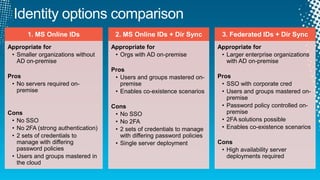








1. MS Online IDs              2. MS Online IDs + Dir Sync           3. Federated IDs + Dir Sync
Appropriate for                     Appropriate for                       Appropriate for
 • Smaller organizations without     • Orgs with AD on-premise             • Larger enterprise organizations
   AD on-premise                                                             with AD on-premise
                                    Pros
Pros                                 • Users and groups mastered on-      Pros
 • No servers required on-             premise                             • SSO with corporate cred
   premise                           • Enables co-existence scenarios      • Users and groups mastered on-
                                                                             premise
                                    Cons                                   • Password policy controlled on-
Cons                                 • No SSO                                premise
 • No SSO                            • No 2FA                              • 2FA solutions possible
 • No 2FA (strong authentication)    • 2 sets of credentials to manage     • Enables co-existence scenarios
 • 2 sets of credentials to            with differing password policies
   manage with differing             • Single server deployment           Cons
   password policies                                                       • High availability server
 • Users and groups mastered in                                              deployments required
   the cloud
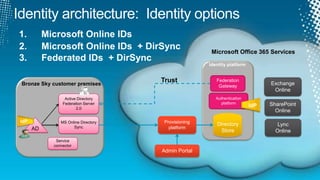
Microsoft Office 365 Services


Bronze Sky customer premises
                                    Trust            Federation
                                                                            Exchange
                                                      Gateway
                                                                             Online
                Active Directory                     Authentication
               Federation Server                       platform             SharePoint
                      2.0
                                                                      IdP
                                                                              Online
IdP           MS Online Directory    Provisioning
                    Sync
                                                     Directory                 Lync
      AD                               platform
                                                      Store                   Online
            Service
           connector
                                    Admin Portal
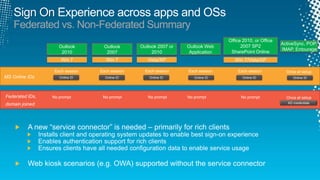
Federated vs. Non-Federated Summary
                                                                          Office 2010, or Office
                                                                                                   ActiveSync, POP,
                 Outlook     Outlook     Outlook 2007 or   Outlook Web          2007 SP2
                                                                                                   IMAP, Entourage
                  2010        2007            2010          Application    SharePoint Online
                  Win 7      Win 7          Vista/XP                         Win 7/Vista/XP


MS Online IDs    Online ID   Online ID       Online ID        Online ID         Online ID                Online ID


Federated IDs,
domain joined                                                                                         AD credentials
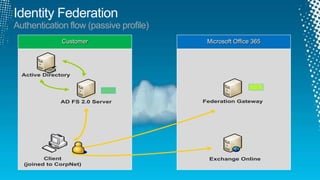
Authentication flow (passive profile)
               Customer                  Microsoft Office 365


  Active Directory


              AD FS 2.0 Server          Federation Gateway


               `


         Client                          Exchange Online
  (joined to CorpNet)
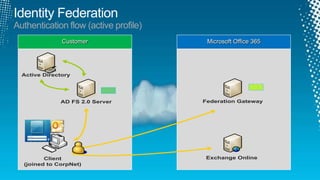
Authentication flow (active profile)
               Customer                 Microsoft Office 365


  Active Directory


              AD FS 2.0 Server         Federation Gateway


               `


         Client                         Exchange Online
  (joined to CorpNet)
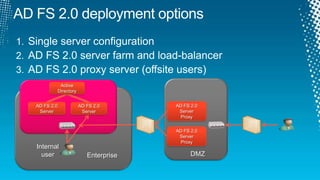
AD FS 2.0 deployment options


                Active
               Directory


   AD FS 2.0               AD FS 2.0       AD FS 2.0
    Server                  Server          Server
                                             Proxy

                                           AD FS 2.0
                                            Server
                                             Proxy
   Internal
     user                     Enterprise         DMZ
Identity Co-Existence
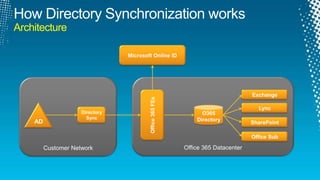
Architecture
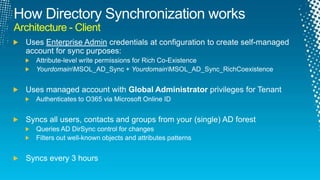
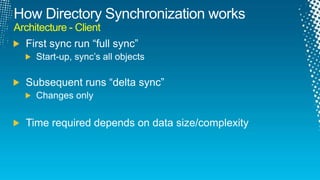
Architecture - Client
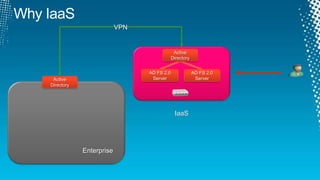
VPN


                                            Active
                                           Directory


                               AD FS 2.0               AD FS 2.0
 Active                         Server                  Server
Directory


                                            IaaS


            Enterprise
AD FS 2.0
              Server


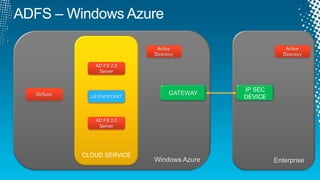
                                          IP SEC
DirSync                       GATEWAY
            LB ENDPOINT                   DEVICE


             AD FS 2.0
              Server


          CLOUD SERVICE
                          Windows Azure            Enterprise
Adfs azure
Adfs azure

Adfs azure

  • 5.
    1. MS OnlineIDs 2. MS Online IDs + Dir Sync 3. Federated IDs + Dir Sync Appropriate for Appropriate for Appropriate for • Smaller organizations without • Orgs with AD on-premise • Larger enterprise organizations AD on-premise with AD on-premise Pros Pros • Users and groups mastered on- Pros • No servers required on- premise • SSO with corporate cred premise • Enables co-existence scenarios • Users and groups mastered on- premise Cons • Password policy controlled on- Cons • No SSO premise • No SSO • No 2FA • 2FA solutions possible • No 2FA (strong authentication) • 2 sets of credentials to manage • Enables co-existence scenarios • 2 sets of credentials to with differing password policies manage with differing • Single server deployment Cons password policies • High availability server • Users and groups mastered in deployments required the cloud
  • 6.
    Microsoft Office 365Services Bronze Sky customer premises Trust Federation Exchange Gateway Online Active Directory Authentication Federation Server platform SharePoint 2.0 IdP Online IdP MS Online Directory Provisioning Sync Directory Lync AD platform Store Online Service connector Admin Portal
  • 7.
    Federated vs. Non-FederatedSummary Office 2010, or Office ActiveSync, POP, Outlook Outlook Outlook 2007 or Outlook Web 2007 SP2 IMAP, Entourage 2010 2007 2010 Application SharePoint Online Win 7 Win 7 Vista/XP Win 7/Vista/XP MS Online IDs Online ID Online ID Online ID Online ID Online ID Online ID Federated IDs, domain joined AD credentials
  • 9.
    Authentication flow (passiveprofile) Customer Microsoft Office 365 Active Directory AD FS 2.0 Server Federation Gateway ` Client Exchange Online (joined to CorpNet)
  • 10.
    Authentication flow (activeprofile) Customer Microsoft Office 365 Active Directory AD FS 2.0 Server Federation Gateway ` Client Exchange Online (joined to CorpNet)
  • 11.
    AD FS 2.0deployment options Active Directory AD FS 2.0 AD FS 2.0 AD FS 2.0 Server Server Server Proxy AD FS 2.0 Server Proxy Internal user Enterprise DMZ
  • 15.
  • 18.
  • 19.
  • 20.
  • 26.
    VPN Active Directory AD FS 2.0 AD FS 2.0 Active Server Server Directory IaaS Enterprise
  • 32.
    AD FS 2.0 Server IP SEC DirSync GATEWAY LB ENDPOINT DEVICE AD FS 2.0 Server CLOUD SERVICE Windows Azure Enterprise

Editor's Notes

  • #17 - how many 2K8 R2?How many want 64-bit? STUCK on 32-bit?
  • #21 Complexity/time – SG memberships heavier, recursive membership