Office 365 Multi-Factor
Authentication with Microsoft Azure
Active Directory Premium
by Nuno Árias Silva
GOLD
SILVERLOCATION
BRONZE
MEDIA
MVP Office Servers and Services
Nuno Árias Silva
Blog: www.nuno-silva.net
Email : email@nuno-silva.net
Twitter : NunoAriasSilva
Facebook : nunoarias
LinkedIn : nunoarias
I advise my clients to be proactive in adopting new
Microsoft technologies that help them to reach business
needs and to accomplish their goals.
Has more than 19 years working on IT, with Master in
Information Technologies, last projects have more focus in
Office 365, Infrastructures and Security within Microsoft
Infrastructure Products.
GFI
Manager - Infrastructure Services
nuno.a.silva@gfi.pt
Agenda
Multi-Factor Authentication
for Office 365
Office client futures with
Multi-Factor Authentication
Microsoft Azure Multi-Factor Authentication
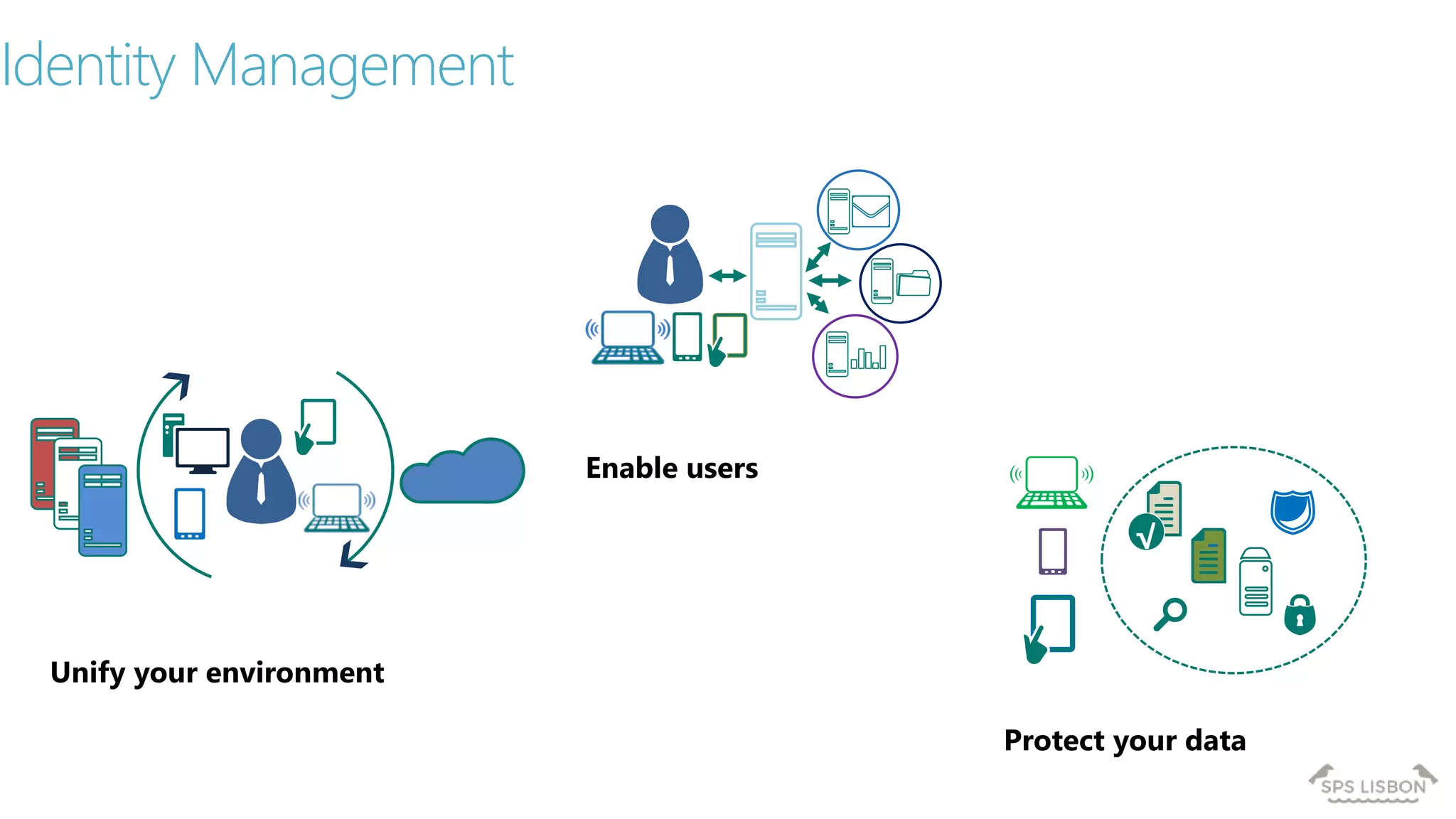
Identity Management
Unify your environment
Enable users
Protect your data
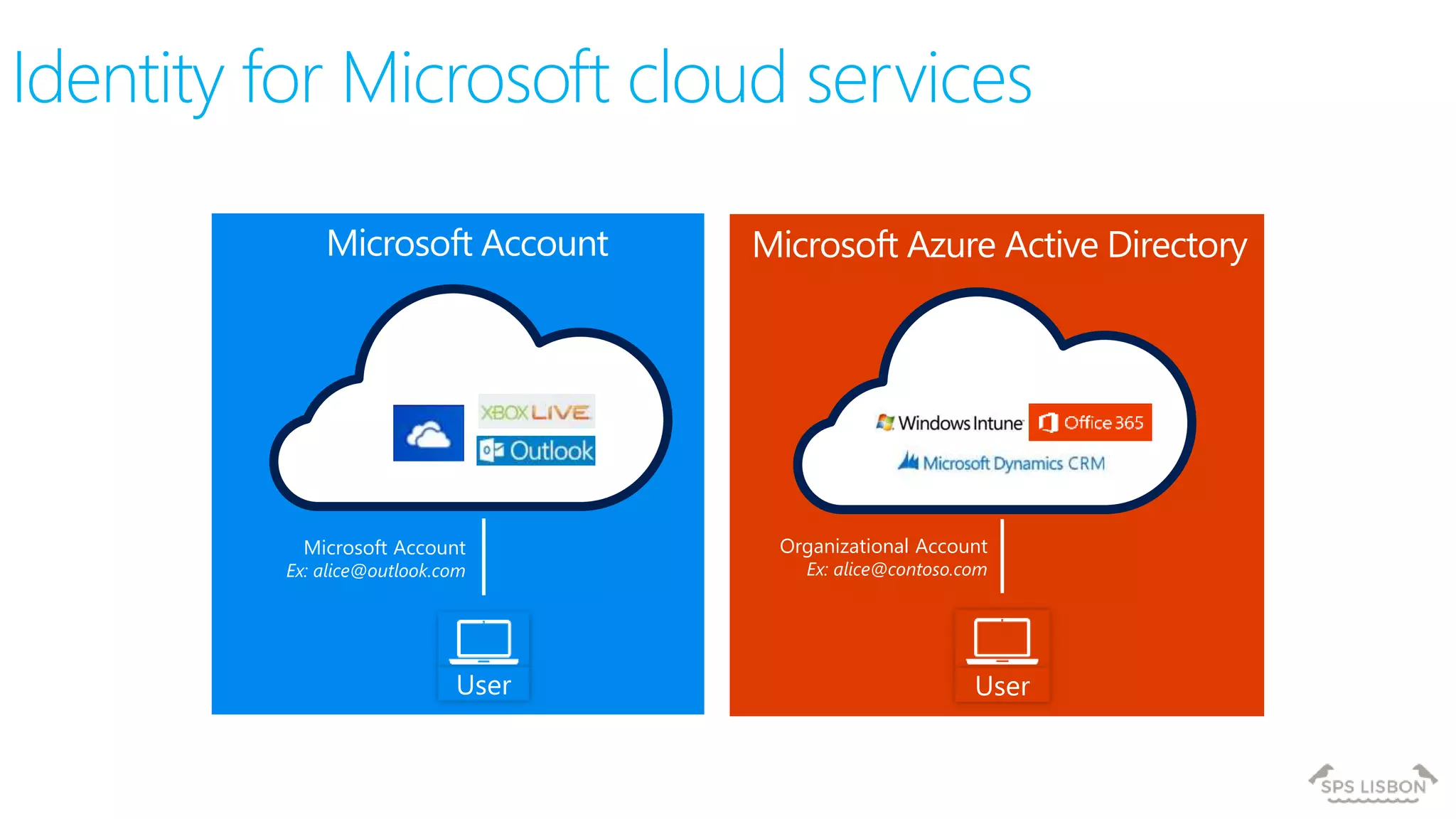
Identity for Microsoft cloud services
User
Microsoft Account
Ex: alice@outlook.com
User
Organizational Account
Ex: alice@contoso.com
Microsoft Account Microsoft Azure Active Directory
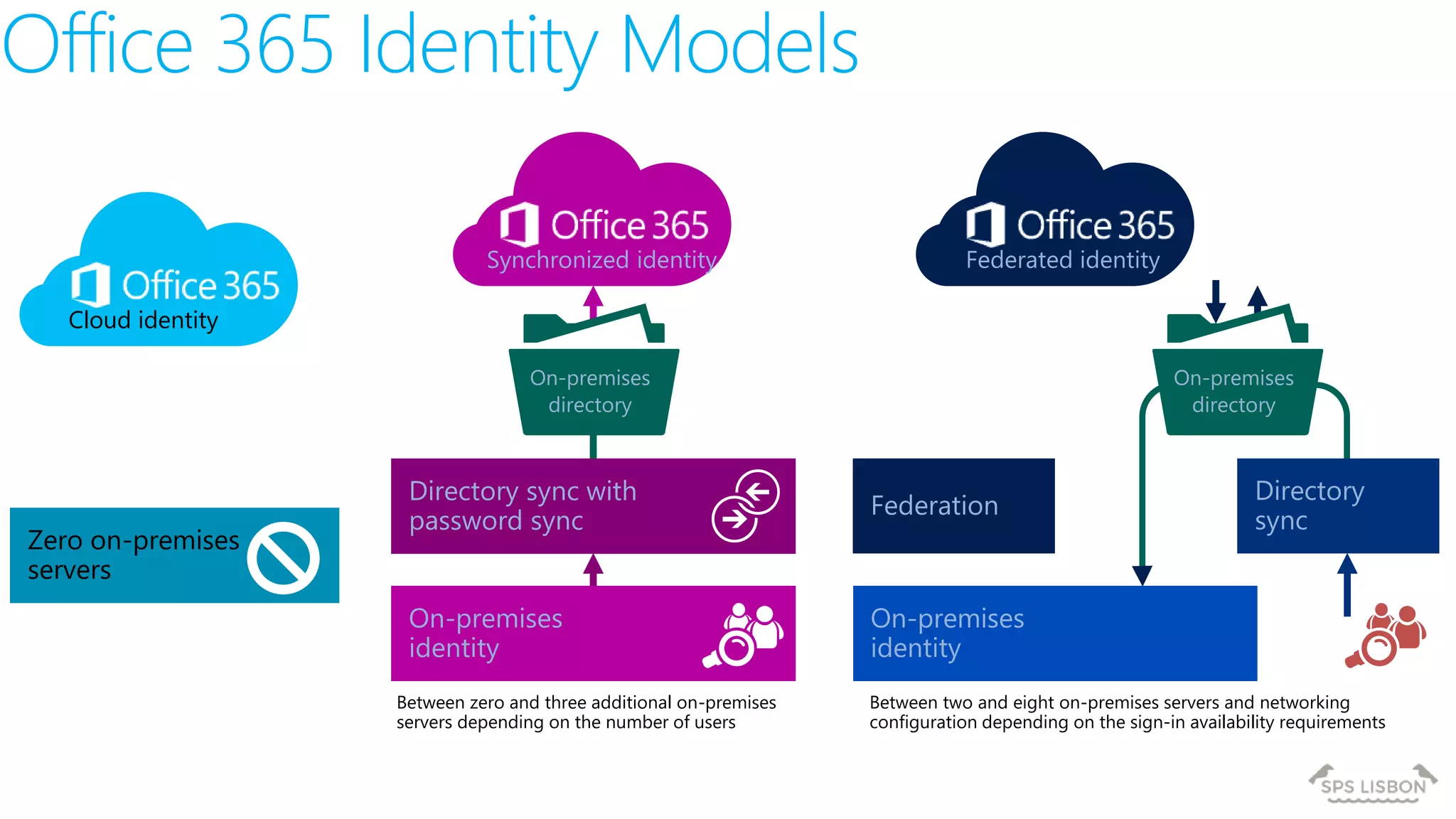
Federated identitySynchronized identity
Cloud identity
On-premises
directory
Zero on-premises
servers
On-premises
directory
Directory sync with
password sync
On-premises
identity
Between zero and three additional on-premises
servers depending on the number of users
On-premises
identity
Between two and eight on-premises servers and networking
configuration depending on the sign-in availability requirements
Directory
sync
Federation
Office 365 Identity Models
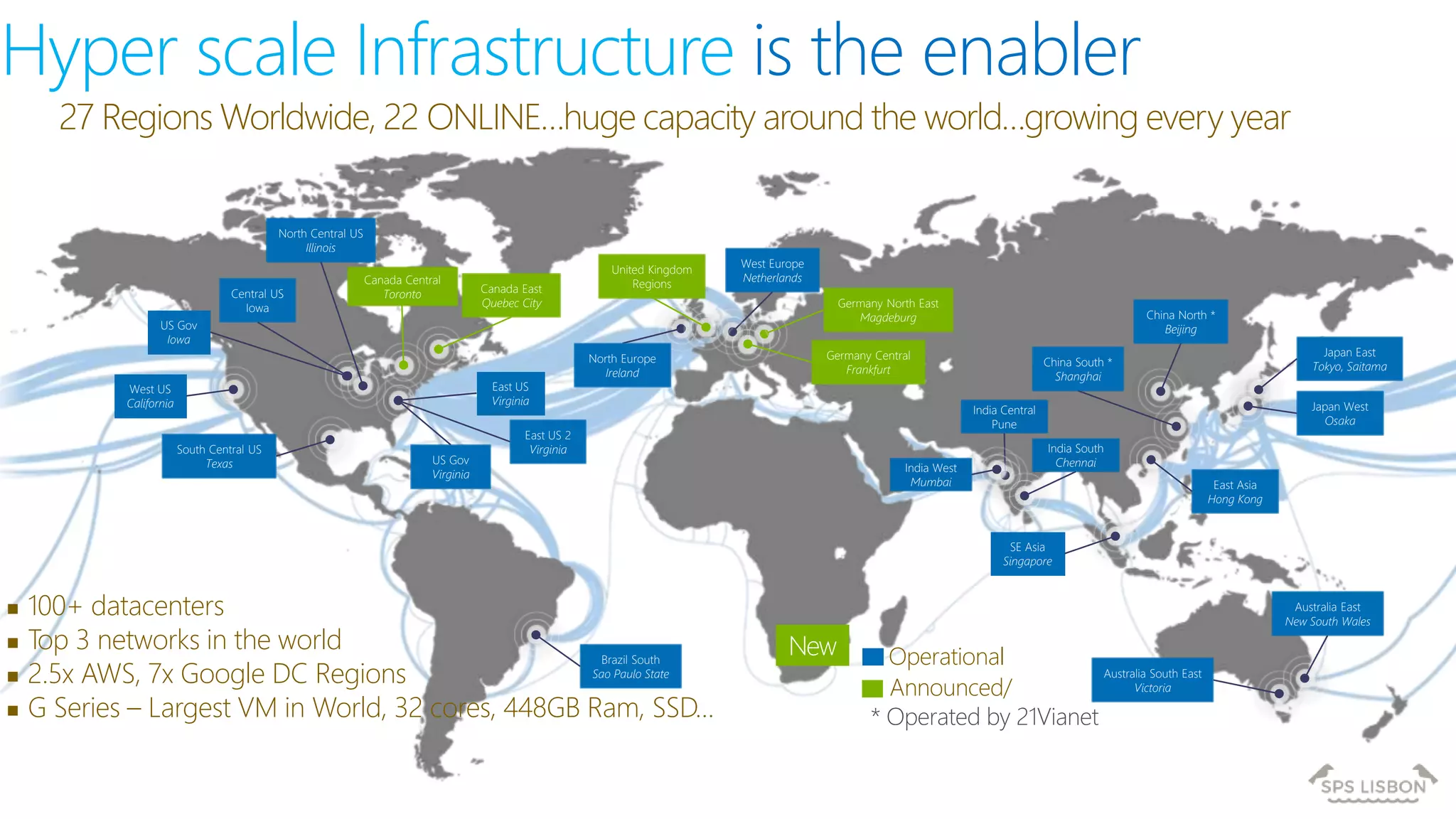
Hyper scale Infrastructure is the enabler
27 Regions Worldwide, 22 ONLINE…huge capacity around the world…growing every year
 100+ datacenters
 Top 3 networks in the world
 2.5x AWS, 7x Google DC Regions
 G Series – Largest VM in World, 32 cores, 448GB Ram, SSD…
Operational
Announced/
Central US
Iowa
West US
California
East US
Virginia
US Gov
Virginia
North Central US
Illinois
US Gov
Iowa
South Central US
Texas
Brazil South
Sao Paulo State
West Europe
Netherlands
China North *
Beijing
China South *
Shanghai
Japan East
Tokyo, Saitama
Japan West
Osaka
India South
Chennai
East Asia
Hong Kong
SE Asia
Singapore
Australia South East
Victoria
Australia East
New South Wales
* Operated by 21Vianet
India Central
Pune
Canada East
Quebec City
Canada Central
Toronto
India West
Mumbai
Germany North East
Magdeburg
Germany Central
Frankfurt
United Kingdom
Regions
North Europe
Ireland
East US 2
Virginia
New
Agenda
Multi-Factor Authentication
for Office 365
Office client futures with
Multi-Factor Authentication
Microsoft Azure Multi-Factor Authentication
Multi-Factor
Authentication
for Office 365
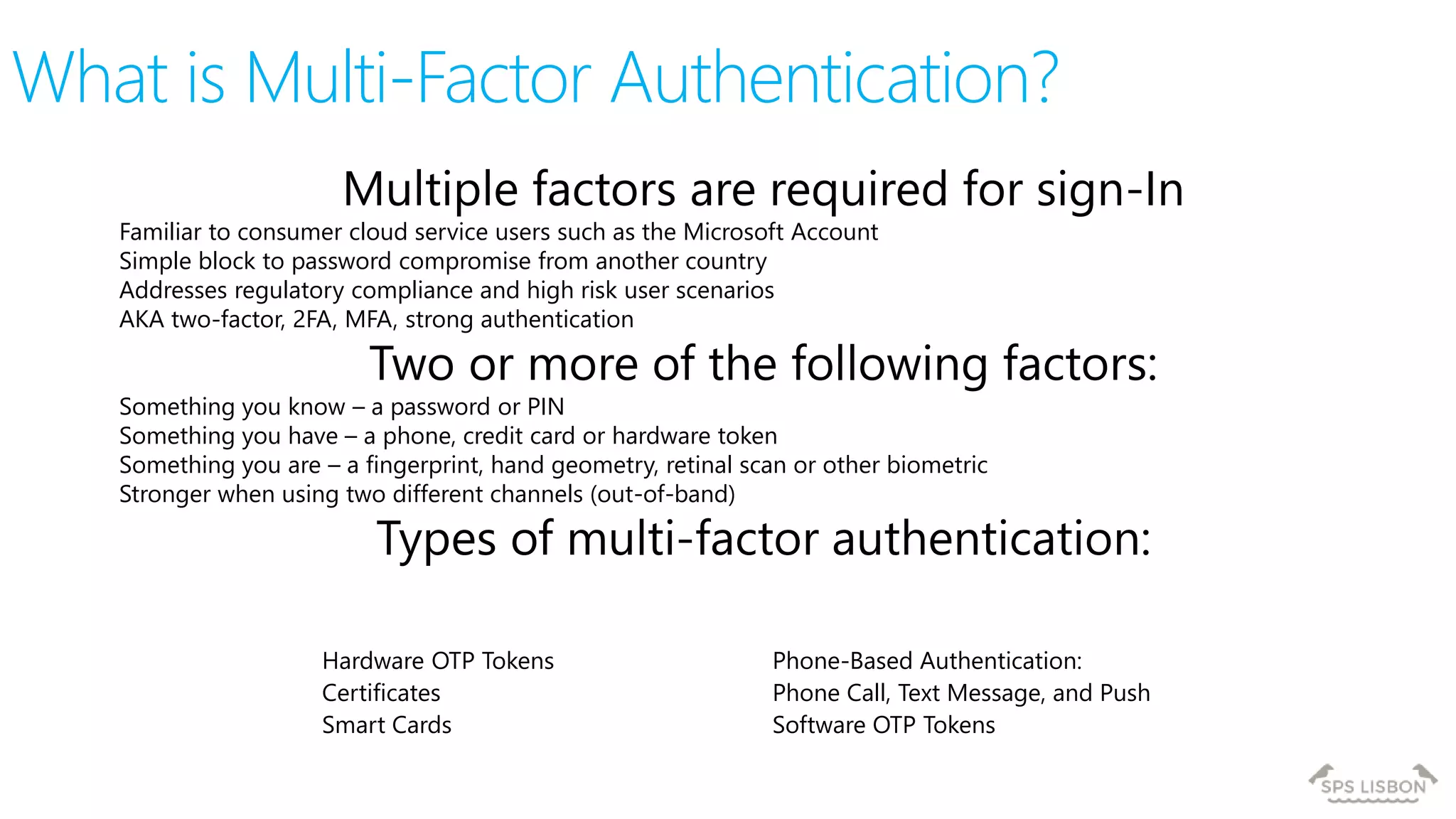
What is Multi-Factor Authentication?
Multiple factors are required for sign-In
Familiar to consumer cloud service users such as the Microsoft Account
Simple block to password compromise from another country
Addresses regulatory compliance and high risk user scenarios
AKA two-factor, 2FA, MFA, strong authentication
Two or more of the following factors:
Something you know – a password or PIN
Something you have – a phone, credit card or hardware token
Something you are – a fingerprint, hand geometry, retinal scan or other biometric
Stronger when using two different channels (out-of-band)
Types of multi-factor authentication:
Hardware OTP Tokens
Certificates
Smart Cards
Phone-Based Authentication:
Phone Call, Text Message, and Push
Software OTP Tokens
What is Multi-Factor Authentication?
Powered by PhoneFactor, acquired
by Microsoft in 2012
Trusted by thousands of enterprises
to authenticate employee, customer,
and partner access
Secures applications and identities
in the cloud and on-premises
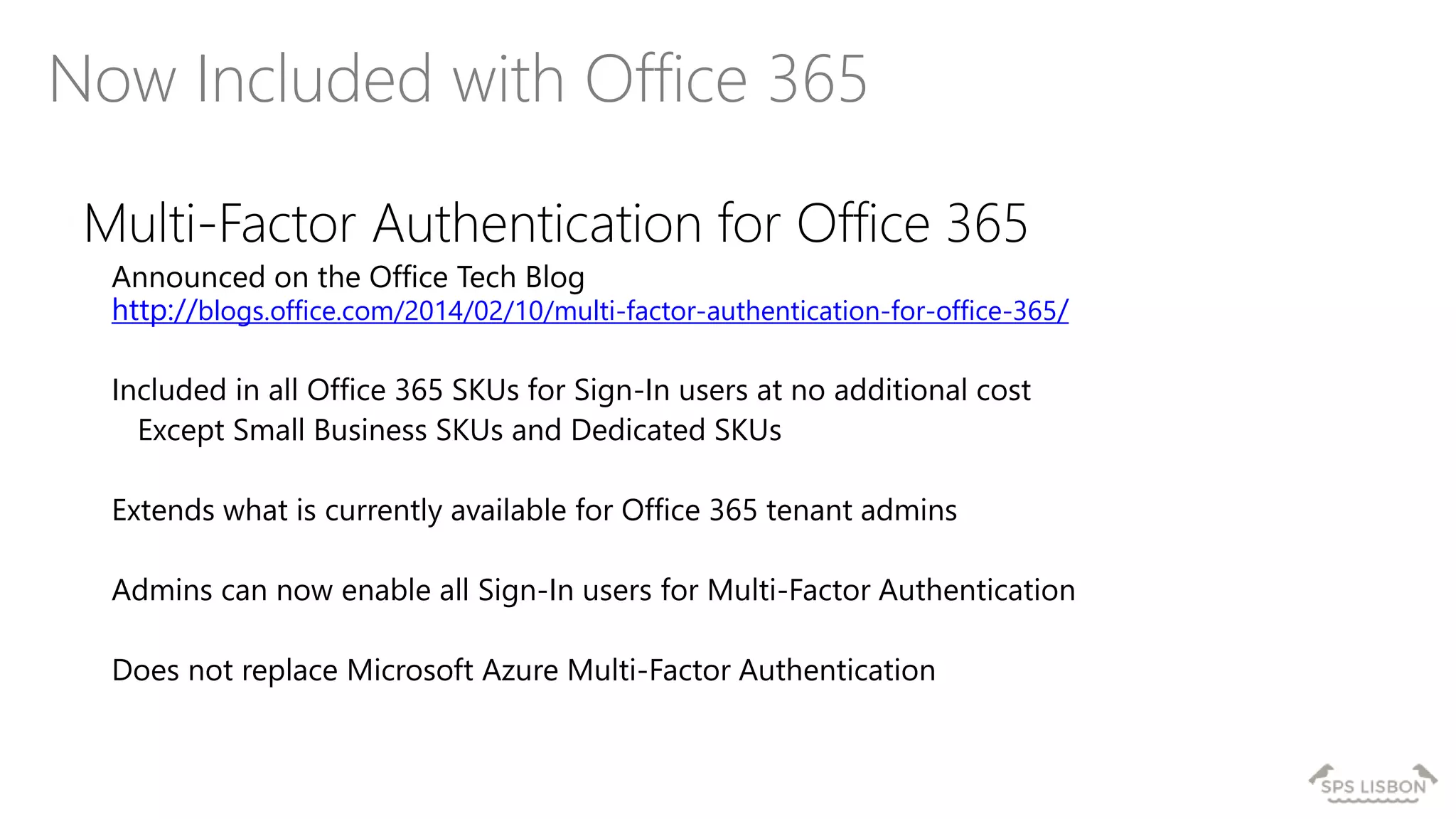
Now Included with Office 365
Multi-Factor Authentication for Office 365
Announced on the Office Tech Blog
http://blogs.office.com/2014/02/10/multi-factor-authentication-for-office-365/
Included in all Office 365 SKUs for Sign-In users at no additional cost
Except Small Business SKUs and Dedicated SKUs
Extends what is currently available for Office 365 tenant admins
Admins can now enable all Sign-In users for Multi-Factor Authentication
Does not replace Microsoft Azure Multi-Factor Authentication
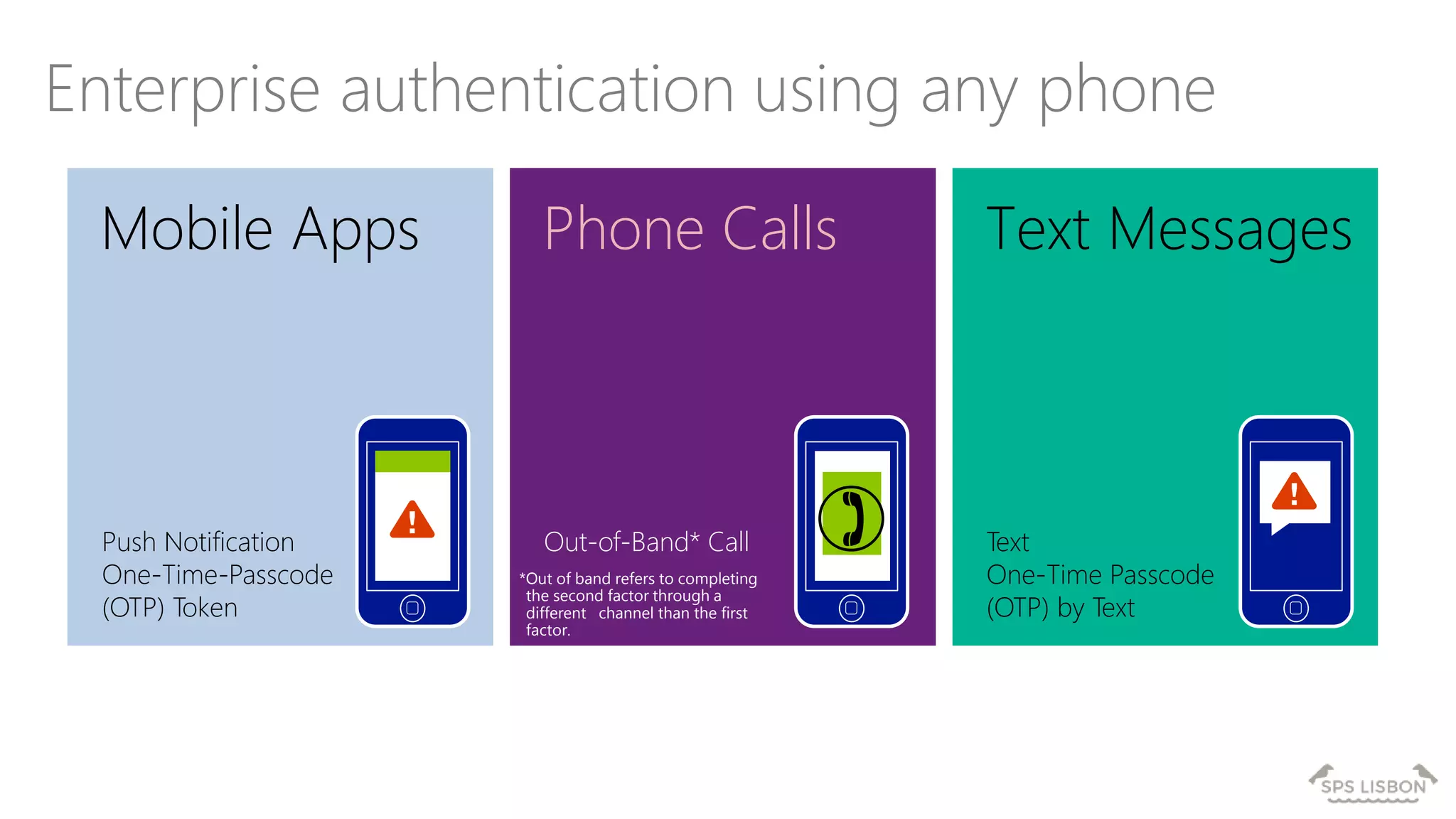
Mobile Apps
Enterprise authentication using any phone
Text MessagesPhone Calls
Push Notification
One-Time-Passcode
(OTP) Token
Out-of-Band* Call Text
One-Time Passcode
(OTP) by Text
*Out of band refers to completing
the second factor through a
different channel than the first
factor.
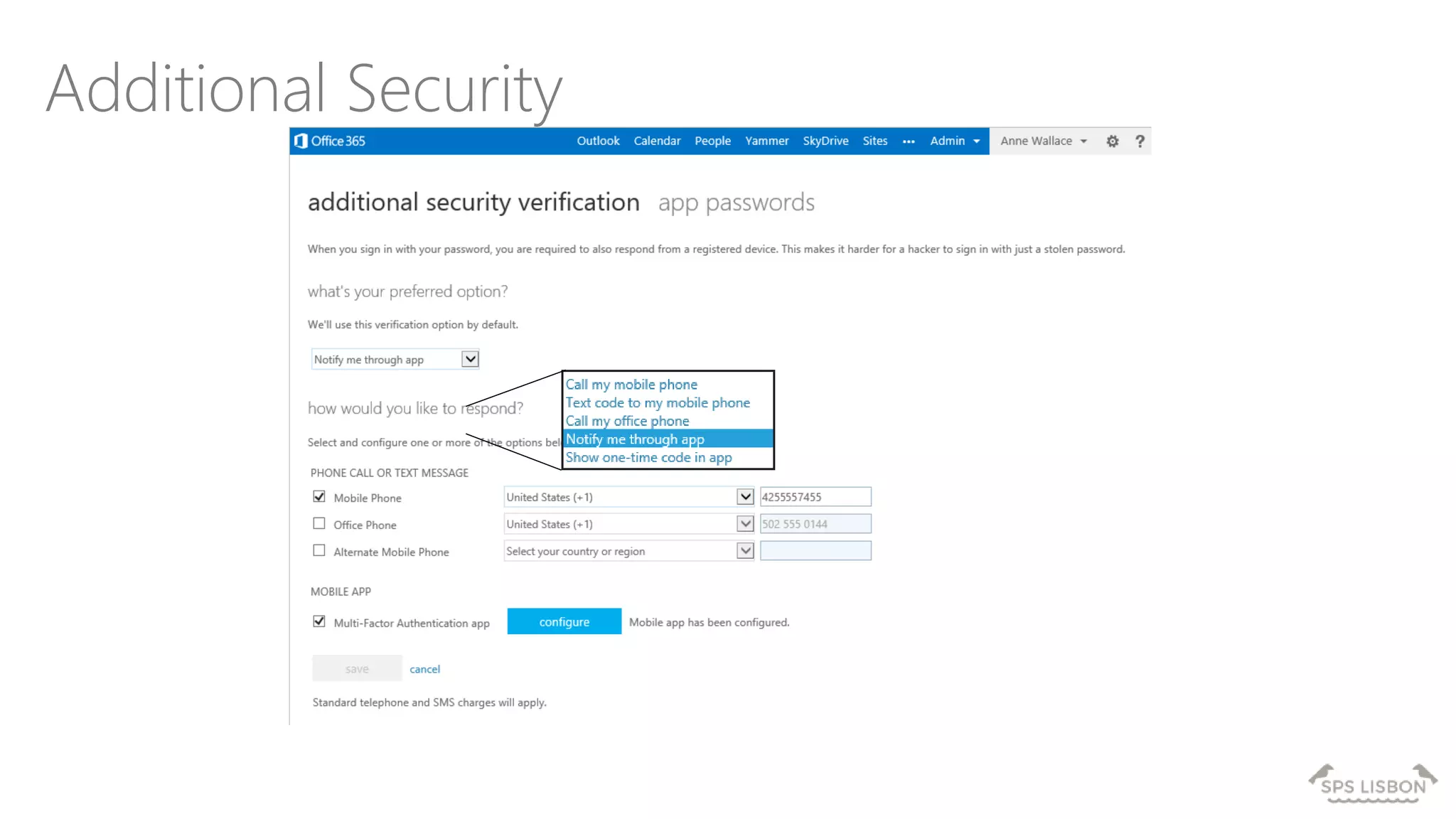
Additional Security
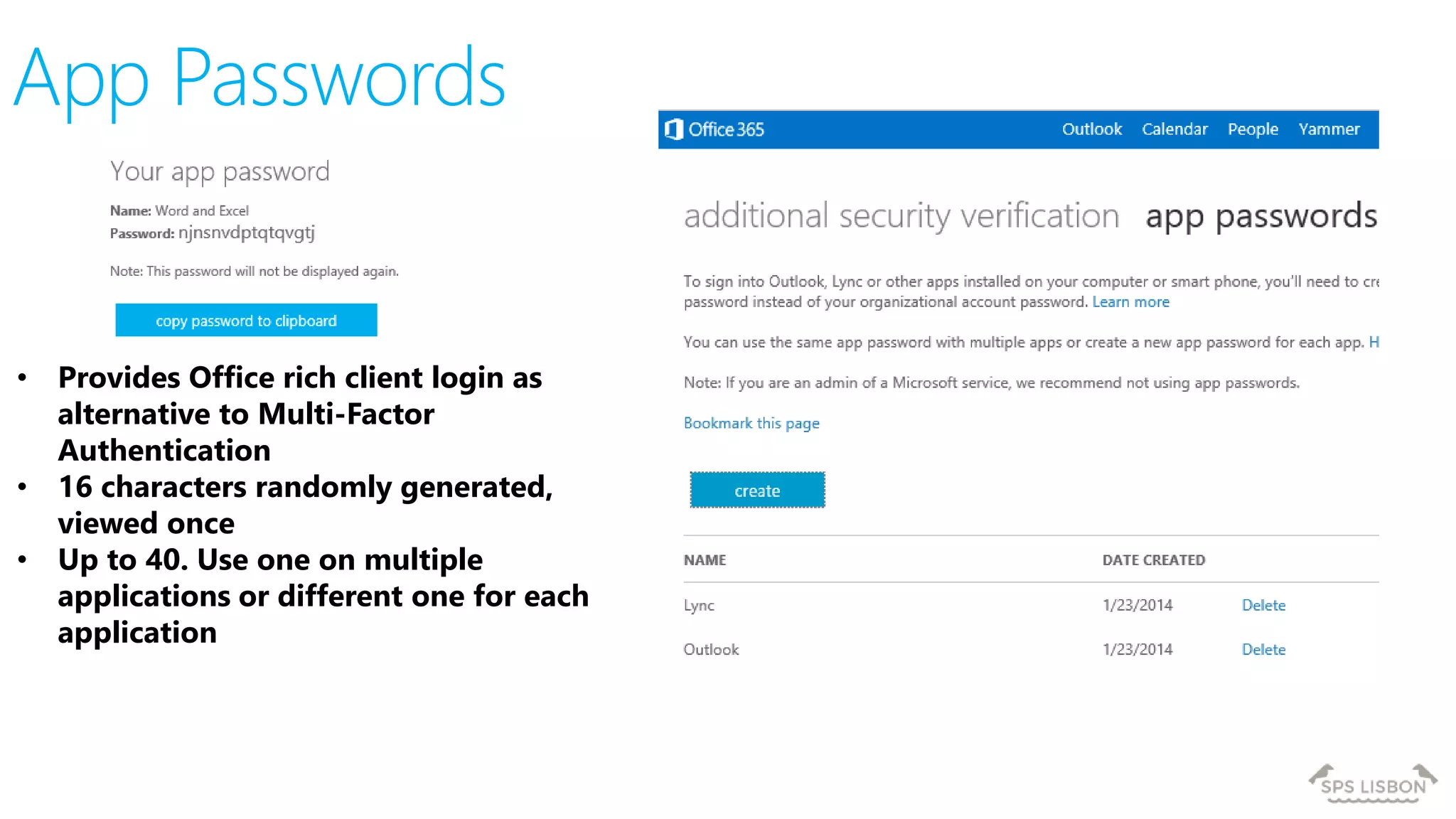
• Provides Office rich client login as
alternative to Multi-Factor
Authentication
• 16 characters randomly generated,
viewed once
• Up to 40. Use one on multiple
applications or different one for each
application
App Passwords
Specific Scenarios
Federated Users
Office 365 resources just needs Multi-Factor Authentication for Office 365
Use Azure Multi-Factor Authentication Server for other ADFS connected applications
Hybrid
On-premises server applications require Azure Multi-Factor Authentication Server
Example: MSIT Lync on-premises and Exchange Online
PowerShell
Create a service account which is an administrator and control access
Agenda
Multi-Factor Authentication
for Office 365
Office client futures with
Multi-Factor Authentication
Microsoft Azure Multi-Factor Authentication
Office client futures with
Multi-Factor
Authentication
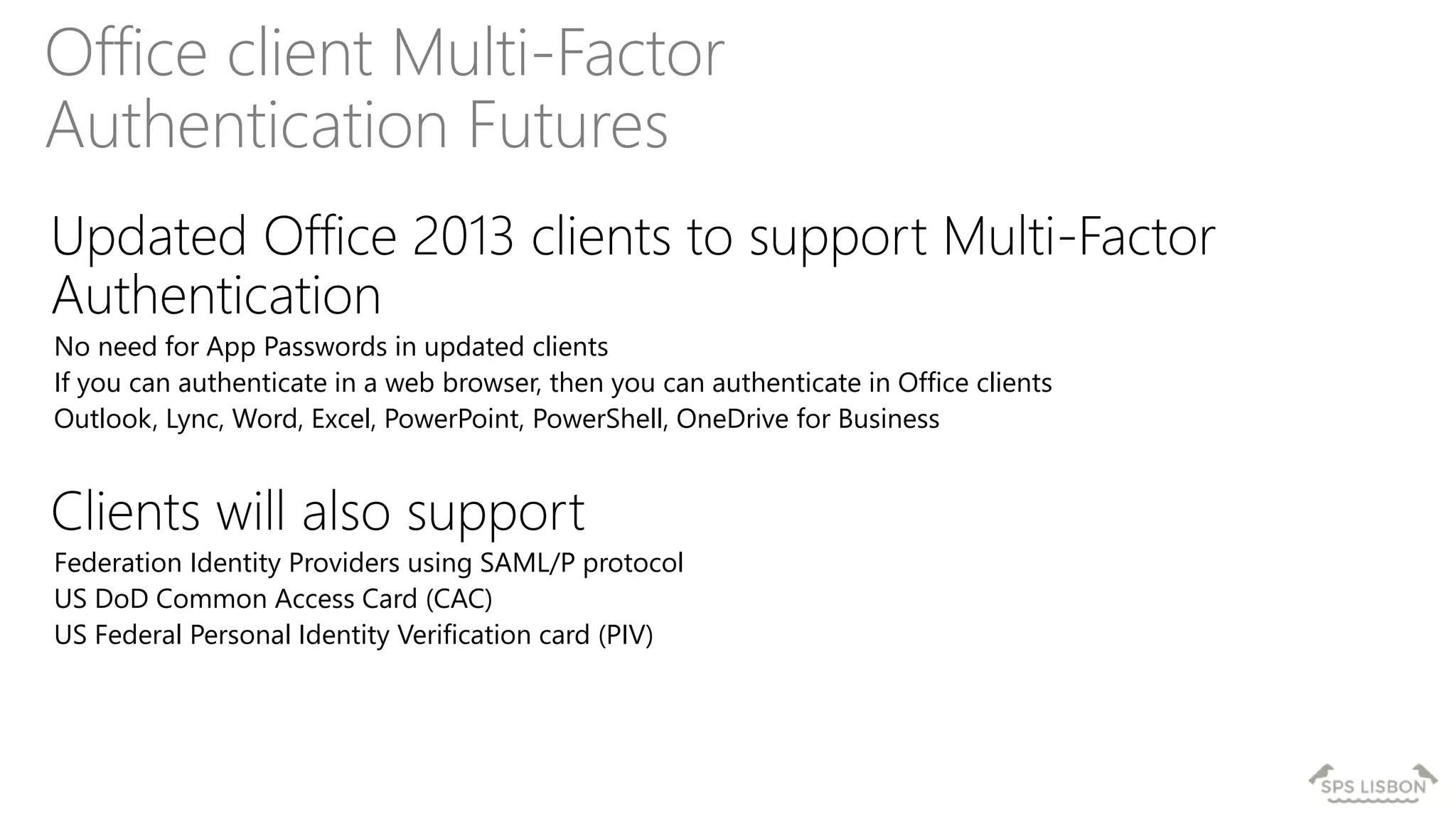
Office client Multi-Factor
Authentication Futures
Updated Office 2013 clients to support Multi-Factor
Authentication
No need for App Passwords in updated clients
If you can authenticate in a web browser, then you can authenticate in Office clients
Outlook, Lync, Word, Excel, PowerPoint, PowerShell, OneDrive for Business
Clients will also support
Federation Identity Providers using SAML/P protocol
US DoD Common Access Card (CAC)
US Federal Personal Identity Verification card (PIV)
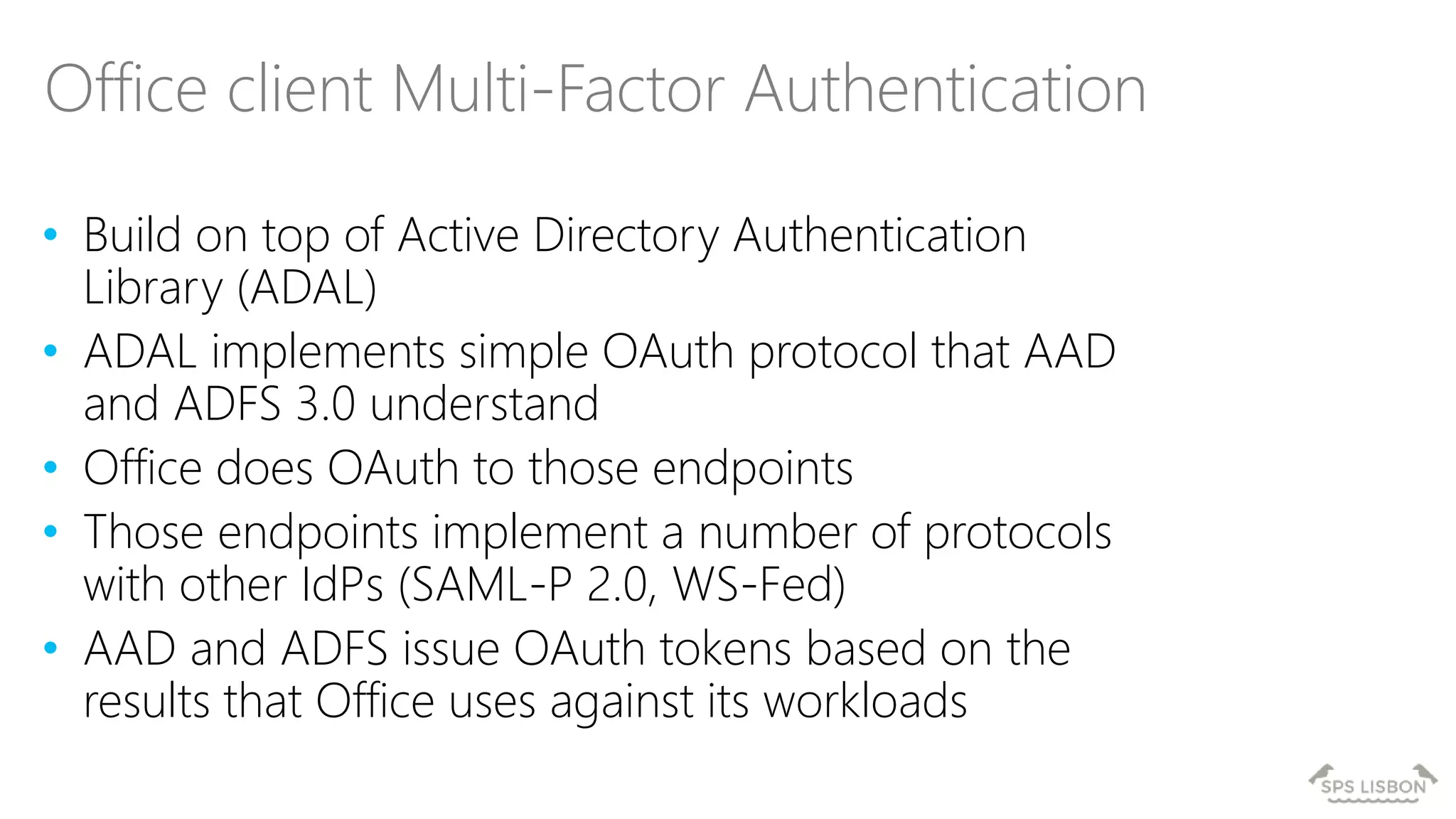
• Build on top of Active Directory Authentication
Library (ADAL)
• ADAL implements simple OAuth protocol that AAD
and ADFS 3.0 understand
• Office does OAuth to those endpoints
• Those endpoints implement a number of protocols
with other IdPs (SAML-P 2.0, WS-Fed)
• AAD and ADFS issue OAuth tokens based on the
results that Office uses against its workloads
Office client Multi-Factor Authentication
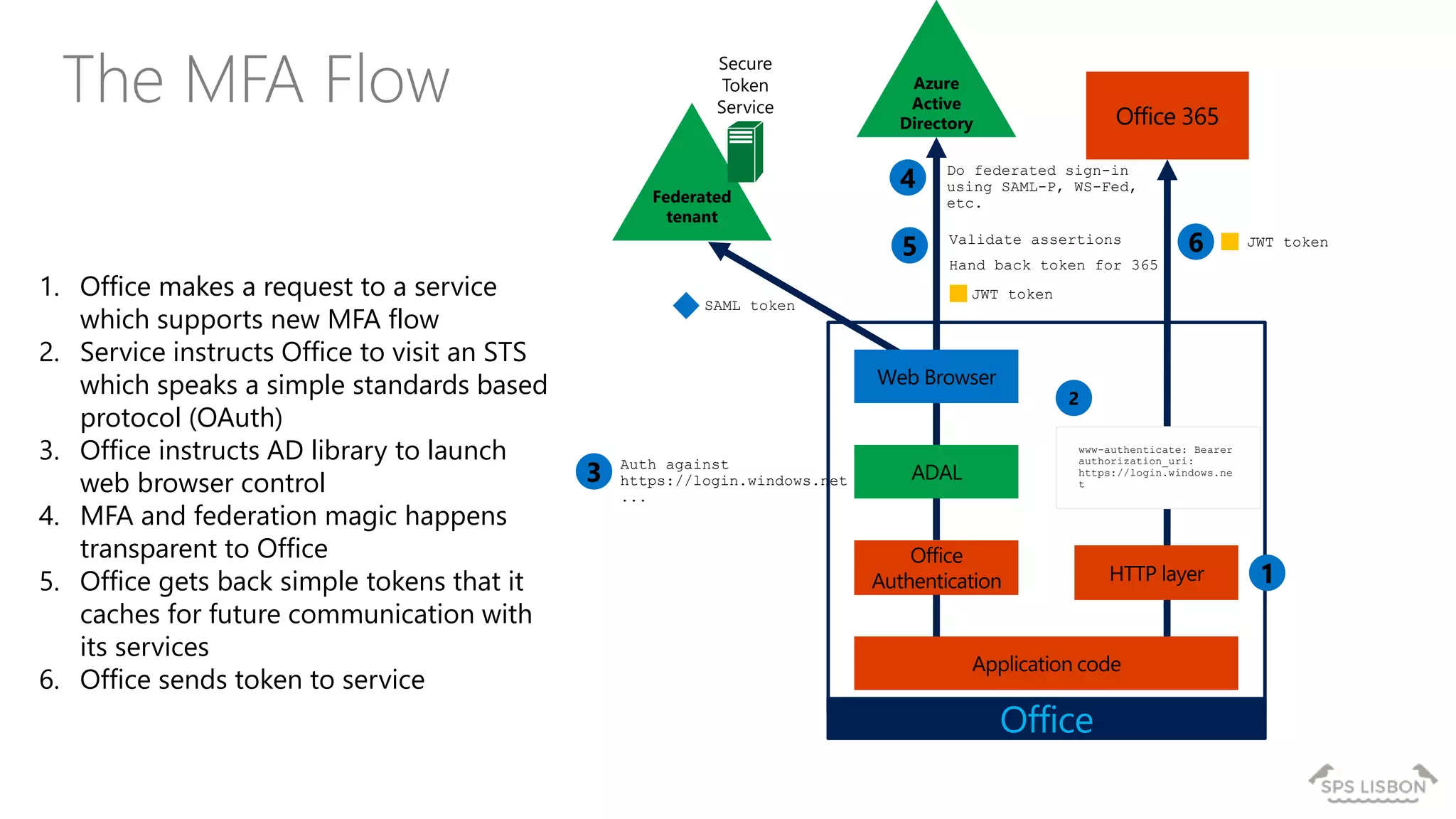
The MFA Flow Azure
Active
Directory
1
2
www-authenticate: Bearer
authorization_uri:
https://login.windows.ne
t
Federated
tenant
Secure
Token
Service
4 Do federated sign-in
using SAML-P, WS-Fed,
etc.
SAML token
5 Validate assertions
Hand back token for 365
JWT token
3 Auth against
https://login.windows.net
...
6 JWT token
Office
1. Office makes a request to a service
which supports new MFA flow
2. Service instructs Office to visit an STS
which speaks a simple standards based
protocol (OAuth)
3. Office instructs AD library to launch
web browser control
4. MFA and federation magic happens
transparent to Office
5. Office gets back simple tokens that it
caches for future communication with
its services
6. Office sends token to service
Agenda
Multi-Factor Authentication
for Office 365
Office client futures with
Multi-Factor Authentication
Microsoft Azure Multi-Factor Authentication
Microsoft Azure Multi-
Factor Authentication
Azure MFA Requires a Microsoft Azure subscription
Use of Office 365 with Azure MFA requires a link from the Microsoft Azure subscription to the Office 365 tenant
Having MFA for Office 365 does not reduce Microsoft Azure MFA subscription costs
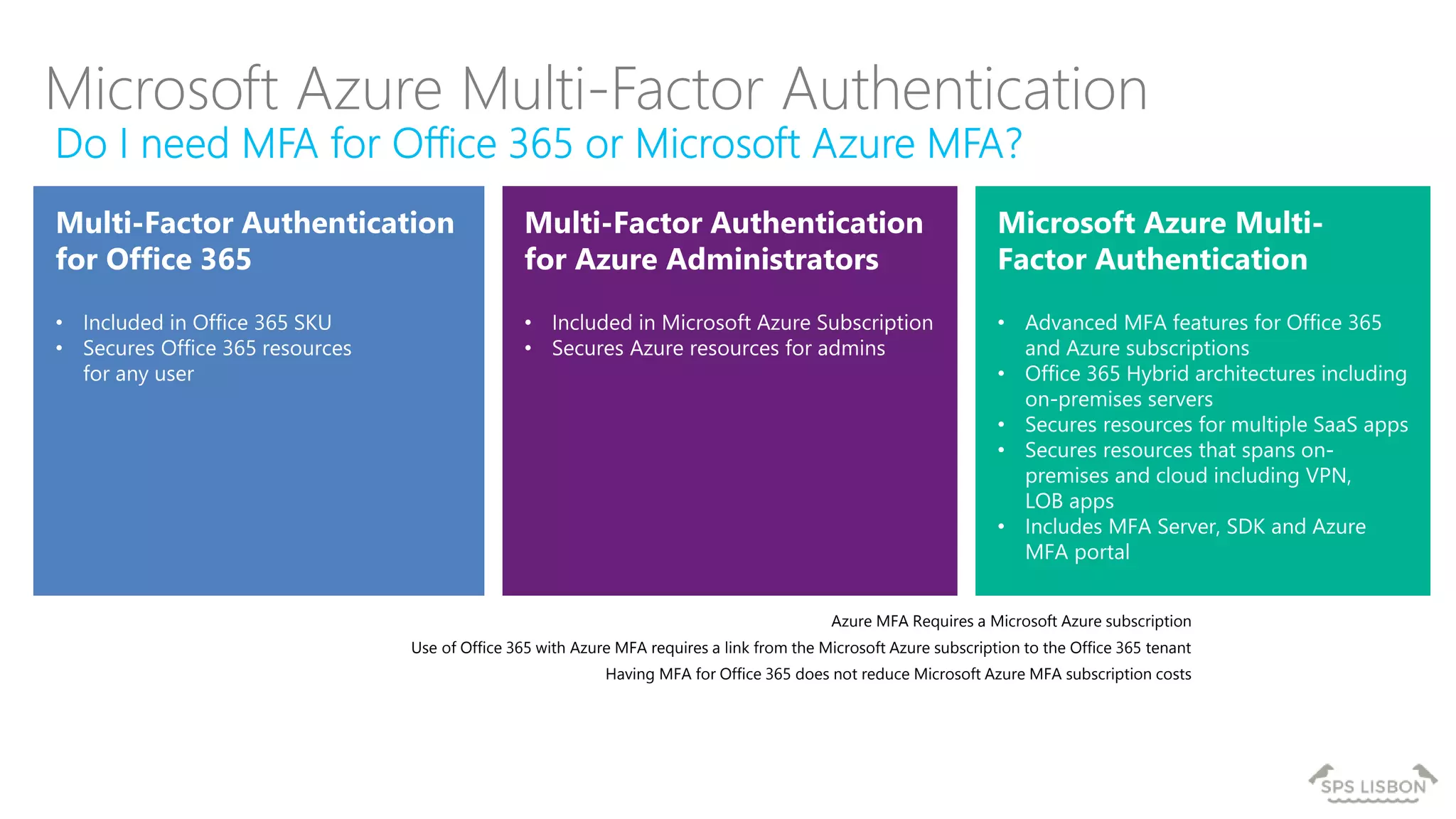
Microsoft Azure Multi-Factor Authentication
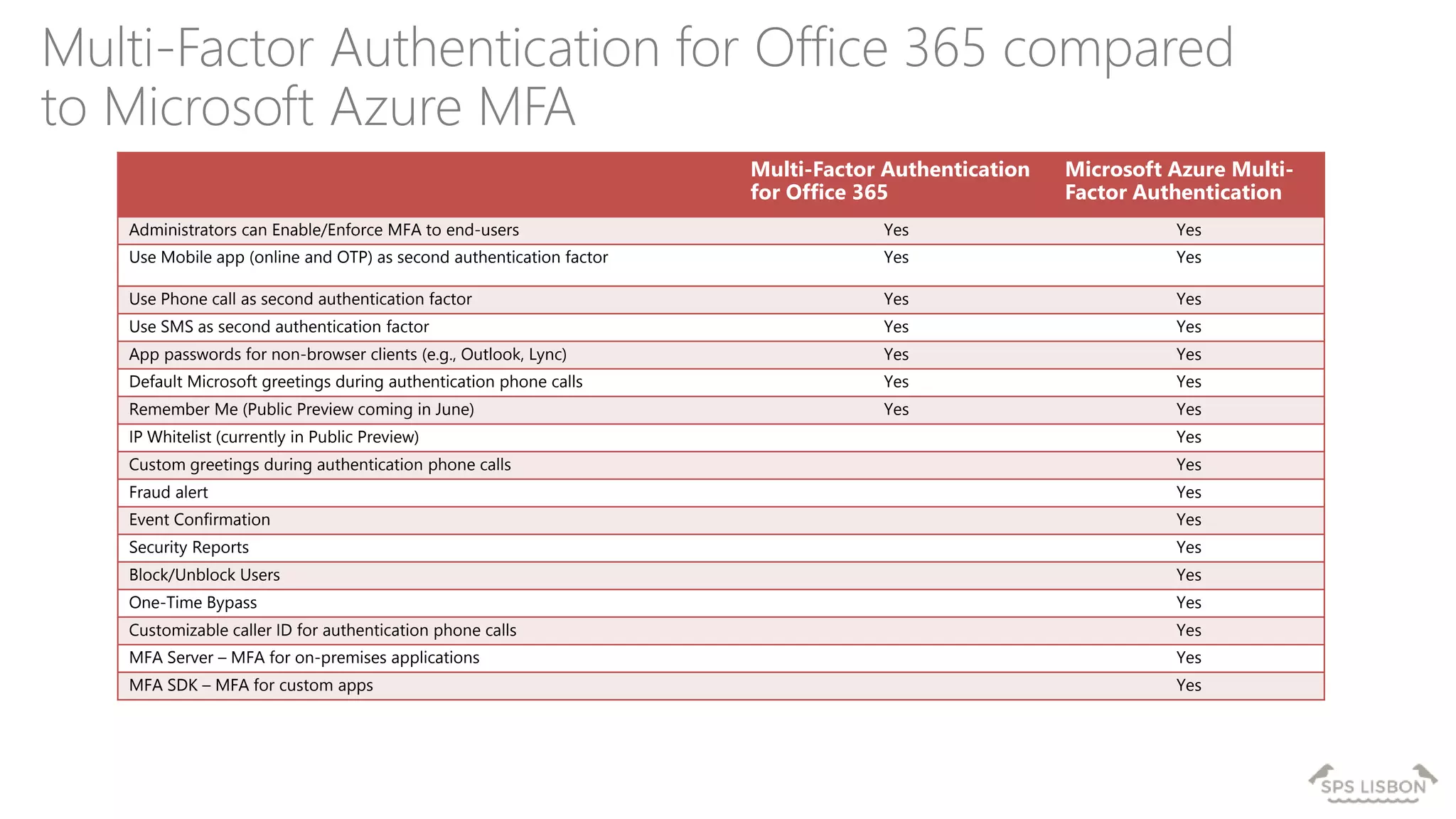
Multi-Factor Authentication for Office 365 compared
to Microsoft Azure MFA
Multi-Factor Authentication
for Office 365
Microsoft Azure Multi-
Factor Authentication
Administrators can Enable/Enforce MFA to end-users Yes Yes
Use Mobile app (online and OTP) as second authentication factor Yes Yes
Use Phone call as second authentication factor Yes Yes
Use SMS as second authentication factor Yes Yes
App passwords for non-browser clients (e.g., Outlook, Lync) Yes Yes
Default Microsoft greetings during authentication phone calls Yes Yes
Remember Me (Public Preview coming in June) Yes Yes
IP Whitelist (currently in Public Preview) Yes
Custom greetings during authentication phone calls Yes
Fraud alert Yes
Event Confirmation Yes
Security Reports Yes
Block/Unblock Users Yes
One-Time Bypass Yes
Customizable caller ID for authentication phone calls Yes
MFA Server – MFA for on-premises applications Yes
MFA SDK – MFA for custom apps Yes
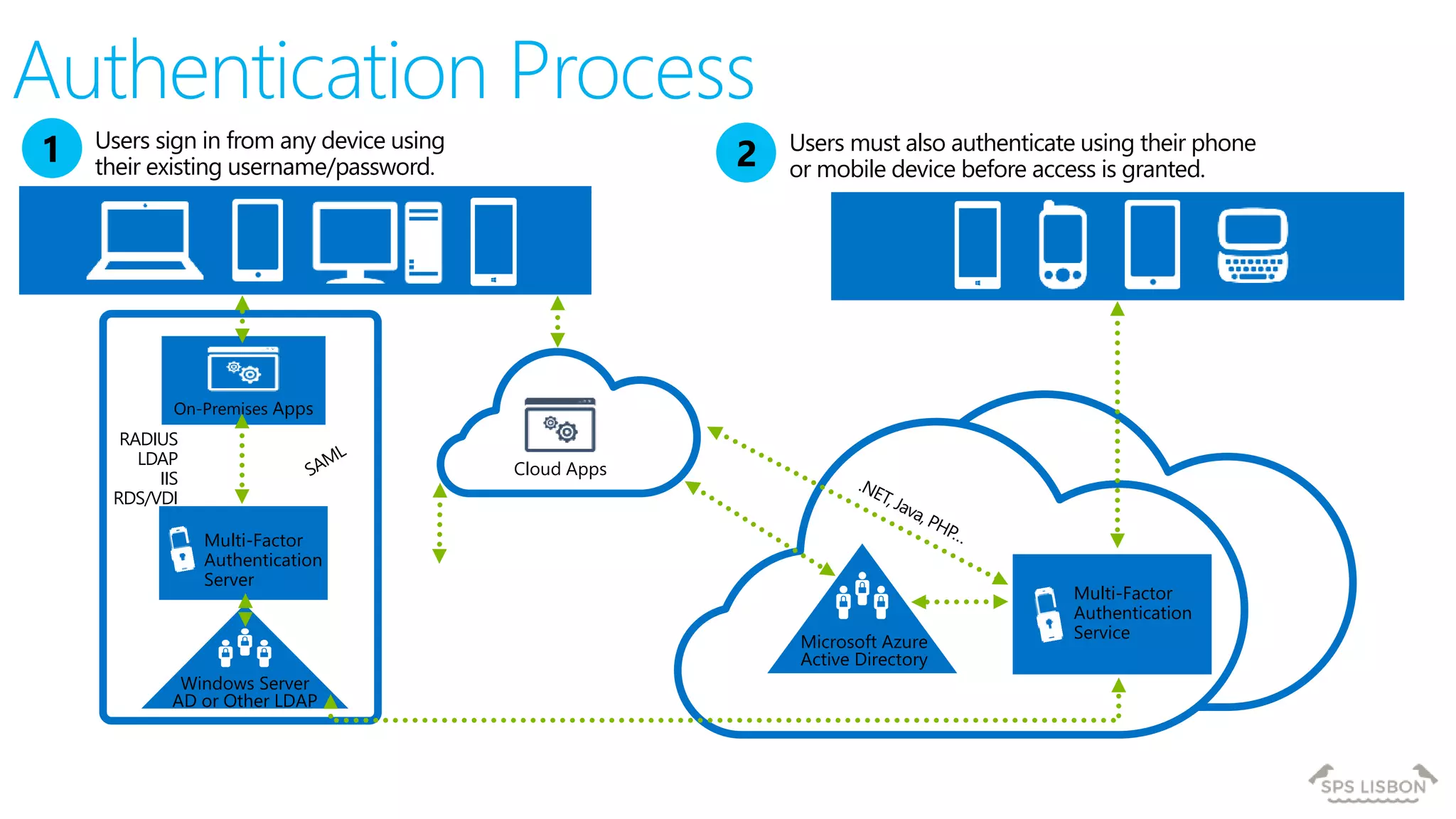
Windows Server
AD or Other LDAP
On-Premises Apps
RADIUS
LDAP
IIS
RDS/VDI
Multi-Factor
Authentication
Server
Multi-Factor
Authentication
Service
Cloud Apps
Users must also authenticate using their phone
or mobile device before access is granted.2
Microsoft Azure
Active Directory
Users sign in from any device using
their existing username/password.
1
Authentication Process
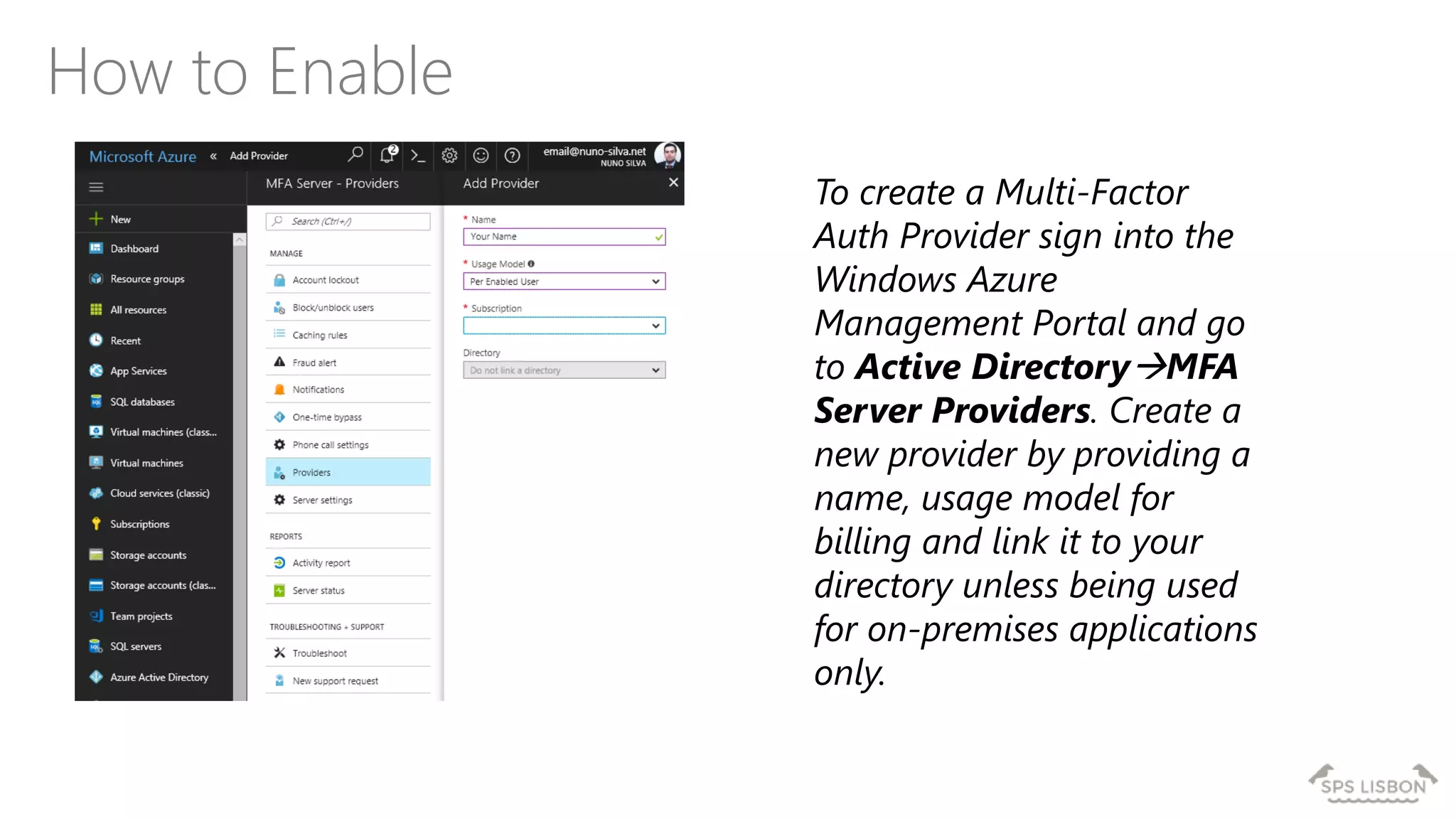
How to Enable
To create a Multi-Factor
Auth Provider sign into the
Windows Azure
Management Portal and go
to Active DirectoryMFA
Server Providers. Create a
new provider by providing a
name, usage model for
billing and link it to your
directory unless being used
for on-premises applications
only.
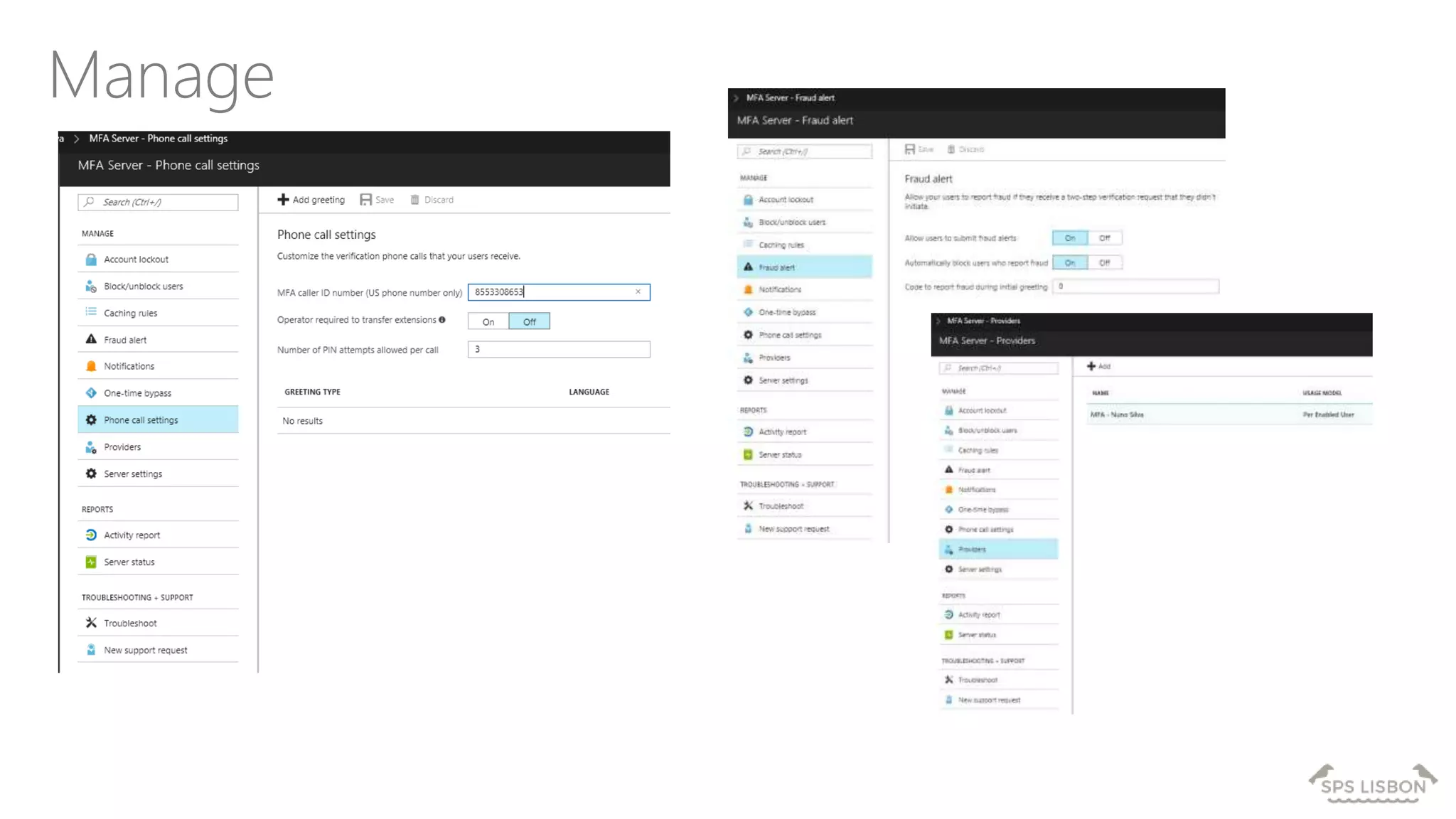
Manage
• Office 365 SKUs include Multi-Factor Authentication
• Users are Enabled and then Enforced
• Users can create App Passwords for client apps
• Updated Office 2013 clients
• Office 365 tenants can be connected to Azure
• Azure Multi-Factor Authentication has additional
features
Summary
The updated authentication are available now
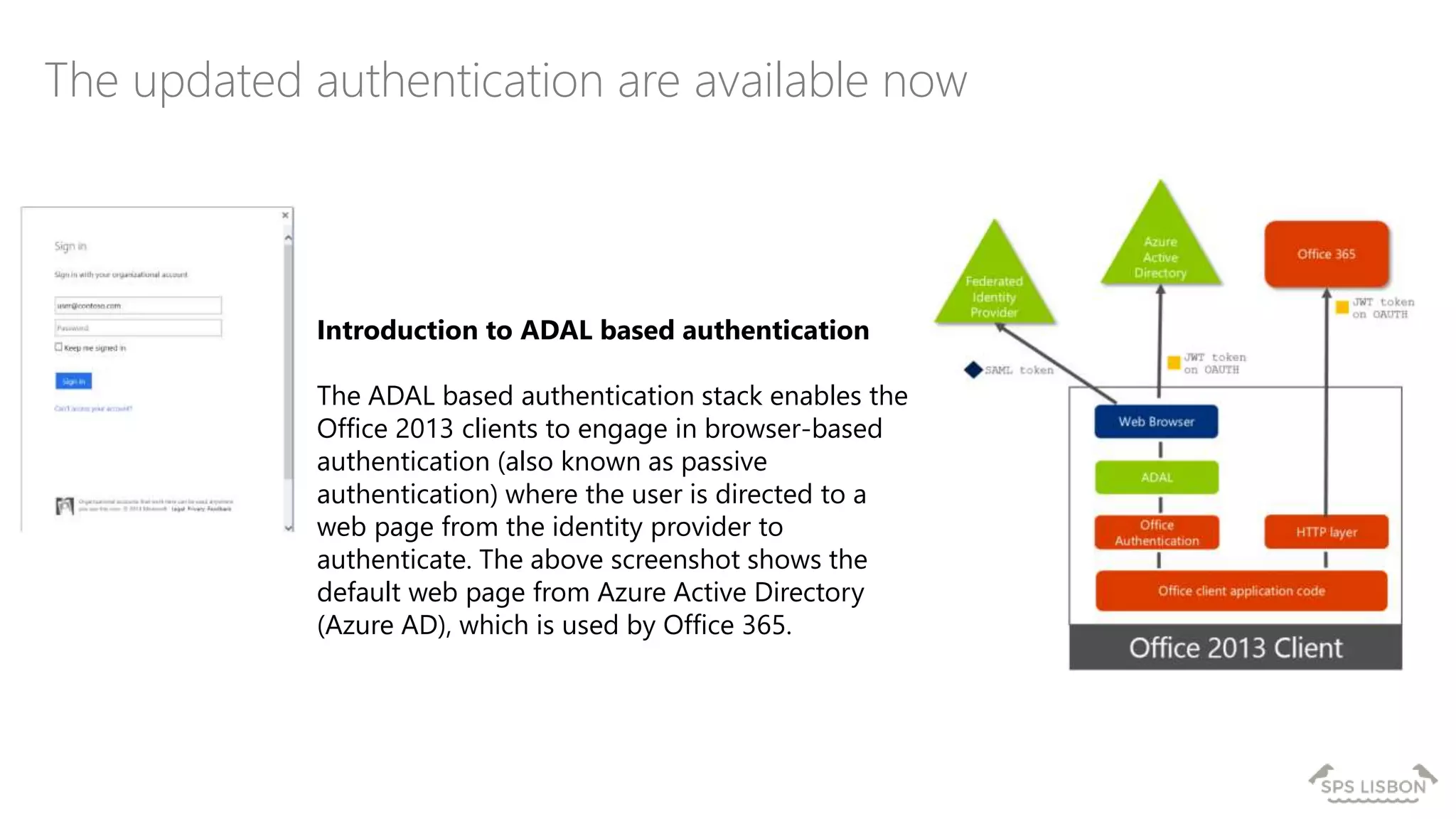
Introduction to ADAL based authentication
The ADAL based authentication stack enables the
Office 2013 clients to engage in browser-based
authentication (also known as passive
authentication) where the user is directed to a
web page from the identity provider to
authenticate. The above screenshot shows the
default web page from Azure Active Directory
(Azure AD), which is used by Office 365.
Azure Multi-Factor Authentication
http://azure.microsoft.com/en-us/services/multi-factor-authentication/
Securing access to cloud services - Information for Administrators
http://technet.microsoft.com/en-us/library/dn394289.aspx
Azure Active Directory Editions
http://msdn.microsoft.com/library/azure/dn532272.aspx
How to Setup
http://blogs.msdn.com/b/mvpawardprogram/archive/2015/03/23/office-365-multi-
factor-authentication-with-microsoft-azure-active-directory.aspx
Support Links
Q&A
Nuno Árias Silva
email@nuno-silva.net
www.nuno-silva.net/blog
@NunoAriasSilva
GOLD
SILVERLOCATION
BRONZE
MEDIA
SPSLisbon 2017 Office 365 Multi-factor Authentication with Microsoft Azure Active Directory Premium

SPSLisbon 2017 Office 365 Multi-factor Authentication with Microsoft Azure Active Directory Premium

  • 1.
    Office 365 Multi-Factor Authenticationwith Microsoft Azure Active Directory Premium by Nuno Árias Silva
  • 2.
  • 3.
    MVP Office Serversand Services Nuno Árias Silva Blog: www.nuno-silva.net Email : email@nuno-silva.net Twitter : NunoAriasSilva Facebook : nunoarias LinkedIn : nunoarias I advise my clients to be proactive in adopting new Microsoft technologies that help them to reach business needs and to accomplish their goals. Has more than 19 years working on IT, with Master in Information Technologies, last projects have more focus in Office 365, Infrastructures and Security within Microsoft Infrastructure Products. GFI Manager - Infrastructure Services nuno.a.silva@gfi.pt
  • 4.
    Agenda Multi-Factor Authentication for Office365 Office client futures with Multi-Factor Authentication Microsoft Azure Multi-Factor Authentication
  • 5.
    Identity Management Unify yourenvironment Enable users Protect your data
  • 6.
    Identity for Microsoftcloud services User Microsoft Account Ex: alice@outlook.com User Organizational Account Ex: alice@contoso.com Microsoft Account Microsoft Azure Active Directory
  • 7.
    Federated identitySynchronized identity Cloudidentity On-premises directory Zero on-premises servers On-premises directory Directory sync with password sync On-premises identity Between zero and three additional on-premises servers depending on the number of users On-premises identity Between two and eight on-premises servers and networking configuration depending on the sign-in availability requirements Directory sync Federation Office 365 Identity Models
  • 8.
    Hyper scale Infrastructureis the enabler 27 Regions Worldwide, 22 ONLINE…huge capacity around the world…growing every year  100+ datacenters  Top 3 networks in the world  2.5x AWS, 7x Google DC Regions  G Series – Largest VM in World, 32 cores, 448GB Ram, SSD… Operational Announced/ Central US Iowa West US California East US Virginia US Gov Virginia North Central US Illinois US Gov Iowa South Central US Texas Brazil South Sao Paulo State West Europe Netherlands China North * Beijing China South * Shanghai Japan East Tokyo, Saitama Japan West Osaka India South Chennai East Asia Hong Kong SE Asia Singapore Australia South East Victoria Australia East New South Wales * Operated by 21Vianet India Central Pune Canada East Quebec City Canada Central Toronto India West Mumbai Germany North East Magdeburg Germany Central Frankfurt United Kingdom Regions North Europe Ireland East US 2 Virginia New
  • 9.
    Agenda Multi-Factor Authentication for Office365 Office client futures with Multi-Factor Authentication Microsoft Azure Multi-Factor Authentication
  • 10.
  • 11.
    What is Multi-FactorAuthentication? Multiple factors are required for sign-In Familiar to consumer cloud service users such as the Microsoft Account Simple block to password compromise from another country Addresses regulatory compliance and high risk user scenarios AKA two-factor, 2FA, MFA, strong authentication Two or more of the following factors: Something you know – a password or PIN Something you have – a phone, credit card or hardware token Something you are – a fingerprint, hand geometry, retinal scan or other biometric Stronger when using two different channels (out-of-band) Types of multi-factor authentication: Hardware OTP Tokens Certificates Smart Cards Phone-Based Authentication: Phone Call, Text Message, and Push Software OTP Tokens
  • 12.
    What is Multi-FactorAuthentication? Powered by PhoneFactor, acquired by Microsoft in 2012 Trusted by thousands of enterprises to authenticate employee, customer, and partner access Secures applications and identities in the cloud and on-premises
  • 13.
    Now Included withOffice 365 Multi-Factor Authentication for Office 365 Announced on the Office Tech Blog http://blogs.office.com/2014/02/10/multi-factor-authentication-for-office-365/ Included in all Office 365 SKUs for Sign-In users at no additional cost Except Small Business SKUs and Dedicated SKUs Extends what is currently available for Office 365 tenant admins Admins can now enable all Sign-In users for Multi-Factor Authentication Does not replace Microsoft Azure Multi-Factor Authentication
  • 14.
    Mobile Apps Enterprise authenticationusing any phone Text MessagesPhone Calls Push Notification One-Time-Passcode (OTP) Token Out-of-Band* Call Text One-Time Passcode (OTP) by Text *Out of band refers to completing the second factor through a different channel than the first factor.
  • 15.
  • 16.
    • Provides Officerich client login as alternative to Multi-Factor Authentication • 16 characters randomly generated, viewed once • Up to 40. Use one on multiple applications or different one for each application App Passwords
  • 17.
    Specific Scenarios Federated Users Office365 resources just needs Multi-Factor Authentication for Office 365 Use Azure Multi-Factor Authentication Server for other ADFS connected applications Hybrid On-premises server applications require Azure Multi-Factor Authentication Server Example: MSIT Lync on-premises and Exchange Online PowerShell Create a service account which is an administrator and control access
  • 18.
    Agenda Multi-Factor Authentication for Office365 Office client futures with Multi-Factor Authentication Microsoft Azure Multi-Factor Authentication
  • 19.
    Office client futureswith Multi-Factor Authentication
  • 20.
    Office client Multi-Factor AuthenticationFutures Updated Office 2013 clients to support Multi-Factor Authentication No need for App Passwords in updated clients If you can authenticate in a web browser, then you can authenticate in Office clients Outlook, Lync, Word, Excel, PowerPoint, PowerShell, OneDrive for Business Clients will also support Federation Identity Providers using SAML/P protocol US DoD Common Access Card (CAC) US Federal Personal Identity Verification card (PIV)
  • 21.
    • Build ontop of Active Directory Authentication Library (ADAL) • ADAL implements simple OAuth protocol that AAD and ADFS 3.0 understand • Office does OAuth to those endpoints • Those endpoints implement a number of protocols with other IdPs (SAML-P 2.0, WS-Fed) • AAD and ADFS issue OAuth tokens based on the results that Office uses against its workloads Office client Multi-Factor Authentication
  • 22.
    The MFA FlowAzure Active Directory 1 2 www-authenticate: Bearer authorization_uri: https://login.windows.ne t Federated tenant Secure Token Service 4 Do federated sign-in using SAML-P, WS-Fed, etc. SAML token 5 Validate assertions Hand back token for 365 JWT token 3 Auth against https://login.windows.net ... 6 JWT token Office 1. Office makes a request to a service which supports new MFA flow 2. Service instructs Office to visit an STS which speaks a simple standards based protocol (OAuth) 3. Office instructs AD library to launch web browser control 4. MFA and federation magic happens transparent to Office 5. Office gets back simple tokens that it caches for future communication with its services 6. Office sends token to service
  • 23.
    Agenda Multi-Factor Authentication for Office365 Office client futures with Multi-Factor Authentication Microsoft Azure Multi-Factor Authentication
  • 24.
  • 25.
    Azure MFA Requiresa Microsoft Azure subscription Use of Office 365 with Azure MFA requires a link from the Microsoft Azure subscription to the Office 365 tenant Having MFA for Office 365 does not reduce Microsoft Azure MFA subscription costs Microsoft Azure Multi-Factor Authentication
  • 26.
    Multi-Factor Authentication forOffice 365 compared to Microsoft Azure MFA Multi-Factor Authentication for Office 365 Microsoft Azure Multi- Factor Authentication Administrators can Enable/Enforce MFA to end-users Yes Yes Use Mobile app (online and OTP) as second authentication factor Yes Yes Use Phone call as second authentication factor Yes Yes Use SMS as second authentication factor Yes Yes App passwords for non-browser clients (e.g., Outlook, Lync) Yes Yes Default Microsoft greetings during authentication phone calls Yes Yes Remember Me (Public Preview coming in June) Yes Yes IP Whitelist (currently in Public Preview) Yes Custom greetings during authentication phone calls Yes Fraud alert Yes Event Confirmation Yes Security Reports Yes Block/Unblock Users Yes One-Time Bypass Yes Customizable caller ID for authentication phone calls Yes MFA Server – MFA for on-premises applications Yes MFA SDK – MFA for custom apps Yes
  • 27.
    Windows Server AD orOther LDAP On-Premises Apps RADIUS LDAP IIS RDS/VDI Multi-Factor Authentication Server Multi-Factor Authentication Service Cloud Apps Users must also authenticate using their phone or mobile device before access is granted.2 Microsoft Azure Active Directory Users sign in from any device using their existing username/password. 1 Authentication Process
  • 28.
    How to Enable Tocreate a Multi-Factor Auth Provider sign into the Windows Azure Management Portal and go to Active DirectoryMFA Server Providers. Create a new provider by providing a name, usage model for billing and link it to your directory unless being used for on-premises applications only.
  • 29.
  • 30.
    • Office 365SKUs include Multi-Factor Authentication • Users are Enabled and then Enforced • Users can create App Passwords for client apps • Updated Office 2013 clients • Office 365 tenants can be connected to Azure • Azure Multi-Factor Authentication has additional features Summary
  • 31.
    The updated authenticationare available now Introduction to ADAL based authentication The ADAL based authentication stack enables the Office 2013 clients to engage in browser-based authentication (also known as passive authentication) where the user is directed to a web page from the identity provider to authenticate. The above screenshot shows the default web page from Azure Active Directory (Azure AD), which is used by Office 365.
  • 32.
    Azure Multi-Factor Authentication http://azure.microsoft.com/en-us/services/multi-factor-authentication/ Securingaccess to cloud services - Information for Administrators http://technet.microsoft.com/en-us/library/dn394289.aspx Azure Active Directory Editions http://msdn.microsoft.com/library/azure/dn532272.aspx How to Setup http://blogs.msdn.com/b/mvpawardprogram/archive/2015/03/23/office-365-multi- factor-authentication-with-microsoft-azure-active-directory.aspx Support Links
  • 34.
  • 35.

Editor's Notes

  • #9 Why this Slide: This is SUCH a big investment – it’s a game for only very few. It’s not new for us – we have been doing this for our own services and our consumer/web properties for 20+ years Key Points: Where are we – EVERYWHERE…! How big is this - $15+ B and counting – this is serious, we continue to bet big and you can count on us Talk about DC innovation – DC Efficiency and Gen 5 data centers. Scale – at this scale you do get efficiencies – the main one being POWER Remember our “strategy” – we will be in the major places, but not everywhere – we have Azure Stack/Hosters for that. Transition to NEXT Slide: This is the physical infrastructure that Azure sits on, now lets talk about Azure the PLATFORM