{
Source Filmmaker
Advanced Techniques
Lesson 3 : Camera Manipulation
By Antonio Cribari
Obejctive: Learn how to manipulate the camera obtain better shots for
animations and poses.
Requirements: A working Steam Client connected to the internet with
Source Filmmaker Installed. You also should have read through Hector’s
Lessons on basic use of Source Filmmaker to understand this lesson.
Step 1
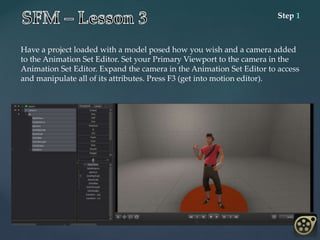
Have a project loaded with a model posed how you wish and a camera added
to the Animation Set Editor. Set your Primary Viewport to the camera in the
Animation Set Editor. Expand the camera in the Animation Set Editor to access
and manipulate all of its attributes. Press F3 (get into motion editor).
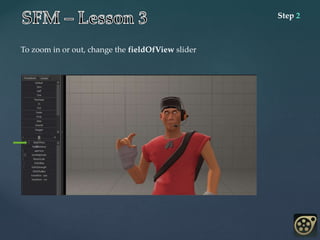
Step 2
To zoom in or out, change the fieldOfView slider
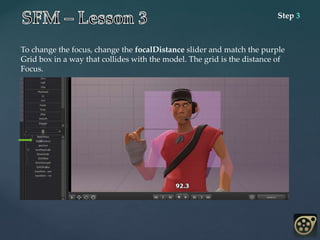
Step 3
To change the focus, change the focalDistance slider and match the purple
Grid box in a way that collides with the model. The grid is the distance of
Focus.
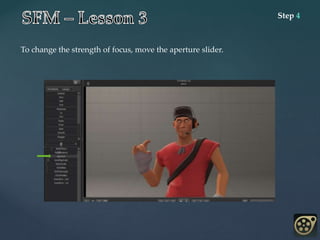
Step 4
To change the strength of focus, move the aperture slider.
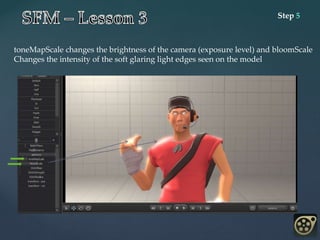
Step 5
toneMapScale changes the brightness of the camera (exposure level) and bloomScale
Changes the intensity of the soft glaring light edges seen on the model
Step 6
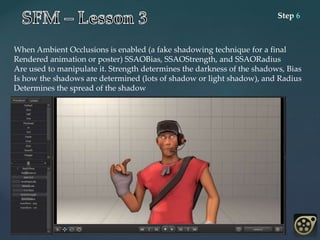
When Ambient Occlusions is enabled (a fake shadowing technique for a final
Rendered animation or poster) SSAOBias, SSAOStrength, and SSAORadius
Are used to manipulate it. Strength determines the darkness of the shadows, Bias
Is how the shadows are determined (lots of shadow or light shadow), and Radius
Determines the spread of the shadow
You should now understand how to manipulate the camera in a way that can either
Stylize or improve your animations and poses. Although it’s simple to move the sliders,
It’s difficult to get an impressive look without experimentation.
Completed
Your Mission
• Make Exposure very bright with super dark SSAO shadows
• Focus the camera on a model with the aperture slide about half way
• Zoom all the way out and make the exposure dark with light SSAO shadows
• Make the exposure dark with Max SSAO darkness; small radius; full Bloomscale

SFM Lesson 3

  • 1.
    { Source Filmmaker Advanced Techniques Lesson3 : Camera Manipulation By Antonio Cribari
  • 2.
    Obejctive: Learn howto manipulate the camera obtain better shots for animations and poses. Requirements: A working Steam Client connected to the internet with Source Filmmaker Installed. You also should have read through Hector’s Lessons on basic use of Source Filmmaker to understand this lesson.
  • 3.
    Step 1 Have aproject loaded with a model posed how you wish and a camera added to the Animation Set Editor. Set your Primary Viewport to the camera in the Animation Set Editor. Expand the camera in the Animation Set Editor to access and manipulate all of its attributes. Press F3 (get into motion editor).
  • 4.
    Step 2 To zoomin or out, change the fieldOfView slider
  • 5.
    Step 3 To changethe focus, change the focalDistance slider and match the purple Grid box in a way that collides with the model. The grid is the distance of Focus.
  • 6.
    Step 4 To changethe strength of focus, move the aperture slider.
  • 7.
    Step 5 toneMapScale changesthe brightness of the camera (exposure level) and bloomScale Changes the intensity of the soft glaring light edges seen on the model
  • 8.
    Step 6 When AmbientOcclusions is enabled (a fake shadowing technique for a final Rendered animation or poster) SSAOBias, SSAOStrength, and SSAORadius Are used to manipulate it. Strength determines the darkness of the shadows, Bias Is how the shadows are determined (lots of shadow or light shadow), and Radius Determines the spread of the shadow
  • 9.
    You should nowunderstand how to manipulate the camera in a way that can either Stylize or improve your animations and poses. Although it’s simple to move the sliders, It’s difficult to get an impressive look without experimentation. Completed Your Mission • Make Exposure very bright with super dark SSAO shadows • Focus the camera on a model with the aperture slide about half way • Zoom all the way out and make the exposure dark with light SSAO shadows • Make the exposure dark with Max SSAO darkness; small radius; full Bloomscale