REVIEW TUTORIAL

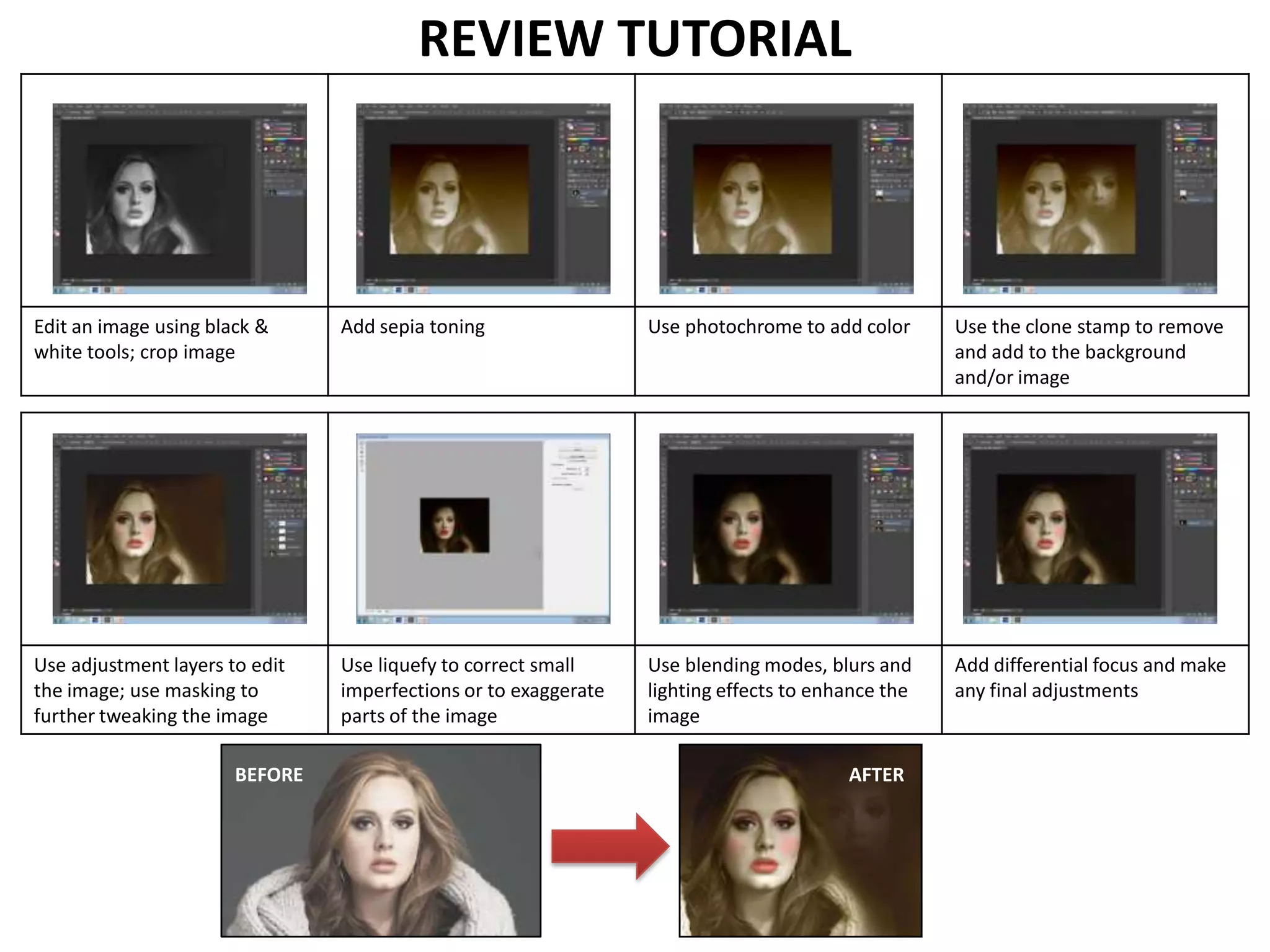
Edit an image using black &
white tools; crop image

Add sepia toning

Use photochrome to add color

Use the clone stamp to remove
and add to the background
and/or image

Use adjustment layers to edit
the image; use masking to
further tweaking the image

Use liquefy to correct small
imperfections or to exaggerate
parts of the image

Use blending modes, blurs and
lighting effects to enhance the
image

Add differential focus and make
any final adjustments

BEFORE

AFTER

Semester 1 Review Tutorial

  • 1.
    REVIEW TUTORIAL Edit animage using black & white tools; crop image Add sepia toning Use photochrome to add color Use the clone stamp to remove and add to the background and/or image Use adjustment layers to edit the image; use masking to further tweaking the image Use liquefy to correct small imperfections or to exaggerate parts of the image Use blending modes, blurs and lighting effects to enhance the image Add differential focus and make any final adjustments BEFORE AFTER