BA (Hons) Advertising Introducing Facebook
 
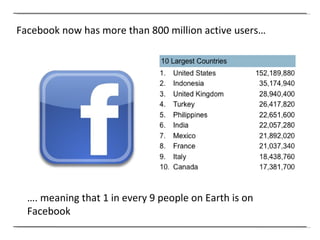
Facebook now has more than 800 million active users… … . meaning that 1 in every 9 people on Earth is on Facebook
In fact, if Facebook were a country…. … it would be the 3 rd  largest in the world (and twice the size of the USA)
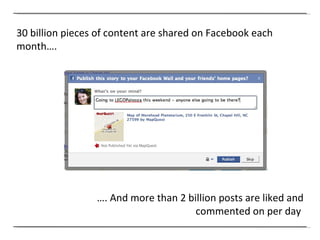
30 billion pieces of content are shared on Facebook each month…. … . And more than 2 billion posts are liked and commented on per day
But how can businesses use Facebook?
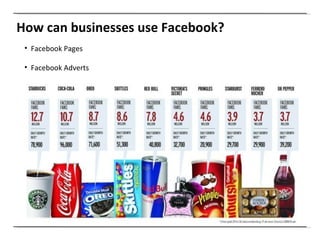
How can businesses use Facebook? Facebook Pages Facebook Adverts
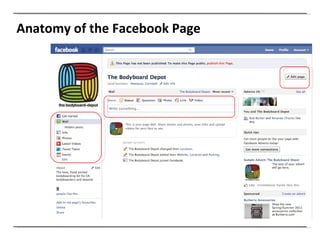
Anatomy of the Facebook Page
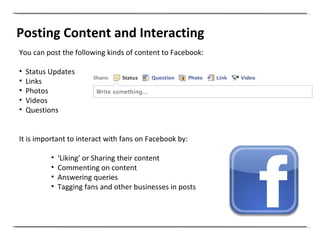
Posting Content and Interacting You can post the following kinds of content to Facebook: Status Updates Links Photos Videos  Questions It is important to interact with fans on Facebook by: ‘ Liking’ or Sharing their content Commenting on content Answering queries Tagging fans and other businesses in posts
Facebook EdgeRank The new Facebook Hybrid News Feed has two main settings: Top Stories -  filters content based on  EdgeRank   Recent   Stories  - shows most of the content published by your Facebook friends/   pages in chronological order There are three factors that are used to assess the  EdgeRank  of a Facebook update or ‘object’: Affinity  – number and type of interactions between fan and the object - different types of interaction are weighted differently depending on  amount of engagement require Weight  – type of object (link, photo or video) different types of objects are  weighted differently  Time Decay –  the value of an object decreases as it gets older
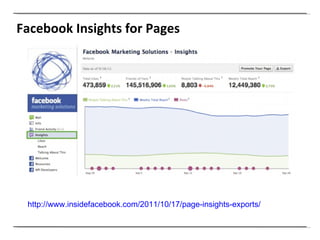
Facebook Insights for Pages http://www.insidefacebook.com/2011/10/17/page-insights-exports/
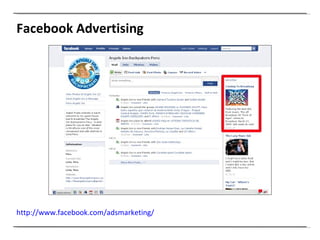
Facebook Advertising http://www.facebook.com/adsmarketing/
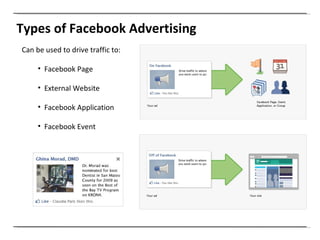
Types of Facebook Advertising Can be used to drive traffic to: Facebook Page External Website Facebook Application Facebook Event
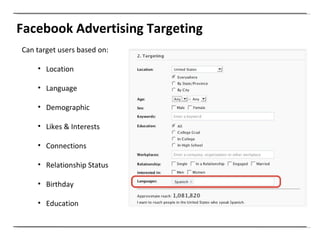
Facebook Advertising Targeting Can target users based on: Location Language Demographic Likes & Interests Connections Relationship Status Birthday Education
But how does Facebook integrate with other content on the web?
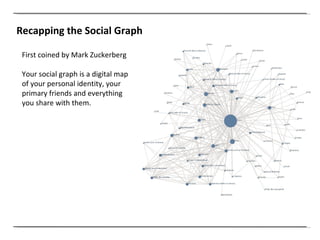
Recapping the Social Graph First coined by Mark Zuckerberg Your social graph is a digital map of your personal identity, your primary friends and everything you share with them.
It all comes down to integrating web pages and content with the social graph…
Content may be king… … .But context means more
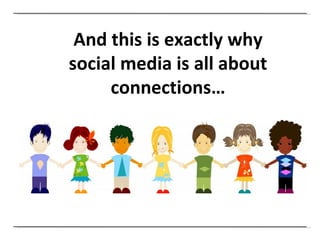
And this is exactly why social media is all about connections…
How are you as marketers going to leverage those connections?
And ensure people share your content?
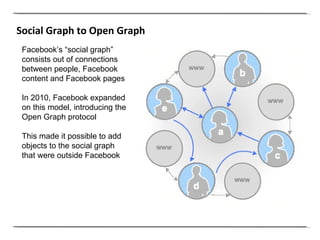
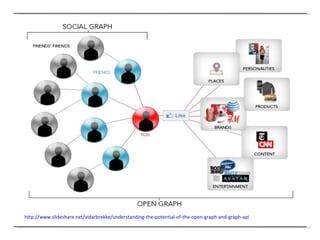
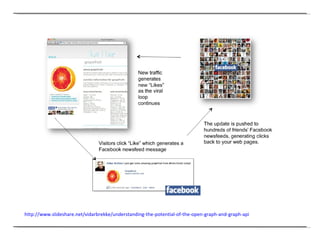
Social Graph to Open Graph Facebook’s “social graph” consists out of connections between people, Facebook content and Facebook pages In 2010, Facebook expanded on this model, introducing the Open Graph protocol  This made it possible to add objects to the social graph that were outside Facebook
http://www.slideshare.net/vidarbrekke/understanding-the-potential-of-the-open-graph-and-graph-api
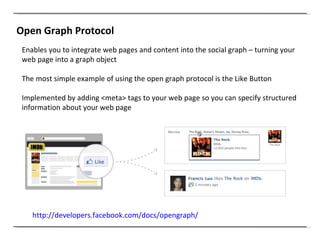
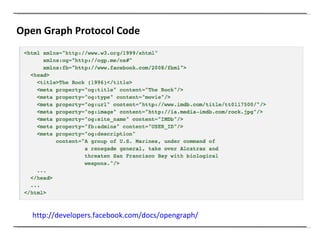
Open Graph Protocol Enables you to integrate web pages and content into the social graph – turning your web page into a graph object The most simple example of using the open graph protocol is the Like Button Implemented by adding <meta> tags to your web page so you can specify structured information about your web page http://developers.facebook.com/docs/opengraph/
http://www.slideshare.net/vidarbrekke/understanding-the-potential-of-the-open-graph-and-graph-api
Open Graph Protocol Code http://developers.facebook.com/docs/opengraph/
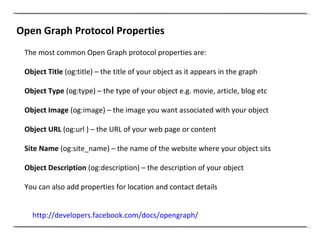
Open Graph Protocol Properties http://developers.facebook.com/docs/opengraph/   The most common Open Graph protocol properties are: Object Title  (og:title) – the title of your object as it appears in the graph Object Type  (og:type) – the type of your object e.g. movie, article, blog etc Object Image  (og:image) – the image you want associated with your object Object URL  (og:url ) – the URL of your web page or content Site Name  (og:site_name) – the name of the website where your object sits Object Description  (og:description) – the description of your object You can also add properties for location and contact details
All objects in the social graph are connected to each other via relationships
Or as Facebook defines it… “ Connections”
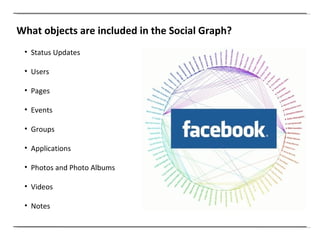
What objects are included in the Social Graph? Status Updates Users Pages Events Groups Applications Photos and Photo Albums Videos Notes
The Facebook social graph is represented by the Graph API
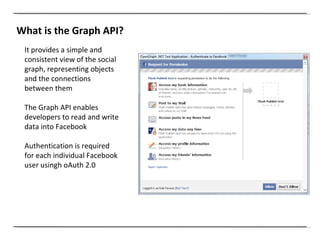
What is the Graph API? It provides a simple and consistent view of the social graph, representing objects and the connections between them The Graph API enables developers to read and write data into Facebook Authentication is required for each individual Facebook user usingh oAuth 2.0
Imagine the possibilities presented by access to this rich data
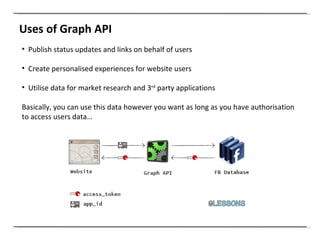
Uses of Graph API Publish status updates and links on behalf of users Create personalised experiences for website users Utilise data for market research and 3 rd  party applications Basically, you can use this data however you want as long as you have authorisation to access users data…
Here’s an example for you…
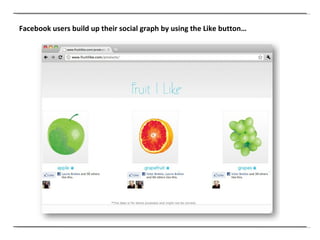
Facebook users build up their social graph by using the Like button…
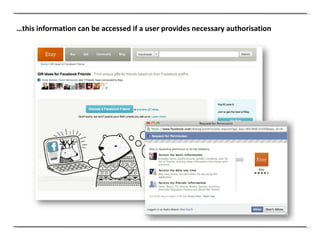
… this information can be accessed if a user provides necessary authorisation
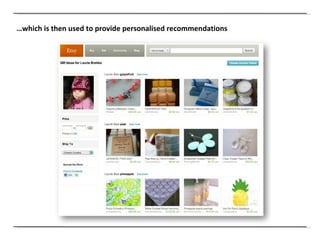
… which is then used to provide personalised recommendations
But unless you are a developer, this may be a little bit complicated…
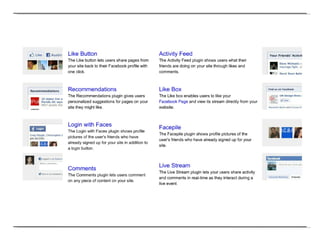
… luckily you can easily add some of this functionality to your site using social plugins
 
But with the latest developments announced at the recent F8 conference…
… everything has changed… … again!
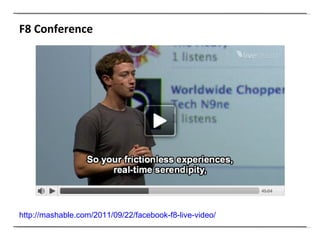
F8 Conference http://mashable.com/2011/09/22/facebook-f8-live-video/
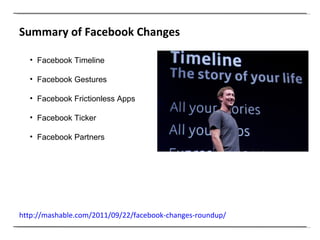
Summary of Facebook Changes http://mashable.com/2011/09/22/facebook-changes-roundup/   Facebook Timeline Facebook Gestures Facebook Frictionless Apps Facebook Ticker Facebook Partners
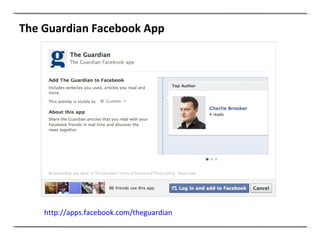
The Guardian Facebook App http://apps.facebook.com/theguardian
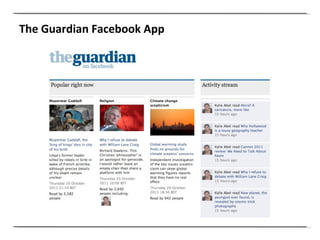
The Guardian Facebook App
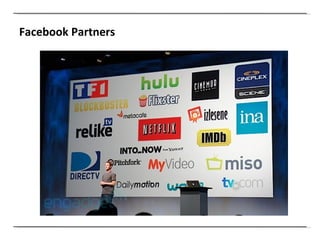
Facebook Partners
Facebook Partners http://www.youtube.com/watch?feature=player_embedded&v=FjAr5nGzjV8# !
Social Media Module on SlideShare http://www.slideshare.net/UCFadvertising
Clemi Hardie [email_address] @clemihardie

Introducing Facebook

  • 1.
    BA (Hons) AdvertisingIntroducing Facebook
  • 2.
  • 3.
    Facebook now hasmore than 800 million active users… … . meaning that 1 in every 9 people on Earth is on Facebook
  • 4.
    In fact, ifFacebook were a country…. … it would be the 3 rd largest in the world (and twice the size of the USA)
  • 5.
    30 billion piecesof content are shared on Facebook each month…. … . And more than 2 billion posts are liked and commented on per day
  • 6.
    But how canbusinesses use Facebook?
  • 7.
    How can businessesuse Facebook? Facebook Pages Facebook Adverts
  • 8.
    Anatomy of theFacebook Page
  • 9.
    Posting Content andInteracting You can post the following kinds of content to Facebook: Status Updates Links Photos Videos Questions It is important to interact with fans on Facebook by: ‘ Liking’ or Sharing their content Commenting on content Answering queries Tagging fans and other businesses in posts
  • 10.
    Facebook EdgeRank Thenew Facebook Hybrid News Feed has two main settings: Top Stories - filters content based on EdgeRank Recent Stories - shows most of the content published by your Facebook friends/ pages in chronological order There are three factors that are used to assess the EdgeRank of a Facebook update or ‘object’: Affinity – number and type of interactions between fan and the object - different types of interaction are weighted differently depending on amount of engagement require Weight – type of object (link, photo or video) different types of objects are weighted differently Time Decay – the value of an object decreases as it gets older
  • 11.
    Facebook Insights forPages http://www.insidefacebook.com/2011/10/17/page-insights-exports/
  • 12.
  • 13.
    Types of FacebookAdvertising Can be used to drive traffic to: Facebook Page External Website Facebook Application Facebook Event
  • 14.
    Facebook Advertising TargetingCan target users based on: Location Language Demographic Likes & Interests Connections Relationship Status Birthday Education
  • 15.
    But how doesFacebook integrate with other content on the web?
  • 16.
    Recapping the SocialGraph First coined by Mark Zuckerberg Your social graph is a digital map of your personal identity, your primary friends and everything you share with them.
  • 17.
    It all comesdown to integrating web pages and content with the social graph…
  • 18.
    Content may beking… … .But context means more
  • 19.
    And this isexactly why social media is all about connections…
  • 20.
    How are youas marketers going to leverage those connections?
  • 21.
    And ensure peopleshare your content?
  • 22.
    Social Graph toOpen Graph Facebook’s “social graph” consists out of connections between people, Facebook content and Facebook pages In 2010, Facebook expanded on this model, introducing the Open Graph protocol This made it possible to add objects to the social graph that were outside Facebook
  • 23.
  • 24.
    Open Graph ProtocolEnables you to integrate web pages and content into the social graph – turning your web page into a graph object The most simple example of using the open graph protocol is the Like Button Implemented by adding <meta> tags to your web page so you can specify structured information about your web page http://developers.facebook.com/docs/opengraph/
  • 25.
  • 26.
    Open Graph ProtocolCode http://developers.facebook.com/docs/opengraph/
  • 27.
    Open Graph ProtocolProperties http://developers.facebook.com/docs/opengraph/ The most common Open Graph protocol properties are: Object Title (og:title) – the title of your object as it appears in the graph Object Type (og:type) – the type of your object e.g. movie, article, blog etc Object Image (og:image) – the image you want associated with your object Object URL (og:url ) – the URL of your web page or content Site Name (og:site_name) – the name of the website where your object sits Object Description (og:description) – the description of your object You can also add properties for location and contact details
  • 28.
    All objects inthe social graph are connected to each other via relationships
  • 29.
    Or as Facebookdefines it… “ Connections”
  • 30.
    What objects areincluded in the Social Graph? Status Updates Users Pages Events Groups Applications Photos and Photo Albums Videos Notes
  • 31.
    The Facebook socialgraph is represented by the Graph API
  • 32.
    What is theGraph API? It provides a simple and consistent view of the social graph, representing objects and the connections between them The Graph API enables developers to read and write data into Facebook Authentication is required for each individual Facebook user usingh oAuth 2.0
  • 33.
    Imagine the possibilitiespresented by access to this rich data
  • 34.
    Uses of GraphAPI Publish status updates and links on behalf of users Create personalised experiences for website users Utilise data for market research and 3 rd party applications Basically, you can use this data however you want as long as you have authorisation to access users data…
  • 35.
  • 36.
    Facebook users buildup their social graph by using the Like button…
  • 37.
    … this informationcan be accessed if a user provides necessary authorisation
  • 38.
    … which isthen used to provide personalised recommendations
  • 39.
    But unless youare a developer, this may be a little bit complicated…
  • 40.
    … luckily youcan easily add some of this functionality to your site using social plugins
  • 41.
  • 42.
    But with thelatest developments announced at the recent F8 conference…
  • 43.
    … everything haschanged… … again!
  • 44.
  • 45.
    Summary of FacebookChanges http://mashable.com/2011/09/22/facebook-changes-roundup/ Facebook Timeline Facebook Gestures Facebook Frictionless Apps Facebook Ticker Facebook Partners
  • 46.
    The Guardian FacebookApp http://apps.facebook.com/theguardian
  • 47.
  • 48.
  • 49.
  • 50.
    Social Media Moduleon SlideShare http://www.slideshare.net/UCFadvertising
  • 51.

Editor's Notes

  • #3 Although this point is the last one made, it is the most important of them all and must be achieved first. Other marketing objectives will follow. Reflects changes in the nature of marketing – gone are one to many messages, it is better to engage in a two-way conversation with your readership..
  • #12 Definition of Social Media Brief description and examples of each.
  • #13 Definition of Social Media Brief description and examples of each.
  • #14 Definition of Social Media Brief description and examples of each.
  • #15 Definition of Social Media Brief description and examples of each.
  • #17 Definition of Social Media Brief description and examples of each.
  • #19 Definition of Social Media Brief description and examples of each.
  • #20 Definition of Social Media Brief description and examples of each.
  • #21 Definition of Social Media Brief description and examples of each.
  • #22 Definition of Social Media Brief description and examples of each.
  • #23 Definition of Social Media Brief description and examples of each.
  • #25 Definition of Social Media Brief description and examples of each.
  • #26 Definition of Social Media Brief description and examples of each.
  • #27 Definition of Social Media Brief description and examples of each.
  • #28 Definition of Social Media Brief description and examples of each.
  • #31 Definition of Social Media Brief description and examples of each.
  • #33 Definition of Social Media Brief description and examples of each.
  • #35 Definition of Social Media Brief description and examples of each.
  • #36 Definition of Social Media Brief description and examples of each.
  • #37 Definition of Social Media Brief description and examples of each.
  • #38 Definition of Social Media Brief description and examples of each.
  • #39 Definition of Social Media Brief description and examples of each.
  • #40 Definition of Social Media Brief description and examples of each.
  • #41 Definition of Social Media Brief description and examples of each.
  • #42 Definition of Social Media Brief description and examples of each.
  • #43 Definition of Social Media Brief description and examples of each.
  • #44 Definition of Social Media Brief description and examples of each.
  • #45 Definition of Social Media Brief description and examples of each.
  • #46 Definition of Social Media Brief description and examples of each.
  • #47 Definition of Social Media Brief description and examples of each.
  • #48 Definition of Social Media Brief description and examples of each.
  • #49 Definition of Social Media Brief description and examples of each.
  • #50 Definition of Social Media Brief description and examples of each.
  • #51 Definition of Social Media Brief description and examples of each.