BA (Hons) Advertising Introducing Blogging
What is a Blog? A  blog  is a type of website or part of a website. Blogs are usually maintained by an individual with regular entries of commentary, descriptions of events, or other material such as graphics or video. Entries are commonly displayed in reverse-chronological order. Most blogs are interactive, allowing visitors to leave comments and even message each other via widgets on the blogs and it is this interactivity that distinguishes them from other static websites
Advantages of Blogging Showcases expertise and knowledge Quick, easy and inexpensive Increases brand awareness and reach Search engine friendly Adds fresh content to website Provides company news source Builds community around blog Appear accessible to customers Interactive medium  http://econsultancy.com/uk/blog/5671-a-beginners-guide-to-blogging-for-business
Blog Writing Guidelines Write unique and quality content which is focused around a specific topic area – demonstrate your expertise Make sure your post headlines are intriguing yet also summarise your  argument and the content of your post Use sub-headings and bullet points to break up the content of your post Keep it short and succinct – around 500-600 words is usually enough.  Make sure you spell and grammar check your blog posts Make sure you include relevant links within the copy – this can be to other resources your reader may find useful or to information on your own website Be aware of your keyword and keyphrases when writing your posts Add rich media such as videos, photos and podcasts
Blog Post Optimisation Guidelines Include your keyphrases in the blog post title and make sure the title is contained within the <h1> tag   Optimise images using the alt attribute – again, try to include your keyphrases Include inline links back to your main website – make sure you use the correct anchor text and landing page   Link out to other sites too – then email them to let them know you have included them in your post – this way they are more likely to link back  to you and reference you in future posts   Use your keyphrase within the first paragraph of your blog post but only if it looks natural – ‘keyword stuffing’ is a frowned upon practice
Blogging Platforms
Social Media Integration
Social Bookmarking “ A method for Internet users to organize, store, manage and search for bookmarks of resources online” An excellent way to increase visibility of your blog content Examples of social bookmarking sites include: Digg Delicious Reddit StumbleUpon All new blog posts should be submitted to social  bookmarking sites
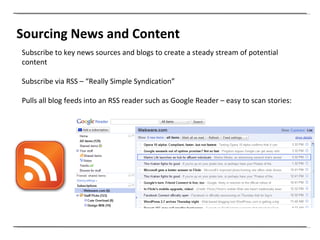
Sourcing News and Content Subscribe to key news sources and blogs to create a steady stream of potential content Subscribe via RSS – “Really Simple Syndication” Pulls all blog feeds into an RSS reader such as Google Reader – easy to scan stories:
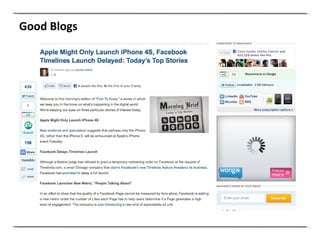
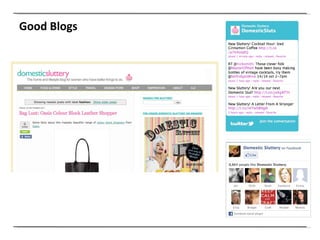
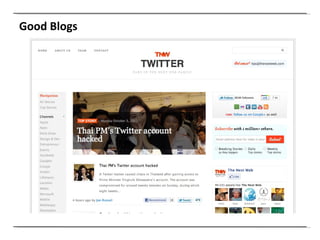
Good Blogs
Good Blogs
Good Blogs
Social Media Module on SlideShare http://www.slideshare.net/UCFadvertising
Clemi Hardie [email_address] @clemihardie

Introduction to Blogging

  • 1.
    BA (Hons) AdvertisingIntroducing Blogging
  • 2.
    What is aBlog? A blog is a type of website or part of a website. Blogs are usually maintained by an individual with regular entries of commentary, descriptions of events, or other material such as graphics or video. Entries are commonly displayed in reverse-chronological order. Most blogs are interactive, allowing visitors to leave comments and even message each other via widgets on the blogs and it is this interactivity that distinguishes them from other static websites
  • 3.
    Advantages of BloggingShowcases expertise and knowledge Quick, easy and inexpensive Increases brand awareness and reach Search engine friendly Adds fresh content to website Provides company news source Builds community around blog Appear accessible to customers Interactive medium http://econsultancy.com/uk/blog/5671-a-beginners-guide-to-blogging-for-business
  • 4.
    Blog Writing GuidelinesWrite unique and quality content which is focused around a specific topic area – demonstrate your expertise Make sure your post headlines are intriguing yet also summarise your argument and the content of your post Use sub-headings and bullet points to break up the content of your post Keep it short and succinct – around 500-600 words is usually enough. Make sure you spell and grammar check your blog posts Make sure you include relevant links within the copy – this can be to other resources your reader may find useful or to information on your own website Be aware of your keyword and keyphrases when writing your posts Add rich media such as videos, photos and podcasts
  • 5.
    Blog Post OptimisationGuidelines Include your keyphrases in the blog post title and make sure the title is contained within the <h1> tag   Optimise images using the alt attribute – again, try to include your keyphrases Include inline links back to your main website – make sure you use the correct anchor text and landing page   Link out to other sites too – then email them to let them know you have included them in your post – this way they are more likely to link back to you and reference you in future posts   Use your keyphrase within the first paragraph of your blog post but only if it looks natural – ‘keyword stuffing’ is a frowned upon practice
  • 6.
  • 7.
  • 8.
    Social Bookmarking “A method for Internet users to organize, store, manage and search for bookmarks of resources online” An excellent way to increase visibility of your blog content Examples of social bookmarking sites include: Digg Delicious Reddit StumbleUpon All new blog posts should be submitted to social bookmarking sites
  • 9.
    Sourcing News andContent Subscribe to key news sources and blogs to create a steady stream of potential content Subscribe via RSS – “Really Simple Syndication” Pulls all blog feeds into an RSS reader such as Google Reader – easy to scan stories:
  • 10.
  • 11.
  • 12.
  • 13.
    Social Media Moduleon SlideShare http://www.slideshare.net/UCFadvertising
  • 14.

Editor's Notes

  • #3 Definition of Social Media Brief description and examples of each.
  • #4 Definition of Social Media Brief description and examples of each.
  • #5 Definition of Social Media Brief description and examples of each.
  • #6 Definition of Social Media Brief description and examples of each.
  • #7 Definition of Social Media Brief description and examples of each.
  • #8 Definition of Social Media Brief description and examples of each.
  • #9 Definition of Social Media Brief description and examples of each.
  • #10 Definition of Social Media Brief description and examples of each.
  • #11 Definition of Social Media Brief description and examples of each.
  • #12 Definition of Social Media Brief description and examples of each.
  • #13 Definition of Social Media Brief description and examples of each.
  • #14 Definition of Social Media Brief description and examples of each.