Outline-session 9 (09-April-2009) >> J2ME Record Management System -Notification of Changes with Record Listener -Exception Handling
Sorting with Record Comparator RecordComparator is a Java interface implement this interface when you would like the enumerator to return records in sorted order Implementation: public class Comparator implements RecordComparator { public int compare(byte[] rec1, byte[] rec2) { String str1 = new String(rec1), str2 = new String(rec2); int result = str1.compareTo(str2); if (result == 0) return RecordComparator.EQUIVALENT; else if (result < 0) return RecordComparator.PRECEDES; else return RecordComparator.FOLLOWS; } }
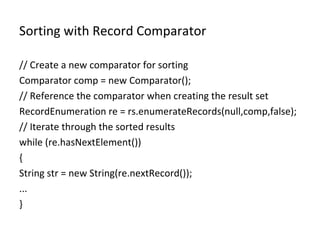
Sorting with Record Comparator // Create a new comparator for sorting Comparator comp = new Comparator(); // Reference the comparator when creating the result set RecordEnumeration re = rs.enumerateRecords(null,comp,false); // Iterate through the sorted results while (re.hasNextElement()) { String str = new String(re.nextRecord()); ... }
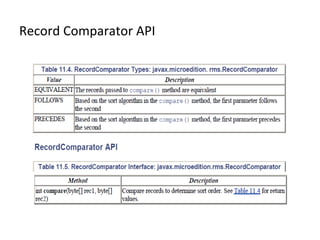
Record Comparator API
String Sort with Compound Records When a record has multiple data types stored within it (what I'll refer to as a compound record), there may be more than one field that would be appropriate for sorting String[] pets = {&quot;duke&quot;, &quot;tiger&quot;, &quot;spike&quot;, &quot;beauregard&quot;}; boolean[] dog = {true, false, true, true}; int[] rank = {3, 0, 1, 2}; StringSort.java IntSort.java
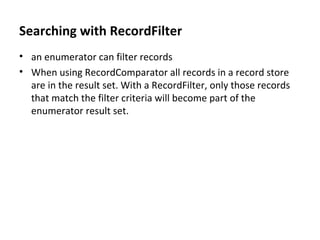
Searching with RecordFilter an enumerator can filter records When using RecordComparator all records in a record store are in the result set. With a RecordFilter, only those records that match the filter criteria will become part of the enumerator result set.
Searching with RecordFilter class SearchFilter implements RecordFilter { private String searchText = null; public SearchFilter(String searchText) 304 { // This is the text to search for this.searchText = searchText.toLowerCase(); } public boolean matches(byte[] candidate) { String str = new String(candidate).toLowerCase(); // Look for a match if (searchText != null && str.indexOf(searchText) != -1) return true; else return false; } }
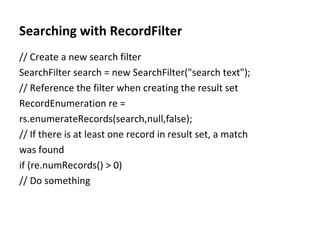
Searching with RecordFilter // Create a new search filter SearchFilter search = new SearchFilter(&quot;search text&quot;); // Reference the filter when creating the result set RecordEnumeration re = rs.enumerateRecords(search,null,false); // If there is at least one record in result set, a match was found if (re.numRecords() > 0) // Do something
RecordFilter -API RecordFilter API Table 11.6. RecordFilter Interface: javax.microedition.rms.RecordFilter Method Description boolean  matches(byte[] candidate) Search a record for a specific value

Session10 J2ME Record Management System

  • 1.
    Outline-session 9 (09-April-2009)>> J2ME Record Management System -Notification of Changes with Record Listener -Exception Handling
  • 2.
    Sorting with RecordComparator RecordComparator is a Java interface implement this interface when you would like the enumerator to return records in sorted order Implementation: public class Comparator implements RecordComparator { public int compare(byte[] rec1, byte[] rec2) { String str1 = new String(rec1), str2 = new String(rec2); int result = str1.compareTo(str2); if (result == 0) return RecordComparator.EQUIVALENT; else if (result < 0) return RecordComparator.PRECEDES; else return RecordComparator.FOLLOWS; } }
  • 3.
    Sorting with RecordComparator // Create a new comparator for sorting Comparator comp = new Comparator(); // Reference the comparator when creating the result set RecordEnumeration re = rs.enumerateRecords(null,comp,false); // Iterate through the sorted results while (re.hasNextElement()) { String str = new String(re.nextRecord()); ... }
  • 4.
  • 5.
    String Sort withCompound Records When a record has multiple data types stored within it (what I'll refer to as a compound record), there may be more than one field that would be appropriate for sorting String[] pets = {&quot;duke&quot;, &quot;tiger&quot;, &quot;spike&quot;, &quot;beauregard&quot;}; boolean[] dog = {true, false, true, true}; int[] rank = {3, 0, 1, 2}; StringSort.java IntSort.java
  • 6.
    Searching with RecordFilteran enumerator can filter records When using RecordComparator all records in a record store are in the result set. With a RecordFilter, only those records that match the filter criteria will become part of the enumerator result set.
  • 7.
    Searching with RecordFilterclass SearchFilter implements RecordFilter { private String searchText = null; public SearchFilter(String searchText) 304 { // This is the text to search for this.searchText = searchText.toLowerCase(); } public boolean matches(byte[] candidate) { String str = new String(candidate).toLowerCase(); // Look for a match if (searchText != null && str.indexOf(searchText) != -1) return true; else return false; } }
  • 8.
    Searching with RecordFilter// Create a new search filter SearchFilter search = new SearchFilter(&quot;search text&quot;); // Reference the filter when creating the result set RecordEnumeration re = rs.enumerateRecords(search,null,false); // If there is at least one record in result set, a match was found if (re.numRecords() > 0) // Do something
  • 9.
    RecordFilter -API RecordFilterAPI Table 11.6. RecordFilter Interface: javax.microedition.rms.RecordFilter Method Description boolean matches(byte[] candidate) Search a record for a specific value