Effects Techniques Used in
                              Uncharted 3: Drake’s Deception

                              Marshall Robin
                            Graphics/Effects Programmer, Naughty Dog
                            <mrobin@naughtydog.com>
                            @mrobin604


Monday, March 12, 12
Good afternoon, and welcome to my talk on the effects techniques used in Uncharted 3: Drake’s Deception. My name is Marshall Robin, I’m a visual effects programmer at Naughty Dog. I’ve been at Naughty Dog since 2005, and I’ve been working on the Uncharted series since Drake’s Fortune.
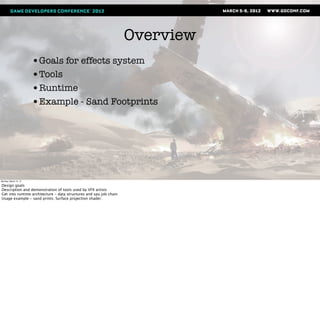
Overview
                       •Goals for effects system
                       •Tools
                       •Runtime
                       •Example - Sand Footprints


Monday, March 12, 12

Design goals
Description and demonstration of tools used by VFX artists
Get into runtime architecture - data structures and spu job chain
Usage example - sand prints. Surface projection shader.
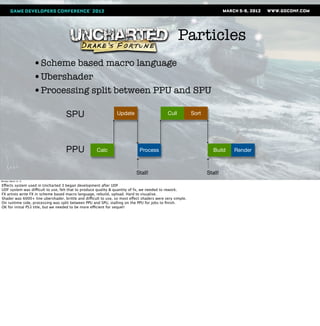
Particles
                       •Scheme based macro language
                       •Ubershader
                       •Processing split between PPU and SPU

                                    SPU                         Update                       Cull          Sort


                                    PPU              Calc                    Process                                 Build   Render


                                                                           Stall!                                 Stall!
Monday, March 12, 12

Effects system used in Uncharted 3 began development after UDF
UDF system was difficult to use, felt that to produce quality & quantity of fx, we needed to rework.
FX artists write FX in scheme based macro language, rebuild, upload. Hard to visualise.
Shader was 6000+ line ubershader, brittle and difficult to use, so most effect shaders were very simple.
On runtime side, processing was split between PPU and SPU, stalling on the PPU for jobs to finish.
OK for initial PS3 title, but we needed to be more efficient for sequel!
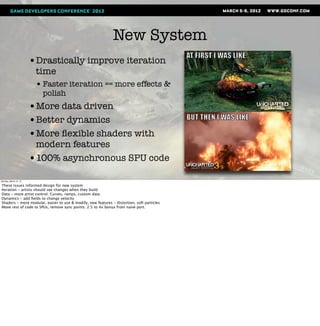
New System
                       •Drastically improve iteration
                        time
                        • Faster iteration == more effects &
                          polish
                       •More data driven
                       •Better dynamics
                       •More flexible shaders with
                        modern features
                       •100% asynchronous SPU code
Monday, March 12, 12

These issues informed design for new system
Iteration - artists should see changes when they build
Data - more artist control. Curves, ramps, custom data
Dynamics - add fields to change velocity
Shaders - more modular, easier to use & modify, new features - distortion, soft particles
Move rest of code to SPUs, remove sync points. 2.5 to 4x bonus from naive port.
Tools
                       •Particler (Particle authoring)
                       •Noodler (Shader creation)


Monday, March 12, 12
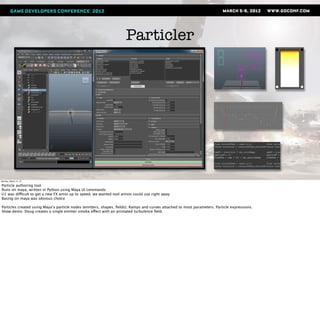
Particler


Monday, March 12, 12

Particle authoring tool
Runs on maya, written in Python using Maya UI commands
U1 was difficult to get a new FX artist up to speed, we wanted tool artists could use right away
Basing on maya was obvious choice

Particles created using Maya’s particle nodes (emitters, shapes, fields). Ramps and curves attached to most parameters. Particle expressions.
Show demo. Doug creates a single emitter smoke effect with an animated turbulence field.
Monday, March 12, 12

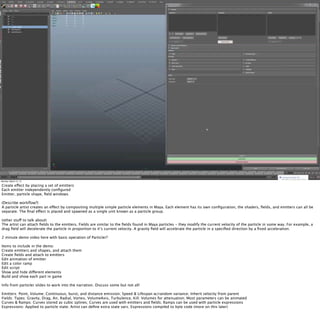
Create effect by placing a set of emitters
Each emitter independently configured
Emitter, particle shape, field windows

(Describe workflow?)
A particle artist creates an effect by compositing multiple simple particle elements in Maya. Each element has its own configuration, the shaders, fields, and emitters can all be
separate. The final effect is placed and spawned as a single unit known as a particle group.

(other stuff to talk about)
The artist can attach fields to the emitters. Fields are similar to the fields found in Maya particles - they modify the current velocity of the particle in some way. For example, a
drag field will decelerate the particle in proportion to it’s current velocity. A gravity field will accelerate the particle in a specified direction by a fixed acceleration.

2 minute demo video here with basic operation of Particler?

Items to include in the demo:
Create emitters and shapes, and attach them
Create fields and attach to emitters
Edit animation of emitter
Edit a color ramp
Edit script
Show and hide different elements
Build and show each part in game

Info from particler slides to work into the narration. Discuss some but not all!

Emitters: Point, Volume; Continuous, burst, and distance emission; Speed & Lifespan w/random variance; Inherit velocity from parent
Fields: Types: Gravity, Drag, Air, Radial, Vortex, VolumeAxis, Turbulence, Kill; Volumes for attenuation; Most parameters can be animated
Curves & Ramps: Curves stored as cubic splines; Curves are used with emitters and fields; Ramps can be used with particle expressions
Expressions: Applied to particle state; Artist can define extra state vars; Expressions compiled to byte code (more on this later)
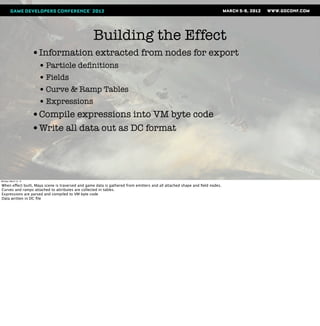
Building the Effect
                       •Information extracted from nodes for export
                        • Particle definitions
                        • Fields
                        • Curve & Ramp Tables
                        • Expressions
                       •Compile expressions into VM byte code
                       •Write all data out as DC format


Monday, March 12, 12

When effect built, Maya scene is traversed and game data is gathered from emitters and all attached shape and field nodes.
Curves and ramps attached to attributes are collected in tables.
Expressions are parsed and compiled to VM byte code
Data written in DC file
DC
                       •Data Compiler
                       •Used for most runtime data
                       •Scheme based


                           (For more info, check out Dan Liebgold’s GDC 2008
                                              presentation)

Monday, March 12, 12

DC - human readable format used for gameplay data.
File gets converted into binary by the Data Compiler tool, hence DC. Built on top of Scheme.
Dan Liebgold gave a presentation at GDC in 2008 talking all about it.Available in slide and audio in the GDC Vault.
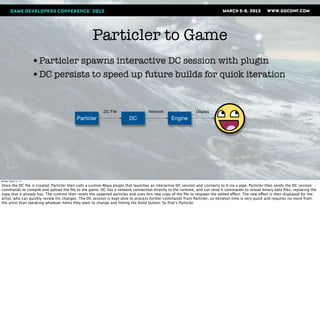
Particler to Game
                       •Particler spawns interactive DC session with plugin
                       •DC persists to speed up future builds for quick iteration


                                                        .DC File                  Network                   Display
                                          Particler                    DC                     Engine


Monday, March 12, 12

Once the DC file is created, Particler then calls a custom Maya plugin that launches an interactive DC session and connects to it via a pipe. Particler then sends the DC session
commands to compile and upload the file to the game. DC has a network connection directly to the runtime, and can send it commands to reload binary data files, replacing the
copy that it already has. The runtime then resets the spawned particles and uses this new copy of the file to respawn the edited effect. The new effect is then displayed for the
artist, who can quickly review his changes. The DC session is kept alive to process further commands from Particler, so iteration time is very quick and requires no more from
the artist than tweaking whatever items they want to change and hitting the build button. So that’s Particler.
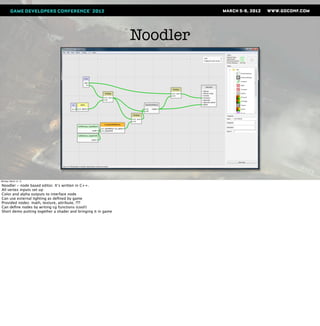
Noodler
                       •Rewritten shaders still not flexible enough
                       •Sony ATG demos editor for us - let’s try it


Monday, March 12, 12

Artists could not experiment
Node based shaders = slow and hard to debug?


Write shaders for U2 but overwhelmed with artist requests
Mike D asks for node based editor so he can write his own shaders
No, shaders too slow and hard to maintain.
Right before U3, Sony ATG shows material system with NBE
Decide to give it a shot since it was ez to integrate
Noodler


Monday, March 12, 12

Noodler - node based editor. It’s written in C++.
All vertex inputs set up
Color and alpha outputs to interface node
Can use external lighting as defined by game
Provided nodes: math, texture, attribute, ???
Can define nodes by writing cg functions (cool!)
Short demo putting together a shader and bringing it in game
Monday, March 12, 12

Demo video here for noodler!

Ideas:
Build a simple blend shader
Drop into surfer, connect up textures
Preview
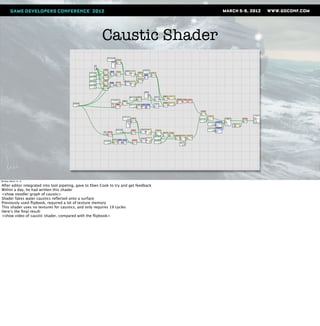
Caustic Shader


Monday, March 12, 12

After editor integrated into tool pipeling, gave to Eben Cook to try and get feedback
Within a day, he had written this shader
<show noodler graph of caustic>
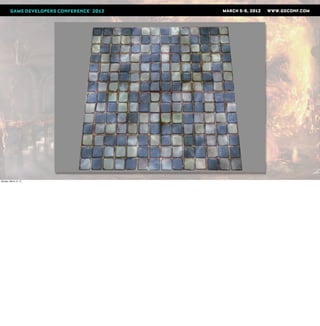
Shader fakes water caustics reflected onto a surface
Previously used flipbook, required a lot of texture memory
This shader uses no textures for caustics, and only requires 19 cycles
Here’s the final result:
<show video of caustic shader, compared with the flipbook>
Monday, March 12, 12
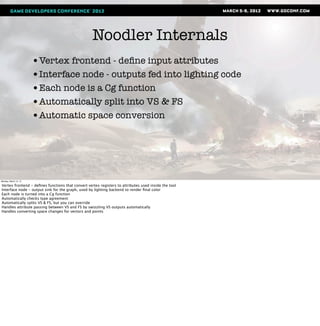
Noodler Internals
                       •Vertex frontend - define input attributes
                       •Interface node - outputs fed into lighting code
                       •Each node is a Cg function
                       •Automatically split into VS & FS
                       •Automatic space conversion


Monday, March 12, 12

Vertex frontend - defines functions that convert vertex registers to attributes used inside the tool
Interface node - output sink for the graph, used by lighting backend to render final color
Each node is turned into a Cg function
Automatically checks type agreement
Automatically splits VS & FS, but you can override
Handles attribute passing between VS and FS by swizzling VS outputs automatically
Handles converting space changes for vectors and points
How did it go?
                       •Noodler used for all FX shaders in U3!
                       •Programmer help needed for some debugging
                        • Decreased over time as artists learned more
                       •Made artists manage their cycle budgets


Monday, March 12, 12

Super fast iteration
Artists could create unique shaders that improved the dynamic look of their effects
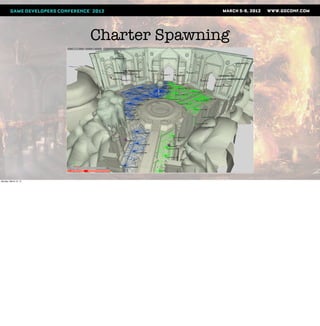
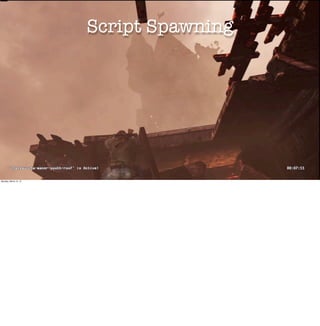
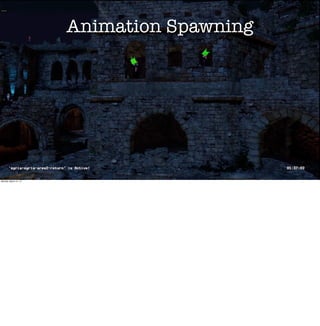
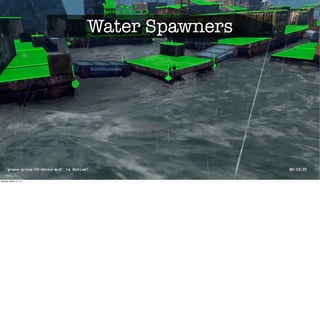
Programmer help with numerical issues, render state, some debugging
Cycle counts were fairly reasonable
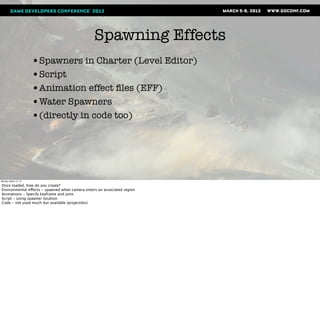
Spawning Effects
                       •Spawners in Charter (Level Editor)
                       •Script
                       •Animation effect files (EFF)
                       •Water Spawners
                       •(directly in code too)


Monday, March 12, 12

Once loaded, how do you create?
Environmental effects - spawned when camera enters an associated region
Animations - Specify keyframe and joint
Script - using spawner location
Code - not used much but available (projectiles)
Charter Spawning


Monday, March 12, 12
Script Spawning


Monday, March 12, 12
Animation Spawning


Monday, March 12, 12
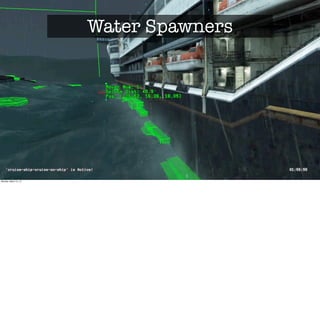
Water Spawners


Monday, March 12, 12
Water Spawners


Monday, March 12, 12
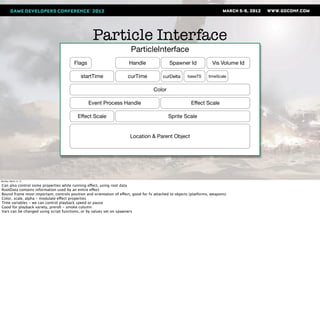
Particle Interface
                                                                        ParticleInterface
                                        Flags                         Handle                 Spawner Id              Vis Volume Id

                                            startTime                 curTime            curDelta      baseTS      timeScale


                                                                                    Color

                                                Event Process Handle                                     Effect Scale

                                          Effect Scale                                      Sprite Scale


                                                                       Location & Parent Object


Monday, March 12, 12

Can also control some properties while running effect, using root data
RootData contains information used by an entire effect
Bound frame most important, controls position and orientation of effect, good for fx attached to objects (platforms, weapons)
Color, scale, alpha - modulate effect properties
Time variables - we can control playback speed or pause
Good for playback variety, preroll - smoke column
Vars can be changed using script functions, or by values set on spawners
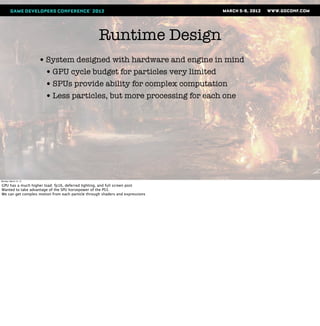
Runtime Design
                       • System designed with hardware and engine in mind
                        • GPU cycle budget for particles very limited
                        • SPUs provide ability for complex computation
                        • Less particles, but more processing for each one


Monday, March 12, 12

GPU has a much higher load: fp16, deferred lighting, and full screen post
Wanted to take advantage of the SPU horsepower of the PS3.
We can get complex motion from each particle through shaders and expressions
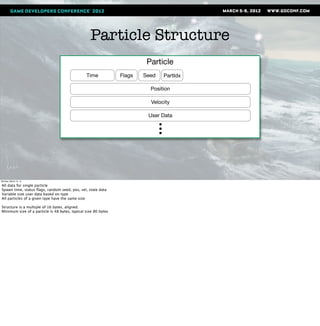
Particle Structure
                                                                         Particle
                                                Time            Flags   Seed   PartIdx

                                                                          Position

                                                                          Velocity

                                                                         User Data


Monday, March 12, 12

All data for single particle
Spawn time, status flags, random seed, pos, vel, state data
Variable size user data based on type
All particles of a given type have the same size

Structure is a multiple of 16 bytes, aligned.
Minimum size of a particle is 48 bytes, typical size 80 bytes
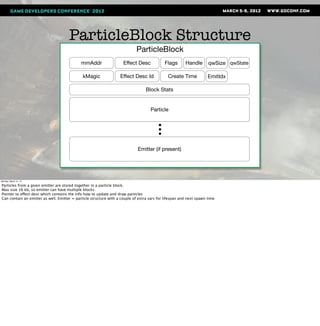
ParticleBlock Structure
                                                                            ParticleBlock
                                             mmAddr                  Effect Desc            Flags       Handle       qwSize qwState

                                              kMagic               Effect Desc Id             Create Time            EmitIdx

                                                                                 Block Stats


                                                                                    Particle


                                                                             Emitter (if present)


Monday, March 12, 12

Particles from a given emitter are stored together in a particle block.
Max size 16 kb, so emitter can have multiple blocks.
Pointer to effect desc which contains the info how to update and draw particles
Can contain an emitter as well. Emitter = particle structure with a couple of extra vars for lifespan and next spawn time
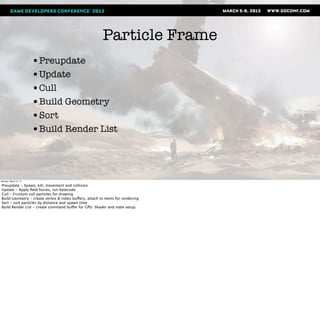
Particle Frame
                       •Preupdate
                       •Update
                       •Cull
                       •Build Geometry
                       •Sort
                       •Build Render List


Monday, March 12, 12

Preupdate - Spawn, kill, movement and collision
Update - Apply field forces, run bytecode
Cull - Frustum cull particles for drawing
Build Geometry - create vertex & index buffers, attach to items for rendering
Sort - sort particles by distance and spawn time
Build Render List - create command buffer for GPU. Shader and state setup.
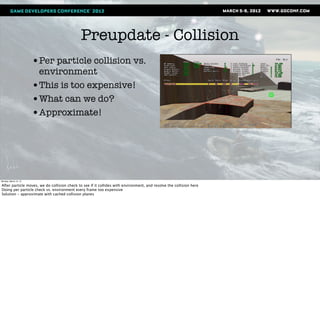
Preupdate - Collision
                       •Per particle collision vs.
                        environment
                       •This is too expensive!
                       •What can we do?
                       •Approximate!


Monday, March 12, 12

After particle moves, we do collision check to see if it collides with environment, and resolve the collision here
Doing per particle check vs. environment every frame too expensive
Solution - approximate with cached collision planes
Preupdate - Collision


Monday, March 12, 12

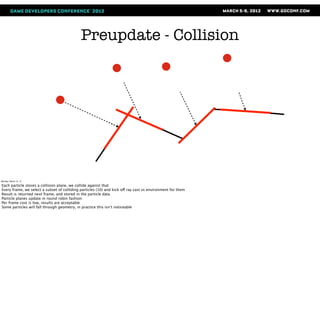
Each particle stores a collision plane, we collide against that
Every frame, we select a subset of colliding particles (10) and kick off ray cast vs environment for them
Result is returned next frame, and stored in the particle data
Particle planes update in round robin fashion
Per frame cost is low, results are acceptable
Some particles will fall through geometry, in practice this isn’t noticeable
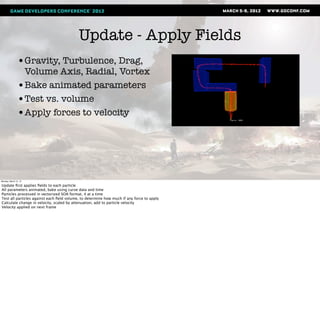
Update - Apply Fields
               •Gravity, Turbulence, Drag,
                Volume Axis, Radial, Vortex
               •Bake animated parameters
               •Test vs. volume
               •Apply forces to velocity


Monday, March 12, 12

Update first applies fields to each particle
All parameters animated, bake using curve data and time
Particles processed in vectorized SOA format, 4 at a time
Test all particles against each field volume, to determine how much if any force to apply
Calculate change in velocity, scaled by attenuation, add to particle velocity
Velocity applied on next frame
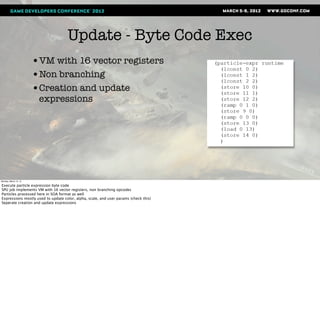
Update - Byte Code Exec
                       •VM with 16 vector registers
                       •Non branching
                       •Creation and update
                        expressions


Monday, March 12, 12

Execute particle expression byte code
SPU job implements VM with 16 vector registers, non branching opcodes
Particles processed here in SOA format as well
Expressions mostly used to update color, alpha, scale, and user params (check this)
Seperate creation and update expressions
Cull & Build Geom
                       • Cull vs. View Frustum
                       • Build Verts
                       • Create Indices & Render Data Structure
                       • Write to Memory


Monday, March 12, 12

Cull - one block at a time. flags particles to draw, reserves space for vert and idx data
Build - extract particle state into a ParticleState structure, which bakes out ramps and copies state data to fixed structure.
Build vert buffers
Some sorting is done here, more detail later
Generate indices, and attach all data to render data structure used by build. Generally all particles in block will be written as a single batch.


The cull job processes one ParticleBlock of particles at a time. First, it culls all particles in the block against the view frustum and sets a flag on the particle. After this, it reserves
space for all the visible particles and creates vertex and index data for each particle.

Particles are tested to see if they are within the view frustum. If the particle passes, we construct vertex data for it and adds a render data structure to the list of particles to be
sorted and rendered. The particle state is extracted into a ParticleState structure which contains all the possible attributes that can be used by a shader. These attribute values
can come from constants, state data, or ramps driven by the particle state. These values are used to set up the vertex data according to the Attribute Descriptions in the
geometry description. The particle vertex data is then added to an output list that is sorted after the block is completely processed.

After all particles in the block have vertex data generated for them, the output list is sorted if required by to the sort type selected for the effect in the particler tool. Sorting is
somewhat complicated so I will explain the particulars when we get to the sorting job later, but for now it will suffice to say that the sorting is split between the cull job and the
sort job, in order to reduce main memory usage and sort job processing load.

After the sort is done, we generate indices for the particle geometry, and create a Sprite Render Data structure that has pointers to the vertices, indices, and the geometry
description DMA list. Generally all particles in a block will be written as a single batch with one render data structure.

Finally, we reserve some space in main memory, and write all the generated render data.
Geometry Description
                                                                        ParticleGeomDesc
                                                Flags                  Technique*

                                             Num Verts               Num Indices               Stride      eaDmaList


                                                                            Attribute Descriptions


                                                                                  Dma List Buffer


                                                                      Attribute Description
                                                Count                      Type             Register Idx    Offset


Monday, March 12, 12

Data used to describe how to set up vertex buffers and render the particle
Attribute descriptions tell cull and build job how to layout the vertex buffers
The dma list is used to transfer the shader for the build command list job
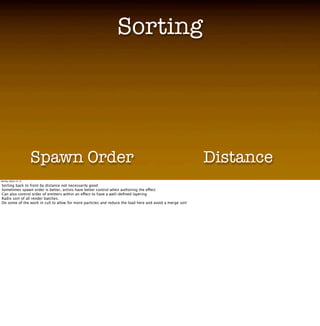
Sorting
                                                                 Sorting
                       • Video showing distance sorting vs. spawn order sorting here
                       • Discuss why this is important
                       • Radix sort

                       • Sort methods
                        • Per emitter or per particle
                        • Dist, Spawn order, Reverse spawn order

                       Spawn Order                                                                        Distance
Monday, March 12, 12

Sorting back to front by distance not necessarily good
Sometimes spawn order is better, artists have better control when authoring the effect

Can also control order of emitters within an effect to have a well-defined layering
Radix sort of all render batches.
Do some of the work in cull to allow for more particles and reduce the load here and avoid a merge sort
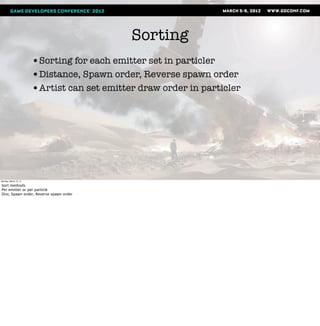
Sorting
                       •Sorting for each emitter set in particler
                       •Distance, Spawn order, Reverse spawn order
                       •Artist can set emitter draw order in particler


Monday, March 12, 12

Sort methods
Per emitter or per particle
Dist, Spawn order, Reverse spawn order
Build Command List
                       •Outputs command list for RSX
                       •Set up viewport, shader, render state, vertex format
                       •Cache shaders and settings


Monday, March 12, 12

Groups particle batches by draw pass and render data to minimize state and shader changes
Set up viewport, shader params, render state, and vertex format
Draw batch
Caches settings between batches for reuse
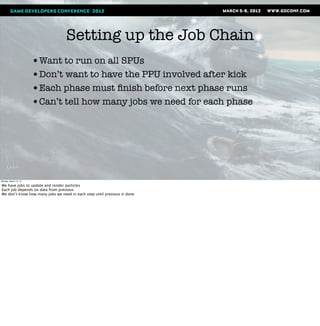
Setting up the Job Chain
                       •Want to run on all SPUs
                       •Don’t want to have the PPU involved after kick
                       •Each phase must finish before next phase runs
                       •Can’t tell how many jobs we need for each phase


Monday, March 12, 12

We have jobs to update and render particles
Each job depends on data from previous
We don’t know how many jobs we need in each step until previous is done
Setting up the Job Chain
                       •Use setup jobs to gather results, and set up new jobs


Monday, March 12, 12
Job Chain
                       SetupStart


                                                    Execute SetupStart Job

Monday, March 12, 12

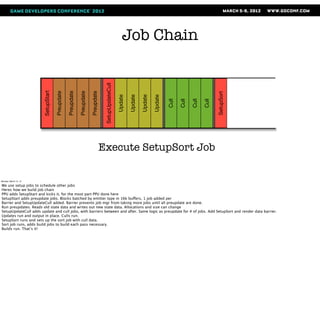
We use setup jobs to schedule other jobs
Heres how we build job chain
PPU adds SetupStart and kicks it, for the most part PPU done here
SetupStart adds preupdate jobs. Blocks batched by emitter type in 16k buffers, 1 job added per
Barrier and SetupUpdateCull added. Barrier prevents job mgr from taking more jobs until all preupdate are done.
Run preupdates. Reads old state data and writes out new state data. Allocations and size can change
SetupUpdateCull adds update and cull jobs, with barriers between and after. Same logic as preupdate for # of jobs. Add SetupSort and render data barrier.
Updates run and output in place. Culls run.
SetupSort runs and sets up the sort job with cull data.
Sort job runs, adds build jobs to build each pass necessary.
Builds run. That’s it!
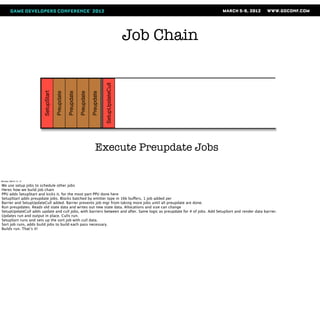
Job Chain


                                                                                    SetupUpdateCull
                       SetupStart

                                    Preupdate

                                                Preupdate

                                                            Preupdate

                                                                        Preupdate


                                                                             Execute Preupdate Jobs

Monday, March 12, 12

We use setup jobs to schedule other jobs
Heres how we build job chain
PPU adds SetupStart and kicks it, for the most part PPU done here
SetupStart adds preupdate jobs. Blocks batched by emitter type in 16k buffers, 1 job added per
Barrier and SetupUpdateCull added. Barrier prevents job mgr from taking more jobs until all preupdate are done.
Run preupdates. Reads old state data and writes out new state data. Allocations and size can change
SetupUpdateCull adds update and cull jobs, with barriers between and after. Same logic as preupdate for # of jobs. Add SetupSort and render data barrier.
Updates run and output in place. Culls run.
SetupSort runs and sets up the sort job with cull data.
Sort job runs, adds build jobs to build each pass necessary.
Builds run. That’s it!
Job Chain


                                                                                    SetupUpdateCull
                       SetupStart

                                    Preupdate

                                                Preupdate

                                                            Preupdate

                                                                        Preupdate


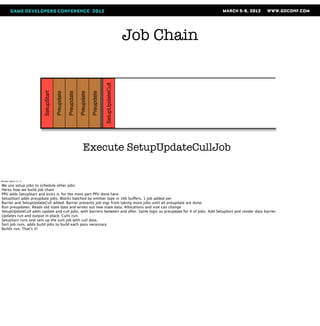
                                                                Execute SetupUpdateCullJob

Monday, March 12, 12

We use setup jobs to schedule other jobs
Heres how we build job chain
PPU adds SetupStart and kicks it, for the most part PPU done here
SetupStart adds preupdate jobs. Blocks batched by emitter type in 16k buffers, 1 job added per
Barrier and SetupUpdateCull added. Barrier prevents job mgr from taking more jobs until all preupdate are done.
Run preupdates. Reads old state data and writes out new state data. Allocations and size can change
SetupUpdateCull adds update and cull jobs, with barriers between and after. Same logic as preupdate for # of jobs. Add SetupSort and render data barrier.
Updates run and output in place. Culls run.
SetupSort runs and sets up the sort job with cull data.
Sort job runs, adds build jobs to build each pass necessary.
Builds run. That’s it!
Job Chain


                                                                                    SetupUpdateCull
                       SetupStart

                                    Preupdate

                                                Preupdate

                                                            Preupdate

                                                                        Preupdate


                                                                                                                                                                      SetupSort
                                                                                                      Update

                                                                                                               Update

                                                                                                                        Update

                                                                                                                                 Update

                                                                                                                                          Cull

                                                                                                                                                 Cull

                                                                                                                                                        Cull

                                                                                                                                                               Cull
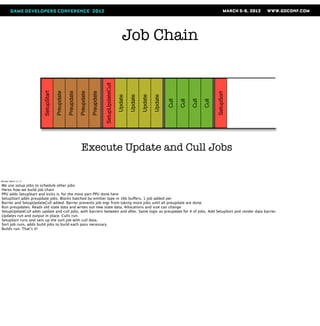
                                                              Execute Update and Cull Jobs

Monday, March 12, 12

We use setup jobs to schedule other jobs
Heres how we build job chain
PPU adds SetupStart and kicks it, for the most part PPU done here
SetupStart adds preupdate jobs. Blocks batched by emitter type in 16k buffers, 1 job added per
Barrier and SetupUpdateCull added. Barrier prevents job mgr from taking more jobs until all preupdate are done.
Run preupdates. Reads old state data and writes out new state data. Allocations and size can change
SetupUpdateCull adds update and cull jobs, with barriers between and after. Same logic as preupdate for # of jobs. Add SetupSort and render data barrier.
Updates run and output in place. Culls run.
SetupSort runs and sets up the sort job with cull data.
Sort job runs, adds build jobs to build each pass necessary.
Builds run. That’s it!
Job Chain


                                                                                     SetupUpdateCull
                       SetupStart

                                    Preupdate

                                                Preupdate

                                                            Preupdate

                                                                        Preupdate


                                                                                                                                                                       SetupSort
                                                                                                       Update

                                                                                                                Update

                                                                                                                         Update

                                                                                                                                  Update

                                                                                                                                           Cull

                                                                                                                                                  Cull

                                                                                                                                                         Cull

                                                                                                                                                                Cull
                                                                                    Execute SetupSort Job

Monday, March 12, 12

We use setup jobs to schedule other jobs
Heres how we build job chain
PPU adds SetupStart and kicks it, for the most part PPU done here
SetupStart adds preupdate jobs. Blocks batched by emitter type in 16k buffers, 1 job added per
Barrier and SetupUpdateCull added. Barrier prevents job mgr from taking more jobs until all preupdate are done.
Run preupdates. Reads old state data and writes out new state data. Allocations and size can change
SetupUpdateCull adds update and cull jobs, with barriers between and after. Same logic as preupdate for # of jobs. Add SetupSort and render data barrier.
Updates run and output in place. Culls run.
SetupSort runs and sets up the sort job with cull data.
Sort job runs, adds build jobs to build each pass necessary.
Builds run. That’s it!
Job Chain


                                                                                    SetupUpdateCull
                       SetupStart

                                    Preupdate

                                                Preupdate

                                                            Preupdate

                                                                        Preupdate


                                                                                                                                                                      SetupSort
                                                                                                      Update

                                                                                                               Update

                                                                                                                        Update

                                                                                                                                 Update


                                                                                                                                                                                  Sort
                                                                                                                                          Cull

                                                                                                                                                 Cull

                                                                                                                                                        Cull

                                                                                                                                                               Cull
                                                                                                      Execute Sort Job

Monday, March 12, 12

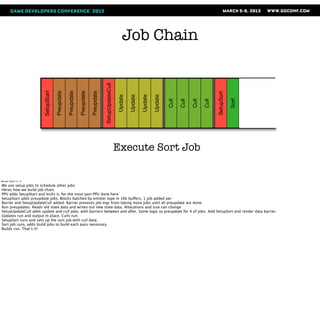
We use setup jobs to schedule other jobs
Heres how we build job chain
PPU adds SetupStart and kicks it, for the most part PPU done here
SetupStart adds preupdate jobs. Blocks batched by emitter type in 16k buffers, 1 job added per
Barrier and SetupUpdateCull added. Barrier prevents job mgr from taking more jobs until all preupdate are done.
Run preupdates. Reads old state data and writes out new state data. Allocations and size can change
SetupUpdateCull adds update and cull jobs, with barriers between and after. Same logic as preupdate for # of jobs. Add SetupSort and render data barrier.
Updates run and output in place. Culls run.
SetupSort runs and sets up the sort job with cull data.
Sort job runs, adds build jobs to build each pass necessary.
Builds run. That’s it!
Job Chain


                                                                                    SetupUpdateCull
                       SetupStart

                                    Preupdate

                                                Preupdate

                                                            Preupdate

                                                                        Preupdate


                                                                                                                                                                      SetupSort
                                                                                                      Update

                                                                                                               Update

                                                                                                                        Update

                                                                                                                                 Update


                                                                                                                                                                                         Build

                                                                                                                                                                                                 Build
                                                                                                                                                                                  Sort
                                                                                                                                          Cull

                                                                                                                                                 Cull

                                                                                                                                                        Cull

                                                                                                                                                               Cull
                                                                                          Execute Build Jobs

Monday, March 12, 12

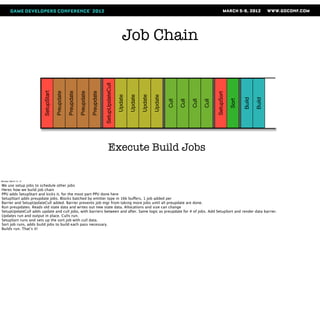
We use setup jobs to schedule other jobs
Heres how we build job chain
PPU adds SetupStart and kicks it, for the most part PPU done here
SetupStart adds preupdate jobs. Blocks batched by emitter type in 16k buffers, 1 job added per
Barrier and SetupUpdateCull added. Barrier prevents job mgr from taking more jobs until all preupdate are done.
Run preupdates. Reads old state data and writes out new state data. Allocations and size can change
SetupUpdateCull adds update and cull jobs, with barriers between and after. Same logic as preupdate for # of jobs. Add SetupSort and render data barrier.
Updates run and output in place. Culls run.
SetupSort runs and sets up the sort job with cull data.
Sort job runs, adds build jobs to build each pass necessary.
Builds run. That’s it!
Sand Footprints


Monday, March 12, 12

Drake spends a lot of time walking in desert
Early on, we discussed ways to make realistic dunes
Dust blowing and nice sand shader, we wanted to deform sand as Drake struggles up and falls down the dunes
Ref video shot at Imperial Sand Dunes, in socal. Keith G standing in for Drake
Example - Sand Footprints
                       •Deform the surface
                       •Animate the deformations
                       •Match lighting model of BG
                       •What to do?


Monday, March 12, 12

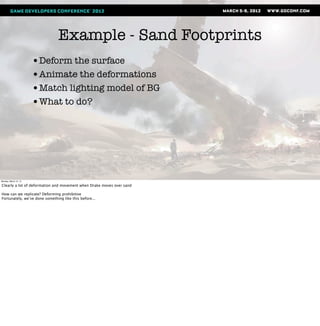
Clearly a lot of deformation and movement when Drake moves over sand

How can we replicate? Deforming prohibitive
Fortunately, we’ve done something like this before...
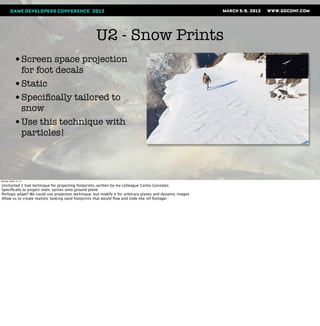
U2 - Snow Prints
            •Screen space projection
             for foot decals
            •Static
            •Specifically tailored to
             snow
            •Use this technique with
             particles!


Monday, March 12, 12

Uncharted 2 had technique for projecting footprints, written by my colleague Carlos Gonzales
Specifically to project static sprites onto ground plane
Perhaps adapt? We could use projection technique, but modify it for arbitrary planes and dynamic images
Allow us to create realistic looking sand footprints that would flow and slide like ref footage!
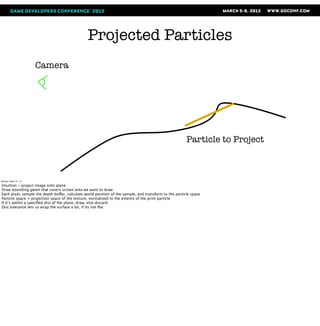
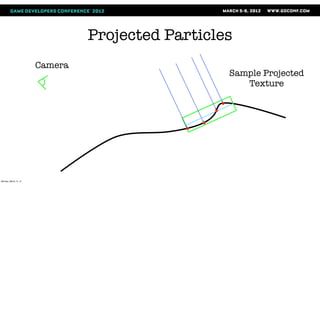
Projected Particles
                       Camera


                                                                                                        Particle to Project


Monday, March 12, 12

Intuition - project image onto plane
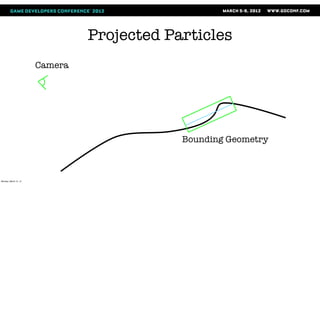
Draw bounding geom that covers screen area we want to draw
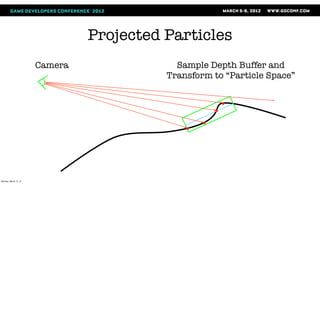
Each pixel, sample the depth buffer, calculate world position of the sample, and transform to the particle space
Particle space = projection space of the texture, normalized to the extents of the print particle
If it’s within a specified dist of the plane, draw, else discard
Dist tolerance lets us wrap the surface a bit, if its not flat
Projected Particles
                       Camera


                                            Bounding Geometry


Monday, March 12, 12
Projected Particles
                       Camera               Sample Depth Buffer and
                                          Transform to “Particle Space”


Monday, March 12, 12
Projected Particles
                       Camera
                                                  Sample Projected
                                                     Texture


Monday, March 12, 12
Projected Particles
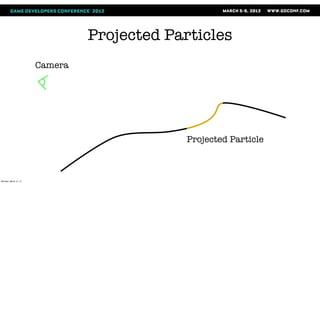
                       Camera


                                             Projected Particle


Monday, March 12, 12
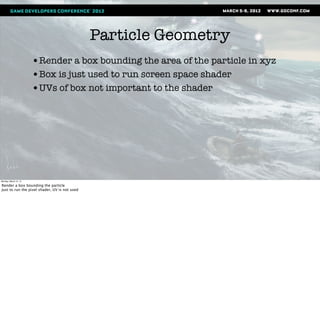
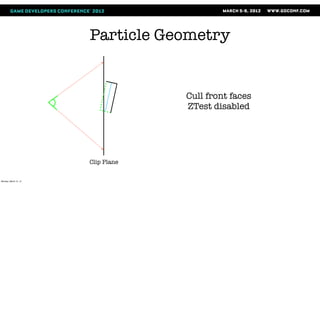
Particle Geometry
                       •Render a box bounding the area of the particle in xyz
                       •Box is just used to run screen space shader
                       •UVs of box not important to the shader


Monday, March 12, 12

Render a box bounding the particle
Just to run the pixel shader, UV is not used
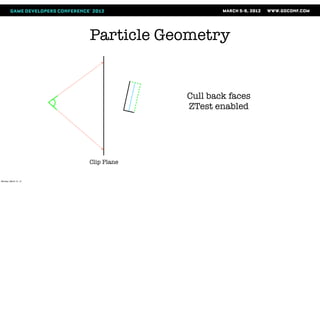
Particle Geometry


                                    Cull back faces
                                    ZTest enabled


                       Clip Plane


Monday, March 12, 12
Particle Geometry


                                    Cull front faces
                                    ZTest disabled


                       Clip Plane


Monday, March 12, 12
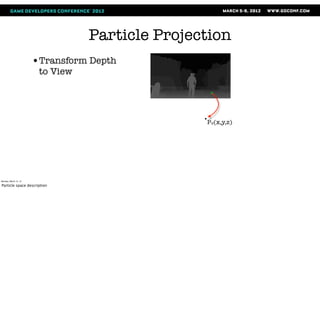
Particle Projection
                       •Transform Depth
                        to View


                                                 Pv(x,y,z)


Monday, March 12, 12

Particle space description
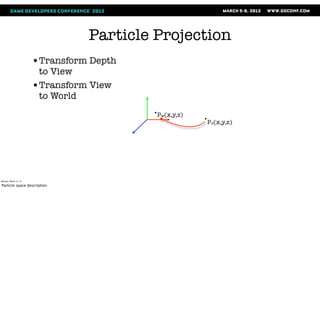
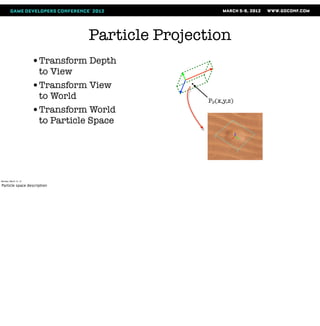
Particle Projection
                       •Transform Depth
                        to View
                       •Transform View
                        to World
                                          Pw(x,y,z)
                                                      Pv(x,y,z)


Monday, March 12, 12

Particle space description
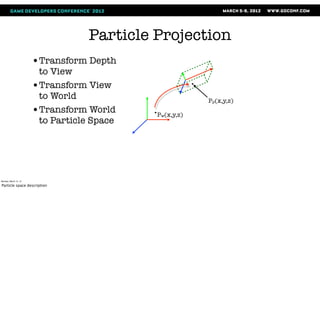
Particle Projection
                       •Transform Depth
                        to View
                       •Transform View
                        to World                        Pp(x,y,z)
                       •Transform World     Pw(x,y,z)
                        to Particle Space


Monday, March 12, 12

Particle space description
Particle Projection
                       •Transform Depth
                        to View
                       •Transform View
                        to World                  Pp(x,y,z)
                       •Transform World
                        to Particle Space


Monday, March 12, 12

Particle space description
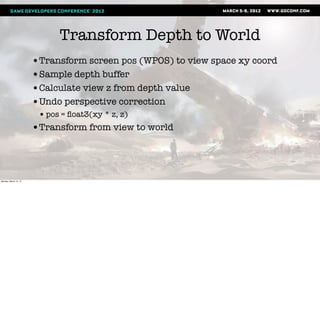
Transform Depth to World
                       •Transform screen pos (WPOS) to view space xy coord
                       •Sample depth buffer
                       •Calculate view z from depth value
                       •Undo perspective correction
                        • pos = float3(xy * z, z)
                       •Transform from view to world


Monday, March 12, 12
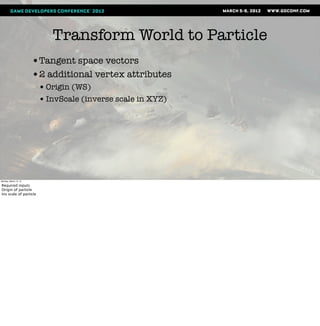
Transform World to Particle
                       •Tangent space vectors
                       •2 additional vertex attributes
                        • Origin (WS)
                        • InvScale (inverse scale in XYZ)


Monday, March 12, 12

Required inputs
Origin of particle
Inv scale of particle
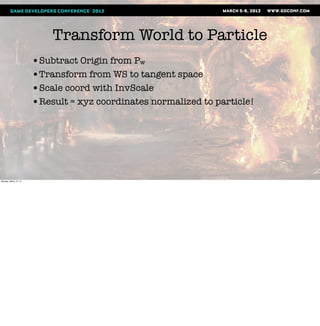
Transform World to Particle
                       •Subtract Origin from Pw
                       •Transform from WS to tangent space
                       •Scale coord with InvScale
                       •Result = xyz coordinates normalized to particle!


Monday, March 12, 12
SSProj UV Node Outputs
                       •UV: XY coordinates
                       •W: Z coordinate
                       •Mask: 1 if xyz values are all in the range
                        [0,1], 0 otherwise. Multiplied with alpha


Monday, March 12, 12

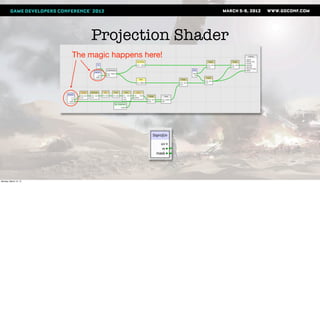
We put this functionality into 1 node!
XYZ coordinates are normalized to 0..1 within the projection space of the particle
Values can be outside the particle box
Z value useful if artist wants to calculate own alpha, for soft falloff, etc
Projection Shader
                       The magic happens here!


Monday, March 12, 12
Example - Sand Prints


Monday, March 12, 12
Match BG lighting?
                       •U3 uses a deferred lighting technique
                       •Normals rendered to a buffer during the depth pass
                       •Used by SPU dynamic lighting code, resulting lighting
                        used by main render pass


Monday, March 12, 12

Particles use a simple lighting model, how can we match the background?
BG use deferred lighting with lots of dynamic lights run on SPU
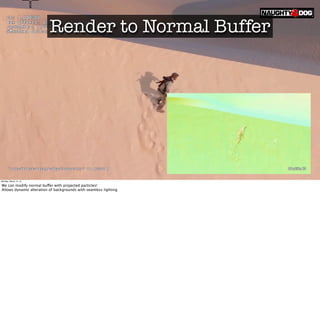
Render to Normal Buffer


Monday, March 12, 12

We can modify normal buffer with projected particles!
Allows dynamic alteration of backgrounds with seamless lighting
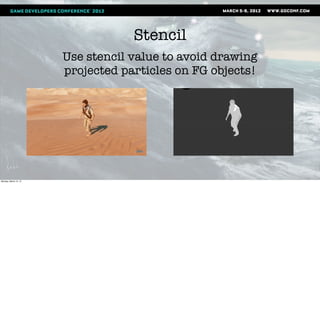
Stencil
                       Use stencil value to avoid drawing
                       projected particles on FG objects!


Monday, March 12, 12
Final Thoughts
                       •Quality is a result of iteration - so speed up iterations!
                       •Give flexibility to the artists
                        • You will have to do some handholding but results are worth it
                       •Node based shader editors aren’t so bad


Monday, March 12, 12
Go see this related talk:

                       The Tricks Up Our Sleeves
                       Keith Guerrette Thursday, 4pm   Room 2003, West Hall


Monday, March 12, 12
Thanks
                       Doug Holder           Mike Dudley
                       Carlos Gonzalez       Iki Ikram
                       Keith Guerrette       Ryan James
                       Eben Cook             Sony WWS ATG
                                             Lynn Soban


Monday, March 12, 12
Questions?


                                         Company Email: jobs@naughtydog.com
                       is hiring!        Recruiter Email: candace_walker@naughtydog.com
                                         Twitter: @Candace_Walker
Monday, March 12, 12

Uncharted3 effect technique

  • 1.
    Effects Techniques Usedin Uncharted 3: Drake’s Deception Marshall Robin Graphics/Effects Programmer, Naughty Dog <mrobin@naughtydog.com> @mrobin604 Monday, March 12, 12 Good afternoon, and welcome to my talk on the effects techniques used in Uncharted 3: Drake’s Deception. My name is Marshall Robin, I’m a visual effects programmer at Naughty Dog. I’ve been at Naughty Dog since 2005, and I’ve been working on the Uncharted series since Drake’s Fortune.
  • 2.
    Overview •Goals for effects system •Tools •Runtime •Example - Sand Footprints Monday, March 12, 12 Design goals Description and demonstration of tools used by VFX artists Get into runtime architecture - data structures and spu job chain Usage example - sand prints. Surface projection shader.
  • 3.
    Particles •Scheme based macro language •Ubershader •Processing split between PPU and SPU SPU Update Cull Sort PPU Calc Process Build Render Stall! Stall! Monday, March 12, 12 Effects system used in Uncharted 3 began development after UDF UDF system was difficult to use, felt that to produce quality & quantity of fx, we needed to rework. FX artists write FX in scheme based macro language, rebuild, upload. Hard to visualise. Shader was 6000+ line ubershader, brittle and difficult to use, so most effect shaders were very simple. On runtime side, processing was split between PPU and SPU, stalling on the PPU for jobs to finish. OK for initial PS3 title, but we needed to be more efficient for sequel!
  • 4.
    New System •Drastically improve iteration time • Faster iteration == more effects & polish •More data driven •Better dynamics •More flexible shaders with modern features •100% asynchronous SPU code Monday, March 12, 12 These issues informed design for new system Iteration - artists should see changes when they build Data - more artist control. Curves, ramps, custom data Dynamics - add fields to change velocity Shaders - more modular, easier to use & modify, new features - distortion, soft particles Move rest of code to SPUs, remove sync points. 2.5 to 4x bonus from naive port.
  • 5.
    Tools •Particler (Particle authoring) •Noodler (Shader creation) Monday, March 12, 12
  • 6.
    Particler Monday, March 12,12 Particle authoring tool Runs on maya, written in Python using Maya UI commands U1 was difficult to get a new FX artist up to speed, we wanted tool artists could use right away Basing on maya was obvious choice Particles created using Maya’s particle nodes (emitters, shapes, fields). Ramps and curves attached to most parameters. Particle expressions. Show demo. Doug creates a single emitter smoke effect with an animated turbulence field.
  • 7.
    Monday, March 12,12 Create effect by placing a set of emitters Each emitter independently configured Emitter, particle shape, field windows (Describe workflow?) A particle artist creates an effect by compositing multiple simple particle elements in Maya. Each element has its own configuration, the shaders, fields, and emitters can all be separate. The final effect is placed and spawned as a single unit known as a particle group. (other stuff to talk about) The artist can attach fields to the emitters. Fields are similar to the fields found in Maya particles - they modify the current velocity of the particle in some way. For example, a drag field will decelerate the particle in proportion to it’s current velocity. A gravity field will accelerate the particle in a specified direction by a fixed acceleration. 2 minute demo video here with basic operation of Particler? Items to include in the demo: Create emitters and shapes, and attach them Create fields and attach to emitters Edit animation of emitter Edit a color ramp Edit script Show and hide different elements Build and show each part in game Info from particler slides to work into the narration. Discuss some but not all! Emitters: Point, Volume; Continuous, burst, and distance emission; Speed & Lifespan w/random variance; Inherit velocity from parent Fields: Types: Gravity, Drag, Air, Radial, Vortex, VolumeAxis, Turbulence, Kill; Volumes for attenuation; Most parameters can be animated Curves & Ramps: Curves stored as cubic splines; Curves are used with emitters and fields; Ramps can be used with particle expressions Expressions: Applied to particle state; Artist can define extra state vars; Expressions compiled to byte code (more on this later)
  • 8.
    Building the Effect •Information extracted from nodes for export • Particle definitions • Fields • Curve & Ramp Tables • Expressions •Compile expressions into VM byte code •Write all data out as DC format Monday, March 12, 12 When effect built, Maya scene is traversed and game data is gathered from emitters and all attached shape and field nodes. Curves and ramps attached to attributes are collected in tables. Expressions are parsed and compiled to VM byte code Data written in DC file
  • 9.
    DC •Data Compiler •Used for most runtime data •Scheme based (For more info, check out Dan Liebgold’s GDC 2008 presentation) Monday, March 12, 12 DC - human readable format used for gameplay data. File gets converted into binary by the Data Compiler tool, hence DC. Built on top of Scheme. Dan Liebgold gave a presentation at GDC in 2008 talking all about it.Available in slide and audio in the GDC Vault.
  • 10.
    Particler to Game •Particler spawns interactive DC session with plugin •DC persists to speed up future builds for quick iteration .DC File Network Display Particler DC Engine Monday, March 12, 12 Once the DC file is created, Particler then calls a custom Maya plugin that launches an interactive DC session and connects to it via a pipe. Particler then sends the DC session commands to compile and upload the file to the game. DC has a network connection directly to the runtime, and can send it commands to reload binary data files, replacing the copy that it already has. The runtime then resets the spawned particles and uses this new copy of the file to respawn the edited effect. The new effect is then displayed for the artist, who can quickly review his changes. The DC session is kept alive to process further commands from Particler, so iteration time is very quick and requires no more from the artist than tweaking whatever items they want to change and hitting the build button. So that’s Particler.
  • 11.
    Noodler •Rewritten shaders still not flexible enough •Sony ATG demos editor for us - let’s try it Monday, March 12, 12 Artists could not experiment Node based shaders = slow and hard to debug? Write shaders for U2 but overwhelmed with artist requests Mike D asks for node based editor so he can write his own shaders No, shaders too slow and hard to maintain. Right before U3, Sony ATG shows material system with NBE Decide to give it a shot since it was ez to integrate
  • 12.
    Noodler Monday, March 12,12 Noodler - node based editor. It’s written in C++. All vertex inputs set up Color and alpha outputs to interface node Can use external lighting as defined by game Provided nodes: math, texture, attribute, ??? Can define nodes by writing cg functions (cool!) Short demo putting together a shader and bringing it in game
  • 13.
    Monday, March 12,12 Demo video here for noodler! Ideas: Build a simple blend shader Drop into surfer, connect up textures Preview
  • 14.
    Caustic Shader Monday, March12, 12 After editor integrated into tool pipeling, gave to Eben Cook to try and get feedback Within a day, he had written this shader <show noodler graph of caustic> Shader fakes water caustics reflected onto a surface Previously used flipbook, required a lot of texture memory This shader uses no textures for caustics, and only requires 19 cycles Here’s the final result: <show video of caustic shader, compared with the flipbook>
  • 15.
  • 16.
    Noodler Internals •Vertex frontend - define input attributes •Interface node - outputs fed into lighting code •Each node is a Cg function •Automatically split into VS & FS •Automatic space conversion Monday, March 12, 12 Vertex frontend - defines functions that convert vertex registers to attributes used inside the tool Interface node - output sink for the graph, used by lighting backend to render final color Each node is turned into a Cg function Automatically checks type agreement Automatically splits VS & FS, but you can override Handles attribute passing between VS and FS by swizzling VS outputs automatically Handles converting space changes for vectors and points
  • 17.
    How did itgo? •Noodler used for all FX shaders in U3! •Programmer help needed for some debugging • Decreased over time as artists learned more •Made artists manage their cycle budgets Monday, March 12, 12 Super fast iteration Artists could create unique shaders that improved the dynamic look of their effects Programmer help with numerical issues, render state, some debugging Cycle counts were fairly reasonable
  • 18.
    Spawning Effects •Spawners in Charter (Level Editor) •Script •Animation effect files (EFF) •Water Spawners •(directly in code too) Monday, March 12, 12 Once loaded, how do you create? Environmental effects - spawned when camera enters an associated region Animations - Specify keyframe and joint Script - using spawner location Code - not used much but available (projectiles)
  • 19.
  • 20.
  • 21.
  • 22.
  • 23.
  • 24.
    Particle Interface ParticleInterface Flags Handle Spawner Id Vis Volume Id startTime curTime curDelta baseTS timeScale Color Event Process Handle Effect Scale Effect Scale Sprite Scale Location & Parent Object Monday, March 12, 12 Can also control some properties while running effect, using root data RootData contains information used by an entire effect Bound frame most important, controls position and orientation of effect, good for fx attached to objects (platforms, weapons) Color, scale, alpha - modulate effect properties Time variables - we can control playback speed or pause Good for playback variety, preroll - smoke column Vars can be changed using script functions, or by values set on spawners
  • 25.
    Runtime Design • System designed with hardware and engine in mind • GPU cycle budget for particles very limited • SPUs provide ability for complex computation • Less particles, but more processing for each one Monday, March 12, 12 GPU has a much higher load: fp16, deferred lighting, and full screen post Wanted to take advantage of the SPU horsepower of the PS3. We can get complex motion from each particle through shaders and expressions
  • 26.
    Particle Structure Particle Time Flags Seed PartIdx Position Velocity User Data Monday, March 12, 12 All data for single particle Spawn time, status flags, random seed, pos, vel, state data Variable size user data based on type All particles of a given type have the same size Structure is a multiple of 16 bytes, aligned. Minimum size of a particle is 48 bytes, typical size 80 bytes
  • 27.
    ParticleBlock Structure ParticleBlock mmAddr Effect Desc Flags Handle qwSize qwState kMagic Effect Desc Id Create Time EmitIdx Block Stats Particle Emitter (if present) Monday, March 12, 12 Particles from a given emitter are stored together in a particle block. Max size 16 kb, so emitter can have multiple blocks. Pointer to effect desc which contains the info how to update and draw particles Can contain an emitter as well. Emitter = particle structure with a couple of extra vars for lifespan and next spawn time
  • 28.
    Particle Frame •Preupdate •Update •Cull •Build Geometry •Sort •Build Render List Monday, March 12, 12 Preupdate - Spawn, kill, movement and collision Update - Apply field forces, run bytecode Cull - Frustum cull particles for drawing Build Geometry - create vertex & index buffers, attach to items for rendering Sort - sort particles by distance and spawn time Build Render List - create command buffer for GPU. Shader and state setup.
  • 29.
    Preupdate - Collision •Per particle collision vs. environment •This is too expensive! •What can we do? •Approximate! Monday, March 12, 12 After particle moves, we do collision check to see if it collides with environment, and resolve the collision here Doing per particle check vs. environment every frame too expensive Solution - approximate with cached collision planes
  • 30.
    Preupdate - Collision Monday,March 12, 12 Each particle stores a collision plane, we collide against that Every frame, we select a subset of colliding particles (10) and kick off ray cast vs environment for them Result is returned next frame, and stored in the particle data Particle planes update in round robin fashion Per frame cost is low, results are acceptable Some particles will fall through geometry, in practice this isn’t noticeable
  • 31.
    Update - ApplyFields •Gravity, Turbulence, Drag, Volume Axis, Radial, Vortex •Bake animated parameters •Test vs. volume •Apply forces to velocity Monday, March 12, 12 Update first applies fields to each particle All parameters animated, bake using curve data and time Particles processed in vectorized SOA format, 4 at a time Test all particles against each field volume, to determine how much if any force to apply Calculate change in velocity, scaled by attenuation, add to particle velocity Velocity applied on next frame
  • 32.
    Update - ByteCode Exec •VM with 16 vector registers •Non branching •Creation and update expressions Monday, March 12, 12 Execute particle expression byte code SPU job implements VM with 16 vector registers, non branching opcodes Particles processed here in SOA format as well Expressions mostly used to update color, alpha, scale, and user params (check this) Seperate creation and update expressions
  • 33.
    Cull & BuildGeom • Cull vs. View Frustum • Build Verts • Create Indices & Render Data Structure • Write to Memory Monday, March 12, 12 Cull - one block at a time. flags particles to draw, reserves space for vert and idx data Build - extract particle state into a ParticleState structure, which bakes out ramps and copies state data to fixed structure. Build vert buffers Some sorting is done here, more detail later Generate indices, and attach all data to render data structure used by build. Generally all particles in block will be written as a single batch. The cull job processes one ParticleBlock of particles at a time. First, it culls all particles in the block against the view frustum and sets a flag on the particle. After this, it reserves space for all the visible particles and creates vertex and index data for each particle. Particles are tested to see if they are within the view frustum. If the particle passes, we construct vertex data for it and adds a render data structure to the list of particles to be sorted and rendered. The particle state is extracted into a ParticleState structure which contains all the possible attributes that can be used by a shader. These attribute values can come from constants, state data, or ramps driven by the particle state. These values are used to set up the vertex data according to the Attribute Descriptions in the geometry description. The particle vertex data is then added to an output list that is sorted after the block is completely processed. After all particles in the block have vertex data generated for them, the output list is sorted if required by to the sort type selected for the effect in the particler tool. Sorting is somewhat complicated so I will explain the particulars when we get to the sorting job later, but for now it will suffice to say that the sorting is split between the cull job and the sort job, in order to reduce main memory usage and sort job processing load. After the sort is done, we generate indices for the particle geometry, and create a Sprite Render Data structure that has pointers to the vertices, indices, and the geometry description DMA list. Generally all particles in a block will be written as a single batch with one render data structure. Finally, we reserve some space in main memory, and write all the generated render data.
  • 34.
    Geometry Description ParticleGeomDesc Flags Technique* Num Verts Num Indices Stride eaDmaList Attribute Descriptions Dma List Buffer Attribute Description Count Type Register Idx Offset Monday, March 12, 12 Data used to describe how to set up vertex buffers and render the particle Attribute descriptions tell cull and build job how to layout the vertex buffers The dma list is used to transfer the shader for the build command list job
  • 35.
    Sorting Sorting • Video showing distance sorting vs. spawn order sorting here • Discuss why this is important • Radix sort • Sort methods • Per emitter or per particle • Dist, Spawn order, Reverse spawn order Spawn Order Distance Monday, March 12, 12 Sorting back to front by distance not necessarily good Sometimes spawn order is better, artists have better control when authoring the effect Can also control order of emitters within an effect to have a well-defined layering Radix sort of all render batches. Do some of the work in cull to allow for more particles and reduce the load here and avoid a merge sort
  • 36.
    Sorting •Sorting for each emitter set in particler •Distance, Spawn order, Reverse spawn order •Artist can set emitter draw order in particler Monday, March 12, 12 Sort methods Per emitter or per particle Dist, Spawn order, Reverse spawn order
  • 37.
    Build Command List •Outputs command list for RSX •Set up viewport, shader, render state, vertex format •Cache shaders and settings Monday, March 12, 12 Groups particle batches by draw pass and render data to minimize state and shader changes Set up viewport, shader params, render state, and vertex format Draw batch Caches settings between batches for reuse
  • 38.
    Setting up theJob Chain •Want to run on all SPUs •Don’t want to have the PPU involved after kick •Each phase must finish before next phase runs •Can’t tell how many jobs we need for each phase Monday, March 12, 12 We have jobs to update and render particles Each job depends on data from previous We don’t know how many jobs we need in each step until previous is done
  • 39.
    Setting up theJob Chain •Use setup jobs to gather results, and set up new jobs Monday, March 12, 12
  • 40.
    Job Chain SetupStart Execute SetupStart Job Monday, March 12, 12 We use setup jobs to schedule other jobs Heres how we build job chain PPU adds SetupStart and kicks it, for the most part PPU done here SetupStart adds preupdate jobs. Blocks batched by emitter type in 16k buffers, 1 job added per Barrier and SetupUpdateCull added. Barrier prevents job mgr from taking more jobs until all preupdate are done. Run preupdates. Reads old state data and writes out new state data. Allocations and size can change SetupUpdateCull adds update and cull jobs, with barriers between and after. Same logic as preupdate for # of jobs. Add SetupSort and render data barrier. Updates run and output in place. Culls run. SetupSort runs and sets up the sort job with cull data. Sort job runs, adds build jobs to build each pass necessary. Builds run. That’s it!
  • 41.
    Job Chain SetupUpdateCull SetupStart Preupdate Preupdate Preupdate Preupdate Execute Preupdate Jobs Monday, March 12, 12 We use setup jobs to schedule other jobs Heres how we build job chain PPU adds SetupStart and kicks it, for the most part PPU done here SetupStart adds preupdate jobs. Blocks batched by emitter type in 16k buffers, 1 job added per Barrier and SetupUpdateCull added. Barrier prevents job mgr from taking more jobs until all preupdate are done. Run preupdates. Reads old state data and writes out new state data. Allocations and size can change SetupUpdateCull adds update and cull jobs, with barriers between and after. Same logic as preupdate for # of jobs. Add SetupSort and render data barrier. Updates run and output in place. Culls run. SetupSort runs and sets up the sort job with cull data. Sort job runs, adds build jobs to build each pass necessary. Builds run. That’s it!
  • 42.
    Job Chain SetupUpdateCull SetupStart Preupdate Preupdate Preupdate Preupdate Execute SetupUpdateCullJob Monday, March 12, 12 We use setup jobs to schedule other jobs Heres how we build job chain PPU adds SetupStart and kicks it, for the most part PPU done here SetupStart adds preupdate jobs. Blocks batched by emitter type in 16k buffers, 1 job added per Barrier and SetupUpdateCull added. Barrier prevents job mgr from taking more jobs until all preupdate are done. Run preupdates. Reads old state data and writes out new state data. Allocations and size can change SetupUpdateCull adds update and cull jobs, with barriers between and after. Same logic as preupdate for # of jobs. Add SetupSort and render data barrier. Updates run and output in place. Culls run. SetupSort runs and sets up the sort job with cull data. Sort job runs, adds build jobs to build each pass necessary. Builds run. That’s it!
  • 43.
    Job Chain SetupUpdateCull SetupStart Preupdate Preupdate Preupdate Preupdate SetupSort Update Update Update Update Cull Cull Cull Cull Execute Update and Cull Jobs Monday, March 12, 12 We use setup jobs to schedule other jobs Heres how we build job chain PPU adds SetupStart and kicks it, for the most part PPU done here SetupStart adds preupdate jobs. Blocks batched by emitter type in 16k buffers, 1 job added per Barrier and SetupUpdateCull added. Barrier prevents job mgr from taking more jobs until all preupdate are done. Run preupdates. Reads old state data and writes out new state data. Allocations and size can change SetupUpdateCull adds update and cull jobs, with barriers between and after. Same logic as preupdate for # of jobs. Add SetupSort and render data barrier. Updates run and output in place. Culls run. SetupSort runs and sets up the sort job with cull data. Sort job runs, adds build jobs to build each pass necessary. Builds run. That’s it!
  • 44.
    Job Chain SetupUpdateCull SetupStart Preupdate Preupdate Preupdate Preupdate SetupSort Update Update Update Update Cull Cull Cull Cull Execute SetupSort Job Monday, March 12, 12 We use setup jobs to schedule other jobs Heres how we build job chain PPU adds SetupStart and kicks it, for the most part PPU done here SetupStart adds preupdate jobs. Blocks batched by emitter type in 16k buffers, 1 job added per Barrier and SetupUpdateCull added. Barrier prevents job mgr from taking more jobs until all preupdate are done. Run preupdates. Reads old state data and writes out new state data. Allocations and size can change SetupUpdateCull adds update and cull jobs, with barriers between and after. Same logic as preupdate for # of jobs. Add SetupSort and render data barrier. Updates run and output in place. Culls run. SetupSort runs and sets up the sort job with cull data. Sort job runs, adds build jobs to build each pass necessary. Builds run. That’s it!
  • 45.
    Job Chain SetupUpdateCull SetupStart Preupdate Preupdate Preupdate Preupdate SetupSort Update Update Update Update Sort Cull Cull Cull Cull Execute Sort Job Monday, March 12, 12 We use setup jobs to schedule other jobs Heres how we build job chain PPU adds SetupStart and kicks it, for the most part PPU done here SetupStart adds preupdate jobs. Blocks batched by emitter type in 16k buffers, 1 job added per Barrier and SetupUpdateCull added. Barrier prevents job mgr from taking more jobs until all preupdate are done. Run preupdates. Reads old state data and writes out new state data. Allocations and size can change SetupUpdateCull adds update and cull jobs, with barriers between and after. Same logic as preupdate for # of jobs. Add SetupSort and render data barrier. Updates run and output in place. Culls run. SetupSort runs and sets up the sort job with cull data. Sort job runs, adds build jobs to build each pass necessary. Builds run. That’s it!
  • 46.
    Job Chain SetupUpdateCull SetupStart Preupdate Preupdate Preupdate Preupdate SetupSort Update Update Update Update Build Build Sort Cull Cull Cull Cull Execute Build Jobs Monday, March 12, 12 We use setup jobs to schedule other jobs Heres how we build job chain PPU adds SetupStart and kicks it, for the most part PPU done here SetupStart adds preupdate jobs. Blocks batched by emitter type in 16k buffers, 1 job added per Barrier and SetupUpdateCull added. Barrier prevents job mgr from taking more jobs until all preupdate are done. Run preupdates. Reads old state data and writes out new state data. Allocations and size can change SetupUpdateCull adds update and cull jobs, with barriers between and after. Same logic as preupdate for # of jobs. Add SetupSort and render data barrier. Updates run and output in place. Culls run. SetupSort runs and sets up the sort job with cull data. Sort job runs, adds build jobs to build each pass necessary. Builds run. That’s it!
  • 47.
    Sand Footprints Monday, March12, 12 Drake spends a lot of time walking in desert Early on, we discussed ways to make realistic dunes Dust blowing and nice sand shader, we wanted to deform sand as Drake struggles up and falls down the dunes Ref video shot at Imperial Sand Dunes, in socal. Keith G standing in for Drake
  • 48.
    Example - SandFootprints •Deform the surface •Animate the deformations •Match lighting model of BG •What to do? Monday, March 12, 12 Clearly a lot of deformation and movement when Drake moves over sand How can we replicate? Deforming prohibitive Fortunately, we’ve done something like this before...
  • 49.
    U2 - SnowPrints •Screen space projection for foot decals •Static •Specifically tailored to snow •Use this technique with particles! Monday, March 12, 12 Uncharted 2 had technique for projecting footprints, written by my colleague Carlos Gonzales Specifically to project static sprites onto ground plane Perhaps adapt? We could use projection technique, but modify it for arbitrary planes and dynamic images Allow us to create realistic looking sand footprints that would flow and slide like ref footage!
  • 50.
    Projected Particles Camera Particle to Project Monday, March 12, 12 Intuition - project image onto plane Draw bounding geom that covers screen area we want to draw Each pixel, sample the depth buffer, calculate world position of the sample, and transform to the particle space Particle space = projection space of the texture, normalized to the extents of the print particle If it’s within a specified dist of the plane, draw, else discard Dist tolerance lets us wrap the surface a bit, if its not flat
  • 51.
    Projected Particles Camera Bounding Geometry Monday, March 12, 12
  • 52.
    Projected Particles Camera Sample Depth Buffer and Transform to “Particle Space” Monday, March 12, 12
  • 53.
    Projected Particles Camera Sample Projected Texture Monday, March 12, 12
  • 54.
    Projected Particles Camera Projected Particle Monday, March 12, 12
  • 55.
    Particle Geometry •Render a box bounding the area of the particle in xyz •Box is just used to run screen space shader •UVs of box not important to the shader Monday, March 12, 12 Render a box bounding the particle Just to run the pixel shader, UV is not used
  • 56.
    Particle Geometry Cull back faces ZTest enabled Clip Plane Monday, March 12, 12
  • 57.
    Particle Geometry Cull front faces ZTest disabled Clip Plane Monday, March 12, 12
  • 58.
    Particle Projection •Transform Depth to View Pv(x,y,z) Monday, March 12, 12 Particle space description
  • 59.
    Particle Projection •Transform Depth to View •Transform View to World Pw(x,y,z) Pv(x,y,z) Monday, March 12, 12 Particle space description
  • 60.
    Particle Projection •Transform Depth to View •Transform View to World Pp(x,y,z) •Transform World Pw(x,y,z) to Particle Space Monday, March 12, 12 Particle space description
  • 61.
    Particle Projection •Transform Depth to View •Transform View to World Pp(x,y,z) •Transform World to Particle Space Monday, March 12, 12 Particle space description
  • 62.
    Transform Depth toWorld •Transform screen pos (WPOS) to view space xy coord •Sample depth buffer •Calculate view z from depth value •Undo perspective correction • pos = float3(xy * z, z) •Transform from view to world Monday, March 12, 12
  • 63.
    Transform World toParticle •Tangent space vectors •2 additional vertex attributes • Origin (WS) • InvScale (inverse scale in XYZ) Monday, March 12, 12 Required inputs Origin of particle Inv scale of particle
  • 64.
    Transform World toParticle •Subtract Origin from Pw •Transform from WS to tangent space •Scale coord with InvScale •Result = xyz coordinates normalized to particle! Monday, March 12, 12
  • 65.
    SSProj UV NodeOutputs •UV: XY coordinates •W: Z coordinate •Mask: 1 if xyz values are all in the range [0,1], 0 otherwise. Multiplied with alpha Monday, March 12, 12 We put this functionality into 1 node! XYZ coordinates are normalized to 0..1 within the projection space of the particle Values can be outside the particle box Z value useful if artist wants to calculate own alpha, for soft falloff, etc
  • 66.
    Projection Shader The magic happens here! Monday, March 12, 12
  • 67.
    Example - SandPrints Monday, March 12, 12
  • 68.
    Match BG lighting? •U3 uses a deferred lighting technique •Normals rendered to a buffer during the depth pass •Used by SPU dynamic lighting code, resulting lighting used by main render pass Monday, March 12, 12 Particles use a simple lighting model, how can we match the background? BG use deferred lighting with lots of dynamic lights run on SPU
  • 69.
    Render to NormalBuffer Monday, March 12, 12 We can modify normal buffer with projected particles! Allows dynamic alteration of backgrounds with seamless lighting
  • 70.
    Stencil Use stencil value to avoid drawing projected particles on FG objects! Monday, March 12, 12
  • 71.
    Final Thoughts •Quality is a result of iteration - so speed up iterations! •Give flexibility to the artists • You will have to do some handholding but results are worth it •Node based shader editors aren’t so bad Monday, March 12, 12
  • 72.
    Go see thisrelated talk: The Tricks Up Our Sleeves Keith Guerrette Thursday, 4pm Room 2003, West Hall Monday, March 12, 12
  • 73.
    Thanks Doug Holder Mike Dudley Carlos Gonzalez Iki Ikram Keith Guerrette Ryan James Eben Cook Sony WWS ATG Lynn Soban Monday, March 12, 12
  • 74.
    Questions? Company Email: jobs@naughtydog.com is hiring! Recruiter Email: candace_walker@naughtydog.com Twitter: @Candace_Walker Monday, March 12, 12