1 www.quandl.com
R Cheat Sheet
Vector and Matrix Operations
Construction
c()
cbind()
rbind()
matrix()
Concatenate
Column Concatenate
Row Concatenate
Create matrix
v <- c(1,2,3,4) # 1 2 3 4
cbind(v,v) # 2 Columns
rbind(v,v) # 2 Rows
mat <- matrix(v,nrow=2,ncol=2)
Selection
v[1]
tail(v,1)
mat[2,1]
mat[1,]
mat[,2]
v[c(1,3)]
v[-c(1,3)]
mat[,c(1,2)]
mat[,1:5]
mat[,“col”]
		
Utility
length()
dim()
sort()
order()
names()
			
Length of vector			
Dimensions of vector/matrix/dataframe			
Sorts vector			
Index to sort vector e.g. sort(v) == v[order(v)]		
Names of columns
			
Select first		
Select last		
Select row 2, column 1		
Select row 1		
Select column 2		
Select the first and third values	
Select all but the first and third values	
Select columns 1 and 2
Select columns 1 to 5		
Select column named “col”
Basic Syntax
#
<- or =
<<-
v[1]
*
%*%
/
%/%
%%
Comments
Assignment
Global Assignment
First element in a vector
Scalar Multiplication
Matrix Multiplication
Division
Integer Division
Remainder
# This is not interpreted
a <- 1; b = 2
a <<- 10 # Not recommended
v[1]
c(1,1)*c(1,1) # 1 1
c(1,1)%*%c(1,1) # 2
1/2 # 0.5
1%/%2 # 0
7%%6 # 1
Example
2 www.quandl.com
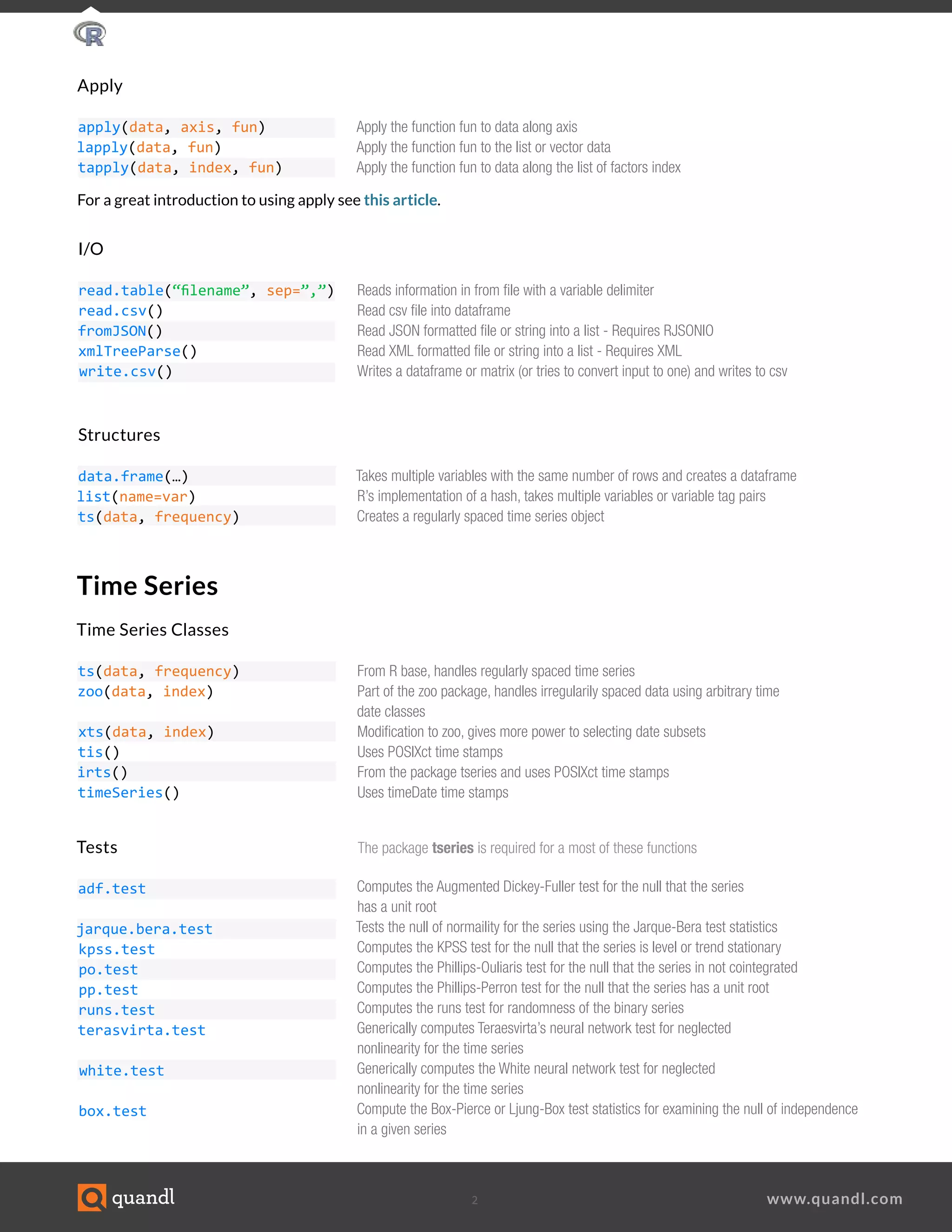
Time Series
Time Series Classes
ts(data, frequency)
zoo(data, index)
xts(data, index)
tis()
irts()
timeSeries()
Structures
data.frame(…)
list(name=var)
ts(data, frequency)
Tests 	 		 The package tseries is required for a most of these functions
adf.test
jarque.bera.test
kpss.test
po.test
pp.test
runs.test
terasvirta.test
white.test
box.test
From R base, handles regularly spaced time series				
Part of the zoo package, handles irregularily spaced data using arbitrary time
date classes				
Modification to zoo, gives more power to selecting date subsets				
Uses POSIXct time stamps				
From the package tseries and uses POSIXct time stamps				
Uses timeDate time stamps	 			
Computes the Augmented Dickey-Fuller test for the null that the series
has a unit root
Tests the null of normaility for the series using the Jarque-Bera test statistics			
Computes the KPSS test for the null that the series is level or trend stationary			
Computes the Phillips-Ouliaris test for the null that the series in not cointegrated
Computes the Phillips-Perron test for the null that the series has a unit root			
Computes the runs test for randomness of the binary series				
Generically computes Teraesvirta’s neural network test for neglected
nonlinearity for the time series				
Generically computes the White neural network test for neglected
nonlinearity for the time series				
Compute the Box-Pierce or Ljung-Box test statistics for examining the null of independence
in a given series									
Takes multiple variables with the same number of rows and creates a dataframe
R’s implementation of a hash, takes multiple variables or variable tag pairs		
Creates a regularly spaced time series object				
	
Apply
apply(data, axis, fun)
lapply(data, fun)
tapply(data, index, fun)
			I/O
read.table(“filename”, sep=”,”)
read.csv()
fromJSON()
xmlTreeParse()
write.csv()
			
Apply the function fun to data along axis
Apply the function fun to the list or vector data				
Apply the function fun to data along the list of factors index			
			
Reads information in from file with a variable delimiter
Read csv file into dataframe				
Read JSON formatted file or string into a list - Requires RJSONIO				
Read XML formatted file or string into a list - Requires XML				
Writes a dataframe or matrix (or tries to convert input to one) and writes to csv			
				
			
For a great introduction to using apply see this article.
3 www.quandl.com
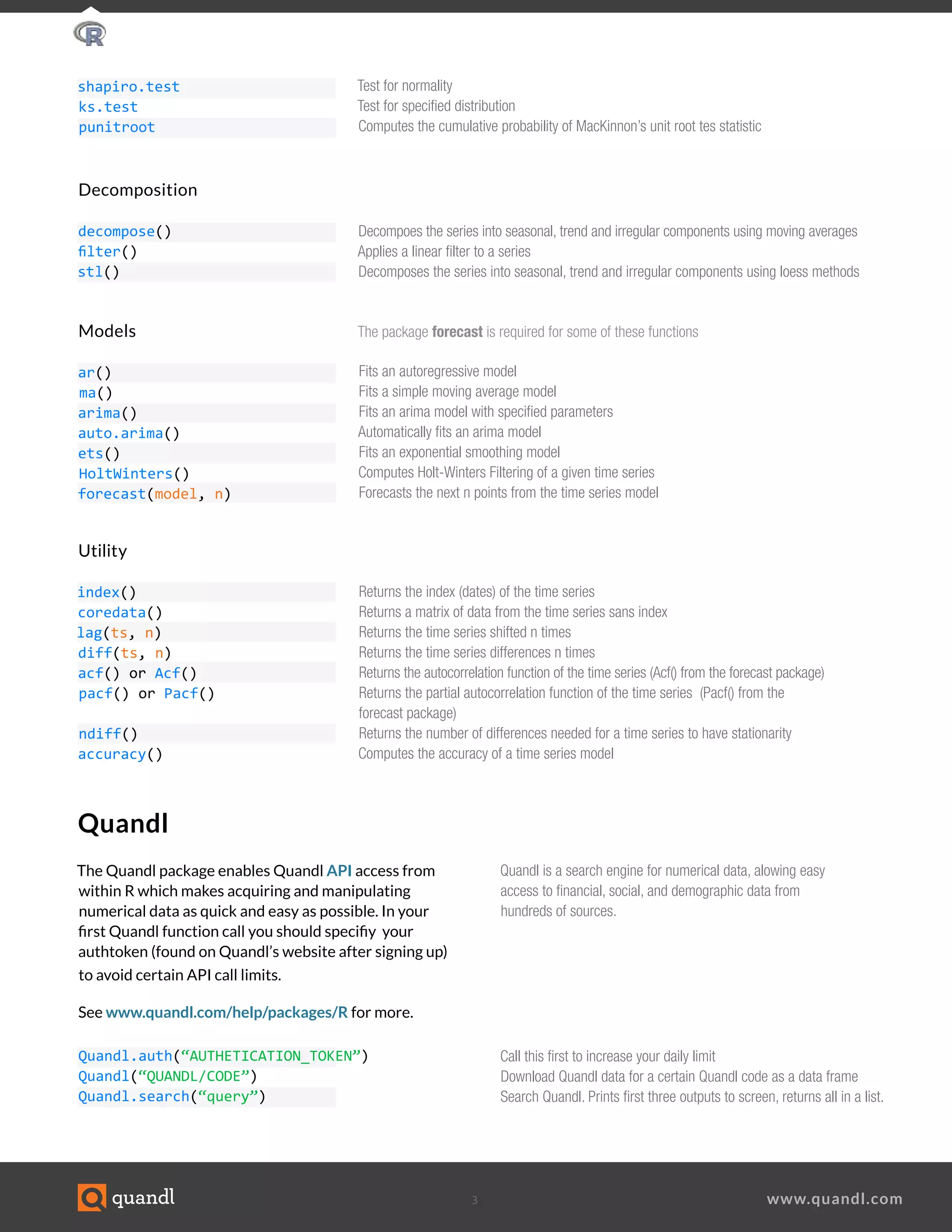
Quandl is a search engine for numerical data, alowing easy
access to financial, social, and demographic data from
hundreds of sources.
Quandl
The Quandl package enables Quandl API access from
within R which makes acquiring and manipulating
numerical data as quick and easy as possible. In your
first Quandl function call you should specifiy your
authtoken (found on Quandl’s website after signing up)
to avoid certain API call limits.
See www.quandl.com/help/packages/R for more.
Models				The package forecast is required for some of these functions
ar()
ma()
arima()
auto.arima()
ets()
HoltWinters()
forecast(model, n)
Utility
index()
coredata()
lag(ts, n)
diff(ts, n)
acf() or Acf()
pacf() or Pacf()
ndiff()
accuracy()
Fits an autoregressive model
Fits a simple moving average model	
Fits an arima model with specified parameters	
Automatically fits an arima model	
Fits an exponential smoothing model	
Computes Holt-Winters Filtering of a given time series
Forecasts the next n points from the time series model					
Returns the index (dates) of the time series				
Returns a matrix of data from the time series sans index				
Returns the time series shifted n times			
Returns the time series differences n times				
Returns the autocorrelation function of the time series (Acf() from the forecast package)		
Returns the partial autocorrelation function of the time series (Pacf() from the
forecast package)				
Returns the number of differences needed for a time series to have stationarity	
Computes the accuracy of a time series model				 	
Decomposition
decompose()
filter()
stl()
Decompoes the series into seasonal, trend and irregular components using moving averages
Applies a linear filter to a series	
Decomposes the series into seasonal, trend and irregular components using loess methods	
	
shapiro.test
ks.test
punitroot
Test for normality				
Test for specified distribution				
Computes the cumulative probability of MacKinnon’s unit root tes statistic							
								
Quandl.auth(“AUTHETICATION_TOKEN”)
Quandl(“QUANDL/CODE”)
Quandl.search(“query”)	
Call this first to increase your daily limit
Download Quandl data for a certain Quandl code as a data frame
Search Quandl. Prints first three outputs to screen, returns all in a list.
4 www.quandl.com
Plotting
plot(ts)
title(main, sub, xlab, ylab)
ggplot()
aes()
geom_line()
geom_boxplot()
xlab()
ylab()
ggtitle()
theme()
R base plot function			
Adds labels to the currently open plot	
Creates a ggplot object				
Creates a properly formatted list of variables for use in ggplot				
Plots data with a line connecting them				
Plots data in the form of box and whiskers plot				
Edit the x axis label			
Edit the y axis label			
Edit the plot title				
Modify a large number of options for the plot from grid elements to colors				
Aside from the built in plotting function in R, ggplot2 is a very powerful plotting package.
See http://docs.ggplot2.org/current/ for complete documentation.
Plotting example with ggplot2
library(Quandl)					
library(ggplot2)					
data_series <- Quandl(“GOOG/NASDAQ_AAPL”, start_date=”2005-01-01”)[,c(1,5)]				
my.plot <- ggplot(data=data_series, aes(x=Date, y=Close)) +	
geom_line(color=”#FAB521”) + # Adding a colored line					
theme(panel.background = element_rect(fill=’#393939’), panel.grid.major.x = element_blank(),
panel.grid.major.y = element_line(colour=’white’, size=0.1),
panel.grid.minor = element_line(colour=’white’, size=0.1)) + # modifying background color
# and grid options					
xlab(“Date”) + ylab(“Closing Price”) + ggtitle(“AAPL”) # Adding titles				
	
my.plot # Generates the plot

R Cheat Sheet

  • 1.
    1 www.quandl.com R CheatSheet Vector and Matrix Operations Construction c() cbind() rbind() matrix() Concatenate Column Concatenate Row Concatenate Create matrix v <- c(1,2,3,4) # 1 2 3 4 cbind(v,v) # 2 Columns rbind(v,v) # 2 Rows mat <- matrix(v,nrow=2,ncol=2) Selection v[1] tail(v,1) mat[2,1] mat[1,] mat[,2] v[c(1,3)] v[-c(1,3)] mat[,c(1,2)] mat[,1:5] mat[,“col”] Utility length() dim() sort() order() names() Length of vector Dimensions of vector/matrix/dataframe Sorts vector Index to sort vector e.g. sort(v) == v[order(v)] Names of columns Select first Select last Select row 2, column 1 Select row 1 Select column 2 Select the first and third values Select all but the first and third values Select columns 1 and 2 Select columns 1 to 5 Select column named “col” Basic Syntax # <- or = <<- v[1] * %*% / %/% %% Comments Assignment Global Assignment First element in a vector Scalar Multiplication Matrix Multiplication Division Integer Division Remainder # This is not interpreted a <- 1; b = 2 a <<- 10 # Not recommended v[1] c(1,1)*c(1,1) # 1 1 c(1,1)%*%c(1,1) # 2 1/2 # 0.5 1%/%2 # 0 7%%6 # 1 Example
  • 2.
    2 www.quandl.com Time Series TimeSeries Classes ts(data, frequency) zoo(data, index) xts(data, index) tis() irts() timeSeries() Structures data.frame(…) list(name=var) ts(data, frequency) Tests The package tseries is required for a most of these functions adf.test jarque.bera.test kpss.test po.test pp.test runs.test terasvirta.test white.test box.test From R base, handles regularly spaced time series Part of the zoo package, handles irregularily spaced data using arbitrary time date classes Modification to zoo, gives more power to selecting date subsets Uses POSIXct time stamps From the package tseries and uses POSIXct time stamps Uses timeDate time stamps Computes the Augmented Dickey-Fuller test for the null that the series has a unit root Tests the null of normaility for the series using the Jarque-Bera test statistics Computes the KPSS test for the null that the series is level or trend stationary Computes the Phillips-Ouliaris test for the null that the series in not cointegrated Computes the Phillips-Perron test for the null that the series has a unit root Computes the runs test for randomness of the binary series Generically computes Teraesvirta’s neural network test for neglected nonlinearity for the time series Generically computes the White neural network test for neglected nonlinearity for the time series Compute the Box-Pierce or Ljung-Box test statistics for examining the null of independence in a given series Takes multiple variables with the same number of rows and creates a dataframe R’s implementation of a hash, takes multiple variables or variable tag pairs Creates a regularly spaced time series object Apply apply(data, axis, fun) lapply(data, fun) tapply(data, index, fun) I/O read.table(“filename”, sep=”,”) read.csv() fromJSON() xmlTreeParse() write.csv() Apply the function fun to data along axis Apply the function fun to the list or vector data Apply the function fun to data along the list of factors index Reads information in from file with a variable delimiter Read csv file into dataframe Read JSON formatted file or string into a list - Requires RJSONIO Read XML formatted file or string into a list - Requires XML Writes a dataframe or matrix (or tries to convert input to one) and writes to csv For a great introduction to using apply see this article.
  • 3.
    3 www.quandl.com Quandl isa search engine for numerical data, alowing easy access to financial, social, and demographic data from hundreds of sources. Quandl The Quandl package enables Quandl API access from within R which makes acquiring and manipulating numerical data as quick and easy as possible. In your first Quandl function call you should specifiy your authtoken (found on Quandl’s website after signing up) to avoid certain API call limits. See www.quandl.com/help/packages/R for more. Models The package forecast is required for some of these functions ar() ma() arima() auto.arima() ets() HoltWinters() forecast(model, n) Utility index() coredata() lag(ts, n) diff(ts, n) acf() or Acf() pacf() or Pacf() ndiff() accuracy() Fits an autoregressive model Fits a simple moving average model Fits an arima model with specified parameters Automatically fits an arima model Fits an exponential smoothing model Computes Holt-Winters Filtering of a given time series Forecasts the next n points from the time series model Returns the index (dates) of the time series Returns a matrix of data from the time series sans index Returns the time series shifted n times Returns the time series differences n times Returns the autocorrelation function of the time series (Acf() from the forecast package) Returns the partial autocorrelation function of the time series (Pacf() from the forecast package) Returns the number of differences needed for a time series to have stationarity Computes the accuracy of a time series model Decomposition decompose() filter() stl() Decompoes the series into seasonal, trend and irregular components using moving averages Applies a linear filter to a series Decomposes the series into seasonal, trend and irregular components using loess methods shapiro.test ks.test punitroot Test for normality Test for specified distribution Computes the cumulative probability of MacKinnon’s unit root tes statistic Quandl.auth(“AUTHETICATION_TOKEN”) Quandl(“QUANDL/CODE”) Quandl.search(“query”) Call this first to increase your daily limit Download Quandl data for a certain Quandl code as a data frame Search Quandl. Prints first three outputs to screen, returns all in a list.
  • 4.
    4 www.quandl.com Plotting plot(ts) title(main, sub,xlab, ylab) ggplot() aes() geom_line() geom_boxplot() xlab() ylab() ggtitle() theme() R base plot function Adds labels to the currently open plot Creates a ggplot object Creates a properly formatted list of variables for use in ggplot Plots data with a line connecting them Plots data in the form of box and whiskers plot Edit the x axis label Edit the y axis label Edit the plot title Modify a large number of options for the plot from grid elements to colors Aside from the built in plotting function in R, ggplot2 is a very powerful plotting package. See http://docs.ggplot2.org/current/ for complete documentation. Plotting example with ggplot2 library(Quandl) library(ggplot2) data_series <- Quandl(“GOOG/NASDAQ_AAPL”, start_date=”2005-01-01”)[,c(1,5)] my.plot <- ggplot(data=data_series, aes(x=Date, y=Close)) + geom_line(color=”#FAB521”) + # Adding a colored line theme(panel.background = element_rect(fill=’#393939’), panel.grid.major.x = element_blank(), panel.grid.major.y = element_line(colour=’white’, size=0.1), panel.grid.minor = element_line(colour=’white’, size=0.1)) + # modifying background color # and grid options xlab(“Date”) + ylab(“Closing Price”) + ggtitle(“AAPL”) # Adding titles my.plot # Generates the plot