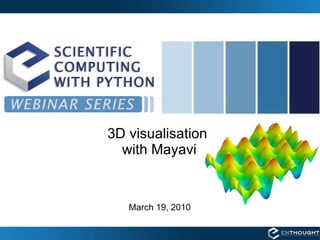
3D visualisation  with Mayavi March 19, 2010
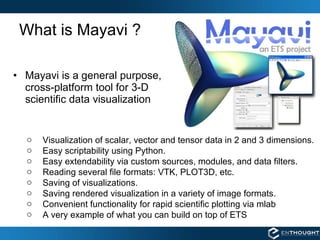
What is Mayavi ? Mayavi is a general purpose, cross-platform tool for 3-D scientific data visualization Visualization of scalar, vector and tensor data in 2 and 3 dimensions. Easy scriptability using Python. Easy extendability via custom sources, modules, and data filters. Reading several file formats: VTK, PLOT3D, etc. Saving of visualizations. Saving rendered visualization in a variety of image formats. Convenient functionality for rapid scientific plotting via mlab A very example of what you can build on top of ETS
Enthought Tool Suite
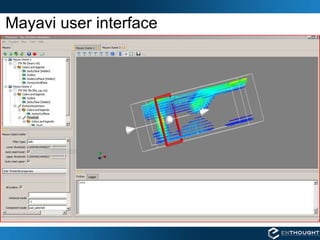
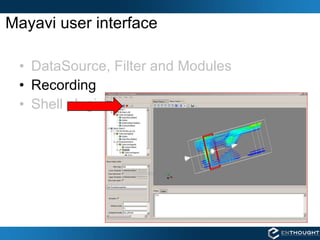
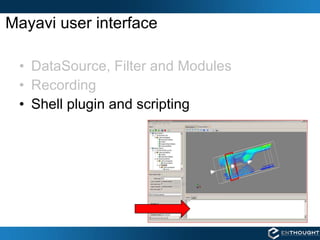
Mayavi user interface
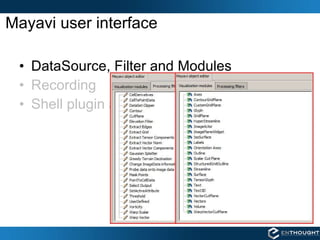
Mayavi user interface DataSource, Filter and Modules Recording Shell plugin and scripting
Mayavi “API” or scripting with mlab # Create the data. from numpy import pi, sin, cos, mgrid dphi, dtheta = pi/250.0, pi/250.0 [phi,theta] = mgrid[0:pi+dphi*1.5:dphi,0:2*pi+dtheta*1.5:dtheta] m0 = 4; m1 = 3; m2 = 2; m3 = 3; m4 = 6; m5 = 2; m6 = 6; m7 = 4; r = sin(m0*phi)**m1 + cos(m2*phi)**m3 + sin(m4*theta)**m5 + cos(m6*theta)**m7 x = r*sin(phi)*cos(theta) y = r*cos(phi) z = r*sin(phi)*sin(theta) # View it. from enthought.mayavi import mlab s = mlab.mesh(x, y, z) mlab.show()
Running mlab within ipython C:\ ipython –wthread >>> from enthought.mayavi import mlab matplotlib  also has an  mlab  namespace.  Be sure you are using the one from  enthought.mayavi
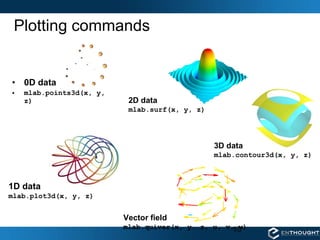
Plotting commands 0D data mlab.points3d(x, y, z) 1D data mlab.plot3d(x, y, z) 3D data mlab.contour3d(x, y, z) Vector field mlab.quiver(x, y, z, u, v, w) 2D data mlab.surf(x, y, z)
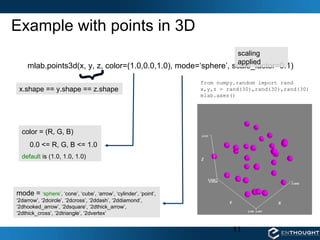
Example with points in 3D mlab.points3d(x, y, z, color=(1.0,0.0,1.0), mode=‘sphere’, scale_factor=0.1) { x.shape == y.shape == z.shape color = (R, G, B) 0.0 <= R, G, B <= 1.0 default  is (1.0, 1.0, 1.0) mode =  ‘sphere’ , ‘cone’, ‘cube’, ‘arrow’, ‘cylinder’, ‘point’, ‘2darrow’, ‘2dcircle’, ‘2dcross’, ‘2ddash’, ‘2ddiamond’, ‘2dhooked_arrow’, ‘2dsquare’, ‘2dthick_arrow’, ‘2dthick_cross’, ‘2dtriangle’, ‘2dvertex’ scaling applied from numpy.random import rand x,y,z = rand(30),rand(30),rand(30) mlab.axes()
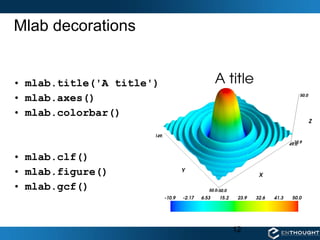
Mlab decorations mlab.title('A title') mlab.axes() mlab.colorbar() mlab.clf() mlab.figure() mlab.gcf()
Mlab helper functions and the engine pipeline >>> mlab.figure() >>> mlab.surf(call_values) >>> mlab.axes() Array2DSource \__ WarpScalar \__ PolyDataNormals \__ Colors and legends \__ Surface   Array2DSource  \__ WarpScalar  \__ PolyDataNormals  \__ Colors and leg \__ Surface def complete_pipeline_call(data_array): src = mlab.pipeline.array2d_source(data_array) warp = mlab.pipeline.warp_scalar(src) normals = mlab.pipeline.poly_data_normals(warp) return mlab.pipeline.surface(normals)
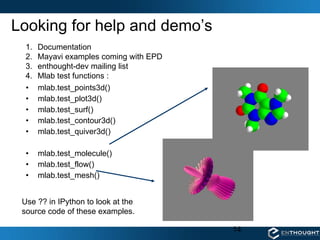
Looking for help and demo’s mlab.test_points3d() mlab.test_plot3d() mlab.test_surf() mlab.test_contour3d() mlab.test_quiver3d() mlab.test_molecule() mlab.test_flow() mlab.test_mesh() Use ?? in IPython to look at the source code of these examples. Documentation Mayavi examples coming with EPD enthought-dev mailing list  Mlab test functions :
Mlab and Traits (mlab_traits_ui.py) class ActorViewer(HasTraits):  scene = Instance(MlabSceneModel, ())  view = View(Item(name='scene‘,  editor=SceneEditor(scene_class=MayaviScene), show_label=False,  resizable=True,  height=500, width=500),  resizable=True)  def __init__(self, **traits):  HasTraits.__init__(self, **traits)  self.generate_data()  def generate_data(self):  X, Y = mgrid[-2:2:100j, -2:2:100j]  R = 10*sqrt(X**2 + Y**2)  Z = sin(R)/R  self.scene.mlab.surf(X, Y, Z, colormap='gist_earth') if __name__ == '__main__':  a = ActorViewer()  a.configure_traits()
Mlab and Traits (lorenz_ui.py)
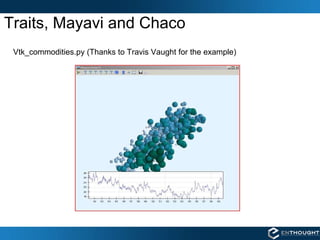
Traits, Mayavi and Chaco Vtk_commodities.py (Thanks to Travis Vaught for the example)
EPD http://www.enthought.com/products/epd.php Enthought Training: http://www.enthought.com/training/ Webinars http://www.enthought.com/training/webinars.php

Scientific Computing with Python Webinar March 19: 3D Visualization with Mayavi

  • 1.
    3D visualisation with Mayavi March 19, 2010
  • 2.
    What is Mayavi? Mayavi is a general purpose, cross-platform tool for 3-D scientific data visualization Visualization of scalar, vector and tensor data in 2 and 3 dimensions. Easy scriptability using Python. Easy extendability via custom sources, modules, and data filters. Reading several file formats: VTK, PLOT3D, etc. Saving of visualizations. Saving rendered visualization in a variety of image formats. Convenient functionality for rapid scientific plotting via mlab A very example of what you can build on top of ETS
  • 3.
  • 4.
  • 5.
    Mayavi user interfaceDataSource, Filter and Modules Recording Shell plugin and scripting
  • 6.
    Mayavi user interfaceDataSource, Filter and Modules Recording Shell plugin and scripting
  • 7.
    Mayavi user interfaceDataSource, Filter and Modules Recording Shell plugin and scripting
  • 8.
    Mayavi “API” orscripting with mlab # Create the data. from numpy import pi, sin, cos, mgrid dphi, dtheta = pi/250.0, pi/250.0 [phi,theta] = mgrid[0:pi+dphi*1.5:dphi,0:2*pi+dtheta*1.5:dtheta] m0 = 4; m1 = 3; m2 = 2; m3 = 3; m4 = 6; m5 = 2; m6 = 6; m7 = 4; r = sin(m0*phi)**m1 + cos(m2*phi)**m3 + sin(m4*theta)**m5 + cos(m6*theta)**m7 x = r*sin(phi)*cos(theta) y = r*cos(phi) z = r*sin(phi)*sin(theta) # View it. from enthought.mayavi import mlab s = mlab.mesh(x, y, z) mlab.show()
  • 9.
    Running mlab withinipython C:\ ipython –wthread >>> from enthought.mayavi import mlab matplotlib also has an mlab namespace. Be sure you are using the one from enthought.mayavi
  • 10.
    Plotting commands 0Ddata mlab.points3d(x, y, z) 1D data mlab.plot3d(x, y, z) 3D data mlab.contour3d(x, y, z) Vector field mlab.quiver(x, y, z, u, v, w) 2D data mlab.surf(x, y, z)
  • 11.
    Example with pointsin 3D mlab.points3d(x, y, z, color=(1.0,0.0,1.0), mode=‘sphere’, scale_factor=0.1) { x.shape == y.shape == z.shape color = (R, G, B) 0.0 <= R, G, B <= 1.0 default is (1.0, 1.0, 1.0) mode = ‘sphere’ , ‘cone’, ‘cube’, ‘arrow’, ‘cylinder’, ‘point’, ‘2darrow’, ‘2dcircle’, ‘2dcross’, ‘2ddash’, ‘2ddiamond’, ‘2dhooked_arrow’, ‘2dsquare’, ‘2dthick_arrow’, ‘2dthick_cross’, ‘2dtriangle’, ‘2dvertex’ scaling applied from numpy.random import rand x,y,z = rand(30),rand(30),rand(30) mlab.axes()
  • 12.
    Mlab decorations mlab.title('Atitle') mlab.axes() mlab.colorbar() mlab.clf() mlab.figure() mlab.gcf()
  • 13.
    Mlab helper functionsand the engine pipeline >>> mlab.figure() >>> mlab.surf(call_values) >>> mlab.axes() Array2DSource \__ WarpScalar \__ PolyDataNormals \__ Colors and legends \__ Surface Array2DSource \__ WarpScalar \__ PolyDataNormals \__ Colors and leg \__ Surface def complete_pipeline_call(data_array): src = mlab.pipeline.array2d_source(data_array) warp = mlab.pipeline.warp_scalar(src) normals = mlab.pipeline.poly_data_normals(warp) return mlab.pipeline.surface(normals)
  • 14.
    Looking for helpand demo’s mlab.test_points3d() mlab.test_plot3d() mlab.test_surf() mlab.test_contour3d() mlab.test_quiver3d() mlab.test_molecule() mlab.test_flow() mlab.test_mesh() Use ?? in IPython to look at the source code of these examples. Documentation Mayavi examples coming with EPD enthought-dev mailing list Mlab test functions :
  • 15.
    Mlab and Traits(mlab_traits_ui.py) class ActorViewer(HasTraits): scene = Instance(MlabSceneModel, ()) view = View(Item(name='scene‘, editor=SceneEditor(scene_class=MayaviScene), show_label=False, resizable=True, height=500, width=500), resizable=True) def __init__(self, **traits): HasTraits.__init__(self, **traits) self.generate_data() def generate_data(self): X, Y = mgrid[-2:2:100j, -2:2:100j] R = 10*sqrt(X**2 + Y**2) Z = sin(R)/R self.scene.mlab.surf(X, Y, Z, colormap='gist_earth') if __name__ == '__main__': a = ActorViewer() a.configure_traits()
  • 16.
    Mlab and Traits(lorenz_ui.py)
  • 17.
    Traits, Mayavi andChaco Vtk_commodities.py (Thanks to Travis Vaught for the example)
  • 18.
    EPD http://www.enthought.com/products/epd.php EnthoughtTraining: http://www.enthought.com/training/ Webinars http://www.enthought.com/training/webinars.php

Editor's Notes

  • #4 This begins the technical overview—this section of our presentation was interspersed with several live demos which I’ll not try to duplicate here.
  • #10 [toc] level = 1 title = 3D Visualization with mlab # end config