How to Break Web
Applications Security
(focused on Web Services)

Dinis Cruz
Principal Security Engineer
About Security Innovation

• Application Security Experts
   – 10+ years research on vulnerabilities
   – Hundreds of assessments on world’s most dominant
     software applications

• Products, Services & Training
   – Software & SDLC Assessment
   – Application Risk Management
   – eLearning
       • Computer based training
       • Secure Development Knowledgebase

• Helping organizations
   – Reduce vulnerabilities and IT/data risk
   – Integrate security into their development process
Agenda


How to think about Web Application
 Security

• OWASP TOP 10

• Demos

• Conclusion
How to Think About Web Application Security

•   Learn as much as possible about the technologies used
•   Understand how the application works
•   Understand the attack surface
•   Find the Assets
•   Map the Company’s risk appetite
•   Focus on HOW the application works, not on WHAT it does
•   Automate Application Security Knowledge
•   Find ways to make application security ‘invisible’ to
    developers
How to Approach Web Security Testing


• Exploratory Testing
   – understand how the application works within it’s environment
   – gives us clues as to how it may break
How to Approach Web Security Testing


• Exploratory Testing
   – understand how the application works within it’s environment
   – gives us clues as to how it may break

• Threat Modeling
   – Profiles how adversaries view the system, its applications and how it
     can be exploited
   – Guides test efforts, ensuring most critical risk areas are addressed
How to Approach Web Security Testing


• Exploratory Testing
   – understand how the application works within it’s environment
   – gives us clues as to how it may break

• Threat Modeling
   – Profiles how adversaries view the system, its applications and how it
     can be exploited
   – Guides test efforts, ensuring most critical risk areas are addressed

• Test Planning
   – For each threat, develop test cases that detail the tools, techniques
     and strategies for finding vulnerabilities
How to Approach Web Security Testing


• Exploratory Testing
   – understand how the application works within it’s environment
   – gives us clues as to how it may break

• Threat Modeling
   – Profiles how adversaries view the system, its applications and how it
     can be exploited
   – Guides test efforts, ensuring most critical risk areas are addressed

• Test Planning
   – For each threat, develop test cases that detail the tools, techniques
     and strategies for finding vulnerabilities
• Test Execution
   – Perform the planned tests and report findings
Exploratory Testing


                      6
Exploratory Testing


• Goal is to find out clues about the system


                                               6
Exploratory Testing


• Goal is to find out clues about the system
   – What does it do?
   – What inputs/outputs does it have?
   – What databases are being used? What is DB structure?


                                                            6
Exploratory Testing


• Goal is to find out clues about the system
   – What does it do?
   – What inputs/outputs does it have?
   – What databases are being used? What is DB structure?
   – Manual Testing Tools


                                                            6
Exploratory Testing


• Goal is to find out clues about the system
   – What does it do?
   – What inputs/outputs does it have?
   – What databases are being used? What is DB structure?
   – Manual Testing Tools

• Should be conducted with automated/manual tools and
 manual techniques


                                                            6
Threat Modeling

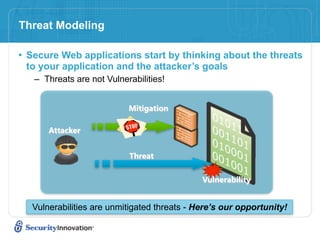
• Secure Web applications start by thinking about the threats
 to your application and the attacker’s goals
   – Threats are not Vulnerabilities!


                           Mitigation

      Attacker


                           Threat

                                             Vulnerability


  Vulnerabilities are unmitigated threats - Here’s our opportunity!
Test Planning
Optimizing Test Efforts Using your Threat Model

• Threat profile serves as basis for security test planning:
    –   Assets of value have been identified
    –   Threats that could compromise those assets have been determined
    –   Attacks that could realize the threats have been uncovered
    –   Key conditions that must be met for each attack to be successful
        have been discovered


• Test plan should focus on testing the key attack
  conditions in order to prove/disprove threats to your app
    – This ensures you are testing the areas where the difficulty of attack
      is least and the impact is highest

• Grab Microsoft’s Free Threat Modeling Tool
Test Execution – Tooling


                           9
Test Execution – Tooling

• Automated scanners


                           9
Test Execution – Tooling

• Automated scanners
   – Run on their own (though some tuning is typically needed).


                                                             9
Test Execution – Tooling

• Automated scanners
   – Run on their own (though some tuning is typically needed).
   – Test for common known vulnerabilities


                                                             9
Test Execution – Tooling

• Automated scanners
   – Run on their own (though some tuning is typically needed).
   – Test for common known vulnerabilities
   – Lack the ability to target business logic attacks


                                                             9
Test Execution – Tooling

• Automated scanners
   –   Run on their own (though some tuning is typically needed).
   –   Test for common known vulnerabilities
   –   Lack the ability to target business logic attacks
   –   Generally will gain better coverage than a human tester ever will


                                                                 9
Test Execution – Tooling

• Automated scanners
   –   Run on their own (though some tuning is typically needed).
   –   Test for common known vulnerabilities
   –   Lack the ability to target business logic attacks
   –   Generally will gain better coverage than a human tester ever will
   – IBM Appscan, HP WebsInspect, 0x90.org Absinthe


                                                                 9
Test Execution – Tooling

• Automated scanners
   –   Run on their own (though some tuning is typically needed).
   –   Test for common known vulnerabilities
   –   Lack the ability to target business logic attacks
   –   Generally will gain better coverage than a human tester ever will
   – IBM Appscan, HP WebsInspect, 0x90.org Absinthe

• Manual Testing Tools
   – These tools are varied and assist a human tester in their activities
   – Tend to be very specialised and often single purpose
   – Examples include
        • Encoders/Decoders (ex. 0x90.org’s Napkin)
        • Fingerprinters (ex. Net-Square’s HTTPrint)
        • Brute Forcers (ex. Sensepost’s CrowBar)
        • Localhost Proxies (ex. ParosProxy)

                                                                 9
Test Execution - Best of both worlds


• Automate Security Knowledge and Workflows

   – Capture Application Security tests as scripts and be able to
     automatically replicate, debug and retest them

   – Package security findings as Unit Tests and insert them into the SDL
     (namely Development and QA phases)

   – Allow Developers to work with Security teams so that better
     ‘application visualisation’ tools are created during the security
     engagement
       • Give these ‘application visualisation tools’ back to the developers
Agenda


How to think about Web Application
 Security

• OWASP TOP 10

• Web Services Security

• Demos

• Conclusion
What is the OWASP Top 10


• A broad consensus of the most critical web application security
 flaws
• Used by many commercial companies, referenced in numerous
 standards and regulations such as PCI-DSS
• Aim:
   – The primary aim of the Top 10 is to educate developers, designers,
     architects and organisations
   – Security is not a one-time event
   – A secure coding initiative must deal with all stage of a programs
     lifecycle
   – The top 10 is an education piece, not a standard
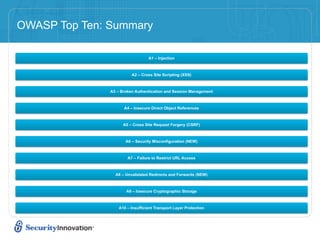
OWASP Top Ten: Summary

                                  A1 – Injection


                         A2 – Cross Site Scripting (XSS)


               A3 – Broken Authentication and Session Management


                     A4 – Insecure Direct Object References


                     A5 – Cross Site Request Forgery (CSRF)


                      A6 – Security Misconfiguration (NEW)


                       A7 – Failure to Restrict URL Access


                 A8 – Unvalidated Redirects and Forwards (NEW)


                      A9 – Insecure Cryptographic Storage


                   A10 – Insufficient Transport Layer Protection
A1 – Injection

• Injection means…
    – Tricking an application into including unintended commands in the data sent to an
      interpreter

• Interpreters…
    – Take strings and interpret them as commands
    – SQL, OS Shell, LDAP, XPath, Hibernate, etc…

• SQL injection is still quite common
    – Many applications still susceptible (really don’t know why)
    – Even though it’s usually very simple to avoid

• Typical Impact
    – Usually severe. Entire database can usually be read or modified
    – May also allow full database schema, or account access, or even OS level access
A1 – Injection
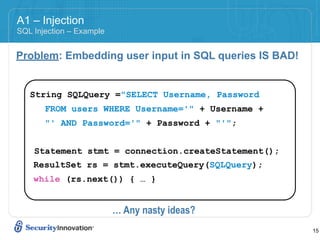
SQL Injection – Example


Problem: Embedding user input in SQL queries IS BAD!


   String SQLQuery ="SELECT Username, Password
       FROM users WHERE Username='" + Username +
       "' AND Password='" + Password + "'";


    Statement stmt = connection.createStatement();
    ResultSet rs = stmt.executeQuery(SQLQuery);
    while (rs.next()) { … }


                          … Any nasty ideas?
                                                       15
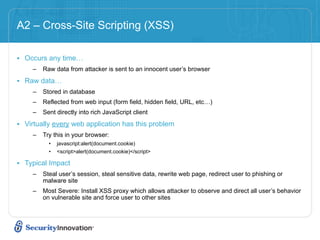
A2 – Cross-Site Scripting (XSS)

• Occurs any time…
     –   Raw data from attacker is sent to an innocent user’s browser

• Raw data…
     –   Stored in database
     –   Reflected from web input (form field, hidden field, URL, etc…)
     –   Sent directly into rich JavaScript client

• Virtually every web application has this problem
     –   Try this in your browser:
           •   javascript:alert(document.cookie)
           •   <script>alert(document.cookie)</script>

• Typical Impact
     –   Steal user’s session, steal sensitive data, rewrite web page, redirect user to phishing or
         malware site
     –   Most Severe: Install XSS proxy which allows attacker to observe and direct all user’s behavior
         on vulnerable site and force user to other sites
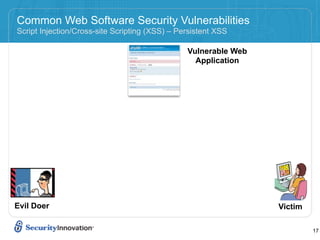
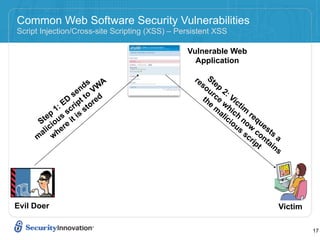
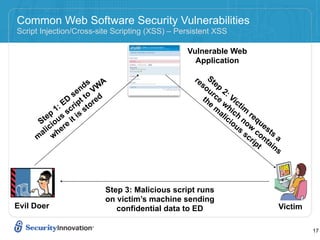
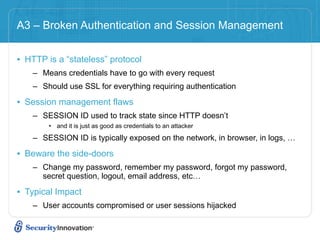
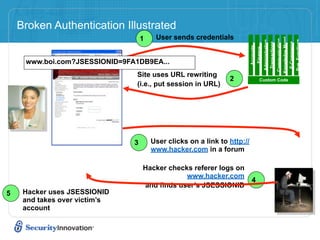
Common Web Software Security Vulnerabilities
Script Injection/Cross-site Scripting (XSS) – Persistent XSS

                                                Vulnerable Web
                                                  Application


Evil Doer                                                        Victim

                                                                          17
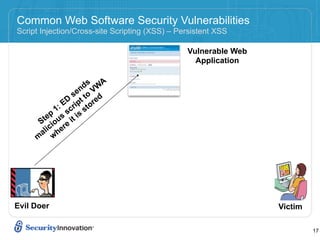
Common Web Software Security Vulnerabilities
Script Injection/Cross-site Scripting (XSS) – Persistent XSS

                                                Vulnerable Web
                                                  Application


                     ds WA
                    n V
                 se to d
              ED ript tore
            1: sc s
          p        s
       te us it i
      S io e
      a lic her
     m w


Evil Doer                                                        Victim

                                                                          17
Common Web Software Security Vulnerabilities
Script Injection/Cross-site Scripting (XSS) – Persistent XSS

                                                Vulnerable Web
                                                  Application

                                                  re Ste
                     ds WA
                    n V
                                                    so p
                                                       ur 2:
                 se to d                             th ce Vic
              ED ript tore                             e wh ti
            1: sc s                                      m ic m
                                                          al h re
          p        s
       te us it i
      S io e
                                                            ic n q
                                                              io o u
                                                                us w es
      a lic her                                                   sc con ts a
     m w                                                            rip ta
                                                                       t ins


Evil Doer                                                                   Victim

                                                                                     17
Common Web Software Security Vulnerabilities
Script Injection/Cross-site Scripting (XSS) – Persistent XSS

                                                Vulnerable Web
                                                  Application

                                                  re Ste
                     ds WA
                    n V
                                                    so p
                                                       ur 2:
                 se to d                             th ce Vic
              ED ript tore                             e wh ti
            1: sc s                                      m ic m
                                                          al h re
          p        s
       te us it i
      S io e
                                                            ic n q
                                                              io o u
                                                                us w es
      a lic her                                                   sc con ts a
     m w                                                            rip ta
                                                                       t ins


                         Step 3: Malicious script runs
                         on victim’s machine sending
Evil Doer                   confidential data to ED                         Victim

                                                                                     17
A3 – Broken Authentication and Session Management


• HTTP is a “stateless” protocol
    – Means credentials have to go with every request
    – Should use SSL for everything requiring authentication

• Session management flaws
    – SESSION ID used to track state since HTTP doesn’t
        • and it is just as good as credentials to an attacker

    – SESSION ID is typically exposed on the network, in browser, in logs, …

• Beware the side-doors
    – Change my password, remember my password, forgot my password,
      secret question, logout, email address, etc…

• Typical Impact
    – User accounts compromised or user sessions hijacked
Broken Authentication Illustrated
                                   1    User sends credentials


                                                                                                      Knowledge Mgmt
                                                                                                      Communication


                                                                                                       Bus. Functions
                                                                                     Administration
                                                                                      Transactions


                                                                                                        E-Commerce
                                                                          Accounts
                                                                           Finance
     www.boi.com?JSESSIONID=9FA1DB9EA...
                                Site uses URL rewriting
                                                                2               Custom Code
                                (i.e., put session in URL)


                               3       User clicks on a link to http://
                                       www.hacker.com in a forum

                                   Hacker checks referer logs on
                                               www.hacker.com
                                                                           4
                                   and finds user’s JSESSIONID
5    Hacker uses JSESSIONID
     and takes over victim’s
     account
A4 – Insecure Direct Object References


• How do you protect access to your data?
   – This is part of enforcing proper “Authorization”, along with
     A7 – Failure to Restrict URL Access

• A common mistake …
   – Only listing the ‘authorized’ objects for the current user, or
   – Hiding the object references in hidden fields
   – … and then not enforcing these restrictions on the server side
   – This is called presentation layer access control, and doesn’t work
   – Attacker simply tampers with parameter value

• Typical Impact
   – Users are able to access unauthorized files or data
Insecure Direct Object References Illustrated

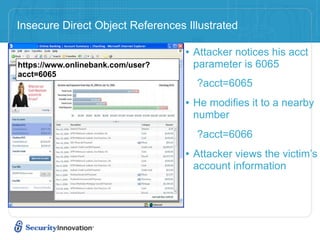
                                   • Attacker notices his acct
https://www.onlinebank.com/user?    parameter is 6065
acct=6065
                                     ?acct=6065
                                   • He modifies it to a nearby
                                    number
                                     ?acct=6066
                                   • Attacker views the victim’s
                                    account information
A5 – Cross Site Request Forgery (CSRF)

• Cross Site Request Forgery
    – An attack where the victim’s browser is tricked into issuing a command to a
      vulnerable web application
    – Vulnerability is caused by browsers automatically including user authentication data
      (session ID, IP address, Windows domain credentials, …) with each request

• Imagine…
    – What if a hacker could steer your mouse and get you to click on links in your online
      banking application?
    – What could they make you do?

• Typical Impact
    – Initiate transactions (transfer funds, logout user, close account)
    – Access sensitive data
    – Change account details
CSRF Illustrated
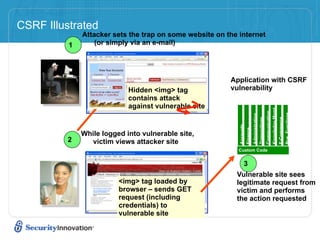
              Attacker sets the trap on some website on the internet
          1       (or simply via an e-mail)


                                                         Application with CSRF
                            Hidden <img> tag             vulnerability
                            contains attack
                            against vulnerable site


                                                                                        Knowledge Mgmt
                                                                                        Communication


                                                                                        Bus. Functions
                                                                       Administration
                                                                       Transactions


                                                                                        E-Commerce
                                                            Accounts
                                                            Finance
              While logged into vulnerable site,
         2      victim views attacker site
                                                            Custom Code


                                                               3
                                                           Vulnerable site sees
                         <img> tag loaded by               legitimate request from
                         browser – sends GET               victim and performs
                         request (including                the action requested
                         credentials) to
                         vulnerable site
A6 – Security Misconfiguration

• Web applications rely on a secure foundation
    – All through the network and platform
    – Don’t forget the development environment

• Is your source code a secret?
    – Think of all the places your source code goes
    – Security should not require secret source code

• CM must extend to all parts of the application
    – All credentials should change in production

• Typical Impact
    – Install backdoor through missing network or server patch
    – XSS flaw exploits due to missing application framework patches
    – Unauthorized access to default accounts, application functionality or data, or
      unused but accessible functionality due to poor server configuration
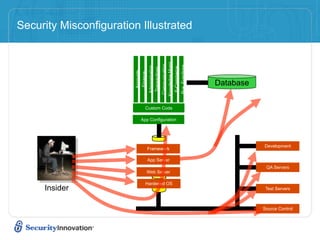
Security Misconfiguration Illustrated


                                                    Knowledge Mgmt
                                                     Communication


                                                     Bus. Functions
                                   Administration


                                                      E-Commerce
                                   Transactions
                        Accounts
                        Finance
                                                                      Database


                               Custom Code

                            App Configuration


                                                                                 Development
                                   Framework

                                   App Server
                                                                                  QA Servers
                                   Web Server

                               Hardened OS
     Insider                                                                      Test Servers


                                                                                 Source Control
A7 – Failure to Restrict URL Access


• How do you protect access to URLs (pages)?
   – This is part of enforcing proper “authorization”, along with
     A4 – Insecure Direct Object References

• A common mistake …
   – Displaying only authorized links and menu choices
   – This is called presentation layer access control, and doesn’t work
   – Attacker simply forges direct access to ‘unauthorized’ pages

• Typical Impact
   – Attackers invoke functions and services they’re not authorized for
   – Access other user’s accounts and data
   – Perform privileged actions
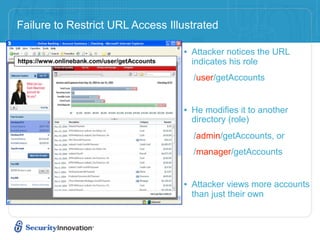
Failure to Restrict URL Access Illustrated

                                  • Attacker notices the URL
                                    indicates his role
                                    /user/getAccounts


                                  • He modifies it to another
                                    directory (role)
                                    /admin/getAccounts, or
                                    /manager/getAccounts


                                  • Attacker views more accounts
                                    than just their own
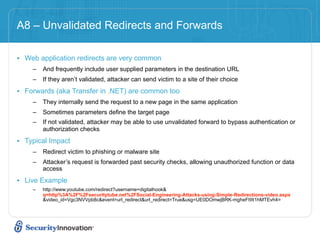
A8 – Unvalidated Redirects and Forwards

• Web application redirects are very common
    –   And frequently include user supplied parameters in the destination URL
    –   If they aren’t validated, attacker can send victim to a site of their choice

• Forwards (aka Transfer in .NET) are common too
    –   They internally send the request to a new page in the same application
    –   Sometimes parameters define the target page
    –   If not validated, attacker may be able to use unvalidated forward to bypass authentication or
        authorization checks

• Typical Impact
    –   Redirect victim to phishing or malware site
    –   Attacker’s request is forwarded past security checks, allowing unauthorized function or data
        access

• Live Example
    –   http://www.youtube.com/redirect?username=digitalhook&
        q=http%3A%2F%2Fsecuritytube.net%2FSocial-Engineering-Attacks-using-Simple-Redirections-video.aspx
        &video_id=Vgc3NVVpb8c&event=url_redirect&url_redirect=True&usg=UE0DOmwjBRK-mgheFtW1hMTEvh4=
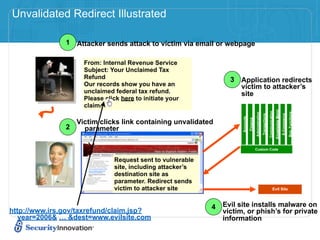
Unvalidated Redirect Illustrated

               1 Attacker sends attack to victim via email or webpage

                     From: Internal Revenue Service
                     Subject: Your Unclaimed Tax
                     Refund                                      3 Application redirects
                     Our records show you have an                  victim to attacker’s
                     unclaimed federal tax refund.                 site
                     Please click here to initiate your
                     claim.


                                                                                                                                          Knowledge Mgmt
                                                                                                                          Communication


                                                                                                                                                                        Bus. Functions
                                                                                          Administration
                                                                                                           Transactions


                                                                                                                                                           E-Commerce
                                                                     Accounts
                                                                                Finance
                   Victim clicks link containing unvalidated
               2     parameter

                                                                                          Custom Code


                               Request sent to vulnerable
                               site, including attacker’s
                               destination site as
                               parameter. Redirect sends
                               victim to attacker site                                                                              Evil Site


                                                            4 Evil site installs malware on
http://www.irs.gov/taxrefund/claim.jsp?                       victim, or phish’s for private
   year=2006& … &dest=www.evilsite.com                        information
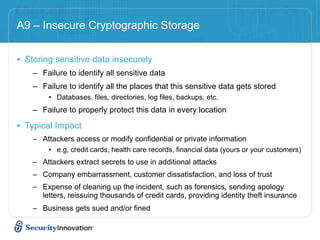
A9 – Insecure Cryptographic Storage


• Storing sensitive data insecurely
    – Failure to identify all sensitive data
    – Failure to identify all the places that this sensitive data gets stored
        • Databases, files, directories, log files, backups, etc.
    – Failure to properly protect this data in every location

• Typical Impact
    – Attackers access or modify confidential or private information
        • e.g, credit cards, health care records, financial data (yours or your customers)
    – Attackers extract secrets to use in additional attacks
    – Company embarrassment, customer dissatisfaction, and loss of trust
    – Expense of cleaning up the incident, such as forensics, sending apology
      letters, reissuing thousands of credit cards, providing identity theft insurance
    – Business gets sued and/or fined
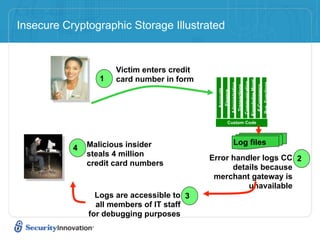
Insecure Cryptographic Storage Illustrated


                      Victim enters credit
                  1   card number in form


                                                                           Knowledge Mgmt
                                                                           Communication


                                                                            Bus. Functions
                                                          Administration
                                                           Transactions


                                                                             E-Commerce
                                               Accounts
                                                Finance
                                                     Custom Code


               Malicious insider                            Log files
           4
               steals 4 million              Error handler logs CC 2
               credit card numbers                 details because
                                              merchant gateway is
                                                       unavailable
                 Logs are accessible to 3
                 all members of IT staff
               for debugging purposes
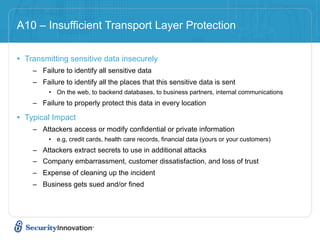
A10 – Insufficient Transport Layer Protection

• Transmitting sensitive data insecurely
    – Failure to identify all sensitive data
    – Failure to identify all the places that this sensitive data is sent
         • On the web, to backend databases, to business partners, internal communications
    – Failure to properly protect this data in every location

• Typical Impact
    – Attackers access or modify confidential or private information
         • e.g, credit cards, health care records, financial data (yours or your customers)
    – Attackers extract secrets to use in additional attacks
    – Company embarrassment, customer dissatisfaction, and loss of trust
    – Expense of cleaning up the incident
    – Business gets sued and/or fined
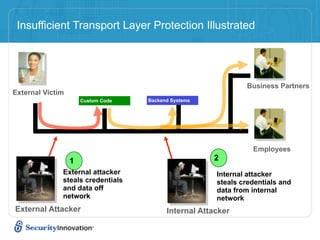
Insufficient Transport Layer Protection Illustrated


                                                               Business Partners
External Victim
                      Custom Code   Backend Systems


                                                                 Employees
                  1                                   2
              External attacker                        Internal attacker
              steals credentials                       steals credentials and
              and data off                             data from internal
              network                                  network
External Attacker                         Internal Attacker
Agenda


How to think about Web Application
 Security

• OWASP TOP 10

• Web Services Security

• Demos

• Conclusion
Agenda


How to think about Web Application
 Security

• OWASP TOP 10

• Web Services Security

• Demos

• Conclusion
Agenda


How to think about Web Application
 Security

• OWASP TOP 10

• Web Services Security

• Demos

• Conclusion
Conclusion
Conclusion

• Learn as much as possible about the technologies used
Conclusion

• Learn as much as possible about the technologies used
• Understand how the application works
Conclusion

• Learn as much as possible about the technologies used
• Understand how the application works
• Understand the attack surface
Conclusion

•   Learn as much as possible about the technologies used
•   Understand how the application works
•   Understand the attack surface
•   Find the Assets
Conclusion

•   Learn as much as possible about the technologies used
•   Understand how the application works
•   Understand the attack surface
•   Find the Assets
•   Map the Company’s risk appetite
Conclusion

•   Learn as much as possible about the technologies used
•   Understand how the application works
•   Understand the attack surface
•   Find the Assets
•   Map the Company’s risk appetite
•   Focus on HOW the application works, not on WHAT it does
Conclusion

•   Learn as much as possible about the technologies used
•   Understand how the application works
•   Understand the attack surface
•   Find the Assets
•   Map the Company’s risk appetite
•   Focus on HOW the application works, not on WHAT it does
•   Automate Application Security Knowledge
Conclusion

•   Learn as much as possible about the technologies used
•   Understand how the application works
•   Understand the attack surface
•   Find the Assets
•   Map the Company’s risk appetite
•   Focus on HOW the application works, not on WHAT it does
•   Automate Application Security Knowledge
•   Find ways to make application security ‘invisible’ to
    developers
Become the Developer’s best Friend


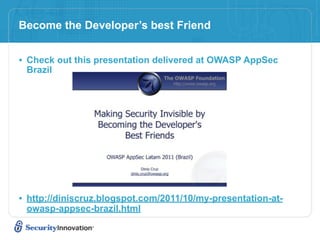
• Check out this presentation delivered at OWASP AppSec
 Brazil


• http://diniscruz.blogspot.com/2011/10/my-presentation-at-
 owasp-appsec-brazil.html
How Security Innovation can Help

• TeamProfessor: Computer-Based Training
   –   OWASP Top Ten
   –   Creating Secure Code
   –   PCI-DSS for Developers
   –   Threat Modeling

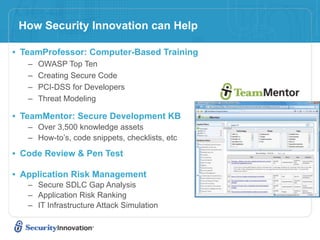
• TeamMentor: Secure Development KB
   – Over 3,500 knowledge assets
   – How-to’s, code snippets, checklists, etc

• Code Review & Pen Test

• Application Risk Management
   – Secure SDLC Gap Analysis
   – Application Risk Ranking
   – IT Infrastructure Attack Simulation
Free
eLearning
Course
for
A0ending
     Testing For OWASP Top Ten

          TeamMentor
 TeamMentor Free OWASP Version:
     owasp.teammentor.com

   TeamMentor Commercial Version
http://teammentor.securityinnovation.com

    Copy
of
Presenta9on/Free
Course
 getsecure@securityinnovation.com
            Presenter
Contact
   dcruz@securityinnovation.com

How to break web applications

  • 1.
    How to BreakWeb Applications Security (focused on Web Services) Dinis Cruz Principal Security Engineer
  • 2.
    About Security Innovation •Application Security Experts – 10+ years research on vulnerabilities – Hundreds of assessments on world’s most dominant software applications • Products, Services & Training – Software & SDLC Assessment – Application Risk Management – eLearning • Computer based training • Secure Development Knowledgebase • Helping organizations – Reduce vulnerabilities and IT/data risk – Integrate security into their development process
  • 3.
    Agenda How to thinkabout Web Application Security • OWASP TOP 10 • Demos • Conclusion
  • 4.
    How to ThinkAbout Web Application Security • Learn as much as possible about the technologies used • Understand how the application works • Understand the attack surface • Find the Assets • Map the Company’s risk appetite • Focus on HOW the application works, not on WHAT it does • Automate Application Security Knowledge • Find ways to make application security ‘invisible’ to developers
  • 5.
    How to ApproachWeb Security Testing
  • 6.
    How to ApproachWeb Security Testing • Exploratory Testing – understand how the application works within it’s environment – gives us clues as to how it may break
  • 7.
    How to ApproachWeb Security Testing • Exploratory Testing – understand how the application works within it’s environment – gives us clues as to how it may break • Threat Modeling – Profiles how adversaries view the system, its applications and how it can be exploited – Guides test efforts, ensuring most critical risk areas are addressed
  • 8.
    How to ApproachWeb Security Testing • Exploratory Testing – understand how the application works within it’s environment – gives us clues as to how it may break • Threat Modeling – Profiles how adversaries view the system, its applications and how it can be exploited – Guides test efforts, ensuring most critical risk areas are addressed • Test Planning – For each threat, develop test cases that detail the tools, techniques and strategies for finding vulnerabilities
  • 9.
    How to ApproachWeb Security Testing • Exploratory Testing – understand how the application works within it’s environment – gives us clues as to how it may break • Threat Modeling – Profiles how adversaries view the system, its applications and how it can be exploited – Guides test efforts, ensuring most critical risk areas are addressed • Test Planning – For each threat, develop test cases that detail the tools, techniques and strategies for finding vulnerabilities • Test Execution – Perform the planned tests and report findings
  • 10.
  • 11.
    Exploratory Testing • Goalis to find out clues about the system 6
  • 12.
    Exploratory Testing • Goalis to find out clues about the system – What does it do? – What inputs/outputs does it have? – What databases are being used? What is DB structure? 6
  • 13.
    Exploratory Testing • Goalis to find out clues about the system – What does it do? – What inputs/outputs does it have? – What databases are being used? What is DB structure? – Manual Testing Tools 6
  • 14.
    Exploratory Testing • Goalis to find out clues about the system – What does it do? – What inputs/outputs does it have? – What databases are being used? What is DB structure? – Manual Testing Tools • Should be conducted with automated/manual tools and manual techniques 6
  • 15.
    Threat Modeling • SecureWeb applications start by thinking about the threats to your application and the attacker’s goals – Threats are not Vulnerabilities! Mitigation Attacker Threat Vulnerability Vulnerabilities are unmitigated threats - Here’s our opportunity!
  • 16.
    Test Planning Optimizing TestEfforts Using your Threat Model • Threat profile serves as basis for security test planning: – Assets of value have been identified – Threats that could compromise those assets have been determined – Attacks that could realize the threats have been uncovered – Key conditions that must be met for each attack to be successful have been discovered • Test plan should focus on testing the key attack conditions in order to prove/disprove threats to your app – This ensures you are testing the areas where the difficulty of attack is least and the impact is highest • Grab Microsoft’s Free Threat Modeling Tool
  • 17.
  • 18.
    Test Execution –Tooling • Automated scanners 9
  • 19.
    Test Execution –Tooling • Automated scanners – Run on their own (though some tuning is typically needed). 9
  • 20.
    Test Execution –Tooling • Automated scanners – Run on their own (though some tuning is typically needed). – Test for common known vulnerabilities 9
  • 21.
    Test Execution –Tooling • Automated scanners – Run on their own (though some tuning is typically needed). – Test for common known vulnerabilities – Lack the ability to target business logic attacks 9
  • 22.
    Test Execution –Tooling • Automated scanners – Run on their own (though some tuning is typically needed). – Test for common known vulnerabilities – Lack the ability to target business logic attacks – Generally will gain better coverage than a human tester ever will 9
  • 23.
    Test Execution –Tooling • Automated scanners – Run on their own (though some tuning is typically needed). – Test for common known vulnerabilities – Lack the ability to target business logic attacks – Generally will gain better coverage than a human tester ever will – IBM Appscan, HP WebsInspect, 0x90.org Absinthe 9
  • 24.
    Test Execution –Tooling • Automated scanners – Run on their own (though some tuning is typically needed). – Test for common known vulnerabilities – Lack the ability to target business logic attacks – Generally will gain better coverage than a human tester ever will – IBM Appscan, HP WebsInspect, 0x90.org Absinthe • Manual Testing Tools – These tools are varied and assist a human tester in their activities – Tend to be very specialised and often single purpose – Examples include • Encoders/Decoders (ex. 0x90.org’s Napkin) • Fingerprinters (ex. Net-Square’s HTTPrint) • Brute Forcers (ex. Sensepost’s CrowBar) • Localhost Proxies (ex. ParosProxy) 9
  • 25.
    Test Execution -Best of both worlds • Automate Security Knowledge and Workflows – Capture Application Security tests as scripts and be able to automatically replicate, debug and retest them – Package security findings as Unit Tests and insert them into the SDL (namely Development and QA phases) – Allow Developers to work with Security teams so that better ‘application visualisation’ tools are created during the security engagement • Give these ‘application visualisation tools’ back to the developers
  • 26.
    Agenda How to thinkabout Web Application Security • OWASP TOP 10 • Web Services Security • Demos • Conclusion
  • 27.
    What is theOWASP Top 10 • A broad consensus of the most critical web application security flaws • Used by many commercial companies, referenced in numerous standards and regulations such as PCI-DSS • Aim: – The primary aim of the Top 10 is to educate developers, designers, architects and organisations – Security is not a one-time event – A secure coding initiative must deal with all stage of a programs lifecycle – The top 10 is an education piece, not a standard
  • 28.
    OWASP Top Ten:Summary A1 – Injection A2 – Cross Site Scripting (XSS) A3 – Broken Authentication and Session Management A4 – Insecure Direct Object References A5 – Cross Site Request Forgery (CSRF) A6 – Security Misconfiguration (NEW) A7 – Failure to Restrict URL Access A8 – Unvalidated Redirects and Forwards (NEW) A9 – Insecure Cryptographic Storage A10 – Insufficient Transport Layer Protection
  • 29.
    A1 – Injection •Injection means… – Tricking an application into including unintended commands in the data sent to an interpreter • Interpreters… – Take strings and interpret them as commands – SQL, OS Shell, LDAP, XPath, Hibernate, etc… • SQL injection is still quite common – Many applications still susceptible (really don’t know why) – Even though it’s usually very simple to avoid • Typical Impact – Usually severe. Entire database can usually be read or modified – May also allow full database schema, or account access, or even OS level access
  • 30.
    A1 – Injection SQLInjection – Example Problem: Embedding user input in SQL queries IS BAD! String SQLQuery ="SELECT Username, Password FROM users WHERE Username='" + Username + "' AND Password='" + Password + "'"; Statement stmt = connection.createStatement(); ResultSet rs = stmt.executeQuery(SQLQuery); while (rs.next()) { … } … Any nasty ideas? 15
  • 31.
    A2 – Cross-SiteScripting (XSS) • Occurs any time… – Raw data from attacker is sent to an innocent user’s browser • Raw data… – Stored in database – Reflected from web input (form field, hidden field, URL, etc…) – Sent directly into rich JavaScript client • Virtually every web application has this problem – Try this in your browser: • javascript:alert(document.cookie) • <script>alert(document.cookie)</script> • Typical Impact – Steal user’s session, steal sensitive data, rewrite web page, redirect user to phishing or malware site – Most Severe: Install XSS proxy which allows attacker to observe and direct all user’s behavior on vulnerable site and force user to other sites
  • 32.
    Common Web SoftwareSecurity Vulnerabilities Script Injection/Cross-site Scripting (XSS) – Persistent XSS Vulnerable Web Application Evil Doer Victim 17
  • 33.
    Common Web SoftwareSecurity Vulnerabilities Script Injection/Cross-site Scripting (XSS) – Persistent XSS Vulnerable Web Application ds WA n V se to d ED ript tore 1: sc s p s te us it i S io e a lic her m w Evil Doer Victim 17
  • 34.
    Common Web SoftwareSecurity Vulnerabilities Script Injection/Cross-site Scripting (XSS) – Persistent XSS Vulnerable Web Application re Ste ds WA n V so p ur 2: se to d th ce Vic ED ript tore e wh ti 1: sc s m ic m al h re p s te us it i S io e ic n q io o u us w es a lic her sc con ts a m w rip ta t ins Evil Doer Victim 17
  • 35.
    Common Web SoftwareSecurity Vulnerabilities Script Injection/Cross-site Scripting (XSS) – Persistent XSS Vulnerable Web Application re Ste ds WA n V so p ur 2: se to d th ce Vic ED ript tore e wh ti 1: sc s m ic m al h re p s te us it i S io e ic n q io o u us w es a lic her sc con ts a m w rip ta t ins Step 3: Malicious script runs on victim’s machine sending Evil Doer confidential data to ED Victim 17
  • 36.
    A3 – BrokenAuthentication and Session Management • HTTP is a “stateless” protocol – Means credentials have to go with every request – Should use SSL for everything requiring authentication • Session management flaws – SESSION ID used to track state since HTTP doesn’t • and it is just as good as credentials to an attacker – SESSION ID is typically exposed on the network, in browser, in logs, … • Beware the side-doors – Change my password, remember my password, forgot my password, secret question, logout, email address, etc… • Typical Impact – User accounts compromised or user sessions hijacked
  • 37.
    Broken Authentication Illustrated 1 User sends credentials Knowledge Mgmt Communication Bus. Functions Administration Transactions E-Commerce Accounts Finance www.boi.com?JSESSIONID=9FA1DB9EA... Site uses URL rewriting 2 Custom Code (i.e., put session in URL) 3 User clicks on a link to http:// www.hacker.com in a forum Hacker checks referer logs on www.hacker.com 4 and finds user’s JSESSIONID 5 Hacker uses JSESSIONID and takes over victim’s account
  • 38.
    A4 – InsecureDirect Object References • How do you protect access to your data? – This is part of enforcing proper “Authorization”, along with A7 – Failure to Restrict URL Access • A common mistake … – Only listing the ‘authorized’ objects for the current user, or – Hiding the object references in hidden fields – … and then not enforcing these restrictions on the server side – This is called presentation layer access control, and doesn’t work – Attacker simply tampers with parameter value • Typical Impact – Users are able to access unauthorized files or data
  • 39.
    Insecure Direct ObjectReferences Illustrated • Attacker notices his acct https://www.onlinebank.com/user? parameter is 6065 acct=6065 ?acct=6065 • He modifies it to a nearby number ?acct=6066 • Attacker views the victim’s account information
  • 40.
    A5 – CrossSite Request Forgery (CSRF) • Cross Site Request Forgery – An attack where the victim’s browser is tricked into issuing a command to a vulnerable web application – Vulnerability is caused by browsers automatically including user authentication data (session ID, IP address, Windows domain credentials, …) with each request • Imagine… – What if a hacker could steer your mouse and get you to click on links in your online banking application? – What could they make you do? • Typical Impact – Initiate transactions (transfer funds, logout user, close account) – Access sensitive data – Change account details
  • 41.
    CSRF Illustrated Attacker sets the trap on some website on the internet 1 (or simply via an e-mail) Application with CSRF Hidden <img> tag vulnerability contains attack against vulnerable site Knowledge Mgmt Communication Bus. Functions Administration Transactions E-Commerce Accounts Finance While logged into vulnerable site, 2 victim views attacker site Custom Code 3 Vulnerable site sees <img> tag loaded by legitimate request from browser – sends GET victim and performs request (including the action requested credentials) to vulnerable site
  • 42.
    A6 – SecurityMisconfiguration • Web applications rely on a secure foundation – All through the network and platform – Don’t forget the development environment • Is your source code a secret? – Think of all the places your source code goes – Security should not require secret source code • CM must extend to all parts of the application – All credentials should change in production • Typical Impact – Install backdoor through missing network or server patch – XSS flaw exploits due to missing application framework patches – Unauthorized access to default accounts, application functionality or data, or unused but accessible functionality due to poor server configuration
  • 43.
    Security Misconfiguration Illustrated Knowledge Mgmt Communication Bus. Functions Administration E-Commerce Transactions Accounts Finance Database Custom Code App Configuration Development Framework App Server QA Servers Web Server Hardened OS Insider Test Servers Source Control
  • 44.
    A7 – Failureto Restrict URL Access • How do you protect access to URLs (pages)? – This is part of enforcing proper “authorization”, along with A4 – Insecure Direct Object References • A common mistake … – Displaying only authorized links and menu choices – This is called presentation layer access control, and doesn’t work – Attacker simply forges direct access to ‘unauthorized’ pages • Typical Impact – Attackers invoke functions and services they’re not authorized for – Access other user’s accounts and data – Perform privileged actions
  • 45.
    Failure to RestrictURL Access Illustrated • Attacker notices the URL indicates his role /user/getAccounts • He modifies it to another directory (role) /admin/getAccounts, or /manager/getAccounts • Attacker views more accounts than just their own
  • 46.
    A8 – UnvalidatedRedirects and Forwards • Web application redirects are very common – And frequently include user supplied parameters in the destination URL – If they aren’t validated, attacker can send victim to a site of their choice • Forwards (aka Transfer in .NET) are common too – They internally send the request to a new page in the same application – Sometimes parameters define the target page – If not validated, attacker may be able to use unvalidated forward to bypass authentication or authorization checks • Typical Impact – Redirect victim to phishing or malware site – Attacker’s request is forwarded past security checks, allowing unauthorized function or data access • Live Example – http://www.youtube.com/redirect?username=digitalhook& q=http%3A%2F%2Fsecuritytube.net%2FSocial-Engineering-Attacks-using-Simple-Redirections-video.aspx &video_id=Vgc3NVVpb8c&event=url_redirect&url_redirect=True&usg=UE0DOmwjBRK-mgheFtW1hMTEvh4=
  • 47.
    Unvalidated Redirect Illustrated 1 Attacker sends attack to victim via email or webpage From: Internal Revenue Service Subject: Your Unclaimed Tax Refund 3 Application redirects Our records show you have an victim to attacker’s unclaimed federal tax refund. site Please click here to initiate your claim. Knowledge Mgmt Communication Bus. Functions Administration Transactions E-Commerce Accounts Finance Victim clicks link containing unvalidated 2 parameter Custom Code Request sent to vulnerable site, including attacker’s destination site as parameter. Redirect sends victim to attacker site Evil Site 4 Evil site installs malware on http://www.irs.gov/taxrefund/claim.jsp? victim, or phish’s for private year=2006& … &dest=www.evilsite.com information
  • 48.
    A9 – InsecureCryptographic Storage • Storing sensitive data insecurely – Failure to identify all sensitive data – Failure to identify all the places that this sensitive data gets stored • Databases, files, directories, log files, backups, etc. – Failure to properly protect this data in every location • Typical Impact – Attackers access or modify confidential or private information • e.g, credit cards, health care records, financial data (yours or your customers) – Attackers extract secrets to use in additional attacks – Company embarrassment, customer dissatisfaction, and loss of trust – Expense of cleaning up the incident, such as forensics, sending apology letters, reissuing thousands of credit cards, providing identity theft insurance – Business gets sued and/or fined
  • 49.
    Insecure Cryptographic StorageIllustrated Victim enters credit 1 card number in form Knowledge Mgmt Communication Bus. Functions Administration Transactions E-Commerce Accounts Finance Custom Code Malicious insider Log files 4 steals 4 million Error handler logs CC 2 credit card numbers details because merchant gateway is unavailable Logs are accessible to 3 all members of IT staff for debugging purposes
  • 50.
    A10 – InsufficientTransport Layer Protection • Transmitting sensitive data insecurely – Failure to identify all sensitive data – Failure to identify all the places that this sensitive data is sent • On the web, to backend databases, to business partners, internal communications – Failure to properly protect this data in every location • Typical Impact – Attackers access or modify confidential or private information • e.g, credit cards, health care records, financial data (yours or your customers) – Attackers extract secrets to use in additional attacks – Company embarrassment, customer dissatisfaction, and loss of trust – Expense of cleaning up the incident – Business gets sued and/or fined
  • 51.
    Insufficient Transport LayerProtection Illustrated Business Partners External Victim Custom Code Backend Systems Employees 1 2 External attacker Internal attacker steals credentials steals credentials and and data off data from internal network network External Attacker Internal Attacker
  • 52.
    Agenda How to thinkabout Web Application Security • OWASP TOP 10 • Web Services Security • Demos • Conclusion
  • 53.
    Agenda How to thinkabout Web Application Security • OWASP TOP 10 • Web Services Security • Demos • Conclusion
  • 54.
    Agenda How to thinkabout Web Application Security • OWASP TOP 10 • Web Services Security • Demos • Conclusion
  • 55.
  • 56.
    Conclusion • Learn asmuch as possible about the technologies used
  • 57.
    Conclusion • Learn asmuch as possible about the technologies used • Understand how the application works
  • 58.
    Conclusion • Learn asmuch as possible about the technologies used • Understand how the application works • Understand the attack surface
  • 59.
    Conclusion • Learn as much as possible about the technologies used • Understand how the application works • Understand the attack surface • Find the Assets
  • 60.
    Conclusion • Learn as much as possible about the technologies used • Understand how the application works • Understand the attack surface • Find the Assets • Map the Company’s risk appetite
  • 61.
    Conclusion • Learn as much as possible about the technologies used • Understand how the application works • Understand the attack surface • Find the Assets • Map the Company’s risk appetite • Focus on HOW the application works, not on WHAT it does
  • 62.
    Conclusion • Learn as much as possible about the technologies used • Understand how the application works • Understand the attack surface • Find the Assets • Map the Company’s risk appetite • Focus on HOW the application works, not on WHAT it does • Automate Application Security Knowledge
  • 63.
    Conclusion • Learn as much as possible about the technologies used • Understand how the application works • Understand the attack surface • Find the Assets • Map the Company’s risk appetite • Focus on HOW the application works, not on WHAT it does • Automate Application Security Knowledge • Find ways to make application security ‘invisible’ to developers
  • 64.
    Become the Developer’sbest Friend • Check out this presentation delivered at OWASP AppSec Brazil • http://diniscruz.blogspot.com/2011/10/my-presentation-at- owasp-appsec-brazil.html
  • 65.
    How Security Innovationcan Help • TeamProfessor: Computer-Based Training – OWASP Top Ten – Creating Secure Code – PCI-DSS for Developers – Threat Modeling • TeamMentor: Secure Development KB – Over 3,500 knowledge assets – How-to’s, code snippets, checklists, etc • Code Review & Pen Test • Application Risk Management – Secure SDLC Gap Analysis – Application Risk Ranking – IT Infrastructure Attack Simulation
  • 66.
    Free
eLearning
Course
for
A0ending Testing For OWASP Top Ten TeamMentor TeamMentor Free OWASP Version: owasp.teammentor.com TeamMentor Commercial Version http://teammentor.securityinnovation.com Copy
of
Presenta9on/Free
Course getsecure@securityinnovation.com Presenter
Contact dcruz@securityinnovation.com

Editor's Notes

  • #2 \n
  • #3 \n
  • #4 \n
  • #5 \n
  • #6 \n
  • #7 \n
  • #8 \n
  • #9 \n
  • #10 \n
  • #11 \n
  • #12 \n
  • #13 \n
  • #14 \n
  • #15 \n
  • #16 It is important not to confuse threats with vulnerabilities. A threat is what an adversary might try to do to a protected resource in the system. A vulnerability is a specific way that a threat is exploitable based on an unmitigated attack path.\n\nA person in the design group with security expertise leads the threat modeling activities, which begin with identification of all potential threats to the system\n\nThreat models must be revisited periodically to account for new threats resulting from new and evolving attack techniques.\n
  • #17 \n
  • #18 \n
  • #19 \n
  • #20 \n
  • #21 \n
  • #22 \n
  • #23 \n
  • #24 \n
  • #25 \n
  • #26 \n
  • #27 \n
  • #28 \n
  • #29 \n
  • #30 \n
  • #31 \n
  • #32 \n
  • #33 \n
  • #34 \n
  • #35 \n
  • #36 \n
  • #37 \n
  • #38 \n
  • #39 \n
  • #40 \n
  • #41 \n
  • #42 \n
  • #43 \n
  • #44 \n
  • #45 \n
  • #46 \n
  • #47 \n
  • #48 \nMain Point\n Here&amp;#x2019;s a concrete example of an access control problem to ensure that everyone understands what access control means.\nTeaching Points\n In this example, the attacker is simply manipulating the account id on the URL. The application should be getting the user&amp;#x2019;s account from a trustworthy source, not the user&amp;#x2019;s request.\n There are many variations of this kind of attack. Many times they are not this obvious, relying on a hidden field, cookie, or header to make the access control decision. But the root cause is the same &amp;#x2013; never rely on anything from the user when making an access control decision.\nExamples, Demonstrations, Stories\n A healthcare application that processes xray and other medical imagery recently had this issue. They set a cookie called &amp;#x201C;privLevel&amp;#x201D; and used it to determine which functions to display. When we changed it from 4 to 10, we were given an administrator menu and could access many powerful unauthorized functions.\n
  • #49 Main Point\n CSRF is essentially an attack that essentially allows the attacker to drive your (the victim&amp;#x2019;s) browser. Wouldn&amp;#x2019;t that be bad? Of course. Its REALLY bad.\nTeaching Points\n CSRF attacks primarily target functions that cause state to change on the application. I.e., modify or delete something, initiate a transaction, etc.\n However, CSRF attacks can simply be used to access sensitive data, and then transfer that sensitive data to the attacker.\nExamples, Demonstrations, Stories\n \n
  • #50 Main Point\n This is how a CSRF attack works.\nTeaching Points\n 1. Attacker lures victim to read some malicious content (in web site or e-mail)\n 2. Malicious request automatically sent to vulnerable site (if in IMG tag or something similar), or user might actually click on or submit something to initiate the request (i.e., phishing like attack).\n 3. IF THE CONDITIONS ARE RIGHT, then the malicious request will include the victim&amp;#x2019;s credentials when sent to the vulnerable site. If it works, the unauthorized transaction will be accepted, or the unauthorized request will return sensitive data to the attacker.\n 4. Regardless of success or failure of the attack, the attack itself is typically completely invisible to the potential victim.\nExamples, Demonstrations, Stories\n \n
  • #51 \n
  • #52 \n
  • #53 \n
  • #54 \n
  • #55 \n
  • #56 \n
  • #57 \n
  • #58 \n
  • #59 \n
  • #60 \n
  • #61 \n
  • #62 \n
  • #63 \n
  • #64 \n
  • #65 \n
  • #66 \n
  • #67 \n
  • #68 \n
  • #69 \n
  • #70 \n
  • #71 \n
  • #72 \n
  • #73 Security Innovation can help you in your efforts to adopt a more secure development process or to otherwise improve the security of your applications. We offer a wide range of information and software security eLearning titles that cover topics such as how to adopt secure development processes, how to perform a penetration test, how to create more secure asp.net or java code and more. You can use these to help yourself, and your team, gain the skills to develop more secure applications. \n
  • #74 Thanks for taking the time to listen to this webcast. If you are interested in getting access to the OWASP Top Ten eLearning courses, or TeamMentor, please contact us.\n\nIf you have any questions or comments about today&amp;#x2019;s presentation, feel free to send me an email. If you have questions about the free eLearning course or want a copy of these slides, send mail to the getsecure email address listed on the slide.\n