In this module we will discuss :-
1. How to track return orders?
Seller app- Returns
How to track return orders?
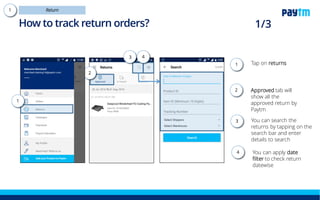
Tap on returns tab
Tap on Approved tab-
here you can see all
the returns approved
by Paytm Mall
You can apply date
filter to check return
datewise
Tap here to search
the returns by their
item id, order id and
other details
1.
2.
4.
1
4
2
3
3.
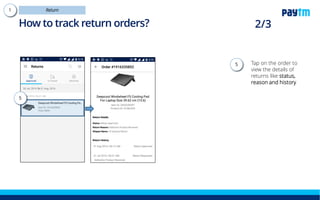
Tap on the order to view
the details of returns like
status, reason and
history
5
5.
How to track return orders?
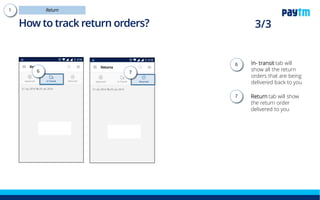
In-transit tab will show
all the return orders that
are being delivered
back to you
You can view the
different sub tabs in the
dropdown
Returned tab will show
the return order
delivered to you
6.
6a.
6 6a 7
7.
How to track return orders?
Thanks everyone!
For any query please raise a ticket on support

Seller app - Returns

  • 1.
    In this modulewe will discuss :- 1. How to track return orders? Seller app- Returns
  • 2.
    How to trackreturn orders? Tap on returns tab Tap on Approved tab- here you can see all the returns approved by Paytm Mall You can apply date filter to check return datewise Tap here to search the returns by their item id, order id and other details 1. 2. 4. 1 4 2 3 3.
  • 3.
    Tap on theorder to view the details of returns like status, reason and history 5 5. How to track return orders?
  • 4.
    In-transit tab willshow all the return orders that are being delivered back to you You can view the different sub tabs in the dropdown Returned tab will show the return order delivered to you 6. 6a. 6 6a 7 7. How to track return orders?
  • 5.
    Thanks everyone! For anyquery please raise a ticket on support