Seller app - Orders
In this module, we will discuss :-
1. Know your Orders Tab on the Seller app
2. How to process orders on the seller app?
KnowyourOrdersTabontheSellerapp
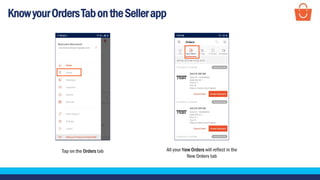
Tap on the Orders tab All your New Orders will reflect in the
New Orders tab
KnowyourOrdersTabontheSellerapp
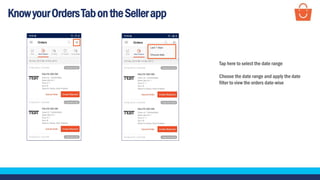
Tap here to select the date range
Choose the date range and apply the date
filter to view the orders date-wise
KnowyourOrdersTabontheSellerapp
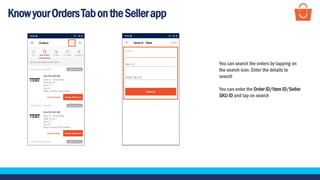
You can search the orders by tapping on
the search icon. Enter the details to
search
You can enter the Order ID/Item ID/Seller
SKU ID and tap on search
HowtoprocesstheordersontheSellerapp?
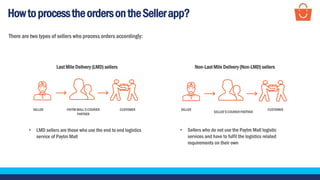
There are two types of sellers who process orders accordingly:
Last Mile Delivery (LMD) sellers Non-Last Mile Delivery (Non-LMD) sellers
โ€ข LMD sellers are those who use the end to end logistics
service of Paytm Mall
โ€ข Sellers who do not use the Paytm Mall logistic
services and have to fulfil the logistics related
requirements on their own
SELLER PAYTM MALLโ€™S COURIER
PARTNER
CUSTOMER SELLER
SELLERโ€™SCOURIERPARTNER
CUSTOMER
HowtoprocesstheordersontheSellerapp?
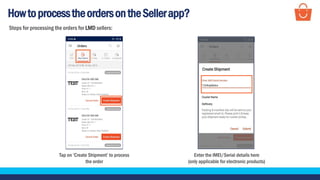
Enter the IMEI/Serial details here
(only applicable for electronic products)
Tap on โ€˜Create Shipmentโ€™ to process
the order
Steps for processing the orders for LMD sellers:
HowtoprocesstheordersontheSellerapp?
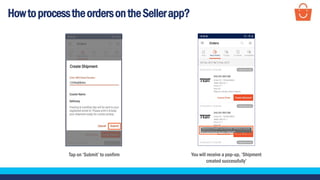
Tap on โ€˜Submitโ€™ to confirm You will receive a pop-up, โ€˜Shipment
created successfullyโ€™
HowtoprocesstheordersontheSellerapp?
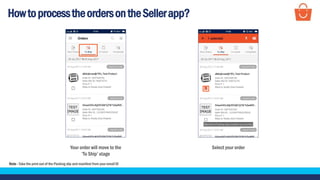
Your order will move to the
โ€˜To Shipโ€™ stage
Select your order
Note - Take the print out of the Packing slip and manifest from your email ID
HowtoprocesstheordersontheSellerapp?
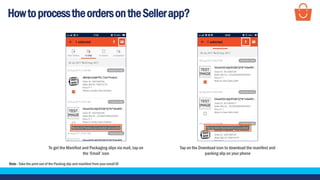
To get the Manifest and Packaging slips via mail, tap on
the โ€˜Emailโ€™ icon
Note - Take the print out of the Packing slip and manifest from your email ID
Tap on the Download icon to download the manifest and
packing slip on your phone
HowtoprocesstheordersontheSellerapp?
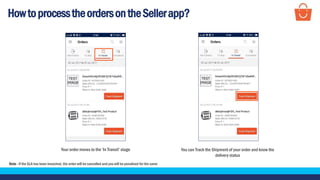
Your order moves to the โ€˜In Transitโ€™ stage
Note - If the SLA has been breached, the order will be cancelled and you will be penalised for the same
You can Track the Shipment of your order and know the
delivery status
HowtoprocesstheordersontheSellerapp?
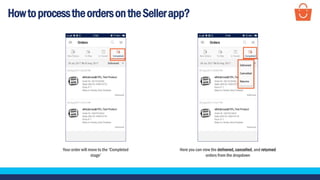
Your order will move to the โ€˜Completed
stageโ€™
Here you can view the delivered, cancelled, and returned
orders from the dropdown
HowtoprocesstheordersontheSellerapp?
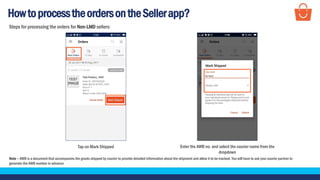
Tap on Mark Shipped
Note โ€“ AWB is a document that accompanies the goods shipped by courier to provide detailed information about the shipment and allow it to be tracked. You will have to ask your courier partner to
generate the AWB number in advance
Enter the AWB no. and select the courier name from the
dropdown
Steps for processing the orders for Non-LMD sellers:
HowtoprocesstheordersontheSellerapp?
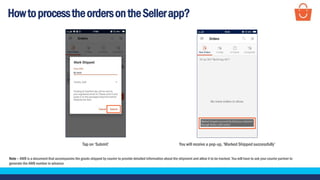
Tap on โ€˜Submitโ€™
Note โ€“ AWB is a document that accompanies the goods shipped by courier to provide detailed information about the shipment and allow it to be tracked. You will have to ask your courier partner to
generate the AWB number in advance
You will receive a pop-up, โ€˜Marked Shipped successfullyโ€™
HowtoprocesstheordersontheSellerapp?
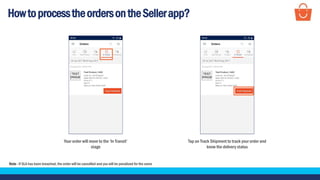
Your order will move to the โ€˜In Transitโ€™
stage
Note - If SLA has been breached, the order will be cancelled and you will be penalised for the same
Tap on Track Shipment to track your order and
know the delivery status
HowtoprocesstheordersontheSellerapp?
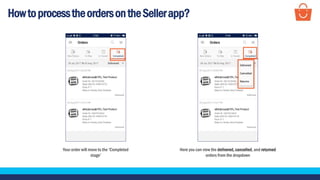
Your order will move to the โ€˜Completed
stageโ€™
Here you can view the delivered, cancelled, and returned
orders from the dropdown
Thankseveryone!
For any query, please raise a ticket on Support

Seller app - Orders