Selenium

for web automation

Madhu Kumari
B.E Computer Engg.
Selenium Webdriver
●

●

●

●

WebDriver is a tool for automating testing web applications
It aims to provide a friendly API that’s easy to explore,
understand and maintain
It’s not tied to any particular test framework, so it can be
used equally well in a unit testing or from a plain old “main”
method
Once your project is set up, you can see that WebDriver
acts just as any normal library: it is entirely self-contained
Selenium IDE
●

●

●

●

●

It is the only flavor of selenium that allows us to record user
actions on browser window
Scripts recorded in IDE can be converted into other
languages like Java, C#, Python and Ruby
It is not only a time saver but also an excellent way of
learning scripts syntax
Allows to insert comments in the middle of the script for
better understanding and debugging
Supports context menu
Selenium Webdriver: Portability
●

●

●

●

All Java projects work the same with a src & bin folders and
other related folders
Each IDE creates it's own IDE project/workspace files as
well
One can use same source files within it's hierarchy of folders
easily among different Java IDEs
Just ensure to use standardized IDE for better portability
experience
Need of Eclipse for Automation
using Selenium Webdriver
●

●

●

Depends upon the requirements
Eclipse has been one of the best IDEs for unit testing ever
since it's early days
But other alternatives to Eclipse for Automation using
Selenium Webdriver are also available
Is there any IDE available for web
automation using Selenium?
●

IntelliJ IDEA
–

Have the best IntelliSense

–

It's also an open source

–

For the Ultimate license you have to pay
Demerits of Selenium IDE
●

It runs only in firefox browser

●

Selenium IDE can execute scripts created in selenese only

●

Cannot upload files

●

It does not directly support loops and conditions

●

Reading from external files like .txt, .xls is not possible
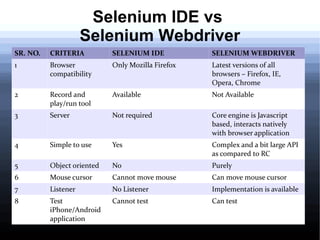
Selenium IDE vs
Selenium Webdriver
SR. NO.

CRITERIA

SELENIUM IDE

SELENIUM WEBDRIVER

1

Browser
compatibility

Only Mozilla Firefox

Latest versions of all
browsers – Firefox, IE,
Opera, Chrome

2

Record and
play/run tool

Available

Not Available

3

Server

Not required

Core engine is Javascript
based, interacts natively
with browser application

4

Simple to use

Yes

Complex and a bit large API
as compared to RC

5

Object oriented

No

Purely

6

Mouse cursor

Cannot move mouse

Can move mouse cursor

7

Listener

No Listener

Implementation is available

8

Test
iPhone/Android
application

Cannot test

Can test
Selenium
vs
Low/Network level tools
●

●

●

"Low/network" level tool like Htmlunit has the advantage of
being fast - but its javascript will not work work in most
complex websites(besides not being a browser test)
Selenium(java, .net) code also has the disadvantage of being
dependent on RC server(not big deal)
You should continue low level tools like Httpunit for
monitoring - but it's not preferable to use these tools for
browser/regression testing.
Selenium vs Watir
●

●

●

●

For people favouring test cases in Ruby (or.net) then Watir
is a tool
Watir does have advantage that its recorder uses IE to
record.
With Selenium IDE – Only browser support is there for
Firefox – else you will have to manually write the code
The biggest advantage of Selenium is its support for FIT
HTML and the vast languages/browsers/platform that it
supports.(with good documentation)
Selenium vs IMacros
●

●

●

IMacros appears better in recording as compared to
Selenium IDE
As per automation Imacros is not powerful for automation
as Selenium IDE
For scheduling as well Selenium is better compared to
IMacros
Selenium vs Dejaclick
●

●

●

Dejaclick is probably the best (free) macro tool for websites
record and play.
Selenium beats DejaClick in overall features(multiple
language suport vs only XML support, free automation vs
paid automation).
Advantages of Dejaclick:
–

It nicely plays back the recorded stuff - by
highlighting appropriate items in green.

–

It can easily record flash/silverlight - by recording
position.(however it may mean that it may not
nicely work in all computers)

–

Allows to encrypt sensitive data

–

Allows to bookmark the script for playback.
Demerits of Dejaclick
●

Disadvantage:
–

●

Dejaclick recording tool is free - But for automation
you have to rely on paid site alertsite

AlertSite
–

Provides great facility for running your dejaclick
script and even soap xml from most of
cities/region in US/world

–

Also allows you to monitor the CDN
performance/reliability or what content your
website is serving across different regions
Selenium vs Sahi
●

Pros:
–
–

Has its own IDE

–

Record and playback tests

–

Data-driven test via jdbc:odbc bridge

–

Test success/failure reporting in html files

–

Capabilities to run test using batch file or ant script

–
●

Multi-browser support

Lightweight

Cons:
–

documentation needs to be enhanced

–

need to be improved reporting

Selenium presentation

  • 1.
    Selenium for web automation MadhuKumari B.E Computer Engg.
  • 2.
    Selenium Webdriver ● ● ● ● WebDriver isa tool for automating testing web applications It aims to provide a friendly API that’s easy to explore, understand and maintain It’s not tied to any particular test framework, so it can be used equally well in a unit testing or from a plain old “main” method Once your project is set up, you can see that WebDriver acts just as any normal library: it is entirely self-contained
  • 3.
    Selenium IDE ● ● ● ● ● It isthe only flavor of selenium that allows us to record user actions on browser window Scripts recorded in IDE can be converted into other languages like Java, C#, Python and Ruby It is not only a time saver but also an excellent way of learning scripts syntax Allows to insert comments in the middle of the script for better understanding and debugging Supports context menu
  • 4.
    Selenium Webdriver: Portability ● ● ● ● AllJava projects work the same with a src & bin folders and other related folders Each IDE creates it's own IDE project/workspace files as well One can use same source files within it's hierarchy of folders easily among different Java IDEs Just ensure to use standardized IDE for better portability experience
  • 5.
    Need of Eclipsefor Automation using Selenium Webdriver ● ● ● Depends upon the requirements Eclipse has been one of the best IDEs for unit testing ever since it's early days But other alternatives to Eclipse for Automation using Selenium Webdriver are also available
  • 6.
    Is there anyIDE available for web automation using Selenium? ● IntelliJ IDEA – Have the best IntelliSense – It's also an open source – For the Ultimate license you have to pay
  • 7.
    Demerits of SeleniumIDE ● It runs only in firefox browser ● Selenium IDE can execute scripts created in selenese only ● Cannot upload files ● It does not directly support loops and conditions ● Reading from external files like .txt, .xls is not possible
  • 8.
    Selenium IDE vs SeleniumWebdriver SR. NO. CRITERIA SELENIUM IDE SELENIUM WEBDRIVER 1 Browser compatibility Only Mozilla Firefox Latest versions of all browsers – Firefox, IE, Opera, Chrome 2 Record and play/run tool Available Not Available 3 Server Not required Core engine is Javascript based, interacts natively with browser application 4 Simple to use Yes Complex and a bit large API as compared to RC 5 Object oriented No Purely 6 Mouse cursor Cannot move mouse Can move mouse cursor 7 Listener No Listener Implementation is available 8 Test iPhone/Android application Cannot test Can test
  • 9.
    Selenium vs Low/Network level tools ● ● ● "Low/network"level tool like Htmlunit has the advantage of being fast - but its javascript will not work work in most complex websites(besides not being a browser test) Selenium(java, .net) code also has the disadvantage of being dependent on RC server(not big deal) You should continue low level tools like Httpunit for monitoring - but it's not preferable to use these tools for browser/regression testing.
  • 10.
    Selenium vs Watir ● ● ● ● Forpeople favouring test cases in Ruby (or.net) then Watir is a tool Watir does have advantage that its recorder uses IE to record. With Selenium IDE – Only browser support is there for Firefox – else you will have to manually write the code The biggest advantage of Selenium is its support for FIT HTML and the vast languages/browsers/platform that it supports.(with good documentation)
  • 11.
    Selenium vs IMacros ● ● ● IMacrosappears better in recording as compared to Selenium IDE As per automation Imacros is not powerful for automation as Selenium IDE For scheduling as well Selenium is better compared to IMacros
  • 12.
    Selenium vs Dejaclick ● ● ● Dejaclickis probably the best (free) macro tool for websites record and play. Selenium beats DejaClick in overall features(multiple language suport vs only XML support, free automation vs paid automation). Advantages of Dejaclick: – It nicely plays back the recorded stuff - by highlighting appropriate items in green. – It can easily record flash/silverlight - by recording position.(however it may mean that it may not nicely work in all computers) – Allows to encrypt sensitive data – Allows to bookmark the script for playback.
  • 13.
    Demerits of Dejaclick ● Disadvantage: – ● Dejaclickrecording tool is free - But for automation you have to rely on paid site alertsite AlertSite – Provides great facility for running your dejaclick script and even soap xml from most of cities/region in US/world – Also allows you to monitor the CDN performance/reliability or what content your website is serving across different regions
  • 14.
    Selenium vs Sahi ● Pros: – – Hasits own IDE – Record and playback tests – Data-driven test via jdbc:odbc bridge – Test success/failure reporting in html files – Capabilities to run test using batch file or ant script – ● Multi-browser support Lightweight Cons: – documentation needs to be enhanced – need to be improved reporting