
Test Automation Using
Selenium
By Nikhil Kapoor
What is Test Automation?
 Test automation is the use of software
 To set test preconditions.
 To control the execution of tests.
 To compare the actual outcomes to predicted
outcomes.
 To report the Execution Status.
 Commonly, test automation involves automating
a manual process already in place that uses a
formalized testing process.
Why and When To Automate?
 Frequent regression testing
 Repeated test case Execution is required
 User Acceptance Tests
 Faster Feedback to the developers
 Reduce the Human Effort
 Test same application on multiple environments
Selenium
Introduction
 Selenium is a free (open source) automated
testing suite for web applications across different
browsers and platforms.
 Selenium allows scripting in several languages like Java,
C#, PHP and Python.
 Selenium is not just a single tool but a suite of
software's, each catering to different testing needs of an
organization.
Introduction (contd.)
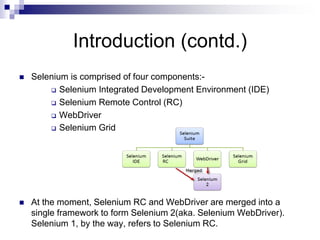
 Selenium is comprised of four components:-
 Selenium Integrated Development Environment (IDE)
 Selenium Remote Control (RC)
 WebDriver
 Selenium Grid
 At the moment, Selenium RC and WebDriver are merged into a
single framework to form Selenium 2(aka. Selenium WebDriver).
Selenium 1, by the way, refers to Selenium RC.
Development and Evolution of
Selenium
 Primarily, Selenium was created by Jason Huggins in 2004.
An engineer at ThoughtWorks, he was working on a web
application that required frequent testing. Having realized that
the repetitious manual testing of their application was
becoming more and more inefficient, he created a JavaScript
program that would automatically control the browser's
actions. He named this program as the
"JavaScriptTestRunner."
 Seeing potential in this idea to help automate other web
applications, he made JavaScriptRunner open-source which
was later re-named as Selenium Core.
Development and Evolution of
Selenium (contd.)
Birth of Selenium Remote Control (Selenium RC)
Unfortunately; testers using Selenium Core had to install
the whole application under test and the web server on
their own local computers because of the restrictions
imposed by the same origin policy. So another
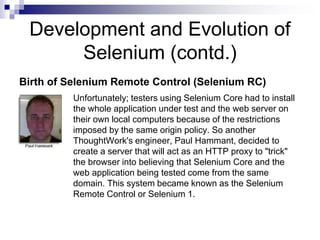
ThoughtWork's engineer, Paul Hammant, decided to
create a server that will act as an HTTP proxy to "trick"
the browser into believing that Selenium Core and the
web application being tested come from the same
domain. This system became known as the Selenium
Remote Control or Selenium 1.
Development and Evolution of
Selenium (contd.)
Birth of Selenium Grid
Selenium Grid was developed by Patrick Lightbody to
address the need of minimizing test execution times as much
as possible. It was capable of capturing browser screenshots
during significant stages, and also of sending out Selenium
commands to different machines simultaneously.
Birth of Selenium IDE
Shinya Kasatani of Japan created Selenium IDE, a Firefox
extension that can automate the browser through a
record-and-playback feature. He came up with this idea to
further increase the speed in creating test cases. He
donated Selenium IDE to the Selenium Project in 2006.
Development and Evolution of
Selenium (contd.)
Birth of WebDriver
Simon Stewart created WebDriver circa 2006 when
browsers and web applications were becoming more
powerful and more restrictive with JavaScript programs
like Selenium Core. It was the first cross- platform
testing framework that could control the browser from
the OS level.
Birth of Selenium 2
In 2008, the whole Selenium Team decided to merge WebDriver and
Selenium RC to form a more powerful tool called Selenium 2, with
WebDriver being the core. Currently, Selenium RC is still being developed
but only in maintenance mode. Most of the Selenium Project's efforts are
now focused on Selenium 2.
Selenium RC
 A test tool that allows you to write automated web
application UI tests in any programming language
against any HTTP website using any mainstream
JavaScript-enabled browser.
 Selenium RC was the main Selenium project for a long
time, before the WebDriver/Selenium merge brought up
Selenium 2, the newest and more powerful tool.
 Now Selenium 1 is deprecated and is not actively
supported (mostly in maintenance mode).
Selenium RC (contd..)
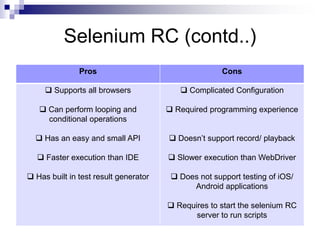
Pros Cons
 Supports all browsers
 Can perform looping and
conditional operations
 Has an easy and small API
 Faster execution than IDE
 Has built in test result generator
 Complicated Configuration
 Required programming experience
 Doesn’t support record/ playback
 Slower execution than WebDriver
 Does not support testing of iOS/
Android applications
 Requires to start the selenium RC
server to run scripts
Selenium IDE
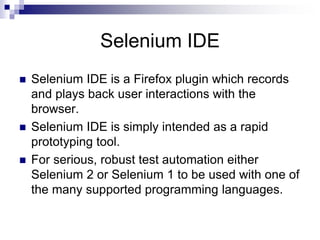
 Selenium IDE is a Firefox plugin which records
and plays back user interactions with the
browser.
 Selenium IDE is simply intended as a rapid
prototyping tool.
 For serious, robust test automation either
Selenium 2 or Selenium 1 to be used with one of
the many supported programming languages.
Selenium IDE (contd..)
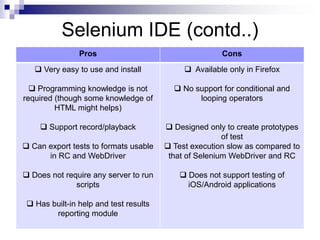
Pros Cons
 Very easy to use and install
 Programming knowledge is not
required (though some knowledge of
HTML might helps)
 Support record/playback
 Can export tests to formats usable
in RC and WebDriver
 Does not require any server to run
scripts
 Has built-in help and test results
reporting module
 Available only in Firefox
 No support for conditional and
looping operators
 Designed only to create prototypes
of test
 Test execution slow as compared to
that of Selenium WebDriver and RC
 Does not support testing of
iOS/Android applications
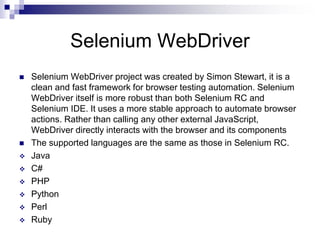
Selenium WebDriver
 Selenium WebDriver project was created by Simon Stewart, it is a
clean and fast framework for browser testing automation. Selenium
WebDriver itself is more robust than both Selenium RC and
Selenium IDE. It uses a more stable approach to automate browser
actions. Rather than calling any other external JavaScript,
WebDriver directly interacts with the browser and its components
 The supported languages are the same as those in Selenium RC.
 Java
 C#
 PHP
 Python
 Perl
 Ruby
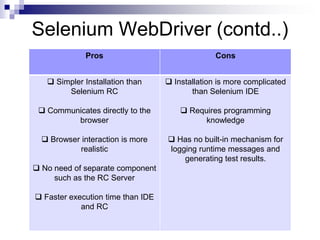
Selenium WebDriver (contd..)
Pros Cons
 Simpler Installation than
Selenium RC
 Communicates directly to the
browser
 Browser interaction is more
realistic
 No need of separate component
such as the RC Server
 Faster execution time than IDE
and RC
 Installation is more complicated
than Selenium IDE
 Requires programming
knowledge
 Has no built-in mechanism for
logging runtime messages and
generating test results.
Selenium Grid
 Selenium Grid is a tool used to run your tests on
different machines against different browsers in
parallel.
 That is, running multiple tests at the same time
against different machines running different
browsers and operating systems.
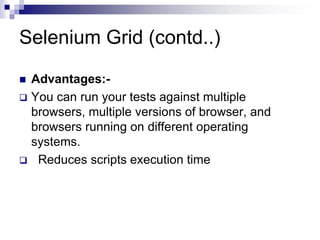
Selenium Grid (contd..)
 Advantages:-
 You can run your tests against multiple
browsers, multiple versions of browser, and
browsers running on different operating
systems.
 Reduces scripts execution time
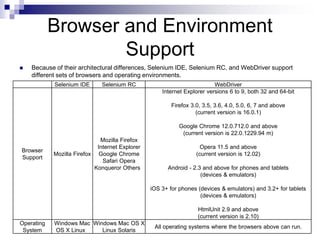
Browser and Environment
Support
 Because of their architectural differences, Selenium IDE, Selenium RC, and WebDriver support
different sets of browsers and operating environments.
Selenium IDE Selenium RC WebDriver
Browser
Support
Mozilla Firefox
Mozilla Firefox
Internet Explorer
Google Chrome
Safari Opera
Konqueror Others
Internet Explorer versions 6 to 9, both 32 and 64-bit
Firefox 3.0, 3.5, 3.6, 4.0, 5.0, 6, 7 and above
(current version is 16.0.1)
Google Chrome 12.0.712.0 and above
(current version is 22.0.1229.94 m)
Opera 11.5 and above
(current version is 12.02)
Android - 2.3 and above for phones and tablets
(devices & emulators)
iOS 3+ for phones (devices & emulators) and 3.2+ for tablets
(devices & emulators)
HtmlUnit 2.9 and above
(current version is 2.10)
Operating
System
Windows Mac
OS X Linux
Windows Mac OS X
Linux Solaris
All operating systems where the browsers above can run.
THANK YOU

Test Automation Using Selenium

  • 1.
  • 2.
    What is TestAutomation?  Test automation is the use of software  To set test preconditions.  To control the execution of tests.  To compare the actual outcomes to predicted outcomes.  To report the Execution Status.  Commonly, test automation involves automating a manual process already in place that uses a formalized testing process.
  • 3.
    Why and WhenTo Automate?  Frequent regression testing  Repeated test case Execution is required  User Acceptance Tests  Faster Feedback to the developers  Reduce the Human Effort  Test same application on multiple environments
  • 4.
  • 5.
    Introduction  Selenium isa free (open source) automated testing suite for web applications across different browsers and platforms.  Selenium allows scripting in several languages like Java, C#, PHP and Python.  Selenium is not just a single tool but a suite of software's, each catering to different testing needs of an organization.
  • 6.
    Introduction (contd.)  Seleniumis comprised of four components:-  Selenium Integrated Development Environment (IDE)  Selenium Remote Control (RC)  WebDriver  Selenium Grid  At the moment, Selenium RC and WebDriver are merged into a single framework to form Selenium 2(aka. Selenium WebDriver). Selenium 1, by the way, refers to Selenium RC.
  • 7.
    Development and Evolutionof Selenium  Primarily, Selenium was created by Jason Huggins in 2004. An engineer at ThoughtWorks, he was working on a web application that required frequent testing. Having realized that the repetitious manual testing of their application was becoming more and more inefficient, he created a JavaScript program that would automatically control the browser's actions. He named this program as the "JavaScriptTestRunner."  Seeing potential in this idea to help automate other web applications, he made JavaScriptRunner open-source which was later re-named as Selenium Core.
  • 8.
    Development and Evolutionof Selenium (contd.) Birth of Selenium Remote Control (Selenium RC) Unfortunately; testers using Selenium Core had to install the whole application under test and the web server on their own local computers because of the restrictions imposed by the same origin policy. So another ThoughtWork's engineer, Paul Hammant, decided to create a server that will act as an HTTP proxy to "trick" the browser into believing that Selenium Core and the web application being tested come from the same domain. This system became known as the Selenium Remote Control or Selenium 1.
  • 9.
    Development and Evolutionof Selenium (contd.) Birth of Selenium Grid Selenium Grid was developed by Patrick Lightbody to address the need of minimizing test execution times as much as possible. It was capable of capturing browser screenshots during significant stages, and also of sending out Selenium commands to different machines simultaneously. Birth of Selenium IDE Shinya Kasatani of Japan created Selenium IDE, a Firefox extension that can automate the browser through a record-and-playback feature. He came up with this idea to further increase the speed in creating test cases. He donated Selenium IDE to the Selenium Project in 2006.
  • 10.
    Development and Evolutionof Selenium (contd.) Birth of WebDriver Simon Stewart created WebDriver circa 2006 when browsers and web applications were becoming more powerful and more restrictive with JavaScript programs like Selenium Core. It was the first cross- platform testing framework that could control the browser from the OS level. Birth of Selenium 2 In 2008, the whole Selenium Team decided to merge WebDriver and Selenium RC to form a more powerful tool called Selenium 2, with WebDriver being the core. Currently, Selenium RC is still being developed but only in maintenance mode. Most of the Selenium Project's efforts are now focused on Selenium 2.
  • 11.
    Selenium RC  Atest tool that allows you to write automated web application UI tests in any programming language against any HTTP website using any mainstream JavaScript-enabled browser.  Selenium RC was the main Selenium project for a long time, before the WebDriver/Selenium merge brought up Selenium 2, the newest and more powerful tool.  Now Selenium 1 is deprecated and is not actively supported (mostly in maintenance mode).
  • 12.
    Selenium RC (contd..) ProsCons  Supports all browsers  Can perform looping and conditional operations  Has an easy and small API  Faster execution than IDE  Has built in test result generator  Complicated Configuration  Required programming experience  Doesn’t support record/ playback  Slower execution than WebDriver  Does not support testing of iOS/ Android applications  Requires to start the selenium RC server to run scripts
  • 13.
    Selenium IDE  SeleniumIDE is a Firefox plugin which records and plays back user interactions with the browser.  Selenium IDE is simply intended as a rapid prototyping tool.  For serious, robust test automation either Selenium 2 or Selenium 1 to be used with one of the many supported programming languages.
  • 14.
    Selenium IDE (contd..) ProsCons  Very easy to use and install  Programming knowledge is not required (though some knowledge of HTML might helps)  Support record/playback  Can export tests to formats usable in RC and WebDriver  Does not require any server to run scripts  Has built-in help and test results reporting module  Available only in Firefox  No support for conditional and looping operators  Designed only to create prototypes of test  Test execution slow as compared to that of Selenium WebDriver and RC  Does not support testing of iOS/Android applications
  • 15.
    Selenium WebDriver  SeleniumWebDriver project was created by Simon Stewart, it is a clean and fast framework for browser testing automation. Selenium WebDriver itself is more robust than both Selenium RC and Selenium IDE. It uses a more stable approach to automate browser actions. Rather than calling any other external JavaScript, WebDriver directly interacts with the browser and its components  The supported languages are the same as those in Selenium RC.  Java  C#  PHP  Python  Perl  Ruby
  • 16.
    Selenium WebDriver (contd..) ProsCons  Simpler Installation than Selenium RC  Communicates directly to the browser  Browser interaction is more realistic  No need of separate component such as the RC Server  Faster execution time than IDE and RC  Installation is more complicated than Selenium IDE  Requires programming knowledge  Has no built-in mechanism for logging runtime messages and generating test results.
  • 17.
    Selenium Grid  SeleniumGrid is a tool used to run your tests on different machines against different browsers in parallel.  That is, running multiple tests at the same time against different machines running different browsers and operating systems.
  • 18.
    Selenium Grid (contd..) Advantages:-  You can run your tests against multiple browsers, multiple versions of browser, and browsers running on different operating systems.  Reduces scripts execution time
  • 19.
    Browser and Environment Support Because of their architectural differences, Selenium IDE, Selenium RC, and WebDriver support different sets of browsers and operating environments. Selenium IDE Selenium RC WebDriver Browser Support Mozilla Firefox Mozilla Firefox Internet Explorer Google Chrome Safari Opera Konqueror Others Internet Explorer versions 6 to 9, both 32 and 64-bit Firefox 3.0, 3.5, 3.6, 4.0, 5.0, 6, 7 and above (current version is 16.0.1) Google Chrome 12.0.712.0 and above (current version is 22.0.1229.94 m) Opera 11.5 and above (current version is 12.02) Android - 2.3 and above for phones and tablets (devices & emulators) iOS 3+ for phones (devices & emulators) and 3.2+ for tablets (devices & emulators) HtmlUnit 2.9 and above (current version is 2.10) Operating System Windows Mac OS X Linux Windows Mac OS X Linux Solaris All operating systems where the browsers above can run.
  • 20.