
Introduction to Selenium
Agenda
• What is testing and why is it required.
• What is Automation testing.
• Difference between Manual and Automation testing.
• Different Automation testing tools in IT industry.
• What is Selenium and why do we need Selenium.
• History of Selenium.
• Who developed Selenium.
• Different versions of Selenium.
• Pre-requisites of Selenium.
• Different types of Components in Selenium.
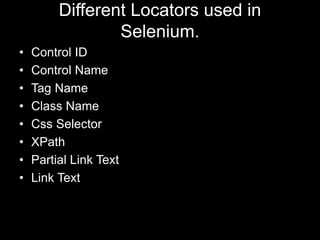
• Different locators used in Selenium.
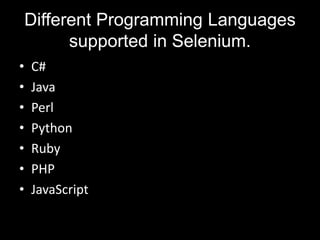
• Different languages supported in Selenium.
• Different kinds of browsers Selenium Supports.
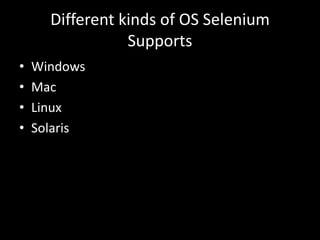
• Different kinds of O.S Selenium Supports.
• Why should I prefer Selenium over other Automation tools.
• What are the advantages of using Selenium.
• Different kind of Selenium Web drivers.
• Comparing Selenium with other Automation testing tools.
• Page Object Model in Selenium(Demo).
• Conclusion.
What is testing and why is it
required ?
• To check the functionality of the application
which is working as expected.
• To deliver a quality or bug free product.
• To ensure application is working properly without
breaking into failures.
• To check if there is any error occurred during the
development phase.
What is Automation testing.
• It is a process of automating the software
application or browser without any human
intervention.
• In automation testing, developers writes a script
and execute it through software testing tools like
Coded UI, Selenium, Protractor, Appium etc.
• With automation testing tools we can overcome
manual repetitive tasks.
Difference between Manual and
Automation testing.
Manual Testing:
• Human intervention is required.
• Human can make mistakes.
• Execution of test cases sequentially.
• Requires more number of resources.
Automation testing:
• No human intervention is required.
• Software cannot make mistakes.
• Execution of test cases in sequential and parallel.
• Requires few resources.
Different Automation testing tools in IT
industry.
• Selenium
• CodedUI
• QTP
• Protractor(For Angular Applications)
• TestCafe
• Sikuli
• Appium
• TestStackWhite
• Robotic Process Automation(RPA) Tools.
What is Selenium and why do we
need Selenium.
• Selenium is an automation testing tool or
software testing framework used for automating
browser or web applications.
• Selenium is an open source which is written in
Java and can be used with various programming
languages.
• It is a library or an API which can be integrated
with different programming languages.
Why do we need Selenium.
• We can automate web applications, desktop or
windows application, mobile applications(IOS &
Android), headless browser execution etc.
• Open Source library.
• Faster in execution.
• Language independent.
• Platform independent.
• Support execution in various browsers.
• Executes TC’s sequentially or parallely connected in
LAN network.
• Large user support group.
History of Selenium.
• Jason Huggins developed an internal project to test internal
applications at Thought Works, which was developed in client side
technology like JavaScript. ie.(Selenium IDE).
• Paul Hammant joined his team and developed the other version of
Selenium, i.e.(Selenium RC) then this tool became open-source to
work with the different Browsers and different platforms.
• Simon Stewart at Thought Works developed an Automation tool for
the browser known as Webdriver and later they merged these
Selenium RC with Webdriver called Selenium Webdriver(Selenium
2.0).
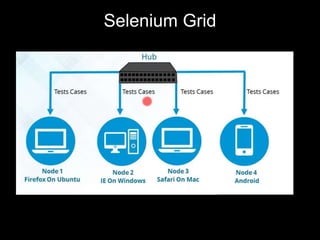
• Philippe Hanrigou at ThoughtWorks developed Selenium Grid.
Selenium Grid is used for configuring single hub and multiple nodes.
Who developed Selenium.
Versions Developed By.
• Selenium IDE Jason Huggins.
• Selenium RC Paul Hammant.
• Selenium Web driver Simon Stewart.
• Selenium Grid Philippe Hanrigou.
Different Versions of Selenium.
Versions :
• Selenium IDE (Selenium 1.0).
• Selenium Remote Control(RC).
• Selenium Webdriver(Selenium 2.0).
• Selenium-Grid 1.0(Launched in 2008).
• Selenium-Grid 2.0(Launched in 2012).
• Selenium 3.0(Launched in July 2016).
• Selenium 4.0(Expected to launch in year end).
Pre-requisites of Selenium.
• Java Runtime Environment (Latest
recommended).
• Selenium Webdrivers like chromeDriver,
IEDriver, GeckDriver etc.
• Browsers such as chrome, IE, Firefox(Latest
recommended).
Different types of components in
Selenium.
• Selenium IDE
• Selenium RC(Remote Control)
• Selenium Web driver
• Selenium Grid.
Selenium IDE
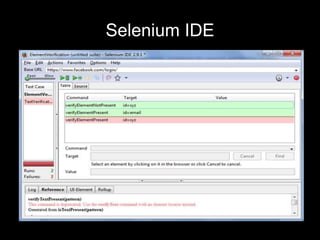
• Extension of Firefox.
• Executes the commands only in Firefox browser.
• No programming or coding is required.
• Cannot perform complex operations.
• Doesn’t support parallel execution.
• Slow in execution.
• Cannot automate IOS or Android applications.
• Cannot automate kendo UI or Angular controls.
Selenium IDE
Selenium RC
• It’s a library or an API.
• It supports various browser’s for execution.
• It supports parallel execution with the help of Selenium
Grid.
• It doesn’t support IOS & Android apps automation.
• It support various Programming language.
• It’s based on Client/Server architecture.
• Drawback with Selenium RC is, programmer or
developer need to run the Selenium server then only
we can execute the test cases.
Selenium Webdriver
• It’s also a library or an API.
• It supports various browser to execute test cases.
• It supports various programming languages.
• It supports parallel execution with Selenium Grid.
• It supports IOS & Android automation.
• It doesn’t depend on Client/Server architecture.
• Faster in execution compared to Selenium RC.
• It supports various drivers.
• Programmer or developer doesn’t requires to run the
Selenium server to execute test cases.
Selenium Grid
Different Locators used in
Selenium.
• Control ID
• Control Name
• Tag Name
• Class Name
• Css Selector
• XPath
• Partial Link Text
• Link Text
Different Programming Languages
supported in Selenium.
• C#
• Java
• Perl
• Python
• Ruby
• PHP
• JavaScript
Different kinds of browsers
Selenium Supports.
• Google Chrome
• Mozilla Firefox
• Internet Explorer
• Edge browser(Selenium 3.0)
• Safari browser
• Opera
Different kinds of OS Selenium
Supports
• Windows
• Mac
• Linux
• Solaris
Why should I prefer Selenium over
other Automation tools.
• It is Open Source
• It supports various browsers.
• It supports various programming language.
• Execution of test cases sequentially & parallely.
• High demand in market.
• Large user support group.
• We can automate various kind of applications.
• High pay for Selenium Automation Testers.
Different kind of drivers Selenium
Supports
• Chrome Driver
• Internet Explorer Driver
• Opera Driver
• Safari Driver
• Gecko Driver
• Edge Driver
Comparing Selenium with other
Automation testing tools.
CodedUI:
• It’s license version with ultimate or enterprise visual studio.
• It can be developed using C#.
QTP/UFT or RPA Tools:
• It’s license version, can be developed using VBScript.
Protractor or Cypress.io or Test cafe:
• It’s open source but development is done only in java Script.
Selenium:
• It is an open source.
• It supports development in C#, Java, JavaScript, Ruby, PERL, Python
PHP etc.
Page Object Model in Selenium
• Page Object Model is a design pattern which became
popular in test automation for the maintenance of code,
reducing code duplication and reusability of code.
• Page Object Model is used to create Object Repository
or Control Properties for web UI elements. For each web
page in the application, there should be corresponding
page class like Login Page, Registration Page etc.
• All the control locators & respective functionality should
be maintained in separate class files, if any control
property changes we can change the locators class
without disturbing the functionality of it.
Conclusion
• Its Open Source Library.
• Selenium helps in automation of Web application,
Windows application, WPF application, Headless
browser application, Mobile application(IOS,
Android) etc.
• It supports various programming languages such as
C#, Java, Python, Ruby, Perl, JavaScript etc.
• It supports various browsers such as Chrome,
Firefox, IE, Edge, Opera, Safari etc.
• No other automation tools in the market supports
these kind of features.
• It’s single package with various bundle of features.

Introduction to selenium

  • 1.
  • 2.
    Agenda • What istesting and why is it required. • What is Automation testing. • Difference between Manual and Automation testing. • Different Automation testing tools in IT industry. • What is Selenium and why do we need Selenium. • History of Selenium. • Who developed Selenium. • Different versions of Selenium. • Pre-requisites of Selenium. • Different types of Components in Selenium. • Different locators used in Selenium. • Different languages supported in Selenium.
  • 3.
    • Different kindsof browsers Selenium Supports. • Different kinds of O.S Selenium Supports. • Why should I prefer Selenium over other Automation tools. • What are the advantages of using Selenium. • Different kind of Selenium Web drivers. • Comparing Selenium with other Automation testing tools. • Page Object Model in Selenium(Demo). • Conclusion.
  • 4.
    What is testingand why is it required ? • To check the functionality of the application which is working as expected. • To deliver a quality or bug free product. • To ensure application is working properly without breaking into failures. • To check if there is any error occurred during the development phase.
  • 5.
    What is Automationtesting. • It is a process of automating the software application or browser without any human intervention. • In automation testing, developers writes a script and execute it through software testing tools like Coded UI, Selenium, Protractor, Appium etc. • With automation testing tools we can overcome manual repetitive tasks.
  • 6.
    Difference between Manualand Automation testing. Manual Testing: • Human intervention is required. • Human can make mistakes. • Execution of test cases sequentially. • Requires more number of resources. Automation testing: • No human intervention is required. • Software cannot make mistakes. • Execution of test cases in sequential and parallel. • Requires few resources.
  • 7.
    Different Automation testingtools in IT industry. • Selenium • CodedUI • QTP • Protractor(For Angular Applications) • TestCafe • Sikuli • Appium • TestStackWhite • Robotic Process Automation(RPA) Tools.
  • 8.
    What is Seleniumand why do we need Selenium. • Selenium is an automation testing tool or software testing framework used for automating browser or web applications. • Selenium is an open source which is written in Java and can be used with various programming languages. • It is a library or an API which can be integrated with different programming languages.
  • 9.
    Why do weneed Selenium. • We can automate web applications, desktop or windows application, mobile applications(IOS & Android), headless browser execution etc. • Open Source library. • Faster in execution. • Language independent. • Platform independent. • Support execution in various browsers. • Executes TC’s sequentially or parallely connected in LAN network. • Large user support group.
  • 10.
    History of Selenium. •Jason Huggins developed an internal project to test internal applications at Thought Works, which was developed in client side technology like JavaScript. ie.(Selenium IDE). • Paul Hammant joined his team and developed the other version of Selenium, i.e.(Selenium RC) then this tool became open-source to work with the different Browsers and different platforms. • Simon Stewart at Thought Works developed an Automation tool for the browser known as Webdriver and later they merged these Selenium RC with Webdriver called Selenium Webdriver(Selenium 2.0). • Philippe Hanrigou at ThoughtWorks developed Selenium Grid. Selenium Grid is used for configuring single hub and multiple nodes.
  • 11.
    Who developed Selenium. VersionsDeveloped By. • Selenium IDE Jason Huggins. • Selenium RC Paul Hammant. • Selenium Web driver Simon Stewart. • Selenium Grid Philippe Hanrigou.
  • 12.
    Different Versions ofSelenium. Versions : • Selenium IDE (Selenium 1.0). • Selenium Remote Control(RC). • Selenium Webdriver(Selenium 2.0). • Selenium-Grid 1.0(Launched in 2008). • Selenium-Grid 2.0(Launched in 2012). • Selenium 3.0(Launched in July 2016). • Selenium 4.0(Expected to launch in year end).
  • 13.
    Pre-requisites of Selenium. •Java Runtime Environment (Latest recommended). • Selenium Webdrivers like chromeDriver, IEDriver, GeckDriver etc. • Browsers such as chrome, IE, Firefox(Latest recommended).
  • 14.
    Different types ofcomponents in Selenium. • Selenium IDE • Selenium RC(Remote Control) • Selenium Web driver • Selenium Grid.
  • 15.
    Selenium IDE • Extensionof Firefox. • Executes the commands only in Firefox browser. • No programming or coding is required. • Cannot perform complex operations. • Doesn’t support parallel execution. • Slow in execution. • Cannot automate IOS or Android applications. • Cannot automate kendo UI or Angular controls.
  • 16.
  • 17.
    Selenium RC • It’sa library or an API. • It supports various browser’s for execution. • It supports parallel execution with the help of Selenium Grid. • It doesn’t support IOS & Android apps automation. • It support various Programming language. • It’s based on Client/Server architecture. • Drawback with Selenium RC is, programmer or developer need to run the Selenium server then only we can execute the test cases.
  • 18.
    Selenium Webdriver • It’salso a library or an API. • It supports various browser to execute test cases. • It supports various programming languages. • It supports parallel execution with Selenium Grid. • It supports IOS & Android automation. • It doesn’t depend on Client/Server architecture. • Faster in execution compared to Selenium RC. • It supports various drivers. • Programmer or developer doesn’t requires to run the Selenium server to execute test cases.
  • 19.
  • 20.
    Different Locators usedin Selenium. • Control ID • Control Name • Tag Name • Class Name • Css Selector • XPath • Partial Link Text • Link Text
  • 21.
    Different Programming Languages supportedin Selenium. • C# • Java • Perl • Python • Ruby • PHP • JavaScript
  • 22.
    Different kinds ofbrowsers Selenium Supports. • Google Chrome • Mozilla Firefox • Internet Explorer • Edge browser(Selenium 3.0) • Safari browser • Opera
  • 23.
    Different kinds ofOS Selenium Supports • Windows • Mac • Linux • Solaris
  • 24.
    Why should Iprefer Selenium over other Automation tools. • It is Open Source • It supports various browsers. • It supports various programming language. • Execution of test cases sequentially & parallely. • High demand in market. • Large user support group. • We can automate various kind of applications. • High pay for Selenium Automation Testers.
  • 25.
    Different kind ofdrivers Selenium Supports • Chrome Driver • Internet Explorer Driver • Opera Driver • Safari Driver • Gecko Driver • Edge Driver
  • 26.
    Comparing Selenium withother Automation testing tools. CodedUI: • It’s license version with ultimate or enterprise visual studio. • It can be developed using C#. QTP/UFT or RPA Tools: • It’s license version, can be developed using VBScript. Protractor or Cypress.io or Test cafe: • It’s open source but development is done only in java Script. Selenium: • It is an open source. • It supports development in C#, Java, JavaScript, Ruby, PERL, Python PHP etc.
  • 27.
    Page Object Modelin Selenium • Page Object Model is a design pattern which became popular in test automation for the maintenance of code, reducing code duplication and reusability of code. • Page Object Model is used to create Object Repository or Control Properties for web UI elements. For each web page in the application, there should be corresponding page class like Login Page, Registration Page etc. • All the control locators & respective functionality should be maintained in separate class files, if any control property changes we can change the locators class without disturbing the functionality of it.
  • 28.
    Conclusion • Its OpenSource Library. • Selenium helps in automation of Web application, Windows application, WPF application, Headless browser application, Mobile application(IOS, Android) etc. • It supports various programming languages such as C#, Java, Python, Ruby, Perl, JavaScript etc. • It supports various browsers such as Chrome, Firefox, IE, Edge, Opera, Safari etc. • No other automation tools in the market supports these kind of features. • It’s single package with various bundle of features.