“Containerize all the things”
By Mike Melusky
Topics
ASP.NET Core 3.0 deployment overview
Docker and Containerization
Cloud providers and serverless computing
Container registries
Bonus deployments! (time permitting)
Java (Spring), JavaScript (React), Python (Flask)
• Michael Melusky - @mrjavascript
• Software developer for
Audacious Inquiry (Baltimore,
MD)
• Regular speaker at Philly.NET
events (monthlies and code
camps)
• College Professor (Penn State /
Franklin & Marshall)
• BBQ and lawn care enthusiast
Caveat
before
session
• Demoes will be done using Amazon Web Services
• Equivalent services using Microsoft Azure will be shown
Dot Net Core?
Dot Net Core
• Framework from Microsoft
• Open Source! (e.g. github.com/dotnet)
• Differs from the traditional .NET Framework
4.X
• How?
• Dot Net Core is cross platform!
• You can run Dot Net Core applications on
Linux
• You cannot run .NET Framework 4.X
applications on Linux
Deployment End
Game
• The end game is deploying our applications
inside of a container
• The ultimate goal – deploy our applications
on a Linux host
• You can deploy .NET Framework 4.X
applications in a container!
• But it must be served on a Microsoft
Windows host
• With containers and Linux, we can take
advantage of serverless computing from
cloud hosting providers
Containers?
Application
Containerization
• What is a container?
• Unit which packages up code
and dependencies into an image
• An image contains everything
needed to run your code!
(runtime, tools, settings)
What is Docker?
• Software that uses OS-virtualization to run software images in
containers
• Docker can run on Windows, Linux and Mac OSX
• Each container runs independently and is isolated
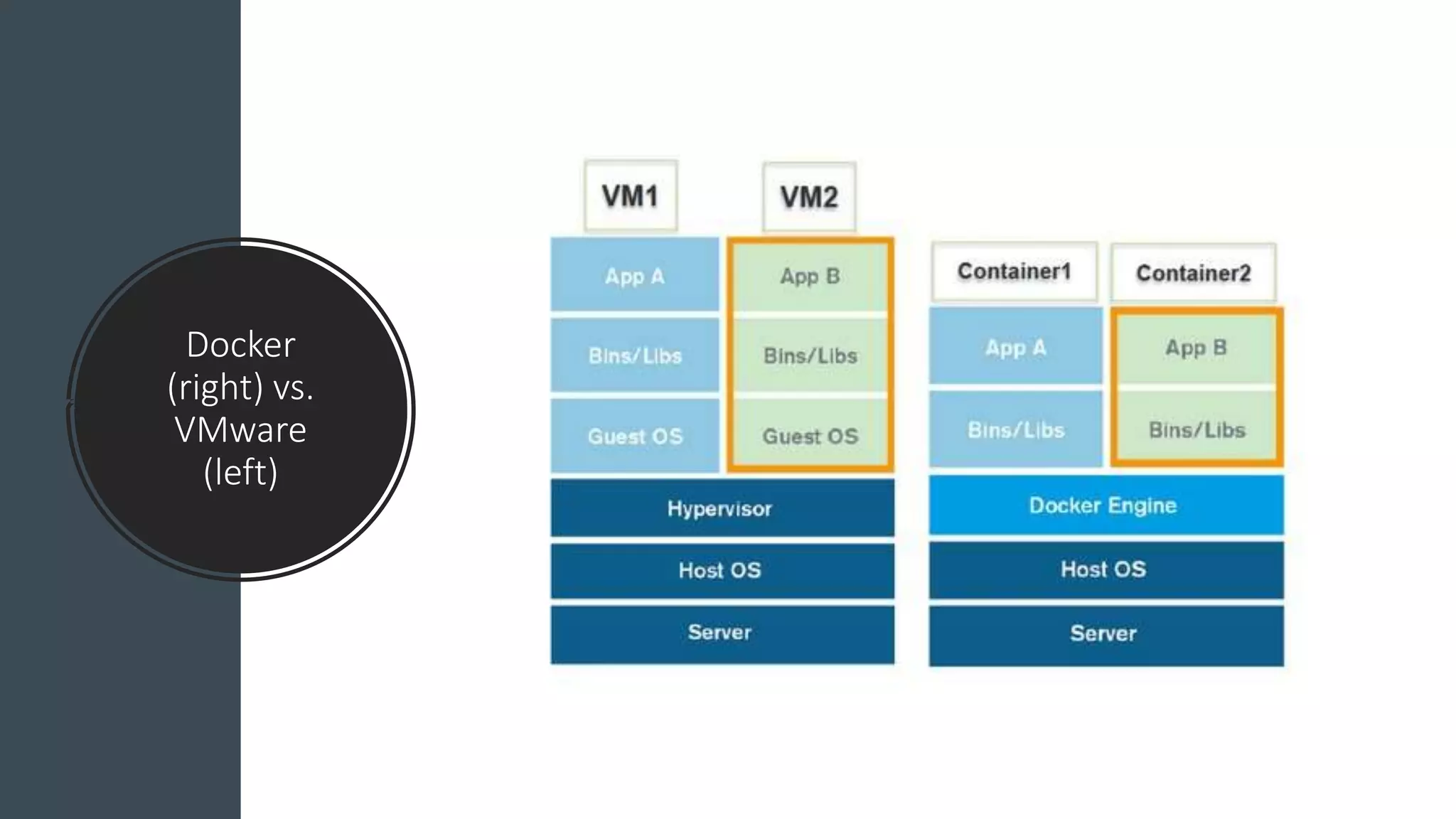
Docker
(right) vs.
VMware
(left)
What is Kubernetes
• Kubernetes is software which
manages container
orchestration
• For instances consider an
application which can run
multiple instances at once
behind a load balancer (e.g. a
“microservice”)
• Kubernetes will manage the
health of your application
• If one of the containers
fails/dies, Kubernetes will
restart the dead container
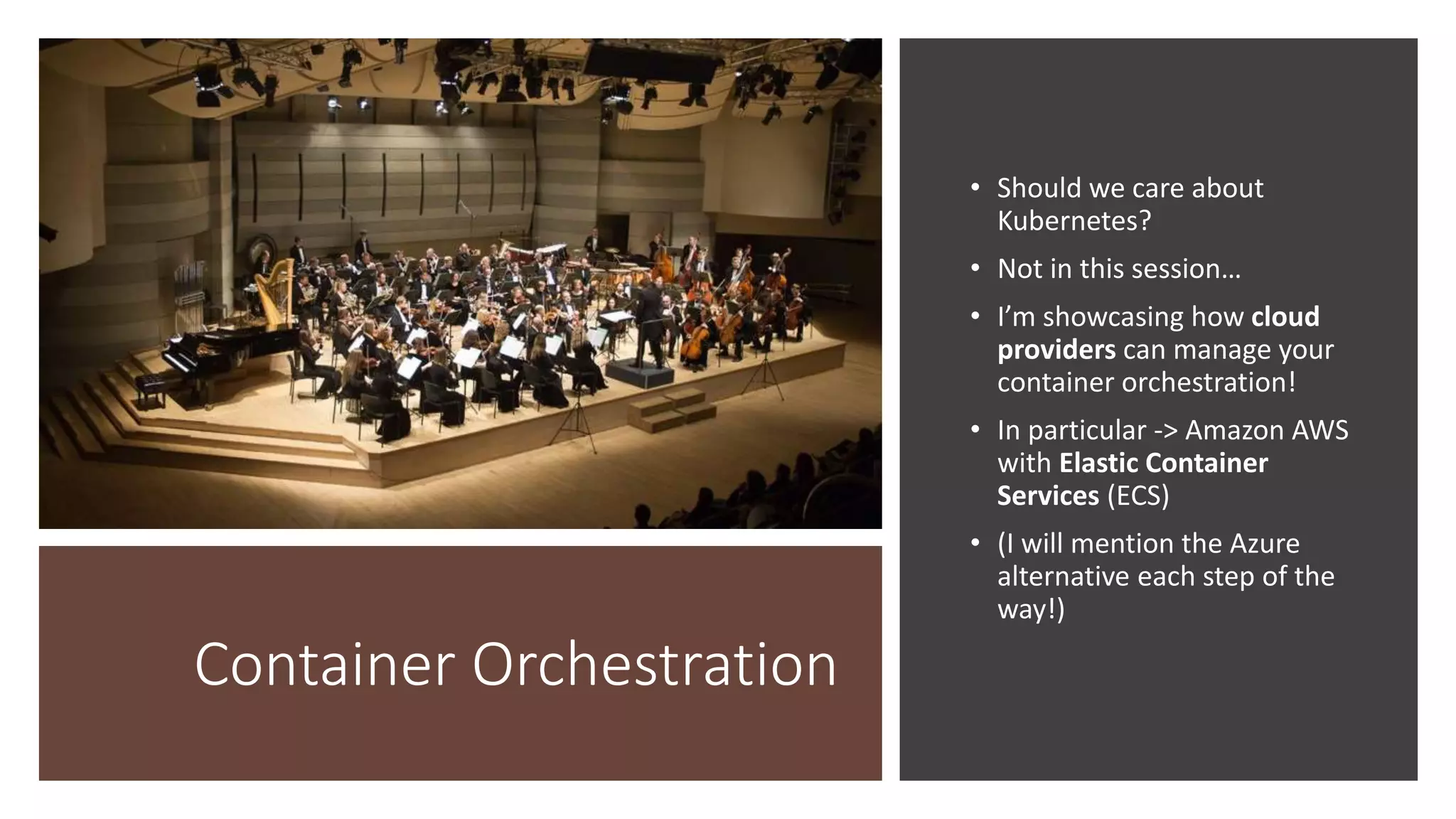
Container Orchestration
• Should we care about
Kubernetes?
• Not in this session…
• I’m showcasing how cloud
providers can manage your
container orchestration!
• In particular -> Amazon AWS
with Elastic Container
Services (ECS)
• (I will mention the Azure
alternative each step of the
way!)
Deploying Dot Net Core
Dot Net Core
• Let’s look at deploying a traditional ASP.NET MVC Core application
• ** demo **
Deploying .NET
Core?
• We traditionally deploy ASP.NET
MVC apps using Microsoft IIS
(both .NET Core and .NET
Framework)
• Easiest to use Web Deploy
through Visual Studio
• How can we containerize this and
deploy using Docker?
Docker
• To containerize your application, you first need Docker installed on
your machine to build the image
• Docker can be installed on Windows, Mac, Linux
• For Windows, Docker can only be installed on Windows 10
Professional machines (since virtualization settings are involved)
Dockerfile
• Once Docker is installed, you need to add a Dockerfile to your
application
• Dockerfile?
• Text document which contains everything needed to build your
application’s Docker image!
• It’s needed to run the docker build command
Dockerfile and Dot Net Core
• Let’s add a Dockerfile to our Dot Net Core application
• Let’s use the docker build command to build our image
• ** DEMO **
We have an image, what now?
Cloud
Providers
• Cloud computing means on
demand availability of computer
resources
• “infrastructure as a service”
• No local data center 
• Lots of options to choose from
• IBM, Microsoft, Amazon, RedHat
…
Amazon Web Services
(AWS)
• I’m going to be demoing everything else using AWS
• Why AWS? Why not Azure?
• I work with AWS at full time job and also on
personal projects
• I will be showing the Azure equivalents for
everything today
• Since we are in a Microsoft campus
Serverless Computing
• Cloud-computing execution model
• The cloud provider runs the server
• Dynamically manages the application resources
• You are billed on actual amount of resources consumed by
application
Serverless Computing
• “Function as a service”
• AWS?
• Offers AWS Lambda
• Azure?
• Azure Functions
• These are useful if you need to run a quick running process in the
cloud (15 minutes or less)
• A step in an ETL process for instance
Serverless Computing (with Containers)
• We know cloud providers offer functions as a service (FaaS)
• Do cloud providers have the ability to run our Docker containers on
demand?
• Without having to worry about the host operating system (and
updates and security patches!)
• Yes
• Containers as a service (CaaS)
IaaS vs. CaaS vs. FaaS
• IaaS – Infrastructure as a Service
• CaaS – Containers as a Service
• FaaS – Functions as a Service
Back to AWS…
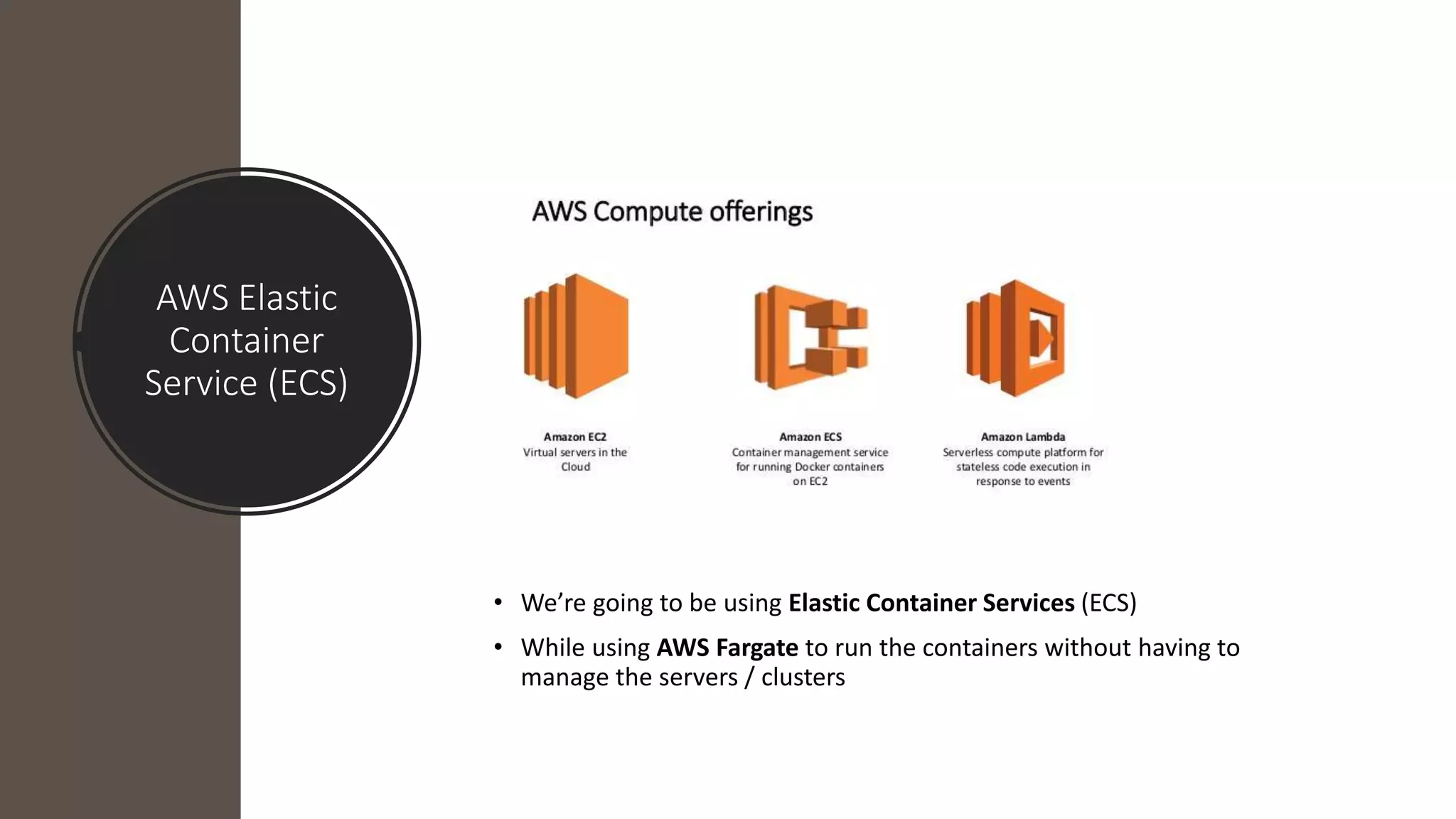
AWS Elastic
Container
Service (ECS)
• We’re going to be using Elastic Container Services (ECS)
• While using AWS Fargate to run the containers without having to
manage the servers / clusters
AWS Fargate
and Docker
• AWS Fargate will automatically run our containers without a host operating
system
• Under the hood it uses Linux
• Our containers must run Linux (they do since Dot Net Core!)
MS Azure
Alternatives to AWS?
Cloud Lexicon
• Functions
• AWS – Lambda
• Azure – Functions
• Containers
• AWS – Elastic Container Services (ECS)
• Azure – Containers
• Serverless Container Runtime
• AWS – Fargate
• Azure – Container Instances (ACI)
Enough with the Sales Pitch
Deploying and running the container
• The steps for running our Dot Net Core application in a cloud
container
• (1) docker build the image
• (2) docker push the image to a container registry
• (3) tag the image (optional)
• (4) run the container with your image you just pushed!
Container Registry?
Yes more stuff we need to know
Container Registry
• A cloud service that holds our Docker images (with tags!)
• LOTS of options to choose from
• Amazon, Microsoft, Github, Google, Gitlab, et al have options
• Azure has Azure Container Registry
• Since I’m demoing using AWS
• I’m going to push my Docker images to AWS Elastic Container
Registry (ECR)
Final Steps
• Let’s set up a container registry in AWS
• Let’s push our Docker image to the registry
• Let’s run our container!
• ** DEMO **
What else can we containerize?
“Containerize all the things”
• This session isn’t called “Containerize the Dot Net Core application”
• If it can run in a Docker container, it can run in the cloud!
• Let’s containerize some other applications
• Java with Spring Boot (framework for application development)
• Python with Flask (more of the same just with Python)
• JavaScript/TypeScript with React (Facebook’s wonderful UI
Framework)
• ** DEMO **
I’m done
Thank you for
coming
Slides on SlideShare and Code on
Github (@mrjavascript)

Containerize all the things!

  • 1.
    “Containerize all thethings” By Mike Melusky
  • 2.
    Topics ASP.NET Core 3.0deployment overview Docker and Containerization Cloud providers and serverless computing Container registries Bonus deployments! (time permitting) Java (Spring), JavaScript (React), Python (Flask)
  • 3.
    • Michael Melusky- @mrjavascript • Software developer for Audacious Inquiry (Baltimore, MD) • Regular speaker at Philly.NET events (monthlies and code camps) • College Professor (Penn State / Franklin & Marshall) • BBQ and lawn care enthusiast
  • 4.
    Caveat before session • Demoes willbe done using Amazon Web Services • Equivalent services using Microsoft Azure will be shown
  • 5.
  • 6.
    Dot Net Core •Framework from Microsoft • Open Source! (e.g. github.com/dotnet) • Differs from the traditional .NET Framework 4.X • How? • Dot Net Core is cross platform! • You can run Dot Net Core applications on Linux • You cannot run .NET Framework 4.X applications on Linux
  • 7.
    Deployment End Game • Theend game is deploying our applications inside of a container • The ultimate goal – deploy our applications on a Linux host • You can deploy .NET Framework 4.X applications in a container! • But it must be served on a Microsoft Windows host • With containers and Linux, we can take advantage of serverless computing from cloud hosting providers
  • 8.
  • 9.
    Application Containerization • What isa container? • Unit which packages up code and dependencies into an image • An image contains everything needed to run your code! (runtime, tools, settings)
  • 10.
    What is Docker? •Software that uses OS-virtualization to run software images in containers • Docker can run on Windows, Linux and Mac OSX • Each container runs independently and is isolated
  • 11.
  • 12.
    What is Kubernetes •Kubernetes is software which manages container orchestration • For instances consider an application which can run multiple instances at once behind a load balancer (e.g. a “microservice”) • Kubernetes will manage the health of your application • If one of the containers fails/dies, Kubernetes will restart the dead container
  • 13.
    Container Orchestration • Shouldwe care about Kubernetes? • Not in this session… • I’m showcasing how cloud providers can manage your container orchestration! • In particular -> Amazon AWS with Elastic Container Services (ECS) • (I will mention the Azure alternative each step of the way!)
  • 14.
  • 15.
    Dot Net Core •Let’s look at deploying a traditional ASP.NET MVC Core application • ** demo **
  • 16.
    Deploying .NET Core? • Wetraditionally deploy ASP.NET MVC apps using Microsoft IIS (both .NET Core and .NET Framework) • Easiest to use Web Deploy through Visual Studio • How can we containerize this and deploy using Docker?
  • 17.
    Docker • To containerizeyour application, you first need Docker installed on your machine to build the image • Docker can be installed on Windows, Mac, Linux • For Windows, Docker can only be installed on Windows 10 Professional machines (since virtualization settings are involved)
  • 18.
    Dockerfile • Once Dockeris installed, you need to add a Dockerfile to your application • Dockerfile? • Text document which contains everything needed to build your application’s Docker image! • It’s needed to run the docker build command
  • 19.
    Dockerfile and DotNet Core • Let’s add a Dockerfile to our Dot Net Core application • Let’s use the docker build command to build our image • ** DEMO **
  • 20.
    We have animage, what now?
  • 21.
    Cloud Providers • Cloud computingmeans on demand availability of computer resources • “infrastructure as a service” • No local data center  • Lots of options to choose from • IBM, Microsoft, Amazon, RedHat …
  • 22.
    Amazon Web Services (AWS) •I’m going to be demoing everything else using AWS • Why AWS? Why not Azure? • I work with AWS at full time job and also on personal projects • I will be showing the Azure equivalents for everything today • Since we are in a Microsoft campus
  • 23.
  • 24.
    Serverless Computing • Cloud-computingexecution model • The cloud provider runs the server • Dynamically manages the application resources • You are billed on actual amount of resources consumed by application
  • 25.
    Serverless Computing • “Functionas a service” • AWS? • Offers AWS Lambda • Azure? • Azure Functions • These are useful if you need to run a quick running process in the cloud (15 minutes or less) • A step in an ETL process for instance
  • 26.
    Serverless Computing (withContainers) • We know cloud providers offer functions as a service (FaaS) • Do cloud providers have the ability to run our Docker containers on demand? • Without having to worry about the host operating system (and updates and security patches!) • Yes • Containers as a service (CaaS)
  • 27.
    IaaS vs. CaaSvs. FaaS • IaaS – Infrastructure as a Service • CaaS – Containers as a Service • FaaS – Functions as a Service
  • 28.
  • 29.
    AWS Elastic Container Service (ECS) •We’re going to be using Elastic Container Services (ECS) • While using AWS Fargate to run the containers without having to manage the servers / clusters
  • 30.
    AWS Fargate and Docker •AWS Fargate will automatically run our containers without a host operating system • Under the hood it uses Linux • Our containers must run Linux (they do since Dot Net Core!)
  • 31.
  • 32.
    Cloud Lexicon • Functions •AWS – Lambda • Azure – Functions • Containers • AWS – Elastic Container Services (ECS) • Azure – Containers • Serverless Container Runtime • AWS – Fargate • Azure – Container Instances (ACI)
  • 33.
    Enough with theSales Pitch
  • 34.
    Deploying and runningthe container • The steps for running our Dot Net Core application in a cloud container • (1) docker build the image • (2) docker push the image to a container registry • (3) tag the image (optional) • (4) run the container with your image you just pushed!
  • 35.
    Container Registry? Yes morestuff we need to know
  • 36.
    Container Registry • Acloud service that holds our Docker images (with tags!) • LOTS of options to choose from • Amazon, Microsoft, Github, Google, Gitlab, et al have options • Azure has Azure Container Registry • Since I’m demoing using AWS • I’m going to push my Docker images to AWS Elastic Container Registry (ECR)
  • 37.
    Final Steps • Let’sset up a container registry in AWS • Let’s push our Docker image to the registry • Let’s run our container! • ** DEMO **
  • 38.
    What else canwe containerize?
  • 39.
    “Containerize all thethings” • This session isn’t called “Containerize the Dot Net Core application” • If it can run in a Docker container, it can run in the cloud! • Let’s containerize some other applications • Java with Spring Boot (framework for application development) • Python with Flask (more of the same just with Python) • JavaScript/TypeScript with React (Facebook’s wonderful UI Framework) • ** DEMO **
  • 40.
  • 41.
    Thank you for coming Slideson SlideShare and Code on Github (@mrjavascript)