Building a.NET Core API
using Google Cloud Firestore
Philly.NET Code Camp 2019.1 – April 13 2019
Microsoft – Malvern, PA
Mike Melusky - @mrjavascript
About Speaker
• Michael Melusky
• Software Developer at Audacious Inquiry in Baltimore, MD
• Professor at Penn State University
• Interests include grilling meat, meat smoking and BBQ
Topics
• Overview of what we’re building
• Introduce Google Cloud Firestore
• Integrate the Firestore API into the client-side code
• Build a .NET Core 2.1 API using Google’s Nuget package for Firestore
• Replace client-side calls to use the new API (and axios)
• Wrap up
Code is on github
• Web code: https://github.com/mrjavascript/phillynet_201901_web
• API code: https://github.com/mrjavascript/phillynet_201901_api
What are we building?
Basic front end application
• Starting with a basic web application
• Built using React, but can be done in Vanilla JS or using another
framework
• ** DEMO **
Google Cloud Firestore
• Cloud Firestore is a NoSQL document database built for automatic
scaling, high performance, and ease of application development
• Meant to replace the real-time database engine in Google Firebase
• Can use it in web apps or native apps
• A number of SDKs available (JavaScript, C#, Java, Python, et al)
Google Cloud Firestore
• Can manage via web console: https://console.firebase.google.com
• Let’s create a database for our application
• ** DEMO **
Firestore JavaScript API
• Currently our React app has data hardcoded (componentDidMount)
• Let’s change that to use FireStore for the data source
• JavaScript: npm install firebase@5.9.3 –save
• ** DEMO **
What else can Firestore do?
Firestore Web Hosting
• You can host your web app on Firestore
• Deploy using NPM:
• npm install -g firebase-tools
• firebase login
• firebase init
• npm run build
• firebase deploy --only hosting
• ** DEMO **
Two and Three Tier
Architecture
Two Tier Architecture
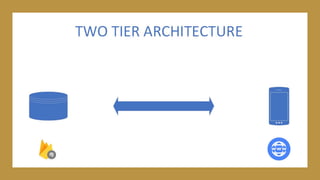
• Currently the application we have is considered two tier architecture
• The data tier is Firestore
• The presentation tier is React
• All business logic is written in the presentation tier
Two Tier Architecture
• Works fine if we’re only planning on developing a web application
• What about if you want to develop a native application:
• Mobile Devices (iOS and Android)
• Gaming Consoles (PS4 and XBOX One)
Some issues with this approach
• Lots of repeated code
• Everything is dependent on Firestore (single point of failure)
• How do we handle transactions? (ACID)
• How do we handle authentication?
• How about filesystem resources like image upload?
Solution
• Instead of using two-tier architecture, we should use three-tier
architecture
• The data tier can remain Firestore, but we’re introducing a middle
tier RESTful API (written using .NET Core)
• We take the business logic out of the presentation tier and transition
it to the middle tier
• This approach makes our presentation tier a thin client
Three tier architecture
• If we ever need to migrate from Firestore to another database engine,
you’ll only need to change the code in the API layer!
• Let’s look at the API and start integrating Firestore
• ** DEMO **
C# and Firestore
Firestore authentication
• With C# and the Firestore SDK, you need a private key from Google
to access the database
• You can generate one the application can use here:
https://console.cloud.google.com/projectselector2/apis/credentials
• Ensure that this private key does not get committed into source
control!
• ** DEMO **
Change the React app to use
the .NET Core API
Ajax and XML HTTP Request
• Currently the React application obtains data directly using Google’s
JavaScript API for Firestore
• We need to replace these calls to use our new RESTful API
• We can use any method in JavaScript to do this:
• XMLHttpRequest, jQuery and .ajax(), fetch API in ES6
• Since we’re using React, axios is an excellent option
• npm i axios
• ** DEMO **
Closing Remarks
Any questions?
• Thank you for coming
• Slides on SlideShare, code on Github
• @mrjavascript

Building a Google Cloud Firestore API with dotnet core

  • 1.
    Building a.NET CoreAPI using Google Cloud Firestore Philly.NET Code Camp 2019.1 – April 13 2019 Microsoft – Malvern, PA Mike Melusky - @mrjavascript
  • 2.
    About Speaker • MichaelMelusky • Software Developer at Audacious Inquiry in Baltimore, MD • Professor at Penn State University • Interests include grilling meat, meat smoking and BBQ
  • 3.
    Topics • Overview ofwhat we’re building • Introduce Google Cloud Firestore • Integrate the Firestore API into the client-side code • Build a .NET Core 2.1 API using Google’s Nuget package for Firestore • Replace client-side calls to use the new API (and axios) • Wrap up
  • 4.
    Code is ongithub • Web code: https://github.com/mrjavascript/phillynet_201901_web • API code: https://github.com/mrjavascript/phillynet_201901_api
  • 5.
    What are webuilding?
  • 6.
    Basic front endapplication • Starting with a basic web application • Built using React, but can be done in Vanilla JS or using another framework • ** DEMO **
  • 7.
  • 8.
    Google Cloud Firestore •Cloud Firestore is a NoSQL document database built for automatic scaling, high performance, and ease of application development • Meant to replace the real-time database engine in Google Firebase • Can use it in web apps or native apps • A number of SDKs available (JavaScript, C#, Java, Python, et al)
  • 9.
    Google Cloud Firestore •Can manage via web console: https://console.firebase.google.com • Let’s create a database for our application • ** DEMO **
  • 10.
  • 11.
    Firestore JavaScript API •Currently our React app has data hardcoded (componentDidMount) • Let’s change that to use FireStore for the data source • JavaScript: npm install firebase@5.9.3 –save • ** DEMO **
  • 12.
    What else canFirestore do?
  • 13.
    Firestore Web Hosting •You can host your web app on Firestore • Deploy using NPM: • npm install -g firebase-tools • firebase login • firebase init • npm run build • firebase deploy --only hosting • ** DEMO **
  • 14.
    Two and ThreeTier Architecture
  • 15.
    Two Tier Architecture •Currently the application we have is considered two tier architecture • The data tier is Firestore • The presentation tier is React • All business logic is written in the presentation tier
  • 17.
    Two Tier Architecture •Works fine if we’re only planning on developing a web application • What about if you want to develop a native application: • Mobile Devices (iOS and Android) • Gaming Consoles (PS4 and XBOX One)
  • 21.
    Some issues withthis approach • Lots of repeated code • Everything is dependent on Firestore (single point of failure) • How do we handle transactions? (ACID) • How do we handle authentication? • How about filesystem resources like image upload?
  • 22.
    Solution • Instead ofusing two-tier architecture, we should use three-tier architecture • The data tier can remain Firestore, but we’re introducing a middle tier RESTful API (written using .NET Core) • We take the business logic out of the presentation tier and transition it to the middle tier • This approach makes our presentation tier a thin client
  • 27.
    Three tier architecture •If we ever need to migrate from Firestore to another database engine, you’ll only need to change the code in the API layer! • Let’s look at the API and start integrating Firestore • ** DEMO **
  • 28.
  • 29.
    Firestore authentication • WithC# and the Firestore SDK, you need a private key from Google to access the database • You can generate one the application can use here: https://console.cloud.google.com/projectselector2/apis/credentials • Ensure that this private key does not get committed into source control! • ** DEMO **
  • 30.
    Change the Reactapp to use the .NET Core API
  • 31.
    Ajax and XMLHTTP Request • Currently the React application obtains data directly using Google’s JavaScript API for Firestore • We need to replace these calls to use our new RESTful API • We can use any method in JavaScript to do this: • XMLHttpRequest, jQuery and .ajax(), fetch API in ES6 • Since we’re using React, axios is an excellent option • npm i axios • ** DEMO **
  • 32.
  • 33.
    Any questions? • Thankyou for coming • Slides on SlideShare, code on Github • @mrjavascript