Searching Library
Databases
Choosing a Database
Searching Databases
Choosing a
Database
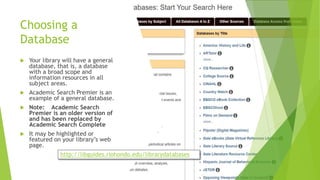
 Your library will have a general
database, that is, a database
with a broad scope and
information resources in all
subject areas.
 Academic Search Premier is an
example of a general database.
 Note: Academic Search
Premier is an older version of
and has been replaced by
Academic Search Complete
 It may be highlighted or
featured on your library’s web
page.
http://libguides.riohondo.edu/librarydatabases
General Databases [p. 90]
 Rio Hondo
Databases
 These are a good place
to start your research.
 You can try out your
search statement, find
some relevant articles
that will help you
identify other, better
keywords and subject
terms, narrow the
focus of your research,
and perhaps even find
enough good
information for your
research
http://libguides.riohondo.edu/librarydatabases
Subject Specific Databases [p. 90]
 If you do not find enough information in a general database, then you will
have to try a subject-specific database.
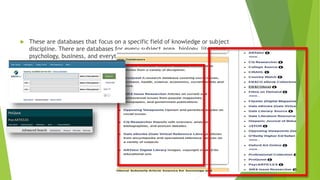
 These are databases that focus on a specific field of knowledge or subject
discipline. There are databases for every subject area, biology, literature,
psychology, business, and everything else.
Federated Searching (searching multiple
databases) p. 90
 Some vendors offer a form of federated searching.
 Federated Searching is: searching several databases at once.
 You can pick and choose which database to search or
search all of the databases that your library license from
that one vendor.
 This can be a substantial number and provide you an opportunity to search across
many disciplines.
 The option will be under a label like „Databases” or “Choose Databases”
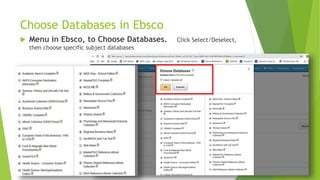
Choose Databases in Ebsco
 Menu in Ebsco, to Choose Databases. Click Select/Deselect,
then choose specific subject databases
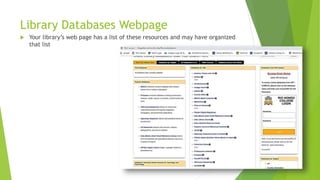
Library Databases Webpage
 Your library’s web page has a list of these resources and may have organized
that list
Subject Specific Databases
 Our databases include some of the following areas:
 Reference Databases: includes encyclopedias, dictionaries, and other
reference sources such as almanacs
 Gale Virtual Reference Library
 Issues Databases: these databases focus on pro/con issues, and
present their sources in this format.
 SIRS
 Gale Opposing Viewpoints
 Articles Databases: these databases focus on finding newspaper,
magainze, and scholarly journal articles
 Ebsco and ProQuest
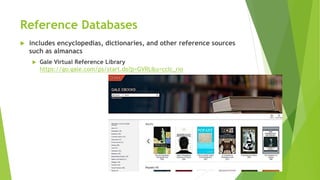
Reference Databases
 includes encyclopedias, dictionaries, and other reference sources
such as almanacs
 Gale Virtual Reference Library
https://go.gale.com/ps/start.do?p=GVRL&u=cclc_rio
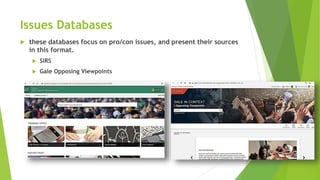
Issues Databases
 these databases focus on pro/con issues, and present their sources
in this format.
 SIRS
 Gale Opposing Viewpoints
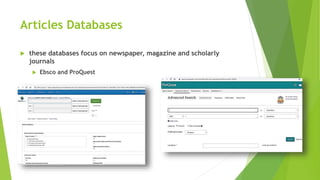
Articles Databases
 these databases focus on newspaper, magazine and scholarly
journals
 Ebsco and ProQuest
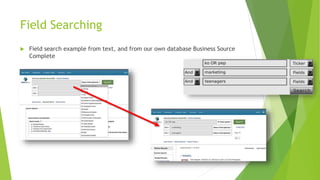
Field Searching
 Field search example from text, and from our own database Business Source
Complete

Searching library databases

  • 1.
    Searching Library Databases Choosing aDatabase Searching Databases
  • 2.
    Choosing a Database  Yourlibrary will have a general database, that is, a database with a broad scope and information resources in all subject areas.  Academic Search Premier is an example of a general database.  Note: Academic Search Premier is an older version of and has been replaced by Academic Search Complete  It may be highlighted or featured on your library’s web page. http://libguides.riohondo.edu/librarydatabases
  • 3.
    General Databases [p.90]  Rio Hondo Databases  These are a good place to start your research.  You can try out your search statement, find some relevant articles that will help you identify other, better keywords and subject terms, narrow the focus of your research, and perhaps even find enough good information for your research http://libguides.riohondo.edu/librarydatabases
  • 4.
    Subject Specific Databases[p. 90]  If you do not find enough information in a general database, then you will have to try a subject-specific database.
  • 5.
     These aredatabases that focus on a specific field of knowledge or subject discipline. There are databases for every subject area, biology, literature, psychology, business, and everything else.
  • 6.
    Federated Searching (searchingmultiple databases) p. 90  Some vendors offer a form of federated searching.  Federated Searching is: searching several databases at once.  You can pick and choose which database to search or search all of the databases that your library license from that one vendor.  This can be a substantial number and provide you an opportunity to search across many disciplines.  The option will be under a label like „Databases” or “Choose Databases”
  • 7.
    Choose Databases inEbsco  Menu in Ebsco, to Choose Databases. Click Select/Deselect, then choose specific subject databases
  • 8.
    Library Databases Webpage Your library’s web page has a list of these resources and may have organized that list
  • 9.
    Subject Specific Databases Our databases include some of the following areas:  Reference Databases: includes encyclopedias, dictionaries, and other reference sources such as almanacs  Gale Virtual Reference Library  Issues Databases: these databases focus on pro/con issues, and present their sources in this format.  SIRS  Gale Opposing Viewpoints  Articles Databases: these databases focus on finding newspaper, magainze, and scholarly journal articles  Ebsco and ProQuest
  • 10.
    Reference Databases  includesencyclopedias, dictionaries, and other reference sources such as almanacs  Gale Virtual Reference Library https://go.gale.com/ps/start.do?p=GVRL&u=cclc_rio
  • 11.
    Issues Databases  thesedatabases focus on pro/con issues, and present their sources in this format.  SIRS  Gale Opposing Viewpoints
  • 12.
    Articles Databases  thesedatabases focus on newspaper, magazine and scholarly journals  Ebsco and ProQuest
  • 13.
    Field Searching  Fieldsearch example from text, and from our own database Business Source Complete