




Search Engine Optimization 101 John Maher Director of Interactive Marketing McDougall Interactive
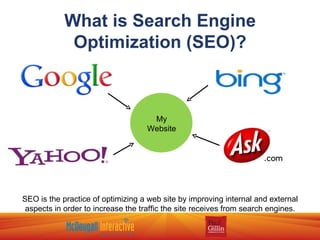
What is Search Engine Optimization (SEO)? SEO is the practice of optimizing a web site by improving internal and external aspects in order to increase the traffic the site receives from search engines. My Website
Why is SEO Necessary? Websites must be built to be read and understood by both robots and humans. Increased traffic, combined with a well-designed site, means leads and sales.
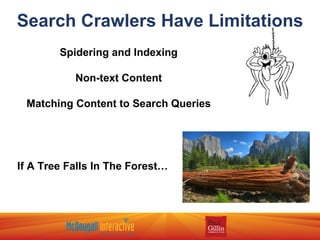
Search Crawlers Have Limitations Spidering and Indexing Non-text Content Matching Content to Search Queries If A Tree Falls In The Forest…
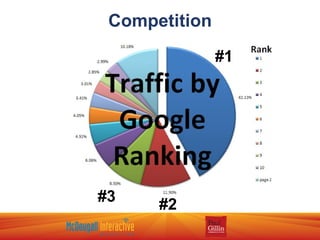
Competition #1 #2 #3
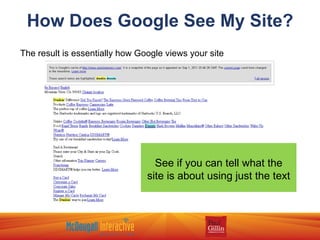
How Does Google See My Site?
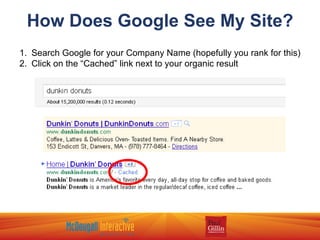
How Does Google See My Site? Search Google for your Company Name (hopefully you rank for this) Click on the “Cached” link next to your organic result
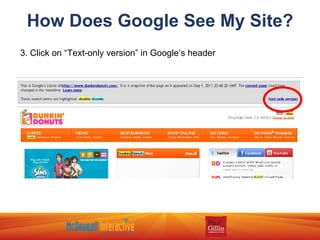
How Does Google See My Site? 3. Click on “Text-only version” in Google’s header
How Does Google See My Site? The result is essentially how Google views your site See if you can tell what the site is about using just the text
Keyword Research
Judging Value Is the keyword relevant to the content on my website? Will users find the answer to their question? Check to see if other sites are paying for ads on that keyword If so, it is likely a valuable keyword Test keywords with Google Adwords Use the data to determine value per visit
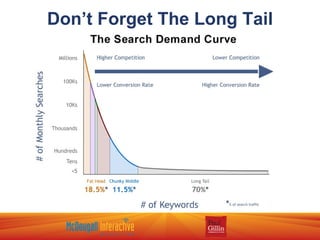
Don’t Forget The Long Tail
Keyword Research Techniques Google Adwords Keyword Tool Google Trends  -  http://www.google.com/trends Google Insights  -  http://www.google.com/insights/search/ Google Suggest Keyword Spy  -   http://www.keywordspy.com WordTracker  -  http://www.wordtracker.com Keyword Discovery  -  http://www.keyworddiscovery.com
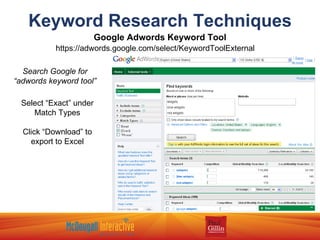
Keyword Research Techniques Google Adwords Keyword Tool Search Google for “adwords keyword tool” https://adwords.google.com/select/KeywordToolExternal  Select “Exact” under Match Types Click “Download” to export to Excel
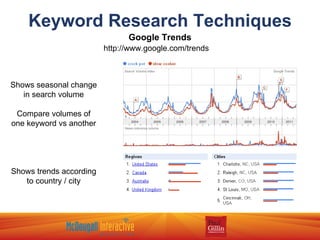
Keyword Research Techniques Google Trends http://www.google.com/trends Shows seasonal change in search volume Compare volumes of one keyword vs another Shows trends according to country / city
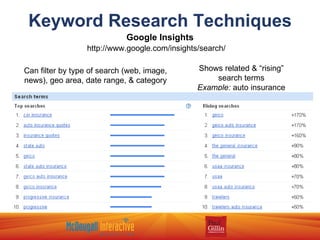
Keyword Research Techniques Google Insights http://www.google.com/insights/search/ Can filter by type of search (web, image, news), geo area, date range, & category Shows related & “rising” search terms Example:  auto insurance
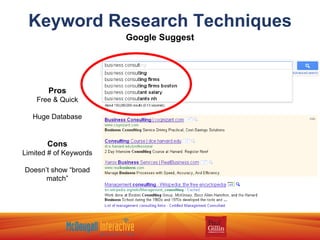
Keyword Research Techniques Google Suggest Pros Free & Quick Huge Database Cons Limited # of Keywords Doesn’t show “broad match”
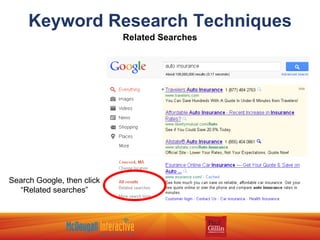
Keyword Research Techniques Related Searches Search Google, then click “Related searches”
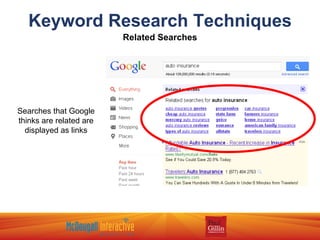
Keyword Research Techniques Related Searches Searches that Google thinks are related are displayed as links
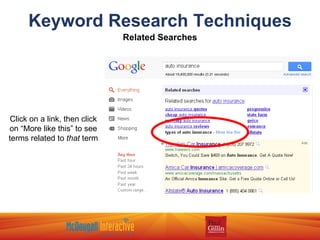
Keyword Research Techniques Related Searches Click on a link, then click on “More like this” to see terms related to  that  term
Keyword Research Techniques Other Ideas Use a  thesaurus or dictionary  to find new terms and variations Perform  interviews  with actual people and ask them how they would search for what you offer Do simple  competitive research  by typing your main keywords into a search engine and looking for words in the Titles of competitors pages KeywordSpy.com  – search by keyword or domain (also good PPC bid estimates) WordTracker  - wordtracker.com Keyword Discovery  - keyworddiscovery.com (good for relative volumes, not actual volumes)
On-Page Optimization
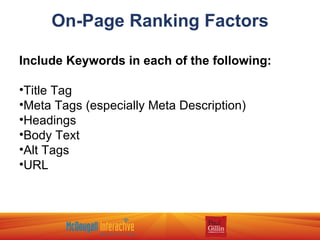
On-Page Ranking Factors Include Keywords in each of the following: Title Tag Meta Tags (especially Meta Description) Headings Body Text Alt Tags URL
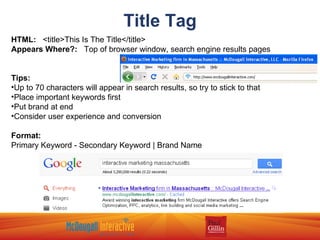
Title Tag HTML:   <title>This Is The Title</title> Appears Where?:   Top of browser window, search engine results pages Tips: Up to 70 characters will appear in search results, so try to stick to that Place important keywords first Put brand at end Consider user experience and conversion Format: Primary Keyword - Secondary Keyword | Brand Name
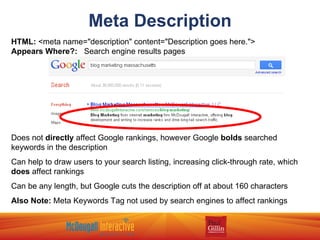
Meta Description HTML:  <meta name=&quot;description&quot; content=&quot;Description goes here.&quot;>  Appears Where?:   Search engine results pages Does not  directly  affect Google rankings, however Google  bolds  searched keywords in the description Can help to draw users to your search listing, increasing click-through rate, which  does  affect rankings Can be any length, but Google cuts the description off at about 160 characters Also Note:  Meta Keywords Tag not used by search engines to affect rankings
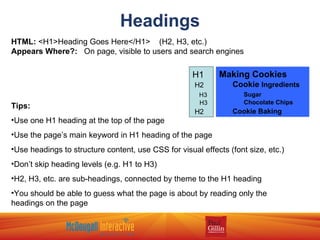
Headings HTML:  <H1>Heading Goes Here</H1>  (H2, H3, etc.)  Appears Where?:   On page, visible to users and search engines Tips: Use one H1 heading at the top of the page Use the page’s main keyword in H1 heading of the page Use headings to structure content, use CSS for visual effects (font size, etc.) Don’t skip heading levels (e.g. H1 to H3) H2, H3, etc. are sub-headings, connected by theme to the H1 heading You should be able to guess what the page is about by reading only the headings on the page Making Cookies   Cookie   Ingredients   Sugar   Chocolate Chips   Cookie Baking H1 H2 H3 H3 H2
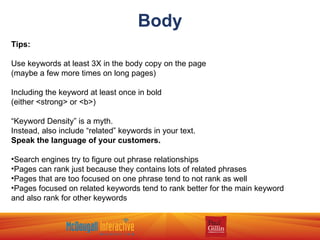
Body Tips: Use keywords at least 3X in the body copy on the page (maybe a few more times on long pages) Including the keyword at least once in bold (either <strong> or <b>) “ Keyword Density” is a myth. Instead, also include “related” keywords in your text. Speak the language of your customers. Search engines try to figure out phrase relationships Pages can rank just because they contains lots of related phrases Pages that are too focused on one phrase tend to not rank as well Pages focused on related keywords tend to rank better for the main keyword and also rank for other keywords
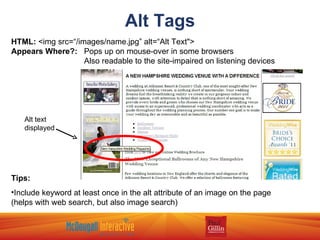
Alt Tags HTML:  <img src=“/images/name.jpg” alt=“Alt Text&quot;> Appears Where?:   Pops up on mouse-over in some browsers   Also readable to the site-impaired on listening devices Tips: Include keyword at least once in the alt attribute of an image on the page (helps with web search, but also image search) Alt text displayed
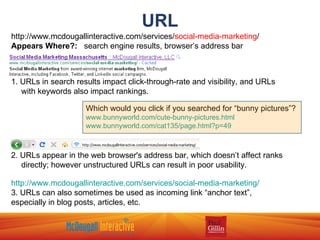
URL http://www.mcdougallinteractive.com/services/ social-media-marketing / Appears Where?:   search engine results, browser’s address bar 1. URLs in search results impact click-through-rate and visibility, and URLs with keywords also impact rankings. 2. URLs appear in the web browser's address bar, which doesn’t affect ranks directly; however unstructured URLs can result in poor usability. http://www.mcdougallinteractive.com/services/social-media-marketing/ 3. URLs can also sometimes be used as incoming link “anchor text”, especially in blog posts, articles, etc. Which would you click if you searched for “bunny pictures”? www.bunnyworld.com/cute-bunny-pictures.html www.bunnyworld.com/cat135/page.html?p=49
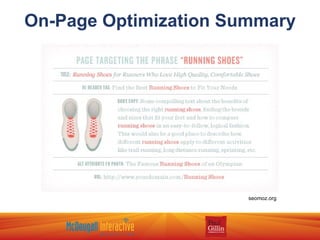
On-Page Optimization Summary seomoz.org
Site Structure
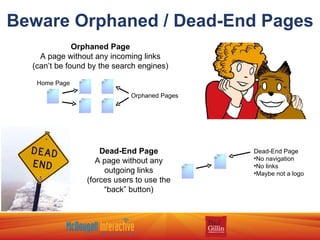
Beware Orphaned / Dead-End Pages Home Page Orphaned Pages Orphaned Page A page without any incoming links (can’t be found by the search engines) Dead-End Page A page without any outgoing links (forces users to use the “back” button) Dead-End Page No navigation No links Maybe not a logo
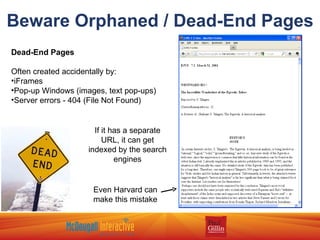
Beware Orphaned / Dead-End Pages Dead-End Pages Often created accidentally by: iFrames Pop-up Windows (images, text pop-ups) Server errors - 404 (File Not Found) Even Harvard can make this mistake If it has a separate URL, it can get indexed by the search engines
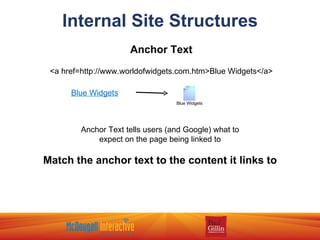
Internal Site Structures Anchor Text <a href=http://www.worldofwidgets.com.htm>Blue Widgets</a> Anchor Text tells users (and Google) what to expect on the page being linked to Match the anchor text to the content it links to Blue Widgets Blue Widgets
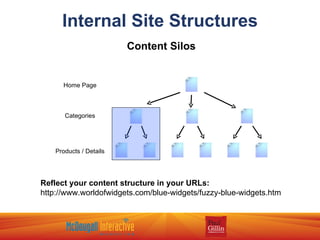
Internal Site Structures Content Silos Home Page Categories Products / Details Reflect your content structure in your URLs: http://www.worldofwidgets.com/blue-widgets/fuzzy-blue-widgets.htm
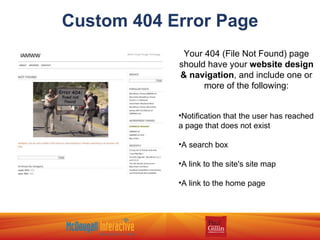
Custom 404 Error Page Your 404 (File Not Found) page should have your  website design & navigation , and include one or more of the following: Notification that the user has reached a page that does not exist A search box A link to the site's site map A link to the home page
URL Construction Put yourself in the mind of the user: Can you guess what the content of the page will be by looking at the URL? Use keywords, but don’t go overboard: Bad:  http://www.worldofwidgets.com/widgets/widgets-again/widgets-widgets.html Good:  http://www.worldofwidgets.com/blue-widgets/pricing.html Use static URLs rather than dynamic if possible: Dynamic:  http://www.fluffybunnies.com/blog?id=123 Static:  http://www.fluffybunnies.com/blog/why-you-should-own-bunnies.html Use real words: Bad: http://www.breadstore.com/cat-123/product-342 Good: http://www.breadstore.com/loaves/sourdough Use hyphens to separate words http://www.fluffybunnies.com/blog/why-you-should-own-bunnies.html - some engines don’t interpret underscores & spaces correctly
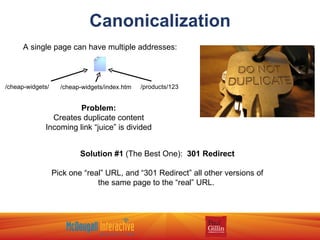
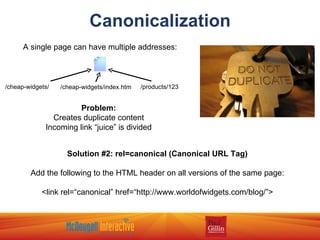
Canonicalization A single page can have multiple addresses: /cheap-widgets/ /cheap-widgets/index.htm /products/123 Problem: Creates duplicate content Incoming link “juice” is divided Solution #1  (The Best One):  301 Redirect Pick one “real” URL, and “301 Redirect” all other versions of the same page to the “real” URL.
Canonicalization A single page can have multiple addresses: /cheap-widgets/ /cheap-widgets/index.htm /products/123 Problem: Creates duplicate content Incoming link “juice” is divided Solution #2:   rel=canonical (Canonical URL Tag) Add the following to the HTML header on all versions of the same page: <link rel=“canonical” href=“http://www.worldofwidgets.com/blog/”>
Take-Aways View your website how Google sees it. Will Google see your site’s “theme”? Do Keyword Research first – use Google Adwords Keyword tool, Google Trends, Insights, Suggest, and Related Searches. Include Keywords in the Title Tag, Meta Description, H1 Heading, at least 3 times in the body, and in at least one Alt Tag on an image. Design the structure of your website to include category and details pages with proper URLs that include keywords where appropriate. Create a Custom 404 (File Not Found) error page that guides users back to the site to find what they were looking for. Be sure to only have 1 URL per page of content, or use 301 Redirect and/or rel=canonical to  tell Google which URL is the “real” one.
www.mcdougallinteractive.com www.gillin.com

Search Engine Optimization 101

  • 1.
  • 2.
    Search Engine Optimization101 John Maher Director of Interactive Marketing McDougall Interactive
  • 3.
    What is SearchEngine Optimization (SEO)? SEO is the practice of optimizing a web site by improving internal and external aspects in order to increase the traffic the site receives from search engines. My Website
  • 4.
    Why is SEONecessary? Websites must be built to be read and understood by both robots and humans. Increased traffic, combined with a well-designed site, means leads and sales.
  • 5.
    Search Crawlers HaveLimitations Spidering and Indexing Non-text Content Matching Content to Search Queries If A Tree Falls In The Forest…
  • 6.
  • 7.
    How Does GoogleSee My Site?
  • 8.
    How Does GoogleSee My Site? Search Google for your Company Name (hopefully you rank for this) Click on the “Cached” link next to your organic result
  • 9.
    How Does GoogleSee My Site? 3. Click on “Text-only version” in Google’s header
  • 10.
    How Does GoogleSee My Site? The result is essentially how Google views your site See if you can tell what the site is about using just the text
  • 11.
  • 12.
    Judging Value Isthe keyword relevant to the content on my website? Will users find the answer to their question? Check to see if other sites are paying for ads on that keyword If so, it is likely a valuable keyword Test keywords with Google Adwords Use the data to determine value per visit
  • 13.
  • 14.
    Keyword Research TechniquesGoogle Adwords Keyword Tool Google Trends - http://www.google.com/trends Google Insights - http://www.google.com/insights/search/ Google Suggest Keyword Spy - http://www.keywordspy.com WordTracker - http://www.wordtracker.com Keyword Discovery - http://www.keyworddiscovery.com
  • 15.
    Keyword Research TechniquesGoogle Adwords Keyword Tool Search Google for “adwords keyword tool” https://adwords.google.com/select/KeywordToolExternal Select “Exact” under Match Types Click “Download” to export to Excel
  • 16.
    Keyword Research TechniquesGoogle Trends http://www.google.com/trends Shows seasonal change in search volume Compare volumes of one keyword vs another Shows trends according to country / city
  • 17.
    Keyword Research TechniquesGoogle Insights http://www.google.com/insights/search/ Can filter by type of search (web, image, news), geo area, date range, & category Shows related & “rising” search terms Example: auto insurance
  • 18.
    Keyword Research TechniquesGoogle Suggest Pros Free & Quick Huge Database Cons Limited # of Keywords Doesn’t show “broad match”
  • 19.
    Keyword Research TechniquesRelated Searches Search Google, then click “Related searches”
  • 20.
    Keyword Research TechniquesRelated Searches Searches that Google thinks are related are displayed as links
  • 21.
    Keyword Research TechniquesRelated Searches Click on a link, then click on “More like this” to see terms related to that term
  • 22.
    Keyword Research TechniquesOther Ideas Use a thesaurus or dictionary to find new terms and variations Perform interviews with actual people and ask them how they would search for what you offer Do simple competitive research by typing your main keywords into a search engine and looking for words in the Titles of competitors pages KeywordSpy.com – search by keyword or domain (also good PPC bid estimates) WordTracker - wordtracker.com Keyword Discovery - keyworddiscovery.com (good for relative volumes, not actual volumes)
  • 23.
  • 24.
    On-Page Ranking FactorsInclude Keywords in each of the following: Title Tag Meta Tags (especially Meta Description) Headings Body Text Alt Tags URL
  • 25.
    Title Tag HTML: <title>This Is The Title</title> Appears Where?: Top of browser window, search engine results pages Tips: Up to 70 characters will appear in search results, so try to stick to that Place important keywords first Put brand at end Consider user experience and conversion Format: Primary Keyword - Secondary Keyword | Brand Name
  • 26.
    Meta Description HTML: <meta name=&quot;description&quot; content=&quot;Description goes here.&quot;> Appears Where?: Search engine results pages Does not directly affect Google rankings, however Google bolds searched keywords in the description Can help to draw users to your search listing, increasing click-through rate, which does affect rankings Can be any length, but Google cuts the description off at about 160 characters Also Note: Meta Keywords Tag not used by search engines to affect rankings
  • 27.
    Headings HTML: <H1>Heading Goes Here</H1> (H2, H3, etc.) Appears Where?: On page, visible to users and search engines Tips: Use one H1 heading at the top of the page Use the page’s main keyword in H1 heading of the page Use headings to structure content, use CSS for visual effects (font size, etc.) Don’t skip heading levels (e.g. H1 to H3) H2, H3, etc. are sub-headings, connected by theme to the H1 heading You should be able to guess what the page is about by reading only the headings on the page Making Cookies Cookie Ingredients Sugar Chocolate Chips Cookie Baking H1 H2 H3 H3 H2
  • 28.
    Body Tips: Usekeywords at least 3X in the body copy on the page (maybe a few more times on long pages) Including the keyword at least once in bold (either <strong> or <b>) “ Keyword Density” is a myth. Instead, also include “related” keywords in your text. Speak the language of your customers. Search engines try to figure out phrase relationships Pages can rank just because they contains lots of related phrases Pages that are too focused on one phrase tend to not rank as well Pages focused on related keywords tend to rank better for the main keyword and also rank for other keywords
  • 29.
    Alt Tags HTML: <img src=“/images/name.jpg” alt=“Alt Text&quot;> Appears Where?: Pops up on mouse-over in some browsers Also readable to the site-impaired on listening devices Tips: Include keyword at least once in the alt attribute of an image on the page (helps with web search, but also image search) Alt text displayed
  • 30.
    URL http://www.mcdougallinteractive.com/services/ social-media-marketing/ Appears Where?: search engine results, browser’s address bar 1. URLs in search results impact click-through-rate and visibility, and URLs with keywords also impact rankings. 2. URLs appear in the web browser's address bar, which doesn’t affect ranks directly; however unstructured URLs can result in poor usability. http://www.mcdougallinteractive.com/services/social-media-marketing/ 3. URLs can also sometimes be used as incoming link “anchor text”, especially in blog posts, articles, etc. Which would you click if you searched for “bunny pictures”? www.bunnyworld.com/cute-bunny-pictures.html www.bunnyworld.com/cat135/page.html?p=49
  • 31.
  • 32.
  • 33.
    Beware Orphaned /Dead-End Pages Home Page Orphaned Pages Orphaned Page A page without any incoming links (can’t be found by the search engines) Dead-End Page A page without any outgoing links (forces users to use the “back” button) Dead-End Page No navigation No links Maybe not a logo
  • 34.
    Beware Orphaned /Dead-End Pages Dead-End Pages Often created accidentally by: iFrames Pop-up Windows (images, text pop-ups) Server errors - 404 (File Not Found) Even Harvard can make this mistake If it has a separate URL, it can get indexed by the search engines
  • 35.
    Internal Site StructuresAnchor Text <a href=http://www.worldofwidgets.com.htm>Blue Widgets</a> Anchor Text tells users (and Google) what to expect on the page being linked to Match the anchor text to the content it links to Blue Widgets Blue Widgets
  • 36.
    Internal Site StructuresContent Silos Home Page Categories Products / Details Reflect your content structure in your URLs: http://www.worldofwidgets.com/blue-widgets/fuzzy-blue-widgets.htm
  • 37.
    Custom 404 ErrorPage Your 404 (File Not Found) page should have your website design & navigation , and include one or more of the following: Notification that the user has reached a page that does not exist A search box A link to the site's site map A link to the home page
  • 38.
    URL Construction Putyourself in the mind of the user: Can you guess what the content of the page will be by looking at the URL? Use keywords, but don’t go overboard: Bad: http://www.worldofwidgets.com/widgets/widgets-again/widgets-widgets.html Good: http://www.worldofwidgets.com/blue-widgets/pricing.html Use static URLs rather than dynamic if possible: Dynamic: http://www.fluffybunnies.com/blog?id=123 Static: http://www.fluffybunnies.com/blog/why-you-should-own-bunnies.html Use real words: Bad: http://www.breadstore.com/cat-123/product-342 Good: http://www.breadstore.com/loaves/sourdough Use hyphens to separate words http://www.fluffybunnies.com/blog/why-you-should-own-bunnies.html - some engines don’t interpret underscores & spaces correctly
  • 39.
    Canonicalization A singlepage can have multiple addresses: /cheap-widgets/ /cheap-widgets/index.htm /products/123 Problem: Creates duplicate content Incoming link “juice” is divided Solution #1 (The Best One): 301 Redirect Pick one “real” URL, and “301 Redirect” all other versions of the same page to the “real” URL.
  • 40.
    Canonicalization A singlepage can have multiple addresses: /cheap-widgets/ /cheap-widgets/index.htm /products/123 Problem: Creates duplicate content Incoming link “juice” is divided Solution #2: rel=canonical (Canonical URL Tag) Add the following to the HTML header on all versions of the same page: <link rel=“canonical” href=“http://www.worldofwidgets.com/blog/”>
  • 41.
    Take-Aways View yourwebsite how Google sees it. Will Google see your site’s “theme”? Do Keyword Research first – use Google Adwords Keyword tool, Google Trends, Insights, Suggest, and Related Searches. Include Keywords in the Title Tag, Meta Description, H1 Heading, at least 3 times in the body, and in at least one Alt Tag on an image. Design the structure of your website to include category and details pages with proper URLs that include keywords where appropriate. Create a Custom 404 (File Not Found) error page that guides users back to the site to find what they were looking for. Be sure to only have 1 URL per page of content, or use 301 Redirect and/or rel=canonical to tell Google which URL is the “real” one.
  • 42.

Editor's Notes

  • #6 Spidering and Indexing Search engines don’t readily fill out online forms Poor linking structures can result in content not found, or deemed “unimportant” Non-text Content Content in Flash, frames, graphics, audio, &amp; video cannot easily/consistently be accessed by search engines Matching Content to Search Queries Text not written in terms that users search for (e.g. you say “veggies” but people search for “vegetables”) Language and spelling (color vs colour) If A Tree Falls In The Forest… Search engines must be able to find your content and judge it worthy of inclusion in the search results
  • #14 The highest volume keywords only account for 30% of searches SEM and content strategies should also target these 70% of searches that are for unpredictable keywords Examples - Head: insurance Medium-Tail: cheap car insurance Long-Tail: car insurance for low-income families
  • #16 Switch to “live” shot of Adwords Keyword Tool: https://adwords.google.com/select/KeywordToolExternal
  • #17 Note people search for crock pots &amp; slow cooker during the winter months (centered around Christmas / New Year) In the US, people search more for “crock pot”, but in Canada &amp; UK people search more for “slow cooker”
  • #20 Related searches = “searches that people did after searching the keyword you’re on, but didn’t find what they wanted &amp; searched again” They also appear at the bottom of the page, but using the tool in the left column allows for drilling down
  • #26 If you have a popular, recognizable brand, it’s okay to put the brand at the beginning of the Title tag.
  • #29 If I say “wheels, tires, engine, seats, toyota, for sale, low mileage”, what am I talking about?
  • #31 URL = Universal Resource Locator
  • #40 Multiple addresses for one page is like multiple personalities in a single person. Who is the “real” one?