Search Engines


       Google & Co. vs Internet
An Introduction to Information Retrieval
Contents
 Overview
 History
 Introduction to Information Retrieval
 Page Rank in Example
 Google & Co.
Search Engines Overview

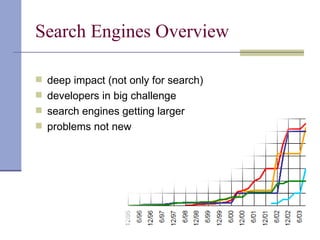
 deep impact (not only for search)
 developers in big challenge
 search engines getting larger
 problems not new
History
 The web happened (1992)
 Mosaic/Netscape happened (1993-95)
 Crawler happened (1994): M. Mauldin
 SEs happened 1994-1996
    – InfoSeek, Lycos, Altavista, Excite, Inktomi, …

 Yahoo decided to go with a directory
 Google happened 1996-98
    Tried selling technology to other engines

 SEs though search was a commodity, portals were in
 Microsoft said: whatever …
Present
 Most search engines have vanished
 Google is a big player
 Yahoo decided to de-emphasize directories
      Buys three search engines
 Microsoft realized Internet is here to stay
      Dominates the browser market
      Realizes search is critical
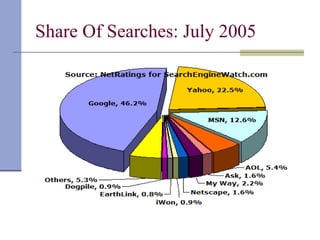
Share Of Searches: July 2005
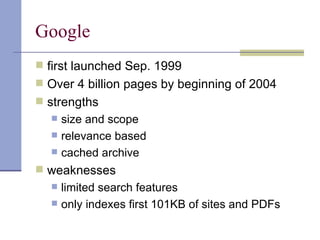
Google
 first launched Sep. 1999
 Over 4 billion pages by beginning of 2004
 strengths
     size and scope
     relevance based
     cached archive
 weaknesses
     limited search features
     only indexes first 101KB of sites and PDFs
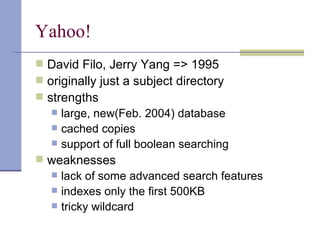
Yahoo!
 David Filo, Jerry Yang => 1995
 originally just a subject directory
 strengths
    large, new(Feb. 2004) database
    cached copies
    support of full boolean searching
 weaknesses
    lack of some advanced search features
    indexes only the first 500KB
    tricky wildcard
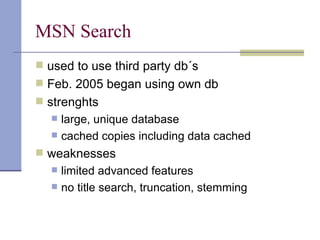
MSN Search
 used to use third party db´s
 Feb. 2005 began using own db
 strenghts
     large, unique database
     cached copies including data cached
 weaknesses
     limited advanced features
     no title search, truncation, stemming
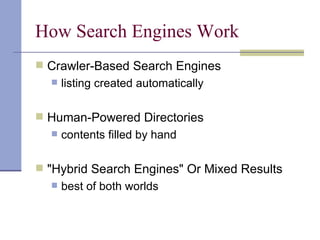
How Search Engines Work
 Crawler-Based Search Engines
     listing created automatically

 Human-Powered Directories
     contents filled by hand

 "Hybrid Search Engines" Or Mixed Results
     best of both worlds
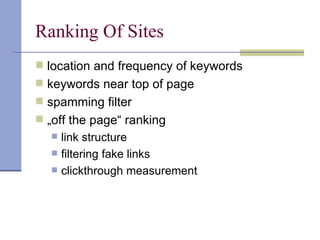
Ranking Of Sites
 location and frequency of keywords
 keywords near top of page
 spamming filter
 „off the page“ ranking
     link structure
     filtering fake links
     clickthrough measurement
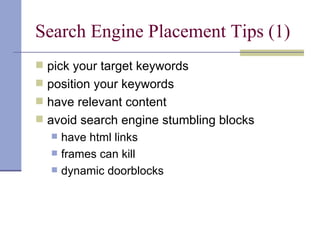
Search Engine Placement Tips (1)
 pick your target keywords
 position your keywords
 have relevant content
 avoid search engine stumbling blocks
     have html links
     frames can kill
     dynamic doorblocks
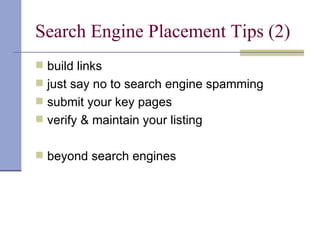
Search Engine Placement Tips (2)
 build links
 just say no to search engine spamming
 submit your key pages
 verify & maintain your listing


 beyond search engines
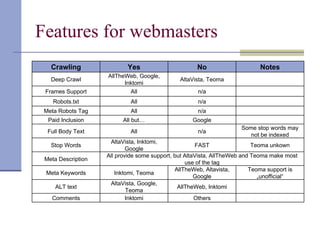
Features for webmasters
   Crawling                Yes                       No                     Notes
                    AllTheWeb, Google,
   Deep Crawl                                 AltaVista, Teoma
                          Inktomi
 Frames Support             All                      n/a
    Robots.txt              All                      n/a
 Meta Robots Tag            All                      n/a
  Paid Inclusion          All but…                 Google
                                                                     Some stop words may
  Full Body Text            All                      n/a
                                                                        not be indexed
                     AltaVista, Inktomi,
   Stop Words                                          FAST                Teoma unkown
                            Google
                    All provide some support, but AltaVista, AllTheWeb and Teoma make most
 Meta Description
                                                  use of the tag
                                              AllTheWeb, Altavista,       Teoma support is
 Meta Keywords          Inktomi, Teoma
                                                      Google                 „unofficial“
                     AltaVista, Google,
     ALT text                                  AllTheWeb, Inktomi
                            Teoma
   Comments                 Inktomi                   Others
What is Information Retrieval?
 Informations get lost in the amount of
  documents, but have to be relocated

 Definition:
      IR is the field, that deals with the relocation of
       information/knowledge out of large document
       database.
Quality of an IR-System (1)
 Precision:
     Is the ratio of the relevant documents retrieved
      to the total number of documents retrieved.
                                =   [0;1]


     Precision = 1: all retrieved documents are
      relevant
Quality of an IR-System (2)
 Recall:
     Is the ratio of the number of relevant
      documents retrieved to the total number of
      relevant documents (retrieved and not).

                                 =   [0;1]

     Recall = 1: all relevant documents were found
Quality of an IR-System (3)
 Aim of a good IR-System:
    increasing Precision and Recall!


 Problem:
    increasing Precision cause a decrease of Recall
        e.g.: search results 1 document:


         Recall->0, Precision=1

      increasing Recall cause a decrease of Precision
          e.g. search results all available documents


           Recall=1, Precision->0
Mathematical models
 Boolean Model


 Vector Space Model
Boolean model
 checks if the document includes the search
  term (true) or not (false). True means, the
  document is relevant

 Problem:
     high variation on the result size, depending on
      the search term
     no ranking on result set -> no sort possible
     “relevance” criteria is too strict (e.g. AND,OR)
Vector space model (1)
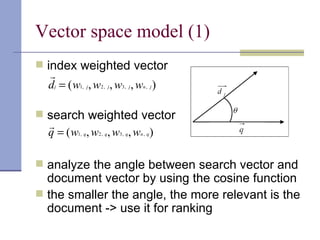
 index weighted vector
   
   dj = ( w1, j , w2 , j , w3, j , wn , j )

 search weighted vector
  
  q = ( w1, q, w2 , q, w3, q, wn , q )

 analyze the angle between search vector and
  document vector by using the cosine function
 the smaller the angle, the more relevant is the
  document -> use it for ranking
Vector space model (2)
 “relevance” criteria is more tolerant
 no use of boolean operators
 uses weighting
 creates a ranking -> sort is possible


 Problem:
      automatic weighting of index terms in queries
       and documents
Weighting Methods (1)
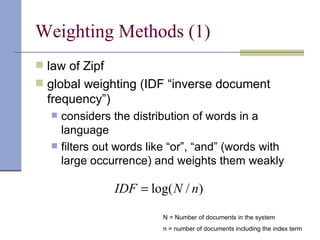
 law of Zipf
 global weighting (IDF “inverse document
  frequency”)
      considers the distribution of words in a
       language
      filters out words like “or”, “and” (words with
       large occurrence) and weights them weakly

                  IDF = log( N / n)

                            N = Number of documents in the system
                            n = number of documents including the index term
Weighting Methods (2)
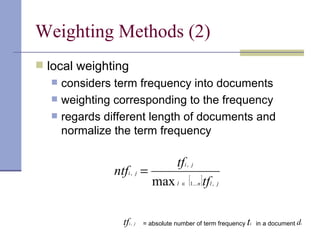
 local weighting
     considers term frequency into documents
     weighting corresponding to the frequency
     regards different length of documents and
      normalize the term frequency

                                        tfi , j
                ntfi , j =
                               max l ∈ {1... n }tfl , j

                  tfi , j   = absolute number of term frequency   ti   in a document di
Weighting Methods (3)
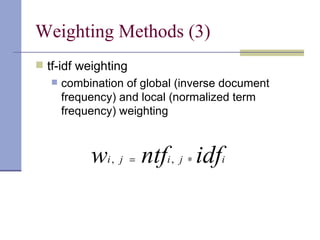
 tf-idf weighting
      combination of global (inverse document
       frequency) and local (normalized term
       frequency) weighting


            wi , j = ntfi , j ∗ idfi
Web-Mining
 Web-Mining ≈ Data-Mining, different problems
 Mining of: Content, Structure or User
 Content-Mining: VSM,BM
 Structure-Mining: Analysis of Structure
 User-Mining: Infos about User of a page


Let‘s have a deeper look at Web-Structure-Mining!
History
 IR necessary but not sufficient for web search
 Doesn’t address web navigation
    Query ibm seeks www.ibm.com
    To IR www.ibm.com may look less topical than a
     quarterly report
 Link analysis
    Hubs and authority (Jon Kleinberg)
    PageRank (Brin and Page)
       Computed on the entire graph

       Query independent

       Faster if serving lots of queries

    Others…
Analysis of Hyperlinks
 Links
    Long history in citation analysis
    Navigational tools on the web
    Also a sign of popularity
    Can be thought of as recommendations
     (source recommends destination)
    Also describe the destination: anchor text
 Idea: The exist of a Hyperlink between two
  pages can also give Information
 Hyperlinks can be used to:
      Create a weighting of web pages
      Find pages with similiar topics
      Group pages by different context of meaning
Hubs and Authorities
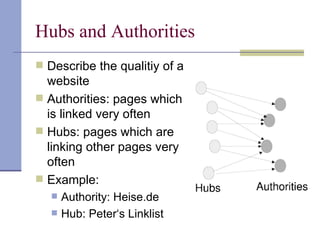
 Describe the qualitiy of a
  website
 Authorities: pages which
  is linked very often
 Hubs: pages which are
  linking other pages very
  often
 Example:
      Authority: Heise.de
      Hub: Peter‘s Linklist
Page Rank


   Invented by Lawrence Page a. Sergey Brin
   Algorithm itself is well-described
   Implementations are not (Google)
   Main Idea:
       relationship of all Links in WWW
       The more a document is linked, the more important it is
       Not every link counts the same – a link from an
        important page has more worth
Page Rank Algorithm


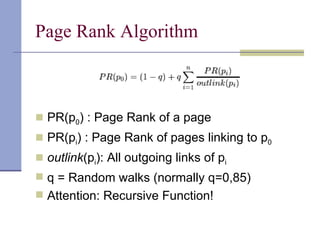
 PR(p0) : Page Rank of a page
 PR(pi) : Page Rank of pages linking to p0
 outlink(pi): All outgoing links of pi
 q = Random walks (normally q=0,85)
 Attention: Recursive Function!
Page Rank Example


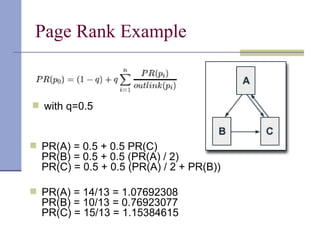
 with q=0.5


 PR(A) = 0.5 + 0.5 PR(C)
  PR(B) = 0.5 + 0.5 (PR(A) / 2)
  PR(C) = 0.5 + 0.5 (PR(A) / 2 + PR(B))

 PR(A) = 14/13 = 1.07692308
  PR(B) = 10/13 = 0.76923077
  PR(C) = 15/13 = 1.15384615
Page Rank Calculation
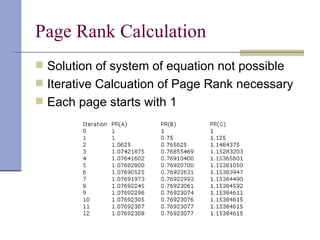
 Solution of system of equation not possible
 Iterative Calcuation of Page Rank necessary
 Each page starts with 1
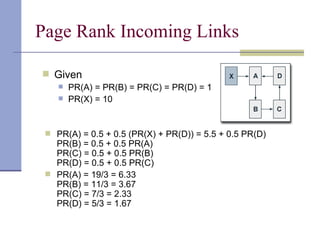
Page Rank Incoming Links

 Given
       PR(A) = PR(B) = PR(C) = PR(D) = 1
       PR(X) = 10


  PR(A) = 0.5 + 0.5 (PR(X) + PR(D)) = 5.5 + 0.5 PR(D)
   PR(B) = 0.5 + 0.5 PR(A)
   PR(C) = 0.5 + 0.5 PR(B)
   PR(D) = 0.5 + 0.5 PR(C)
  PR(A) = 19/3 = 6.33
   PR(B) = 11/3 = 3.67
   PR(C) = 7/3 = 2.33
   PR(D) = 5/3 = 1.67
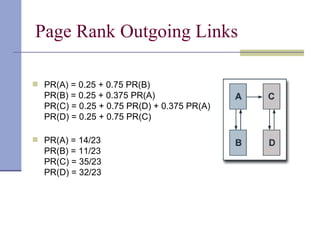
Page Rank Outgoing Links

 PR(A) = 0.25 + 0.75 PR(B)
  PR(B) = 0.25 + 0.375 PR(A)
  PR(C) = 0.25 + 0.75 PR(D) + 0.375 PR(A)
  PR(D) = 0.25 + 0.75 PR(C)

 PR(A) = 14/23
  PR(B) = 11/23
  PR(C) = 35/23
  PR(D) = 32/23
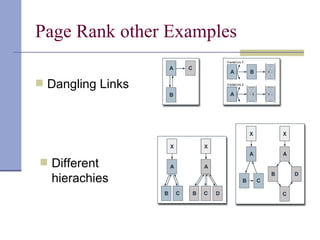
Page Rank other Examples

 Dangling Links


 Different
  hierachies
Page Rank Implementation
 Normally implemented as weighting system
 Additional content-search needed for
  retrieving the document set
 Also involved in Page Rank
     The markup of a link
     The position of a link in the document
     The distance between the pages (e.g. other
      domain)
     The context of the linking page
     The actuality of the page
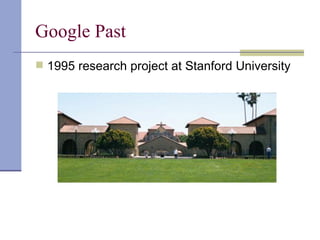
Google Past
 1995 research project at Stanford University
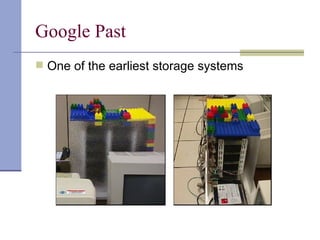
Google Past
 One of the earliest storage systems
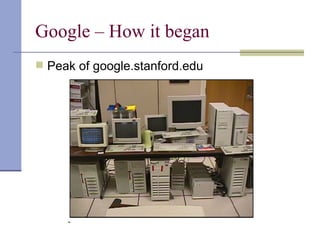
Google – How it began
 Peak of google.stanford.edu
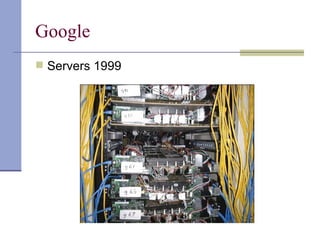
Google
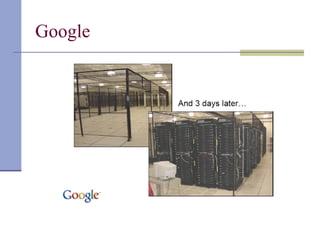
 Servers 1999
Google
Google by Numbers
 Index: 40 TB (4 Bill. Pages with est. Size 10 kb)
 Up to 2000 Servers in one Cluster
 Over 30 Cluster
 One Petabyte Data per Cluster – so much that a
  quota of hard disk breakdowns with 1 in 10-15 Bits
  gets a real problem
 Each day in each greater cluster normally two
  servers will breakdown
 System running stable (without any breakdowns)
  since February 2000 (Yes, they don’t use Windows
  server…)
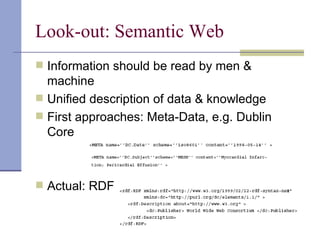
Look-out: Semantic Web
 Information should be read by men &
  machine
 Unified description of data & knowledge
 First approaches: Meta-Data, e.g. Dublin
  Core


 Actual: RDF
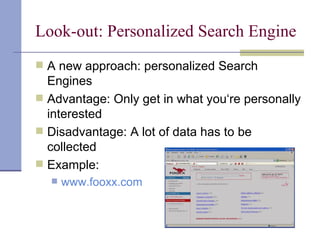
Look-out: Personalized Search Engine
 A new approach: personalized Search
  Engines
 Advantage: Only get in what you‘re personally
  interested
 Disadvantage: A lot of data has to be
  collected
 Example:
     www.fooxx.com
Links
 www.searchenginewatch.com (common
  Information about search engines)

 http://pr.efactory.de (page rank algorithm)


 http://zdnet.de/itmanager/unternehmen/0,3902344
  (article: “Google’s Technologien: Von
  Zauberei kaum zu unterscheiden”)
The End
 Thank you for your attention

Introduction into Search Engines and Information Retrieval

  • 1.
    Search Engines Google & Co. vs Internet An Introduction to Information Retrieval
  • 2.
    Contents  Overview  History Introduction to Information Retrieval  Page Rank in Example  Google & Co.
  • 3.
    Search Engines Overview deep impact (not only for search)  developers in big challenge  search engines getting larger  problems not new
  • 4.
    History  The webhappened (1992)  Mosaic/Netscape happened (1993-95)  Crawler happened (1994): M. Mauldin  SEs happened 1994-1996  – InfoSeek, Lycos, Altavista, Excite, Inktomi, …  Yahoo decided to go with a directory  Google happened 1996-98  Tried selling technology to other engines  SEs though search was a commodity, portals were in  Microsoft said: whatever …
  • 5.
    Present  Most searchengines have vanished  Google is a big player  Yahoo decided to de-emphasize directories  Buys three search engines  Microsoft realized Internet is here to stay  Dominates the browser market  Realizes search is critical
  • 6.
  • 7.
    Google  first launchedSep. 1999  Over 4 billion pages by beginning of 2004  strengths  size and scope  relevance based  cached archive  weaknesses  limited search features  only indexes first 101KB of sites and PDFs
  • 8.
    Yahoo!  David Filo,Jerry Yang => 1995  originally just a subject directory  strengths  large, new(Feb. 2004) database  cached copies  support of full boolean searching  weaknesses  lack of some advanced search features  indexes only the first 500KB  tricky wildcard
  • 9.
    MSN Search  usedto use third party db´s  Feb. 2005 began using own db  strenghts  large, unique database  cached copies including data cached  weaknesses  limited advanced features  no title search, truncation, stemming
  • 10.
    How Search EnginesWork  Crawler-Based Search Engines  listing created automatically  Human-Powered Directories  contents filled by hand  "Hybrid Search Engines" Or Mixed Results  best of both worlds
  • 11.
    Ranking Of Sites location and frequency of keywords  keywords near top of page  spamming filter  „off the page“ ranking  link structure  filtering fake links  clickthrough measurement
  • 12.
    Search Engine PlacementTips (1)  pick your target keywords  position your keywords  have relevant content  avoid search engine stumbling blocks  have html links  frames can kill  dynamic doorblocks
  • 13.
    Search Engine PlacementTips (2)  build links  just say no to search engine spamming  submit your key pages  verify & maintain your listing  beyond search engines
  • 14.
    Features for webmasters Crawling Yes No Notes AllTheWeb, Google, Deep Crawl AltaVista, Teoma Inktomi Frames Support All n/a Robots.txt All n/a Meta Robots Tag All n/a Paid Inclusion All but… Google Some stop words may Full Body Text All n/a not be indexed AltaVista, Inktomi, Stop Words FAST Teoma unkown Google All provide some support, but AltaVista, AllTheWeb and Teoma make most Meta Description use of the tag AllTheWeb, Altavista, Teoma support is Meta Keywords Inktomi, Teoma Google „unofficial“ AltaVista, Google, ALT text AllTheWeb, Inktomi Teoma Comments Inktomi Others
  • 15.
    What is InformationRetrieval?  Informations get lost in the amount of documents, but have to be relocated  Definition:  IR is the field, that deals with the relocation of information/knowledge out of large document database.
  • 16.
    Quality of anIR-System (1)  Precision:  Is the ratio of the relevant documents retrieved to the total number of documents retrieved. = [0;1]  Precision = 1: all retrieved documents are relevant
  • 17.
    Quality of anIR-System (2)  Recall:  Is the ratio of the number of relevant documents retrieved to the total number of relevant documents (retrieved and not). = [0;1]  Recall = 1: all relevant documents were found
  • 18.
    Quality of anIR-System (3)  Aim of a good IR-System:  increasing Precision and Recall!  Problem:  increasing Precision cause a decrease of Recall  e.g.: search results 1 document: Recall->0, Precision=1  increasing Recall cause a decrease of Precision  e.g. search results all available documents Recall=1, Precision->0
  • 19.
    Mathematical models  BooleanModel  Vector Space Model
  • 20.
    Boolean model  checksif the document includes the search term (true) or not (false). True means, the document is relevant  Problem:  high variation on the result size, depending on the search term  no ranking on result set -> no sort possible  “relevance” criteria is too strict (e.g. AND,OR)
  • 21.
    Vector space model(1)  index weighted vector  dj = ( w1, j , w2 , j , w3, j , wn , j )  search weighted vector  q = ( w1, q, w2 , q, w3, q, wn , q )  analyze the angle between search vector and document vector by using the cosine function  the smaller the angle, the more relevant is the document -> use it for ranking
  • 22.
    Vector space model(2)  “relevance” criteria is more tolerant  no use of boolean operators  uses weighting  creates a ranking -> sort is possible  Problem:  automatic weighting of index terms in queries and documents
  • 23.
    Weighting Methods (1) law of Zipf  global weighting (IDF “inverse document frequency”)  considers the distribution of words in a language  filters out words like “or”, “and” (words with large occurrence) and weights them weakly IDF = log( N / n) N = Number of documents in the system n = number of documents including the index term
  • 24.
    Weighting Methods (2) local weighting  considers term frequency into documents  weighting corresponding to the frequency  regards different length of documents and normalize the term frequency tfi , j ntfi , j = max l ∈ {1... n }tfl , j tfi , j = absolute number of term frequency ti in a document di
  • 25.
    Weighting Methods (3) tf-idf weighting  combination of global (inverse document frequency) and local (normalized term frequency) weighting wi , j = ntfi , j ∗ idfi
  • 26.
    Web-Mining  Web-Mining ≈Data-Mining, different problems  Mining of: Content, Structure or User  Content-Mining: VSM,BM  Structure-Mining: Analysis of Structure  User-Mining: Infos about User of a page Let‘s have a deeper look at Web-Structure-Mining!
  • 27.
    History  IR necessarybut not sufficient for web search  Doesn’t address web navigation  Query ibm seeks www.ibm.com  To IR www.ibm.com may look less topical than a quarterly report  Link analysis  Hubs and authority (Jon Kleinberg)  PageRank (Brin and Page)  Computed on the entire graph  Query independent  Faster if serving lots of queries  Others…
  • 28.
    Analysis of Hyperlinks Links  Long history in citation analysis  Navigational tools on the web  Also a sign of popularity  Can be thought of as recommendations (source recommends destination)  Also describe the destination: anchor text  Idea: The exist of a Hyperlink between two pages can also give Information  Hyperlinks can be used to:  Create a weighting of web pages  Find pages with similiar topics  Group pages by different context of meaning
  • 29.
    Hubs and Authorities Describe the qualitiy of a website  Authorities: pages which is linked very often  Hubs: pages which are linking other pages very often  Example:  Authority: Heise.de  Hub: Peter‘s Linklist
  • 30.
    Page Rank  Invented by Lawrence Page a. Sergey Brin  Algorithm itself is well-described  Implementations are not (Google)  Main Idea:  relationship of all Links in WWW  The more a document is linked, the more important it is  Not every link counts the same – a link from an important page has more worth
  • 31.
    Page Rank Algorithm PR(p0) : Page Rank of a page  PR(pi) : Page Rank of pages linking to p0  outlink(pi): All outgoing links of pi  q = Random walks (normally q=0,85)  Attention: Recursive Function!
  • 32.
    Page Rank Example with q=0.5  PR(A) = 0.5 + 0.5 PR(C) PR(B) = 0.5 + 0.5 (PR(A) / 2) PR(C) = 0.5 + 0.5 (PR(A) / 2 + PR(B))  PR(A) = 14/13 = 1.07692308 PR(B) = 10/13 = 0.76923077 PR(C) = 15/13 = 1.15384615
  • 33.
    Page Rank Calculation Solution of system of equation not possible  Iterative Calcuation of Page Rank necessary  Each page starts with 1
  • 34.
    Page Rank IncomingLinks  Given  PR(A) = PR(B) = PR(C) = PR(D) = 1  PR(X) = 10  PR(A) = 0.5 + 0.5 (PR(X) + PR(D)) = 5.5 + 0.5 PR(D) PR(B) = 0.5 + 0.5 PR(A) PR(C) = 0.5 + 0.5 PR(B) PR(D) = 0.5 + 0.5 PR(C)  PR(A) = 19/3 = 6.33 PR(B) = 11/3 = 3.67 PR(C) = 7/3 = 2.33 PR(D) = 5/3 = 1.67
  • 35.
    Page Rank OutgoingLinks  PR(A) = 0.25 + 0.75 PR(B) PR(B) = 0.25 + 0.375 PR(A) PR(C) = 0.25 + 0.75 PR(D) + 0.375 PR(A) PR(D) = 0.25 + 0.75 PR(C)  PR(A) = 14/23 PR(B) = 11/23 PR(C) = 35/23 PR(D) = 32/23
  • 36.
    Page Rank otherExamples  Dangling Links  Different hierachies
  • 37.
    Page Rank Implementation Normally implemented as weighting system  Additional content-search needed for retrieving the document set  Also involved in Page Rank  The markup of a link  The position of a link in the document  The distance between the pages (e.g. other domain)  The context of the linking page  The actuality of the page
  • 38.
    Google Past  1995research project at Stanford University
  • 39.
    Google Past  Oneof the earliest storage systems
  • 40.
    Google – Howit began  Peak of google.stanford.edu
  • 41.
  • 42.
  • 43.
    Google by Numbers Index: 40 TB (4 Bill. Pages with est. Size 10 kb)  Up to 2000 Servers in one Cluster  Over 30 Cluster  One Petabyte Data per Cluster – so much that a quota of hard disk breakdowns with 1 in 10-15 Bits gets a real problem  Each day in each greater cluster normally two servers will breakdown  System running stable (without any breakdowns) since February 2000 (Yes, they don’t use Windows server…)
  • 44.
    Look-out: Semantic Web Information should be read by men & machine  Unified description of data & knowledge  First approaches: Meta-Data, e.g. Dublin Core  Actual: RDF
  • 45.
    Look-out: Personalized SearchEngine  A new approach: personalized Search Engines  Advantage: Only get in what you‘re personally interested  Disadvantage: A lot of data has to be collected  Example:  www.fooxx.com
  • 46.
    Links  www.searchenginewatch.com (common Information about search engines)  http://pr.efactory.de (page rank algorithm)  http://zdnet.de/itmanager/unternehmen/0,3902344 (article: “Google’s Technologien: Von Zauberei kaum zu unterscheiden”)
  • 47.
    The End  Thankyou for your attention