
Software
Architectural Design
by:
Dr. Bharat V. Chawda
Computer Engineering Department,
BBIT, VVNagar, Gujarat, India
1
Overview
 Introduction
 Architectural Design Decisions
 Architectural Views
 Architectural Patterns
 Application Architectures
(As per GTU Curriculum – Diploma in Computer/IT Engineering)
Based on Books:
1. Software Engineering – by Ian Sommerville
2
Introduction
 Architectural Design
 Concerned with –
 Understanding: how a system should be organized &
 Designing: the overall structure of the system.
3
Architectural Design Decisions
 Some fundamental questions…
 Is Generic application architecture available?
 What is the fundamental approach to structure
system?
 What architectural patterns or styles might be used?
 Which architecture is best: Non-fun requirements?
 How: system is distributed across cores &
processors?
 How: Structural components  sub-components?
 What Strategy will be used to control op of
components?
 How architectural design will be evaluated?
 How sys architecture will be documented?
4
Architectural Views
 Logical View
 Shows key abstractions in system as Objects or Classes
 System requirements r related to entities
 Process View
 Shows: how sys is composed of interacting processes
 Useful 4 making judgments about non-functional req.
 Development View
 Shows: how SW is decomposed for development
 Useful for SW managers and programmers
 Physical View
 Shows: sys HW; How SW components r distributed…
 Useful 4 sys engineers : planning a system deployment
5
Architectural Patterns
 MVC (Model-View-Controller) Architecture
 Layered Architecture
 Repository Architecture
 Client-Server Architecture
 Pipe and Filter Architecture
6
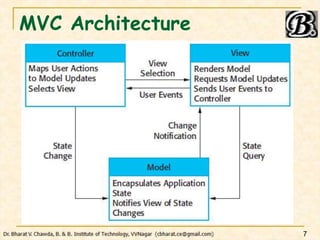
MVC Architecture
7
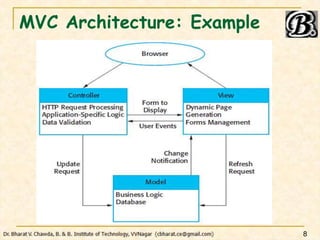
MVC Architecture: Example
8
MVC Architecture: Concept
 Concept
 Separates presentation and interaction from sys data
 Model: Manages system data & associated operations
 View: Manages how data is presented to the user
 Controller: Manages user interactions; passes to M, V
 When used
 There are multiple ways to view & interact with data
 Future requirements for interaction and presentation of
data are unknown
9
MVC Architecture: Ad-Disad
 Advantage
 Allows data to change independently of its
representation and vice versa
 Supports presentation of the same data in different
ways
 Disadvantage
 Can involve additional code and code complexity: when
data model and interactions are simple
10
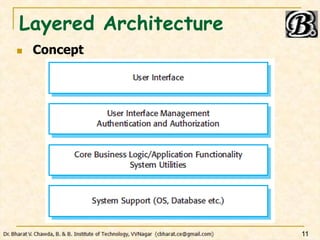
Layered Architecture
 Concept
11
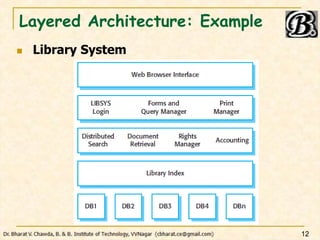
Layered Architecture: Example
 Library System
12
Layered Architecture: Concept
 Concept
 Organizes the system into layers: Each layer has some
functionality
 A layer provides services to the layer above it
 Lowest-level layers provide core services: likely to be
used throughout the system
 When used
 Building new facilities on top of existing systems
 Development is spread across several teams…
 Requirement for multi-level security
13
Layered Architecture: Ad-Disad
 Advantage
 Allows replacement of entire layer without affecting
system
 Redundant facilities can be provided in each layer to
increase dependability; Ex: Authentication
 Disadvantage
 Providing clean separation between layers is difficult
 Service request is processed at each layer  May affect
the performance
14
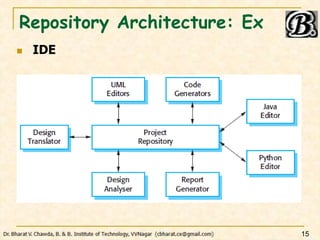
Repository Architecture: Ex
 IDE
15
Repository Architecture: Concept
 Concept
 All data in a system is managed in a central database
(repository) : accessible to all components
 Components do not interact directly; but through
repository
 When used
 Systems having large volumes of data/info : need to be
stored for a long time
16
Repository Architecture: Ad-Disad
 Advantage
 Components can be independent – do not need to
know existence of other components
 Consistent data management
 Changes made by one component can be propagated
to all components
 Disadvantage
 Repository is a single point of failure
 Distributing repository across several computers may
be difficult
17
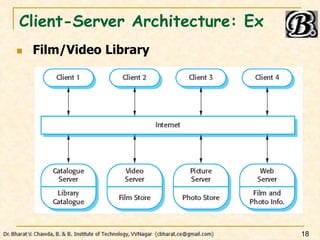
Client-Server Architecture: Ex
 Film/Video Library
18
Client-Server Arch: Concept
 Concept
 Functionality of the system is organized into services:
each service delivered from a separate server
 Clients are users of these services; Access servers to
make use of them
 When used
 Data in shared database need to be accessed from a
range of locations
 Load on a system is variable: As servers can be
replicated
19
Client-Server Arch: Ad-Disad
 Advantage
 Servers can be distributed across a network
 General functionality can be available to all clients: No
need to be implemented by all services: Ex – Printing
Service
 Disadvantage
 Each service is a single point of failure: Denial of
Service; Server Failure
 Unpredictable performance: depends upon network +
system
 Management prob possible: servers r owned by diff org
20
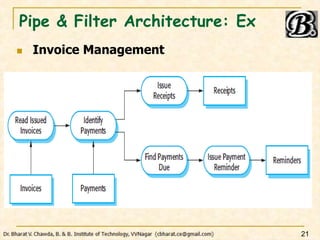
Pipe & Filter Architecture: Ex
 Invoice Management
21
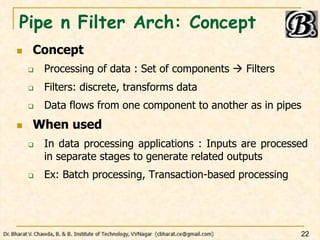
Pipe n Filter Arch: Concept
 Concept
 Processing of data : Set of components  Filters
 Filters: discrete, transforms data
 Data flows from one component to another as in pipes
 When used
 In data processing applications : Inputs are processed
in separate stages to generate related outputs
 Ex: Batch processing, Transaction-based processing
22
Pipe n Filter Arch: Ad-Disad
 Advantage
 Easy to understand; Supports transformation reuse
 Evolution by adding transformations is straight forward
 Can be implemented: Sequential or Concurrent
 Disadvantage
 Data need to be parsed or unparsed as per format of
different components
 This increases system overhead
 Transformation can’t be reused if uses incompatible
data structures
23
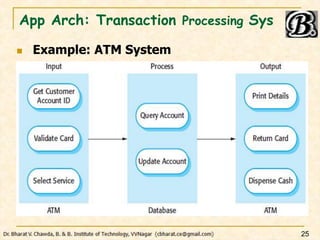
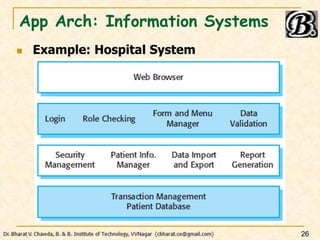
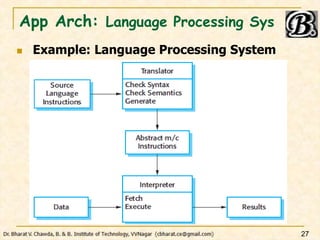
Application Architectures
 What?
 Applications –
 As a starting point for the architectural design process
 As a design check list
 As a way of organizing the work of the development
team
 As a means for assessing components for reuse
 As a vocabulary for talking about types of applications
24
App Arch: Transaction Processing Sys
 Example: ATM System
25
App Arch: Information Systems
 Example: Hospital System
26
App Arch: Language Processing Sys
 Example: Language Processing System
27
Thank-U…!!!
28

SE2023 0207 Software Architectural Design.pptx

  • 1.
    Software Architectural Design by: Dr. BharatV. Chawda Computer Engineering Department, BBIT, VVNagar, Gujarat, India 1
  • 2.
    Overview  Introduction  ArchitecturalDesign Decisions  Architectural Views  Architectural Patterns  Application Architectures (As per GTU Curriculum – Diploma in Computer/IT Engineering) Based on Books: 1. Software Engineering – by Ian Sommerville 2
  • 3.
    Introduction  Architectural Design Concerned with –  Understanding: how a system should be organized &  Designing: the overall structure of the system. 3
  • 4.
    Architectural Design Decisions Some fundamental questions…  Is Generic application architecture available?  What is the fundamental approach to structure system?  What architectural patterns or styles might be used?  Which architecture is best: Non-fun requirements?  How: system is distributed across cores & processors?  How: Structural components  sub-components?  What Strategy will be used to control op of components?  How architectural design will be evaluated?  How sys architecture will be documented? 4
  • 5.
    Architectural Views  LogicalView  Shows key abstractions in system as Objects or Classes  System requirements r related to entities  Process View  Shows: how sys is composed of interacting processes  Useful 4 making judgments about non-functional req.  Development View  Shows: how SW is decomposed for development  Useful for SW managers and programmers  Physical View  Shows: sys HW; How SW components r distributed…  Useful 4 sys engineers : planning a system deployment 5
  • 6.
    Architectural Patterns  MVC(Model-View-Controller) Architecture  Layered Architecture  Repository Architecture  Client-Server Architecture  Pipe and Filter Architecture 6
  • 7.
  • 8.
  • 9.
    MVC Architecture: Concept Concept  Separates presentation and interaction from sys data  Model: Manages system data & associated operations  View: Manages how data is presented to the user  Controller: Manages user interactions; passes to M, V  When used  There are multiple ways to view & interact with data  Future requirements for interaction and presentation of data are unknown 9
  • 10.
    MVC Architecture: Ad-Disad Advantage  Allows data to change independently of its representation and vice versa  Supports presentation of the same data in different ways  Disadvantage  Can involve additional code and code complexity: when data model and interactions are simple 10
  • 11.
  • 12.
  • 13.
    Layered Architecture: Concept Concept  Organizes the system into layers: Each layer has some functionality  A layer provides services to the layer above it  Lowest-level layers provide core services: likely to be used throughout the system  When used  Building new facilities on top of existing systems  Development is spread across several teams…  Requirement for multi-level security 13
  • 14.
    Layered Architecture: Ad-Disad Advantage  Allows replacement of entire layer without affecting system  Redundant facilities can be provided in each layer to increase dependability; Ex: Authentication  Disadvantage  Providing clean separation between layers is difficult  Service request is processed at each layer  May affect the performance 14
  • 15.
  • 16.
    Repository Architecture: Concept Concept  All data in a system is managed in a central database (repository) : accessible to all components  Components do not interact directly; but through repository  When used  Systems having large volumes of data/info : need to be stored for a long time 16
  • 17.
    Repository Architecture: Ad-Disad Advantage  Components can be independent – do not need to know existence of other components  Consistent data management  Changes made by one component can be propagated to all components  Disadvantage  Repository is a single point of failure  Distributing repository across several computers may be difficult 17
  • 18.
  • 19.
    Client-Server Arch: Concept Concept  Functionality of the system is organized into services: each service delivered from a separate server  Clients are users of these services; Access servers to make use of them  When used  Data in shared database need to be accessed from a range of locations  Load on a system is variable: As servers can be replicated 19
  • 20.
    Client-Server Arch: Ad-Disad Advantage  Servers can be distributed across a network  General functionality can be available to all clients: No need to be implemented by all services: Ex – Printing Service  Disadvantage  Each service is a single point of failure: Denial of Service; Server Failure  Unpredictable performance: depends upon network + system  Management prob possible: servers r owned by diff org 20
  • 21.
    Pipe & FilterArchitecture: Ex  Invoice Management 21
  • 22.
    Pipe n FilterArch: Concept  Concept  Processing of data : Set of components  Filters  Filters: discrete, transforms data  Data flows from one component to another as in pipes  When used  In data processing applications : Inputs are processed in separate stages to generate related outputs  Ex: Batch processing, Transaction-based processing 22
  • 23.
    Pipe n FilterArch: Ad-Disad  Advantage  Easy to understand; Supports transformation reuse  Evolution by adding transformations is straight forward  Can be implemented: Sequential or Concurrent  Disadvantage  Data need to be parsed or unparsed as per format of different components  This increases system overhead  Transformation can’t be reused if uses incompatible data structures 23
  • 24.
    Application Architectures  What? Applications –  As a starting point for the architectural design process  As a design check list  As a way of organizing the work of the development team  As a means for assessing components for reuse  As a vocabulary for talking about types of applications 24
  • 25.
    App Arch: TransactionProcessing Sys  Example: ATM System 25
  • 26.
    App Arch: InformationSystems  Example: Hospital System 26
  • 27.
    App Arch: LanguageProcessing Sys  Example: Language Processing System 27
  • 28.