3
Architectural design
Architecturaldesign is concerned with understanding
how a software system should be organized and
designing the overall structure of that system.
Architectural design is the critical link between design
and requirements engineering, as it identifies the main
structural components in a system and the relationships
between them.
The output of the architectural design process is an
architectural model that describes how the system is
organized as a set of communicating components.
4.
4
It focuseson creating architectures that are flexible, modular, and
evolve over time to meet changing requirements.
Key Characteristics:
Evolvable: Supports frequent iteration and incremental changes.
Minimal upfront design: Emphasizes "just enough" architecture early on.
Continuous feedback loops: Architecture evolves through feedback and
testing.
Decentralized decision-making: Teams can make local architecture
decisions.
Supports DevOps and CI/CD pipelines.
Example: Using microservices in a loosely coupled system to allow
teams to independently develop, deploy, and scale features.
Agility and architecture
5.
5
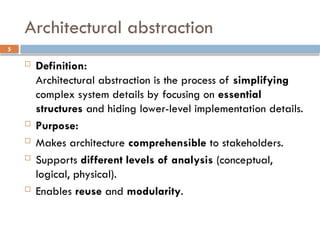
Architectural abstraction
Definition:
Architecturalabstraction is the process of simplifying
complex system details by focusing on essential
structures and hiding lower-level implementation details.
Purpose:
Makes architecture comprehensible to stakeholders.
Supports different levels of analysis (conceptual,
logical, physical).
Enables reuse and modularity.
6.
6
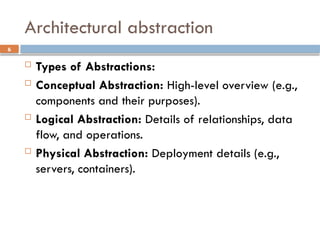
Architectural abstraction
Typesof Abstractions:
Conceptual Abstraction: High-level overview (e.g.,
components and their purposes).
Logical Abstraction: Details of relationships, data
flow, and operations.
Physical Abstraction: Deployment details (e.g.,
servers, containers).
7.
7
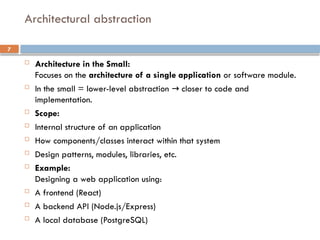
Architecture inthe Small:
Focuses on the architecture of a single application or software module.
In the small = lower-level abstraction closer to code and
→
implementation.
Scope:
Internal structure of an application
How components/classes interact within that system
Design patterns, modules, libraries, etc.
Example:
Designing a web application using:
A frontend (React)
A backend API (Node.js/Express)
A local database (PostgreSQL)
Architectural abstraction
8.
8
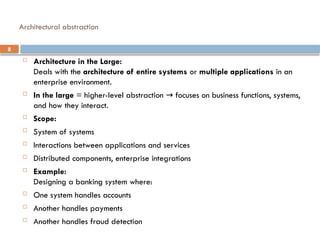
Architecture inthe Large:
Deals with the architecture of entire systems or multiple applications in an
enterprise environment.
In the large = higher-level abstraction focuses on business functions, systems,
→
and how they interact.
Scope:
System of systems
Interactions between applications and services
Distributed components, enterprise integrations
Example:
Designing a banking system where:
One system handles accounts
Another handles payments
Another handles fraud detection
Architectural abstraction
9.
9
Advantages of explicitarchitecture
Stakeholder communication
Architecture may be used as a focus of discussion by
system stakeholders.
System analysis
Means that analysis of whether the system can meet its
non-functional requirements is possible.
Large-scale reuse
The architecture may be reusable across a range of
systems
Product-line architectures may be developed.
10.
10
Use of architecturalmodels
As a way of facilitating discussion about the system design
A high-level architectural view of a system is useful for
communication with system stakeholders and project planning
because it is not messy with detail. Stakeholders can relate to it
and understand an abstract view of the system. They can then
discuss the system as a whole without being confused by detail.
As a way of documenting an architecture that has been
designed
The aim here is to produce a complete system model that shows
the different components in a system, their interfaces and their
connections.
12
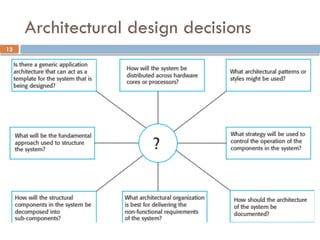
Architectural design decisions
Architectural design is a creative process so the
process differs depending on the type of system
being developed.
Decisions that determine how the system is built,
what technologies it uses, and how components
interact.
However, a number of common decisions period all
design processes and these decisions affect the non-
functional characteristics of the system.
14
Architecture reuse
Systemsin the same domain often have similar
architectures that reflect domain concepts.
Application product lines are built around a core
architecture with variants that satisfy particular
customer requirements.
The architecture of a system may be designed
around one of more architectural patterns or ‘styles’.
These capture the core of an architecture and can be
instantiated in different ways.
15.
15
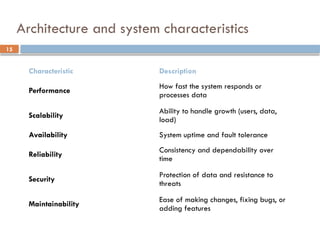
Architecture and systemcharacteristics
Characteristic Description
Performance
How fast the system responds or
processes data
Scalability
Ability to handle growth (users, data,
load)
Availability System uptime and fault tolerance
Reliability
Consistency and dependability over
time
Security
Protection of data and resistance to
threats
Maintainability
Ease of making changes, fixing bugs, or
adding features
16.
16
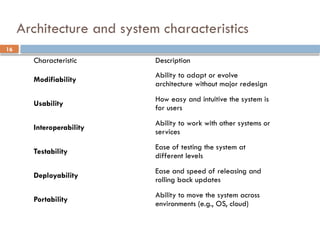
Architecture and systemcharacteristics
Characteristic Description
Modifiability
Ability to adapt or evolve
architecture without major redesign
Usability
How easy and intuitive the system is
for users
Interoperability
Ability to work with other systems or
services
Testability
Ease of testing the system at
different levels
Deployability
Ease and speed of releasing and
rolling back updates
Portability
Ability to move the system across
environments (e.g., OS, cloud)
18
Architectural views
Views:-Set of representations of an architecture that covers stakeholder
issues. It also represents functional and non-functional requirements of
software application.
Each view highlights particular aspects of the system, enabling better
communication, understanding, and decision-making during design and
development.
What views or perspectives are useful when designing and documenting a
system’s architecture
What notations should be used for describing architectural models
Each architectural model only shows one view or perspective of the system.
It might show how a system is decomposed into modules, how the run-time
processes interact or the different ways in which system components are distributed
across a network. For both design and documentation, you usually need to present
multiple views of the software architecture.
19.
19
Key Characteristics ofArchitectural Views
Stakeholder-Focused: Different stakeholders (e.g.,
developers, testers, business analysts) require
different types of information about the system.
Separation of Concerns: Each view focuses on a
specific aspect, avoiding information overload and
allowing for more detailed analysis.
Complementary: No single view can capture the
entire architecture; multiple views work together to
provide a complete understanding.
21
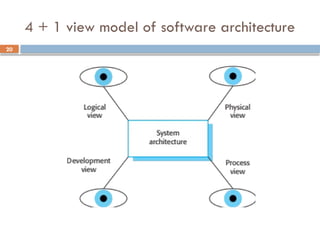
4 + 1view model of software architecture
Logical View:
Focuses on the functionality of the system.
Represents the system's components and their relationships
(e.g., class diagrams, entity-relationship diagrams).
Useful for developers and analysts.
Development View:
Describes the system's software modules and their
organization in the development environment.
Includes components like libraries, packages, and modules.
Relevant to developers and configuration managers.
22.
22
4 + 1view model of software architecture
Process View:
Focuses on the dynamic aspects of the system, including
processes, threads, and communication.
Addresses performance, scalability, and concurrency concerns.
Important for architects and system engineers.
Physical View:
Represents the deployment of the software on hardware
resources (e.g., servers, network topologies).
Deals with distribution, scalability, and physical constraints.
Relevant for network and system administrators.
23.
23
4 + 1view model of software architecture
Scenario View (or Use Case View):
Focuses on how the system behaves in specific
scenarios or use cases.
Useful for validating the architecture against
functional requirements.
Important for testers and business stakeholders.
25
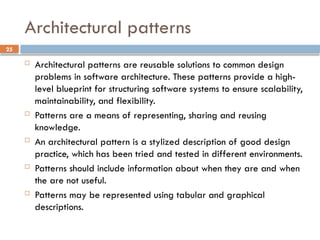
Architectural patterns
Architecturalpatterns are reusable solutions to common design
problems in software architecture. These patterns provide a high-
level blueprint for structuring software systems to ensure scalability,
maintainability, and flexibility.
Patterns are a means of representing, sharing and reusing
knowledge.
An architectural pattern is a stylized description of good design
practice, which has been tried and tested in different environments.
Patterns should include information about when they are and when
the are not useful.
Patterns may be represented using tabular and graphical
descriptions.
26.
26
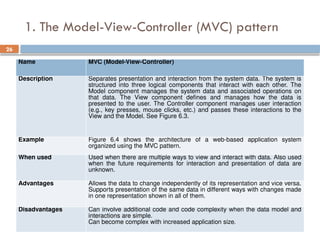
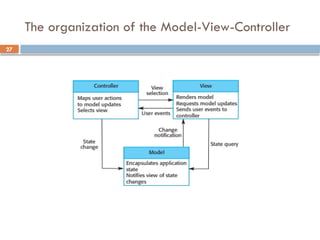
1. The Model-View-Controller(MVC) pattern
Name MVC (Model-View-Controller)
Description Separates presentation and interaction from the system data. The system is
structured into three logical components that interact with each other. The
Model component manages the system data and associated operations on
that data. The View component defines and manages how the data is
presented to the user. The Controller component manages user interaction
(e.g., key presses, mouse clicks, etc.) and passes these interactions to the
View and the Model. See Figure 6.3.
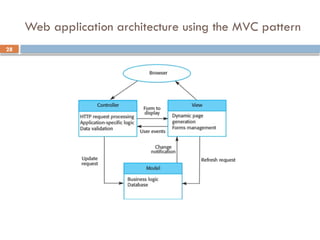
Example Figure 6.4 shows the architecture of a web-based application system
organized using the MVC pattern.
When used Used when there are multiple ways to view and interact with data. Also used
when the future requirements for interaction and presentation of data are
unknown.
Advantages Allows the data to change independently of its representation and vice versa.
Supports presentation of the same data in different ways with changes made
in one representation shown in all of them.
Disadvantages Can involve additional code and code complexity when the data model and
interactions are simple.
Can become complex with increased application size.
29
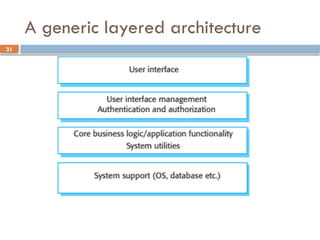
2. Layered architecture
Used to model the interfacing of sub-systems.
Organises the system into a set of layers (or abstract
machines) each of which provide a set of services.
Supports the incremental development of sub-systems in
different layers. When a layer interface changes, only the
adjacent layer is affected.
However, often artificial to structure systems in this way.
30.
30
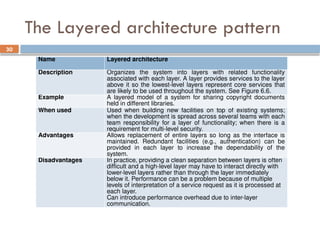
The Layered architecturepattern
Name Layered architecture
Description Organizes the system into layers with related functionality
associated with each layer. A layer provides services to the layer
above it so the lowest-level layers represent core services that
are likely to be used throughout the system. See Figure 6.6.
Example A layered model of a system for sharing copyright documents
held in different libraries.
When used Used when building new facilities on top of existing systems;
when the development is spread across several teams with each
team responsibility for a layer of functionality; when there is a
requirement for multi-level security.
Advantages Allows replacement of entire layers so long as the interface is
maintained. Redundant facilities (e.g., authentication) can be
provided in each layer to increase the dependability of the
system.
Disadvantages In practice, providing a clean separation between layers is often
difficult and a high-level layer may have to interact directly with
lower-level layers rather than through the layer immediately
below it. Performance can be a problem because of multiple
levels of interpretation of a service request as it is processed at
each layer.
Can introduce performance overhead due to inter-layer
communication.
32
3. Repository architecture
Centralized storage system where all components
interact through a shared repository.
Sub-systems must exchange data. This may be done
in two ways:
Shared data is held in a central database or repository
and may be accessed by all sub-systems;
Each sub-system maintains its own database and passes
data explicitly to other sub-systems.
When large amounts of data are to be shared, the
repository model of sharing is most commonly used,
as it is an efficient data sharing mechanism.
33.
33
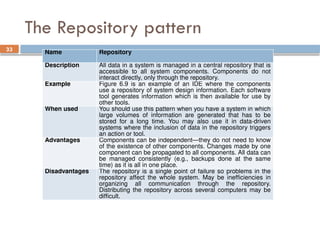
The Repository pattern
NameRepository
Description All data in a system is managed in a central repository that is
accessible to all system components. Components do not
interact directly, only through the repository.
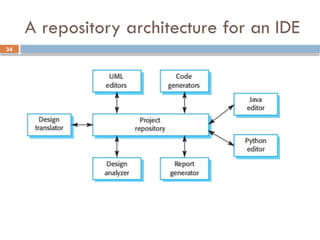
Example Figure 6.9 is an example of an IDE where the components
use a repository of system design information. Each software
tool generates information which is then available for use by
other tools.
When used You should use this pattern when you have a system in which
large volumes of information are generated that has to be
stored for a long time. You may also use it in data-driven
systems where the inclusion of data in the repository triggers
an action or tool.
Advantages Components can be independent—they do not need to know
of the existence of other components. Changes made by one
component can be propagated to all components. All data can
be managed consistently (e.g., backups done at the same
time) as it is all in one place.
Disadvantages The repository is a single point of failure so problems in the
repository affect the whole system. May be inefficiencies in
organizing all communication through the repository.
Distributing the repository across several computers may be
difficult.
35
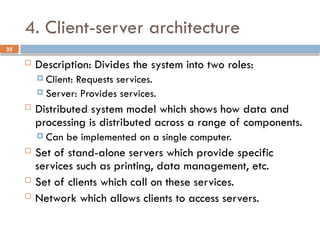
4. Client-server architecture
Description: Divides the system into two roles:
Client: Requests services.
Server: Provides services.
Distributed system model which shows how data and
processing is distributed across a range of components.
Can be implemented on a single computer.
Set of stand-alone servers which provide specific
services such as printing, data management, etc.
Set of clients which call on these services.
Network which allows clients to access servers.
36.
36
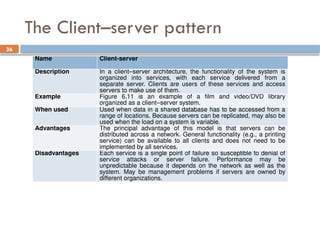
The Client–server pattern
NameClient-server
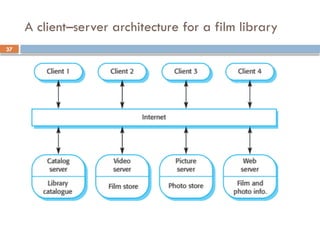
Description In a client–server architecture, the functionality of the system is
organized into services, with each service delivered from a
separate server. Clients are users of these services and access
servers to make use of them.
Example Figure 6.11 is an example of a film and video/DVD library
organized as a client–server system.
When used Used when data in a shared database has to be accessed from a
range of locations. Because servers can be replicated, may also be
used when the load on a system is variable.
Advantages The principal advantage of this model is that servers can be
distributed across a network. General functionality (e.g., a printing
service) can be available to all clients and does not need to be
implemented by all services.
Disadvantages Each service is a single point of failure so susceptible to denial of
service attacks or server failure. Performance may be
unpredictable because it depends on the network as well as the
system. May be management problems if servers are owned by
different organizations.
38
5. Pipe andfilter architecture
Data flows through a sequence of processing elements
(filters) connected by pipes.
Functional transformations process their inputs to
produce outputs.
May be referred to as a pipe and filter model (as in
UNIX shell).
Variants of this approach are very common. When
transformations are sequential, this is a batch sequential
model which is extensively used in data processing
systems.
Not really suitable for interactive systems.
39.
39
The pipe andfilter pattern
Name Pipe and filter
Description The processing of the data in a system is organized so that each
processing component (filter) is discrete and carries out one type of
data transformation. The data flows (as in a pipe) from one component
to another for processing.
Example Figure 6.13 is an example of a pipe and filter system used for
processing invoices.
When used Commonly used in data processing applications (both batch- and
transaction-based) where inputs are processed in separate stages to
generate related outputs.
Advantages Easy to understand and supports transformation reuse. Workflow style
matches the structure of many business processes. Evolution by
adding transformations is straightforward. Can be implemented as
either a sequential or concurrent system.
Disadvantages The format for data transfer has to be agreed upon between
communicating transformations. Each transformation must parse its
input and unparse its output to the agreed form. This increases system
overhead and may mean that it is impossible to reuse functional
transformations that use incompatible data structures.
40.
40
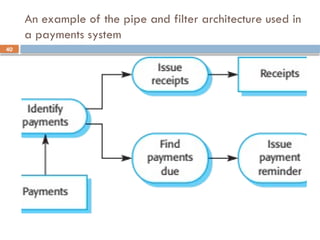
An example ofthe pipe and filter architecture used in
a payments system
42
Application architectures
Applicationarchitectures are structural patterns that define
how software components interact to form a complete
application. These architectures help organize systems to
meet specific business and technical requirements.
Application systems are designed to meet an
organizational need.
A generic application architecture is an architecture for a
type of software system that may be configured and
adapted to create a system that meets specific
requirements.
43.
43
Use of applicationarchitectures
As a starting point for architectural design.
As a design checklist.
Architectural guidelines ensure critical design elements,
such as scalability, security, and maintainability, are
addressed systematically.
As a way of organising the work of the
development team.
Clearly defined architectural components and their
boundaries enable task allocation, parallel work, and
team collaboration, minimizing conflicts.
44.
44
Use of applicationarchitectures
As a means of assessing components for reuse.
By identifying common or modular components in the
architecture, teams can evaluate the potential for
reusing existing solutions, saving time and resources.
As a vocabulary for talking about application
types.
Standard architectural terminology (e.g., microservices,
monoliths) facilitates clear communication and shared
understanding among stakeholders, including
developers, managers, and clients.
45.
45
Examples of applicationtypes
Data processing applications
Software systems designed to handle the collection, processing, storage,
and analysis of data to generate useful information or insights.
Data driven applications that process data in batches without explicit
user intervention during the processing.
Transaction processing applications
Data-centred applications that process user requests and update
information in a system database.
Event processing systems
Applications where system actions depend on interpreting events from
the system’s environment.
Language processing systems
Applications where the users’ intentions are specified in a formal
language that is processed and interpreted by the system.
46.
46
Application type examples
Two very widely used generic application architectures are
transaction processing systems and language processing systems.
Transaction processing systems
E-commerce systems;
Reservation systems.
Language processing systems
Compilers;
Command interpreters.
47.
47
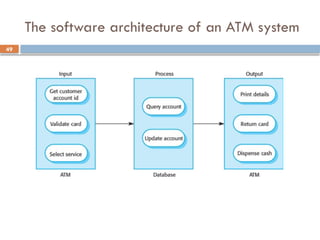
Transaction processing systems
Process user requests for information from a
database or requests to update the database.
From a user perspective a transaction is:
Any coherent sequence of operations that satisfies a
goal;
For example - find the times of flights from London to
Paris.
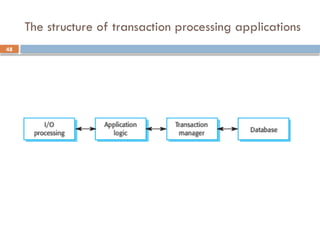
Users make asynchronous requests for service which
are then processed by a transaction manager.
50
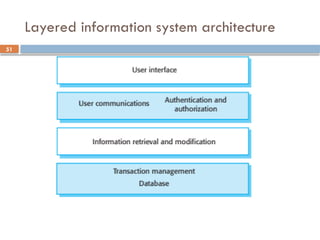
Information systems architecture
Information systems have a generic architecture that
can be organised as a layered architecture.
These are transaction-based systems as interaction with
these systems generally involves database transactions.
Layers include:
The user interface
User communications
Information retrieval
System database
53
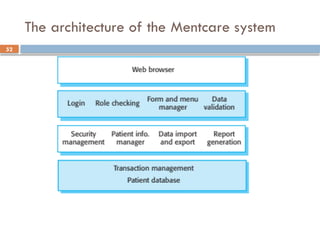
Web-based information systems
Information and resource management systems are now usually
web-based systems where the user interfaces are implemented
using a web browser.
For example, e-commerce systems are Internet-based resource
management systems that accept electronic orders for goods or
services and then arrange delivery of these goods or services
to the customer.
In an e-commerce system, the application-specific layer includes
additional functionality supporting a ‘shopping cart’ in which
users can place a number of items in separate transactions, then
pay for them all together in a single transaction.
54.
54
Server implementation
Thesesystems are often implemented as multi-tier
client server/architectures
The web server is responsible for all user
communications, with the user interface implemented
using a web browser;
The application server is responsible for implementing
application-specific logic as well as information storage
and retrieval requests;
The database server moves information to and from the
database and handles transaction management.
55.
55
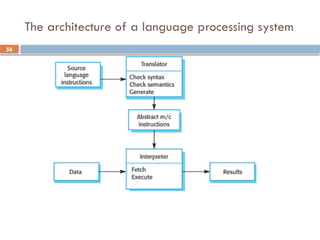
Language processing systems
Accept a natural or artificial language as input and generate
some other representation of that language.
May include an interpreter to act on the instructions in the
language that is being processed.
Used in situations where the easiest way to solve a problem is to
describe an algorithm or describe the system data
Meta-case tools process tool descriptions, method rules, etc and
generate tools.
57
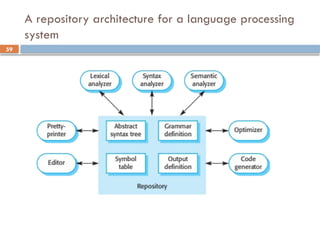
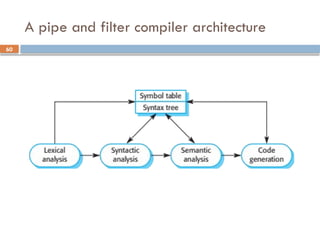
Compiler components
Alexical analyzer, which takes input language
tokens and converts them to an internal form.
A symbol table, which holds information about the
names of entities (variables, class names, object
names, etc.) used in the text that is being translated.
A syntax analyzer, which checks the syntax of the
language being translated.
A syntax tree, which is an internal structure
representing the program being compiled.
58.
58
Compiler components
Asemantic analyzer that uses information from the
syntax tree and the symbol table to check the
semantic correctness of the input language text.
A code generator that ‘walks’ the syntax tree and
generates abstract machine code.
#18 Views:- set of representations of an architecture that covers stakeholder issues. It also represents functional and non-functional requirements of software application.
#22 Processes and Threads:
Processes are independent units of execution with their own memory space.
Threads are smaller units of execution within a process that share the same memory space.
The Process View explains how these units are organized and managed.
Concurrency:
Deals with the ability of the system to handle multiple operations simultaneously.
Network Topology: The arrangement of nodes and connections in a computer network, determining how devices communicate with each other.
#25 Tabular Description: Provides detailed and structured information in textual form.
Graphical Description: Offers a visual representation to illustrate the structure and relationships.
#38 A shell is a type of computer program called a command-line interpreter that lets Linux and Unix users control their operating systems with command-line interfaces. Shells allow users to communicate efficiently and directly with their operating systems.
Batch sequential:- The next job in the queue cannot be processed until the previous job is finished.
#44 Monolithic Architecture: A single, unified application where all components are tightly integrated and deployed together.
Microservices Architecture: An application built as a collection of loosely coupled, independently deployable services.