
Architecture Of
Web Based
System
What Is Architecture?
 Website architecture is the planning and design of the
technical, functional and visual components of a website -
before it is designed, developed and deployed. It is used by
website designers and developers as a means to design and
develop a website.
 Website architecture is used in creating a logical layout of a
website in line with the user and/or business requirements. It
defines the different components that will make up a website
and the services each component or the website will provide
in whole.
Client Server and 2 tier Web
Architectures
 Typically, when you are browsing the Internet, you will be using Web
Browser software such as Internet Explorer or Mozilla Firefox. The computer
which is running a browser is called a client, whilst the machine which is
providing Web pages is called a server.
 When you dial up to an Internet Service Provider ( ISP ) e.g. Blue Yonder, Aol,
your computer is forming a network connection to a Web server. In this
situation, your computer is in effect a client, which is linked to an ISP Web
server. The web server, as the name suggests, serves your browser with Web
pages (e.g. HTML, ASPX, JSP pages etc).

 This simple scenario, where the Web server is connected to one or more
clients is known as a 2 tier architecture model.
 Figure below demonstrates how Web pages are accessed via a
browser, using a 2 tier architecture.
3-Tier Architecture
 Generally computing applications consist of three different and distinct types of
functionalities.
 Presentation Services
 Functional logic
 Data Management
Presentation Services
 These manifest themselves in the form of information display
and user data input facilities. Generally the front-end for user
interaction. For example logging in requires interaction in the
form of collecting username and password information using a
HTML-form.
 Occupies the top level and displays information related to
services available on a website. This tier communicates with
other tiers by sending results to the browser and other tiers in
the network.
Functional logic
 Every application includes some data processing and this may also
involve database interactivity. For example user authentication
requires the logic unit to read username-password combinations
from a database and compare until a good comparison (hopefully)
is arrived at.
Data Management
 Data, its storage, insertion and retrieval, its management and alteration is
central to computing applications. For example a database management
system (DBMS) is required for the management of usernames and
associated passwords, their owners, etc.
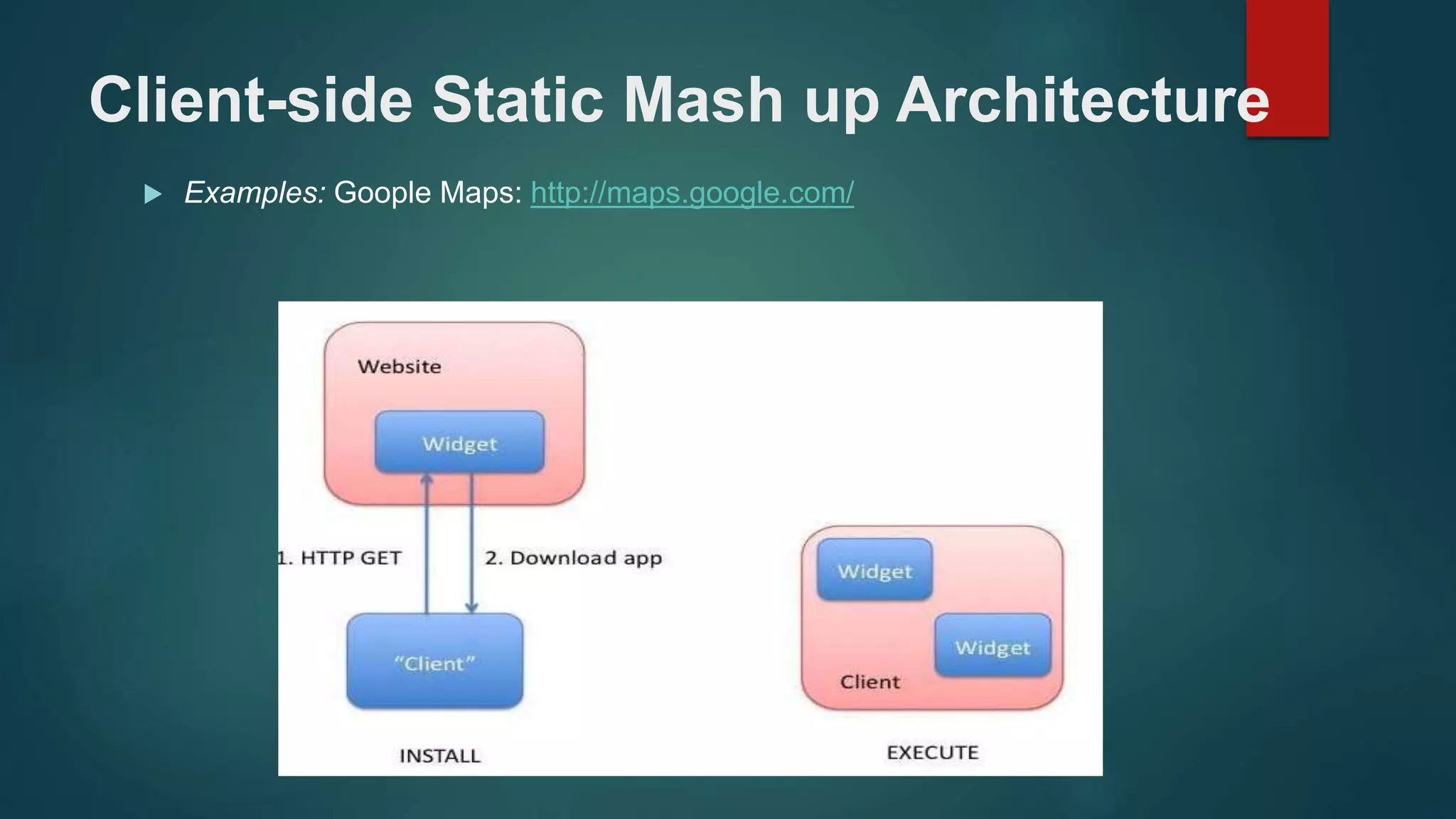
Client-side Static Mash up Architecture
 Examples: Goople Maps: http://maps.google.com/
 The client downloads an application that then runs locally. These
applications are often called "widgets". Typically, the client sends
some data to the website, perhaps by filling a form, and a customized
widget is downloaded.
WIDGET
 A widget is an element of a graphical user interface (GUI) that displays
information or provides a specific way for a user to interact with
the operating system or an application.
 Widgets include icons, pull-down menus, buttons, selection boxes,
progress indicators, on-off checkmarks, scroll bars, windows,
window edges (that let you resize the window), toggle buttons, form,
and many other devices for displaying information and for inviting,
accepting, and responding to user actions.
 The data submitted by the user may be sensitive so security and
privacy considerations apply.
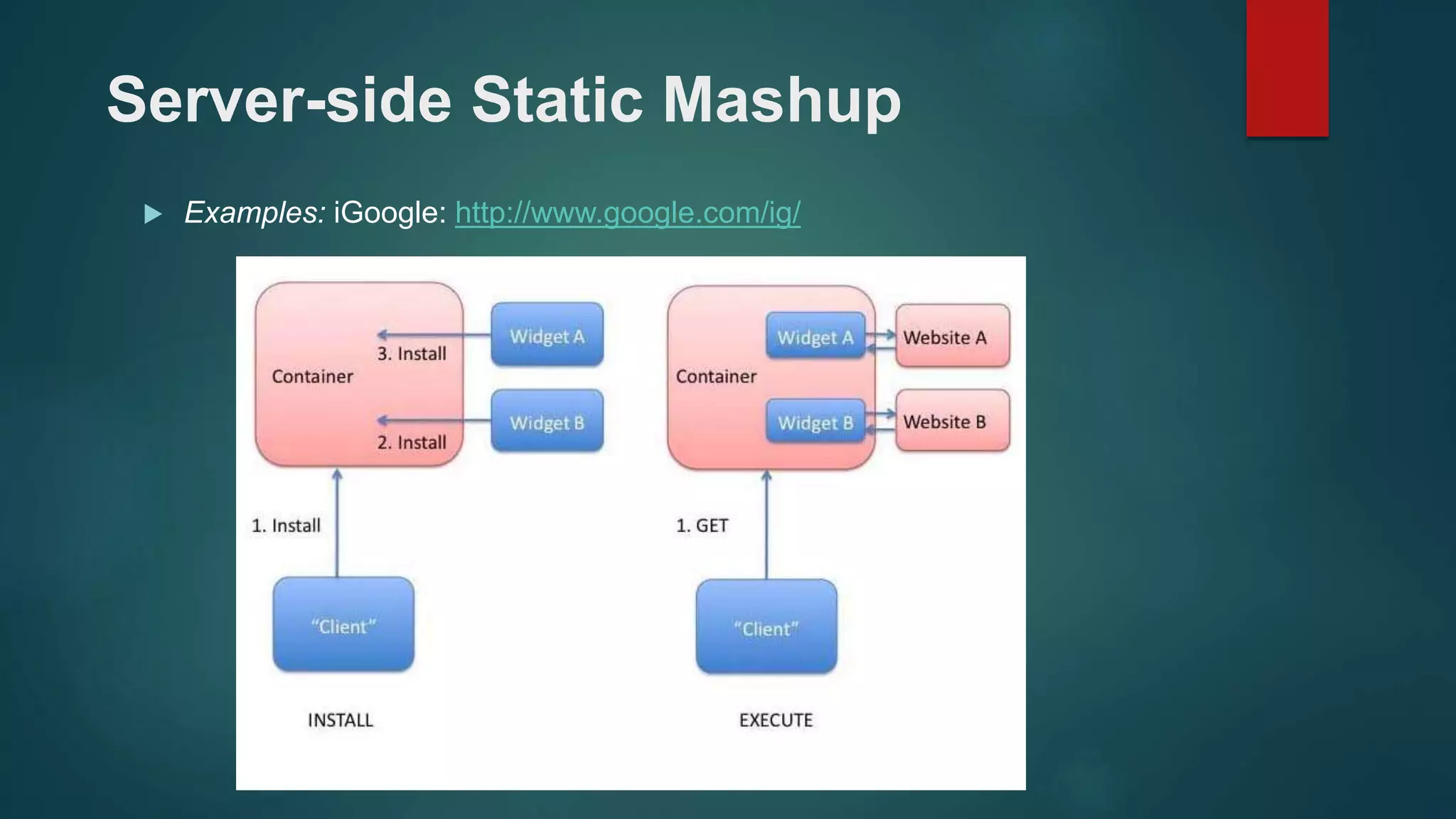
Server-side Static Mashup
 Examples: iGoogle: http://www.google.com/ig/
 Widgets on the server-side
 No separate download step, but often requires installation of
content to a "container"
 One website combines content from multiple other websites, often
by means of iFrames
 External content validated statically by (for example) Caja, FBJS
 DNS-based trust, proxied by "container" site
Client-side Dynamic Mashup
 One site creates content which includes requests for content to
other sites, or for information provided by the client
 Content is assembled dynamically on the client, based on content
from multiple places
 Trust based on a combination of "user grant", enforcement of
restrictions such as SOP, and other techniques (CORS, UMP,
OAuth et al)
General Web Application
Architecture
 The general architecture for Web Applications can be described as
a user, from a browser, initiating an application that may run on one
or more websites. The websites communicate to one another and
may exchange data or start processes.
 The user initiates the application on one websites, sending
parameters and other customizing information to it. This website
may enlist the aid of other websites. The display on the user's
browser, in general, may consist of data from several websites .
 In some cases, code may be transferred to run on the user's
browser.
 In addition to the usual conerns with browsers and URIs this
architecture provides several additional challenges. For example:
 Secure communication between the websites
 Trust between the cooperating websites .
 Need for client-side storage
THANK YOU

Dos1

  • 1.
  • 2.
    What Is Architecture? Website architecture is the planning and design of the technical, functional and visual components of a website - before it is designed, developed and deployed. It is used by website designers and developers as a means to design and develop a website.  Website architecture is used in creating a logical layout of a website in line with the user and/or business requirements. It defines the different components that will make up a website and the services each component or the website will provide in whole.
  • 3.
    Client Server and2 tier Web Architectures  Typically, when you are browsing the Internet, you will be using Web Browser software such as Internet Explorer or Mozilla Firefox. The computer which is running a browser is called a client, whilst the machine which is providing Web pages is called a server.  When you dial up to an Internet Service Provider ( ISP ) e.g. Blue Yonder, Aol, your computer is forming a network connection to a Web server. In this situation, your computer is in effect a client, which is linked to an ISP Web server. The web server, as the name suggests, serves your browser with Web pages (e.g. HTML, ASPX, JSP pages etc). 
  • 4.
     This simplescenario, where the Web server is connected to one or more clients is known as a 2 tier architecture model.  Figure below demonstrates how Web pages are accessed via a browser, using a 2 tier architecture.
  • 5.
    3-Tier Architecture  Generallycomputing applications consist of three different and distinct types of functionalities.  Presentation Services  Functional logic  Data Management
  • 6.
    Presentation Services  Thesemanifest themselves in the form of information display and user data input facilities. Generally the front-end for user interaction. For example logging in requires interaction in the form of collecting username and password information using a HTML-form.  Occupies the top level and displays information related to services available on a website. This tier communicates with other tiers by sending results to the browser and other tiers in the network.
  • 7.
    Functional logic  Everyapplication includes some data processing and this may also involve database interactivity. For example user authentication requires the logic unit to read username-password combinations from a database and compare until a good comparison (hopefully) is arrived at.
  • 8.
    Data Management  Data,its storage, insertion and retrieval, its management and alteration is central to computing applications. For example a database management system (DBMS) is required for the management of usernames and associated passwords, their owners, etc.
  • 9.
    Client-side Static Mashup Architecture  Examples: Goople Maps: http://maps.google.com/
  • 10.
     The clientdownloads an application that then runs locally. These applications are often called "widgets". Typically, the client sends some data to the website, perhaps by filling a form, and a customized widget is downloaded. WIDGET  A widget is an element of a graphical user interface (GUI) that displays information or provides a specific way for a user to interact with the operating system or an application.
  • 11.
     Widgets includeicons, pull-down menus, buttons, selection boxes, progress indicators, on-off checkmarks, scroll bars, windows, window edges (that let you resize the window), toggle buttons, form, and many other devices for displaying information and for inviting, accepting, and responding to user actions.  The data submitted by the user may be sensitive so security and privacy considerations apply.
  • 12.
    Server-side Static Mashup Examples: iGoogle: http://www.google.com/ig/
  • 13.
     Widgets onthe server-side  No separate download step, but often requires installation of content to a "container"  One website combines content from multiple other websites, often by means of iFrames  External content validated statically by (for example) Caja, FBJS  DNS-based trust, proxied by "container" site
  • 14.
  • 15.
     One sitecreates content which includes requests for content to other sites, or for information provided by the client  Content is assembled dynamically on the client, based on content from multiple places  Trust based on a combination of "user grant", enforcement of restrictions such as SOP, and other techniques (CORS, UMP, OAuth et al)
  • 16.
  • 17.
     The generalarchitecture for Web Applications can be described as a user, from a browser, initiating an application that may run on one or more websites. The websites communicate to one another and may exchange data or start processes.  The user initiates the application on one websites, sending parameters and other customizing information to it. This website may enlist the aid of other websites. The display on the user's browser, in general, may consist of data from several websites .
  • 18.
     In somecases, code may be transferred to run on the user's browser.  In addition to the usual conerns with browsers and URIs this architecture provides several additional challenges. For example:  Secure communication between the websites  Trust between the cooperating websites .  Need for client-side storage
  • 19.