Scan-to-BIM 
How it is done
• 
Laser scanning is a technique used to quickly, accurately and reliably capture every existing situation or object with a high level of detail. 
• 
It is a very useful addition to existing landsurveying equipment such as total stations. 
• 
Laserscanning is being used in many different industries for many different purposes. Just a few examples: 
• 
Proces industry (mainly for piping) 
• 
Shipsbuilding and –repair (hull survey for hydrodynamic models) 
• 
Bulk storage (quantity surveying) 
• 
Civil works (highway clearances, profiles etc.) 
• 
Building industry (renovation and conversions) 
What is laser scanning?
How a laser scanner works? 
1. The scanner sends out a laser beam
How a laser scanner works? 
2. The laser beam is reflected by the object, the distance is determined.
How a laser scanner works? 
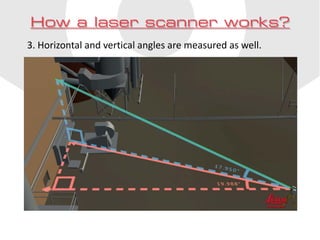
3. Horizontal and vertical angles are measured as well.
How a laser scanner works? 
4. Angles and distances are combined. XYZ-coordinates are calculated.
How a laser scanner works? 
5. Proceeding in equal steps the scanner measures up to 1 million points per second.
How a laser scanner works? 
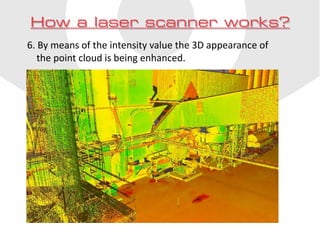
6. By means of the intensity value the 3D appearance of the point cloud is being enhanced.
How a laser scanner works? 
7. Using an internal or external camera photo-realistic coloring optionally can be added.
How a laser scanner works? 
8. Usually many instrument set-ups are required to completely capture the situation or object.
How a laser scanner works? 
9. Using targets or overlap scans can be registered into a single point cloud afterwards.
How does a scan-to- BIM project look like? 
Just three simple steps!
• 
Coenradie takes care of scanning: 
• 
Outside building 
• 
Inside building 
• 
Both outside and inside 
• 
With or without photo-realistic coloring 
Step 1
• 
Coenradie creates a useful point cloud: 
• 
Noise removed 
• 
Accurately registered 
• 
Suitable for Autodesk Recap + Revit 
Step 2
• 
In Revit a model is built from the point cloud: 
• 
Sometimes by Coenradie’s architectural partner 
• 
Often by our client or the projects architect. 
Step 3
• 
An accurate and reliable BIM-model of the existing situation. 
Final result

Scan-to-BIM english

  • 1.
  • 2.
    • Laser scanningis a technique used to quickly, accurately and reliably capture every existing situation or object with a high level of detail. • It is a very useful addition to existing landsurveying equipment such as total stations. • Laserscanning is being used in many different industries for many different purposes. Just a few examples: • Proces industry (mainly for piping) • Shipsbuilding and –repair (hull survey for hydrodynamic models) • Bulk storage (quantity surveying) • Civil works (highway clearances, profiles etc.) • Building industry (renovation and conversions) What is laser scanning?
  • 3.
    How a laserscanner works? 1. The scanner sends out a laser beam
  • 4.
    How a laserscanner works? 2. The laser beam is reflected by the object, the distance is determined.
  • 5.
    How a laserscanner works? 3. Horizontal and vertical angles are measured as well.
  • 6.
    How a laserscanner works? 4. Angles and distances are combined. XYZ-coordinates are calculated.
  • 7.
    How a laserscanner works? 5. Proceeding in equal steps the scanner measures up to 1 million points per second.
  • 8.
    How a laserscanner works? 6. By means of the intensity value the 3D appearance of the point cloud is being enhanced.
  • 9.
    How a laserscanner works? 7. Using an internal or external camera photo-realistic coloring optionally can be added.
  • 10.
    How a laserscanner works? 8. Usually many instrument set-ups are required to completely capture the situation or object.
  • 11.
    How a laserscanner works? 9. Using targets or overlap scans can be registered into a single point cloud afterwards.
  • 12.
    How does ascan-to- BIM project look like? Just three simple steps!
  • 13.
    • Coenradie takescare of scanning: • Outside building • Inside building • Both outside and inside • With or without photo-realistic coloring Step 1
  • 14.
    • Coenradie createsa useful point cloud: • Noise removed • Accurately registered • Suitable for Autodesk Recap + Revit Step 2
  • 15.
    • In Revita model is built from the point cloud: • Sometimes by Coenradie’s architectural partner • Often by our client or the projects architect. Step 3
  • 16.
    • An accurateand reliable BIM-model of the existing situation. Final result