MongoDB
My name is 
John Jenson
• 12 years writing code 
• 11 years using Oracle 
• 9 months using Mongo 
• BYU Alumnus 
• Principal Engineer @ Cengage 
• Currently doing MEAN stack dev
When to use 
MongoDB?
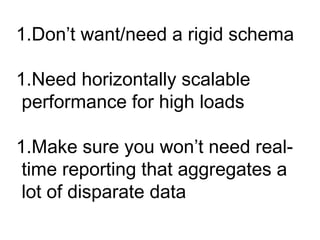
1.Don’t want/need a rigid schema 
1.Need horizontally scalable 
performance for high loads 
1.Make sure you won’t need real-time 
reporting that aggregates a 
lot of disparate data
Use Cases for Mongo
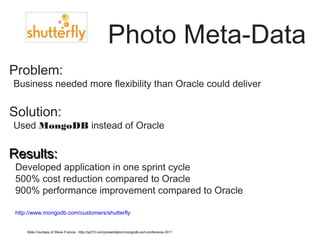
Photo Meta-Data 
Problem: 
•Business needed more flexibility than Oracle could deliver 
Solution: 
•Used MongoDB instead of Oracle 
RReessuullttss:: 
• Developed application in one sprint cycle 
• 500% cost reduction compared to Oracle 
• 900% performance improvement compared to Oracle 
• http://www.mongodb.com/customers/shutterfly 
Slide Courtesy of Steve Francia - http://spf13.com/presentation/mongodb-sort-conference-2011
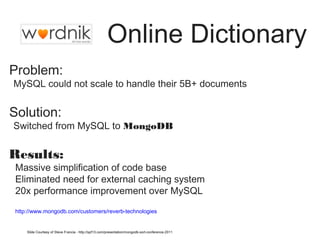
Online Dictionary 
Problem: 
•MySQL could not scale to handle their 5B+ documents 
Solution: 
•Switched from MySQL to MongoDB 
Results: 
• Massive simplification of code base 
• Eliminated need for external caching system 
• 20x performance improvement over MySQL 
• http://www.mongodb.com/customers/reverb-technologies 
Slide Courtesy of Steve Francia - http://spf13.com/presentation/mongodb-sort-conference-2011
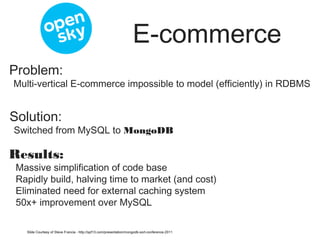
E-commerce 
Problem: 
•Multi-vertical E-commerce impossible to model (efficiently) in RDBMS 
Solution: 
•Switched from MySQL to MongoDB 
Results: 
• Massive simplification of code base 
• Rapidly build, halving time to market (and cost) 
• Eliminated need for external caching system 
• 50x+ improvement over MySQL 
Slide Courtesy of Steve Francia - http://spf13.com/presentation/mongodb-sort-conference-2011
Mongo’s Philosophy 
• Mongo tries to provide a good degree of 
functionality to handle a large set of use 
cases 
• sometimes need strong consistency / 
atomicity 
• secondary indexes 
• ad hoc queries
Had to leave out a few 
things in order to scale 
• No Joins 
• no choice here. Can’t have joins if we want to scale 
horizontally 
• No ACID Transactions 
• distributed transactions are hard to scale 
• Mongo does not support multi-document 
transactions 
• Only document level atomic operations provided
MongoDB 
• JSON Documents 
• Querying/Indexing/Updating similar to 
relational databases 
• Configurable Consistency 
• Auto-Sharding
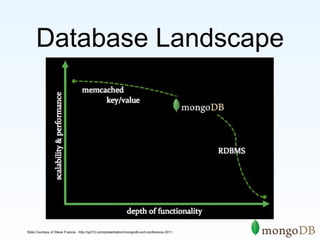
Database Landscape 
Slide Courtesy of Steve Francia - http://spf13.com/presentation/mongodb-sort-conference-2011
MongoDB is: 
Horizontally Scalable 
Document 
Oriented 
{{ aauutthhoorr:: ““sstteevvee””,, 
ddaattee:: nneeww DDaattee(()),, 
tteexxtt:: ““AAbboouutt MMoonnggooDDBB......””,, 
ttaaggss:: [[““tteecchh””,, ““ddaattaabbaassee””]]}} 
Application 
High 
Performance 
Slide Courtesy of Steve Francia - http://spf13.com/presentation/mongodb-sort-conference-2011
“• MongoDB has the best 
features of key/ values stores, 
document databases and 
relational databases in one. 
• John Nunemaker
Schema Design
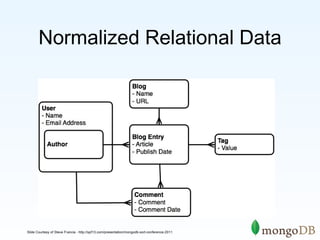
Normalized Relational Data 
Slide Courtesy of Steve Francia - http://spf13.com/presentation/mongodb-sort-conference-2011
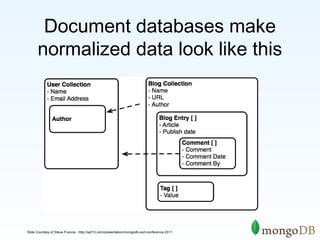
Document databases make 
normalized data look like this 
Slide Courtesy of Steve Francia - http://spf13.com/presentation/mongodb-sort-conference-2011
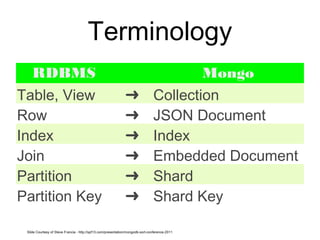
Terminology 
RDBMS Mongo 
Table, View ➜ Collection 
Row ➜ JSON Document 
Index ➜ Index 
Join ➜ Embedded Document 
Partition ➜ Shard 
Partition Key ➜ Shard Key 
Slide Courtesy of Steve Francia - http://spf13.com/presentation/mongodb-sort-conference-2011
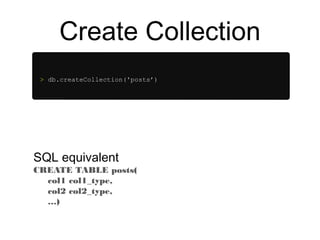
Create Collection 
> db.createCollection('posts’) 
SQL equivalent 
CREATE TABLE posts( 
col1 col1_type, 
col2 col2_type, 
…)
Insert Document 
> p = {author: "roger", 
date: new Date(), 
text: "about mongoDB...", 
tags: ["tech", "databases"]} 
> db.posts.save(p) 
SQL equivalent 
INSERT INTO posts (col1, col2, …) 
VALUES (val1, val2, …)
Querying 
> db.posts.find() 
> { _id : ObjectId("4c4ba5c0672c685e5e8aabf3"), 
author : "roger", 
date : "Sat Jul 24 2010 19:47:11", 
text : "About MongoDB...", 
tags : [ "tech", "databases" ] } 
SQL equivalent 
SELECT * FROM POSTS
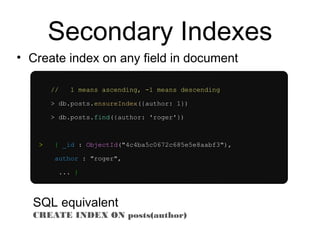
Secondary Indexes 
• Create index on any field in document 
// 1 means ascending, -1 means descending 
> db.posts.ensureIndex({author: 1}) 
> db.posts.find({author: 'roger'}) 
> { _id : ObjectId("4c4ba5c0672c685e5e8aabf3"), 
author : "roger", 
... } 
SQL equivalent 
CREATE INDEX ON posts(author)
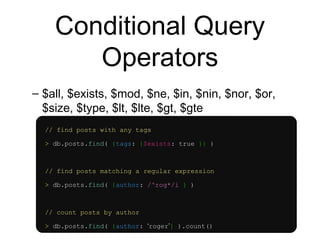
Conditional Query 
Operators 
– $all, $exists, $mod, $ne, $in, $nin, $nor, $or, 
$size, $type, $lt, $lte, $gt, $gte 
// find posts with any tags 
> db.posts.find( {tags: {$exists: true }} ) 
// find posts matching a regular expression 
> db.posts.find( {author: /^rog*/i } ) 
// count posts by author 
> db.posts.find( {author: ‘roger’} ).count()
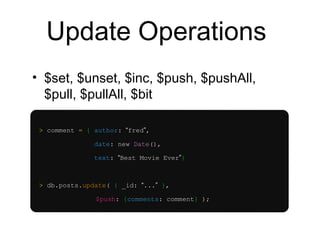
Update Operations 
• $set, $unset, $inc, $push, $pushAll, 
$pull, $pullAll, $bit 
> comment = { author: “fred”, 
date: new Date(), 
text: “Best Movie Ever”} 
> db.posts.update( { _id: “...” }, 
$push: {comments: comment} );
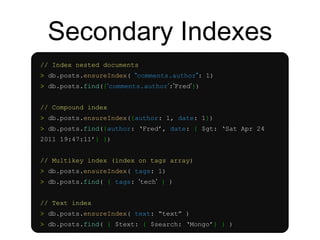
Secondary Indexes 
// Index nested documents 
> db.posts.ensureIndex( “comments.author”: 1) 
> db.posts.find({‘comments.author’:’Fred’}) 
// Compound index 
> db.posts.ensureIndex({author: 1, date: 1}) 
> db.posts.find({author: ‘Fred’, date: { $gt: ‘Sat Apr 24 
2011 19:47:11’} }) 
// Multikey index (index on tags array) 
> db.posts.ensureIndex( tags: 1) 
> db.posts.find( { tags: ‘tech’ } ) 
// Text index 
> db.posts.ensureIndex( text: “text” ) 
> db.posts.find( { $text: { $search: ‘Mongo’} } )
Our Use Case for 
Mongo 
1.We needed to prototype some app 
ideas for a class test in the market. We 
didn’t want a hardened schema. Just 
wanted to get stuff out quick to try it out. 
2.We made sure that real-time analytic 
reporting wasn’t needed. 
3.We were using nodejs on the backend 
so Mongo was a natural fit.
What we gained by using Mongo 
• Faster turnaround in development 
• The flexibility to figure out our schema 
design as we went and change our minds 
often if needed 
• A database that we could scale 
horizontally if needed in the future
What we gave up by using Mongo 
• No multi-document transactions. This means 
We could not guarantee consistency in some 
cases. 
• Can’t write queries that use more than one 
collection. Aggregation framework only works 
on one collection at a time. Joining data has 
to be done programmatically and doesn’t 
scale. 
• Nesting isn’t always possible, and there are 
no foreign key constraints to enforce 
consistency.
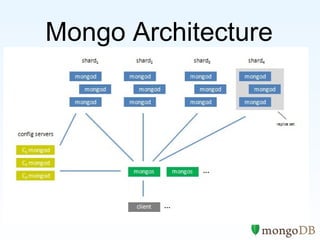
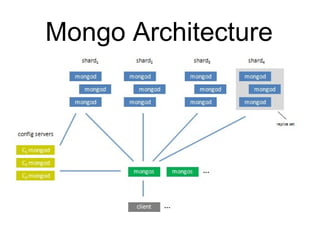
Mongo Architecture
Limitations 
• Max BSON document size is 16MB 
– Mongo provides GridFS to get around this 
• No more than 100 levels of nesting 
• No more than 12 members in a replica set 
http://docs.mongodb.org/manual/reference/limits/
Scaling 
Sharding MongoDB
MongoDB Sharding 
• Shard data without no downtime 
• Automatic balancing as data is written 
• Range based or hash based sharding
Accessing a sharded 
collection 
• Inserts - must have the Shard Key 
• Updates - must have the Shard Key 
• Queries 
• With Shard Key - routed to nodes 
• Without Shard Key - scatter gather 
• Indexed Queries 
• With Shard Key - routed in order 
• Without Shard Key - distributed sort merge
High Availability
MongoDB Replication 
• MongoDB replication like MySQL replication 
(kinda) 
• Asynchronous master/slave 
• Variations 
•Master / slave 
•Replica Sets
Replication features 
• Reads from Primary are always consistent 
• Reads from Secondaries are eventually 
consistent 
• Automatic failover if a Primary fails 
• Automatic recovery when a node joins the set 
• Control of where writes occur
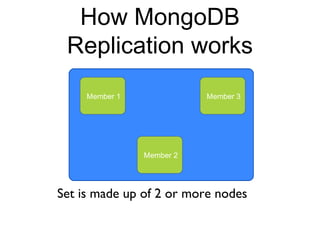
How MongoDB 
Replication works 
Member 1 
Member 2 
Member 3 
Set is made up of 2 or more nodes
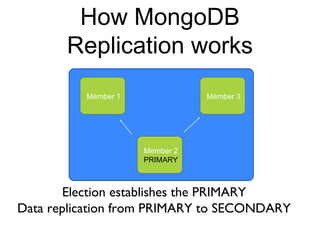
How MongoDB 
Replication works 
Member 1 
Member 2 
PRIMARY 
Member 3 
Election establishes the PRIMARY 
Data replication from PRIMARY to SECONDARY
How MongoDB 
Replication works 
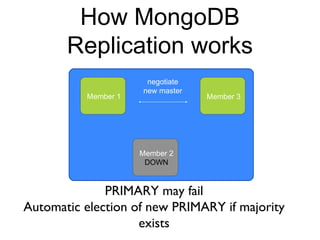
PRIMARY may fail 
Automatic election of new PRIMARY if majority 
exists 
Member 1 
Member 2 
DOWN 
Member 3 
negotiate 
new master
How MongoDB 
Replication works 
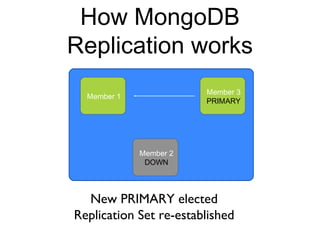
Member 1 
Member 2 
DOWN 
Member 3 
PRIMARY 
New PRIMARY elected 
Replication Set re-established
How MongoDB 
Replication works 
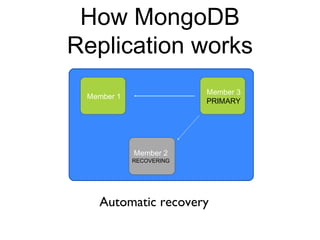
Member 1 
Member 3 
PRIMARY 
Member 2 
RECOVERING 
Automatic recovery
How MongoDB 
Replication works 
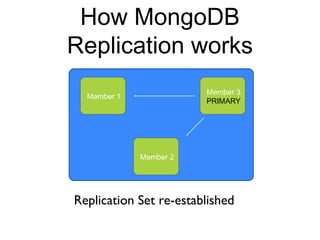
Member 1 
Member 3 
PRIMARY 
Member 2 
Replication Set re-established
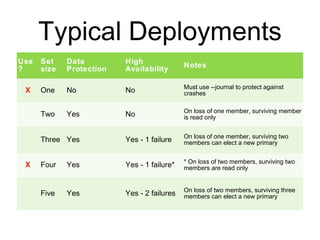
Typical Deployments 
Use 
? 
Set 
size 
Data 
Protection 
High 
Availability Notes 
X One No No Must use --journal to protect against 
crashes 
Two Yes No On loss of one member, surviving member 
is read only 
Three Yes Yes - 1 failure On loss of one member, surviving two 
members can elect a new primary 
X Four Yes Yes - 1 failure* * On loss of two members, surviving two 
members are read only 
Five Yes Yes - 2 failures On loss of two members, surviving three 
members can elect a new primary
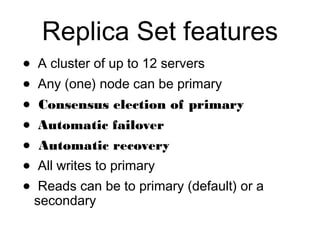
Replica Set features 
• A cluster of up to 12 servers 
• Any (one) node can be primary 
• Consensus election of primary 
• Automatic failover 
• Automatic recovery 
• All writes to primary 
• Reads can be to primary (default) or a 
secondary
Mongo Architecture
MongoDB Pros and Cons

MongoDB Pros and Cons

  • 1.
  • 2.
    My name is John Jenson
  • 3.
    • 12 yearswriting code • 11 years using Oracle • 9 months using Mongo • BYU Alumnus • Principal Engineer @ Cengage • Currently doing MEAN stack dev
  • 4.
    When to use MongoDB?
  • 5.
    1.Don’t want/need arigid schema 1.Need horizontally scalable performance for high loads 1.Make sure you won’t need real-time reporting that aggregates a lot of disparate data
  • 6.
  • 7.
    Photo Meta-Data Problem: •Business needed more flexibility than Oracle could deliver Solution: •Used MongoDB instead of Oracle RReessuullttss:: • Developed application in one sprint cycle • 500% cost reduction compared to Oracle • 900% performance improvement compared to Oracle • http://www.mongodb.com/customers/shutterfly Slide Courtesy of Steve Francia - http://spf13.com/presentation/mongodb-sort-conference-2011
  • 8.
    Online Dictionary Problem: •MySQL could not scale to handle their 5B+ documents Solution: •Switched from MySQL to MongoDB Results: • Massive simplification of code base • Eliminated need for external caching system • 20x performance improvement over MySQL • http://www.mongodb.com/customers/reverb-technologies Slide Courtesy of Steve Francia - http://spf13.com/presentation/mongodb-sort-conference-2011
  • 9.
    E-commerce Problem: •Multi-verticalE-commerce impossible to model (efficiently) in RDBMS Solution: •Switched from MySQL to MongoDB Results: • Massive simplification of code base • Rapidly build, halving time to market (and cost) • Eliminated need for external caching system • 50x+ improvement over MySQL Slide Courtesy of Steve Francia - http://spf13.com/presentation/mongodb-sort-conference-2011
  • 10.
    Mongo’s Philosophy •Mongo tries to provide a good degree of functionality to handle a large set of use cases • sometimes need strong consistency / atomicity • secondary indexes • ad hoc queries
  • 11.
    Had to leaveout a few things in order to scale • No Joins • no choice here. Can’t have joins if we want to scale horizontally • No ACID Transactions • distributed transactions are hard to scale • Mongo does not support multi-document transactions • Only document level atomic operations provided
  • 12.
    MongoDB • JSONDocuments • Querying/Indexing/Updating similar to relational databases • Configurable Consistency • Auto-Sharding
  • 13.
    Database Landscape SlideCourtesy of Steve Francia - http://spf13.com/presentation/mongodb-sort-conference-2011
  • 14.
    MongoDB is: HorizontallyScalable Document Oriented {{ aauutthhoorr:: ““sstteevvee””,, ddaattee:: nneeww DDaattee(()),, tteexxtt:: ““AAbboouutt MMoonnggooDDBB......””,, ttaaggss:: [[““tteecchh””,, ““ddaattaabbaassee””]]}} Application High Performance Slide Courtesy of Steve Francia - http://spf13.com/presentation/mongodb-sort-conference-2011
  • 15.
    “• MongoDB hasthe best features of key/ values stores, document databases and relational databases in one. • John Nunemaker
  • 16.
  • 17.
    Normalized Relational Data Slide Courtesy of Steve Francia - http://spf13.com/presentation/mongodb-sort-conference-2011
  • 18.
    Document databases make normalized data look like this Slide Courtesy of Steve Francia - http://spf13.com/presentation/mongodb-sort-conference-2011
  • 19.
    Terminology RDBMS Mongo Table, View ➜ Collection Row ➜ JSON Document Index ➜ Index Join ➜ Embedded Document Partition ➜ Shard Partition Key ➜ Shard Key Slide Courtesy of Steve Francia - http://spf13.com/presentation/mongodb-sort-conference-2011
  • 20.
    Create Collection >db.createCollection('posts’) SQL equivalent CREATE TABLE posts( col1 col1_type, col2 col2_type, …)
  • 21.
    Insert Document >p = {author: "roger", date: new Date(), text: "about mongoDB...", tags: ["tech", "databases"]} > db.posts.save(p) SQL equivalent INSERT INTO posts (col1, col2, …) VALUES (val1, val2, …)
  • 22.
    Querying > db.posts.find() > { _id : ObjectId("4c4ba5c0672c685e5e8aabf3"), author : "roger", date : "Sat Jul 24 2010 19:47:11", text : "About MongoDB...", tags : [ "tech", "databases" ] } SQL equivalent SELECT * FROM POSTS
  • 23.
    Secondary Indexes •Create index on any field in document // 1 means ascending, -1 means descending > db.posts.ensureIndex({author: 1}) > db.posts.find({author: 'roger'}) > { _id : ObjectId("4c4ba5c0672c685e5e8aabf3"), author : "roger", ... } SQL equivalent CREATE INDEX ON posts(author)
  • 24.
    Conditional Query Operators – $all, $exists, $mod, $ne, $in, $nin, $nor, $or, $size, $type, $lt, $lte, $gt, $gte // find posts with any tags > db.posts.find( {tags: {$exists: true }} ) // find posts matching a regular expression > db.posts.find( {author: /^rog*/i } ) // count posts by author > db.posts.find( {author: ‘roger’} ).count()
  • 25.
    Update Operations •$set, $unset, $inc, $push, $pushAll, $pull, $pullAll, $bit > comment = { author: “fred”, date: new Date(), text: “Best Movie Ever”} > db.posts.update( { _id: “...” }, $push: {comments: comment} );
  • 26.
    Secondary Indexes //Index nested documents > db.posts.ensureIndex( “comments.author”: 1) > db.posts.find({‘comments.author’:’Fred’}) // Compound index > db.posts.ensureIndex({author: 1, date: 1}) > db.posts.find({author: ‘Fred’, date: { $gt: ‘Sat Apr 24 2011 19:47:11’} }) // Multikey index (index on tags array) > db.posts.ensureIndex( tags: 1) > db.posts.find( { tags: ‘tech’ } ) // Text index > db.posts.ensureIndex( text: “text” ) > db.posts.find( { $text: { $search: ‘Mongo’} } )
  • 27.
    Our Use Casefor Mongo 1.We needed to prototype some app ideas for a class test in the market. We didn’t want a hardened schema. Just wanted to get stuff out quick to try it out. 2.We made sure that real-time analytic reporting wasn’t needed. 3.We were using nodejs on the backend so Mongo was a natural fit.
  • 28.
    What we gainedby using Mongo • Faster turnaround in development • The flexibility to figure out our schema design as we went and change our minds often if needed • A database that we could scale horizontally if needed in the future
  • 29.
    What we gaveup by using Mongo • No multi-document transactions. This means We could not guarantee consistency in some cases. • Can’t write queries that use more than one collection. Aggregation framework only works on one collection at a time. Joining data has to be done programmatically and doesn’t scale. • Nesting isn’t always possible, and there are no foreign key constraints to enforce consistency.
  • 30.
  • 31.
    Limitations • MaxBSON document size is 16MB – Mongo provides GridFS to get around this • No more than 100 levels of nesting • No more than 12 members in a replica set http://docs.mongodb.org/manual/reference/limits/
  • 32.
  • 33.
    MongoDB Sharding •Shard data without no downtime • Automatic balancing as data is written • Range based or hash based sharding
  • 34.
    Accessing a sharded collection • Inserts - must have the Shard Key • Updates - must have the Shard Key • Queries • With Shard Key - routed to nodes • Without Shard Key - scatter gather • Indexed Queries • With Shard Key - routed in order • Without Shard Key - distributed sort merge
  • 35.
  • 36.
    MongoDB Replication •MongoDB replication like MySQL replication (kinda) • Asynchronous master/slave • Variations •Master / slave •Replica Sets
  • 37.
    Replication features •Reads from Primary are always consistent • Reads from Secondaries are eventually consistent • Automatic failover if a Primary fails • Automatic recovery when a node joins the set • Control of where writes occur
  • 38.
    How MongoDB Replicationworks Member 1 Member 2 Member 3 Set is made up of 2 or more nodes
  • 39.
    How MongoDB Replicationworks Member 1 Member 2 PRIMARY Member 3 Election establishes the PRIMARY Data replication from PRIMARY to SECONDARY
  • 40.
    How MongoDB Replicationworks PRIMARY may fail Automatic election of new PRIMARY if majority exists Member 1 Member 2 DOWN Member 3 negotiate new master
  • 41.
    How MongoDB Replicationworks Member 1 Member 2 DOWN Member 3 PRIMARY New PRIMARY elected Replication Set re-established
  • 42.
    How MongoDB Replicationworks Member 1 Member 3 PRIMARY Member 2 RECOVERING Automatic recovery
  • 43.
    How MongoDB Replicationworks Member 1 Member 3 PRIMARY Member 2 Replication Set re-established
  • 44.
    Typical Deployments Use ? Set size Data Protection High Availability Notes X One No No Must use --journal to protect against crashes Two Yes No On loss of one member, surviving member is read only Three Yes Yes - 1 failure On loss of one member, surviving two members can elect a new primary X Four Yes Yes - 1 failure* * On loss of two members, surviving two members are read only Five Yes Yes - 2 failures On loss of two members, surviving three members can elect a new primary
  • 45.
    Replica Set features • A cluster of up to 12 servers • Any (one) node can be primary • Consensus election of primary • Automatic failover • Automatic recovery • All writes to primary • Reads can be to primary (default) or a secondary
  • 46.