Scalable Apache for Beginners Aaron Bannert [email_address]  /  [email_address] .com http://www.codemass.com/~aaron/presentations/ apachecon2005/ac2005performance.ppt
Measuring Performance What is  Performance ?
How do we measure performance? Benchmarks Requests per Second Bandwidth Latency Concurrency (Scalability)
Real-world Scenarios Can benchmarks tell us how it will perform in the real world?
What makes a good Web Server? Correctness Reliability Scalability Stability Speed
Correctness Does it conform to the HTTP specification? Does it work with every browser? Does it handle erroneous input gracefully?
Reliability Can you sleep at night? Are you being paged during dinner? It is an appliance?
Scalability Does it handle nominal load? Have you been  Slashdotted ? And did you survive? What is your peak load?
Speed (Latency) Does it  feel  fast? Do pages snap in quickly? Do users often reload pages?
Apache the General Purpose Webserver Apache developers strive for correctness first , and speed second .
Apache 1.3 Fast enough for most sites Particularly on 1 and 2 CPU systems.
Apache 2.0 Adds more features filters threads portability (has excellent Windows support) Scales to much higher loads.
 
Apache HTTP Server Architecture Overview
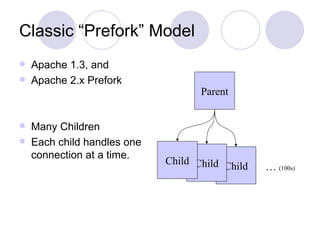
Classic “Prefork” Model Apache 1.3, and Apache 2.x Prefork Many Children Each child handles one connection at a time. Child Parent Child Child …  (100s)
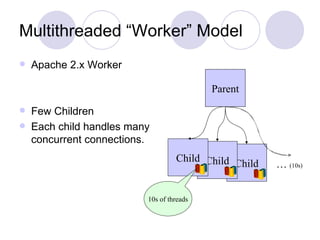
Multithreaded “Worker” Model Apache 2.x Worker Few Children Each child handles many concurrent connections. Child Parent Child Child …  (10s) 10s of threads
Dynamic Content: Modules Extensive API Pluggable Interface Dynamic or Static Linkage
In-process Modules Run from inside the  httpd  process CGI (mod_cgi) mod_perl mod_php mod_python mod_tcl
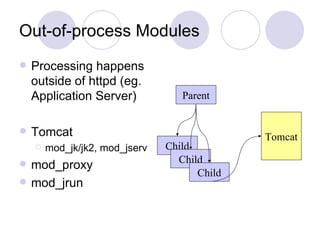
Out-of-process Modules Processing happens outside of httpd (eg. Application Server) Tomcat mod_jk/jk2, mod_jserv mod_proxy mod_jrun Parent Tomcat Child Child Child
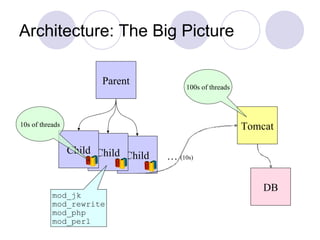
Architecture: The Big Picture Child Parent Child Child …  (10s) 10s of threads Tomcat DB 100s of threads mod_jk mod_rewrite mod_php mod_perl
 
Terms and Definitions Terms from the Documentation and the Configuration
“HTTP” HyperText Transfer Protocol A network protocol used to communicate between  web servers  and  web clients  (eg. a Web Browser).
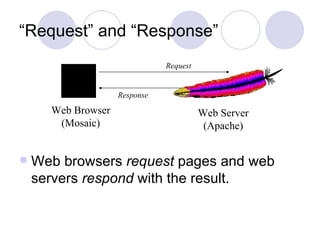
“Request” and “Response” Web browsers  request  pages and web servers  respond  with the result. Web Browser (Mosaic) Web Server (Apache) Request Response
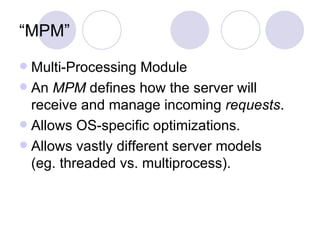
“MPM” Multi-Processing Module An  MPM  defines how the server will receive and manage incoming  requests . Allows OS-specific optimizations. Allows vastly different server models (eg. threaded vs. multiprocess).
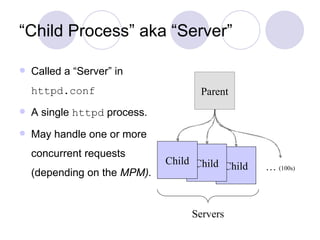
“ Child Process” aka “Server” Called a “Server” in  httpd.conf A single  httpd  process. May handle one or more concurrent requests (depending on the  MPM). Child Parent Child Child …  (100s) Servers
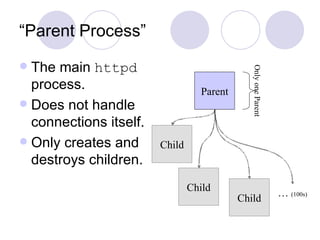
“Parent Process” The main  httpd  process. Does not handle connections itself. Only creates and destroys children. Child Parent Child Child …  (100s) Only one Parent
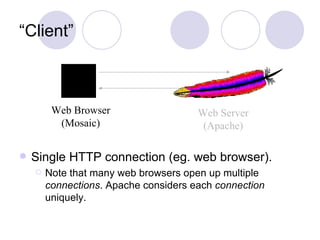
“Client” Single HTTP connection (eg. web browser). Note that many web browsers open up multiple  connections . Apache considers each  connection  uniquely. Web Browser (Mosaic) Web Server (Apache)
“Thread” In multi-threaded MPMs (eg.  Worker ). Each thread handles a single connection. Allows Children to handle many connections at once.
 
Apache Configuration httpd.conf  walkthrough
Prefork MPM Apache 1.3 and Apache 2.x Prefork Each child handles one connection at a time Many children High memory requirements “ You’ll run out of memory before CPU”
Prefork Directives  (Apache 2.x) StartServers MinSpareServers MaxSpareServers MaxClients MaxRequestsPerChild
Worker MPM Apache 2.0 and later Multithreaded within each child Dramatically reduced memory footprint Only a few children  (fewer than prefork)
Worker Directives MinSpareThreads MaxSpareThreads ThreadsPerChild MaxClients MaxRequestsPerChild
KeepAlive Requests Persistent connections Multiple requests over one TCP socket Directives: KeepAlive MaxKeepAliveRequests KeepAliveTimeout
 
Apache 1.3 and 2.x Performance Characteristics Multi-process, Multi-threaded, or Both?
Prefork High memory usage Highly tolerant of faulty modules Highly tolerant of crashing children Fast Well-suited for 1 and 2-CPU systems Tried-and-tested model from Apache 1.3 “You’ll run out of memory before CPU.”
Worker Low to moderate memory usage Moderately tolerant to faulty modules Faulty threads can affect all threads in child Highly-scalable Well-suited for multiple processors Requires a mature threading library (Solaris, AIX, Linux 2.6 and others work well) Memory is no longer the bottleneck.
Important Performance Considerations sendfile() support DNS considerations stat() calls Unnecessary modules
sendfile() Support No more double-copy Zero-copy* Dramatic improvement for static files Available on Linux 2.4.x Solaris 8+ FreeBSD/NetBSD/OpenBSD ... * Zero-copy requires both OS support and NIC driver support.
DNS Considerations HostNameLookups DNS query for each incoming request Use  logresolve  instead. Name-based Allow/Deny clauses Two DNS queries  per request  for each allow/deny clause.
stat() for Symlinks Options FollowSymLinks Symlinks are trusted. SymLinksIfOwnersMatch Must  stat()  and  lstat()  each symlink, yuck!
stat() for .htaccess files AllowOverride stat() for .htaccess in each path component of a request Happens for any AllowOverride Try to disable or limit to specific sub-dirs Avoid use at the DocumentRoot
stat() for Content Negotiation DirectoryIndex Don’t use wildcards like “index” Use something like this instead DirectoryIndex index.html index.php index.shtml mod_negotiation Use a  type-map  instead of MultiViews if possible
Remove Unused Modules Saves Memory Reduces code and data footprint Reduces some processing (eg. filters) Makes calls to  fork()  faster Static modules are faster than dynamic
 
Testing Performance Benchmarking Tools
Some Popular (Free) Tools ab flood httperf JMeter ...and many others
ab Simple Load on a Single URL Comes with Apache Good for sanity check Scales poorly
flood Profile-driven load tester Useful for generating real-world scenarios I co-authored it Part of the httpd-test project at the ASF Built to be highly-scalable Designed to be extremely flexible
JMeter Has a graphical interface Built on Java Part of Apache Jakarta project Depends heavily on JVM performance
Benchmarking Metrics What are we interested in testing? Recall that we want our web server to be Correct Reliable Scalable Stable Fast
Benchmarking Metrics: Correctness No errors No data corruption Protocol compliant Should not be an everyday concern for admins
Benchmarking Metrics: Reliability MTBF - Mean Time Between Failures Difficult to measure programmatically Easy to judge subjectively
Benchmarking Metrics: Scalability Predicted concurrency Maximum concurrent connections Requests per Second (rps) Concurrent Users
Benchmarking Metrics: Stability Consistency, Predictability Errors per Thousand Correctness under Stress Never returns invalid information Common problem with custom web-apps Works well with 10 users, but chokes on 1000.
Benchmarking Metrics: Speed Requests per Second (rps) Latency time until connected time to first byte time to last byte time to close Easy to test with current tools Highly related to Scalability/Concurrency
Method Define the problem eg. Test Max Concurrency, Correctness, etc... Narrow the scope of the problem Simplify the problem Use tools to collect data Come up with a hypothesis Make minimal changes, retest
 
Troubleshooting Common pitfalls and their solutions
Check your error_log The first place to look Increase the LogLevel if needed Make sure to turn it back down (but not off) in production
Check System Health vmstat, systat, iostat, mpstat, lockstat, etc... Check interrupt load NIC might be overloaded Are you swapping memory? A web server should  never  swap Check system logs /var/log/message, /var/log/syslog, etc...
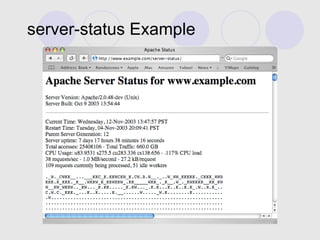
Check Apache Health server-status ExtendedStatus  (see next slide) Verify “httpd -V” ps -elf | grep httpd | wc -l How many httpd processes are running?
server-status Example
Other Possibilities Set up a staging environment Set up duplicate hardware Check for known bugs http://issues.apache.org/
Common Bottlenecks No more File Descriptors Sockets stuck in TIME_WAIT High Memory Use (swapping) CPU Overload Interrupt (IRQ) Overload
File Descriptors Symptoms entry in error_log new httpd children fail to start fork() failing across the system Solutions Increase system-wide limits Increase ulimit settings in  apachectl
TIME_WAIT Symptoms Unable to accept new connections CPU under-utilized, httpd processes sit idle Not Swapping netstat shows huge numbers of sockets in TIME_WAIT Many TIME_WAIT are to be expected Only when new connections are failing is it a problem Decrease system-wide TCP/IP FIN timeout
Memory Overload, Swapping Symptoms Ignore system free memory, it is misleading! Lots of Disk Activity top / free  show high swap usage Load gradually increasing ps  shows processes blocking on Disk I/O Solutions Add more memory Use less dynamic content, cache as much as possible Try the Worker MPM
How much free memory do I really have? Output from  top / free  is misleading. Kernels use buffers File I/O uses cache Programs share memory Explicit shared memory Copy-On-Write after fork() The only time you can be sure is when it starts swapping.
CPU Overload Symptoms top  shows little or no idle CPU time System is  not  Swapping High system load System feels sluggish Much of the CPU time is spent in userspace Solutions Add another CPU, get a faster machine Use less dynamic content, cache as much as possible
Interrupt (IRQ) Overload Symptoms Frequent on big machines (8-CPUs and above) Not Swapping One or two CPUs are busy, the rest are idle Low overall system load Solutions Add another NIC bind it to the first or use two IP addresses in Apache put NICs on different PCI busses if possible
 
Next Generation Improvements
Linux 2.6 NPTL and NGPT Next-Gen Thread Libraries for Linux Available in most modern Linux distros O(1) scheduling patch Preemptive Kernel patch All improvements affect Apache, but the Worker MPM will likely be the most affected.
Solaris 9 and 10 1:1 threads Decreases thread library overhead Improves CPU load sharing sendfile()-like support (since late Solaris 7) Zero-copy
64-bit Native Support Sparc had it for a long time G5s have it (sort-of) AMD64 (aka x86_64) Noticeable improvement in Apache 2.x Increased Requests-per-second Faster 64-bit time calculations Huge Virtual Memory Address-space mmap / sendfile
 
The End Thank You!

Scalable Apache for Beginners

  • 1.
    Scalable Apache forBeginners Aaron Bannert [email_address] / [email_address] .com http://www.codemass.com/~aaron/presentations/ apachecon2005/ac2005performance.ppt
  • 2.
  • 3.
    How do wemeasure performance? Benchmarks Requests per Second Bandwidth Latency Concurrency (Scalability)
  • 4.
    Real-world Scenarios Canbenchmarks tell us how it will perform in the real world?
  • 5.
    What makes agood Web Server? Correctness Reliability Scalability Stability Speed
  • 6.
    Correctness Does itconform to the HTTP specification? Does it work with every browser? Does it handle erroneous input gracefully?
  • 7.
    Reliability Can yousleep at night? Are you being paged during dinner? It is an appliance?
  • 8.
    Scalability Does ithandle nominal load? Have you been Slashdotted ? And did you survive? What is your peak load?
  • 9.
    Speed (Latency) Doesit feel fast? Do pages snap in quickly? Do users often reload pages?
  • 10.
    Apache the GeneralPurpose Webserver Apache developers strive for correctness first , and speed second .
  • 11.
    Apache 1.3 Fastenough for most sites Particularly on 1 and 2 CPU systems.
  • 12.
    Apache 2.0 Addsmore features filters threads portability (has excellent Windows support) Scales to much higher loads.
  • 13.
  • 14.
    Apache HTTP ServerArchitecture Overview
  • 15.
    Classic “Prefork” ModelApache 1.3, and Apache 2.x Prefork Many Children Each child handles one connection at a time. Child Parent Child Child … (100s)
  • 16.
    Multithreaded “Worker” ModelApache 2.x Worker Few Children Each child handles many concurrent connections. Child Parent Child Child … (10s) 10s of threads
  • 17.
    Dynamic Content: ModulesExtensive API Pluggable Interface Dynamic or Static Linkage
  • 18.
    In-process Modules Runfrom inside the httpd process CGI (mod_cgi) mod_perl mod_php mod_python mod_tcl
  • 19.
    Out-of-process Modules Processinghappens outside of httpd (eg. Application Server) Tomcat mod_jk/jk2, mod_jserv mod_proxy mod_jrun Parent Tomcat Child Child Child
  • 20.
    Architecture: The BigPicture Child Parent Child Child … (10s) 10s of threads Tomcat DB 100s of threads mod_jk mod_rewrite mod_php mod_perl
  • 21.
  • 22.
    Terms and DefinitionsTerms from the Documentation and the Configuration
  • 23.
    “HTTP” HyperText TransferProtocol A network protocol used to communicate between web servers and web clients (eg. a Web Browser).
  • 24.
    “Request” and “Response”Web browsers request pages and web servers respond with the result. Web Browser (Mosaic) Web Server (Apache) Request Response
  • 25.
    “MPM” Multi-Processing ModuleAn MPM defines how the server will receive and manage incoming requests . Allows OS-specific optimizations. Allows vastly different server models (eg. threaded vs. multiprocess).
  • 26.
    “ Child Process”aka “Server” Called a “Server” in httpd.conf A single httpd process. May handle one or more concurrent requests (depending on the MPM). Child Parent Child Child … (100s) Servers
  • 27.
    “Parent Process” Themain httpd process. Does not handle connections itself. Only creates and destroys children. Child Parent Child Child … (100s) Only one Parent
  • 28.
    “Client” Single HTTPconnection (eg. web browser). Note that many web browsers open up multiple connections . Apache considers each connection uniquely. Web Browser (Mosaic) Web Server (Apache)
  • 29.
    “Thread” In multi-threadedMPMs (eg. Worker ). Each thread handles a single connection. Allows Children to handle many connections at once.
  • 30.
  • 31.
  • 32.
    Prefork MPM Apache1.3 and Apache 2.x Prefork Each child handles one connection at a time Many children High memory requirements “ You’ll run out of memory before CPU”
  • 33.
    Prefork Directives (Apache 2.x) StartServers MinSpareServers MaxSpareServers MaxClients MaxRequestsPerChild
  • 34.
    Worker MPM Apache2.0 and later Multithreaded within each child Dramatically reduced memory footprint Only a few children (fewer than prefork)
  • 35.
    Worker Directives MinSpareThreadsMaxSpareThreads ThreadsPerChild MaxClients MaxRequestsPerChild
  • 36.
    KeepAlive Requests Persistentconnections Multiple requests over one TCP socket Directives: KeepAlive MaxKeepAliveRequests KeepAliveTimeout
  • 37.
  • 38.
    Apache 1.3 and2.x Performance Characteristics Multi-process, Multi-threaded, or Both?
  • 39.
    Prefork High memoryusage Highly tolerant of faulty modules Highly tolerant of crashing children Fast Well-suited for 1 and 2-CPU systems Tried-and-tested model from Apache 1.3 “You’ll run out of memory before CPU.”
  • 40.
    Worker Low tomoderate memory usage Moderately tolerant to faulty modules Faulty threads can affect all threads in child Highly-scalable Well-suited for multiple processors Requires a mature threading library (Solaris, AIX, Linux 2.6 and others work well) Memory is no longer the bottleneck.
  • 41.
    Important Performance Considerationssendfile() support DNS considerations stat() calls Unnecessary modules
  • 42.
    sendfile() Support Nomore double-copy Zero-copy* Dramatic improvement for static files Available on Linux 2.4.x Solaris 8+ FreeBSD/NetBSD/OpenBSD ... * Zero-copy requires both OS support and NIC driver support.
  • 43.
    DNS Considerations HostNameLookupsDNS query for each incoming request Use logresolve instead. Name-based Allow/Deny clauses Two DNS queries per request for each allow/deny clause.
  • 44.
    stat() for SymlinksOptions FollowSymLinks Symlinks are trusted. SymLinksIfOwnersMatch Must stat() and lstat() each symlink, yuck!
  • 45.
    stat() for .htaccessfiles AllowOverride stat() for .htaccess in each path component of a request Happens for any AllowOverride Try to disable or limit to specific sub-dirs Avoid use at the DocumentRoot
  • 46.
    stat() for ContentNegotiation DirectoryIndex Don’t use wildcards like “index” Use something like this instead DirectoryIndex index.html index.php index.shtml mod_negotiation Use a type-map instead of MultiViews if possible
  • 47.
    Remove Unused ModulesSaves Memory Reduces code and data footprint Reduces some processing (eg. filters) Makes calls to fork() faster Static modules are faster than dynamic
  • 48.
  • 49.
  • 50.
    Some Popular (Free)Tools ab flood httperf JMeter ...and many others
  • 51.
    ab Simple Loadon a Single URL Comes with Apache Good for sanity check Scales poorly
  • 52.
    flood Profile-driven loadtester Useful for generating real-world scenarios I co-authored it Part of the httpd-test project at the ASF Built to be highly-scalable Designed to be extremely flexible
  • 53.
    JMeter Has agraphical interface Built on Java Part of Apache Jakarta project Depends heavily on JVM performance
  • 54.
    Benchmarking Metrics Whatare we interested in testing? Recall that we want our web server to be Correct Reliable Scalable Stable Fast
  • 55.
    Benchmarking Metrics: CorrectnessNo errors No data corruption Protocol compliant Should not be an everyday concern for admins
  • 56.
    Benchmarking Metrics: ReliabilityMTBF - Mean Time Between Failures Difficult to measure programmatically Easy to judge subjectively
  • 57.
    Benchmarking Metrics: ScalabilityPredicted concurrency Maximum concurrent connections Requests per Second (rps) Concurrent Users
  • 58.
    Benchmarking Metrics: StabilityConsistency, Predictability Errors per Thousand Correctness under Stress Never returns invalid information Common problem with custom web-apps Works well with 10 users, but chokes on 1000.
  • 59.
    Benchmarking Metrics: SpeedRequests per Second (rps) Latency time until connected time to first byte time to last byte time to close Easy to test with current tools Highly related to Scalability/Concurrency
  • 60.
    Method Define theproblem eg. Test Max Concurrency, Correctness, etc... Narrow the scope of the problem Simplify the problem Use tools to collect data Come up with a hypothesis Make minimal changes, retest
  • 61.
  • 62.
  • 63.
    Check your error_logThe first place to look Increase the LogLevel if needed Make sure to turn it back down (but not off) in production
  • 64.
    Check System Healthvmstat, systat, iostat, mpstat, lockstat, etc... Check interrupt load NIC might be overloaded Are you swapping memory? A web server should never swap Check system logs /var/log/message, /var/log/syslog, etc...
  • 65.
    Check Apache Healthserver-status ExtendedStatus (see next slide) Verify “httpd -V” ps -elf | grep httpd | wc -l How many httpd processes are running?
  • 66.
  • 67.
    Other Possibilities Setup a staging environment Set up duplicate hardware Check for known bugs http://issues.apache.org/
  • 68.
    Common Bottlenecks Nomore File Descriptors Sockets stuck in TIME_WAIT High Memory Use (swapping) CPU Overload Interrupt (IRQ) Overload
  • 69.
    File Descriptors Symptomsentry in error_log new httpd children fail to start fork() failing across the system Solutions Increase system-wide limits Increase ulimit settings in apachectl
  • 70.
    TIME_WAIT Symptoms Unableto accept new connections CPU under-utilized, httpd processes sit idle Not Swapping netstat shows huge numbers of sockets in TIME_WAIT Many TIME_WAIT are to be expected Only when new connections are failing is it a problem Decrease system-wide TCP/IP FIN timeout
  • 71.
    Memory Overload, SwappingSymptoms Ignore system free memory, it is misleading! Lots of Disk Activity top / free show high swap usage Load gradually increasing ps shows processes blocking on Disk I/O Solutions Add more memory Use less dynamic content, cache as much as possible Try the Worker MPM
  • 72.
    How much freememory do I really have? Output from top / free is misleading. Kernels use buffers File I/O uses cache Programs share memory Explicit shared memory Copy-On-Write after fork() The only time you can be sure is when it starts swapping.
  • 73.
    CPU Overload Symptomstop shows little or no idle CPU time System is not Swapping High system load System feels sluggish Much of the CPU time is spent in userspace Solutions Add another CPU, get a faster machine Use less dynamic content, cache as much as possible
  • 74.
    Interrupt (IRQ) OverloadSymptoms Frequent on big machines (8-CPUs and above) Not Swapping One or two CPUs are busy, the rest are idle Low overall system load Solutions Add another NIC bind it to the first or use two IP addresses in Apache put NICs on different PCI busses if possible
  • 75.
  • 76.
  • 77.
    Linux 2.6 NPTLand NGPT Next-Gen Thread Libraries for Linux Available in most modern Linux distros O(1) scheduling patch Preemptive Kernel patch All improvements affect Apache, but the Worker MPM will likely be the most affected.
  • 78.
    Solaris 9 and10 1:1 threads Decreases thread library overhead Improves CPU load sharing sendfile()-like support (since late Solaris 7) Zero-copy
  • 79.
    64-bit Native SupportSparc had it for a long time G5s have it (sort-of) AMD64 (aka x86_64) Noticeable improvement in Apache 2.x Increased Requests-per-second Faster 64-bit time calculations Huge Virtual Memory Address-space mmap / sendfile
  • 80.
  • 81.

Editor's Notes

  • #2 © 2005 Aaron Bannert Except where otherwise noted, this presentation is licensed under the Creative Commons Attribution-NonCommercial-NoDerivs 2.5 License, available here: http://creativecommons.org/licenses/by-nc-nd/2.5/
  • #5 Benchmarks are a valuable tool for testing performance. All benchmarks strive to some degree to represent real-world scenarios. The key is knowing how well your benchmarks represent your workload. The accuracy of your benchmarks will directly affect your ability to improve your system using those results.
  • #6 In decreasing order of importance, these are the most important values of a production web server.
  • #7 It MUST conform to the HTTP spec. It should be flexible with input and strict with output.
  • #8 We don’t want our web servers waking us up in the middle of the night or requiring constant attention. We want a web server that we set up once and never touch again. We want this thing to behave like an appliance, never breaking down.
  • #9 Many systems are deployed without significant scalability testing. This is unfortunate, since these are the sites that fail when uptime is most critical.
  • #10 Although Latency and Concurrency are different values that we strive to achieve in a web server, they are actually very closely related. Often, as a site struggles to serve more and more concurrent users, the speed at which each page is served will increase. One critical point is the point when users begin to hit stop on their browsers and reload the page. This can place even more load on an already strained system, causing further service denial.
  • #34 StartServer - The number of child processes to create at start-time. MinSpareServer - The minimum number of idle children to have at any time. MaxSpareServer - The maximum number of idle children to have at any time. MaxClients - The maximum number of concurrent client connections to allow at any time. MaxRequestsPerChild - The maximum number of requests that each child is allowed to serve before it must terminate and be replaced. Useful for starting with a clean slate every once in awhile, and particular useful for buggy 3rd party modules that leak precious system resources.
  • #36 MinSpareThreads - The minimum number of idle threads to allow at any time across all children. MaxSpareThreads - The maximum number of idle threads to allow at any time across all children. ThreadsPerChild - The number of threads within each child. MaxClients - The maximum number of concurrent client connections to allow at any time. MaxRequestsPerChild - The maximum number of requests that each child is allowed to serve before it must terminate and be replaced. Useful for starting with a clean slate every once in awhile, and particular useful for buggy 3rd party modules that leak precious system resources.
  • #37 KeepAlive - Enable or Disable KeepAlive suport. MaxKeepAliveRequests - The maximum number of requests to allow across one persistent TCP/IP connection. KeepAliveTimeout - The maximum amount of time to wait between requests on one persistent TCP/IP connection.
  • #43 If you serve a lot of static content (eg. html pages, images, downloaded files, etc) then you should seriously consider running under an OS that supports sendfile. Double-copy is what happens when a process reads data from a file and sends it to a network device. The first copy happens when the kernel reads the file into the userspace process memory area. The second copy happens when the kernel copies the data back out of userspace into kernel space, forms a full data packet, and then copies that to the network card. When sendfile is involved, the process simply instructs the kernel to send a particular file out to a network connection. The kernel is then able to skip one of the copy steps, dramatically decreasing processing. In Apache 2.0 is can actually be much worse than double-copy, since filters that manipulate data sometimes need a third or subsequent copy. Zero-copy is the best-case scenario, since that is when the kernel and the network card cooperate together to read and assemble data directly from a disk straight to the network. The data can actually pass to a network socket without ever having to be copied into main memory. Modern UNIX (and Windows) operating systems support this, but it is important that the network driver also have support for this, otherwise you fall back to simple sendfile() support.
  • #44 HostNameLookups are disabled by default since Apache 1.3. If you need to get equivalent functionality, the logresolve program that comes with Apache will often suffice. It is suggested that the processing occur on a different box than the web server, so as to not adversely affect server performance. If possible, restrict Allow/Deny clauses to a small set of users and directory locations and only use IP addresses.
  • #45 By default, Apache will check each path component of a URL with stat() to see if it is a symlink. This doesn’t happen if FollowSymLinks is enabled, since symlinks are simply trusted. However, If the SymLinksIfOwnersMatch Option is enabled in a directory, then each stat() call that results in a symlink will also have lstat() called on it. To reduce the number of system calls per request, avoid using symlinks, or try to isolate them to a place that you trust so that you do not have to incur the extra stat()+lstat() penalty across the entire DocumentRoot hierarchy.
  • #46 If you don’t want any .htaccess support, use “AllowOverride None” and you will get the best performance. If that is not possible, try to restruct .htaccess support to a certain part of your directory-space.
  • #47 DirectoryIndex is a very handy feature of Apache, but if you want to squeeze a little more performance out of Apache then you might considering disabling it and referring to all pages directly. An in-depth discussion of the features and benefits of mod_negotiation is outside the scope of this presentation, however if you wish to use this wonderful feature, you might consider using a type-map instead of MultiViews for the sake of performance.
  • #48 Read the documentation about build-configuration. Specifically the configure parameter --enable-mods-static, --enable-static-apr, etc are useful for improving performance in a stable server configuration where you don’t need dynamic module support or dynamic library support.
  • #51 Note that these are only freely-available or open-source benchmarking tools. There are a number of commercial tools available, but those are outside the scope of this presentation.
  • #52 Ab is probably already installed on your system. It is great for a quick check to see if your system can stand up to minimal load.
  • #57 If you’re spending a lot of time babying your system, monitoring log files and restarting Apache, then you might have a reliability problem. On the other hand, if the system runs so smoothly that you hardly notice it, then chances are you built yourself a reliable system. This isn’t so much something that can change overnight, but is more a long-term goal of every administrator.
  • #58 The main difference between the RPS and the Concurrent User count is the way the website is used. Typical users will load a page containing many graphics, and then they will appear idle as they interact with that page. The server is only involved when there is network activity, when a page is being loaded. The number of Concurrent Users is the total number of users visiting the site over any time period, even if they are idly reading the text of the webpage and not using network or server resources.
  • #59 Predicting all the ways your server will be stressed is very difficult. At best one might hope to cover enough ground to be able to predict how the server will respond under a few important conditions, and feel confident that it will remain healthy. The worse case scenario is a deployment that fails catastrophically under very-high load but not under artificial load conditions.
  • #60 Latency is a very important factor in the user experience. Pages that snap in to place quickly allow a user to quickly navigate a site without any delays. Even a short delay can frustrate a user. The longer a delay, the more likely a user will try to reload a page in their browser, or perhaps leave the site entirely.