Docker Container
Orchestration
@dhilipsiva
Tech Lead, Full-Stack & DevOps - @Appknox
http://dhilipsiva.com
dhilipsiva@gmail.com
Container Developers
Meetup Bangalore
Meetup #3 - Dockerizing Applications
Docker Orchestration tools
https://www.meetup.com/Container-Developers-
Meetup-Bangalore/events/233529360/
@dhilipsiva
Tech Lead, Full-Stack & DevOps - @Appknox
I code for Web, Mobile, Embedded & IoT. Open-
Source Fanatic. Big Data & Machine Learning
Enthusiast. Dad. Atheist
So primarily a Developer + little bit of this & that
Jack of all trades & Master of none
I have no idea what I am
talking about
If you think that I got something wrong, then I
probably am. So please feel free to correct me
After all, it is the mistakes and the lessons we
learn from it - are the very things that de ne us
Constructive criticism is more than welcomed!
Orchestration
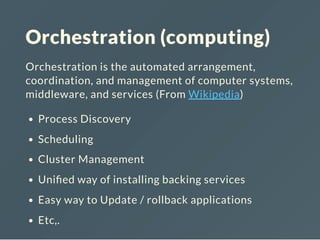
Orchestration (computing)
Orchestration is the automated arrangement,
coordination, and management of computer systems,
middleware, and services (From Wikipedia)
Process Discovery
Scheduling
Cluster Management
Uni ed way of installing backing services
Easy way to Update / rollback applications
Etc,.
Orchestration Tools
Container - Speci c tools
Kubernetes, Marathon, Chef Ironfan, Rancher,
Helios, Ansible Container, Swarm & SwarmKit,
Shipper, Azk, maestro-ng, Maestro,
Others
Ansible, OpenStack Heat, Python Fabric, Chef,
Puppet, Serf, Archipel, governor, Gru, Circuit, Rex
Kubernetes
There is a detailed Hands-On sessions on
Kubernetes this Afternoon
Docker Basics is an absolute requirement.
If you are not comfortable with Basics of Docker,
please attend Anand Gothe's Docker by example
Session
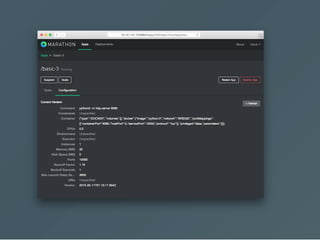
Marathon
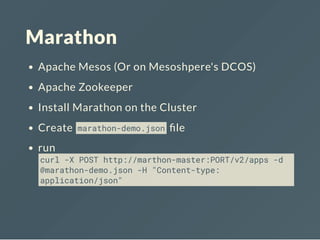
Apache Mesos (Or on Mesoshpere's DCOS)
Apache Zookeeper
Install Marathon on the Cluster
Create marathon-demo.json le
run
curl -X POST http://marthon-master:PORT/v2/apps -d
@marathon-demo.json -H "Content-type:
application/json"
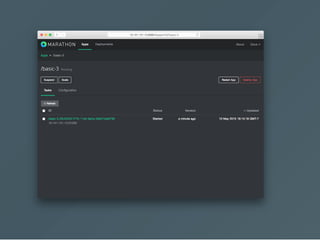
basic-3.json
{
"id": "marathon-demo",
"cmd": "python3 -m http.server 8080",
"cpus": 0.5,
"mem": 32.0,
"container": {
"type": "DOCKER",
"docker": {
"image": "python:3",
"network": "BRIDGE",
"portMappings": [
{ "containerPort": 8080, "hostPort": 0 }
]
}
}
}
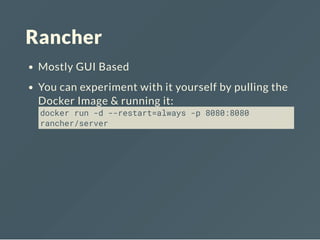
Rancher
Mostly GUI Based
You can experiment with it yourself by pulling the
Docker Image & running it:
docker run -d --restart=always -p 8080:8080
rancher/server
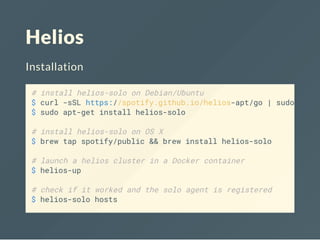
Helios
Installation
# install helios-solo on Debian/Ubuntu
$ curl -sSL https://spotify.github.io/helios-apt/go | sudo sh -
$ sudo apt-get install helios-solo
# install helios-solo on OS X
$ brew tap spotify/public && brew install helios-solo
# launch a helios cluster in a Docker container
$ helios-up
# check if it worked and the solo agent is registered
$ helios-solo hosts
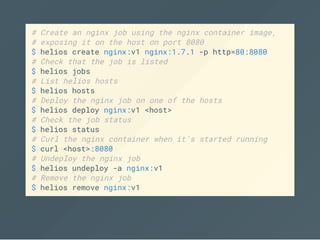
# Create an nginx job using the nginx container image,
# exposing it on the host on port 8080
$ helios create nginx:v1 nginx:1.7.1 -p http=80:8080
# Check that the job is listed
$ helios jobs
# List helios hosts
$ helios hosts
# Deploy the nginx job on one of the hosts
$ helios deploy nginx:v1 <host>
# Check the job status
$ helios status
# Curl the nginx container when it's started running
$ curl <host>:8080
# Undeploy the nginx job
$ helios undeploy -a nginx:v1
# Remove the nginx job
$ helios remove nginx:v1
Ansible Container
$ [sudo] pip install ansible-container
$ ansible-container init
$ ansible-container build
$ ansible-container run
$ ansible-container push
$ ansible-container shipit
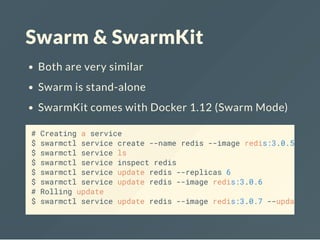
Swarm & SwarmKit
Both are very similar
Swarm is stand-alone
SwarmKit comes with Docker 1.12 (Swarm Mode)
# Creating a service
$ swarmctl service create --name redis --image redis:3.0.5
$ swarmctl service ls
$ swarmctl service inspect redis
$ swarmctl service update redis --replicas 6
$ swarmctl service update redis --image redis:3.0.6
# Rolling update
$ swarmctl service update redis --image redis:3.0.7 --update
Shipper
shipper is a fabric for docker - tool for orchestrating
docker containers. Supports parallel execution and
can generate command line interface
from shipper import Shipper, run, command
@command
def build(tag, path):
s = Shipper()
s.build(tag=tag, path=path)
@command
def ps(all=False, running=True):
s = Shipper(["host-a", "host-b"])
print s.containers(pretty=True, all=all, running=running)
@command
def start(image, command, ports=None):
if ports:
ports = ports.split(",")
s = Shipper()
s.run(image, command, ports=ports, once=True)
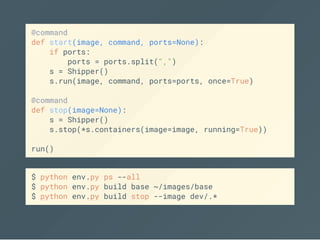
@command
def stop(image=None):
s = Shipper()
s.stop(*s.containers(image=image, running=True))
run()
$ python env.py ps --all
$ python env.py build base ~/images/base
$ python env.py build stop --image dev/.*
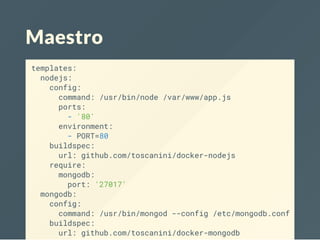
Maestro
templates:
nodejs:
config:
command: /usr/bin/node /var/www/app.js
ports:
- '80'
environment:
- PORT=80
buildspec:
url: github.com/toscanini/docker-nodejs
require:
mongodb:
port: '27017'
mongodb:
config:
command: /usr/bin/mongod --config /etc/mongodb.conf
buildspec:
url: github.com/toscanini/docker-mongodb
Maestro provides the ability to easily launch,
orchestrate and manage mulitple Docker containers
as single unit.
maestro build
maestro start [node_name]
maestro stop [node_name]
maestro run template [commandline]
maestro ps
maestro destroy
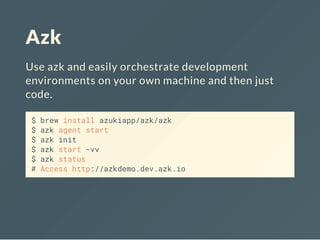
Azk
Use azk and easily orchestrate development
environments on your own machine and then just
code.
$ brew install azukiapp/azk/azk
$ azk agent start
$ azk init
$ azk start -vv
$ azk status
# Access http://azkdemo.dev.azk.io
/**
* Documentation: http://docs.azk.io/Azkfile.js
*/
// Adds the systems that shape your system
systems({
azkdemo: {
// Dependent systems
depends: [],
// More images: http://images.azk.io
image: {"docker": "azukiapp/node:0.12"},
// Steps to execute before running instances
provision: [
"npm install",
],
workdir: "/azk/#{manifest.dir}",
shell: "/bin/bash",
command: ["npm", "start"],
wait: {"retry": 20, "timeout": 1000},
mounts: {
'/azk/#{manifest.dir}': path("."),
'/azk/#{manifest.dir}/node_modules': persistent("node-modu
Other things that you might
be interested in
Dokku, Deis, Flynn, Fabric8, Tsuru, Empire, PAZ,
Paasta, Cocaine, AWSbox
Thanks!
https://github.com/dhilipsiva/talks
Copyright © 2016 dhilipsiva
This copy is released under the MIT License
Source Code
Questions
http://dhilipsiva.com
dhilipsiva@gmail.com

Container (Docker) Orchestration Tools

  • 1.
    Docker Container Orchestration @dhilipsiva Tech Lead,Full-Stack & DevOps - @Appknox http://dhilipsiva.com dhilipsiva@gmail.com
  • 2.
    Container Developers Meetup Bangalore Meetup#3 - Dockerizing Applications Docker Orchestration tools https://www.meetup.com/Container-Developers- Meetup-Bangalore/events/233529360/
  • 3.
    @dhilipsiva Tech Lead, Full-Stack& DevOps - @Appknox I code for Web, Mobile, Embedded & IoT. Open- Source Fanatic. Big Data & Machine Learning Enthusiast. Dad. Atheist So primarily a Developer + little bit of this & that Jack of all trades & Master of none
  • 4.
    I have noidea what I am talking about If you think that I got something wrong, then I probably am. So please feel free to correct me After all, it is the mistakes and the lessons we learn from it - are the very things that de ne us Constructive criticism is more than welcomed!
  • 5.
  • 6.
    Orchestration (computing) Orchestration isthe automated arrangement, coordination, and management of computer systems, middleware, and services (From Wikipedia) Process Discovery Scheduling Cluster Management Uni ed way of installing backing services Easy way to Update / rollback applications Etc,.
  • 7.
    Orchestration Tools Container -Speci c tools Kubernetes, Marathon, Chef Ironfan, Rancher, Helios, Ansible Container, Swarm & SwarmKit, Shipper, Azk, maestro-ng, Maestro, Others Ansible, OpenStack Heat, Python Fabric, Chef, Puppet, Serf, Archipel, governor, Gru, Circuit, Rex
  • 8.
    Kubernetes There is adetailed Hands-On sessions on Kubernetes this Afternoon Docker Basics is an absolute requirement. If you are not comfortable with Basics of Docker, please attend Anand Gothe's Docker by example Session
  • 9.
    Marathon Apache Mesos (Oron Mesoshpere's DCOS) Apache Zookeeper Install Marathon on the Cluster Create marathon-demo.json le run curl -X POST http://marthon-master:PORT/v2/apps -d @marathon-demo.json -H "Content-type: application/json"
  • 10.
    basic-3.json { "id": "marathon-demo", "cmd": "python3-m http.server 8080", "cpus": 0.5, "mem": 32.0, "container": { "type": "DOCKER", "docker": { "image": "python:3", "network": "BRIDGE", "portMappings": [ { "containerPort": 8080, "hostPort": 0 } ] } } }
  • 13.
    Rancher Mostly GUI Based Youcan experiment with it yourself by pulling the Docker Image & running it: docker run -d --restart=always -p 8080:8080 rancher/server
  • 14.
    Helios Installation # install helios-soloon Debian/Ubuntu $ curl -sSL https://spotify.github.io/helios-apt/go | sudo sh - $ sudo apt-get install helios-solo # install helios-solo on OS X $ brew tap spotify/public && brew install helios-solo # launch a helios cluster in a Docker container $ helios-up # check if it worked and the solo agent is registered $ helios-solo hosts
  • 15.
    # Create annginx job using the nginx container image, # exposing it on the host on port 8080 $ helios create nginx:v1 nginx:1.7.1 -p http=80:8080 # Check that the job is listed $ helios jobs # List helios hosts $ helios hosts # Deploy the nginx job on one of the hosts $ helios deploy nginx:v1 <host> # Check the job status $ helios status # Curl the nginx container when it's started running $ curl <host>:8080 # Undeploy the nginx job $ helios undeploy -a nginx:v1 # Remove the nginx job $ helios remove nginx:v1
  • 16.
    Ansible Container $ [sudo]pip install ansible-container $ ansible-container init $ ansible-container build $ ansible-container run $ ansible-container push $ ansible-container shipit
  • 17.
    Swarm & SwarmKit Bothare very similar Swarm is stand-alone SwarmKit comes with Docker 1.12 (Swarm Mode) # Creating a service $ swarmctl service create --name redis --image redis:3.0.5 $ swarmctl service ls $ swarmctl service inspect redis $ swarmctl service update redis --replicas 6 $ swarmctl service update redis --image redis:3.0.6 # Rolling update $ swarmctl service update redis --image redis:3.0.7 --update
  • 18.
    Shipper shipper is afabric for docker - tool for orchestrating docker containers. Supports parallel execution and can generate command line interface from shipper import Shipper, run, command @command def build(tag, path): s = Shipper() s.build(tag=tag, path=path) @command def ps(all=False, running=True): s = Shipper(["host-a", "host-b"]) print s.containers(pretty=True, all=all, running=running)
  • 19.
    @command def start(image, command,ports=None): if ports: ports = ports.split(",") s = Shipper() s.run(image, command, ports=ports, once=True) @command def stop(image=None): s = Shipper() s.stop(*s.containers(image=image, running=True)) run() $ python env.py ps --all $ python env.py build base ~/images/base $ python env.py build stop --image dev/.*
  • 20.
    Maestro templates: nodejs: config: command: /usr/bin/node /var/www/app.js ports: -'80' environment: - PORT=80 buildspec: url: github.com/toscanini/docker-nodejs require: mongodb: port: '27017' mongodb: config: command: /usr/bin/mongod --config /etc/mongodb.conf buildspec: url: github.com/toscanini/docker-mongodb
  • 21.
    Maestro provides theability to easily launch, orchestrate and manage mulitple Docker containers as single unit. maestro build maestro start [node_name] maestro stop [node_name] maestro run template [commandline] maestro ps maestro destroy
  • 22.
    Azk Use azk andeasily orchestrate development environments on your own machine and then just code. $ brew install azukiapp/azk/azk $ azk agent start $ azk init $ azk start -vv $ azk status # Access http://azkdemo.dev.azk.io
  • 23.
    /** * Documentation: http://docs.azk.io/Azkfile.js */ //Adds the systems that shape your system systems({ azkdemo: { // Dependent systems depends: [], // More images: http://images.azk.io image: {"docker": "azukiapp/node:0.12"}, // Steps to execute before running instances provision: [ "npm install", ], workdir: "/azk/#{manifest.dir}", shell: "/bin/bash", command: ["npm", "start"], wait: {"retry": 20, "timeout": 1000}, mounts: { '/azk/#{manifest.dir}': path("."), '/azk/#{manifest.dir}/node_modules': persistent("node-modu
  • 24.
    Other things thatyou might be interested in Dokku, Deis, Flynn, Fabric8, Tsuru, Empire, PAZ, Paasta, Cocaine, AWSbox
  • 25.
    Thanks! https://github.com/dhilipsiva/talks Copyright © 2016dhilipsiva This copy is released under the MIT License Source Code Questions http://dhilipsiva.com dhilipsiva@gmail.com