Unit 4—Lesson 7:
Saving Data
Saving data
View Model
User action Update
Update Notify
Controller
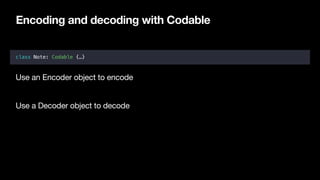
Encoding and decoding with Codable
class Note: Codable {…}
Use an Encoder object to encode

Use a Decoder object to decode
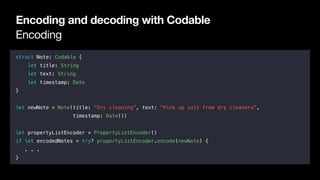
Encoding
Encoding and decoding with Codable
struct Note: Codable {
let title: String
let text: String
let timestamp: Date
}
let newNote = Note(title: "Dry cleaning", text: "Pick up suit from dry cleaners",
timestamp: Date())
let propertyListEncoder = PropertyListEncoder()
if let encodedNotes = try? propertyListEncoder.encode(newNote) {
. . .
}
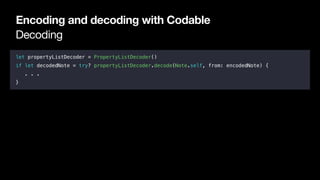
Decoding
Encoding and decoding with Codable
let propertyListDecoder = PropertyListDecoder()
if let decodedNote = try? propertyListDecoder.decode(Note.self, from: encodedNote) {
. . .
}
App sandbox
App sandbox
Sandboxing
Writing data to a file
App File Manager
Documents
Documents
Documents
Documents directory
Writing data to a file
let documentsDirectory = FileManager.default.urls(for: .documentDirectory,
in: .userDomainMask).first!
let archiveURL =
documentsDirectory.appendingPathComponent("appData").appendingPathExtension("plist")
Writing the data
Writing data to a file
let documentsDirectory = FileManager.default.urls(for: .documentDirectory,
in: .userDomainMask).first!
let archiveURL =
documentsDirectory.appendingPathComponent("notes_data").appendingPathExtension("plist")
let propertyListEncoder = PropertyListEncoder()
let encodedData = try? propertyListEncoder.encode(data)
try? encodedData?.write(to: archiveURL, options: .noFileProtection)
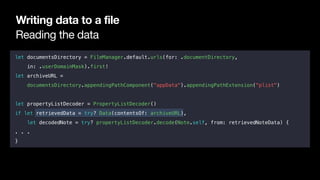
Reading the data
Writing data to a file
let documentsDirectory = FileManager.default.urls(for: .documentDirectory,
in: .userDomainMask).first!
let archiveURL =
documentsDirectory.appendingPathComponent("appData").appendingPathExtension("plist")
let propertyListDecoder = PropertyListDecoder()
if let retrievedData = try? Data(contentsOf: archiveURL),
let decodedNote = try? propertyListDecoder.decode(Note.self, from: retrievedNoteData) {
. . .
}
Saving an array of model data
Writing data to a file
let notes = [note1, note2, note3]
let documentsDirectory = FileManager.default.urls(for: .documentDirectory,
in: .userDomainMask).first!
let archiveURL =
documentsDirectory.appendingPathComponent("notes_data").appendingPathExtension("plist")
let propertyListEncoder = PropertyListEncoder()
let encodedData = try? propertyListEncoder.encode(notes)
try? encodedData?.write(to: archiveURL, options: .noFileProtection)
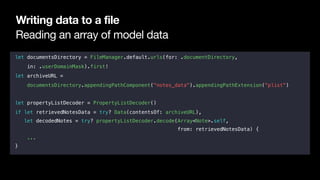
Reading an array of model data
Writing data to a file
let documentsDirectory = FileManager.default.urls(for: .documentDirectory,
in: .userDomainMask).first!
let archiveURL =
documentsDirectory.appendingPathComponent("notes_data").appendingPathExtension("plist")
let propertyListDecoder = PropertyListDecoder()
if let retrievedNotesData = try? Data(contentsOf: archiveURL),
let decodedNotes = try? propertyListDecoder.decode(Array<Note>.self,
from: retrievedNotesData) {
...
}
Remember
Your model objects should implement the Codable protocol.

Reading and writing should happen in the model controller.

Archive in the correct app delegate life-cycle events. For example:

• When the app enters the background

• When the app is terminated
Saving Data
Unit 4—Lesson 7
Learn how to persist data using Codable, a protocol for saving files to your app’s
Documents directory.
Lab: Remember Your Best Friends
Unit 4—Lesson 7
Use the Codable protocol to persist information between launches of an app
listing your best friends.
© 2017 Apple Inc. 

This work is licensed by Apple Inc. under the Creative Commons Attribution-NonCommercial-ShareAlike 4.0 International license.

Saving Data

  • 1.
  • 2.
    Saving data View Model Useraction Update Update Notify Controller
  • 3.
    Encoding and decodingwith Codable class Note: Codable {…} Use an Encoder object to encode Use a Decoder object to decode
  • 4.
    Encoding Encoding and decodingwith Codable struct Note: Codable { let title: String let text: String let timestamp: Date } let newNote = Note(title: "Dry cleaning", text: "Pick up suit from dry cleaners", timestamp: Date()) let propertyListEncoder = PropertyListEncoder() if let encodedNotes = try? propertyListEncoder.encode(newNote) { . . . }
  • 5.
    Decoding Encoding and decodingwith Codable let propertyListDecoder = PropertyListDecoder() if let decodedNote = try? propertyListDecoder.decode(Note.self, from: encodedNote) { . . . }
  • 6.
  • 7.
  • 8.
    Sandboxing Writing data toa file App File Manager Documents Documents Documents
  • 9.
    Documents directory Writing datato a file let documentsDirectory = FileManager.default.urls(for: .documentDirectory, in: .userDomainMask).first! let archiveURL = documentsDirectory.appendingPathComponent("appData").appendingPathExtension("plist")
  • 10.
    Writing the data Writingdata to a file let documentsDirectory = FileManager.default.urls(for: .documentDirectory, in: .userDomainMask).first! let archiveURL = documentsDirectory.appendingPathComponent("notes_data").appendingPathExtension("plist") let propertyListEncoder = PropertyListEncoder() let encodedData = try? propertyListEncoder.encode(data) try? encodedData?.write(to: archiveURL, options: .noFileProtection)
  • 11.
    Reading the data Writingdata to a file let documentsDirectory = FileManager.default.urls(for: .documentDirectory, in: .userDomainMask).first! let archiveURL = documentsDirectory.appendingPathComponent("appData").appendingPathExtension("plist") let propertyListDecoder = PropertyListDecoder() if let retrievedData = try? Data(contentsOf: archiveURL), let decodedNote = try? propertyListDecoder.decode(Note.self, from: retrievedNoteData) { . . . }
  • 12.
    Saving an arrayof model data Writing data to a file let notes = [note1, note2, note3] let documentsDirectory = FileManager.default.urls(for: .documentDirectory, in: .userDomainMask).first! let archiveURL = documentsDirectory.appendingPathComponent("notes_data").appendingPathExtension("plist") let propertyListEncoder = PropertyListEncoder() let encodedData = try? propertyListEncoder.encode(notes) try? encodedData?.write(to: archiveURL, options: .noFileProtection)
  • 13.
    Reading an arrayof model data Writing data to a file let documentsDirectory = FileManager.default.urls(for: .documentDirectory, in: .userDomainMask).first! let archiveURL = documentsDirectory.appendingPathComponent("notes_data").appendingPathExtension("plist") let propertyListDecoder = PropertyListDecoder() if let retrievedNotesData = try? Data(contentsOf: archiveURL), let decodedNotes = try? propertyListDecoder.decode(Array<Note>.self, from: retrievedNotesData) { ... }
  • 14.
    Remember Your model objectsshould implement the Codable protocol. Reading and writing should happen in the model controller. Archive in the correct app delegate life-cycle events. For example: • When the app enters the background • When the app is terminated
  • 15.
    Saving Data Unit 4—Lesson7 Learn how to persist data using Codable, a protocol for saving files to your app’s Documents directory.
  • 16.
    Lab: Remember YourBest Friends Unit 4—Lesson 7 Use the Codable protocol to persist information between launches of an app listing your best friends.
  • 17.
    © 2017 AppleInc. This work is licensed by Apple Inc. under the Creative Commons Attribution-NonCommercial-ShareAlike 4.0 International license.