04 | Data Acess Technologies 
Bruno Terkaly | Technical Evangelist 
Bret Stateham | Technical Evangelist
Module Overview 
• ADO.NET 
• LINQ (Language Integrated Query) 
• XML (Extensible Markup Language) 
• LINQ to XML
ADO.NET
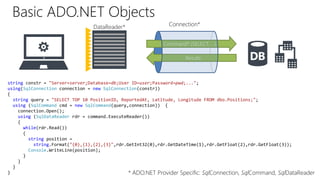
DataReader* Connection* 
Command* (SELECT, …) 
Results 
Basic ADO.NET Objects 
string constr = "Server=server;Database=db;User ID=user;Password=pwd;..."; 
using(SqlConnection connection = new SqlConnection(constr)) 
{ 
string query = "SELECT TOP 10 PositionID, ReportedAt, Latitude, Longitude FROM dbo.Positions;"; 
using (SqlCommand cmd = new SqlCommand(query,connection)) { 
connection.Open(); 
using (SqlDataReader rdr = command.ExecuteReader()) 
{ 
while(rdr.Read()) 
{ 
string position = 
string.Format("{0},{1},{2},{3}",rdr.GetInt32(0),rdr.GetDateTime(1),rdr.GetFloat(2),rdr.GetFloat(3)); 
Console.WriteLine(position); 
} 
} 
} 
} * ADO.NET Provider Specific: SqlConnection, SqlCommand, SqlDataReader
ADO.NET Providers
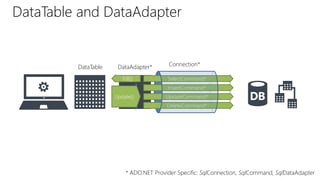
DataTable and DataAdapter 
DataTable DataAdapter* 
Connection* 
SelectCommand* 
InsertCommand* 
UpdateCommand* 
DeleteCommand* 
Fill() 
Update() 
* ADO.NET Provider Specific: SqlConnection, SqlCommand, SqlDataAdapter
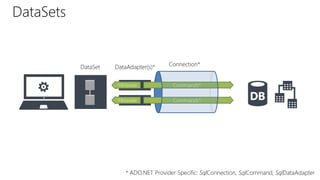
DataSet DataAdapter(s)* 
Connection* 
Fill/Update Commands* 
DataSets 
* ADO.NET Provider Specific: SqlConnection, SqlCommand, SqlDataAdapter
DEMO 
Querying data with ADO.NET
LINQ (Language-INtegrated Query)
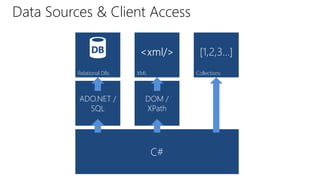
Data Sources & Client Access 
Relational DBs XML Collections 
ADO.NET / 
SQL 
DOM / 
XPath 
C#
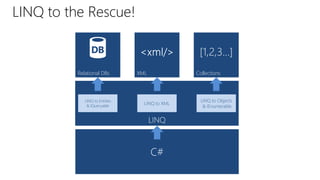
LINQ to the Rescue! 
Relational DBs XML Collections 
LINQ 
C# 
LINQ to Entities 
& IQueryable 
LINQ to XML 
LINQ to Objects 
& IEnumerable
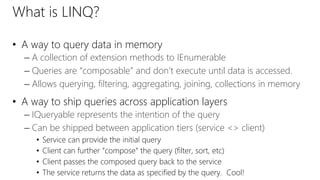
What is LINQ? 
• A way to query data in memory 
– A collection of extension methods to IEnumerable 
– Queries are “composable” and don’t execute until data is accessed. 
– Allows querying, filtering, aggregating, joining, collections in memory 
• A way to ship queries across application layers 
– IQueryable represents the intention of the query 
– Can be shipped between application tiers (service <> client) 
• Service can provide the initial query 
• Client can further “compose” the query (filter, sort, etc) 
• Client passes the composed query back to the service 
• The service returns the data as specified by the query. Cool!
DEMO 
LINQ to Objects
XML (Extensible Markup Language)
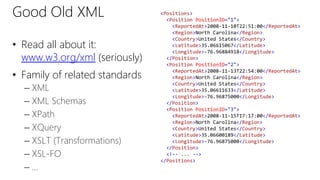
Good Old XML 
• Read all about it: 
www.w3.org/xml (seriously) 
• Family of related standards 
– XML 
– XML Schemas 
– XPath 
– XQuery 
– XSLT (Transformations) 
– XSL-FO 
– … 
<Positions> 
<Position PositionID="1"> 
<ReportedAt>2008-11-10T22:51:00</ReportedAt> 
<Region>North Carolina</Region> 
<Country>United States</Country> 
<Latitude>35.06615067</Latitude> 
<Longitude>-76.96884918</Longitude> 
</Position> 
<Position PositionID="2"> 
<ReportedAt>2008-11-13T22:54:00</ReportedAt> 
<Region>North Carolina</Region> 
<Country>United States</Country> 
<Latitude>35.06611633</Latitude> 
<Longitude>-76.96875000</Longitude> 
</Position> 
<Position PositionID="3"> 
<ReportedAt>2008-11-15T17:17:00</ReportedAt> 
<Region>North Carolina</Region> 
<Country>United States</Country> 
<Latitude>35.06600189</Latitude> 
<Longitude>-76.96875000</Longitude> 
</Position> 
<!-- ... --> 
</Positions>
Working with XML in Code 
• System.Xml 
– XmlDocument for Document Object Model (DOM) based operations 
– XmlReader for SAX (streaming) based operations 
• Create XML with XmlDocument, XmlElement, XmlAttribute… 
• Can save / load XML from files 
• Can parse XML from strings
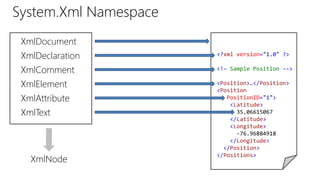
System.Xml Namespace 
<?xml version="1.0" ?> 
<!– Sample Position --> 
<Position>…</Position> 
<Position 
PositionID="1"> 
<Latitude> 
35.06615067 
</Latitude> 
<Longitude> 
-76.96884918 
</Longitude> 
</Position> 
</Positions> 
XmlDocument 
XmlDeclaration 
XmlComment 
XmlElement 
XmlAttribute 
XmlText 
XmlNode
DEMO 
DOM Based XML Processing
LINQ to XML
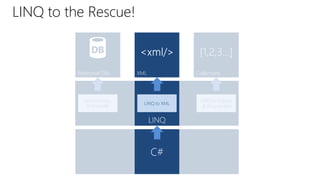
LINQ to the Rescue! 
Relational DBs XML Collections 
LINQ 
C# 
LINQ to Entities 
& IQueryable 
LINQ to XML 
LINQ to Objects 
& IEnumerable
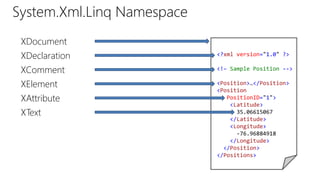
System.Xml.Linq Namespace 
<?xml version="1.0" ?> 
<!– Sample Position --> 
<Position>…</Position> 
<Position 
PositionID="1"> 
<Latitude> 
35.06615067 
</Latitude> 
<Longitude> 
-76.96884918 
</Longitude> 
</Position> 
</Positions> 
XDocument 
XDeclaration 
XComment 
XElement 
XAttribute 
XText
DEMO 
LINQ to XML
©2013 Microsoft Corporation. All rights reserved. Microsoft, Windows, Office, Azure, System Center, Dynamics and other product names are or may be registered trademarks and/or trademarks in 
the U.S. and/or other countries. The information herein is for informational purposes only and represents the current view of Microsoft Corporation as of the date of this presentation. Because 
Microsoft must respond to changing market conditions, it should not be interpreted to be a commitment on the part of Microsoft, and Microsoft cannot guarantee the accuracy of any information 
provided after the date of this presentation. MICROSOFT MAKES NO WARRANTIES, EXPRESS, IMPLIED OR STATUTORY, AS TO THE INFORMATION IN THIS PRESENTATION.

04 data accesstechnologies

  • 1.
    04 | DataAcess Technologies Bruno Terkaly | Technical Evangelist Bret Stateham | Technical Evangelist
  • 2.
    Module Overview •ADO.NET • LINQ (Language Integrated Query) • XML (Extensible Markup Language) • LINQ to XML
  • 3.
  • 4.
    DataReader* Connection* Command*(SELECT, …) Results Basic ADO.NET Objects string constr = "Server=server;Database=db;User ID=user;Password=pwd;..."; using(SqlConnection connection = new SqlConnection(constr)) { string query = "SELECT TOP 10 PositionID, ReportedAt, Latitude, Longitude FROM dbo.Positions;"; using (SqlCommand cmd = new SqlCommand(query,connection)) { connection.Open(); using (SqlDataReader rdr = command.ExecuteReader()) { while(rdr.Read()) { string position = string.Format("{0},{1},{2},{3}",rdr.GetInt32(0),rdr.GetDateTime(1),rdr.GetFloat(2),rdr.GetFloat(3)); Console.WriteLine(position); } } } } * ADO.NET Provider Specific: SqlConnection, SqlCommand, SqlDataReader
  • 5.
  • 6.
    DataTable and DataAdapter DataTable DataAdapter* Connection* SelectCommand* InsertCommand* UpdateCommand* DeleteCommand* Fill() Update() * ADO.NET Provider Specific: SqlConnection, SqlCommand, SqlDataAdapter
  • 7.
    DataSet DataAdapter(s)* Connection* Fill/Update Commands* Fill/Update Commands* DataSets * ADO.NET Provider Specific: SqlConnection, SqlCommand, SqlDataAdapter
  • 8.
    DEMO Querying datawith ADO.NET
  • 9.
  • 10.
    Data Sources &Client Access Relational DBs XML Collections ADO.NET / SQL DOM / XPath C#
  • 11.
    LINQ to theRescue! Relational DBs XML Collections LINQ C# LINQ to Entities & IQueryable LINQ to XML LINQ to Objects & IEnumerable
  • 12.
    What is LINQ? • A way to query data in memory – A collection of extension methods to IEnumerable – Queries are “composable” and don’t execute until data is accessed. – Allows querying, filtering, aggregating, joining, collections in memory • A way to ship queries across application layers – IQueryable represents the intention of the query – Can be shipped between application tiers (service <> client) • Service can provide the initial query • Client can further “compose” the query (filter, sort, etc) • Client passes the composed query back to the service • The service returns the data as specified by the query. Cool!
  • 13.
    DEMO LINQ toObjects
  • 14.
  • 15.
    Good Old XML • Read all about it: www.w3.org/xml (seriously) • Family of related standards – XML – XML Schemas – XPath – XQuery – XSLT (Transformations) – XSL-FO – … <Positions> <Position PositionID="1"> <ReportedAt>2008-11-10T22:51:00</ReportedAt> <Region>North Carolina</Region> <Country>United States</Country> <Latitude>35.06615067</Latitude> <Longitude>-76.96884918</Longitude> </Position> <Position PositionID="2"> <ReportedAt>2008-11-13T22:54:00</ReportedAt> <Region>North Carolina</Region> <Country>United States</Country> <Latitude>35.06611633</Latitude> <Longitude>-76.96875000</Longitude> </Position> <Position PositionID="3"> <ReportedAt>2008-11-15T17:17:00</ReportedAt> <Region>North Carolina</Region> <Country>United States</Country> <Latitude>35.06600189</Latitude> <Longitude>-76.96875000</Longitude> </Position> <!-- ... --> </Positions>
  • 16.
    Working with XMLin Code • System.Xml – XmlDocument for Document Object Model (DOM) based operations – XmlReader for SAX (streaming) based operations • Create XML with XmlDocument, XmlElement, XmlAttribute… • Can save / load XML from files • Can parse XML from strings
  • 17.
    System.Xml Namespace <?xmlversion="1.0" ?> <!– Sample Position --> <Position>…</Position> <Position PositionID="1"> <Latitude> 35.06615067 </Latitude> <Longitude> -76.96884918 </Longitude> </Position> </Positions> XmlDocument XmlDeclaration XmlComment XmlElement XmlAttribute XmlText XmlNode
  • 18.
    DEMO DOM BasedXML Processing
  • 19.
  • 20.
    LINQ to theRescue! Relational DBs XML Collections LINQ C# LINQ to Entities & IQueryable LINQ to XML LINQ to Objects & IEnumerable
  • 21.
    System.Xml.Linq Namespace <?xmlversion="1.0" ?> <!– Sample Position --> <Position>…</Position> <Position PositionID="1"> <Latitude> 35.06615067 </Latitude> <Longitude> -76.96884918 </Longitude> </Position> </Positions> XDocument XDeclaration XComment XElement XAttribute XText
  • 22.
  • 23.
    ©2013 Microsoft Corporation.All rights reserved. Microsoft, Windows, Office, Azure, System Center, Dynamics and other product names are or may be registered trademarks and/or trademarks in the U.S. and/or other countries. The information herein is for informational purposes only and represents the current view of Microsoft Corporation as of the date of this presentation. Because Microsoft must respond to changing market conditions, it should not be interpreted to be a commitment on the part of Microsoft, and Microsoft cannot guarantee the accuracy of any information provided after the date of this presentation. MICROSOFT MAKES NO WARRANTIES, EXPRESS, IMPLIED OR STATUTORY, AS TO THE INFORMATION IN THIS PRESENTATION.

Editor's Notes