Video Content Handling
Ahsan Saleem
August, 2013
Agenda
1.  Problem
2.  Key Terms
3.  Youtube Video handling/guidelines
4.  Suggested video handling guidelines
a. 
b. 

Standard resolution and aspect ratios cases
Non-standard cases

5.  Useful resources
Problem
●  Multiple playback platforms: Web, FB,
iPhone, iPad, Android devices
●  Free form video upload, any resolution or
aspect ratio expected
●  Achieve consistent video experience
●  Avoid too many video outputs
●  Avoid complex calculations
Key Terms
Aspect Ratio: Width to height pixel ratio of video arranged
as x:y - Note its a ratio and NOT pixel size of video. 4:3
and 16:9 are the most common ones
Orientation: Portrait or Landscape depends on how video
was shot (Camera Vertical or Horizontal)
Video Resolution: Number of horizontal and vertical
pixels. For example: 1280 x 720 (width x height).
Widescreen: Any video with width:height pixel ratio greater
than 1.37:1 on width side
Key Terms
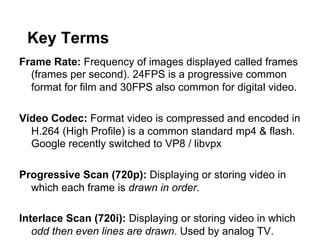
Frame Rate: Frequency of images displayed called frames
(frames per second). 24FPS is a progressive common
format for film and 30FPS also common for digital video.
Video Codec: Format video is compressed and encoded in
H.264 (High Profile) is a common standard mp4 & flash.
Google recently switched to VP8 / libvpx
Progressive Scan (720p): Displaying or storing video in
which each frame is drawn in order.
Interlace Scan (720i): Displaying or storing video in which
odd then even lines are drawn. Used by analog TV.
Key Terms
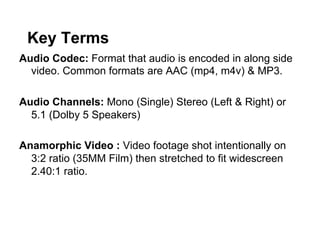
Audio Codec: Format that audio is encoded in along side
video. Common formats are AAC (mp4, m4v) & MP3.
Audio Channels: Mono (Single) Stereo (Left & Right) or
5.1 (Dolby 5 Speakers)
Anamorphic Video : Video footage shot intentionally on
3:2 ratio (35MM Film) then stretched to fit widescreen
2.40:1 ratio.
Key Terms
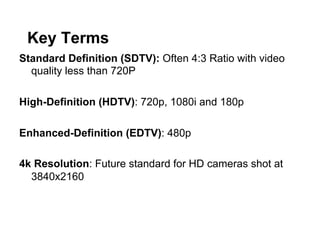
Standard Definition (SDTV): Often 4:3 Ratio with video
quality less than 720P
High-Definition (HDTV): 720p, 1080i and 180p
Enhanced-Definition (EDTV): 480p
4k Resolution: Future standard for HD cameras shot at
3840x2160
Key Terms
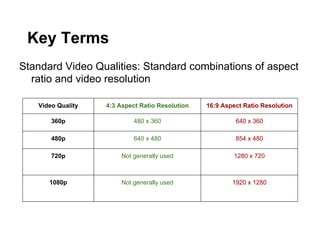
Standard Video Qualities: Standard combinations of aspect
ratio and video resolution
Video Quality

4:3 Aspect Ratio Resolution

16:9 Aspect Ratio Resolution

360p

480 x 360

640 x 360

480p

640 x 480

854 x 480

720p

Not generally used

1280 x 720

1080p

Not generally used

1920 x 1280
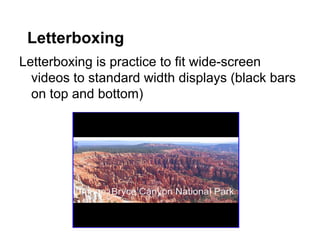
Letterboxing
Letterboxing is practice to fit wide-screen
videos to standard width displays (black bars
on top and bottom)
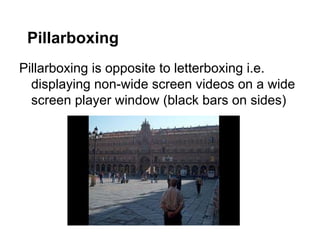
Pillarboxing
Pillarboxing is opposite to letterboxing i.e.
displaying non-wide screen videos on a wide
screen player window (black bars on sides)
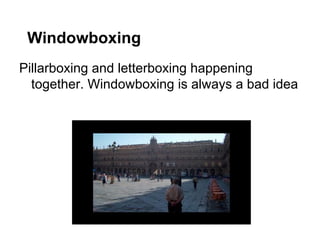
Windowboxing
Pillarboxing and letterboxing happening
together. Windowboxing is always a bad idea
How YouTube handles video

•  Suggests 16:9 aspect for uploading videos
•  Suggest standard resolutions like 240p,
• 
• 
• 

360p, 480p, 720p, 1080p
Discourages adding pillarboxing or
letterboxing before upload; Youtube player
adds that by itself if needed
Displays 4:3 videos in 16:9 player with
pillarbox
Offers set player sizes or embeddable player
Next: Our Strategy
●  Your Player
●  Video encode handling of standard
resolutions
●  Video encode handling of non-standard
resolutions
●  Suggested zencoder settings
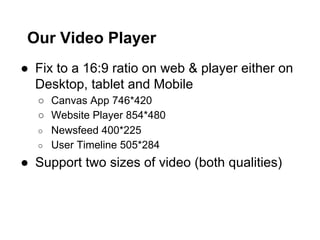
Our Video Player
●  Fix to a 16:9 ratio on web & player either on
Desktop, tablet and Mobile
○  Canvas App 746*420
○  Website Player 854*480
○  Newsfeed 400*225
○  User Timeline 505*284

●  Support two sizes of video (both qualities)
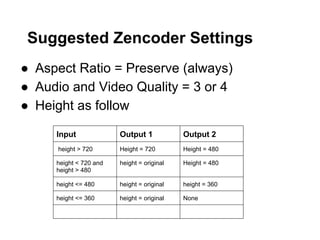
Suggested Zencoder Settings
●  Aspect Ratio = Preserve (always)
●  Audio and Video Quality = 3 or 4
●  Height as follow
Input

Output 1

Output 2

height > 720

Height = 720

Height = 480

height < 720 and
height > 480

height = original

Height = 480

height <= 480

height = original

height = 360

height <= 360

height = original

None
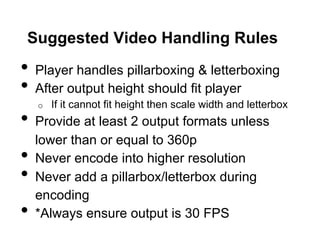
Suggested Video Handling Rules

•  Player handles pillarboxing & letterboxing
•  After output height should fit player
If it cannot fit height then scale width and letterbox
•  Provide at least 2 output formats unless
o 

• 
• 
• 

lower than or equal to 360p
Never encode into higher resolution
Never add a pillarbox/letterbox during
encoding
*Always ensure output is 30 FPS
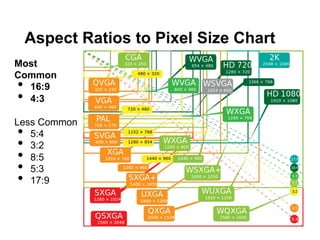
Aspect Ratios to Pixel Size Chart
Most
Common
16:9
4:3

• 
• 

Less Common
5:4
3:2
8:5
5:3
17:9

• 
• 
• 
• 
• 
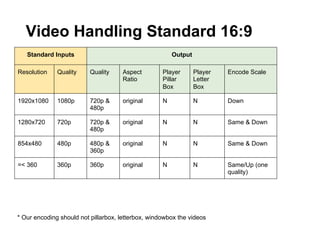
Video Handling Standard 16:9
Standard Inputs

Output

Resolution

Quality

Quality

Aspect
Ratio

Player
Pillar
Box

Player
Letter
Box

Encode Scale

1920x1080

1080p

720p &
480p

original

N

N

Down

1280x720

720p

720p &
480p

original

N

N

Same & Down

854x480

480p

480p &
360p

original

N

N

Same & Down

=< 360

360p

360p

original

N

N

Same/Up (one
quality)

* Our encoding should not pillarbox, letterbox, windowbox the videos
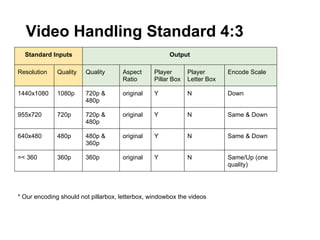
Video Handling Standard 4:3
Standard Inputs

Output

Resolution

Quality

Quality

Aspect
Ratio

Player
Pillar Box

Player
Letter Box

Encode Scale

1440x1080

1080p

720p &
480p

original

Y

N

Down

955x720

720p

720p &
480p

original

Y

N

Same & Down

640x480

480p

480p &
360p

original

Y

N

Same & Down

=< 360

360p

360p

original

Y

N

Same/Up (one
quality)

* Our encoding should not pillarbox, letterbox, windowbox the videos
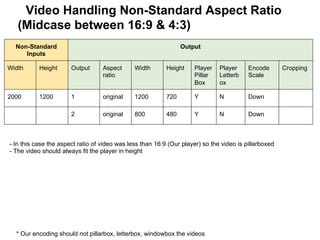
Video Handling Non-Standard Aspect Ratio
(Midcase between 16:9 & 4:3)
Non-Standard
Inputs

Output

Width

Height

Output

Aspect
ratio

Width

Height

Player
Pillar
Box

Player
Letterb
ox

Encode
Scale

2000

1200

1

original

1200

720

Y

N

Down

2

original

800

480

Y

N

Down

- In this case the aspect ratio of video was less than 16:9 (Our player) so the video is pillarboxed
- The video should always fit the player in height

* Our encoding should not pillarbox, letterbox, windowbox the videos

Cropping
Video Handling Non-Standard Aspect Ratio
(2:1)
Non-Standard
Inputs

Output

Width

Height

Output

Aspect
ratio

Width

Height

Player
Pillar
Box

Player
Letterb
ox

Encode
Scale

Cropping

2400

1200

1

original

1440

720

N

Y

Down

N

2

original

960

480

N

Y

Down

N

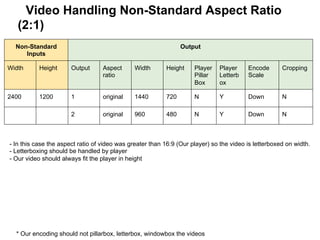
- In this case the aspect ratio of video was greater than 16:9 (Our player) so the video is letterboxed on width.
- Letterboxing should be handled by player
- Our video should always fit the player in height

* Our encoding should not pillarbox, letterbox, windowbox the videos
Video Handling Non-Standard Aspect Ratio
Non-Standard
Inputs

Output

Width

Height

Output

Aspect
ratio

Width

Height

Player
Pillar
Box

Player
Letterb
ox

Encode
Scale

Cropping

700

500

1

original

700

500

Y

N

None

N

2

original

672

480

Y

N

Down

N

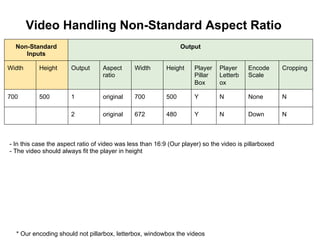
- In this case the aspect ratio of video was less than 16:9 (Our player) so the video is pillarboxed
- The video should always fit the player in height

* Our encoding should not pillarbox, letterbox, windowbox the videos
Video Handling Non-Standard Aspect Ratio
Non-Standard
Inputs

Output

Width

Height

Output

Aspect
ratio

Width

Height

Player
Pillar
Box

Player
Letterb
ox

Encode
Scale

Cropping

700

400

1

original

700

400

Y

N

None

N

2

original

630

360

Y

N

Down

N

1

original

720

360

N

Y

N

N

600

300

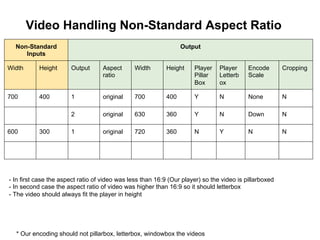
- In first case the aspect ratio of video was less than 16:9 (Our player) so the video is pillarboxed
- In second case the aspect ratio of video was higher than 16:9 so it should letterbox
- The video should always fit the player in height

* Our encoding should not pillarbox, letterbox, windowbox the videos
Video Handling Non-Standard Aspect Ratio
Non-Standard
Inputs

Output

Width

Height

Output

Aspect
ratio

Width

Height

Player
Pillar
Box

Player
Letterb
ox

Encode
Scale

Cropping

1200

2000

1

original

432

720

Y

N

Down

N

2

original

288

480

Y

N

Down

N

1

original

600

720

Y

N

Down

N

original

400

480

Y

N

Down

N

900

1080

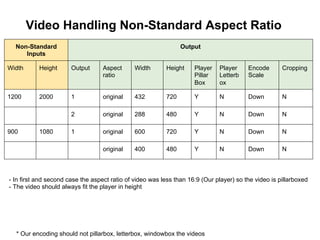
- In first and second case the aspect ratio of video was less than 16:9 (Our player) so the video is pillarboxed
- The video should always fit the player in height

* Our encoding should not pillarbox, letterbox, windowbox the videos
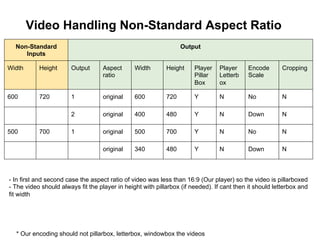
Video Handling Non-Standard Aspect Ratio
Non-Standard
Inputs

Output

Width

Height

Output

Aspect
ratio

Width

Height

Player
Pillar
Box

Player
Letterb
ox

Encode
Scale

Cropping

600

720

1

original

600

720

Y

N

No

N

2

original

400

480

Y

N

Down

N

1

original

500

700

Y

N

No

N

original

340

480

Y

N

Down

N

500

700

- In first and second case the aspect ratio of video was less than 16:9 (Our player) so the video is pillarboxed
- The video should always fit the player in height with pillarbox (if needed). If cant then it should letterbox and
fit width

* Our encoding should not pillarbox, letterbox, windowbox the videos
Useful Resources
YouTube Uploading Guidelines
https://support.google.com/youtube/answer/1722171?hl=en

Vimeo Compression Guidelines
https://vimeo.com/help/compression

Facebook Video Guidelines
https://www.facebook.com/help/www/154271141375595

DivX Play Dimensions
http://labs.divx.com/webplayer/tips/web-video-dimensions

Video Content Handling for Rich Content Web Sites

  • 1.
    Video Content Handling AhsanSaleem August, 2013
  • 2.
    Agenda 1.  Problem 2.  KeyTerms 3.  Youtube Video handling/guidelines 4.  Suggested video handling guidelines a.  b.  Standard resolution and aspect ratios cases Non-standard cases 5.  Useful resources
  • 3.
    Problem ●  Multiple playbackplatforms: Web, FB, iPhone, iPad, Android devices ●  Free form video upload, any resolution or aspect ratio expected ●  Achieve consistent video experience ●  Avoid too many video outputs ●  Avoid complex calculations
  • 4.
    Key Terms Aspect Ratio:Width to height pixel ratio of video arranged as x:y - Note its a ratio and NOT pixel size of video. 4:3 and 16:9 are the most common ones Orientation: Portrait or Landscape depends on how video was shot (Camera Vertical or Horizontal) Video Resolution: Number of horizontal and vertical pixels. For example: 1280 x 720 (width x height). Widescreen: Any video with width:height pixel ratio greater than 1.37:1 on width side
  • 5.
    Key Terms Frame Rate:Frequency of images displayed called frames (frames per second). 24FPS is a progressive common format for film and 30FPS also common for digital video. Video Codec: Format video is compressed and encoded in H.264 (High Profile) is a common standard mp4 & flash. Google recently switched to VP8 / libvpx Progressive Scan (720p): Displaying or storing video in which each frame is drawn in order. Interlace Scan (720i): Displaying or storing video in which odd then even lines are drawn. Used by analog TV.
  • 6.
    Key Terms Audio Codec:Format that audio is encoded in along side video. Common formats are AAC (mp4, m4v) & MP3. Audio Channels: Mono (Single) Stereo (Left & Right) or 5.1 (Dolby 5 Speakers) Anamorphic Video : Video footage shot intentionally on 3:2 ratio (35MM Film) then stretched to fit widescreen 2.40:1 ratio.
  • 7.
    Key Terms Standard Definition(SDTV): Often 4:3 Ratio with video quality less than 720P High-Definition (HDTV): 720p, 1080i and 180p Enhanced-Definition (EDTV): 480p 4k Resolution: Future standard for HD cameras shot at 3840x2160
  • 8.
    Key Terms Standard VideoQualities: Standard combinations of aspect ratio and video resolution Video Quality 4:3 Aspect Ratio Resolution 16:9 Aspect Ratio Resolution 360p 480 x 360 640 x 360 480p 640 x 480 854 x 480 720p Not generally used 1280 x 720 1080p Not generally used 1920 x 1280
  • 9.
    Letterboxing Letterboxing is practiceto fit wide-screen videos to standard width displays (black bars on top and bottom)
  • 10.
    Pillarboxing Pillarboxing is oppositeto letterboxing i.e. displaying non-wide screen videos on a wide screen player window (black bars on sides)
  • 11.
    Windowboxing Pillarboxing and letterboxinghappening together. Windowboxing is always a bad idea
  • 12.
    How YouTube handlesvideo •  Suggests 16:9 aspect for uploading videos •  Suggest standard resolutions like 240p, •  •  •  360p, 480p, 720p, 1080p Discourages adding pillarboxing or letterboxing before upload; Youtube player adds that by itself if needed Displays 4:3 videos in 16:9 player with pillarbox Offers set player sizes or embeddable player
  • 13.
    Next: Our Strategy ● Your Player ●  Video encode handling of standard resolutions ●  Video encode handling of non-standard resolutions ●  Suggested zencoder settings
  • 14.
    Our Video Player ● Fix to a 16:9 ratio on web & player either on Desktop, tablet and Mobile ○  Canvas App 746*420 ○  Website Player 854*480 ○  Newsfeed 400*225 ○  User Timeline 505*284 ●  Support two sizes of video (both qualities)
  • 15.
    Suggested Zencoder Settings ● Aspect Ratio = Preserve (always) ●  Audio and Video Quality = 3 or 4 ●  Height as follow Input Output 1 Output 2 height > 720 Height = 720 Height = 480 height < 720 and height > 480 height = original Height = 480 height <= 480 height = original height = 360 height <= 360 height = original None
  • 16.
    Suggested Video HandlingRules •  Player handles pillarboxing & letterboxing •  After output height should fit player If it cannot fit height then scale width and letterbox •  Provide at least 2 output formats unless o  •  •  •  lower than or equal to 360p Never encode into higher resolution Never add a pillarbox/letterbox during encoding *Always ensure output is 30 FPS
  • 17.
    Aspect Ratios toPixel Size Chart Most Common 16:9 4:3 •  •  Less Common 5:4 3:2 8:5 5:3 17:9 •  •  •  •  • 
  • 18.
    Video Handling Standard16:9 Standard Inputs Output Resolution Quality Quality Aspect Ratio Player Pillar Box Player Letter Box Encode Scale 1920x1080 1080p 720p & 480p original N N Down 1280x720 720p 720p & 480p original N N Same & Down 854x480 480p 480p & 360p original N N Same & Down =< 360 360p 360p original N N Same/Up (one quality) * Our encoding should not pillarbox, letterbox, windowbox the videos
  • 19.
    Video Handling Standard4:3 Standard Inputs Output Resolution Quality Quality Aspect Ratio Player Pillar Box Player Letter Box Encode Scale 1440x1080 1080p 720p & 480p original Y N Down 955x720 720p 720p & 480p original Y N Same & Down 640x480 480p 480p & 360p original Y N Same & Down =< 360 360p 360p original Y N Same/Up (one quality) * Our encoding should not pillarbox, letterbox, windowbox the videos
  • 20.
    Video Handling Non-StandardAspect Ratio (Midcase between 16:9 & 4:3) Non-Standard Inputs Output Width Height Output Aspect ratio Width Height Player Pillar Box Player Letterb ox Encode Scale 2000 1200 1 original 1200 720 Y N Down 2 original 800 480 Y N Down - In this case the aspect ratio of video was less than 16:9 (Our player) so the video is pillarboxed - The video should always fit the player in height * Our encoding should not pillarbox, letterbox, windowbox the videos Cropping
  • 21.
    Video Handling Non-StandardAspect Ratio (2:1) Non-Standard Inputs Output Width Height Output Aspect ratio Width Height Player Pillar Box Player Letterb ox Encode Scale Cropping 2400 1200 1 original 1440 720 N Y Down N 2 original 960 480 N Y Down N - In this case the aspect ratio of video was greater than 16:9 (Our player) so the video is letterboxed on width. - Letterboxing should be handled by player - Our video should always fit the player in height * Our encoding should not pillarbox, letterbox, windowbox the videos
  • 22.
    Video Handling Non-StandardAspect Ratio Non-Standard Inputs Output Width Height Output Aspect ratio Width Height Player Pillar Box Player Letterb ox Encode Scale Cropping 700 500 1 original 700 500 Y N None N 2 original 672 480 Y N Down N - In this case the aspect ratio of video was less than 16:9 (Our player) so the video is pillarboxed - The video should always fit the player in height * Our encoding should not pillarbox, letterbox, windowbox the videos
  • 23.
    Video Handling Non-StandardAspect Ratio Non-Standard Inputs Output Width Height Output Aspect ratio Width Height Player Pillar Box Player Letterb ox Encode Scale Cropping 700 400 1 original 700 400 Y N None N 2 original 630 360 Y N Down N 1 original 720 360 N Y N N 600 300 - In first case the aspect ratio of video was less than 16:9 (Our player) so the video is pillarboxed - In second case the aspect ratio of video was higher than 16:9 so it should letterbox - The video should always fit the player in height * Our encoding should not pillarbox, letterbox, windowbox the videos
  • 24.
    Video Handling Non-StandardAspect Ratio Non-Standard Inputs Output Width Height Output Aspect ratio Width Height Player Pillar Box Player Letterb ox Encode Scale Cropping 1200 2000 1 original 432 720 Y N Down N 2 original 288 480 Y N Down N 1 original 600 720 Y N Down N original 400 480 Y N Down N 900 1080 - In first and second case the aspect ratio of video was less than 16:9 (Our player) so the video is pillarboxed - The video should always fit the player in height * Our encoding should not pillarbox, letterbox, windowbox the videos
  • 25.
    Video Handling Non-StandardAspect Ratio Non-Standard Inputs Output Width Height Output Aspect ratio Width Height Player Pillar Box Player Letterb ox Encode Scale Cropping 600 720 1 original 600 720 Y N No N 2 original 400 480 Y N Down N 1 original 500 700 Y N No N original 340 480 Y N Down N 500 700 - In first and second case the aspect ratio of video was less than 16:9 (Our player) so the video is pillarboxed - The video should always fit the player in height with pillarbox (if needed). If cant then it should letterbox and fit width * Our encoding should not pillarbox, letterbox, windowbox the videos
  • 26.
    Useful Resources YouTube UploadingGuidelines https://support.google.com/youtube/answer/1722171?hl=en Vimeo Compression Guidelines https://vimeo.com/help/compression Facebook Video Guidelines https://www.facebook.com/help/www/154271141375595 DivX Play Dimensions http://labs.divx.com/webplayer/tips/web-video-dimensions