SASS
Syntactically Awesome Style Sheets
SASS
● Sass is a CSS pre-processor with syntax advancements
● Sass has two syntaxes
● The new main syntax (as of Sass 3) is known as “SCSS”
(for “Sassy CSS”)
● The second, older syntax is known as the indented
syntax (or just “Sass”). Inspired by Haml’s terseness,
it’s intended for people who prefer conciseness over
similarity to CSS
● It doesn’t use { } and ; it uses TAB indentation similar
like Python lang.
SASS
WHAT DO WE NEED TO SET UP SASS?
SASS
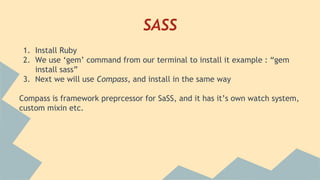
1. Install Ruby
2. We use ‘gem’ command from our terminal to install it example : “gem
install sass”
3. Next we will use Compass, and install in the same way
Compass is framework preprcessor for SaSS, and it has it’s own watch system,
custom mixin etc.
SASS
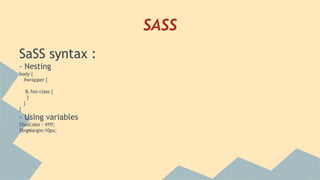
SaSS syntax :
- Nesting
body {
#wrapper {
&.foo-class {
}
}
}
- Using variables
$fooColor : #fff;
$bigMargin:10px;
SASS
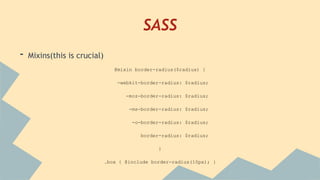
- Mixins(this is crucial)
@mixin border-radius($radius) {
-webkit-border-radius: $radius;
-moz-border-radius: $radius;
-ms-border-radius: $radius;
-o-border-radius: $radius;
border-radius: $radius;
}
.box { @include border-radius(10px); }
SASS
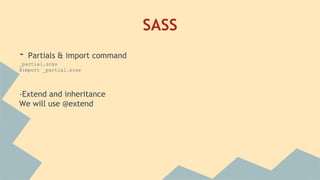
- Partials & import command
_partial.scss
@import _partial.scss
-Extend and inheritance
We will use @extend
SASS
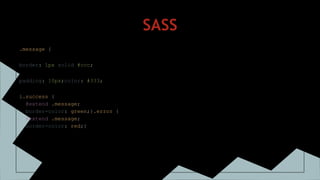
.message {
border: 1px solid #ccc;
padding: 10px;color: #333;
}.success {
@extend .message;
border-color: green;}.error {
@extend .message;
border-color: red;}
SASS
.message, .success, .error, .warning {
border: 1px solid #cccccc;
padding: 10px;
color: #333;}.success {
border-color: green;}.error {
border-color: red;}
SASS
and finally Operators
+,-,/ …
aside[role="complimentary"] {
float: right;
width: 300px / 960px * 100%;
}
SASS
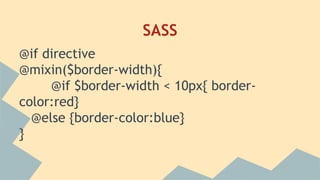
@if directive
@mixin($border-width){
@if $border-width < 10px{ border-
color:red}
@else {border-color:blue}
}

Sass presentation

  • 1.
  • 2.
    SASS ● Sass isa CSS pre-processor with syntax advancements ● Sass has two syntaxes ● The new main syntax (as of Sass 3) is known as “SCSS” (for “Sassy CSS”) ● The second, older syntax is known as the indented syntax (or just “Sass”). Inspired by Haml’s terseness, it’s intended for people who prefer conciseness over similarity to CSS ● It doesn’t use { } and ; it uses TAB indentation similar like Python lang.
  • 3.
    SASS WHAT DO WENEED TO SET UP SASS?
  • 4.
    SASS 1. Install Ruby 2.We use ‘gem’ command from our terminal to install it example : “gem install sass” 3. Next we will use Compass, and install in the same way Compass is framework preprcessor for SaSS, and it has it’s own watch system, custom mixin etc.
  • 5.
    SASS SaSS syntax : -Nesting body { #wrapper { &.foo-class { } } } - Using variables $fooColor : #fff; $bigMargin:10px;
  • 6.
    SASS - Mixins(this iscrucial) @mixin border-radius($radius) { -webkit-border-radius: $radius; -moz-border-radius: $radius; -ms-border-radius: $radius; -o-border-radius: $radius; border-radius: $radius; } .box { @include border-radius(10px); }
  • 7.
    SASS - Partials &import command _partial.scss @import _partial.scss -Extend and inheritance We will use @extend
  • 8.
    SASS .message { border: 1pxsolid #ccc; padding: 10px;color: #333; }.success { @extend .message; border-color: green;}.error { @extend .message; border-color: red;}
  • 9.
    SASS .message, .success, .error,.warning { border: 1px solid #cccccc; padding: 10px; color: #333;}.success { border-color: green;}.error { border-color: red;}
  • 10.
    SASS and finally Operators +,-,/… aside[role="complimentary"] { float: right; width: 300px / 960px * 100%; }
  • 11.
    SASS @if directive @mixin($border-width){ @if $border-width< 10px{ border- color:red} @else {border-color:blue} }