SAP Change and  Transport Management   - Presented By  Ravi Jain 29/07/2009
Introduction  Change and Transport System Clients & their roles  System Landscape Basics of Transport control Transport Layer Transport Route Transport Strategy Transport with Import Queue Procedure of Mass Import Procedure of Single Import Continue…. Monday, July 27, 2009 2 Contents
Transport Strategy Transport Workflow Transport Organizer Working with Transport Organizer Functions in Transport Organizer Change Request Roles in Change & Transport System  Thank you !!! Appendix A - Selected Transaction Code Appendix B - Steps of Activity for TMS Appendix C - Version Managements Monday, July 27, 2009 3 Contents
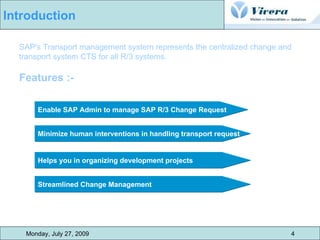
SAP's Transport management system represents the centralized change and transport system CTS for all R/3 systems.  Features :- Enable SAP Admin to manage SAP R/3 Change Request Streamlined Change Management Minimize human interventions in handling transport request Helps you in organizing development projects Monday, July 27, 2009 4 Introduction
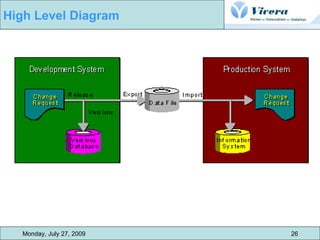
Monday, July 27, 2009 5 Change & Transport System CTS is the central tool for managing changes to Customizing and Repository data CTS records all changes in change requests changes in change requests can be linked together logically, or can be completely independent of each other When you have finished your work, you can release the request The change request is then used to copy the changes from this client to other clients or systems. This automatic procedure is known as a transport.  Transports of changes by the CTS allow you to develop in one environment, test your development work in a test environment, and then, if the tests are successful, use it productively
Monday, July 27, 2009 6 Clients and Their Roles   We can divide clients into mainly three category :-  CUST :- - SAP system landscape requires a client where Customizing settings, and possibly ABAP Workbench developments, can be made. client is known as the Customizing and development client, or Customizing client for short. The abbreviation CUST is used for this client QTST :- - Before you can use the Customizing settings and Workbench developments productively, you need to test them extensively for errors. The client where these tests are made is the Quality Assurance Client, QTST for short. PROD :- - Separate client is required for productive use of the SAP System. This client is known as the Production Client, PROD for short.
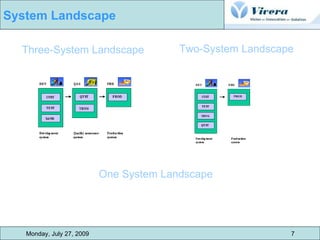
Monday, July 27, 2009 7 System Landscape   Three-System Landscape Two-System Landscape One System Landscape
A transport layer is assigned to each development class and thus to all the object  in that class. Transport layer determines :- in which SAP system development or changes to the repository objects are made weather objects are transported to other system within the group. all the project developed in the same system and transported on the same transport  route are grouped together to form a transport layer. Monday, July 27, 2009 9 Basics of Transport Control -  Transport Layer
There are two types of transport route :- Consolidated Routes to make the changes transportable, we set up consolidate route for each  transport and specify the source system (dev system) and target system (quality  system)  Any modified object that have consolidate route setup for their transport layer are  Included into transportable change request. Delivery Routes  to transport the work to production system or other SAP system, we need  delivery routes. We can setup routes between source and target system via :- parallel forwarding multilevel forwarding Monday, July 27, 2009 10 Basics of Transport Control –   Transport Route
Monday, July 27, 2009 11 Transport Route example via  Multilevel Delivery In more complex system  Landscape, in layered dev  project that have each other as  Sources  We can activate multiple Delivery route in sequence
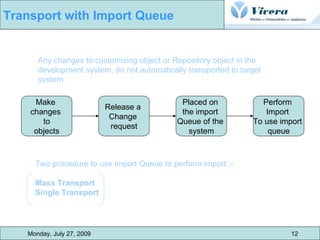
Any changes to customizing object or Repository object in the development system, do not automatically transported to target system.  Two procedure to use import Queue to perform import :-  Mass Transport  Single Transport Make  changes  to objects Release a  Change  request Placed on  the import  Queue of the  system Perform  Import  To use import  queue Monday, July 27, 2009 12 Transport with Import Queue
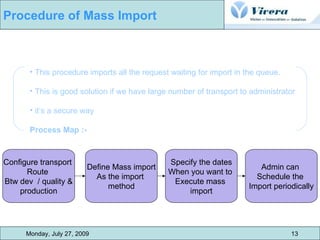
This procedure imports all the request waiting for import in the queue. This is good solution if we have large number of transport to administrator  it’s a secure way  Process Map :- Configure transport  Route  Btw dev  / quality & production Define Mass import As the import  method Specify the dates When you want to  Execute mass  import Admin can  Schedule the  Import periodically Monday, July 27, 2009 13 Procedure of Mass Import
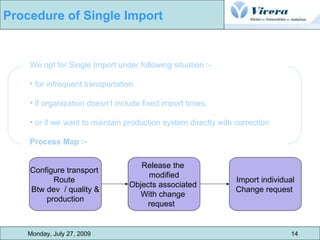
We opt for Single Import under following situation :- for infrequent transportation if organization doesn’t include fixed import times.  or if we want to maintain production system directly with correction Process Map :- Configure transport  Route  Btw dev  / quality & production Release the  modified Objects associated  With change  request Import individual Change request  Monday, July 27, 2009 14 Procedure of Single Import
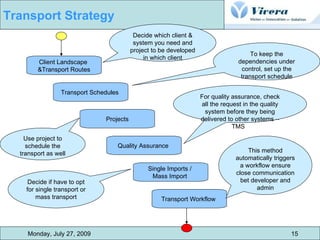
Monday, July 27, 2009 15 Transport Strategy  Client Landscape  &Transport Routes Transport Schedules  Projects Quality Assurance  Single Imports /  Mass Import  Transport Workflow  Decide which client & system you need and project to be developed in which client To keep the dependencies under control, set up the transport schedule For quality assurance, check all the request in the quality system before they being delivered to other systems – TMS  Use project to schedule the transport as well Decide if have to opt for single transport or mass transport This method automatically triggers a workflow ensure close communication bet developer and admin
It provides a framework for transporting enhancement or new development. It provides a direct connection between development and transport administration. Ways to use transport workflow :- Transport Workflow as transport strategy Special transport workflow (mass transport) Monday, July 27, 2009 16 Transport Workflow
Create  Transport Proposal Proposal Contains  Required Transport request Proposal  Appear  in TMS  Work list Admin  Approves  Or  reject it Admin  Can  change  it  As well if  approves TMS  imports  Transport  Request  Into target system if  import  is  Successful  developer Can  Complete  The  Proposal  Monday, July 27, 2009 17 Transport Workflow –  Process Diagram
A set of tools in the SAP systems for managing development project in the ABAP  workbench and in customizing and for preparing and managing transportation  between the SAP system. Features :- Provide functions for creating, documenting and release of change request. to reorganize development landscape. can call by SE09 / SE10  There are multiple ways to manage and record the changes for the object, which are being discussed further. Monday, July 27, 2009 18 Transport Organizer
Steps involve while working with the Transport Organizer :- Record Changes in the Change request  working with Change request from creation to release. checking weather transported request were successful or not. Monday, July 27, 2009 19 Working with Transport Organizer
A source of information in the transport organizer that records and manage  all the modification made to repository and customizing settings during a  development work.  Types :- Workbench Request Customizing Request Transport of Copies  Relocations Monday, July 27, 2009 20 Function in the Transport Organizer - Change Request
A source of information in the transport organizer that records and manage  all the modification made to repository and customizing settings during a  development work.  Few Points :- for every change to the repository object we need to assign that to specified workbench request. From the system setting (if transport route is defined for the package of these objects) system determines if weather the change request are transportable and to which target system we can only save the changes if we assign object to a change request. Monday, July 27, 2009 21 Workbench   Request
Change request for coping and transporting changed system setting from client specific tables. Few points :-   Customizing request record client-specific customizing settings made in a single client. Customizing request in the SAP System are all transportable or local depend on System settings. System uses Standard Transport layer to determine automatically if change request are transportable and to which target system. we can only save the changes if we assign object to a change request. Monday, July 27, 2009 22 Customizing Request
transport object to a specified SAP system. object are transported with the current version in SAP system.  original location of the object will remain  no delivery to another SAP System. Monday, July 27, 2009 23 Transport of Copies
Relocation without package change to create object into another SAP system for temporary basis It is having same functions as transport of copies It allows you to move original location of object. Relocation with package change Opt this type if want to change the development system for a  object for permanent basis. Allows you to change the original location of object. Relocation of complete package Opt this solution when development system of a complete  package is to be changed. it allows us to change the transport layer of the package. Monday, July 27, 2009 24 Relocations
Monday, July 27, 2009 25 Releasing Change Request Create Request Create Task Use Request Editor to  edit the content of CR / Task Object check when  Releasing request Release Task Release Change  Request Create a request in transport organizer or editing object  Add new task to the existing CR Use request editor to edit the CR and task. We can write document, edit properties & edit object list If the check process is activated, cant release the request unless it is error free When you release a task, the object entry it contains r copied to the object list of CR Final release  Change request
Monday, July 27, 2009 26 High Level Diagram
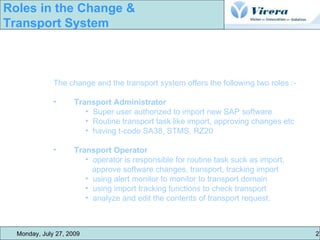
The change and the transport system offers the following two roles :- Transport Administrator Super user authorized to import new SAP software Routine transport task like import, approving changes etc having t-code SA38, STMS, RZ20 Transport Operator  operator is responsible for routine task suck as import,  approve software changes, transport, tracking import using alert monitor to monitor to transport domain using import tracking functions to check transport analyze and edit the contents of transport request. Monday, July 27, 2009  27  Roles in the Change &  Transport System
Monday, July 27, 2009  28  Q&A Oops…
Monday, July 27, 2009  29  Thank you !!!
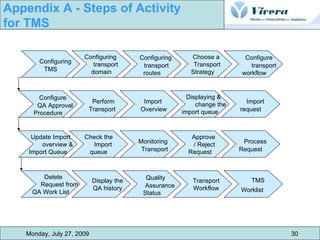
Configuring  TMS Configuring  transport  domain Configuring  transport  routes Choose a  Transport  Strategy Configure transport workflow Configure  QA Approval  Procedure Perform  Transport Import  Overview Displaying &  change the  import queue Import  request Update Import  overview &  Import Queue Check the Import  queue Monitoring  Transport Approve  / Reject  Request Process  Request Delete  Request from  QA Work List Display the  QA history  Quality  Assurance  Status Transport  Workflow TMS  Worklist   Monday, July 27, 2009 30 Appendix A - Steps of Activity  for TMS
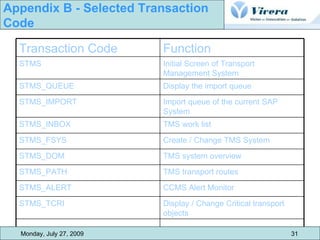
Monday, July 27, 2009 31 Appendix B - Selected Transaction  Code TMS system overview STMS_DOM TMS transport routes STMS_PATH CCMS Alert Monitor STMS_ALERT Display / Change Critical transport objects STMS_TCRI Create / Change TMS System STMS_FSYS TMS work list  STMS_INBOX Import queue of the current SAP System STMS_IMPORT Display the import queue STMS_QUEUE Initial Screen of Transport Management System STMS Function Transaction Code
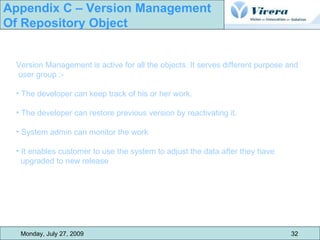
Monday, July 27, 2009 32 Appendix C – Version Management  Of Repository Object Version Management is active for all the objects. It serves different purpose and user group :- The developer can keep track of his or her work. The developer can restore previous version by reactivating it. System admin can monitor the work It enables customer to use the system to adjust the data after they have  upgraded to new release

Sap Change And Transport Management

  • 1.
    SAP Change and Transport Management - Presented By Ravi Jain 29/07/2009
  • 2.
    Introduction Changeand Transport System Clients & their roles System Landscape Basics of Transport control Transport Layer Transport Route Transport Strategy Transport with Import Queue Procedure of Mass Import Procedure of Single Import Continue…. Monday, July 27, 2009 2 Contents
  • 3.
    Transport Strategy TransportWorkflow Transport Organizer Working with Transport Organizer Functions in Transport Organizer Change Request Roles in Change & Transport System Thank you !!! Appendix A - Selected Transaction Code Appendix B - Steps of Activity for TMS Appendix C - Version Managements Monday, July 27, 2009 3 Contents
  • 4.
    SAP's Transport managementsystem represents the centralized change and transport system CTS for all R/3 systems. Features :- Enable SAP Admin to manage SAP R/3 Change Request Streamlined Change Management Minimize human interventions in handling transport request Helps you in organizing development projects Monday, July 27, 2009 4 Introduction
  • 5.
    Monday, July 27,2009 5 Change & Transport System CTS is the central tool for managing changes to Customizing and Repository data CTS records all changes in change requests changes in change requests can be linked together logically, or can be completely independent of each other When you have finished your work, you can release the request The change request is then used to copy the changes from this client to other clients or systems. This automatic procedure is known as a transport. Transports of changes by the CTS allow you to develop in one environment, test your development work in a test environment, and then, if the tests are successful, use it productively
  • 6.
    Monday, July 27,2009 6 Clients and Their Roles We can divide clients into mainly three category :- CUST :- - SAP system landscape requires a client where Customizing settings, and possibly ABAP Workbench developments, can be made. client is known as the Customizing and development client, or Customizing client for short. The abbreviation CUST is used for this client QTST :- - Before you can use the Customizing settings and Workbench developments productively, you need to test them extensively for errors. The client where these tests are made is the Quality Assurance Client, QTST for short. PROD :- - Separate client is required for productive use of the SAP System. This client is known as the Production Client, PROD for short.
  • 7.
    Monday, July 27,2009 7 System Landscape Three-System Landscape Two-System Landscape One System Landscape
  • 8.
    A transport layeris assigned to each development class and thus to all the object in that class. Transport layer determines :- in which SAP system development or changes to the repository objects are made weather objects are transported to other system within the group. all the project developed in the same system and transported on the same transport route are grouped together to form a transport layer. Monday, July 27, 2009 9 Basics of Transport Control - Transport Layer
  • 9.
    There are twotypes of transport route :- Consolidated Routes to make the changes transportable, we set up consolidate route for each transport and specify the source system (dev system) and target system (quality system) Any modified object that have consolidate route setup for their transport layer are Included into transportable change request. Delivery Routes to transport the work to production system or other SAP system, we need delivery routes. We can setup routes between source and target system via :- parallel forwarding multilevel forwarding Monday, July 27, 2009 10 Basics of Transport Control – Transport Route
  • 10.
    Monday, July 27,2009 11 Transport Route example via Multilevel Delivery In more complex system Landscape, in layered dev project that have each other as Sources We can activate multiple Delivery route in sequence
  • 11.
    Any changes tocustomizing object or Repository object in the development system, do not automatically transported to target system. Two procedure to use import Queue to perform import :- Mass Transport Single Transport Make changes to objects Release a Change request Placed on the import Queue of the system Perform Import To use import queue Monday, July 27, 2009 12 Transport with Import Queue
  • 12.
    This procedure importsall the request waiting for import in the queue. This is good solution if we have large number of transport to administrator it’s a secure way Process Map :- Configure transport Route Btw dev / quality & production Define Mass import As the import method Specify the dates When you want to Execute mass import Admin can Schedule the Import periodically Monday, July 27, 2009 13 Procedure of Mass Import
  • 13.
    We opt forSingle Import under following situation :- for infrequent transportation if organization doesn’t include fixed import times. or if we want to maintain production system directly with correction Process Map :- Configure transport Route Btw dev / quality & production Release the modified Objects associated With change request Import individual Change request Monday, July 27, 2009 14 Procedure of Single Import
  • 14.
    Monday, July 27,2009 15 Transport Strategy Client Landscape &Transport Routes Transport Schedules Projects Quality Assurance Single Imports / Mass Import Transport Workflow Decide which client & system you need and project to be developed in which client To keep the dependencies under control, set up the transport schedule For quality assurance, check all the request in the quality system before they being delivered to other systems – TMS Use project to schedule the transport as well Decide if have to opt for single transport or mass transport This method automatically triggers a workflow ensure close communication bet developer and admin
  • 15.
    It provides aframework for transporting enhancement or new development. It provides a direct connection between development and transport administration. Ways to use transport workflow :- Transport Workflow as transport strategy Special transport workflow (mass transport) Monday, July 27, 2009 16 Transport Workflow
  • 16.
    Create TransportProposal Proposal Contains Required Transport request Proposal Appear in TMS Work list Admin Approves Or reject it Admin Can change it As well if approves TMS imports Transport Request Into target system if import is Successful developer Can Complete The Proposal Monday, July 27, 2009 17 Transport Workflow – Process Diagram
  • 17.
    A set oftools in the SAP systems for managing development project in the ABAP workbench and in customizing and for preparing and managing transportation between the SAP system. Features :- Provide functions for creating, documenting and release of change request. to reorganize development landscape. can call by SE09 / SE10 There are multiple ways to manage and record the changes for the object, which are being discussed further. Monday, July 27, 2009 18 Transport Organizer
  • 18.
    Steps involve whileworking with the Transport Organizer :- Record Changes in the Change request working with Change request from creation to release. checking weather transported request were successful or not. Monday, July 27, 2009 19 Working with Transport Organizer
  • 19.
    A source ofinformation in the transport organizer that records and manage all the modification made to repository and customizing settings during a development work. Types :- Workbench Request Customizing Request Transport of Copies Relocations Monday, July 27, 2009 20 Function in the Transport Organizer - Change Request
  • 20.
    A source ofinformation in the transport organizer that records and manage all the modification made to repository and customizing settings during a development work. Few Points :- for every change to the repository object we need to assign that to specified workbench request. From the system setting (if transport route is defined for the package of these objects) system determines if weather the change request are transportable and to which target system we can only save the changes if we assign object to a change request. Monday, July 27, 2009 21 Workbench Request
  • 21.
    Change request forcoping and transporting changed system setting from client specific tables. Few points :- Customizing request record client-specific customizing settings made in a single client. Customizing request in the SAP System are all transportable or local depend on System settings. System uses Standard Transport layer to determine automatically if change request are transportable and to which target system. we can only save the changes if we assign object to a change request. Monday, July 27, 2009 22 Customizing Request
  • 22.
    transport object toa specified SAP system. object are transported with the current version in SAP system. original location of the object will remain no delivery to another SAP System. Monday, July 27, 2009 23 Transport of Copies
  • 23.
    Relocation without packagechange to create object into another SAP system for temporary basis It is having same functions as transport of copies It allows you to move original location of object. Relocation with package change Opt this type if want to change the development system for a object for permanent basis. Allows you to change the original location of object. Relocation of complete package Opt this solution when development system of a complete package is to be changed. it allows us to change the transport layer of the package. Monday, July 27, 2009 24 Relocations
  • 24.
    Monday, July 27,2009 25 Releasing Change Request Create Request Create Task Use Request Editor to edit the content of CR / Task Object check when Releasing request Release Task Release Change Request Create a request in transport organizer or editing object Add new task to the existing CR Use request editor to edit the CR and task. We can write document, edit properties & edit object list If the check process is activated, cant release the request unless it is error free When you release a task, the object entry it contains r copied to the object list of CR Final release Change request
  • 25.
    Monday, July 27,2009 26 High Level Diagram
  • 26.
    The change andthe transport system offers the following two roles :- Transport Administrator Super user authorized to import new SAP software Routine transport task like import, approving changes etc having t-code SA38, STMS, RZ20 Transport Operator operator is responsible for routine task suck as import, approve software changes, transport, tracking import using alert monitor to monitor to transport domain using import tracking functions to check transport analyze and edit the contents of transport request. Monday, July 27, 2009 27 Roles in the Change & Transport System
  • 27.
    Monday, July 27,2009 28 Q&A Oops…
  • 28.
    Monday, July 27,2009 29 Thank you !!!
  • 29.
    Configuring TMSConfiguring transport domain Configuring transport routes Choose a Transport Strategy Configure transport workflow Configure QA Approval Procedure Perform Transport Import Overview Displaying & change the import queue Import request Update Import overview & Import Queue Check the Import queue Monitoring Transport Approve / Reject Request Process Request Delete Request from QA Work List Display the QA history Quality Assurance Status Transport Workflow TMS Worklist Monday, July 27, 2009 30 Appendix A - Steps of Activity for TMS
  • 30.
    Monday, July 27,2009 31 Appendix B - Selected Transaction Code TMS system overview STMS_DOM TMS transport routes STMS_PATH CCMS Alert Monitor STMS_ALERT Display / Change Critical transport objects STMS_TCRI Create / Change TMS System STMS_FSYS TMS work list STMS_INBOX Import queue of the current SAP System STMS_IMPORT Display the import queue STMS_QUEUE Initial Screen of Transport Management System STMS Function Transaction Code
  • 31.
    Monday, July 27,2009 32 Appendix C – Version Management Of Repository Object Version Management is active for all the objects. It serves different purpose and user group :- The developer can keep track of his or her work. The developer can restore previous version by reactivating it. System admin can monitor the work It enables customer to use the system to adjust the data after they have upgraded to new release