SAP BASIS Notes by Keylabs Training
WWW.KEYLABSTRAINING.COM USA: 908-366-7933 India: +91-9550645679 1
SAP BASIS Notes by Keylabs Training
WWW.KEYLABSTRAINING.COM USA: 908-366-7933 India: +91-9550645679 2
Work process
A. All the process which handles by the use task based on the type of the user
request.
B. Types of work process
1) Dialog work process
2) Background work process
3) Update work process
4) Message server
5) Enqueue server
6) Gateway
7) Spool
C. What are the different types of work process in R/3?
Dialog (D), Update (V), Enqueue (E), Background (B) and Spool(S)
Dialog work process (D)
A. Dialog work process is used to handle by the user request only
B. Dialog work process parameter name is – rdispwp_no_dia=2
C. Dialog work processes are minimum 2
One is user request running another one is distributing the work process
D. Each request occupies 75mb to 150mb
E. Dial work process is multiplexive
Multiplexive means at a time one (or) more use request is running
F. The user request handle by the dialog work process maximum up to 1800 seconds
G. If the user request 600 seconds default in that time data is not completed then user
request session is terminated
H. No of Dialog work process >= No of non Dialog work process
I. Dialog work process time out parameter is
SAP BASIS Notes by Keylabs Training
WWW.KEYLABSTRAINING.COM USA: 908-366-7933 India: +91-9550645679 3
rdispmax_wp_run_timeout=600 to 1800
J. One dialog work process maximum up to 32 users are we can create
K. One application server maximum up to 100 work process are we can create
L. Work process statuses are
1) Waiting
2) Running
3) Error
4) Stopped
5) Private mode: Dedicated to the particular user
6) Sleep: Work process is running but not responding
Why: Waiting for resources
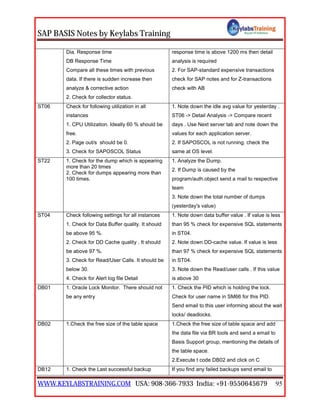
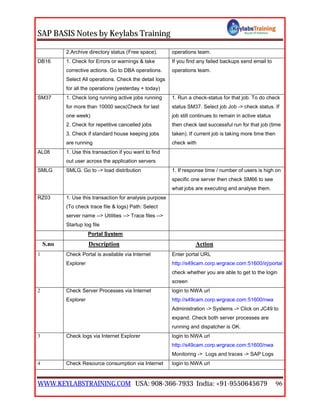
M. In sap level work process overview – SM50
N. In sap level global work process overview – SM66
O. In O.S level work process overview – dpmon
Dpmon: when the user could not login to the sap system
P. In sap level display a list of application server – SM51
Q. In sm51 transaction to identify the Release note, the R/3 kernel, D/B kernel, O.S.
Kernel and support packages information
R. In sap level version statuses are – system ---> status
S. In O.S level version we can see – disp+work
How to user request flow?
User request ---> dispatcher ---> work process ---> dialog work process --->
update the tables
Background work process (B)
A. The background work process handle by the long running jobs.
The background work process that process can be executed without the user
interaction.
SAP BASIS Notes by Keylabs Training
WWW.KEYLABSTRAINING.COM USA: 908-366-7933 India: +91-9550645679 4
Background jobs are programs, printing specification and interactively can be run
automatically by the background processing system
B. Background work process parameter name is – rdispwp_no_btc=2
C. During the installation minimum of 2 background work process
One is defining and another one is executing
D. Scheduling the background job is – SM36
Job name should start either z or y.
Maximum 32 characters are allowed in the name.
E. Start conditions
1) Immediate
2) Date/time
3) After job
4) After event
5) At operation mode
F. Background job steps
1) ABAP program: It is a standard program (or) customized program which
will execute by variant.
 Variant: It is a program selection criterion to provide the inputs
during the runtime (or) execution of the program.
 Variants are stored in the table is TVARV
 We can create the variant from SE38
2) External command: It is used for pre defined input by system
administrator.
 External commands are defined in SM49 (or) SM69
 External commands & external program are executed by SAPXG
program
3) External program: It is used for direct command input by system
administrator
SAP BASIS Notes by Keylabs Training
WWW.KEYLABSTRAINING.COM USA: 908-366-7933 India: +91-9550645679 5
G. Background job is every 60 seconds default time is – rdispbtctime=60sec  It
stored in the default profile
H. What is the background job scheduler every 60seconds?
SAPMSSYS
I. In O.S level background work process stored in global directory
usrsap<Sid>sysglobal
J. Simple job selection is SM37
K. Job statuses are
1) Scheduled: Whenever job is defined in that time job status scheduled.
2) Released: Whenever we specify date & time to schedule job.
3) Ready: When the time is elapsed.
4) Active: Job status is running.
5) Finished: All the job steps are complete successfully.
6) Cancelled: There was an error and job has been terminated, as mentioned in
the job log.
L. Background job table is TBTC*
TBTCT table is used for job scheduler
TBTCS table is used for job time table
M. Background job status from release to ready program is – SAPMSSYZF
N. What is the difference between SA38 and SE38?
SA38 is only we can execute a program and SE38 is we can create; edit a
program, changing attributes and documents for the program
O. If we want suspend all the background jobs are using BTCTRANS1 report
P. If we want resume all the background jobs are using BTCTRANS2 report
To execute these reports and programs from SA38 (or) SE38
Q. If you have a long running job, how to you analysis? (Or) How to analyze long
running job?
Using the transaction code is – SE30
SAP BASIS Notes by Keylabs Training
WWW.KEYLABSTRAINING.COM USA: 908-366-7933 India: +91-9550645679 6
R. Standard background jobs (or) Housekeeping jobs are sap_reorg*
1) Sap_reorg_abapdumps:
Program: RSSNAPDL
2) Sap_reorg_batchinput: This job is used for delete batch input files
Program: RSBDCREO
3) Sap_reorg_jobs: This job is used for delete old background jobs
Program: RSBTCDEL
4) Sap_reorg_statististics: This job is used for run the statistics of sap tables
Program: RSBPSTDE
5) Sap_reorg_spool: This job is used for delete the old print request.
Program: RSPO0041
6) Sap_reorg_updaterecords: this job is used for delete the old update
records
Program: RSM13002
S. Background job issues (or) why background job is cancelled?
1) File system is not accessible.
2) User id & password may be expired.
3) Dependent job is may be failed.
4) RFC connection is failed.
5) Incorrect in puts.
6) May be files corrupted at O.S level.
7) Space issues in database level.
8) Memory issues.
9) Ora-arch director is may be full.
10)Invalid file formats.
SAP BASIS Notes by Keylabs Training
WWW.KEYLABSTRAINING.COM USA: 908-366-7933 India: +91-9550645679 7
Update work process (V)
A. It is used to update the database by reading from the temporary tables. It can’t
communicate with user directly
B. There are 2 types of update work process. They are v1 and v2
V1 update is used for critical jobs and V2 update is used for non critical jobs
C. We need at least one update work process per sap system and we have more than
per dispatcher
D. The update profile parameter name is rdispwp_no_vb, rdispwp_no_vb2
E. Update monitoring is – SM13
Here we can check critical and non critical updates. We can specify date and time
F. Update program administration – SM14
This transaction code is used for active to deactivate & deactivates to activate
update request and you configure the update servers, update groups and display &
monitoring update parameters.
G. Update temporary table is VB*
1) Vbmod – update function module
2) Vbdata – update data
3) Vberror – update error information
4) Vbhdr – update header
5) Vbwrk – work list for mass processing at a time have update
H. Update status are
1) Init – the status will be initial.
2) Run – update is started in main database.
3) Error – update is thrown into error.
4) Auto – update is thrown into error due to problem in database space.
I. Update tables are stored in TBLOD
SAPMV45A: which update work process is going on?
SAP BASIS Notes by Keylabs Training
WWW.KEYLABSTRAINING.COM USA: 908-366-7933 India: +91-9550645679 8
Update types are 3: they are
1) Local update: Dialog work processes update the directly in Database that is
called local update.
2) Synchronous: Dialog work processes update goes to the temporary table that
is called synchronous.
3) Asynchronous: temporary table goes to database that is called asynchronous
Update statistics are 4: they are
Read, Write, Execute and Delete
J. Update parameters
1) rdispvb_stop_acive: Set to “0” so that update can be deactivated. If the
value is set to be “1” update can be activated.
2) rdispvbdelete: This parameter is used to delete the old update requests
based on the no. of days. It will delete default 50 days.
3) rdispvbmail: It is used to send an email. It update thrown an error which
can be viewed in “SBWP” (“sap business workplace”) based on your user
(set to “0” or “1”).
4) rdispvbname : Name of the server running where update are processed
5) rdispvbreorg: It is used to delete the incomplete update request.
1=delete, 0=no, we can also schedule a background job “RSM13002” but it
will delete the update request which are in completed it will be deleted after
restarting.
6) rdispvb_delete_after_execution: It is used to delete the update request
soon after the execute of the update. Set it to”1” to delete the record (or)
“2” to the record will not be deleted. If it is set to “1” the background job
“RSM13002” is not required. If not schedule periodically daily during off
peak hours.
SAP BASIS Notes by Keylabs Training
WWW.KEYLABSTRAINING.COM USA: 908-366-7933 India: +91-9550645679 9
Enqueue server (E)
A. Enqueue server handles by the locking and unlocking mechanism
B. The Enqueue server parameter name is – rdispwp_no_enq
C. Enqueue server table size is minimum of 4MB
D. We can increase the maximum of size is 100MB
E. Enqueue table size is enqtable_size=4mb to 100mb
F. Enqueue server log files will be stored in O.S level
Usrsap<Sid>instance<number>log
G. The Enqueue server work process administrators a lock table in the shared
memory area
H. Enqueue server 4 types they are
1) Shared locks: one user can read the tables and another one user can write
the tables
2) Exclusive locks: only a particular user can read it, nobody else can access it
3) Cumulative locks: The same user with different transaction accessing the
same table then the lock will be shared with user transactions
4) Optimistic locks: One user lock the table and another user doesn’t have
read & access the table permission
I. Select lock entries – SM12
You can check (or) released the locked entries using transaction is sm12.
If there is a sudden power failure. Some of the users update entry might still be
locked. If possible asked the user to logoff first, before deleting the lock entries
J. Transaction codes: locks and unlocks – SM01
K. Enqueue server lock tables are stored in TLOCK
SAP BASIS Notes by Keylabs Training
WWW.KEYLABSTRAINING.COM USA: 908-366-7933 India: +91-9550645679 10
Message server (M)
A. Message servers handle by the load balancing. It distributes the dispatcher where
the load balance is less.
B. Message server log files are stored in O.S level DEV_MS
Path is – usrsap<Sid><instance (number)>workdev_ms
C. In O.S level message server monitoring is – msmon ->cmd
D. Message server port number is – 36<instance number>
E. Internal port number is – 39<instance number>
NOTE: sap server has only one message server and enqueue server.
NOTE: application server or dialog instance are same. And central instance is
different
Gate way (G)
A. It is used to communication between the sap system to non sap system
B. There will be only 1 gate way for each instance.
C. In sap level gateway monitoring is - SMGW
D. In O.S level gate way monitoring is – DEV_RD
Path is – usrsap<Sid><instance (number)>workdev_rd
E. We can check also DEV_DISP, i.s dispatcher for log files
F. usrsap<Sid>instance<number>work ----> work directory stores log of the
work process information in the format of DEV_W*
Spool (S)
A. It is used to print the documents to a printer
B. There should be at least 1 spool process in the entire system
C. The spool profile parameter name is – rdispwp_no_spo
SAP BASIS Notes by Keylabs Training
WWW.KEYLABSTRAINING.COM USA: 908-366-7933 India: +91-9550645679 11
D. Dialog work process (or) background work process are creates a spool request. i.e.
to print the documents
E. In O.S level spool request are stored in global directory usrsap<Sid>sysglobal
F. The storage location specific parameter name is – rdispstore_location
G. This parameter has 2 values they are global_G and database_DB.
H. G means it stored in global directory DB means it stored in database tables are
“TST01” and “TST03”
I. The spool request is also referred as TEMSE
Temse is used for temporary sequential objects
J. Access method: It is connection to spool server to O.S spool.
Access methods are 3 types
1) Local access method: the spool process and the spool host (printer spool)
reside on the same system. Access method type L is used for UNIX O.S
and C is used for windows O.S
2) Remote access method: the spool process and the spool host reside on two
different systems. Access method type U is used for UNIX O.S and S is
used for windows O.S
3) Front end method: access method p is the printers are connected to end
users desktop do not configured to many front and printers F and G
K. We can see all the clients and users spool request T_Code is – SP01
L. We can see specific client and user spool request T_Code is – SP02
M. Spool administration is - SPAD
N. Default printers are – SWIN, SAPWIN
RFC – Remote Function Call
A. RFC is using connect to the one sap system to another sap system.
B. Sap gate way is using of RFC
C. RFC connections are 4 types
SAP BASIS Notes by Keylabs Training
WWW.KEYLABSTRAINING.COM USA: 908-366-7933 India: +91-9550645679 12
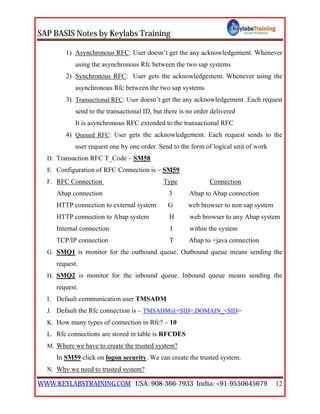
1) Asynchronous RFC: User doesn’t get the any acknowledgement. Whenever
using the asynchronous Rfc between the two sap systems
2) Synchronous RFC: User gets the acknowledgement. Whenever using the
asynchronous Rfc between the two sap systems
3) Transactional RFC: User doesn’t get the any acknowledgement .Each request
send to the transactional ID, but there is no order delivered
It is asynchronous RFC extended to the transactional RFC
4) Queued RFC: User gets the acknowledgement. Each request sends to the
user request one by one order. Send to the form of logical unit of work
D. Transaction RFC T_Code – SM58
E. Configuration of RFC Connection is – SM59
F. RFC Connection Type Connection
Abap connection 3 Abap to Abap connection
HTTP connection to external system G web browser to non sap system
HTTP connection to Abap system H web browser to any Abap system
Internal connection I within the system
TCP/IP connection T Abap to +java connection
G. SMQ1 is monitor for the outbound queue. Outbound queue means sending the
request.
H. SMQ2 is monitor for the inbound queue. Inbound queue means sending the
request.
I. Default communication user TMSADM
J. Default the Rfc connection is – TMSADM@<SID>.DOMAIN_<SID>
K. How many types of connection in Rfc? – 10
L. Rfc connections are stored in table is RFCDES
M. Where we have to create the trusted system?
In SM59 click on logon security. We can create the trusted system.
N. Why we need to trusted system?
SAP BASIS Notes by Keylabs Training
WWW.KEYLABSTRAINING.COM USA: 908-366-7933 India: +91-9550645679 13
To communication for business requirement
O. What is the transaction code RZ12?
It is used to define the RFC Server groups and Assign the instance
P. Which user is used when you create RFC?
TMSADM
Q. How to create the RFC connection between source client & target client
1) Login with target client
2) Using the transaction code SM59
3) Create the connection type
4) Give the RFC destination, description & connection type and click on
administration
5) Click on technical settings
6) Give the target hostname and system (instance) number & select host name
option
7) Click on logon security tab
8) Give source client details like number, username & password
9) Click on save button
10)Destination will be saved
11)Click on Unicode test button
12)Click on remote logon button’
13)Click on start sap easy access button
14)Here we can find that client number111 (we logged 222 in client)
15)Click on logoff button [exit from 111 clients]
Rfc issues (or) Why Rfc connection failure
1) Target system to source system does not match like version, production and
component.
2) May be target system is down.
3) May be authorization problems.
SAP BASIS Notes by Keylabs Training
WWW.KEYLABSTRAINING.COM USA: 908-366-7933 India: +91-9550645679 14
4) May be incorrect credential of the target system
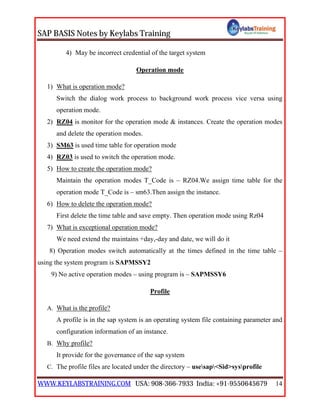
Operation mode
1) What is operation mode?
Switch the dialog work process to background work process vice versa using
operation mode.
2) RZ04 is monitor for the operation mode & instances. Create the operation modes
and delete the operation modes.
3) SM63 is used time table for operation mode
4) RZ03 is used to switch the operation mode.
5) How to create the operation mode?
Maintain the operation modes T_Code is – RZ04.We assign time table for the
operation mode T_Code is – sm63.Then assign the instance.
6) How to delete the operation mode?
First delete the time table and save empty. Then operation mode using Rz04
7) What is exceptional operation mode?
We need extend the maintains +day,-day and date, we will do it
8) Operation modes switch automatically at the times defined in the time table –
using the system program is SAPMSSY2
9) No active operation modes – using program is – SAPMSSY6
Profile
A. What is the profile?
A profile is in the sap system is an operating system file containing parameter and
configuration information of an instance.
B. Why profile?
It provide for the governance of the sap system
C. The profile files are located under the directory – usesap<Sid>sysprofile
SAP BASIS Notes by Keylabs Training
WWW.KEYLABSTRAINING.COM USA: 908-366-7933 India: +91-9550645679 15
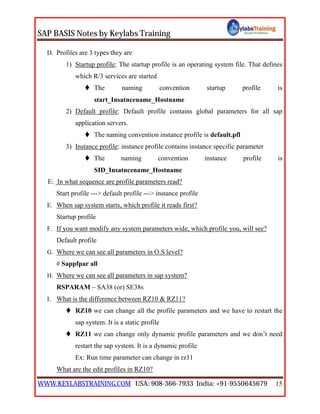
D. Profiles are 3 types they are
1) Startup profile: The startup profile is an operating system file. That defines
which R/3 services are started
 The naming convention startup profile is
start_Insatncename_Hostname
2) Default profile: Default profile contains global parameters for all sap
application servers.
 The naming convention instance profile is default.pfl
3) Instance profile: instance profile contains instance specific parameter
 The naming convention instance profile is
SID_Insatncename_Hostname
E: In what sequence are profile parameters read?
Start profile ---> default profile ---> instance profile
E. When sap system starts, which profile it reads first?
Startup profile
F. If you want modify any system parameters wide, which profile you, will see?
Default profile
G. Where we can see all parameters in O.S level?
# Sappfpar all
H. Where we can see all parameters in sap system?
RSPARAM – SA38 (or) SE38s
I. What is the difference between RZ10 & RZ11?
 RZ10 we can change all the profile parameters and we have to restart the
sap system. It is a static profile
 RZ11 we can change only dynamic profile parameters and we don’t need
restart the sap system. It is a dynamic profile
Ex: Run time parameter can change in rz11
What are the edit profiles in RZ10?
SAP BASIS Notes by Keylabs Training
WWW.KEYLABSTRAINING.COM USA: 908-366-7933 India: +91-9550645679 16
Administration data
Basic maintenance
Extended maintenance
Where you can see the Profiles?
Sap level – transaction code is RZ10 & RZ11
OS level – usrsap<Sid>sysprofile
DB level – PAH1, TPFYPROFTY, TPFET, TPFHR
USERS:
 During the sap installation for windows O.S default users are <Sid>adm,
sap service<Sid>.
 During the sap installation for UNIX default users are <Sid>adm, sap
service<Sid>, ora<Sid>.
1) <Sid>adm: It owns the sap system and start and stop done by <Sid>adm.
2) Sap service<Sid>: It is used to start and stop the services.
Ex: [sap<Sid>_00, sap<Sid>_01…..]
3) Ora<Sid>: It is used to owner to work on database
SAP GUI default users are – DDIC & sap*
After installation database users are – sys, system
Database schema users are: Abap level – SAPSR3, java level –
SAPSR3DB
Communication user is SAP JSF
 Default users are: DDIC is 06071992, Sap* is 19920706
J. Default services are
a. Sap OS Col: sap OS Col collector which is used to collect the O.S
resources that are required to start the installation.
b. Ora TNS Listener: Ora TNS listener service should be started on the
specified port number is [1521 – 1529].
c. Oracle service<Sid>: This is required for the database.
SAP BASIS Notes by Keylabs Training
WWW.KEYLABSTRAINING.COM USA: 908-366-7933 India: +91-9550645679 17
d. Sap service hostname<Instance number>:
 Whether system is down we have to check whether these services (or) not
Click on services –> start
 Services.msc – windows O.S (or) start –> settings – control panel –>
administrative tool –>services
 Ps –efgrep ora* - UNIX O.S
K. How to check whether the sap is running or not on UNIX level?
 # Ps –Efgrep DW [check is sap is running or not]
 # ps – Efgrep ora [check oracle status]
L. How many initialization files for sap GUI?
1) Saplogon.ini
2) Saproute.ini
3) Sapmsg.ini
M. How you can start & stop the sap system on windows?
 Go to login as <Sid> adm
 Password: master password
 Click on MMC icon on the desktop
 <Sid> right click
 Start or stop
N. How you can start & stop the sap system on UNIX?
 Go to login as <Sid> adm
 Password: master password
 Start sap –-----------------------> R3 & DB
[Command] [SAP]
 Stop sap -------------------------> R3 & DB [Here system is down]
O. How to start only sap, when DB is up?
 Startsapr3 –---------------------> to start only R/3 system
 Stopsapr3 –----------------------> to stop only R/3 system
SAP BASIS Notes by Keylabs Training
WWW.KEYLABSTRAINING.COM USA: 908-366-7933 India: +91-9550645679 18
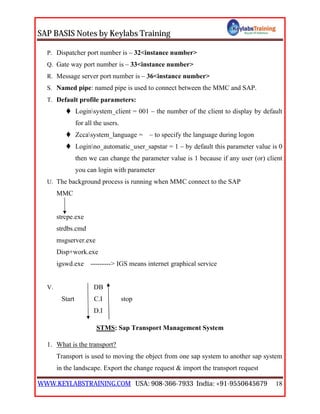
P. Dispatcher port number is – 32<instance number>
Q. Gate way port number is – 33<instance number>
R. Message server port number is – 36<instance number>
S. Named pipe: named pipe is used to connect between the MMC and SAP.
T. Default profile parameters:
 Loginsystem_client = 001 – the number of the client to display by default
for all the users.
 Zccasystem_language = – to specify the language during logon
 Loginno_automatic_user_sapstar = 1 – by default this parameter value is 0
then we can change the parameter value is 1 because if any user (or) client
you can login with parameter
U. The background process is running when MMC connect to the SAP
MMC
strcpe.exe
strdbs.cmd
msgserver.exe
Disp+work.exe
igswd.exe ---------> IGS means internet graphical service
V. DB
Start C.I stop
D.I
STMS: Sap Transport Management System
1. What is the transport?
Transport is used to moving the object from one sap system to another sap system
in the landscape. Export the change request & import the transport request
SAP BASIS Notes by Keylabs Training
WWW.KEYLABSTRAINING.COM USA: 908-366-7933 India: +91-9550645679 19
2. The transport objects are divided into 2 types they are Export & Import
DEV QAS PRO
Export Import
Central T.P Delivery at O.S level
3. What is domain controller?
Domain control is a control all the systems in the landscape. It is used to manage
all the transport parameters in the landscape. In the most of the environment there
will be only one domain controller.
4. What is Transport domain controller?
It is created as part of the post installation activity.
5. What is the transport domain & domain controller?
All the sap level it is called as transport domain and at O.S level it is called as
domain controller.
6. How to configure the domain controller?
A. First decided which system you could like to define domain controller
B. Login to the sap system with DDIC in client 000
C. Go to SE06
D. Click the post installation activity
E. Go to STMS
F. It will ask for the domain controller name
G. Enter system ID of the domain controller
H. Enter domain_<Sid> as domain controller name and enter the description
I. Click save button
7. Steps to add the other system with domain controller
J. Logon domain controller system
SAP BASIS Notes by Keylabs Training
WWW.KEYLABSTRAINING.COM USA: 908-366-7933 India: +91-9550645679 20
K. Approve the added system
8. What is landscape?
Landscape is arrangement of group of system to flow the objects
DEV --------------------> QAS -----------------------> PRO
9. Landscape
 ECC DEV ------> QAS -------> PRO
 EP DEV ------> QAS -------> PRO
 BI DEV ------> QAS -------> PRO
Based on the customer requirements we can define the single, two, three and multi
systems .in the landscape
10.In order to define landscape we need system
A. Transport layer
B. Transport root
C. Transport group
D. Transport target group
A. Transport layer: transport layer is used to moving the object path from one
system to another system within the landscape.
 Transport layers are 2 types they are
1. Z<Sid> – customizing object move the Z<Sid> layer
2. SAP – repository objects move the sap layer
B. Transport routs: which shows from the transport direction to the target
system?
 In three system landscape
 Dev -----> integrated system
 Qas -----> consolidated system
 Pro -----> delivery system
 Transport routs are 2 types they are
SAP BASIS Notes by Keylabs Training
WWW.KEYLABSTRAINING.COM USA: 908-366-7933 India: +91-9550645679 21
1. Consolidated route: the route between development system to
quality system is called consolidated route
2. Delivery route: the route between quality systems to production
system is called delivery route
 NOTE: In a two system landscape delivery route is not available
C. Transport group: The systems which are shared a Trans directory is called
transport group
D. Transport target group: more than 3 systems & multiple clients it work’s on
extended transport controller is called transport target group
 Extended transport controller: it is used to transport objects within
the client & system
11.What is the backup domain controller?
Whenever primary domain controller is failed. In that time it will care of the
transportation
12.What is work flow?
To set off the automatic process & responsibility of quality system
13.Transport background jobs are RDDIMPDP, RDDNEWDP
14.Transport request are stored in TRBAT & TRJOB
15.All the change requests are stored table is E070
 E070 – Change request headers
 E071 – change request object lists
 E071k – object key contained within transports
16.At end of the import, transport specific the return codes
1) 000: import the finished with successfully
2) 004: import finished with warnings
3) 008: some objects are not transported
4) 0012: critical transport errors
SAP BASIS Notes by Keylabs Training
WWW.KEYLABSTRAINING.COM USA: 908-366-7933 India: +91-9550645679 22
17.What is the change request?
Whenever we can create a request that is called a change request
18.What is the transport request?
Whenever we will release the change request that is called transport request
19.Which system we can configure the domain controller?
Development system
20.What is transport domain (or) integrated system?
Development system
21.RSTPTEST: - Can be extended if there are any problems with TP (or) R/3
instance.
22.How to check the consistence of STMS?
Using the transaction code is SA38 (or) SE38 and run the report is RSTPTEST (it
will check the if any errors in STMS or not)
23.User locks the transaction code is EWZ5 at sap level and in OS level we can lock
the system by using Tp # tp lock sys<Sid> (or) tp un lock sys<Sid>
24.What is the naming convention of the transport request?
<Sid>k9<5 digits>
25.How many types of editors?
A. Graphical editor
B. Hierarchical editor
26.Transports are O.S and Data Base Independent but R/3 system is dependent
27.What is r3trans –d?
r3 trans –d is used to check the R3 trans connecting to the DB (or) not.
28.Trans directory path is – usrsaptrans
29.Transport request types are 3 they are
K type – with change in integrated system to consolidated system
C type – without change in integrated system to consolidated system
T type – move the one system to another system
SAP BASIS Notes by Keylabs Training
WWW.KEYLABSTRAINING.COM USA: 908-366-7933 India: +91-9550645679 23
29.Tran’s directory structure is
Trans
Bin buffer cofiles date eps etc log sapnames tmp
 Bin: it consists of domain configuration files and transport profile
parameters.
Tp_domain. <Sid>.pfl, domain.cfg
 Buffer: buffer contains transport request ready to import
 Transport request are 2 types they are
 Cofiles: A cofiles contains control information of the transport request.
cofiles start with K
 Date files: A data file contains data information of the transport request.
Data files start with R
 EPS [Electronic panel service]: which is used to store the support
packages?
 Log: it rides the log files during the change request
1) A log: it contains the information about the transport request. Who is
the transport request and name of the consultant?
2) S log: S log files are stored in transport request of specific system
3) U log: U log means it contains the transport command that are
executed at OS level
 Sapnames: the owner of the change request is documented here
30.How to disable the fully loaded truck?
SAP BASIS Notes by Keylabs Training
WWW.KEYLABSTRAINING.COM USA: 908-366-7933 India: +91-9550645679 24
Go to STMS --->overview ----> system ----> double click system (Ex: dev) ---> go
to transport tool tab ----> insert row ----> N0_IMPORT ALL = 1 – this is used to
disable the fully loaded truck
31.How to create the STMS?
Login to the system with DDIC in client 000
Go to the T_Code STMS ---->configured ---->standard configured ----> single
system, development system, three system in group
(Or)
Go to the T_Code STMS ---->overview ----> systems ----> sap systems ---->
external system ----> then we have to give the system name, <Sid>
32.How to create the transport route?
Overview ---> transport route ---> change button ---> click the DEV, QAS & PRO
---> here click the add transport route tab ---> then we have to give the <Sid>,
transport layer, system name.
33.How to create the change request?
Using the transaction codes are SE01, SE09 and SE10
34.How to import the change request?
Go to STMS --->overview ---> import (or) import overview – button
35. How many types of change request?
Four they are
1) Customizing request: customizing request containing client specific object
2) Workbench request: workbench request containing cross client objects &
repository objects
3) Transport of copies: transport of copies is used for more the tables for user
date. This is used for DB refresh & Client refresh
4) Relocation: relocation object is used for changing the location of object
from one system to another system
35.What are the steps for importing at command level?
SAP BASIS Notes by Keylabs Training
WWW.KEYLABSTRAINING.COM USA: 908-366-7933 India: +91-9550645679 25
Login to target system at OS level using <Sid>adm
Type #Add to buffer <transport request number><Sid> (enter)
It should provide you return code 0
Type #import <request number>CLNT<client number><Sid> U1
Now look for return codes 0, 4,8,12
If RC>8 then look for problems with data files & cofiles. Check permissions,
check data creation, size.
36.Transport at OS level
Requesting add to buffer: # tp add to buffer <transport request no> <sap Sid>
Import request is: # tp import<transport request no><Sid>
Tp clean the buffer is #tp clean buffer <Sid> ---> to delete the request after
completed successfully
#tp del form buffer <tp request no><Sid> ---> here we can delete the particular
request
#tp show buffer <Sid> ---> display the buffer request
37.How do you import the transport request at OS level?
# tp import <tp request no><Sid>CLNT = <client no> pf =
usrsaptransbinTp_domain_<Sid>.pfl
38.How many types of transport request types?
They are 2 one is released and another one is locked
Dev system to Qas, Qas system to Prod that is called transport request
Prod system to Qas system, Qas system to Dev that is called transport of copies
SE01 – transaction code is used for transport organization
SE09 – transaction code is used for workbench request
SE10 – transaction code is used for customized transport request
Transport request naming convention?
<Sod>k9<5 digits>
SAP BASIS Notes by Keylabs Training
WWW.KEYLABSTRAINING.COM USA: 908-366-7933 India: +91-9550645679 26
<Sod>k9<5 digits>
Prerequisites for ECC installation steps
A. Go to service market place – www.service.sap.com
Here it will ask for the user ID & password, user ID must start with s000*******
B. We can download the software’s they are
1. Java core software j2sdk 1.4.2_12.windows [sun.java.com]
2. Sap database software [www.service.sap.com/downloads]
3. Sap installation master DVD’S [www.service.sap.com/downloads]
4. Sap kernel software [www.service.sap.com/downloads]
5. Oracle client software [www.service.sap.com/downloads]
6. Sap export software [www.service.sap.com/downloads]
7. Sap java base software components [www.service.sap.com/downloads]
8. JCE policy.zip software [sun java.com]
C. Verify the software by using lable.asc
D. Define a host name and IP address – windowssystem32driversetc
E. PAM (product available matrix) – compatibility of O.S, DB & SAP
F. Java core software installation – set the environment variables
 How to the set environment variables?
Go to my computers ---> properties ---> advanced (here click the environment
variables) ---> here we have to give the user variables & system variables
G. Install the database software along with necessary patches.
Here we have to give the particular drive & system ID
H. We can set the virtual memory- For 32 bit 3*ram size
- For 64 bit maximum 20GM
I. Ensure that installation port number is – 21212, 21213 blocked or not
[# net stat –a]
SAP BASIS Notes by Keylabs Training
WWW.KEYLABSTRAINING.COM USA: 908-366-7933 India: +91-9550645679 27
J. Ensure that service port number is – 32<instance number>, 33<instance
number>,36<instance number>, 47<instance number>, 48<instance number>
series blocked or not
K. Internet is available for resolve the issues.
L. We can generate the license key based on the system details like <Sid>, instance
number and host name in the landscape.
 Why we need virtual memory?
To decrease the load on the RAM
ECC Post Installation Steps
A. SICK (or) SM28 – SAP installation check consistency
To check the compatibility between O.S, DB & R/3
B. Slicence – to get the hardware key sap license –get (cmd)
SE06 – perform the post installation activity and it is used for system level control
C. STMS – sap transport management system
1. Login to the sap system with DDIC in client 000
2. Go to STMS
3. It will ask for the domain controller name
4. Enter system ID of the domain controller
5. Enter domain_<Sid> as domain controller name and enter the description
6. Click save button
D. SE03 – system set to modifiable or not
E. RZ10 – import from the O.S levels to SAP level
Go to utilities --->import --->of active servers
F. SCC4 – create the client
G. SU01 – create the users
H. SALE – create the logical system
I. SMLT – install the language
SAP BASIS Notes by Keylabs Training
WWW.KEYLABSTRAINING.COM USA: 908-366-7933 India: +91-9550645679 28
J. DB13 – database back up
K. SGEN – we edges the software component. All the programs are compiler
L. SR13 – display of the library configuration
Dynamic help
Plain html http
Plain html file
Html help file
M. Check the house keeping jobs
Version of SAP
A. 4.7 – 470 is kernel version
B. 4.7EE – 620 is kernel version
C. NW04 sr1, sr2 – 640 is kernel version
D. NW2004Ssr1– 700 is kernel version, patch level – 6
2004Ssr2 – 700 is kernel version, patch level – 9
2004Ssr3 – 700 is kernel version, patch level – 14
E. ECC 5.0 – 640 is kernel version
It is also called as ERP2004 Sr1, Sr2
F. ECC 6.0 – 700 is kernel version [ECC means enterprise central component]
It is also called as ERP2005 Sr1, Sr2 and Sr3
G. Is it possible to install ECC5.0 as a test system and not production, without
installing solution manager?
During the installation you will be asked for a key, which can only be generated
by the solution manager.
What is the difference between Net weaver and ECC (or) ERP?
 Net weaver is Abap stack & java stack
SAP BASIS Notes by Keylabs Training
WWW.KEYLABSTRAINING.COM USA: 908-366-7933 India: +91-9550645679 29
ECC is also Abap stack & java stack
 Net weaver is 4 soft ware components they are SAP_BASIS, SAP_ABA,
PI_BASIS, SAP _ BW
ECC6.0 is 35+ software components & ECC5.0 is 25+ software components
(Here ECC 4 application software components mainly)
1. Net weaver software components
SAP_BASIS, SAP_ABA, PI_BASIS _ SAP _ BW
2. Application software components
SAP_AP, SAP_APPL, SAP-HR
3. Enterprise software components
EA_HE, EA_APPL, EA_RETAIL, EA_PS (public sector)
4. Industrial software components
IA_OIL, IA_PHARMA Ext…..
 Java stack – EP, Xi/Pi, BW/BI, MI/KM
1. Whenever you install the EP – EP CORE, AS JAVA
2. Whenever you install the MI – AS ABAP, AS JAVA
3. Whenever you install the PI – AS ABAP, AS JAVA
4. Whenever you install the EP CORE – AS JAVA
5. Whenever you install the BI JAVA – AS JAVA, EP, EP CORE
6. Whenever you install the DI – AS JAVA
Clients
SAP BASIS Notes by Keylabs Training
WWW.KEYLABSTRAINING.COM USA: 908-366-7933 India: +91-9550645679 30
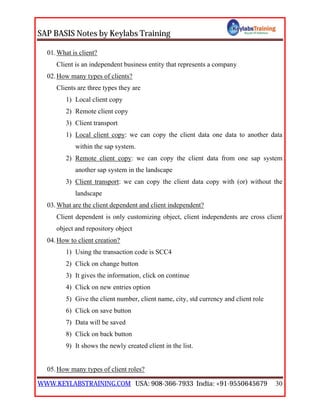
01.What is client?
Client is an independent business entity that represents a company
02.How many types of clients?
Clients are three types they are
1) Local client copy
2) Remote client copy
3) Client transport
1) Local client copy: we can copy the client data one data to another data
within the sap system.
2) Remote client copy: we can copy the client data from one sap system
another sap system in the landscape
3) Client transport: we can copy the client data copy with (or) without the
landscape
03.What are the client dependent and client independent?
Client dependent is only customizing object, client independents are cross client
object and repository object
04.How to client creation?
1) Using the transaction code is SCC4
2) Click on change button
3) It gives the information, click on continue
4) Click on new entries option
5) Give the client number, client name, city, std currency and client role
6) Click on save button
7) Data will be saved
8) Click on back button
9) It shows the newly created client in the list.
05.How many types of client roles?
SAP BASIS Notes by Keylabs Training
WWW.KEYLABSTRAINING.COM USA: 908-366-7933 India: +91-9550645679 31
1) TEST [Development test client]
2) QTST [Quality system]
3) CUST [Customizing]
4) PROD [Production]
5) SAND [Sandbox client] ---> R & D Purpose (Research & Development)
6) TRNG [Training client]
06.What are the changes and transports for client specific objects?
o Changes without automatic recording
o Automatic recording of changes
o No changes allowed
o Changes w/o automatic recording, no transport allowed.
07.What are the cross client object changes?
1. Changes to Repository and crass-client Customizing allowed
2. No changes to crass-client Customizing objects
3. No Changes to Repository objects
4. No Changes to Repository objects and crass-client Customizing object
How many types of Client properties? (protect client copier and comparison tool)
0 – No restrictions
1 – No overwriting
2 – No overwriting, no extended availability
08.What is the purpose of T000?
List of clients defined in this T000 table. Which we can maintain with transaction
SCC4
09.How to lock a client?
In SE37 Functional module people we have to give the SCCR_LOCK_CLIENT
then click on Execute button. Give the client number you want to lock and click on
save button. Then client locked successfully.
SAP BASIS Notes by Keylabs Training
WWW.KEYLABSTRAINING.COM USA: 908-366-7933 India: +91-9550645679 32
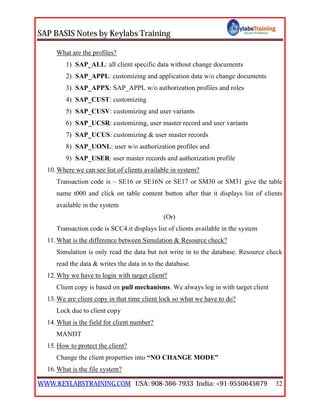
What are the profiles?
1) SAP_ALL: all client specific data without change documents
2) SAP_APPL: customizing and application data w/o change documents
3) SAP_APPX: SAP_APPL w/o authorization profiles and roles
4) SAP_CUST: customizing
5) SAP_CUSV: customizing and user variants
6) SAP_UCSR: customizing, user master record and user variants
7) SAP_UCUS: customizing & user master records
8) SAP_UONL: user w/o authorization profiles and
9) SAP_USER: user master records and authorization profile
10.Where we can see list of clients available in system?
Transaction code is – SE16 or SE16N or SE17 or SM30 or SM31 give the table
name t000 and click on table content button after that it displays list of clients
available in the system
(Or)
Transaction code is SCC4.it displays list of clients available in the system
11.What is the difference between Simulation & Resource check?
Simulation is only read the data but not write in to the database. Resource check
read the data & writes the data in to the database.
12.Why we have to login with target client?
Client copy is based on pull mechanisms. We always log in with target client
13.We are client copy in that time client lock so what we have to do?
Lock due to client copy
14.What is the field for client number?
MANDT
15.How to protect the client?
Change the client properties into “NO CHANGE MODE”
16.What is the file system?
SAP BASIS Notes by Keylabs Training
WWW.KEYLABSTRAINING.COM USA: 908-366-7933 India: +91-9550645679 33
The files are organized in terms of documents and directories
17.How many client copies you perform the regular basis?
Depends on business requirement. It is not a regular task
18.Client Export & Import, Remote client copy so which one is better?
Client export & import is better
 Why?
May be RFC connection is failed in remote client copy. And also it will take long
time to process the client copy because depending on the net work problems.
19.How do you move the transport request different clients within the system?
Using the transaction code SCC1
20.How do you find out the client size?
Using the transaction is SA38 (or) SE38 and run the report is RSSPACECHECK
21.How do you find out the table size?
Using the transaction code SA38 (or) SE38 an run the report is RSTABLESIZE
22.How many clients you can create on the sap system?
997 clients we can create
How many clients we can create?
We can create the up to 1000 clients [000 to 999]
23.What are the default clients after installation of sap system?
Three, they are
1) 000: it is standard client (or) master client. It contains client independent
settings and it is used for applying the patches, add-ons and transport
management configuration
2) 001: it is a backup of the “000” client can be considered for working as
production system
3) 066: Early watcher & alert reports – If there is any problem with sap system
then the early watch client throws the alerts.
24.How do you disable multiple login in the same client?
SAP BASIS Notes by Keylabs Training
WWW.KEYLABSTRAINING.COM USA: 908-366-7933 India: +91-9550645679 34
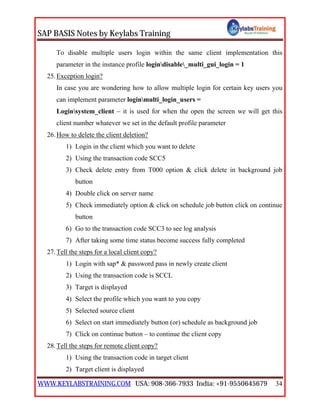
To disable multiple users login within the same client implementation this
parameter in the instance profile logindisable_multi_gui_login = 1
25.Exception login?
In case you are wondering how to allow multiple login for certain key users you
can implement parameter loginmulti_login_users =
Loginsystem_client – it is used for when the open the screen we will get this
client number whatever we set in the default profile parameter
26.How to delete the client deletion?
1) Login in the client which you want to delete
2) Using the transaction code SCC5
3) Check delete entry from T000 option & click delete in background job
button
4) Double click on server name
5) Check immediately option & click on schedule job button click on continue
button
6) Go to the transaction code SCC3 to see log analysis
7) After taking some time status become success fully completed
27.Tell the steps for a local client copy?
1) Login with sap* & password pass in newly create client
2) Using the transaction code is SCCL
3) Target is displayed
4) Select the profile which you want to you copy
5) Selected source client
6) Select on start immediately button (or) schedule as background job
7) Click on continue button – to continue the client copy
28.Tell the steps for remote client copy?
1) Using the transaction code in target client
2) Target client is displayed
SAP BASIS Notes by Keylabs Training
WWW.KEYLABSTRAINING.COM USA: 908-366-7933 India: +91-9550645679 35
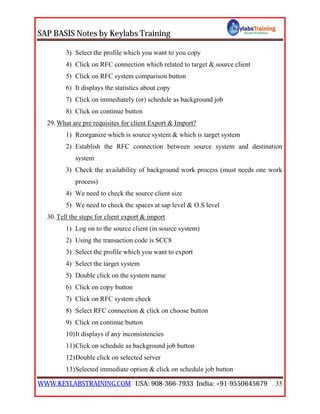
3) Select the profile which you want to you copy
4) Click on RFC connection which related to target & source client
5) Click on RFC system comparison button
6) It displays the statistics about copy
7) Click on immediately (or) schedule as background job
8) Click on continue button
29.What are pre requisites for client Export & Import?
1) Reorganize which is source system & which is target system
2) Establish the RFC connection between source system and destination
system
3) Check the availability of background work process (must needs one work
process)
4) We need to check the source client size
5) We need to check the spaces at sap level & O.S level
30.Tell the steps for client export & import
1) Log on to the source client (in source system)
2) Using the transaction code is SCC8
3) Select the profile which you want to export
4) Select the target system
5) Double click on the system name
6) Click on copy button
7) Click on RFC system check
8) Select RFC connection & click on choose button
9) Click on continue button
10)It displays if any inconsistencies
11)Click on schedule as background job button
12)Double click on selected server
13)Selected immediate option & click on schedule job button
SAP BASIS Notes by Keylabs Training
WWW.KEYLABSTRAINING.COM USA: 908-366-7933 India: +91-9550645679 36
14)Once verify all the values & click on continue button
15)Using the transaction code SCC3
16)Click on export button
17)Copy Ex: RT01148.ECC from D:usersaptransdata
18)Copy Ex: KT01148.ECC from D:usersaptranscofiles
19)Log on to target client (in target system)
20)Using the transaction code STMS
21)Go to overview tab and click on import option
22)Double click on our system
23)Go to extras ---> other request ---> add
24)Select our transport request number & click on copy button
25)Click on continue button
26)Select our request number click on import request[semi loaded truck]
option.
 NOTE: here transport request status is stopped(red color)
27)Select the target client & click on choose button
28)Click on import button
29)Give the target client number, user name & password
30)Here transport request status is running (truck button)
31)Click on continue button
31.Post client copy:
1) Using the transaction code scc7(in target client)
2) Click on schedule as background job button
3) Double click on selected server
4) Selected immediately option & click on schedule job button
5) Once verify all the values & click on continue button
6) Using the transaction code SCC3
7) Double click on our job log
SAP BASIS Notes by Keylabs Training
WWW.KEYLABSTRAINING.COM USA: 908-366-7933 India: +91-9550645679 37
8) It displays import successfully
32.Using the logical system transaction code is SALE
33.What is logical system?
To identify the client in the landscape .it is unique identified
34.Where we have to store the logical system?
TBDLS
35.What is the naming convention of logical system?
<Sid>client<client number> Ex: BPDCLNT555
36.BDLS – Tool: conversion of logical system names
37.How to assign the logical system to client a client?
1) Using the transaction code SALE
2) Click on Basis settings ---> logical system ---> assign the logical system to
client
3) Double click on the client which you want to assign the logical system
4) Select the logical system & click on copy button
5) Click on save button
6) Data was saved that means logical system assigned successfully
(Or)
7) Using the transaction is SCC4 is also we can assign the logical system to
client
Support packages
A. Patches: To fix the bugs, to get the functional enhancement and To upgrade the
system to next level
SAP BASIS Notes by Keylabs Training
WWW.KEYLABSTRAINING.COM USA: 908-366-7933 India: +91-9550645679 38
B. SNOTE: SNOTE is the single object correction. They are 2 types
1. Manual note: the note is provided the runtime issues.
2. Corrective note: The note is providing the functional enhancement and
fixes the bugs.
C. The process of applying NOTE got to the transaction is SNOTE
What is the process for applying SAP NOTES to sap system?
Go to transaction code SNOTE ---> go to menu ---> download sap note ---> give
the NOTE number ---> after downloading check the status. If it shows that it can
be implemented then select the NOTE go to menu SAPNOTE ---> implement note
D. How to install the Add-ons?
Using the transaction code – SAINT
E. Support packages: support packages are multiple of object corrections
Support packages contain the set of patches. Support packages we should apply on
sequence manner.
F. The support packages status are stored in “PAT01” table and “PAT03”
G. How do you get latest kernel, support packages & Add-ons?
Service market place [www.service.sap.com]
H. While applying support packages. If users accurse in SPAU & SPDD phases then
what will you do?
SPAU in problems accurse I can skip the problem. If it is SPDD in problems
accurse I can execute technical people.
SPDD & SPAU ---> please inform the customer to take care. If locked objects
found can be Release using the transaction code is SE03
What is naming convention for support packs?
Kb46c005
I. What is the difference between sap note & support packages?
SNOTE – single object correction
Support package – multiple object correction
SAP BASIS Notes by Keylabs Training
WWW.KEYLABSTRAINING.COM USA: 908-366-7933 India: +91-9550645679 39
J. With solution manager can I apply support packages in C.I & D.I?
Yes, I can
 How?
We can install the C.I & D.I on the host and on the same <Sid> can apply support
packages.
K. Usrsaptransepsin:
This directory stores uncar patches which are download from the service market
place
L. Table “TPFET” is used for store the parameter values along with patches
Kernel patch latest number: 156/291
Support package highest level: 26
Patch: Group of NOTES is called patches
Packages: Group of patches is called packages
Stacks: Group of packages is called stacks
M. How to uncar .car/.sar files in UNIX single shot?
# $for I in *, SAR: do SAPCAR –XVF $I: done
We can’t able to see uncar files in EPS directory then what will you do?
May be file corrupted
Sap car may old version
N. Can you apply the support packages in Java system?
Yes, through SDM and JSPM
O. Why we required 2 background work process in support packages?
Support package is the time taking process in this process due to some problems.
If one job is failed another one job is take the backup.
P. What are prerequisites for applying support packages?
1. Ensure that SPAM/SAINT version is updated to the current version.
2. Ensure that valid backup is available
SAP BASIS Notes by Keylabs Training
WWW.KEYLABSTRAINING.COM USA: 908-366-7933 India: +91-9550645679 40
3. Ensure that STMS is consistence checked
4. Ensure that at least two background work process are available
5. Ensure that “RDDIMPDP” job schedule in the background in client “000”
with user “DDIC”
6. Patches should be applied in the sequence SAP_BASIS, SAP_ABAP,
SAP_APPL, SAP_HR
7. Ensure that there should enough space in the Database
8. Ensure that there should be enough space in the usrsaptransepsin
directory
9. Apply the patches in the client 000 with user like DDIC
10.We need lock the users in the sap system and also we need to intimate then
well advanced before applying support packages using SM02
11.Ensure that internet connection is available to resolve the issues
12.If the support packages are more than 10MB apply through application
server, if not then through frontend
13.Download the support packages from www.service.sap.com
14.After April 1st
2007 can be downloading only through solution manager
15.Apply the patches in the landscape sequence. That is (DEV – QAS – PRD)
16.Once support packages applied can’t be reverted back
17.The patches comes in the format .sar (or) .car
18.Download the patches into Tran’s directory and uncar the file using this
command Sap car – xvf <filename> –R
19.It will check for epsen directory format is .ATT and .PAT files
Q. How to apply the support packages?
1. Download the SAPKB***.car/SAPKA***.car/SAPKH***.car files
2. Uncar into the EpsIn directory
3. Go to SPAM
4. Load the packages from front – end (or) application server
SAP BASIS Notes by Keylabs Training
WWW.KEYLABSTRAINING.COM USA: 908-366-7933 India: +91-9550645679 41
5. Display define the Queue
6. Import Queue
7. The import can be scheduled immediately (or) background immediately
(or) at later time during off peak hours
Phases of the Support Package Manager
 The Support Package Manager runs through a series of phases when it imports
Support Packages. If you want to know which phases were performed for which
scenario (test scenario or standard scenario), execute program RSSPAM10.
 The following list provides an overview of all the modules and phases and list
them in the order in which they are executed by the Support Package Manager:
Module: Preparation
1. PROLOGUE
This phase checks if you are authorized to import Support Packages.
2. CHECK_REQUIREMENTS
This phase checks various prerequisites for importing Support Packages such as
the tp logon to your system.
3. DISASSEMBLE
This phase disassembles, or unpacks, the data files from the relevant EPS parcels
and copies them to the transport directory.
4. ADD_TO_BUFFER
This phase copies the queue to the transport buffer of your system.
5. MODIFY_BUFFER
In this phase, the transport buffer is prepared for correct processing of the
following import phases.
6. IMPORT_OBJECT_LIST
SAP BASIS Notes by Keylabs Training
WWW.KEYLABSTRAINING.COM USA: 908-366-7933 India: +91-9550645679 42
This phase imports the object lists of the Support Packages in the queue into the
system.
7. TEST_IMPORT
This phase performs a test import for the current queue using tp. It checks if there
are objects that are in open repairs and will be overwritten during the import, or if
any other circumstances are preventing an object from being imported
successfully.
8. OBJECTS_LOCKED_?
This phase checks if there are objects that will be overwritten by the Support
Package, and that are still in requests that have not yet been released.
9. ADDON_CONFLICTS_?
This phase checks if there are conflicts between the objects in the queue and the
installed add-ons.
10.SCHEDULE_RDDIMPDP
This phase schedules the transport daemon (program RDDIMPDP).
Module Import 1
11.CREATE_VERS_BEFORE
This phase generates versions of the objects in the Support Packages that are in the
queue.
12.SPDD_SPAU_CHECK
This phase checks if a modification adjustment is necessary (Transactions
SPDD/SPAU).
13.DDIC_IMPORT
This phase imports all ABAP Dictionary objects in the queue.
14.AUTO_MOD_SPDD
This phase checks if modifications to ABAP Dictionary objects can be adjusted
automatically.
SAP BASIS Notes by Keylabs Training
WWW.KEYLABSTRAINING.COM USA: 908-366-7933 India: +91-9550645679 43
15.RUN_SPDD_?
This phase prompts you to adjust your modifications to ABAP Dictionary objects
with Transaction SPDD.
16.LOCK_EU (For Import Mode Downtime-Minimized Only)
This phase locks the development environment.
17.INACTIVE_IMPORT (For Import Mode Downtime-Minimized Only)
This phase imports program code and program texts in an inactive state.
18.DDIC_ACTIVATION
This phase activates the imported Data Dictionary objects.
19.IMPORT_PROPER
This phase imports all Repository objects and table entries, provided they have not
already been imported during the phase INACTIVE_IMPORT. This is preceded
by actions such as table conversion and activation of the name tabs.
20.PREPARE_XPRA
This phase prepares the XPRAs and after-import methods to be executed.
21.UNLOCK_EU (For Import Mode Downtime-Minimized Only)
This phase unlocks the development environment.
22.AUTO_MOD_SPAU
This phase checks whether modifications can be adjusted automatically.
23.XPRA_EXECUTION
This step executes the XPRAs and the post-import methods.
24.ABAP_GENERATION
This phase generates runtime objects for the imported Repository objects (ABAP
source texts and screens).
25.RUN_SPAU_?
This phase prompts you to adjust your modifications to Repository objects with
transaction SPAU.
26.CLEAR_OLD_REPORTS (For Import Mode Downtime-Minimized Only)
SAP BASIS Notes by Keylabs Training
WWW.KEYLABSTRAINING.COM USA: 908-366-7933 India: +91-9550645679 44
This phase deletes obsolete versions of the program code and program texts in the
database.
27.EPILOGUE
This phase completes the import of the Support Package. It also checks if the
queue was processed completely.
Kernel patch upgrade
A. What is the kernel patch upgrade?
Kernel patch upgrade is a process of upgrading the executables files in the run
directory with current version
B. What are prerequisites for applying kernel patch upgrationad?
1) Before applying kernel patch we have to take online backup (or) off line
backup of the system
2) Before applying kernel patch we have to take backup of this folder
usrsap<Sid>sysexeucnti386run
3) Stop the sap system and stop all the sap services
4) Download the current kernel from www.service.sap.com
5) Download the kernel files they are Database Independent & Database
dependent
6) After downloading this files with get the file format.car (or) .sar files
 Ex: file format is SAPEXE_Patchlevel.sar (DB independent), file format
SAPEXEDB_Patchlevel.sar (DB dependent)
7) Extract the downloaded files from by using following command
SAPCAR –XVF Filename.sar new folder
SAP BASIS Notes by Keylabs Training
WWW.KEYLABSTRAINING.COM USA: 908-366-7933 India: +91-9550645679 45
SAPCAR –XVF SAPEXE_Patchlevel.sar
SAPCAR –XVF SAPEXEDB_Patchlevel.sar
8) The files will be in the format of .EXE (or) .DLL (or) .DB ……..ext
C. How to apply the kernel?
1. Take the extracted files from new folder and replace the existing kernel
usrsap<Sid>exeucnti386run with newly extracted files
2. Once replacement has finished we need to start the services
3. Go to services.msc then select the following files are started
4. Go to MMC select the instance click the start button
5. Once sap system is up & running check the kernel version
Go to cmd prompt -----> disp+work (it will show the upgrade kernel
version)
D. How to get the sap kernel files?
Logon market place ---> s/w downloads ---> entry by application group --->
additional component ---> click0n sap kernel (32 bit uc, 64 bit uc, 32 bit nuc, 64
bit nuc.)
Once database independent is completed after that Database dependent completed
E. usrsap<Sid>sysexeucnti386run
Run directory is called as a kernel directory
This stores all the executables through which sap runs
F. Kernel is provided the communication between SAP, DB & O.S
SMLG – Logon load balancing
A. More than one instance we can configured the in that time we can use logon load
balancing
B. Decreasing the load balancing on the C.I
C. Effective utilization of buffers
SAP BASIS Notes by Keylabs Training
WWW.KEYLABSTRAINING.COM USA: 908-366-7933 India: +91-9550645679 46
D. We can create and delete groups entire system
E. If the one instance is failed then the request goes to another instance failover
F. How to create the logon load balancing?
Using the transaction code – SMLG ---> click on the create button ---> here we
have to give the logon group and instance ---> copy ---> after open the GUI pad ---
> click the NEW ITEM ---> next ---> here we have to give the connection type
(group server selection) ---> we have to the description, application server, system
number, system ID ---> next ---> finish
Sap startup problems
1. Services may be stopped
2. Maybe no spaces at work directory in O.S level – dev_ms, dev_disp, sapstart.log,
sapstartsrv.log, STD. Err
3. May be problems in startup, instance & default profile parameters
4. Work process may be crossed 100
5. Message server hostname may be changed
6. We have to check whether logged <Sid>adm (or) not
7. We have to check the oracle status up (or) not
 Cmd – sqlplus /as sysdba (enter)
 SQL :> select status from v$ instance;
Open (or) mount (or) no mount (or) not available
8. If oracle is not coming up we need to start it
 SQL :> startup [to open the oracle]
9. Oracle blocks may be corrupted (we need to recover the data]
10. Ora arch directory may be full [backup & delete the old data]
SAP BASIS Notes by Keylabs Training
WWW.KEYLABSTRAINING.COM USA: 908-366-7933 India: +91-9550645679 47
11. Table space issues (or) space issues at O.S level [then increase the table space
issues (or) increase O.S level spaces]
12. Dispatcher is not coming up in that time we have to check the listener
Cmd: lsnctl (enter)
Listener :> status (to check whether it is started or not
Listener :> start [to start the listener]
Listeners :> stop [to stop the listener]
13. If system is not coming up then change in instance profile that is rdisptrace = 0,
1,2,3,4 then start sap again it will writes the logs into work directory (after starting
sap system we need to change the trace level = “0”)
[Trace = 0 – no trace is written to files]
[Trace =1 – write error messages in the trace file]
[Trace = 2 – write the full trace]
[Trace = 3 – write the full trace including data blocks]
Performance
1. ST01 – system trace
 How to identify the expensive SQL statement?
We can identify the expensive SQL statements in st05
 We can check kernel functions and authorization checking
 SQL trace, buffer trace and RFC also we can check here
2. ST02 – buffer swap
 What is the sap memory management?
Roll area, page area, extended memory, heap memory
3. ST03 – workload analysis
 Database performance and monitoring, workload collector & statistic
records are based on day, weekly & monthly we can see
How to delete the entire in table MONI
SAP BASIS Notes by Keylabs Training
WWW.KEYLABSTRAINING.COM USA: 908-366-7933 India: +91-9550645679 48
loss the performance the data
ST03 – go to ---> performance DB ---> clients of DB
4. ST04 – database overview
 We can check database buffer, shared pool, log buffer, time statistics &
redo logs
5. ST05 – performance analysis
 What is SQL trace?
To identify the expensive SQL statement path enqueue trace
 Enqueue time goes to behind threshold value occurs
1 milliseconds on central instance
5 milliseconds on database instance
 Rfc trace: Rfc time exceeds threshold value occurs & Rfc time is 10 to
40% average of responsibility of time table buffer trace
Load generation time exceed the threshold value occurs time is 200
milliseconds
6. ST06 – OS monitoring
 It is used for CPU utilization, number of CPU’S physical memory available
and utilized
 It is used to start & stop the sap OS Col services. Click on detailed analysis
menu to display the top CPU users
 If fetches the data using service saposcol and it displays
 Memory utilization
 Disk response time
 CPU idle time not less than 30% [for portal up to 80 to 85%]
 This transaction code is also used start & stop the sap operating system
collector
 Click on LANCHECK by ping to check the number of presentation server.
You can ping to the servers (or) to a specific IP address
SAP BASIS Notes by Keylabs Training
WWW.KEYLABSTRAINING.COM USA: 908-366-7933 India: +91-9550645679 49
 NOTE: OScol brings the OS information into ST06. If OS call not stared
ST06 will be blank
We can check top CPU utilization for the current last 24 hours
7. ST07 – application monitoring
 Here we can see how many users are log, number of servers, clients & work
process
 it is used to identify whether the system is optimally designed or not, this is
also used to identify the buffer utilization & response TIME
8. ST11 – it is used to display the developer traces of work directory
usrsap<Sid>syswork
How to delete the statistics of file R/3?
Sometimes deleted manually
Using ST03 or ST03N
OS level: DVEBMGS/data file
NET WEAVER EP (Enterprise Portal)
A. Portal components are as java, EP, EP Core
B. Portal system logon URL: http://hostname:5<instance number>00/irj/portal
 irj = iview runtime java
C. In java login URL:http://hostname:5<instance number>00
java users are – j2ee_admin and administrator
D. What is the use of portal system?
1. Portal is the middle ware technology
2. It is a web based technology based on web site
E. What is purpose of collaboration?
Chat with in the company, the people who are under the company
F. What is knowledge management?
We are storing the sap documents in the company. It gets from the BW system.
SAP BASIS Notes by Keylabs Training
WWW.KEYLABSTRAINING.COM USA: 908-366-7933 India: +91-9550645679 50
G. EP post installation steps:
1. Maintain the JVM settings in config tool
2. Configure the SLD for portal system
3. Configure the single sign on
4. Create the JCO RFC destination between portal and backend systems
5. Installation the license for the portal system
6. Configure the backup for portal system
H. When we login to the portal system the tables are
1. Content administration
By using this we configure the portal content like iview, work sets & pages
2. User administration
By using this we can create the portal users assign the portal roles to
particular users and export import of the roles, users
3. System administration
By using this we can configure the SSO and key store administration &
UWL [universal work list configuration]
I. How to start the java system?
Start
DB, SCS, C.I, D.I
Stop
J. Work process overview – JCMON
Config tool
A. To logon the config tool database should be up but their java is not mandatory
B. Without user ID & password we can log in the config tool
C. If you change this config tool then we can restart the sap system
SAP BASIS Notes by Keylabs Training
WWW.KEYLABSTRAINING.COM USA: 908-366-7933 India: +91-9550645679 51
D. Config tool path is – usrsap<Sid><instance number>j2eeconfig tool
config.bat ---> windows OS (config.sh ---> UNIX)
E. Options:
1. Cluster data
2. Secure store
3. UME LDAP Data
1. Cluster data:
1) Global dispatcher configuration
2) Global server configuration
3) Instance – id 60466 ---> for a specific instance changes of parameters
 If we change in the global that effect to instance
 If we change in the instance that effect to that instance only
 JVM settings
 Secure store area
 Default logon tickets
 If we want to add one more server node (or) server process click on
instance ---> click on add server button using config tool we can change the
JVM settings
2. Secure store area:
1) We can change the parameter in security in config tool
2) Secure store we can change the password (administration user password)
3) We can maintain the administration and java schema user & password in
secure store area using config tool
4) Whenever we want to change the password we have to restart the sap
system
Com.sap.security.core.ume.service
1. Ume.saperadmin.active
SAP BASIS Notes by Keylabs Training
WWW.KEYLABSTRAINING.COM USA: 908-366-7933 India: +91-9550645679 52
Ume.superadmin.password
2. Ume.logon.logon_help
Key store --->default log on tickets)
3. UME LDAP Date:
1) In the config tool we can updated the LDAP Data server information if we
are using active directory for the user connection
LDAP ---> LIGHT WEIHT DATA ACCESS PROTOCOL
2) To fetched the data from active servers using LDAP Data
3) Services:
1. Licensing service
2. Locking service
3. Log viewer service
4. Log configure service
5. JCO RFC service
6. Security service
7. SLD service
8. SSL service
4) Manager:
1. Configuration manager: it process the configuration data from
relationship of database
2. Cluster manager: it manage the communication b/w J2EE engine
cluster elements
3. Service manager: it provides runtime elements of the J2EE engine
4. Thread manager:
5. Port manager: it manages the process of pooling java object.
6. Long manager: it manages process of logging system
SAP BASIS Notes by Keylabs Training
WWW.KEYLABSTRAINING.COM USA: 908-366-7933 India: +91-9550645679 53
Visual admin tool
A. To login to the visual admin tool data base and java system must be up
B. We need user ID & password for login to the visual admin tool
C. If you change this visual admin tool then we don’t need restart the sap system
D. Visual admin tool path is –
E. Visual admin tool port number is: 5<instance number>04
F. Destination for java system: [destination (or) target system] [one java is connected
to another java system]
G. Licensing adapter: after downloading the market place we give license here
H. JCORFC Provider
This is used for connecting the Abap system and java system
 Program – SSO
 Gwservice – sapgw00
 Server count – 2
 Application server host –
 System no –
 User ID –
 Password –
 Log viewer – here we can see all the logs
I. All the runtime errors we can check in the file Default. Trace file
Usrsap<Sid><instance number>J2EEclustersecuritylog
J. Monitoring services:
These used for monitoring the java system
1. Application
2. Kernel
3. Performance
4. Services
SAP BASIS Notes by Keylabs Training
WWW.KEYLABSTRAINING.COM USA: 908-366-7933 India: +91-9550645679 54
5. System
K. Key store services: these are the services we can to create the sap logon tickets.
These log on tickets used for authorization and security for java system.
SDM (Software Deployment Manager)
K. What is the SDM?
SDM is only for the C.I, there is no SDM for dialog instance
L. SDM tool is used for deploy (or) un deploy the Java patches
1. Deploy: It is using their services we can start & stop the application server
runtime. Java patch extension .SCA (or) .SDA
 SCA: component archive
 SDA: software deployment archive
2. Un deployment:
 Click on un deployment tab
 Selection file
 Start un deployment
M. For up to 640 kernel for deployment & un deployment
N. SDM path is – usrsap<instance number>SDMprogramremotegui.bat
O. SDM port number is – 5<instance number>18
P. SDM we can run in two modules
1. Stand alone mode: whenever we start the system then we have to start the
SDM separately
2. Integrate mode: the SDM automatically started
JSPM (Java Support Package Manager)
A. JSPM is used for deployment of the patch of java system from 700 kernel on
words
B. JSPM Path is – usrsap<Sid><instance number>j2eeJSPMgo.bat
SAP BASIS Notes by Keylabs Training
WWW.KEYLABSTRAINING.COM USA: 908-366-7933 India: +91-9550645679 55
C. Download the support patches put in usrsaptransepsin
D. JSPM contains are
1. Support stack
2. Single support stack
3. New s/w component
4. Business packages
E. Here no need to apply the support packages in sequence
F. If we want login the JSPM it asks the password then we must give the SDM
password
G. Before applying the JSPM we need to check the trance directory is full (or) not
H. How to apply the support packages in JSPM?
1. Download the java support pack stack from the market place
2. Keep the stack files under usrsaptranceepsin
I. We can apply the kernel patches also using the JSPM
SINGLE SIGN ON (SSO)
Single sign on setup as following steps:
Create Backend system in portal.
Create System alias name
Download portal certificate from portal.
Import portal certificate in portal
Creating connections to backend systems:
Under System Administration  System Configuration  System
Landscape, search for the ERP folder in the Portal Catalog. Under
‘Systems’, create a new system by right-clicking on the folder and selecting
new system from template
1)You will be taken to an iview creation wizard.
Select SAP system using dedicated application server.
SAP BASIS Notes by Keylabs Training
WWW.KEYLABSTRAINING.COM USA: 908-366-7933 India: +91-9550645679 56
2)Enter required information: System name, System ID (same as name),
system id prefix (com.pg), System Description (as seen from SAPGUI pick
list). Hit ‘Next’ when done.
3)Review the information given, then hit ‘Finish’
4)Open the newly-created system for editing
5)Select property category connector and give all backend system details
Navigate to the system object you want to add the system alias:
1)System Administration->System Configuration->Portal Content->ERP
Content->Systems->Right click on system object->Open->System Aliases
2)Type the new system alias, Add, then Save.
download portal certificate
1)As a user with administrator privileges, logon to the portal and navigate
to System Administration  System Configuration
2)In the left navigation tree, choose Key store Administration
3) In the Content tab, choose the right certificate download the verify.der
file on your PC
4). The following profile parameters should be defined for all parameter
files in backend system
login/create_sso2_ticket 2
login/accept_sso2_ticket 1
SAPSECULIB/sapmnt/<SID>/exe/libsapsecu.sl
Import Portal Certificate
1) Login to target SAP system and run transaction STRUSTSSO2.
2)In the left navigation tree, under the System PSE node, double click on
the system PSE.
3)In the right panel, click on Import Certificate button .
4)In the Import Certificate screen, browse to the Portal certificate file (the
one saved and extracted in step #4 named verify.der) and click Open.
SAP BASIS Notes by Keylabs Training
WWW.KEYLABSTRAINING.COM USA: 908-366-7933 India: +91-9550645679 57
5)Make sure that “Binary” is selected as the File format. Click on green
check mark.
6)Click on Add to Certificate List button, Notice that the Portal Certificate
is now added to the list of certificates.
7)Click on Add to ACL button. When prompted, fill in the WPS System
with the SID of Portal and WPS Client to 002.
8)Login to portal click on system administrator ---> system configuration --
->portal content->ERP folder-> System right click on connection test
DATABASE
What are ora – 01555 errors?
This is also called read in consistency error. This is called “snapshot too old “create some
more roll back segments to avoid this error.
DB13: define backup schedule
Click on date and select backup – type [offline/online] and save
Error codes:
TNS 12560 – listener problems
ORA 253, 255 – oracle struck
ORA 01034 – no comparable error
SAP BASIS Notes by Keylabs Training
WWW.KEYLABSTRAINING.COM USA: 908-366-7933 India: +91-9550645679 58
What is sap scheduler?
DB calendar (DB14)
While starting sap, I get an error, how to the problems?
Login as <Sid>adm
#r3trance –d
Should returns you 0000 return codes if it is 0012, then look for trans/log file for detail
error.
BRTOOLS
Br tools read the parameter init<Sid>.sap
BRCONNECT:
It is used to connect the database and perform the various administrative tasks
# Brconnect –f check: to check the database and writes the logs into sap check directory
# brconnect –f stats: it is used to run the database statistics. It identifies the tables whose
statistics are out based and update them.
# Brconnect –f cleanup: it is used to clean the old log files from sap trace & sap check
directory
# Brconnect –f next: next extents can be increase automatically
Db optimizer: all the tables & indexes will be stored known as a DB optimizer
Br – backup: it is used to take the take the backup of the database. These are 2 types
Offline backup: the database is down during backup & no transaction is allowed
SAP BASIS Notes by Keylabs Training
WWW.KEYLABSTRAINING.COM USA: 908-366-7933 India: +91-9550645679 59
Online backup: the database is up & running without effecting the user transaction
Redo logs the generate during the back up
Partial backup: it is taken for a specific table is during the patch
Complete backup: take the full backup of system without catalog information
Wholes ---> take the backup with catalog information
Incremental: for incremental backup, first take the full backup system [Ex: 1 2 3 4,
add the 5 6 then incremental]
Parameters:
Backup_mode = all
Backup_type = off line
Backup_dev_type = tape (or) disk
Backup_root_dir = e:oracle<Sid>sap backup
Br archive: it is used to backup the offline redo log file to tape (or) disk from ora arch
directory to tape (or) disk
---> when online redo logs are full then ora arch writes contents to ora arch (offline redo
logs) the content of ora arch is reference of off line redo logs
Restore database – from database back up
Restore database – from redo log backup
How to sap is independent of database?
There is a mediator is called DB client with the help of DB client. It becomes as database
independent
SAP BASIS Notes by Keylabs Training
WWW.KEYLABSTRAINING.COM USA: 908-366-7933 India: +91-9550645679 60
What is database client?
Database client is used to convert the open SQL statement into native SQL statement and
vice versa
How to db client connect to oracle?
LISTNER will provide the connectivity between the sap system and database during
startup of sap system
During the starting of sap system LISTNER will create shadow process in the ratio of 1:1
to connect to database
LISTNER: create the shadow process which are going to connect the database table
“SAPUSER” by using ops$ mechanism
Ops$ mechanism contain the one table in database, that table is “SAPUSER” this table
contains schema owner name & password. Shadow work process get the scheme owner
name & pass word, disconnect (choose connection database) the database.
Shadow process again connects to database by using schema owner name & password.
What is the ops$ mechanism:
The user who is authorized at o.s level is automatically authenticared at Database level.
That means no user ID & password is required to login to Database
It is provide the 2 parameters are contained in RZ10 T_Code
OS_authent_prefix = ops$
Remote_OS_authent = true
822379 support package know problems
SGEN is running one background program is PARAGENER8
SAP BASIS Notes by Keylabs Training
WWW.KEYLABSTRAINING.COM USA: 908-366-7933 India: +91-9550645679 61
Which performing the client copy PSAPUNDO table space will be increase
NOTE: If there is no space in space in PSAPUNDO table space SNAPSHOT too old
dump is thrown into ST22 then we need to lock after the “PSAPUNDO” table space
CATT: computer Aided Test tool
DATABASE:
What is database?
It is used to store the data in tables
Table contains of Rows & Columns
Where column represents fields & row represents
Advantages:
Consistency
Availability
Reliability
Uniqueness
Redundancy
Indexing
Cross client object changes:
Changes to repository and cross client customizing allowed
No changes to cross client customizing objects
No changes to repository objects
SAP BASIS Notes by Keylabs Training
WWW.KEYLABSTRAINING.COM USA: 908-366-7933 India: +91-9550645679 62
No changes to repository and cross client customizing objects
BRBACKUP: Backup of data files, control files and online redo log files
BRARCHIVE: Backup of offline redo log files
BRRESTORE: Restore the data files, control files, online redo log files & offline redo
log files
BRRECOVERY: Interactive tool for database restore & recovery
BRCONNECT: DBA- instance management, space management and Reorganization
Symbol:
+: control file – the action is completed
- : control choice list – you can choose (or) execute this now
*: control I/P – you can’t choose (or) execute this now
-: I/P – you can choose this parameter
N: I/P – you can choose this option parameter
Stop: all menus – this cancel the program
Help: all menus –
Back: all menus – go back
Continue yes: all menus – continue to next menu
No: not used – skips the following actions to narmal program steps;it is recorded is
IR06761 in the detail log
=: control choose list – this is the initial default choice with yellow background
SAP BASIS Notes by Keylabs Training
WWW.KEYLABSTRAINING.COM USA: 908-366-7933 India: +91-9550645679 63
?: I/P – you must enter a value for this parameter
#: control I/P – you can’t 1. Execute this action 2. Change this parameter
Changing the password of sap owner:
Option8: additional program
1 – Show profile & logs
2 – Clean up DBA logs & tables
3 – Adapt next extents
4 – Change password of DB User
5 – create/change synonyms for DBA tables
6 – Reset program status
Option 4 choice
Modification of original object is called correction
If Lot of achieve Logs are getting generated in minutes then what will do?
Increase the redo log file size
Reorganization: reconstruction of objects in the database
Re org jobs: table contains the information of the standard background jobs
Oracle listener: it is used to connecting the R/3 work process and shadow process
3 O.S files are used configuration
Tnsnames.ora
SAP BASIS Notes by Keylabs Training
WWW.KEYLABSTRAINING.COM USA: 908-366-7933 India: +91-9550645679 64
SQLnet.ora
Listener.ora
Here listener address = IP address or hostname
Port number = 1521 to 1529
Restore from the database backup recover from the redo log files, alter database backup
from control file to trace
Four housekeeping jobs:
Brconnect –f check
Brconnect –f status
Brconnect –f next
Brconnect –f cleanup
Buffer size will be 150mb by default we can increase up to 600 GB
Buffer settings which can be modified SE13
# SQL :> delete from sapar3.usr02 where bname = sap* and mandt = client number
Roll in: the process of copying the user related information in to work process handler
The work process continues to process the user request and response back to the user
Roll out: the process of copying the user related information into user context
User context displayed the transaction code is – SU56
SAP USER: sap user is the table which contains database scheme user ID & password
Data dictionary is stored in DD – cache
SAP BASIS Notes by Keylabs Training
WWW.KEYLABSTRAINING.COM USA: 908-366-7933 India: +91-9550645679 65
Init <Sid>.ora ---> it is store the parameter related the BRTOOLS
The user complaints that he could not log into the system in our glass mode?
Work process in to private mode
Archive struck
The user could not update any record and result in our glass mode
Buffer hit ratio: sap recommended the value to be around 98%
For every 100 request the 2 request goes to database and remaining should be form the
buffers
DSDLOG: buffer synchronous table
R/3 memory management:
User needs 2 kind of memory
R/3 buffers: [memory accessible for all users] – programs, table and field definition,
customizing tables.
User context: [memory attached individual users] – variables, lists, internal tables,
administration data (authorizations)
Local memory: local memory is associated with individual work process, local memory
is executables, data, stack, buffer for data transfer, local roll area, local paging area.
Shared memory: shared memory is associated with all the process of one instance R/3
buffer contains global objects for all users and work process such as programs and
customizing tables.
Heap memory: it contains user context, when extended memory is full. It is called and
released on demand.
SAP BASIS Notes by Keylabs Training
WWW.KEYLABSTRAINING.COM USA: 908-366-7933 India: +91-9550645679 66
The six R/3 memory areas are:
Buffers, extended memory, heap memory, roll memory, R/3 paging memory, local work
process memory.
What is roll area & page area?
Roll area: user context data is store of that is an authorization, set/get parameters, internal
tables and report lists.
Paging area: which stores application program data that corresponding to specific Abap
commands?
Parameters:
Ztta/roll_first – define first port of the roll area set to 1.17kb to 4.6
Ztta/roll_extention – extended memory
Ztta/roll_area – total roll area for work process
Ztta/roll_shm – the size of the roll buffers
Ztta/roll_maxfs – the size of the roll buffers and roll file
Em/intial_size_mb – the fixed size of extended memory
Em/address_space_mb – amount of extended memory for work process
Abap/heap_area_total – total amount of heap memory allocated to all work process
Abap/heap_area_dia – limit for the amount of local memory allocated to dialog work
process
Abap/heap_area_media – amount of local memory allocated to dialog work process
SAP BASIS Notes by Keylabs Training
WWW.KEYLABSTRAINING.COM USA: 908-366-7933 India: +91-9550645679 67
Abap/heaplimits – maximum heap limit – if it is reached the work process is flogged for
restart
Heap memory is released after use. After ending the transaction the heap memory is
automatically released and the work process restarted to release the swap memory.
Oracle startup options: startup no mounts: oracle is not operational and oracle
background process is not started. It will used to create the control file.
Startup mount: oracle is not open and not operational. Oracle background process is
started. SGA is created [SGA means shared global area]
Startup: oracle is open and operational
Oracle shutdown 4 types the are
Abort
Immediate
Transactional
Normal
Abort: here we forcefully shutdown the database without intimating any users. The total
cache information in the lost and SMON can recover the information from online redo
log files whenever system is restarts
Immediate: the committed transactions are updated in to the database. the database open
transactions are rolled back
Transactional: open transactional are successfully updated in to the database. No need
connections are not allowed. Shutdown is normal transactions are also not allowed.
SAP BASIS Notes by Keylabs Training
WWW.KEYLABSTRAINING.COM USA: 908-366-7933 India: +91-9550645679 68
Normal: no connections are allowed exist user can perform transaction till complete the
task
Oracle files structure:
Oracle – sid – sapdata1
Oracle – sai – sapdata2
Oracle – sai – sapdatan
Oracle – sid – sap backup
Oracle – sid – sap arch [recover purpose data]
Oracle – sid – sap trace – user trace – trace file
Oracle – sid sap trace – background trace – alter_<Sid>.trace [it contain all profile in
formation about oracle]
Oravle – sid – orig log A [online redo log files & control files]
Oravle – sid – orig log B [online redo log files & control files]
Oracle – sid – mirror log A [mirror of orig log files]
Oracle – sid – mirror log B [mirror of orig log files]
Oracle – sid - Ora arch [off line redo logs
Control file: it contains the oracle structure. It is a binary file. It can be updated only
oracle. We can’t edit manually.
If lot of achieve logs are getting generated in minutes then what do we do?
Increase the redo log file size
SAP BASIS Notes by Keylabs Training
WWW.KEYLABSTRAINING.COM USA: 908-366-7933 India: +91-9550645679 69
What is your database size?
Start from 500 GB
What is your database growth?
Monthly 20 GB (or) 30 GB growth
What do you check in DB02?
Table space utilization, space critical objects and table space growth
What is your action, if any space critical objects are there?
Go to DB02, click on space critical objects, then note down the objects, go to SAPDBA,
go to reorganization (option d), then use option b ---> show extent ---> resize the extent
(take the recommended value)
How do you check the backup log?
In sap level – DB12
In OS level (log in as <Sid>adm)
Go to oracle/<Sid>/sap backup
# Tail back<Sid>.log
What is sap scheduler (or) database backup?
DB calendar (DB13)
What file is responsible for sap backup?
Init<Sid>.sap
What is your backup strategy?
SAP BASIS Notes by Keylabs Training
WWW.KEYLABSTRAINING.COM USA: 908-366-7933 India: +91-9550645679 70
We do daily on line backup on all servers and weekly offline backup on DEV and Quality
system
Why mapping?
The user ID’s are particular system & back end system are different then we need to
perform the user mapping
DB02: this transaction is used for checking the database table space
What are the table spaces?
System – oracle table spaces
Sysaux – oracle table spaces
Psapsr3 – component specific
Psapsr3700
Paspsr3usr
Psapundo – for roll back information
Psapremp
If abap+java stack are one more table is added
Psapsr3db
Db backup calendar transaction code is – DB13
Db backup logs transaction code is – DB12
Data base log & BRTOOLS logs transaction code is – DB14 & DB24
SAP BASIS Notes by Keylabs Training
WWW.KEYLABSTRAINING.COM USA: 908-366-7933 India: +91-9550645679 71
To check the performance of the Database transaction code is – ST04
How to add the data files for database table space?
Brspace –f tsextended –t <tablename> (enter)
What are the database initialization files?
Init <Sid>.ora ---> p file
Sp file<Sid>.ora ---> sp file
Init<Sid>.ora
Init<Sid>.sap
What is the difference between p file & sp file?
P file is the static file, it is a test file and we can edit manually by using notepad.
Sp file is server parameter file. It is a binary file and we can’t edit the manually. It can
modified with the ALTER SYSTEM SET command
# alter system set timed statistics = true scope = both;
Init <Sid>.sap is used for generation of BRTOOLS option
Database locks transaction code is – DB01
Workload analysis transaction code is – ST03 & ST03N
Here we can see database response time 150millisecinods
SAP BASIS Notes by Keylabs Training
WWW.KEYLABSTRAINING.COM USA: 908-366-7933 India: +91-9550645679 72
CPU response time is 150ms
Rollin/rollout response time 50ms
GUI response time 200ms
RFC response time 200ms
Log_archive_start = true ---> indicates to automatically start the archive process when
the database is start
Log_archive_dest ---> archiving directory for offline redo log files
Db_block_size ---> specifies the size of the oracle block in bytes
Db_block_buffer --->total no. of data buffer in SGA
Shared_pool_size ---> specifies in bytes the amount of space that SGA reserved to cashed
& SQL start
Log_buffer ---> space allocated to the redo log buffers
Disk_copy ---> it is used for copying the database to disk
Why we need to DB refresh?
To test the object or changes which are made to system like production environment. We
need to restore the production data to QAS data.
What are homogeneous system copy & heterogeneous system copy and how you will do
that?
A system copy without a change in the database type and the OS is called a homogeneous
system copy.
SAP BASIS Notes by Keylabs Training
WWW.KEYLABSTRAINING.COM USA: 908-366-7933 India: +91-9550645679 73
A system copy with a change in the database type and the operating system is called a
heterogeneous system copy
What is db refresh?
It is the process of refreshing the data of one system by another system [OS, DB & R3]
remains the same but only database is refreshed
Pre steps for db refresh?
Create the transport of copies by using SE01 and specify the following tables are USR01,
USR02, RFCDES and TBDLS. Then we need to release the transport of copies.
Copy the cofiles & datafiles in usrsap<Sid>trans
Take the screen shots of SM59, BD54, DB13, SM37, AL11, SMLG, RZ12, RZ04, SCC4
& SPAM
And then we need to delete all the datafiles related to QAS system. Data1, Data2 ---- ext
first we need to stop the oracle services, the structure should remain same
Directories like sapdata1 ……….sap data n
Mirrorloga
Mirror log b
Orig log a
Orig log b
Copy the sap back up folder from PRD, along with the control.sql file pasted on the desk
top to QAS (oracleQASsap backup)
SAP BASIS Notes by Keylabs Training
WWW.KEYLABSTRAINING.COM USA: 908-366-7933 India: +91-9550645679 74
Open the .afd/.and backup file (ex: bdjvujux.afd) present in sap directory. Replace the
PRD with the QAS and save it
Go to oracleQASsap backup**** (ex: bdjvux.afd) backup filename folder; location
rename the files with PRD to QAS
Start ---> run ---> cmd goes to the location oracleQASsap backup and type
Brrestore –m full –b <file name>.afd –c (backup is restored success fully)
Check the present of the paths for the creation of the control file oracle
OracleQasorig log Acntrl
OracleQasorig log Bcntrl
OracleQassapdata1cntrl
If one of these path is not created . then create it
Start the oracle services
Oracle<Qas102>SQL* plus
Oracle<Qas102>TNSLISTNER
Oracle service <Sid>
Login to SQL from the location where the control SQL file is located.
E:oracleQassapbackup> sqlplus “/as sysdba”
SQL: > select status from v$ instance;
SQL: > startup nomount;
Oracle instance is started
SAP BASIS Notes by Keylabs Training
WWW.KEYLABSTRAINING.COM USA: 908-366-7933 India: +91-9550645679 75
Archive to carried on PRD system
1. take the backup using BRTOOLS
Here I have considered off line back up[compression mode]
Click start ---> run ---> type ---> BRTOOLS and click ok
1. Instance management
2. Space management
3. Segment management
4. Backup and database copy
5. Restore and recovery
6. Check and verification
7. Database statistics
8. Additional functions
9. Exit program
----> enter choice 4
Database backup
Archivelog backup
database copy
Archive log backup
Database copy
Non database copy-----ext
SAP BASIS Notes by Keylabs Training
WWW.KEYLABSTRAINING.COM USA: 908-366-7933 India: +91-9550645679 76
Reset program status
Enter your choice 1 ---> c ---> c ---> c ---> c
The above window denotes that the backup has stored and being saved in the location
D:oraclePRDsap back up
Here the backup file name is <file name>.afd
If shows down the database instance as we are taking on offline backup (then backup has
been completed success fully)
Exit from the BRTOOLS by selecting option S and then select the option y
Create a control file
Click start ---> run ---> type ---> sqlplus “as sysdba” and click ok
SQL: > alter database backup control file to trace; [then database alerted]
You can find the trace file in the following location “d:oracle<Sid> (PRD)sap
traceuser trace” [then check the latest file that is generated]
Copy that file and paste it onto the desktop and rename it with control.sql
Open the control.sql file and perform the following
Remove the lines present above “startupnomount” and below “charactersetutfs” and save
the file
Replace the <source SID> with <target SID>
Example: here it is from PRD to QAS
Replace REUSE with SET
SAP BASIS Notes by Keylabs Training
WWW.KEYLABSTRAINING.COM USA: 908-366-7933 India: +91-9550645679 77
Replace NORESETLOGS with RESETLOGS
Replace ARCHIVELOG with NOARCHIVELOG
After control file is created, the oracle is in mounted state
SQL: > select status from v$ instance;
STATUS
MOUNTED
SQL: >alter database open reset logs; [then database is alerted
SQL: >select status from v$ instance;
STATUS
OPEN
Now the database is open status
SQL: > select username from dba_users;
USER NAME
------ 9 rows selected
You can view the PRD op$ users in the above screen
Go to location: c:progarm filesapinst_instdirERPsystemoracentralas copy the
ORADBUSER.SQL file and past it in oracleQASsap backup
Execute the ORADBUSER.SQL file and provide the inputs as follows
Enter value for 1: SAPR3
Enter value for 2: NT
SAP BASIS Notes by Keylabs Training
WWW.KEYLABSTRAINING.COM USA: 908-366-7933 India: +91-9550645679 78
Enter value for 3: Target host name
Enter value for 4: target<Sid> i.e. QAS
Login to SQL and check the users
SQL: > select user name from dba_users;
USERNAME:
--------> 12 rows selected
Drop the source system users. i.e PRD users
D:oracleqassap backupsqlplus “as sysdba”
SQL :> drop user “ops$<host name>sap service<Sid>” (PRD) cascade;
User dropped
SQL :> drop user “ops$<host name><Sid>adm” cascade;
User dropped
Below screen displays the list of users available after dropping PRD users
SQL: > select user name from dba_users;
USERNAME:
--------> 10 rows selected
Provide permissions to the following QAS users as mentioned in the bellow screen
SQL: >select status from v$ instance
STATUS
SAP BASIS Notes by Keylabs Training
WWW.KEYLABSTRAINING.COM USA: 908-366-7933 India: +91-9550645679 79
OPEN
START THE SAP INSTANCE OR MMC
Install the license for QAS system and remove the PRD system license
Sap license –show (display the license of both QAS and PRD system)
Sap license –delete (delete the PRD system license)
Sap license –install (install license for the QAS system)
Perform post installation activities as shown bellow
SICK
SEO6 and select “database copy or database migration” option click perform post
installation action ---> yes ---> accept the source system ---> yes accept --->yes ---> yes
---> yes
Configure the STMS. Run the transaction code is STMS
Note: here we are considering the system as (NAG) domain controller. If it is a child
system, including that system in to the domain controller as per bellow screen that system
in to domain controller as bellow per screen
Run the transaction code is RZ10
Selected extended maintenance and click & display button
To delete profile of PRD system for that follow to bellow path
Profile ---> delete ---> all versions ---> of a profile ---> click yes ---> no ---> click on
continue ---> similarly delete start profile & delete profile as shown screen
SAP BASIS Notes by Keylabs Training
WWW.KEYLABSTRAINING.COM USA: 908-366-7933 India: +91-9550645679 80
After deleting all profile of the PRD system then import profile of NAG system by using
bellow path go to utilities ---> import profile ---> of active servers
Seo6 – post installation action for transport organizer
Standard installation
Database copy or database migration
Perform post installation actions
Where we have to see the user list?
Select BNAME, UFLOG from sapsr3.usr02 where MANDT = “000”
In one client all the users are locked. How you can login the particular client?
Listener path:
Oracle<Sid>instancenumber><NETWORKADMINlistner.ora
startup pf = d:oracledev102databaseinitdev.ora
How to increase the table space?
Using the SQL: > create sp file from p file; [then file is created]
Using the SQL: > create p file from sp file; [then file is created]
In BRTOOLS
Go to BRTOOLS --> option 2 --> option 1 --> option 3 --> PASPSR3 --> c --> c
DBACOCKPIT – table space monitoring, missing indexes monitoring, performance
monitoring everything belongs to database.
SAP BASIS Notes by Keylabs Training
WWW.KEYLABSTRAINING.COM USA: 908-366-7933 India: +91-9550645679 81
DBREFRESH:
Redo log full size is 50MB
Backup mode: (all, full, table space, incremental …etc)
Db client: communication with database and native language
User buffer – once we log off every thing os rolled off
Public buffer – until the instance is restarted
---> Block – 8 kb minimum
Group of blocks is called – extent
Group of extent is called – segment
Group of segment is called – table space
Database copy: when a system is setup as a copy of production
Intermediate buffers: Frequently accessed content to reduce the load on the data base
server
Database client to communicate with DB server
Buffer: buffer is used to stored frequently accessed data
Where you have to check the java software status and java version?
# Java c
# Java –version
DB01 – database locks
SAP BASIS Notes by Keylabs Training
WWW.KEYLABSTRAINING.COM USA: 908-366-7933 India: +91-9550645679 82
DB02 – database performance: table & indexes
Choose: space statistics, free space, statistics, missing indexes, space critical
objects current sizes
DB08: parameter changes are here
DB11 – select database connection.
DB12 – backup logs
Redo log backup and database
DB13 – planning calendar
DB14 – BR tools logs
DB15 – tables & archiving objects
DB16 – database check
Find out the errors & warnings
Interview question
1) How many users you have?
A: 400 users
2) What is your team size?
A: Basis we have 4 and security we have 2 in current project
3) How many servers you have?
A: Four Servers
Sap all tables are stored in DD02L
4) Where we have to see all the transaction codes?
A: SE93, Table level TSTC
SAP BASIS Notes by Keylabs Training
WWW.KEYLABSTRAINING.COM USA: 908-366-7933 India: +91-9550645679 83
5) How can you confirm the patch level for SAP GUI?
A: Log in to sap GUI, and hit alt – f12 -> about patch level information.
6) What is the difference between central instance & dialog instance?
A:Instance where message server and enqueue server is present that is called central
instance
Which doesn’t contain message server and enqueue server that is called dialog instance
7) How to connect to sap server?
A:As Abap -----> SAP GUI
As Java ------> Web browser (HTML)
8) What is the latest version in sap?
A: ECC6.0 (or) ERP2005 Sr1, Sr2, Sr3
9) What is the user to communication between ABAP & JAVA?
A: SAPJSF
10) What is the connection between presentation layers to application layer?
A: DIAG Protocol
11) What is your landscape?
A: Three system landscape
12) What system landscape you have?
A: R/3 system, EP system & BI system
13) What are modules configured?
SAP BASIS Notes by Keylabs Training
WWW.KEYLABSTRAINING.COM USA: 908-366-7933 India: +91-9550645679 84
A: We have ECC6.0, EP and BI
14) What operating system you worked on?
A: Windows 2003
15) Which database you worked on?
A: Oracle 10g with patch 10.2.1.0.7
SM20 transaction code is user for user login details in month
16) What is the difference between ECC5.0& 4.7EE?
A: ECC5-0 is used for installation master (sapint.exe)
4.7EE is used for setup.cmd
SM62: event history
17) What system you installed?
A: ECC6.0, Net weaver
18) What is sap net weaver?
A: Sap net weaver is a as Java, EP and EP core
19) Any idea about ECC5.0?
A: ECC 25+ components we can use
20) How to delete 1000 users of a particular client?
A: SCATT: sap computer aided tasting tool
LSMW: legacy system migration workbench
SAP BASIS Notes by Keylabs Training
WWW.KEYLABSTRAINING.COM USA: 908-366-7933 India: +91-9550645679 85
These 3 are used to administrative users massively [deletion, modification and creation
whatever]
21) How to assign same role to 200 users?
A: Using PFGH transaction code ---> enter a role ---> change ---> go to user tab ---> past
the users ---> click on comparison ---> complete comparison ---> save the role.
Scripts (or) forms available – SE71
Development packages are defined in SE80/SE84
Customizing project – sp20
Customizing – a customer’s needs by adjusting parameter & settings
22) What is difference between sap* & DDIC?
Sap*: sap* does not contain any user master records. It will be adjusted at kernel level. If
you delete sap* then it will be automatically with password PASS
Sap* contains only sap_all profile only
DDIC: DDIC is the data dictionary in charge it will contains the all authorization &
profiles
DDIS contains SAP_ALL & SAP_NEW
23) Where to check for system logs of sap application at OS level?
The system logs of SAP application at OS level can be checked at sap MMC ---> sap
system ---> <Sid> ---> sys log
SAP R/3 log on appears 4 fields – client, user, password, language
SAPMCCMSR: is used for runtime java & Abap connection services
SAP BASIS Notes by Keylabs Training
WWW.KEYLABSTRAINING.COM USA: 908-366-7933 India: +91-9550645679 86
24) What is the difference between ST22 & SM21?
ST22 SM21
Program errors ST22 and extra in work process errors
System errors Startup errors
Critical & non critical update request errors
Update de active mechanism
Time out error
Memory related issues with error logs
Enqueue table overflow
Illegal time
SM02 – this transaction is used for system messages
Application server naming convention
<Project name>ECCSAPC.I
What is the difference between Unicode & non Unicode?
Unicode means it will support for all the languages and code pages
Non fUnicode – it will not supported the all the language except English & germen
What is the difference between typical & custom?
Typical: typical is nothing but the system will take automatically the installation drivers
Custom: Custom is nothing but it will ask for the installation drovers
SAP BASIS Notes by Keylabs Training
WWW.KEYLABSTRAINING.COM USA: 908-366-7933 India: +91-9550645679 87
IP address we need to check the system status
Go to cmd ---> ping 10:11:128:130 [10:11 is mandatory]
If the ping is unsuccessful. It will show request failed or request error
To check the IP address of the server.
Go to cmd ---> ipconfig [ip means internet protocol]
 we don’t install ECC system and net weaver is one system. If any problems accurse
we have to restart the system. At that time along net weaver system and ECC system will
also turn of then business will lose
What is software component?
Software component is which including the all applications is called software component
What is OSS connection? [Online support services]
This connection is used to connect the sap server to business peoples
---> Before going to the sap installation, first install operating system and database
---> Hard ware sizing based on the end users using “QUICK SIZE TOOL”
25) What is sizing?
A: The sap basis consultant should decided the hard ware capacity on the end users this
concept is Known as Sizing. It will done by “quick size tool”
Single GUI to access all the sap application [ERP, CRM, SCM, XI, PI, BI & SRM]
SAP BASIS Notes by Keylabs Training
WWW.KEYLABSTRAINING.COM USA: 908-366-7933 India: +91-9550645679 88
Instance type:
Central instance
Dialog instance
Database instance
Non ides [international demo educational system]
Ides additional client – 800, 811, 812 clients are available
Installation logs:
Sapinst.log – specifies installation success or failure
Sapinst_dev.log – installation is aborted
.tsk – specified the table/indexes …ext
Keydb.xml – kernel to restart installation from the point where it is failed
---> create local groups and global groups and assigns them to users
Local group – locally
Global group – domain level
--->in the production system never changes made
26) How to check the system availability?
A: Using the transaction code RZ20 (or) available.log file on windows
Work directory: this stores startup and error logs
27) How to lock & unlock the users?
SAP BASIS Notes by Keylabs Training
WWW.KEYLABSTRAINING.COM USA: 908-366-7933 India: +91-9550645679 89
A: Alter user <user name> unlocks account;
I) System logs at OS level ---> MMC ---> SAP system ---> <Sid> ---> sys log
UNIX command:
Ls –ll ---> long list of file
Pwd ---> present working directory
Whoami ---> which is user you login currently
Cdpro --->profile directory
Cd <directoryname> ---> change directory
Cat <filename> ---> to open the file & read the files
Ri <file name> ---> if you want modify any file it is use full
Su <filename> <target location> ---> to move the other directory or rename the file
Cp <filename> <target location> ---> to copy one location to another location
Rn <file name> ---> remove the file
Rm –r <directory name> ---> to remove the directory and sub folder
UNIX commands:
Ps –ef ---> to know all process
Kill pid ---> to till particular process
Kill -9pid ---> to kill process forcefully
Ls –ll ---> give full information of files and directories
SAP BASIS Notes by Keylabs Training
WWW.KEYLABSTRAINING.COM USA: 908-366-7933 India: +91-9550645679 90
ls –a ---> display hidden files
ls –p ---> shows difference between files and directories
SM51 SAP Servers :
1- Check Availability of All Servers
2- Check Process Lists for All Servers for Unusual Processes or Activities (e.g. Extra-long
execution times, too many errored processes, too many sequential reports)
SM66 Global Process Monitor:
1- Check for over-all system process utilization
2- Are Batch id's taking up too many DIA processes
3- Is one user running too many BGD jobs for the same report
4- Is one server being used heavily compared to others
SM21 System Logs:
1- Is there any repetitive errors in the system log
2- Any unusual repetitive failed login attempts
ST22 Short Dumps:
1- Except 'Time-Out' errors, is there any short dumps.
SMLG Logon Groups:
1- Check load distribution (Menu: Goto-->Load Distribution)
2- Are server response times acceptable? (< 2 sec)
3- Is user distribution even among active servers
ST03N Workload Analysis:
1- Check is daily, weekly and monthly totals are being calculated for each server
2- Check for Avg. Dialog Response Times. Is it below 2 secs
SM12 Lock Overview:
1- Check for outdated lock records
2- Verify that these lock records are not actively being used and delete these lock records if they
are obsolete
SM13 Update Records:
1- Check if the 'Update System' is active.
2- If not active, investigate what happened
3- Activate 'Update System' after fixing the problem
4- Review update records of past two days and delete if errored or obsolete
SM37 Background Job log:
1- Check if the are any critical jobs that were canceled
SAP BASIS Notes by Keylabs Training
WWW.KEYLABSTRAINING.COM USA: 908-366-7933 India: +91-9550645679 91
2- Identify/Fix the problem
3- Contact canceled job user for details
4- Reschedule if needed
SP01 Spool Request overview:
1- Check if there unusual number of errors in spool (>100)
2- Check if there are spool request with more then 200 pages
3- Should not be a need to delete any as the daily job should handle, unless too many spools are
old.
ST04 Database Activity Monitor:
1- Check 'Data Buffer' and 'Shared Pool Cache' quality
2- Investigate and make suggestions to the team to improve quality of these buffers
DB02 Database Performance:
1- Check 'Current Sizes' to see if any table space is above %90
2- Add new data file to the table space if needed
3- Check if there is space-critical objects
4- Check if there is any missing objects in DB or R/3 Data Dictionary
DB16 Database Check, Overview of message:
1- Check if there is any messages
2- Take immediate action to fix the problem
3- Notify the team if there is any parameter changes or assistance needed for Production Systems
DB24 Database Operations Logs:
1- Check if all DB Operations are executed
2- Check if any of the operations generated any errors
3- Fix the problem. Notify team if needed
DB12 Database confirm backup success:
1- Check to see that the previous backup was successful
2- If a backup is currently running check its status
3- If the last backup failed , check the reason correct and resubmit.
ST06 OS Monitor:
1- Click on 'Detailed Analysis menu'
2- Click on 'CPU' in 'Previous Hours' Group
3- Check if at any past hours is > %80
4- Notify Team if there is any such case
The Following are the transaction codes used for the System Monitoring:
SM12:
This Traction is used for Check for Lock Entries. There may be old locks still in place from
transactions that did not release, or from when the user was cut off from the Network. If any lock
SAP BASIS Notes by Keylabs Training
WWW.KEYLABSTRAINING.COM USA: 908-366-7933 India: +91-9550645679 92
entries are exist then we have to check since how long this lock existing. If, this lock existing
from more than one day then we should check that particular User is available or not (By using
the Transaction Code AL08). If he is not available then delete that lock. Otherwise we should
wait 1 or 2 Days.
SM13:
This Transaction is used for Check for any Errors in Update Records. A failed or “Update
Terminate” is an update to the failed database. These failed Updates occur when a user entry or
transaction is not entered or Updated in database. And we should check Whether Update is
ACTIVE or not. And also we should check any Update Records are terminated.
SM21:
This Transaction is used to check System Logs. After hitting the traction we should go to System
log--> Choose All Remote System logs, and set Date and time to before the Last log review. And
we should check whether any Errors, Warnings, Security Messages, Database, Abends, Any
other different Events are there. The log is important because unexpected or unknown warnings
and errors could indicate a serious problem.
SM51:
This Transaction is used to check that all Application Servers are UP. And also this transaction is
a central transaction from which you can select the instance to be monitor.
SM50:
This Transaction is used to check Work Process Overview and for Systems with out Servers.
Here all work processes with a “Running” or “Waiting” State. If Batch Jobs are not running, if
all the work processes are in use, this transaction provides a hint of this problem.
ST01:
This Transaction is used for System Trace. By this transaction we can trace that what are the
operations performed on particular file by particular user on which dates.
ST02:
This transaction is used for Buffer tuning or Buffer Statistics. And it is used to tune Buffer
parameters of R/3. The Buffer is important because significant buffer swapping reduces
performance. Look under “Swaps” for Red Entries. Regularly check these entries to establish
trends and get a feel of the Buffer behavior. And in this transaction we should Maintain “Hit
Ratio” is in between 90 – 100% for all , and “Heap Memory” allocated should be “0” , and
“Swaps” is 0.
ST03:
This Transaction is used to Check Work Load Analysis of. Workload Analysis is used to
determine System performance. Check Statistics and Record Trends to get a feel for the
System’s Behavior and Performance. Understanding the System when it is running well helps us
to determine what changes may need to be made when it is not.
SAP BASIS Notes by Keylabs Training
WWW.KEYLABSTRAINING.COM USA: 908-366-7933 India: +91-9550645679 93
ST04:
This Transaction is used for Database Performance Analysis. This transaction provides the
ability to Monitor the Database in related to 1) In Shared Pool “SQL Area Get Ratio” should be
90 – 95% 2) In Log Buffer Allocation Retries / Entries <1% 3) In Data Buffer “Quality” should
be in 90 – 95% 4) In Sorts Disk / Memory <1% 5) In Table Scan & Fetches “Long Table Scans”
should maintain as minimum as possible. And we should check Detailed Analysis then we
should hit “Detailed Analysis menu” Button in this screen. In that we can check Database
Overview like “Exclusive Lock Waits” , “Wait Events”, “Buffer Busy Waits”, “ File System
Request”, “ Database Message logs”, “ SQL Requests”, Summery Report for all activities, etc
ST22 :
This Transaction is used to Analyses ABAP Dumps or Short Dumps. This transaction is also
used for Analyses and Determine why the errors occurred and take corrective action. It looks for
an excessive number of dumps, and also dumps of an unusual nature. A ABAP dump is
generated when a report or transaction terminates as a result of a serious error. The system
records in the System Log (SM21) and writes a snapshot of the program terminate to a special
table.
DB02:
This transaction is used to check all table Spaces and Indexes. Here we should check table spaces
sizes. If any table used space is =>99 then we should increase add the space for particular table
space. And this transaction is provides a way to examine database allocation. And this
transaction is allows us to monitor items such as: a) DB Space History b) DB Analysis By this
transaction we can view Database history by Dates and Times.
DB12:
This Transaction is used to check database Backups. And in this we should we see successful
Backups and Unsuccessful Backups list
AL08:
This transaction is used to check the users on the System. This transaction displays User Ids and
Terminal Names who are currently logged on the system.
SM37:
This transaction is used for Monitoring Background Jobs. Background is batch jobs scheduled to
run at specific time during the day. Here we should check for cancelled jobs. Here If we want to
check particular job then, we should enter the Job Name and enter User name in User name field
or ‘*’ and hit execute Button. And verify that all critical jobs are successful.
T_Code Description Action
SM66 1. Check Long running job. (Job running
for more than 12 hours (43200Secs)
1 You can Send a mail to user confirming the
runtime for the same.
SAP BASIS Notes by Keylabs Training
WWW.KEYLABSTRAINING.COM USA: 908-366-7933 India: +91-9550645679 94
2. Check the status for all work processes.
There should not be lot of dialog work
processes in PRIV mode.
2. For dialog work process in PRIV mode for
more than 12 hrs contact the user and take
confirmation and kill the sessions.
SM50 Check for the long running work process If you find any anomalies, Contact the user and
check whether we can kill the process. Once
user gives the confirmation, kill the WP without
core.
SM51 1. Check if all application servers are
running. Double click on each application
server and check whether you are able to
login
1. If you find problems in logging to application
servers, login to OS level of the app server and
check the wps using dpmon.
SM21 1. Check for Database errors, Oracle error,
System Errors etc.
2. Refer to "Sys log Codes" Sheet for
errors
Note: Please check the system log starting
from yesterday 00:00:00 till Current time.
This should help to see the errors which
occurred yesterday
1. Analyses & take appropriate action
SM12 1. Check for old lock entries (Generally 1
day old)
1. Check if there is any active job running for
that user using SM66. If not then write email to
user and take the confirmation for clearing old
lock entries after confirmation from user.
2. Note down the actual utile value. This value
should be <= 80% of
SM13 1. Check for " Update is active "
2. Check for Update failures.
1. Note down the number of V1 and V2 update
failures
ST02 1. Ensure Hit ratio for each buffer is more
than 95 %.
2. Sometimes if hit ratio is below 95 % &
no Swaps you can ignore it.
3. Ensure extended memory should not
cross more than 80% use.
4. Please check the following thresholds
for SWAPS for individual
1) Note down the buffer and value if hit ratio is
<95%
2) No action to be taken if sometimes hit ratio is
<95%,
ST03N 1. Check and note the following
parameters.
1. Note down the values for all application
servers (yesterday's value) and analyze. If the
SAP BASIS Notes by Keylabs Training
WWW.KEYLABSTRAINING.COM USA: 908-366-7933 India: +91-9550645679 95
Dia. Response time
DB Response Time
Compare all these times with previous
data. If there is sudden increase then
analyze & corrective action
2. Check for collector status.
response time is above 1200 ms then detail
analysis is required
2. For SAP-standard expensive transactions
check for SAP notes and for Z-transactions
check with AB
ST06 Check for following utilization in all
instances
1. CPU Utilization. Ideally 60 % should be
free.
2. Page out/s should be 0.
3. Check for SAPOSCOL Status
1. Note down the idle avg value for yesterday .
ST06 -> Detail Analysis -> Compare recent
days . Use Next server tab and note down the
values for each application server.
2. If SAPOSCOL is not running. check the
same at OS level.
ST22 1. Check for the dump which is appearing
more than 20 times
2. Check for dumps appearing more than
100 times.
1. Analyze the Dump.
2. If Dump is caused by the
program/auth.object send a mail to respective
team
3. Note down the total number of dumps
(yesterday's value)
ST04 Check following settings for all instances
1. Check for Data Buffer quality. It should
be above 95 %.
2. Check for DD Cache quality . It should
be above 97 %.
3. Check for Read/User Calls. It should be
below 30.
4. Check for Alert log file Detail
1. Note down data buffer value . If value is less
than 95 % check for expensive SQL statements
in ST04.
2. Note down DD-cache value. If value is less
than 97 % check for expensive SQL statements
in ST04.
3. Note down the Read/user calls . If this value
is above 30
DB01 1. Oracle Lock Monitor. There should not
be any entry
1. Check the PID which is holding the lock.
Check for user name in SM66 for this PID.
Send email to this user informing about the wait
locks/ deadlocks.
DB02 1.Check the free size of the table space 1.Check the free size of table space and add
the data file via BR tools and send a email to
Basis Support group, mentioning the details of
the table space.
2.Execute t code DB02 and click on C
DB12 1. Check the Last successful backup If you find any failed backups send email to
SAP BASIS Notes by Keylabs Training
WWW.KEYLABSTRAINING.COM USA: 908-366-7933 India: +91-9550645679 96
2.Archive directory status (Free space). operations team.
DB16 1. Check for Errors or warnings & take
corrective actions. Go to DBA operations.
Select All operations. Check the detail logs
for all the operations (yesterday + today)
If you find any failed backups send email to
operations team.
SM37 1. Check long running active jobs running
for more than 10000 secs(Check for last
one week)
2. Check for repetitive cancelled jobs
3. Check if standard house keeping jobs
are running
1. Run a check-status for that job. To do check
status SM37. Select job Job -> check status. If
job still continues to remain in active status
then check last successful run for that job (time
taken). If current job is taking more time then
check with
AL08 1. Use this transaction if you want to find
out user across the application servers
SMLG SMLG. Go to -> load distribution 1. If response time / number of users is high on
specific one server then check SM66 to see
what jobs are executing and analyse them.
RZ03 1. Use this transaction for analysis purpose
(To check trace file & logs) Path: Select
server name --> Utilities --> Trace files -->
Startup log file
Portal System
S.no Description Action
1 Check Portal is available via Internet
Explorer
Enter portal URL
http://s49cam.corp.wrgrace.com:51600/irj/portal
check whether you are able to get to the login
screen
2 Check Server Processes via Internet
Explorer
login to NWA url
http://s49cam.corp.wrgrace.com:51600/nwa
Administration -> Systems -> Click on JC49 to
expand. Check both server processes are
running and dispatcher is OK.
3 Check logs via Internet Explorer login to NWA url
http://s49cam.corp.wrgrace.com:51600/nwa
Monitoring -> Logs and traces -> SAP Logs
4 Check Resource consumption via Internet login to NWA url
SAP BASIS Notes by Keylabs Training
WWW.KEYLABSTRAINING.COM USA: 908-366-7933 India: +91-9550645679 97
Explorer http://s49cam.corp.wrgrace.com:51600/nwa
Monitoring -> Java System reports
Database Checks
1 Run/Review Database Check job via BR
tools
Run the database check job. This will highlight
any errors that have turned up in the oracle
alert logs, table space problems, statistics etc.
Logon as oraepp user to the DB server
Run brtools
6 - Check and verification, continue
1 = Database system check,
2 Check Database backup and Redo log
backups via BR tools
Check the status of the BR backups/ BR
Connect and view the log if required.
Logon as oraepp user to the DB server
Run brtools
8 - Additional functions
1 = Show profiles and logs
Select either
3 - BRBACKUP logs
4 - BRARCHIVE logs
Check Table space Free space via Br tools Check the free space left in the table spaces:
Logon as oraepp user to the DB server
Run Br tools
2 - Space management
7 - Additional space functions
1 = Show table spaces
Continue
Continue

Sap basis-notes-keylabs-training

  • 1.
    SAP BASIS Notesby Keylabs Training WWW.KEYLABSTRAINING.COM USA: 908-366-7933 India: +91-9550645679 1
  • 2.
    SAP BASIS Notesby Keylabs Training WWW.KEYLABSTRAINING.COM USA: 908-366-7933 India: +91-9550645679 2 Work process A. All the process which handles by the use task based on the type of the user request. B. Types of work process 1) Dialog work process 2) Background work process 3) Update work process 4) Message server 5) Enqueue server 6) Gateway 7) Spool C. What are the different types of work process in R/3? Dialog (D), Update (V), Enqueue (E), Background (B) and Spool(S) Dialog work process (D) A. Dialog work process is used to handle by the user request only B. Dialog work process parameter name is – rdispwp_no_dia=2 C. Dialog work processes are minimum 2 One is user request running another one is distributing the work process D. Each request occupies 75mb to 150mb E. Dial work process is multiplexive Multiplexive means at a time one (or) more use request is running F. The user request handle by the dialog work process maximum up to 1800 seconds G. If the user request 600 seconds default in that time data is not completed then user request session is terminated H. No of Dialog work process >= No of non Dialog work process I. Dialog work process time out parameter is
  • 3.
    SAP BASIS Notesby Keylabs Training WWW.KEYLABSTRAINING.COM USA: 908-366-7933 India: +91-9550645679 3 rdispmax_wp_run_timeout=600 to 1800 J. One dialog work process maximum up to 32 users are we can create K. One application server maximum up to 100 work process are we can create L. Work process statuses are 1) Waiting 2) Running 3) Error 4) Stopped 5) Private mode: Dedicated to the particular user 6) Sleep: Work process is running but not responding Why: Waiting for resources M. In sap level work process overview – SM50 N. In sap level global work process overview – SM66 O. In O.S level work process overview – dpmon Dpmon: when the user could not login to the sap system P. In sap level display a list of application server – SM51 Q. In sm51 transaction to identify the Release note, the R/3 kernel, D/B kernel, O.S. Kernel and support packages information R. In sap level version statuses are – system ---> status S. In O.S level version we can see – disp+work How to user request flow? User request ---> dispatcher ---> work process ---> dialog work process ---> update the tables Background work process (B) A. The background work process handle by the long running jobs. The background work process that process can be executed without the user interaction.
  • 4.
    SAP BASIS Notesby Keylabs Training WWW.KEYLABSTRAINING.COM USA: 908-366-7933 India: +91-9550645679 4 Background jobs are programs, printing specification and interactively can be run automatically by the background processing system B. Background work process parameter name is – rdispwp_no_btc=2 C. During the installation minimum of 2 background work process One is defining and another one is executing D. Scheduling the background job is – SM36 Job name should start either z or y. Maximum 32 characters are allowed in the name. E. Start conditions 1) Immediate 2) Date/time 3) After job 4) After event 5) At operation mode F. Background job steps 1) ABAP program: It is a standard program (or) customized program which will execute by variant.  Variant: It is a program selection criterion to provide the inputs during the runtime (or) execution of the program.  Variants are stored in the table is TVARV  We can create the variant from SE38 2) External command: It is used for pre defined input by system administrator.  External commands are defined in SM49 (or) SM69  External commands & external program are executed by SAPXG program 3) External program: It is used for direct command input by system administrator
  • 5.
    SAP BASIS Notesby Keylabs Training WWW.KEYLABSTRAINING.COM USA: 908-366-7933 India: +91-9550645679 5 G. Background job is every 60 seconds default time is – rdispbtctime=60sec  It stored in the default profile H. What is the background job scheduler every 60seconds? SAPMSSYS I. In O.S level background work process stored in global directory usrsap<Sid>sysglobal J. Simple job selection is SM37 K. Job statuses are 1) Scheduled: Whenever job is defined in that time job status scheduled. 2) Released: Whenever we specify date & time to schedule job. 3) Ready: When the time is elapsed. 4) Active: Job status is running. 5) Finished: All the job steps are complete successfully. 6) Cancelled: There was an error and job has been terminated, as mentioned in the job log. L. Background job table is TBTC* TBTCT table is used for job scheduler TBTCS table is used for job time table M. Background job status from release to ready program is – SAPMSSYZF N. What is the difference between SA38 and SE38? SA38 is only we can execute a program and SE38 is we can create; edit a program, changing attributes and documents for the program O. If we want suspend all the background jobs are using BTCTRANS1 report P. If we want resume all the background jobs are using BTCTRANS2 report To execute these reports and programs from SA38 (or) SE38 Q. If you have a long running job, how to you analysis? (Or) How to analyze long running job? Using the transaction code is – SE30
  • 6.
    SAP BASIS Notesby Keylabs Training WWW.KEYLABSTRAINING.COM USA: 908-366-7933 India: +91-9550645679 6 R. Standard background jobs (or) Housekeeping jobs are sap_reorg* 1) Sap_reorg_abapdumps: Program: RSSNAPDL 2) Sap_reorg_batchinput: This job is used for delete batch input files Program: RSBDCREO 3) Sap_reorg_jobs: This job is used for delete old background jobs Program: RSBTCDEL 4) Sap_reorg_statististics: This job is used for run the statistics of sap tables Program: RSBPSTDE 5) Sap_reorg_spool: This job is used for delete the old print request. Program: RSPO0041 6) Sap_reorg_updaterecords: this job is used for delete the old update records Program: RSM13002 S. Background job issues (or) why background job is cancelled? 1) File system is not accessible. 2) User id & password may be expired. 3) Dependent job is may be failed. 4) RFC connection is failed. 5) Incorrect in puts. 6) May be files corrupted at O.S level. 7) Space issues in database level. 8) Memory issues. 9) Ora-arch director is may be full. 10)Invalid file formats.
  • 7.
    SAP BASIS Notesby Keylabs Training WWW.KEYLABSTRAINING.COM USA: 908-366-7933 India: +91-9550645679 7 Update work process (V) A. It is used to update the database by reading from the temporary tables. It can’t communicate with user directly B. There are 2 types of update work process. They are v1 and v2 V1 update is used for critical jobs and V2 update is used for non critical jobs C. We need at least one update work process per sap system and we have more than per dispatcher D. The update profile parameter name is rdispwp_no_vb, rdispwp_no_vb2 E. Update monitoring is – SM13 Here we can check critical and non critical updates. We can specify date and time F. Update program administration – SM14 This transaction code is used for active to deactivate & deactivates to activate update request and you configure the update servers, update groups and display & monitoring update parameters. G. Update temporary table is VB* 1) Vbmod – update function module 2) Vbdata – update data 3) Vberror – update error information 4) Vbhdr – update header 5) Vbwrk – work list for mass processing at a time have update H. Update status are 1) Init – the status will be initial. 2) Run – update is started in main database. 3) Error – update is thrown into error. 4) Auto – update is thrown into error due to problem in database space. I. Update tables are stored in TBLOD SAPMV45A: which update work process is going on?
  • 8.
    SAP BASIS Notesby Keylabs Training WWW.KEYLABSTRAINING.COM USA: 908-366-7933 India: +91-9550645679 8 Update types are 3: they are 1) Local update: Dialog work processes update the directly in Database that is called local update. 2) Synchronous: Dialog work processes update goes to the temporary table that is called synchronous. 3) Asynchronous: temporary table goes to database that is called asynchronous Update statistics are 4: they are Read, Write, Execute and Delete J. Update parameters 1) rdispvb_stop_acive: Set to “0” so that update can be deactivated. If the value is set to be “1” update can be activated. 2) rdispvbdelete: This parameter is used to delete the old update requests based on the no. of days. It will delete default 50 days. 3) rdispvbmail: It is used to send an email. It update thrown an error which can be viewed in “SBWP” (“sap business workplace”) based on your user (set to “0” or “1”). 4) rdispvbname : Name of the server running where update are processed 5) rdispvbreorg: It is used to delete the incomplete update request. 1=delete, 0=no, we can also schedule a background job “RSM13002” but it will delete the update request which are in completed it will be deleted after restarting. 6) rdispvb_delete_after_execution: It is used to delete the update request soon after the execute of the update. Set it to”1” to delete the record (or) “2” to the record will not be deleted. If it is set to “1” the background job “RSM13002” is not required. If not schedule periodically daily during off peak hours.
  • 9.
    SAP BASIS Notesby Keylabs Training WWW.KEYLABSTRAINING.COM USA: 908-366-7933 India: +91-9550645679 9 Enqueue server (E) A. Enqueue server handles by the locking and unlocking mechanism B. The Enqueue server parameter name is – rdispwp_no_enq C. Enqueue server table size is minimum of 4MB D. We can increase the maximum of size is 100MB E. Enqueue table size is enqtable_size=4mb to 100mb F. Enqueue server log files will be stored in O.S level Usrsap<Sid>instance<number>log G. The Enqueue server work process administrators a lock table in the shared memory area H. Enqueue server 4 types they are 1) Shared locks: one user can read the tables and another one user can write the tables 2) Exclusive locks: only a particular user can read it, nobody else can access it 3) Cumulative locks: The same user with different transaction accessing the same table then the lock will be shared with user transactions 4) Optimistic locks: One user lock the table and another user doesn’t have read & access the table permission I. Select lock entries – SM12 You can check (or) released the locked entries using transaction is sm12. If there is a sudden power failure. Some of the users update entry might still be locked. If possible asked the user to logoff first, before deleting the lock entries J. Transaction codes: locks and unlocks – SM01 K. Enqueue server lock tables are stored in TLOCK
  • 10.
    SAP BASIS Notesby Keylabs Training WWW.KEYLABSTRAINING.COM USA: 908-366-7933 India: +91-9550645679 10 Message server (M) A. Message servers handle by the load balancing. It distributes the dispatcher where the load balance is less. B. Message server log files are stored in O.S level DEV_MS Path is – usrsap<Sid><instance (number)>workdev_ms C. In O.S level message server monitoring is – msmon ->cmd D. Message server port number is – 36<instance number> E. Internal port number is – 39<instance number> NOTE: sap server has only one message server and enqueue server. NOTE: application server or dialog instance are same. And central instance is different Gate way (G) A. It is used to communication between the sap system to non sap system B. There will be only 1 gate way for each instance. C. In sap level gateway monitoring is - SMGW D. In O.S level gate way monitoring is – DEV_RD Path is – usrsap<Sid><instance (number)>workdev_rd E. We can check also DEV_DISP, i.s dispatcher for log files F. usrsap<Sid>instance<number>work ----> work directory stores log of the work process information in the format of DEV_W* Spool (S) A. It is used to print the documents to a printer B. There should be at least 1 spool process in the entire system C. The spool profile parameter name is – rdispwp_no_spo
  • 11.
    SAP BASIS Notesby Keylabs Training WWW.KEYLABSTRAINING.COM USA: 908-366-7933 India: +91-9550645679 11 D. Dialog work process (or) background work process are creates a spool request. i.e. to print the documents E. In O.S level spool request are stored in global directory usrsap<Sid>sysglobal F. The storage location specific parameter name is – rdispstore_location G. This parameter has 2 values they are global_G and database_DB. H. G means it stored in global directory DB means it stored in database tables are “TST01” and “TST03” I. The spool request is also referred as TEMSE Temse is used for temporary sequential objects J. Access method: It is connection to spool server to O.S spool. Access methods are 3 types 1) Local access method: the spool process and the spool host (printer spool) reside on the same system. Access method type L is used for UNIX O.S and C is used for windows O.S 2) Remote access method: the spool process and the spool host reside on two different systems. Access method type U is used for UNIX O.S and S is used for windows O.S 3) Front end method: access method p is the printers are connected to end users desktop do not configured to many front and printers F and G K. We can see all the clients and users spool request T_Code is – SP01 L. We can see specific client and user spool request T_Code is – SP02 M. Spool administration is - SPAD N. Default printers are – SWIN, SAPWIN RFC – Remote Function Call A. RFC is using connect to the one sap system to another sap system. B. Sap gate way is using of RFC C. RFC connections are 4 types
  • 12.
    SAP BASIS Notesby Keylabs Training WWW.KEYLABSTRAINING.COM USA: 908-366-7933 India: +91-9550645679 12 1) Asynchronous RFC: User doesn’t get the any acknowledgement. Whenever using the asynchronous Rfc between the two sap systems 2) Synchronous RFC: User gets the acknowledgement. Whenever using the asynchronous Rfc between the two sap systems 3) Transactional RFC: User doesn’t get the any acknowledgement .Each request send to the transactional ID, but there is no order delivered It is asynchronous RFC extended to the transactional RFC 4) Queued RFC: User gets the acknowledgement. Each request sends to the user request one by one order. Send to the form of logical unit of work D. Transaction RFC T_Code – SM58 E. Configuration of RFC Connection is – SM59 F. RFC Connection Type Connection Abap connection 3 Abap to Abap connection HTTP connection to external system G web browser to non sap system HTTP connection to Abap system H web browser to any Abap system Internal connection I within the system TCP/IP connection T Abap to +java connection G. SMQ1 is monitor for the outbound queue. Outbound queue means sending the request. H. SMQ2 is monitor for the inbound queue. Inbound queue means sending the request. I. Default communication user TMSADM J. Default the Rfc connection is – TMSADM@<SID>.DOMAIN_<SID> K. How many types of connection in Rfc? – 10 L. Rfc connections are stored in table is RFCDES M. Where we have to create the trusted system? In SM59 click on logon security. We can create the trusted system. N. Why we need to trusted system?
  • 13.
    SAP BASIS Notesby Keylabs Training WWW.KEYLABSTRAINING.COM USA: 908-366-7933 India: +91-9550645679 13 To communication for business requirement O. What is the transaction code RZ12? It is used to define the RFC Server groups and Assign the instance P. Which user is used when you create RFC? TMSADM Q. How to create the RFC connection between source client & target client 1) Login with target client 2) Using the transaction code SM59 3) Create the connection type 4) Give the RFC destination, description & connection type and click on administration 5) Click on technical settings 6) Give the target hostname and system (instance) number & select host name option 7) Click on logon security tab 8) Give source client details like number, username & password 9) Click on save button 10)Destination will be saved 11)Click on Unicode test button 12)Click on remote logon button’ 13)Click on start sap easy access button 14)Here we can find that client number111 (we logged 222 in client) 15)Click on logoff button [exit from 111 clients] Rfc issues (or) Why Rfc connection failure 1) Target system to source system does not match like version, production and component. 2) May be target system is down. 3) May be authorization problems.
  • 14.
    SAP BASIS Notesby Keylabs Training WWW.KEYLABSTRAINING.COM USA: 908-366-7933 India: +91-9550645679 14 4) May be incorrect credential of the target system Operation mode 1) What is operation mode? Switch the dialog work process to background work process vice versa using operation mode. 2) RZ04 is monitor for the operation mode & instances. Create the operation modes and delete the operation modes. 3) SM63 is used time table for operation mode 4) RZ03 is used to switch the operation mode. 5) How to create the operation mode? Maintain the operation modes T_Code is – RZ04.We assign time table for the operation mode T_Code is – sm63.Then assign the instance. 6) How to delete the operation mode? First delete the time table and save empty. Then operation mode using Rz04 7) What is exceptional operation mode? We need extend the maintains +day,-day and date, we will do it 8) Operation modes switch automatically at the times defined in the time table – using the system program is SAPMSSY2 9) No active operation modes – using program is – SAPMSSY6 Profile A. What is the profile? A profile is in the sap system is an operating system file containing parameter and configuration information of an instance. B. Why profile? It provide for the governance of the sap system C. The profile files are located under the directory – usesap<Sid>sysprofile
  • 15.
    SAP BASIS Notesby Keylabs Training WWW.KEYLABSTRAINING.COM USA: 908-366-7933 India: +91-9550645679 15 D. Profiles are 3 types they are 1) Startup profile: The startup profile is an operating system file. That defines which R/3 services are started  The naming convention startup profile is start_Insatncename_Hostname 2) Default profile: Default profile contains global parameters for all sap application servers.  The naming convention instance profile is default.pfl 3) Instance profile: instance profile contains instance specific parameter  The naming convention instance profile is SID_Insatncename_Hostname E: In what sequence are profile parameters read? Start profile ---> default profile ---> instance profile E. When sap system starts, which profile it reads first? Startup profile F. If you want modify any system parameters wide, which profile you, will see? Default profile G. Where we can see all parameters in O.S level? # Sappfpar all H. Where we can see all parameters in sap system? RSPARAM – SA38 (or) SE38s I. What is the difference between RZ10 & RZ11?  RZ10 we can change all the profile parameters and we have to restart the sap system. It is a static profile  RZ11 we can change only dynamic profile parameters and we don’t need restart the sap system. It is a dynamic profile Ex: Run time parameter can change in rz11 What are the edit profiles in RZ10?
  • 16.
    SAP BASIS Notesby Keylabs Training WWW.KEYLABSTRAINING.COM USA: 908-366-7933 India: +91-9550645679 16 Administration data Basic maintenance Extended maintenance Where you can see the Profiles? Sap level – transaction code is RZ10 & RZ11 OS level – usrsap<Sid>sysprofile DB level – PAH1, TPFYPROFTY, TPFET, TPFHR USERS:  During the sap installation for windows O.S default users are <Sid>adm, sap service<Sid>.  During the sap installation for UNIX default users are <Sid>adm, sap service<Sid>, ora<Sid>. 1) <Sid>adm: It owns the sap system and start and stop done by <Sid>adm. 2) Sap service<Sid>: It is used to start and stop the services. Ex: [sap<Sid>_00, sap<Sid>_01…..] 3) Ora<Sid>: It is used to owner to work on database SAP GUI default users are – DDIC & sap* After installation database users are – sys, system Database schema users are: Abap level – SAPSR3, java level – SAPSR3DB Communication user is SAP JSF  Default users are: DDIC is 06071992, Sap* is 19920706 J. Default services are a. Sap OS Col: sap OS Col collector which is used to collect the O.S resources that are required to start the installation. b. Ora TNS Listener: Ora TNS listener service should be started on the specified port number is [1521 – 1529]. c. Oracle service<Sid>: This is required for the database.
  • 17.
    SAP BASIS Notesby Keylabs Training WWW.KEYLABSTRAINING.COM USA: 908-366-7933 India: +91-9550645679 17 d. Sap service hostname<Instance number>:  Whether system is down we have to check whether these services (or) not Click on services –> start  Services.msc – windows O.S (or) start –> settings – control panel –> administrative tool –>services  Ps –efgrep ora* - UNIX O.S K. How to check whether the sap is running or not on UNIX level?  # Ps –Efgrep DW [check is sap is running or not]  # ps – Efgrep ora [check oracle status] L. How many initialization files for sap GUI? 1) Saplogon.ini 2) Saproute.ini 3) Sapmsg.ini M. How you can start & stop the sap system on windows?  Go to login as <Sid> adm  Password: master password  Click on MMC icon on the desktop  <Sid> right click  Start or stop N. How you can start & stop the sap system on UNIX?  Go to login as <Sid> adm  Password: master password  Start sap –-----------------------> R3 & DB [Command] [SAP]  Stop sap -------------------------> R3 & DB [Here system is down] O. How to start only sap, when DB is up?  Startsapr3 –---------------------> to start only R/3 system  Stopsapr3 –----------------------> to stop only R/3 system
  • 18.
    SAP BASIS Notesby Keylabs Training WWW.KEYLABSTRAINING.COM USA: 908-366-7933 India: +91-9550645679 18 P. Dispatcher port number is – 32<instance number> Q. Gate way port number is – 33<instance number> R. Message server port number is – 36<instance number> S. Named pipe: named pipe is used to connect between the MMC and SAP. T. Default profile parameters:  Loginsystem_client = 001 – the number of the client to display by default for all the users.  Zccasystem_language = – to specify the language during logon  Loginno_automatic_user_sapstar = 1 – by default this parameter value is 0 then we can change the parameter value is 1 because if any user (or) client you can login with parameter U. The background process is running when MMC connect to the SAP MMC strcpe.exe strdbs.cmd msgserver.exe Disp+work.exe igswd.exe ---------> IGS means internet graphical service V. DB Start C.I stop D.I STMS: Sap Transport Management System 1. What is the transport? Transport is used to moving the object from one sap system to another sap system in the landscape. Export the change request & import the transport request
  • 19.
    SAP BASIS Notesby Keylabs Training WWW.KEYLABSTRAINING.COM USA: 908-366-7933 India: +91-9550645679 19 2. The transport objects are divided into 2 types they are Export & Import DEV QAS PRO Export Import Central T.P Delivery at O.S level 3. What is domain controller? Domain control is a control all the systems in the landscape. It is used to manage all the transport parameters in the landscape. In the most of the environment there will be only one domain controller. 4. What is Transport domain controller? It is created as part of the post installation activity. 5. What is the transport domain & domain controller? All the sap level it is called as transport domain and at O.S level it is called as domain controller. 6. How to configure the domain controller? A. First decided which system you could like to define domain controller B. Login to the sap system with DDIC in client 000 C. Go to SE06 D. Click the post installation activity E. Go to STMS F. It will ask for the domain controller name G. Enter system ID of the domain controller H. Enter domain_<Sid> as domain controller name and enter the description I. Click save button 7. Steps to add the other system with domain controller J. Logon domain controller system
  • 20.
    SAP BASIS Notesby Keylabs Training WWW.KEYLABSTRAINING.COM USA: 908-366-7933 India: +91-9550645679 20 K. Approve the added system 8. What is landscape? Landscape is arrangement of group of system to flow the objects DEV --------------------> QAS -----------------------> PRO 9. Landscape  ECC DEV ------> QAS -------> PRO  EP DEV ------> QAS -------> PRO  BI DEV ------> QAS -------> PRO Based on the customer requirements we can define the single, two, three and multi systems .in the landscape 10.In order to define landscape we need system A. Transport layer B. Transport root C. Transport group D. Transport target group A. Transport layer: transport layer is used to moving the object path from one system to another system within the landscape.  Transport layers are 2 types they are 1. Z<Sid> – customizing object move the Z<Sid> layer 2. SAP – repository objects move the sap layer B. Transport routs: which shows from the transport direction to the target system?  In three system landscape  Dev -----> integrated system  Qas -----> consolidated system  Pro -----> delivery system  Transport routs are 2 types they are
  • 21.
    SAP BASIS Notesby Keylabs Training WWW.KEYLABSTRAINING.COM USA: 908-366-7933 India: +91-9550645679 21 1. Consolidated route: the route between development system to quality system is called consolidated route 2. Delivery route: the route between quality systems to production system is called delivery route  NOTE: In a two system landscape delivery route is not available C. Transport group: The systems which are shared a Trans directory is called transport group D. Transport target group: more than 3 systems & multiple clients it work’s on extended transport controller is called transport target group  Extended transport controller: it is used to transport objects within the client & system 11.What is the backup domain controller? Whenever primary domain controller is failed. In that time it will care of the transportation 12.What is work flow? To set off the automatic process & responsibility of quality system 13.Transport background jobs are RDDIMPDP, RDDNEWDP 14.Transport request are stored in TRBAT & TRJOB 15.All the change requests are stored table is E070  E070 – Change request headers  E071 – change request object lists  E071k – object key contained within transports 16.At end of the import, transport specific the return codes 1) 000: import the finished with successfully 2) 004: import finished with warnings 3) 008: some objects are not transported 4) 0012: critical transport errors
  • 22.
    SAP BASIS Notesby Keylabs Training WWW.KEYLABSTRAINING.COM USA: 908-366-7933 India: +91-9550645679 22 17.What is the change request? Whenever we can create a request that is called a change request 18.What is the transport request? Whenever we will release the change request that is called transport request 19.Which system we can configure the domain controller? Development system 20.What is transport domain (or) integrated system? Development system 21.RSTPTEST: - Can be extended if there are any problems with TP (or) R/3 instance. 22.How to check the consistence of STMS? Using the transaction code is SA38 (or) SE38 and run the report is RSTPTEST (it will check the if any errors in STMS or not) 23.User locks the transaction code is EWZ5 at sap level and in OS level we can lock the system by using Tp # tp lock sys<Sid> (or) tp un lock sys<Sid> 24.What is the naming convention of the transport request? <Sid>k9<5 digits> 25.How many types of editors? A. Graphical editor B. Hierarchical editor 26.Transports are O.S and Data Base Independent but R/3 system is dependent 27.What is r3trans –d? r3 trans –d is used to check the R3 trans connecting to the DB (or) not. 28.Trans directory path is – usrsaptrans 29.Transport request types are 3 they are K type – with change in integrated system to consolidated system C type – without change in integrated system to consolidated system T type – move the one system to another system
  • 23.
    SAP BASIS Notesby Keylabs Training WWW.KEYLABSTRAINING.COM USA: 908-366-7933 India: +91-9550645679 23 29.Tran’s directory structure is Trans Bin buffer cofiles date eps etc log sapnames tmp  Bin: it consists of domain configuration files and transport profile parameters. Tp_domain. <Sid>.pfl, domain.cfg  Buffer: buffer contains transport request ready to import  Transport request are 2 types they are  Cofiles: A cofiles contains control information of the transport request. cofiles start with K  Date files: A data file contains data information of the transport request. Data files start with R  EPS [Electronic panel service]: which is used to store the support packages?  Log: it rides the log files during the change request 1) A log: it contains the information about the transport request. Who is the transport request and name of the consultant? 2) S log: S log files are stored in transport request of specific system 3) U log: U log means it contains the transport command that are executed at OS level  Sapnames: the owner of the change request is documented here 30.How to disable the fully loaded truck?
  • 24.
    SAP BASIS Notesby Keylabs Training WWW.KEYLABSTRAINING.COM USA: 908-366-7933 India: +91-9550645679 24 Go to STMS --->overview ----> system ----> double click system (Ex: dev) ---> go to transport tool tab ----> insert row ----> N0_IMPORT ALL = 1 – this is used to disable the fully loaded truck 31.How to create the STMS? Login to the system with DDIC in client 000 Go to the T_Code STMS ---->configured ---->standard configured ----> single system, development system, three system in group (Or) Go to the T_Code STMS ---->overview ----> systems ----> sap systems ----> external system ----> then we have to give the system name, <Sid> 32.How to create the transport route? Overview ---> transport route ---> change button ---> click the DEV, QAS & PRO ---> here click the add transport route tab ---> then we have to give the <Sid>, transport layer, system name. 33.How to create the change request? Using the transaction codes are SE01, SE09 and SE10 34.How to import the change request? Go to STMS --->overview ---> import (or) import overview – button 35. How many types of change request? Four they are 1) Customizing request: customizing request containing client specific object 2) Workbench request: workbench request containing cross client objects & repository objects 3) Transport of copies: transport of copies is used for more the tables for user date. This is used for DB refresh & Client refresh 4) Relocation: relocation object is used for changing the location of object from one system to another system 35.What are the steps for importing at command level?
  • 25.
    SAP BASIS Notesby Keylabs Training WWW.KEYLABSTRAINING.COM USA: 908-366-7933 India: +91-9550645679 25 Login to target system at OS level using <Sid>adm Type #Add to buffer <transport request number><Sid> (enter) It should provide you return code 0 Type #import <request number>CLNT<client number><Sid> U1 Now look for return codes 0, 4,8,12 If RC>8 then look for problems with data files & cofiles. Check permissions, check data creation, size. 36.Transport at OS level Requesting add to buffer: # tp add to buffer <transport request no> <sap Sid> Import request is: # tp import<transport request no><Sid> Tp clean the buffer is #tp clean buffer <Sid> ---> to delete the request after completed successfully #tp del form buffer <tp request no><Sid> ---> here we can delete the particular request #tp show buffer <Sid> ---> display the buffer request 37.How do you import the transport request at OS level? # tp import <tp request no><Sid>CLNT = <client no> pf = usrsaptransbinTp_domain_<Sid>.pfl 38.How many types of transport request types? They are 2 one is released and another one is locked Dev system to Qas, Qas system to Prod that is called transport request Prod system to Qas system, Qas system to Dev that is called transport of copies SE01 – transaction code is used for transport organization SE09 – transaction code is used for workbench request SE10 – transaction code is used for customized transport request Transport request naming convention? <Sod>k9<5 digits>
  • 26.
    SAP BASIS Notesby Keylabs Training WWW.KEYLABSTRAINING.COM USA: 908-366-7933 India: +91-9550645679 26 <Sod>k9<5 digits> Prerequisites for ECC installation steps A. Go to service market place – www.service.sap.com Here it will ask for the user ID & password, user ID must start with s000******* B. We can download the software’s they are 1. Java core software j2sdk 1.4.2_12.windows [sun.java.com] 2. Sap database software [www.service.sap.com/downloads] 3. Sap installation master DVD’S [www.service.sap.com/downloads] 4. Sap kernel software [www.service.sap.com/downloads] 5. Oracle client software [www.service.sap.com/downloads] 6. Sap export software [www.service.sap.com/downloads] 7. Sap java base software components [www.service.sap.com/downloads] 8. JCE policy.zip software [sun java.com] C. Verify the software by using lable.asc D. Define a host name and IP address – windowssystem32driversetc E. PAM (product available matrix) – compatibility of O.S, DB & SAP F. Java core software installation – set the environment variables  How to the set environment variables? Go to my computers ---> properties ---> advanced (here click the environment variables) ---> here we have to give the user variables & system variables G. Install the database software along with necessary patches. Here we have to give the particular drive & system ID H. We can set the virtual memory- For 32 bit 3*ram size - For 64 bit maximum 20GM I. Ensure that installation port number is – 21212, 21213 blocked or not [# net stat –a]
  • 27.
    SAP BASIS Notesby Keylabs Training WWW.KEYLABSTRAINING.COM USA: 908-366-7933 India: +91-9550645679 27 J. Ensure that service port number is – 32<instance number>, 33<instance number>,36<instance number>, 47<instance number>, 48<instance number> series blocked or not K. Internet is available for resolve the issues. L. We can generate the license key based on the system details like <Sid>, instance number and host name in the landscape.  Why we need virtual memory? To decrease the load on the RAM ECC Post Installation Steps A. SICK (or) SM28 – SAP installation check consistency To check the compatibility between O.S, DB & R/3 B. Slicence – to get the hardware key sap license –get (cmd) SE06 – perform the post installation activity and it is used for system level control C. STMS – sap transport management system 1. Login to the sap system with DDIC in client 000 2. Go to STMS 3. It will ask for the domain controller name 4. Enter system ID of the domain controller 5. Enter domain_<Sid> as domain controller name and enter the description 6. Click save button D. SE03 – system set to modifiable or not E. RZ10 – import from the O.S levels to SAP level Go to utilities --->import --->of active servers F. SCC4 – create the client G. SU01 – create the users H. SALE – create the logical system I. SMLT – install the language
  • 28.
    SAP BASIS Notesby Keylabs Training WWW.KEYLABSTRAINING.COM USA: 908-366-7933 India: +91-9550645679 28 J. DB13 – database back up K. SGEN – we edges the software component. All the programs are compiler L. SR13 – display of the library configuration Dynamic help Plain html http Plain html file Html help file M. Check the house keeping jobs Version of SAP A. 4.7 – 470 is kernel version B. 4.7EE – 620 is kernel version C. NW04 sr1, sr2 – 640 is kernel version D. NW2004Ssr1– 700 is kernel version, patch level – 6 2004Ssr2 – 700 is kernel version, patch level – 9 2004Ssr3 – 700 is kernel version, patch level – 14 E. ECC 5.0 – 640 is kernel version It is also called as ERP2004 Sr1, Sr2 F. ECC 6.0 – 700 is kernel version [ECC means enterprise central component] It is also called as ERP2005 Sr1, Sr2 and Sr3 G. Is it possible to install ECC5.0 as a test system and not production, without installing solution manager? During the installation you will be asked for a key, which can only be generated by the solution manager. What is the difference between Net weaver and ECC (or) ERP?  Net weaver is Abap stack & java stack
  • 29.
    SAP BASIS Notesby Keylabs Training WWW.KEYLABSTRAINING.COM USA: 908-366-7933 India: +91-9550645679 29 ECC is also Abap stack & java stack  Net weaver is 4 soft ware components they are SAP_BASIS, SAP_ABA, PI_BASIS, SAP _ BW ECC6.0 is 35+ software components & ECC5.0 is 25+ software components (Here ECC 4 application software components mainly) 1. Net weaver software components SAP_BASIS, SAP_ABA, PI_BASIS _ SAP _ BW 2. Application software components SAP_AP, SAP_APPL, SAP-HR 3. Enterprise software components EA_HE, EA_APPL, EA_RETAIL, EA_PS (public sector) 4. Industrial software components IA_OIL, IA_PHARMA Ext…..  Java stack – EP, Xi/Pi, BW/BI, MI/KM 1. Whenever you install the EP – EP CORE, AS JAVA 2. Whenever you install the MI – AS ABAP, AS JAVA 3. Whenever you install the PI – AS ABAP, AS JAVA 4. Whenever you install the EP CORE – AS JAVA 5. Whenever you install the BI JAVA – AS JAVA, EP, EP CORE 6. Whenever you install the DI – AS JAVA Clients
  • 30.
    SAP BASIS Notesby Keylabs Training WWW.KEYLABSTRAINING.COM USA: 908-366-7933 India: +91-9550645679 30 01.What is client? Client is an independent business entity that represents a company 02.How many types of clients? Clients are three types they are 1) Local client copy 2) Remote client copy 3) Client transport 1) Local client copy: we can copy the client data one data to another data within the sap system. 2) Remote client copy: we can copy the client data from one sap system another sap system in the landscape 3) Client transport: we can copy the client data copy with (or) without the landscape 03.What are the client dependent and client independent? Client dependent is only customizing object, client independents are cross client object and repository object 04.How to client creation? 1) Using the transaction code is SCC4 2) Click on change button 3) It gives the information, click on continue 4) Click on new entries option 5) Give the client number, client name, city, std currency and client role 6) Click on save button 7) Data will be saved 8) Click on back button 9) It shows the newly created client in the list. 05.How many types of client roles?
  • 31.
    SAP BASIS Notesby Keylabs Training WWW.KEYLABSTRAINING.COM USA: 908-366-7933 India: +91-9550645679 31 1) TEST [Development test client] 2) QTST [Quality system] 3) CUST [Customizing] 4) PROD [Production] 5) SAND [Sandbox client] ---> R & D Purpose (Research & Development) 6) TRNG [Training client] 06.What are the changes and transports for client specific objects? o Changes without automatic recording o Automatic recording of changes o No changes allowed o Changes w/o automatic recording, no transport allowed. 07.What are the cross client object changes? 1. Changes to Repository and crass-client Customizing allowed 2. No changes to crass-client Customizing objects 3. No Changes to Repository objects 4. No Changes to Repository objects and crass-client Customizing object How many types of Client properties? (protect client copier and comparison tool) 0 – No restrictions 1 – No overwriting 2 – No overwriting, no extended availability 08.What is the purpose of T000? List of clients defined in this T000 table. Which we can maintain with transaction SCC4 09.How to lock a client? In SE37 Functional module people we have to give the SCCR_LOCK_CLIENT then click on Execute button. Give the client number you want to lock and click on save button. Then client locked successfully.
  • 32.
    SAP BASIS Notesby Keylabs Training WWW.KEYLABSTRAINING.COM USA: 908-366-7933 India: +91-9550645679 32 What are the profiles? 1) SAP_ALL: all client specific data without change documents 2) SAP_APPL: customizing and application data w/o change documents 3) SAP_APPX: SAP_APPL w/o authorization profiles and roles 4) SAP_CUST: customizing 5) SAP_CUSV: customizing and user variants 6) SAP_UCSR: customizing, user master record and user variants 7) SAP_UCUS: customizing & user master records 8) SAP_UONL: user w/o authorization profiles and 9) SAP_USER: user master records and authorization profile 10.Where we can see list of clients available in system? Transaction code is – SE16 or SE16N or SE17 or SM30 or SM31 give the table name t000 and click on table content button after that it displays list of clients available in the system (Or) Transaction code is SCC4.it displays list of clients available in the system 11.What is the difference between Simulation & Resource check? Simulation is only read the data but not write in to the database. Resource check read the data & writes the data in to the database. 12.Why we have to login with target client? Client copy is based on pull mechanisms. We always log in with target client 13.We are client copy in that time client lock so what we have to do? Lock due to client copy 14.What is the field for client number? MANDT 15.How to protect the client? Change the client properties into “NO CHANGE MODE” 16.What is the file system?
  • 33.
    SAP BASIS Notesby Keylabs Training WWW.KEYLABSTRAINING.COM USA: 908-366-7933 India: +91-9550645679 33 The files are organized in terms of documents and directories 17.How many client copies you perform the regular basis? Depends on business requirement. It is not a regular task 18.Client Export & Import, Remote client copy so which one is better? Client export & import is better  Why? May be RFC connection is failed in remote client copy. And also it will take long time to process the client copy because depending on the net work problems. 19.How do you move the transport request different clients within the system? Using the transaction code SCC1 20.How do you find out the client size? Using the transaction is SA38 (or) SE38 and run the report is RSSPACECHECK 21.How do you find out the table size? Using the transaction code SA38 (or) SE38 an run the report is RSTABLESIZE 22.How many clients you can create on the sap system? 997 clients we can create How many clients we can create? We can create the up to 1000 clients [000 to 999] 23.What are the default clients after installation of sap system? Three, they are 1) 000: it is standard client (or) master client. It contains client independent settings and it is used for applying the patches, add-ons and transport management configuration 2) 001: it is a backup of the “000” client can be considered for working as production system 3) 066: Early watcher & alert reports – If there is any problem with sap system then the early watch client throws the alerts. 24.How do you disable multiple login in the same client?
  • 34.
    SAP BASIS Notesby Keylabs Training WWW.KEYLABSTRAINING.COM USA: 908-366-7933 India: +91-9550645679 34 To disable multiple users login within the same client implementation this parameter in the instance profile logindisable_multi_gui_login = 1 25.Exception login? In case you are wondering how to allow multiple login for certain key users you can implement parameter loginmulti_login_users = Loginsystem_client – it is used for when the open the screen we will get this client number whatever we set in the default profile parameter 26.How to delete the client deletion? 1) Login in the client which you want to delete 2) Using the transaction code SCC5 3) Check delete entry from T000 option & click delete in background job button 4) Double click on server name 5) Check immediately option & click on schedule job button click on continue button 6) Go to the transaction code SCC3 to see log analysis 7) After taking some time status become success fully completed 27.Tell the steps for a local client copy? 1) Login with sap* & password pass in newly create client 2) Using the transaction code is SCCL 3) Target is displayed 4) Select the profile which you want to you copy 5) Selected source client 6) Select on start immediately button (or) schedule as background job 7) Click on continue button – to continue the client copy 28.Tell the steps for remote client copy? 1) Using the transaction code in target client 2) Target client is displayed
  • 35.
    SAP BASIS Notesby Keylabs Training WWW.KEYLABSTRAINING.COM USA: 908-366-7933 India: +91-9550645679 35 3) Select the profile which you want to you copy 4) Click on RFC connection which related to target & source client 5) Click on RFC system comparison button 6) It displays the statistics about copy 7) Click on immediately (or) schedule as background job 8) Click on continue button 29.What are pre requisites for client Export & Import? 1) Reorganize which is source system & which is target system 2) Establish the RFC connection between source system and destination system 3) Check the availability of background work process (must needs one work process) 4) We need to check the source client size 5) We need to check the spaces at sap level & O.S level 30.Tell the steps for client export & import 1) Log on to the source client (in source system) 2) Using the transaction code is SCC8 3) Select the profile which you want to export 4) Select the target system 5) Double click on the system name 6) Click on copy button 7) Click on RFC system check 8) Select RFC connection & click on choose button 9) Click on continue button 10)It displays if any inconsistencies 11)Click on schedule as background job button 12)Double click on selected server 13)Selected immediate option & click on schedule job button
  • 36.
    SAP BASIS Notesby Keylabs Training WWW.KEYLABSTRAINING.COM USA: 908-366-7933 India: +91-9550645679 36 14)Once verify all the values & click on continue button 15)Using the transaction code SCC3 16)Click on export button 17)Copy Ex: RT01148.ECC from D:usersaptransdata 18)Copy Ex: KT01148.ECC from D:usersaptranscofiles 19)Log on to target client (in target system) 20)Using the transaction code STMS 21)Go to overview tab and click on import option 22)Double click on our system 23)Go to extras ---> other request ---> add 24)Select our transport request number & click on copy button 25)Click on continue button 26)Select our request number click on import request[semi loaded truck] option.  NOTE: here transport request status is stopped(red color) 27)Select the target client & click on choose button 28)Click on import button 29)Give the target client number, user name & password 30)Here transport request status is running (truck button) 31)Click on continue button 31.Post client copy: 1) Using the transaction code scc7(in target client) 2) Click on schedule as background job button 3) Double click on selected server 4) Selected immediately option & click on schedule job button 5) Once verify all the values & click on continue button 6) Using the transaction code SCC3 7) Double click on our job log
  • 37.
    SAP BASIS Notesby Keylabs Training WWW.KEYLABSTRAINING.COM USA: 908-366-7933 India: +91-9550645679 37 8) It displays import successfully 32.Using the logical system transaction code is SALE 33.What is logical system? To identify the client in the landscape .it is unique identified 34.Where we have to store the logical system? TBDLS 35.What is the naming convention of logical system? <Sid>client<client number> Ex: BPDCLNT555 36.BDLS – Tool: conversion of logical system names 37.How to assign the logical system to client a client? 1) Using the transaction code SALE 2) Click on Basis settings ---> logical system ---> assign the logical system to client 3) Double click on the client which you want to assign the logical system 4) Select the logical system & click on copy button 5) Click on save button 6) Data was saved that means logical system assigned successfully (Or) 7) Using the transaction is SCC4 is also we can assign the logical system to client Support packages A. Patches: To fix the bugs, to get the functional enhancement and To upgrade the system to next level
  • 38.
    SAP BASIS Notesby Keylabs Training WWW.KEYLABSTRAINING.COM USA: 908-366-7933 India: +91-9550645679 38 B. SNOTE: SNOTE is the single object correction. They are 2 types 1. Manual note: the note is provided the runtime issues. 2. Corrective note: The note is providing the functional enhancement and fixes the bugs. C. The process of applying NOTE got to the transaction is SNOTE What is the process for applying SAP NOTES to sap system? Go to transaction code SNOTE ---> go to menu ---> download sap note ---> give the NOTE number ---> after downloading check the status. If it shows that it can be implemented then select the NOTE go to menu SAPNOTE ---> implement note D. How to install the Add-ons? Using the transaction code – SAINT E. Support packages: support packages are multiple of object corrections Support packages contain the set of patches. Support packages we should apply on sequence manner. F. The support packages status are stored in “PAT01” table and “PAT03” G. How do you get latest kernel, support packages & Add-ons? Service market place [www.service.sap.com] H. While applying support packages. If users accurse in SPAU & SPDD phases then what will you do? SPAU in problems accurse I can skip the problem. If it is SPDD in problems accurse I can execute technical people. SPDD & SPAU ---> please inform the customer to take care. If locked objects found can be Release using the transaction code is SE03 What is naming convention for support packs? Kb46c005 I. What is the difference between sap note & support packages? SNOTE – single object correction Support package – multiple object correction
  • 39.
    SAP BASIS Notesby Keylabs Training WWW.KEYLABSTRAINING.COM USA: 908-366-7933 India: +91-9550645679 39 J. With solution manager can I apply support packages in C.I & D.I? Yes, I can  How? We can install the C.I & D.I on the host and on the same <Sid> can apply support packages. K. Usrsaptransepsin: This directory stores uncar patches which are download from the service market place L. Table “TPFET” is used for store the parameter values along with patches Kernel patch latest number: 156/291 Support package highest level: 26 Patch: Group of NOTES is called patches Packages: Group of patches is called packages Stacks: Group of packages is called stacks M. How to uncar .car/.sar files in UNIX single shot? # $for I in *, SAR: do SAPCAR –XVF $I: done We can’t able to see uncar files in EPS directory then what will you do? May be file corrupted Sap car may old version N. Can you apply the support packages in Java system? Yes, through SDM and JSPM O. Why we required 2 background work process in support packages? Support package is the time taking process in this process due to some problems. If one job is failed another one job is take the backup. P. What are prerequisites for applying support packages? 1. Ensure that SPAM/SAINT version is updated to the current version. 2. Ensure that valid backup is available
  • 40.
    SAP BASIS Notesby Keylabs Training WWW.KEYLABSTRAINING.COM USA: 908-366-7933 India: +91-9550645679 40 3. Ensure that STMS is consistence checked 4. Ensure that at least two background work process are available 5. Ensure that “RDDIMPDP” job schedule in the background in client “000” with user “DDIC” 6. Patches should be applied in the sequence SAP_BASIS, SAP_ABAP, SAP_APPL, SAP_HR 7. Ensure that there should enough space in the Database 8. Ensure that there should be enough space in the usrsaptransepsin directory 9. Apply the patches in the client 000 with user like DDIC 10.We need lock the users in the sap system and also we need to intimate then well advanced before applying support packages using SM02 11.Ensure that internet connection is available to resolve the issues 12.If the support packages are more than 10MB apply through application server, if not then through frontend 13.Download the support packages from www.service.sap.com 14.After April 1st 2007 can be downloading only through solution manager 15.Apply the patches in the landscape sequence. That is (DEV – QAS – PRD) 16.Once support packages applied can’t be reverted back 17.The patches comes in the format .sar (or) .car 18.Download the patches into Tran’s directory and uncar the file using this command Sap car – xvf <filename> –R 19.It will check for epsen directory format is .ATT and .PAT files Q. How to apply the support packages? 1. Download the SAPKB***.car/SAPKA***.car/SAPKH***.car files 2. Uncar into the EpsIn directory 3. Go to SPAM 4. Load the packages from front – end (or) application server
  • 41.
    SAP BASIS Notesby Keylabs Training WWW.KEYLABSTRAINING.COM USA: 908-366-7933 India: +91-9550645679 41 5. Display define the Queue 6. Import Queue 7. The import can be scheduled immediately (or) background immediately (or) at later time during off peak hours Phases of the Support Package Manager  The Support Package Manager runs through a series of phases when it imports Support Packages. If you want to know which phases were performed for which scenario (test scenario or standard scenario), execute program RSSPAM10.  The following list provides an overview of all the modules and phases and list them in the order in which they are executed by the Support Package Manager: Module: Preparation 1. PROLOGUE This phase checks if you are authorized to import Support Packages. 2. CHECK_REQUIREMENTS This phase checks various prerequisites for importing Support Packages such as the tp logon to your system. 3. DISASSEMBLE This phase disassembles, or unpacks, the data files from the relevant EPS parcels and copies them to the transport directory. 4. ADD_TO_BUFFER This phase copies the queue to the transport buffer of your system. 5. MODIFY_BUFFER In this phase, the transport buffer is prepared for correct processing of the following import phases. 6. IMPORT_OBJECT_LIST
  • 42.
    SAP BASIS Notesby Keylabs Training WWW.KEYLABSTRAINING.COM USA: 908-366-7933 India: +91-9550645679 42 This phase imports the object lists of the Support Packages in the queue into the system. 7. TEST_IMPORT This phase performs a test import for the current queue using tp. It checks if there are objects that are in open repairs and will be overwritten during the import, or if any other circumstances are preventing an object from being imported successfully. 8. OBJECTS_LOCKED_? This phase checks if there are objects that will be overwritten by the Support Package, and that are still in requests that have not yet been released. 9. ADDON_CONFLICTS_? This phase checks if there are conflicts between the objects in the queue and the installed add-ons. 10.SCHEDULE_RDDIMPDP This phase schedules the transport daemon (program RDDIMPDP). Module Import 1 11.CREATE_VERS_BEFORE This phase generates versions of the objects in the Support Packages that are in the queue. 12.SPDD_SPAU_CHECK This phase checks if a modification adjustment is necessary (Transactions SPDD/SPAU). 13.DDIC_IMPORT This phase imports all ABAP Dictionary objects in the queue. 14.AUTO_MOD_SPDD This phase checks if modifications to ABAP Dictionary objects can be adjusted automatically.
  • 43.
    SAP BASIS Notesby Keylabs Training WWW.KEYLABSTRAINING.COM USA: 908-366-7933 India: +91-9550645679 43 15.RUN_SPDD_? This phase prompts you to adjust your modifications to ABAP Dictionary objects with Transaction SPDD. 16.LOCK_EU (For Import Mode Downtime-Minimized Only) This phase locks the development environment. 17.INACTIVE_IMPORT (For Import Mode Downtime-Minimized Only) This phase imports program code and program texts in an inactive state. 18.DDIC_ACTIVATION This phase activates the imported Data Dictionary objects. 19.IMPORT_PROPER This phase imports all Repository objects and table entries, provided they have not already been imported during the phase INACTIVE_IMPORT. This is preceded by actions such as table conversion and activation of the name tabs. 20.PREPARE_XPRA This phase prepares the XPRAs and after-import methods to be executed. 21.UNLOCK_EU (For Import Mode Downtime-Minimized Only) This phase unlocks the development environment. 22.AUTO_MOD_SPAU This phase checks whether modifications can be adjusted automatically. 23.XPRA_EXECUTION This step executes the XPRAs and the post-import methods. 24.ABAP_GENERATION This phase generates runtime objects for the imported Repository objects (ABAP source texts and screens). 25.RUN_SPAU_? This phase prompts you to adjust your modifications to Repository objects with transaction SPAU. 26.CLEAR_OLD_REPORTS (For Import Mode Downtime-Minimized Only)
  • 44.
    SAP BASIS Notesby Keylabs Training WWW.KEYLABSTRAINING.COM USA: 908-366-7933 India: +91-9550645679 44 This phase deletes obsolete versions of the program code and program texts in the database. 27.EPILOGUE This phase completes the import of the Support Package. It also checks if the queue was processed completely. Kernel patch upgrade A. What is the kernel patch upgrade? Kernel patch upgrade is a process of upgrading the executables files in the run directory with current version B. What are prerequisites for applying kernel patch upgrationad? 1) Before applying kernel patch we have to take online backup (or) off line backup of the system 2) Before applying kernel patch we have to take backup of this folder usrsap<Sid>sysexeucnti386run 3) Stop the sap system and stop all the sap services 4) Download the current kernel from www.service.sap.com 5) Download the kernel files they are Database Independent & Database dependent 6) After downloading this files with get the file format.car (or) .sar files  Ex: file format is SAPEXE_Patchlevel.sar (DB independent), file format SAPEXEDB_Patchlevel.sar (DB dependent) 7) Extract the downloaded files from by using following command SAPCAR –XVF Filename.sar new folder
  • 45.
    SAP BASIS Notesby Keylabs Training WWW.KEYLABSTRAINING.COM USA: 908-366-7933 India: +91-9550645679 45 SAPCAR –XVF SAPEXE_Patchlevel.sar SAPCAR –XVF SAPEXEDB_Patchlevel.sar 8) The files will be in the format of .EXE (or) .DLL (or) .DB ……..ext C. How to apply the kernel? 1. Take the extracted files from new folder and replace the existing kernel usrsap<Sid>exeucnti386run with newly extracted files 2. Once replacement has finished we need to start the services 3. Go to services.msc then select the following files are started 4. Go to MMC select the instance click the start button 5. Once sap system is up & running check the kernel version Go to cmd prompt -----> disp+work (it will show the upgrade kernel version) D. How to get the sap kernel files? Logon market place ---> s/w downloads ---> entry by application group ---> additional component ---> click0n sap kernel (32 bit uc, 64 bit uc, 32 bit nuc, 64 bit nuc.) Once database independent is completed after that Database dependent completed E. usrsap<Sid>sysexeucnti386run Run directory is called as a kernel directory This stores all the executables through which sap runs F. Kernel is provided the communication between SAP, DB & O.S SMLG – Logon load balancing A. More than one instance we can configured the in that time we can use logon load balancing B. Decreasing the load balancing on the C.I C. Effective utilization of buffers
  • 46.
    SAP BASIS Notesby Keylabs Training WWW.KEYLABSTRAINING.COM USA: 908-366-7933 India: +91-9550645679 46 D. We can create and delete groups entire system E. If the one instance is failed then the request goes to another instance failover F. How to create the logon load balancing? Using the transaction code – SMLG ---> click on the create button ---> here we have to give the logon group and instance ---> copy ---> after open the GUI pad --- > click the NEW ITEM ---> next ---> here we have to give the connection type (group server selection) ---> we have to the description, application server, system number, system ID ---> next ---> finish Sap startup problems 1. Services may be stopped 2. Maybe no spaces at work directory in O.S level – dev_ms, dev_disp, sapstart.log, sapstartsrv.log, STD. Err 3. May be problems in startup, instance & default profile parameters 4. Work process may be crossed 100 5. Message server hostname may be changed 6. We have to check whether logged <Sid>adm (or) not 7. We have to check the oracle status up (or) not  Cmd – sqlplus /as sysdba (enter)  SQL :> select status from v$ instance; Open (or) mount (or) no mount (or) not available 8. If oracle is not coming up we need to start it  SQL :> startup [to open the oracle] 9. Oracle blocks may be corrupted (we need to recover the data] 10. Ora arch directory may be full [backup & delete the old data]
  • 47.
    SAP BASIS Notesby Keylabs Training WWW.KEYLABSTRAINING.COM USA: 908-366-7933 India: +91-9550645679 47 11. Table space issues (or) space issues at O.S level [then increase the table space issues (or) increase O.S level spaces] 12. Dispatcher is not coming up in that time we have to check the listener Cmd: lsnctl (enter) Listener :> status (to check whether it is started or not Listener :> start [to start the listener] Listeners :> stop [to stop the listener] 13. If system is not coming up then change in instance profile that is rdisptrace = 0, 1,2,3,4 then start sap again it will writes the logs into work directory (after starting sap system we need to change the trace level = “0”) [Trace = 0 – no trace is written to files] [Trace =1 – write error messages in the trace file] [Trace = 2 – write the full trace] [Trace = 3 – write the full trace including data blocks] Performance 1. ST01 – system trace  How to identify the expensive SQL statement? We can identify the expensive SQL statements in st05  We can check kernel functions and authorization checking  SQL trace, buffer trace and RFC also we can check here 2. ST02 – buffer swap  What is the sap memory management? Roll area, page area, extended memory, heap memory 3. ST03 – workload analysis  Database performance and monitoring, workload collector & statistic records are based on day, weekly & monthly we can see How to delete the entire in table MONI
  • 48.
    SAP BASIS Notesby Keylabs Training WWW.KEYLABSTRAINING.COM USA: 908-366-7933 India: +91-9550645679 48 loss the performance the data ST03 – go to ---> performance DB ---> clients of DB 4. ST04 – database overview  We can check database buffer, shared pool, log buffer, time statistics & redo logs 5. ST05 – performance analysis  What is SQL trace? To identify the expensive SQL statement path enqueue trace  Enqueue time goes to behind threshold value occurs 1 milliseconds on central instance 5 milliseconds on database instance  Rfc trace: Rfc time exceeds threshold value occurs & Rfc time is 10 to 40% average of responsibility of time table buffer trace Load generation time exceed the threshold value occurs time is 200 milliseconds 6. ST06 – OS monitoring  It is used for CPU utilization, number of CPU’S physical memory available and utilized  It is used to start & stop the sap OS Col services. Click on detailed analysis menu to display the top CPU users  If fetches the data using service saposcol and it displays  Memory utilization  Disk response time  CPU idle time not less than 30% [for portal up to 80 to 85%]  This transaction code is also used start & stop the sap operating system collector  Click on LANCHECK by ping to check the number of presentation server. You can ping to the servers (or) to a specific IP address
  • 49.
    SAP BASIS Notesby Keylabs Training WWW.KEYLABSTRAINING.COM USA: 908-366-7933 India: +91-9550645679 49  NOTE: OScol brings the OS information into ST06. If OS call not stared ST06 will be blank We can check top CPU utilization for the current last 24 hours 7. ST07 – application monitoring  Here we can see how many users are log, number of servers, clients & work process  it is used to identify whether the system is optimally designed or not, this is also used to identify the buffer utilization & response TIME 8. ST11 – it is used to display the developer traces of work directory usrsap<Sid>syswork How to delete the statistics of file R/3? Sometimes deleted manually Using ST03 or ST03N OS level: DVEBMGS/data file NET WEAVER EP (Enterprise Portal) A. Portal components are as java, EP, EP Core B. Portal system logon URL: http://hostname:5<instance number>00/irj/portal  irj = iview runtime java C. In java login URL:http://hostname:5<instance number>00 java users are – j2ee_admin and administrator D. What is the use of portal system? 1. Portal is the middle ware technology 2. It is a web based technology based on web site E. What is purpose of collaboration? Chat with in the company, the people who are under the company F. What is knowledge management? We are storing the sap documents in the company. It gets from the BW system.
  • 50.
    SAP BASIS Notesby Keylabs Training WWW.KEYLABSTRAINING.COM USA: 908-366-7933 India: +91-9550645679 50 G. EP post installation steps: 1. Maintain the JVM settings in config tool 2. Configure the SLD for portal system 3. Configure the single sign on 4. Create the JCO RFC destination between portal and backend systems 5. Installation the license for the portal system 6. Configure the backup for portal system H. When we login to the portal system the tables are 1. Content administration By using this we configure the portal content like iview, work sets & pages 2. User administration By using this we can create the portal users assign the portal roles to particular users and export import of the roles, users 3. System administration By using this we can configure the SSO and key store administration & UWL [universal work list configuration] I. How to start the java system? Start DB, SCS, C.I, D.I Stop J. Work process overview – JCMON Config tool A. To logon the config tool database should be up but their java is not mandatory B. Without user ID & password we can log in the config tool C. If you change this config tool then we can restart the sap system
  • 51.
    SAP BASIS Notesby Keylabs Training WWW.KEYLABSTRAINING.COM USA: 908-366-7933 India: +91-9550645679 51 D. Config tool path is – usrsap<Sid><instance number>j2eeconfig tool config.bat ---> windows OS (config.sh ---> UNIX) E. Options: 1. Cluster data 2. Secure store 3. UME LDAP Data 1. Cluster data: 1) Global dispatcher configuration 2) Global server configuration 3) Instance – id 60466 ---> for a specific instance changes of parameters  If we change in the global that effect to instance  If we change in the instance that effect to that instance only  JVM settings  Secure store area  Default logon tickets  If we want to add one more server node (or) server process click on instance ---> click on add server button using config tool we can change the JVM settings 2. Secure store area: 1) We can change the parameter in security in config tool 2) Secure store we can change the password (administration user password) 3) We can maintain the administration and java schema user & password in secure store area using config tool 4) Whenever we want to change the password we have to restart the sap system Com.sap.security.core.ume.service 1. Ume.saperadmin.active
  • 52.
    SAP BASIS Notesby Keylabs Training WWW.KEYLABSTRAINING.COM USA: 908-366-7933 India: +91-9550645679 52 Ume.superadmin.password 2. Ume.logon.logon_help Key store --->default log on tickets) 3. UME LDAP Date: 1) In the config tool we can updated the LDAP Data server information if we are using active directory for the user connection LDAP ---> LIGHT WEIHT DATA ACCESS PROTOCOL 2) To fetched the data from active servers using LDAP Data 3) Services: 1. Licensing service 2. Locking service 3. Log viewer service 4. Log configure service 5. JCO RFC service 6. Security service 7. SLD service 8. SSL service 4) Manager: 1. Configuration manager: it process the configuration data from relationship of database 2. Cluster manager: it manage the communication b/w J2EE engine cluster elements 3. Service manager: it provides runtime elements of the J2EE engine 4. Thread manager: 5. Port manager: it manages the process of pooling java object. 6. Long manager: it manages process of logging system
  • 53.
    SAP BASIS Notesby Keylabs Training WWW.KEYLABSTRAINING.COM USA: 908-366-7933 India: +91-9550645679 53 Visual admin tool A. To login to the visual admin tool data base and java system must be up B. We need user ID & password for login to the visual admin tool C. If you change this visual admin tool then we don’t need restart the sap system D. Visual admin tool path is – E. Visual admin tool port number is: 5<instance number>04 F. Destination for java system: [destination (or) target system] [one java is connected to another java system] G. Licensing adapter: after downloading the market place we give license here H. JCORFC Provider This is used for connecting the Abap system and java system  Program – SSO  Gwservice – sapgw00  Server count – 2  Application server host –  System no –  User ID –  Password –  Log viewer – here we can see all the logs I. All the runtime errors we can check in the file Default. Trace file Usrsap<Sid><instance number>J2EEclustersecuritylog J. Monitoring services: These used for monitoring the java system 1. Application 2. Kernel 3. Performance 4. Services
  • 54.
    SAP BASIS Notesby Keylabs Training WWW.KEYLABSTRAINING.COM USA: 908-366-7933 India: +91-9550645679 54 5. System K. Key store services: these are the services we can to create the sap logon tickets. These log on tickets used for authorization and security for java system. SDM (Software Deployment Manager) K. What is the SDM? SDM is only for the C.I, there is no SDM for dialog instance L. SDM tool is used for deploy (or) un deploy the Java patches 1. Deploy: It is using their services we can start & stop the application server runtime. Java patch extension .SCA (or) .SDA  SCA: component archive  SDA: software deployment archive 2. Un deployment:  Click on un deployment tab  Selection file  Start un deployment M. For up to 640 kernel for deployment & un deployment N. SDM path is – usrsap<instance number>SDMprogramremotegui.bat O. SDM port number is – 5<instance number>18 P. SDM we can run in two modules 1. Stand alone mode: whenever we start the system then we have to start the SDM separately 2. Integrate mode: the SDM automatically started JSPM (Java Support Package Manager) A. JSPM is used for deployment of the patch of java system from 700 kernel on words B. JSPM Path is – usrsap<Sid><instance number>j2eeJSPMgo.bat
  • 55.
    SAP BASIS Notesby Keylabs Training WWW.KEYLABSTRAINING.COM USA: 908-366-7933 India: +91-9550645679 55 C. Download the support patches put in usrsaptransepsin D. JSPM contains are 1. Support stack 2. Single support stack 3. New s/w component 4. Business packages E. Here no need to apply the support packages in sequence F. If we want login the JSPM it asks the password then we must give the SDM password G. Before applying the JSPM we need to check the trance directory is full (or) not H. How to apply the support packages in JSPM? 1. Download the java support pack stack from the market place 2. Keep the stack files under usrsaptranceepsin I. We can apply the kernel patches also using the JSPM SINGLE SIGN ON (SSO) Single sign on setup as following steps: Create Backend system in portal. Create System alias name Download portal certificate from portal. Import portal certificate in portal Creating connections to backend systems: Under System Administration  System Configuration  System Landscape, search for the ERP folder in the Portal Catalog. Under ‘Systems’, create a new system by right-clicking on the folder and selecting new system from template 1)You will be taken to an iview creation wizard. Select SAP system using dedicated application server.
  • 56.
    SAP BASIS Notesby Keylabs Training WWW.KEYLABSTRAINING.COM USA: 908-366-7933 India: +91-9550645679 56 2)Enter required information: System name, System ID (same as name), system id prefix (com.pg), System Description (as seen from SAPGUI pick list). Hit ‘Next’ when done. 3)Review the information given, then hit ‘Finish’ 4)Open the newly-created system for editing 5)Select property category connector and give all backend system details Navigate to the system object you want to add the system alias: 1)System Administration->System Configuration->Portal Content->ERP Content->Systems->Right click on system object->Open->System Aliases 2)Type the new system alias, Add, then Save. download portal certificate 1)As a user with administrator privileges, logon to the portal and navigate to System Administration  System Configuration 2)In the left navigation tree, choose Key store Administration 3) In the Content tab, choose the right certificate download the verify.der file on your PC 4). The following profile parameters should be defined for all parameter files in backend system login/create_sso2_ticket 2 login/accept_sso2_ticket 1 SAPSECULIB/sapmnt/<SID>/exe/libsapsecu.sl Import Portal Certificate 1) Login to target SAP system and run transaction STRUSTSSO2. 2)In the left navigation tree, under the System PSE node, double click on the system PSE. 3)In the right panel, click on Import Certificate button . 4)In the Import Certificate screen, browse to the Portal certificate file (the one saved and extracted in step #4 named verify.der) and click Open.
  • 57.
    SAP BASIS Notesby Keylabs Training WWW.KEYLABSTRAINING.COM USA: 908-366-7933 India: +91-9550645679 57 5)Make sure that “Binary” is selected as the File format. Click on green check mark. 6)Click on Add to Certificate List button, Notice that the Portal Certificate is now added to the list of certificates. 7)Click on Add to ACL button. When prompted, fill in the WPS System with the SID of Portal and WPS Client to 002. 8)Login to portal click on system administrator ---> system configuration -- ->portal content->ERP folder-> System right click on connection test DATABASE What are ora – 01555 errors? This is also called read in consistency error. This is called “snapshot too old “create some more roll back segments to avoid this error. DB13: define backup schedule Click on date and select backup – type [offline/online] and save Error codes: TNS 12560 – listener problems ORA 253, 255 – oracle struck ORA 01034 – no comparable error
  • 58.
    SAP BASIS Notesby Keylabs Training WWW.KEYLABSTRAINING.COM USA: 908-366-7933 India: +91-9550645679 58 What is sap scheduler? DB calendar (DB14) While starting sap, I get an error, how to the problems? Login as <Sid>adm #r3trance –d Should returns you 0000 return codes if it is 0012, then look for trans/log file for detail error. BRTOOLS Br tools read the parameter init<Sid>.sap BRCONNECT: It is used to connect the database and perform the various administrative tasks # Brconnect –f check: to check the database and writes the logs into sap check directory # brconnect –f stats: it is used to run the database statistics. It identifies the tables whose statistics are out based and update them. # Brconnect –f cleanup: it is used to clean the old log files from sap trace & sap check directory # Brconnect –f next: next extents can be increase automatically Db optimizer: all the tables & indexes will be stored known as a DB optimizer Br – backup: it is used to take the take the backup of the database. These are 2 types Offline backup: the database is down during backup & no transaction is allowed
  • 59.
    SAP BASIS Notesby Keylabs Training WWW.KEYLABSTRAINING.COM USA: 908-366-7933 India: +91-9550645679 59 Online backup: the database is up & running without effecting the user transaction Redo logs the generate during the back up Partial backup: it is taken for a specific table is during the patch Complete backup: take the full backup of system without catalog information Wholes ---> take the backup with catalog information Incremental: for incremental backup, first take the full backup system [Ex: 1 2 3 4, add the 5 6 then incremental] Parameters: Backup_mode = all Backup_type = off line Backup_dev_type = tape (or) disk Backup_root_dir = e:oracle<Sid>sap backup Br archive: it is used to backup the offline redo log file to tape (or) disk from ora arch directory to tape (or) disk ---> when online redo logs are full then ora arch writes contents to ora arch (offline redo logs) the content of ora arch is reference of off line redo logs Restore database – from database back up Restore database – from redo log backup How to sap is independent of database? There is a mediator is called DB client with the help of DB client. It becomes as database independent
  • 60.
    SAP BASIS Notesby Keylabs Training WWW.KEYLABSTRAINING.COM USA: 908-366-7933 India: +91-9550645679 60 What is database client? Database client is used to convert the open SQL statement into native SQL statement and vice versa How to db client connect to oracle? LISTNER will provide the connectivity between the sap system and database during startup of sap system During the starting of sap system LISTNER will create shadow process in the ratio of 1:1 to connect to database LISTNER: create the shadow process which are going to connect the database table “SAPUSER” by using ops$ mechanism Ops$ mechanism contain the one table in database, that table is “SAPUSER” this table contains schema owner name & password. Shadow work process get the scheme owner name & pass word, disconnect (choose connection database) the database. Shadow process again connects to database by using schema owner name & password. What is the ops$ mechanism: The user who is authorized at o.s level is automatically authenticared at Database level. That means no user ID & password is required to login to Database It is provide the 2 parameters are contained in RZ10 T_Code OS_authent_prefix = ops$ Remote_OS_authent = true 822379 support package know problems SGEN is running one background program is PARAGENER8
  • 61.
    SAP BASIS Notesby Keylabs Training WWW.KEYLABSTRAINING.COM USA: 908-366-7933 India: +91-9550645679 61 Which performing the client copy PSAPUNDO table space will be increase NOTE: If there is no space in space in PSAPUNDO table space SNAPSHOT too old dump is thrown into ST22 then we need to lock after the “PSAPUNDO” table space CATT: computer Aided Test tool DATABASE: What is database? It is used to store the data in tables Table contains of Rows & Columns Where column represents fields & row represents Advantages: Consistency Availability Reliability Uniqueness Redundancy Indexing Cross client object changes: Changes to repository and cross client customizing allowed No changes to cross client customizing objects No changes to repository objects
  • 62.
    SAP BASIS Notesby Keylabs Training WWW.KEYLABSTRAINING.COM USA: 908-366-7933 India: +91-9550645679 62 No changes to repository and cross client customizing objects BRBACKUP: Backup of data files, control files and online redo log files BRARCHIVE: Backup of offline redo log files BRRESTORE: Restore the data files, control files, online redo log files & offline redo log files BRRECOVERY: Interactive tool for database restore & recovery BRCONNECT: DBA- instance management, space management and Reorganization Symbol: +: control file – the action is completed - : control choice list – you can choose (or) execute this now *: control I/P – you can’t choose (or) execute this now -: I/P – you can choose this parameter N: I/P – you can choose this option parameter Stop: all menus – this cancel the program Help: all menus – Back: all menus – go back Continue yes: all menus – continue to next menu No: not used – skips the following actions to narmal program steps;it is recorded is IR06761 in the detail log =: control choose list – this is the initial default choice with yellow background
  • 63.
    SAP BASIS Notesby Keylabs Training WWW.KEYLABSTRAINING.COM USA: 908-366-7933 India: +91-9550645679 63 ?: I/P – you must enter a value for this parameter #: control I/P – you can’t 1. Execute this action 2. Change this parameter Changing the password of sap owner: Option8: additional program 1 – Show profile & logs 2 – Clean up DBA logs & tables 3 – Adapt next extents 4 – Change password of DB User 5 – create/change synonyms for DBA tables 6 – Reset program status Option 4 choice Modification of original object is called correction If Lot of achieve Logs are getting generated in minutes then what will do? Increase the redo log file size Reorganization: reconstruction of objects in the database Re org jobs: table contains the information of the standard background jobs Oracle listener: it is used to connecting the R/3 work process and shadow process 3 O.S files are used configuration Tnsnames.ora
  • 64.
    SAP BASIS Notesby Keylabs Training WWW.KEYLABSTRAINING.COM USA: 908-366-7933 India: +91-9550645679 64 SQLnet.ora Listener.ora Here listener address = IP address or hostname Port number = 1521 to 1529 Restore from the database backup recover from the redo log files, alter database backup from control file to trace Four housekeeping jobs: Brconnect –f check Brconnect –f status Brconnect –f next Brconnect –f cleanup Buffer size will be 150mb by default we can increase up to 600 GB Buffer settings which can be modified SE13 # SQL :> delete from sapar3.usr02 where bname = sap* and mandt = client number Roll in: the process of copying the user related information in to work process handler The work process continues to process the user request and response back to the user Roll out: the process of copying the user related information into user context User context displayed the transaction code is – SU56 SAP USER: sap user is the table which contains database scheme user ID & password Data dictionary is stored in DD – cache
  • 65.
    SAP BASIS Notesby Keylabs Training WWW.KEYLABSTRAINING.COM USA: 908-366-7933 India: +91-9550645679 65 Init <Sid>.ora ---> it is store the parameter related the BRTOOLS The user complaints that he could not log into the system in our glass mode? Work process in to private mode Archive struck The user could not update any record and result in our glass mode Buffer hit ratio: sap recommended the value to be around 98% For every 100 request the 2 request goes to database and remaining should be form the buffers DSDLOG: buffer synchronous table R/3 memory management: User needs 2 kind of memory R/3 buffers: [memory accessible for all users] – programs, table and field definition, customizing tables. User context: [memory attached individual users] – variables, lists, internal tables, administration data (authorizations) Local memory: local memory is associated with individual work process, local memory is executables, data, stack, buffer for data transfer, local roll area, local paging area. Shared memory: shared memory is associated with all the process of one instance R/3 buffer contains global objects for all users and work process such as programs and customizing tables. Heap memory: it contains user context, when extended memory is full. It is called and released on demand.
  • 66.
    SAP BASIS Notesby Keylabs Training WWW.KEYLABSTRAINING.COM USA: 908-366-7933 India: +91-9550645679 66 The six R/3 memory areas are: Buffers, extended memory, heap memory, roll memory, R/3 paging memory, local work process memory. What is roll area & page area? Roll area: user context data is store of that is an authorization, set/get parameters, internal tables and report lists. Paging area: which stores application program data that corresponding to specific Abap commands? Parameters: Ztta/roll_first – define first port of the roll area set to 1.17kb to 4.6 Ztta/roll_extention – extended memory Ztta/roll_area – total roll area for work process Ztta/roll_shm – the size of the roll buffers Ztta/roll_maxfs – the size of the roll buffers and roll file Em/intial_size_mb – the fixed size of extended memory Em/address_space_mb – amount of extended memory for work process Abap/heap_area_total – total amount of heap memory allocated to all work process Abap/heap_area_dia – limit for the amount of local memory allocated to dialog work process Abap/heap_area_media – amount of local memory allocated to dialog work process
  • 67.
    SAP BASIS Notesby Keylabs Training WWW.KEYLABSTRAINING.COM USA: 908-366-7933 India: +91-9550645679 67 Abap/heaplimits – maximum heap limit – if it is reached the work process is flogged for restart Heap memory is released after use. After ending the transaction the heap memory is automatically released and the work process restarted to release the swap memory. Oracle startup options: startup no mounts: oracle is not operational and oracle background process is not started. It will used to create the control file. Startup mount: oracle is not open and not operational. Oracle background process is started. SGA is created [SGA means shared global area] Startup: oracle is open and operational Oracle shutdown 4 types the are Abort Immediate Transactional Normal Abort: here we forcefully shutdown the database without intimating any users. The total cache information in the lost and SMON can recover the information from online redo log files whenever system is restarts Immediate: the committed transactions are updated in to the database. the database open transactions are rolled back Transactional: open transactional are successfully updated in to the database. No need connections are not allowed. Shutdown is normal transactions are also not allowed.
  • 68.
    SAP BASIS Notesby Keylabs Training WWW.KEYLABSTRAINING.COM USA: 908-366-7933 India: +91-9550645679 68 Normal: no connections are allowed exist user can perform transaction till complete the task Oracle files structure: Oracle – sid – sapdata1 Oracle – sai – sapdata2 Oracle – sai – sapdatan Oracle – sid – sap backup Oracle – sid – sap arch [recover purpose data] Oracle – sid – sap trace – user trace – trace file Oracle – sid sap trace – background trace – alter_<Sid>.trace [it contain all profile in formation about oracle] Oravle – sid – orig log A [online redo log files & control files] Oravle – sid – orig log B [online redo log files & control files] Oracle – sid – mirror log A [mirror of orig log files] Oracle – sid – mirror log B [mirror of orig log files] Oracle – sid - Ora arch [off line redo logs Control file: it contains the oracle structure. It is a binary file. It can be updated only oracle. We can’t edit manually. If lot of achieve logs are getting generated in minutes then what do we do? Increase the redo log file size
  • 69.
    SAP BASIS Notesby Keylabs Training WWW.KEYLABSTRAINING.COM USA: 908-366-7933 India: +91-9550645679 69 What is your database size? Start from 500 GB What is your database growth? Monthly 20 GB (or) 30 GB growth What do you check in DB02? Table space utilization, space critical objects and table space growth What is your action, if any space critical objects are there? Go to DB02, click on space critical objects, then note down the objects, go to SAPDBA, go to reorganization (option d), then use option b ---> show extent ---> resize the extent (take the recommended value) How do you check the backup log? In sap level – DB12 In OS level (log in as <Sid>adm) Go to oracle/<Sid>/sap backup # Tail back<Sid>.log What is sap scheduler (or) database backup? DB calendar (DB13) What file is responsible for sap backup? Init<Sid>.sap What is your backup strategy?
  • 70.
    SAP BASIS Notesby Keylabs Training WWW.KEYLABSTRAINING.COM USA: 908-366-7933 India: +91-9550645679 70 We do daily on line backup on all servers and weekly offline backup on DEV and Quality system Why mapping? The user ID’s are particular system & back end system are different then we need to perform the user mapping DB02: this transaction is used for checking the database table space What are the table spaces? System – oracle table spaces Sysaux – oracle table spaces Psapsr3 – component specific Psapsr3700 Paspsr3usr Psapundo – for roll back information Psapremp If abap+java stack are one more table is added Psapsr3db Db backup calendar transaction code is – DB13 Db backup logs transaction code is – DB12 Data base log & BRTOOLS logs transaction code is – DB14 & DB24
  • 71.
    SAP BASIS Notesby Keylabs Training WWW.KEYLABSTRAINING.COM USA: 908-366-7933 India: +91-9550645679 71 To check the performance of the Database transaction code is – ST04 How to add the data files for database table space? Brspace –f tsextended –t <tablename> (enter) What are the database initialization files? Init <Sid>.ora ---> p file Sp file<Sid>.ora ---> sp file Init<Sid>.ora Init<Sid>.sap What is the difference between p file & sp file? P file is the static file, it is a test file and we can edit manually by using notepad. Sp file is server parameter file. It is a binary file and we can’t edit the manually. It can modified with the ALTER SYSTEM SET command # alter system set timed statistics = true scope = both; Init <Sid>.sap is used for generation of BRTOOLS option Database locks transaction code is – DB01 Workload analysis transaction code is – ST03 & ST03N Here we can see database response time 150millisecinods
  • 72.
    SAP BASIS Notesby Keylabs Training WWW.KEYLABSTRAINING.COM USA: 908-366-7933 India: +91-9550645679 72 CPU response time is 150ms Rollin/rollout response time 50ms GUI response time 200ms RFC response time 200ms Log_archive_start = true ---> indicates to automatically start the archive process when the database is start Log_archive_dest ---> archiving directory for offline redo log files Db_block_size ---> specifies the size of the oracle block in bytes Db_block_buffer --->total no. of data buffer in SGA Shared_pool_size ---> specifies in bytes the amount of space that SGA reserved to cashed & SQL start Log_buffer ---> space allocated to the redo log buffers Disk_copy ---> it is used for copying the database to disk Why we need to DB refresh? To test the object or changes which are made to system like production environment. We need to restore the production data to QAS data. What are homogeneous system copy & heterogeneous system copy and how you will do that? A system copy without a change in the database type and the OS is called a homogeneous system copy.
  • 73.
    SAP BASIS Notesby Keylabs Training WWW.KEYLABSTRAINING.COM USA: 908-366-7933 India: +91-9550645679 73 A system copy with a change in the database type and the operating system is called a heterogeneous system copy What is db refresh? It is the process of refreshing the data of one system by another system [OS, DB & R3] remains the same but only database is refreshed Pre steps for db refresh? Create the transport of copies by using SE01 and specify the following tables are USR01, USR02, RFCDES and TBDLS. Then we need to release the transport of copies. Copy the cofiles & datafiles in usrsap<Sid>trans Take the screen shots of SM59, BD54, DB13, SM37, AL11, SMLG, RZ12, RZ04, SCC4 & SPAM And then we need to delete all the datafiles related to QAS system. Data1, Data2 ---- ext first we need to stop the oracle services, the structure should remain same Directories like sapdata1 ……….sap data n Mirrorloga Mirror log b Orig log a Orig log b Copy the sap back up folder from PRD, along with the control.sql file pasted on the desk top to QAS (oracleQASsap backup)
  • 74.
    SAP BASIS Notesby Keylabs Training WWW.KEYLABSTRAINING.COM USA: 908-366-7933 India: +91-9550645679 74 Open the .afd/.and backup file (ex: bdjvujux.afd) present in sap directory. Replace the PRD with the QAS and save it Go to oracleQASsap backup**** (ex: bdjvux.afd) backup filename folder; location rename the files with PRD to QAS Start ---> run ---> cmd goes to the location oracleQASsap backup and type Brrestore –m full –b <file name>.afd –c (backup is restored success fully) Check the present of the paths for the creation of the control file oracle OracleQasorig log Acntrl OracleQasorig log Bcntrl OracleQassapdata1cntrl If one of these path is not created . then create it Start the oracle services Oracle<Qas102>SQL* plus Oracle<Qas102>TNSLISTNER Oracle service <Sid> Login to SQL from the location where the control SQL file is located. E:oracleQassapbackup> sqlplus “/as sysdba” SQL: > select status from v$ instance; SQL: > startup nomount; Oracle instance is started
  • 75.
    SAP BASIS Notesby Keylabs Training WWW.KEYLABSTRAINING.COM USA: 908-366-7933 India: +91-9550645679 75 Archive to carried on PRD system 1. take the backup using BRTOOLS Here I have considered off line back up[compression mode] Click start ---> run ---> type ---> BRTOOLS and click ok 1. Instance management 2. Space management 3. Segment management 4. Backup and database copy 5. Restore and recovery 6. Check and verification 7. Database statistics 8. Additional functions 9. Exit program ----> enter choice 4 Database backup Archivelog backup database copy Archive log backup Database copy Non database copy-----ext
  • 76.
    SAP BASIS Notesby Keylabs Training WWW.KEYLABSTRAINING.COM USA: 908-366-7933 India: +91-9550645679 76 Reset program status Enter your choice 1 ---> c ---> c ---> c ---> c The above window denotes that the backup has stored and being saved in the location D:oraclePRDsap back up Here the backup file name is <file name>.afd If shows down the database instance as we are taking on offline backup (then backup has been completed success fully) Exit from the BRTOOLS by selecting option S and then select the option y Create a control file Click start ---> run ---> type ---> sqlplus “as sysdba” and click ok SQL: > alter database backup control file to trace; [then database alerted] You can find the trace file in the following location “d:oracle<Sid> (PRD)sap traceuser trace” [then check the latest file that is generated] Copy that file and paste it onto the desktop and rename it with control.sql Open the control.sql file and perform the following Remove the lines present above “startupnomount” and below “charactersetutfs” and save the file Replace the <source SID> with <target SID> Example: here it is from PRD to QAS Replace REUSE with SET
  • 77.
    SAP BASIS Notesby Keylabs Training WWW.KEYLABSTRAINING.COM USA: 908-366-7933 India: +91-9550645679 77 Replace NORESETLOGS with RESETLOGS Replace ARCHIVELOG with NOARCHIVELOG After control file is created, the oracle is in mounted state SQL: > select status from v$ instance; STATUS MOUNTED SQL: >alter database open reset logs; [then database is alerted SQL: >select status from v$ instance; STATUS OPEN Now the database is open status SQL: > select username from dba_users; USER NAME ------ 9 rows selected You can view the PRD op$ users in the above screen Go to location: c:progarm filesapinst_instdirERPsystemoracentralas copy the ORADBUSER.SQL file and past it in oracleQASsap backup Execute the ORADBUSER.SQL file and provide the inputs as follows Enter value for 1: SAPR3 Enter value for 2: NT
  • 78.
    SAP BASIS Notesby Keylabs Training WWW.KEYLABSTRAINING.COM USA: 908-366-7933 India: +91-9550645679 78 Enter value for 3: Target host name Enter value for 4: target<Sid> i.e. QAS Login to SQL and check the users SQL: > select user name from dba_users; USERNAME: --------> 12 rows selected Drop the source system users. i.e PRD users D:oracleqassap backupsqlplus “as sysdba” SQL :> drop user “ops$<host name>sap service<Sid>” (PRD) cascade; User dropped SQL :> drop user “ops$<host name><Sid>adm” cascade; User dropped Below screen displays the list of users available after dropping PRD users SQL: > select user name from dba_users; USERNAME: --------> 10 rows selected Provide permissions to the following QAS users as mentioned in the bellow screen SQL: >select status from v$ instance STATUS
  • 79.
    SAP BASIS Notesby Keylabs Training WWW.KEYLABSTRAINING.COM USA: 908-366-7933 India: +91-9550645679 79 OPEN START THE SAP INSTANCE OR MMC Install the license for QAS system and remove the PRD system license Sap license –show (display the license of both QAS and PRD system) Sap license –delete (delete the PRD system license) Sap license –install (install license for the QAS system) Perform post installation activities as shown bellow SICK SEO6 and select “database copy or database migration” option click perform post installation action ---> yes ---> accept the source system ---> yes accept --->yes ---> yes ---> yes Configure the STMS. Run the transaction code is STMS Note: here we are considering the system as (NAG) domain controller. If it is a child system, including that system in to the domain controller as per bellow screen that system in to domain controller as bellow per screen Run the transaction code is RZ10 Selected extended maintenance and click & display button To delete profile of PRD system for that follow to bellow path Profile ---> delete ---> all versions ---> of a profile ---> click yes ---> no ---> click on continue ---> similarly delete start profile & delete profile as shown screen
  • 80.
    SAP BASIS Notesby Keylabs Training WWW.KEYLABSTRAINING.COM USA: 908-366-7933 India: +91-9550645679 80 After deleting all profile of the PRD system then import profile of NAG system by using bellow path go to utilities ---> import profile ---> of active servers Seo6 – post installation action for transport organizer Standard installation Database copy or database migration Perform post installation actions Where we have to see the user list? Select BNAME, UFLOG from sapsr3.usr02 where MANDT = “000” In one client all the users are locked. How you can login the particular client? Listener path: Oracle<Sid>instancenumber><NETWORKADMINlistner.ora startup pf = d:oracledev102databaseinitdev.ora How to increase the table space? Using the SQL: > create sp file from p file; [then file is created] Using the SQL: > create p file from sp file; [then file is created] In BRTOOLS Go to BRTOOLS --> option 2 --> option 1 --> option 3 --> PASPSR3 --> c --> c DBACOCKPIT – table space monitoring, missing indexes monitoring, performance monitoring everything belongs to database.
  • 81.
    SAP BASIS Notesby Keylabs Training WWW.KEYLABSTRAINING.COM USA: 908-366-7933 India: +91-9550645679 81 DBREFRESH: Redo log full size is 50MB Backup mode: (all, full, table space, incremental …etc) Db client: communication with database and native language User buffer – once we log off every thing os rolled off Public buffer – until the instance is restarted ---> Block – 8 kb minimum Group of blocks is called – extent Group of extent is called – segment Group of segment is called – table space Database copy: when a system is setup as a copy of production Intermediate buffers: Frequently accessed content to reduce the load on the data base server Database client to communicate with DB server Buffer: buffer is used to stored frequently accessed data Where you have to check the java software status and java version? # Java c # Java –version DB01 – database locks
  • 82.
    SAP BASIS Notesby Keylabs Training WWW.KEYLABSTRAINING.COM USA: 908-366-7933 India: +91-9550645679 82 DB02 – database performance: table & indexes Choose: space statistics, free space, statistics, missing indexes, space critical objects current sizes DB08: parameter changes are here DB11 – select database connection. DB12 – backup logs Redo log backup and database DB13 – planning calendar DB14 – BR tools logs DB15 – tables & archiving objects DB16 – database check Find out the errors & warnings Interview question 1) How many users you have? A: 400 users 2) What is your team size? A: Basis we have 4 and security we have 2 in current project 3) How many servers you have? A: Four Servers Sap all tables are stored in DD02L 4) Where we have to see all the transaction codes? A: SE93, Table level TSTC
  • 83.
    SAP BASIS Notesby Keylabs Training WWW.KEYLABSTRAINING.COM USA: 908-366-7933 India: +91-9550645679 83 5) How can you confirm the patch level for SAP GUI? A: Log in to sap GUI, and hit alt – f12 -> about patch level information. 6) What is the difference between central instance & dialog instance? A:Instance where message server and enqueue server is present that is called central instance Which doesn’t contain message server and enqueue server that is called dialog instance 7) How to connect to sap server? A:As Abap -----> SAP GUI As Java ------> Web browser (HTML) 8) What is the latest version in sap? A: ECC6.0 (or) ERP2005 Sr1, Sr2, Sr3 9) What is the user to communication between ABAP & JAVA? A: SAPJSF 10) What is the connection between presentation layers to application layer? A: DIAG Protocol 11) What is your landscape? A: Three system landscape 12) What system landscape you have? A: R/3 system, EP system & BI system 13) What are modules configured?
  • 84.
    SAP BASIS Notesby Keylabs Training WWW.KEYLABSTRAINING.COM USA: 908-366-7933 India: +91-9550645679 84 A: We have ECC6.0, EP and BI 14) What operating system you worked on? A: Windows 2003 15) Which database you worked on? A: Oracle 10g with patch 10.2.1.0.7 SM20 transaction code is user for user login details in month 16) What is the difference between ECC5.0& 4.7EE? A: ECC5-0 is used for installation master (sapint.exe) 4.7EE is used for setup.cmd SM62: event history 17) What system you installed? A: ECC6.0, Net weaver 18) What is sap net weaver? A: Sap net weaver is a as Java, EP and EP core 19) Any idea about ECC5.0? A: ECC 25+ components we can use 20) How to delete 1000 users of a particular client? A: SCATT: sap computer aided tasting tool LSMW: legacy system migration workbench
  • 85.
    SAP BASIS Notesby Keylabs Training WWW.KEYLABSTRAINING.COM USA: 908-366-7933 India: +91-9550645679 85 These 3 are used to administrative users massively [deletion, modification and creation whatever] 21) How to assign same role to 200 users? A: Using PFGH transaction code ---> enter a role ---> change ---> go to user tab ---> past the users ---> click on comparison ---> complete comparison ---> save the role. Scripts (or) forms available – SE71 Development packages are defined in SE80/SE84 Customizing project – sp20 Customizing – a customer’s needs by adjusting parameter & settings 22) What is difference between sap* & DDIC? Sap*: sap* does not contain any user master records. It will be adjusted at kernel level. If you delete sap* then it will be automatically with password PASS Sap* contains only sap_all profile only DDIC: DDIC is the data dictionary in charge it will contains the all authorization & profiles DDIS contains SAP_ALL & SAP_NEW 23) Where to check for system logs of sap application at OS level? The system logs of SAP application at OS level can be checked at sap MMC ---> sap system ---> <Sid> ---> sys log SAP R/3 log on appears 4 fields – client, user, password, language SAPMCCMSR: is used for runtime java & Abap connection services
  • 86.
    SAP BASIS Notesby Keylabs Training WWW.KEYLABSTRAINING.COM USA: 908-366-7933 India: +91-9550645679 86 24) What is the difference between ST22 & SM21? ST22 SM21 Program errors ST22 and extra in work process errors System errors Startup errors Critical & non critical update request errors Update de active mechanism Time out error Memory related issues with error logs Enqueue table overflow Illegal time SM02 – this transaction is used for system messages Application server naming convention <Project name>ECCSAPC.I What is the difference between Unicode & non Unicode? Unicode means it will support for all the languages and code pages Non fUnicode – it will not supported the all the language except English & germen What is the difference between typical & custom? Typical: typical is nothing but the system will take automatically the installation drivers Custom: Custom is nothing but it will ask for the installation drovers
  • 87.
    SAP BASIS Notesby Keylabs Training WWW.KEYLABSTRAINING.COM USA: 908-366-7933 India: +91-9550645679 87 IP address we need to check the system status Go to cmd ---> ping 10:11:128:130 [10:11 is mandatory] If the ping is unsuccessful. It will show request failed or request error To check the IP address of the server. Go to cmd ---> ipconfig [ip means internet protocol]  we don’t install ECC system and net weaver is one system. If any problems accurse we have to restart the system. At that time along net weaver system and ECC system will also turn of then business will lose What is software component? Software component is which including the all applications is called software component What is OSS connection? [Online support services] This connection is used to connect the sap server to business peoples ---> Before going to the sap installation, first install operating system and database ---> Hard ware sizing based on the end users using “QUICK SIZE TOOL” 25) What is sizing? A: The sap basis consultant should decided the hard ware capacity on the end users this concept is Known as Sizing. It will done by “quick size tool” Single GUI to access all the sap application [ERP, CRM, SCM, XI, PI, BI & SRM]
  • 88.
    SAP BASIS Notesby Keylabs Training WWW.KEYLABSTRAINING.COM USA: 908-366-7933 India: +91-9550645679 88 Instance type: Central instance Dialog instance Database instance Non ides [international demo educational system] Ides additional client – 800, 811, 812 clients are available Installation logs: Sapinst.log – specifies installation success or failure Sapinst_dev.log – installation is aborted .tsk – specified the table/indexes …ext Keydb.xml – kernel to restart installation from the point where it is failed ---> create local groups and global groups and assigns them to users Local group – locally Global group – domain level --->in the production system never changes made 26) How to check the system availability? A: Using the transaction code RZ20 (or) available.log file on windows Work directory: this stores startup and error logs 27) How to lock & unlock the users?
  • 89.
    SAP BASIS Notesby Keylabs Training WWW.KEYLABSTRAINING.COM USA: 908-366-7933 India: +91-9550645679 89 A: Alter user <user name> unlocks account; I) System logs at OS level ---> MMC ---> SAP system ---> <Sid> ---> sys log UNIX command: Ls –ll ---> long list of file Pwd ---> present working directory Whoami ---> which is user you login currently Cdpro --->profile directory Cd <directoryname> ---> change directory Cat <filename> ---> to open the file & read the files Ri <file name> ---> if you want modify any file it is use full Su <filename> <target location> ---> to move the other directory or rename the file Cp <filename> <target location> ---> to copy one location to another location Rn <file name> ---> remove the file Rm –r <directory name> ---> to remove the directory and sub folder UNIX commands: Ps –ef ---> to know all process Kill pid ---> to till particular process Kill -9pid ---> to kill process forcefully Ls –ll ---> give full information of files and directories
  • 90.
    SAP BASIS Notesby Keylabs Training WWW.KEYLABSTRAINING.COM USA: 908-366-7933 India: +91-9550645679 90 ls –a ---> display hidden files ls –p ---> shows difference between files and directories SM51 SAP Servers : 1- Check Availability of All Servers 2- Check Process Lists for All Servers for Unusual Processes or Activities (e.g. Extra-long execution times, too many errored processes, too many sequential reports) SM66 Global Process Monitor: 1- Check for over-all system process utilization 2- Are Batch id's taking up too many DIA processes 3- Is one user running too many BGD jobs for the same report 4- Is one server being used heavily compared to others SM21 System Logs: 1- Is there any repetitive errors in the system log 2- Any unusual repetitive failed login attempts ST22 Short Dumps: 1- Except 'Time-Out' errors, is there any short dumps. SMLG Logon Groups: 1- Check load distribution (Menu: Goto-->Load Distribution) 2- Are server response times acceptable? (< 2 sec) 3- Is user distribution even among active servers ST03N Workload Analysis: 1- Check is daily, weekly and monthly totals are being calculated for each server 2- Check for Avg. Dialog Response Times. Is it below 2 secs SM12 Lock Overview: 1- Check for outdated lock records 2- Verify that these lock records are not actively being used and delete these lock records if they are obsolete SM13 Update Records: 1- Check if the 'Update System' is active. 2- If not active, investigate what happened 3- Activate 'Update System' after fixing the problem 4- Review update records of past two days and delete if errored or obsolete SM37 Background Job log: 1- Check if the are any critical jobs that were canceled
  • 91.
    SAP BASIS Notesby Keylabs Training WWW.KEYLABSTRAINING.COM USA: 908-366-7933 India: +91-9550645679 91 2- Identify/Fix the problem 3- Contact canceled job user for details 4- Reschedule if needed SP01 Spool Request overview: 1- Check if there unusual number of errors in spool (>100) 2- Check if there are spool request with more then 200 pages 3- Should not be a need to delete any as the daily job should handle, unless too many spools are old. ST04 Database Activity Monitor: 1- Check 'Data Buffer' and 'Shared Pool Cache' quality 2- Investigate and make suggestions to the team to improve quality of these buffers DB02 Database Performance: 1- Check 'Current Sizes' to see if any table space is above %90 2- Add new data file to the table space if needed 3- Check if there is space-critical objects 4- Check if there is any missing objects in DB or R/3 Data Dictionary DB16 Database Check, Overview of message: 1- Check if there is any messages 2- Take immediate action to fix the problem 3- Notify the team if there is any parameter changes or assistance needed for Production Systems DB24 Database Operations Logs: 1- Check if all DB Operations are executed 2- Check if any of the operations generated any errors 3- Fix the problem. Notify team if needed DB12 Database confirm backup success: 1- Check to see that the previous backup was successful 2- If a backup is currently running check its status 3- If the last backup failed , check the reason correct and resubmit. ST06 OS Monitor: 1- Click on 'Detailed Analysis menu' 2- Click on 'CPU' in 'Previous Hours' Group 3- Check if at any past hours is > %80 4- Notify Team if there is any such case The Following are the transaction codes used for the System Monitoring: SM12: This Traction is used for Check for Lock Entries. There may be old locks still in place from transactions that did not release, or from when the user was cut off from the Network. If any lock
  • 92.
    SAP BASIS Notesby Keylabs Training WWW.KEYLABSTRAINING.COM USA: 908-366-7933 India: +91-9550645679 92 entries are exist then we have to check since how long this lock existing. If, this lock existing from more than one day then we should check that particular User is available or not (By using the Transaction Code AL08). If he is not available then delete that lock. Otherwise we should wait 1 or 2 Days. SM13: This Transaction is used for Check for any Errors in Update Records. A failed or “Update Terminate” is an update to the failed database. These failed Updates occur when a user entry or transaction is not entered or Updated in database. And we should check Whether Update is ACTIVE or not. And also we should check any Update Records are terminated. SM21: This Transaction is used to check System Logs. After hitting the traction we should go to System log--> Choose All Remote System logs, and set Date and time to before the Last log review. And we should check whether any Errors, Warnings, Security Messages, Database, Abends, Any other different Events are there. The log is important because unexpected or unknown warnings and errors could indicate a serious problem. SM51: This Transaction is used to check that all Application Servers are UP. And also this transaction is a central transaction from which you can select the instance to be monitor. SM50: This Transaction is used to check Work Process Overview and for Systems with out Servers. Here all work processes with a “Running” or “Waiting” State. If Batch Jobs are not running, if all the work processes are in use, this transaction provides a hint of this problem. ST01: This Transaction is used for System Trace. By this transaction we can trace that what are the operations performed on particular file by particular user on which dates. ST02: This transaction is used for Buffer tuning or Buffer Statistics. And it is used to tune Buffer parameters of R/3. The Buffer is important because significant buffer swapping reduces performance. Look under “Swaps” for Red Entries. Regularly check these entries to establish trends and get a feel of the Buffer behavior. And in this transaction we should Maintain “Hit Ratio” is in between 90 – 100% for all , and “Heap Memory” allocated should be “0” , and “Swaps” is 0. ST03: This Transaction is used to Check Work Load Analysis of. Workload Analysis is used to determine System performance. Check Statistics and Record Trends to get a feel for the System’s Behavior and Performance. Understanding the System when it is running well helps us to determine what changes may need to be made when it is not.
  • 93.
    SAP BASIS Notesby Keylabs Training WWW.KEYLABSTRAINING.COM USA: 908-366-7933 India: +91-9550645679 93 ST04: This Transaction is used for Database Performance Analysis. This transaction provides the ability to Monitor the Database in related to 1) In Shared Pool “SQL Area Get Ratio” should be 90 – 95% 2) In Log Buffer Allocation Retries / Entries <1% 3) In Data Buffer “Quality” should be in 90 – 95% 4) In Sorts Disk / Memory <1% 5) In Table Scan & Fetches “Long Table Scans” should maintain as minimum as possible. And we should check Detailed Analysis then we should hit “Detailed Analysis menu” Button in this screen. In that we can check Database Overview like “Exclusive Lock Waits” , “Wait Events”, “Buffer Busy Waits”, “ File System Request”, “ Database Message logs”, “ SQL Requests”, Summery Report for all activities, etc ST22 : This Transaction is used to Analyses ABAP Dumps or Short Dumps. This transaction is also used for Analyses and Determine why the errors occurred and take corrective action. It looks for an excessive number of dumps, and also dumps of an unusual nature. A ABAP dump is generated when a report or transaction terminates as a result of a serious error. The system records in the System Log (SM21) and writes a snapshot of the program terminate to a special table. DB02: This transaction is used to check all table Spaces and Indexes. Here we should check table spaces sizes. If any table used space is =>99 then we should increase add the space for particular table space. And this transaction is provides a way to examine database allocation. And this transaction is allows us to monitor items such as: a) DB Space History b) DB Analysis By this transaction we can view Database history by Dates and Times. DB12: This Transaction is used to check database Backups. And in this we should we see successful Backups and Unsuccessful Backups list AL08: This transaction is used to check the users on the System. This transaction displays User Ids and Terminal Names who are currently logged on the system. SM37: This transaction is used for Monitoring Background Jobs. Background is batch jobs scheduled to run at specific time during the day. Here we should check for cancelled jobs. Here If we want to check particular job then, we should enter the Job Name and enter User name in User name field or ‘*’ and hit execute Button. And verify that all critical jobs are successful. T_Code Description Action SM66 1. Check Long running job. (Job running for more than 12 hours (43200Secs) 1 You can Send a mail to user confirming the runtime for the same.
  • 94.
    SAP BASIS Notesby Keylabs Training WWW.KEYLABSTRAINING.COM USA: 908-366-7933 India: +91-9550645679 94 2. Check the status for all work processes. There should not be lot of dialog work processes in PRIV mode. 2. For dialog work process in PRIV mode for more than 12 hrs contact the user and take confirmation and kill the sessions. SM50 Check for the long running work process If you find any anomalies, Contact the user and check whether we can kill the process. Once user gives the confirmation, kill the WP without core. SM51 1. Check if all application servers are running. Double click on each application server and check whether you are able to login 1. If you find problems in logging to application servers, login to OS level of the app server and check the wps using dpmon. SM21 1. Check for Database errors, Oracle error, System Errors etc. 2. Refer to "Sys log Codes" Sheet for errors Note: Please check the system log starting from yesterday 00:00:00 till Current time. This should help to see the errors which occurred yesterday 1. Analyses & take appropriate action SM12 1. Check for old lock entries (Generally 1 day old) 1. Check if there is any active job running for that user using SM66. If not then write email to user and take the confirmation for clearing old lock entries after confirmation from user. 2. Note down the actual utile value. This value should be <= 80% of SM13 1. Check for " Update is active " 2. Check for Update failures. 1. Note down the number of V1 and V2 update failures ST02 1. Ensure Hit ratio for each buffer is more than 95 %. 2. Sometimes if hit ratio is below 95 % & no Swaps you can ignore it. 3. Ensure extended memory should not cross more than 80% use. 4. Please check the following thresholds for SWAPS for individual 1) Note down the buffer and value if hit ratio is <95% 2) No action to be taken if sometimes hit ratio is <95%, ST03N 1. Check and note the following parameters. 1. Note down the values for all application servers (yesterday's value) and analyze. If the
  • 95.
    SAP BASIS Notesby Keylabs Training WWW.KEYLABSTRAINING.COM USA: 908-366-7933 India: +91-9550645679 95 Dia. Response time DB Response Time Compare all these times with previous data. If there is sudden increase then analyze & corrective action 2. Check for collector status. response time is above 1200 ms then detail analysis is required 2. For SAP-standard expensive transactions check for SAP notes and for Z-transactions check with AB ST06 Check for following utilization in all instances 1. CPU Utilization. Ideally 60 % should be free. 2. Page out/s should be 0. 3. Check for SAPOSCOL Status 1. Note down the idle avg value for yesterday . ST06 -> Detail Analysis -> Compare recent days . Use Next server tab and note down the values for each application server. 2. If SAPOSCOL is not running. check the same at OS level. ST22 1. Check for the dump which is appearing more than 20 times 2. Check for dumps appearing more than 100 times. 1. Analyze the Dump. 2. If Dump is caused by the program/auth.object send a mail to respective team 3. Note down the total number of dumps (yesterday's value) ST04 Check following settings for all instances 1. Check for Data Buffer quality. It should be above 95 %. 2. Check for DD Cache quality . It should be above 97 %. 3. Check for Read/User Calls. It should be below 30. 4. Check for Alert log file Detail 1. Note down data buffer value . If value is less than 95 % check for expensive SQL statements in ST04. 2. Note down DD-cache value. If value is less than 97 % check for expensive SQL statements in ST04. 3. Note down the Read/user calls . If this value is above 30 DB01 1. Oracle Lock Monitor. There should not be any entry 1. Check the PID which is holding the lock. Check for user name in SM66 for this PID. Send email to this user informing about the wait locks/ deadlocks. DB02 1.Check the free size of the table space 1.Check the free size of table space and add the data file via BR tools and send a email to Basis Support group, mentioning the details of the table space. 2.Execute t code DB02 and click on C DB12 1. Check the Last successful backup If you find any failed backups send email to
  • 96.
    SAP BASIS Notesby Keylabs Training WWW.KEYLABSTRAINING.COM USA: 908-366-7933 India: +91-9550645679 96 2.Archive directory status (Free space). operations team. DB16 1. Check for Errors or warnings & take corrective actions. Go to DBA operations. Select All operations. Check the detail logs for all the operations (yesterday + today) If you find any failed backups send email to operations team. SM37 1. Check long running active jobs running for more than 10000 secs(Check for last one week) 2. Check for repetitive cancelled jobs 3. Check if standard house keeping jobs are running 1. Run a check-status for that job. To do check status SM37. Select job Job -> check status. If job still continues to remain in active status then check last successful run for that job (time taken). If current job is taking more time then check with AL08 1. Use this transaction if you want to find out user across the application servers SMLG SMLG. Go to -> load distribution 1. If response time / number of users is high on specific one server then check SM66 to see what jobs are executing and analyse them. RZ03 1. Use this transaction for analysis purpose (To check trace file & logs) Path: Select server name --> Utilities --> Trace files --> Startup log file Portal System S.no Description Action 1 Check Portal is available via Internet Explorer Enter portal URL http://s49cam.corp.wrgrace.com:51600/irj/portal check whether you are able to get to the login screen 2 Check Server Processes via Internet Explorer login to NWA url http://s49cam.corp.wrgrace.com:51600/nwa Administration -> Systems -> Click on JC49 to expand. Check both server processes are running and dispatcher is OK. 3 Check logs via Internet Explorer login to NWA url http://s49cam.corp.wrgrace.com:51600/nwa Monitoring -> Logs and traces -> SAP Logs 4 Check Resource consumption via Internet login to NWA url
  • 97.
    SAP BASIS Notesby Keylabs Training WWW.KEYLABSTRAINING.COM USA: 908-366-7933 India: +91-9550645679 97 Explorer http://s49cam.corp.wrgrace.com:51600/nwa Monitoring -> Java System reports Database Checks 1 Run/Review Database Check job via BR tools Run the database check job. This will highlight any errors that have turned up in the oracle alert logs, table space problems, statistics etc. Logon as oraepp user to the DB server Run brtools 6 - Check and verification, continue 1 = Database system check, 2 Check Database backup and Redo log backups via BR tools Check the status of the BR backups/ BR Connect and view the log if required. Logon as oraepp user to the DB server Run brtools 8 - Additional functions 1 = Show profiles and logs Select either 3 - BRBACKUP logs 4 - BRARCHIVE logs Check Table space Free space via Br tools Check the free space left in the table spaces: Logon as oraepp user to the DB server Run Br tools 2 - Space management 7 - Additional space functions 1 = Show table spaces Continue Continue