TEAM PRODUCTION
SAP business one is a complete and
customizable software solution to manage small and
midsize businesses, including accounting & finance,
sales & service, reporting & administration, inventory
& distribution, and purchasing & operations.
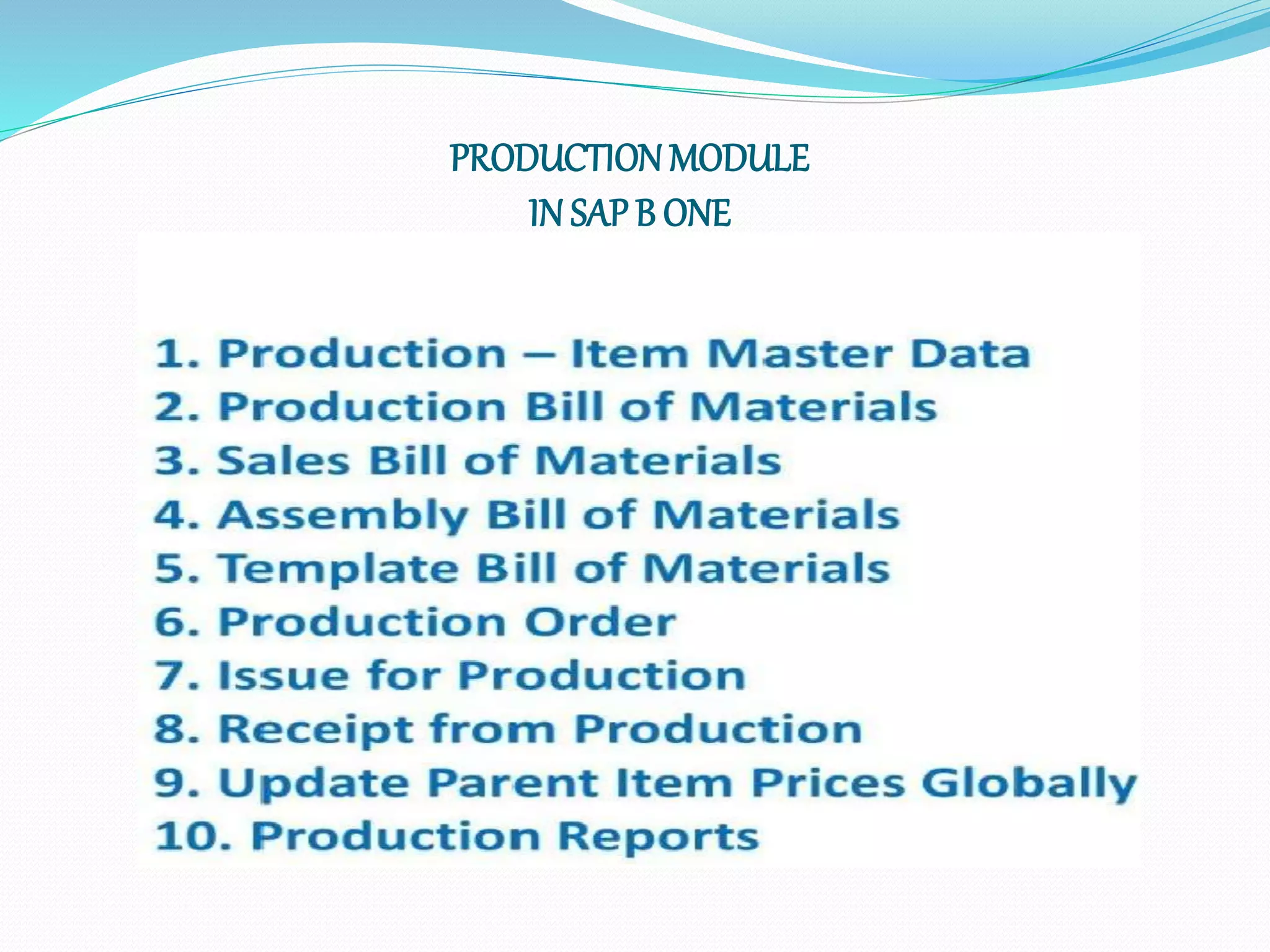
PRODUCTIONMODULE
IN SAP B ONE
SAP Business One (production)
Benefits for management
 SIMPLIFICATION – SAP Business One simplifies
definition and management of production, assembly,
sales, and template bills-of-materials (BOM)
 GAIN EFFICIENCY – by automating processes and
using integrated production functionality
 IMPROVE CUSTOMER SERVICE – with on-time
delivery and fewer shortages and stock-outs
 REDUCE INVENTORY COSTS – with improved
inventory control and materials planning in SAP
Business One
PODUCTION IN SAP B 1
Use the SAP Business One Production module to create and
maintain the following:
 Bill of Materials (BOMs) - specifies the quantities of components that make up a
product.
 Production Orders - a set of instructions for planning and assembling a production
item. It tracks all the material transactions and costs involved in the production process,
as well as additional costs, such as labor overhead.
 SAP Business One supports the following types of production orders:
 Standard - used for regular production. Components are copied from the item BOM.
 Special - used to produce items or perform activities on the shop floor that are not
based on theStandard BOM.
 Disassembly - used to report the disassembly of an item with a production BOM.
Components are copied from the item BOM.
 A finished product may be the result of an entire production process, or a collection of
items that are sold as a unit, but are not the output of a production or assembly process.
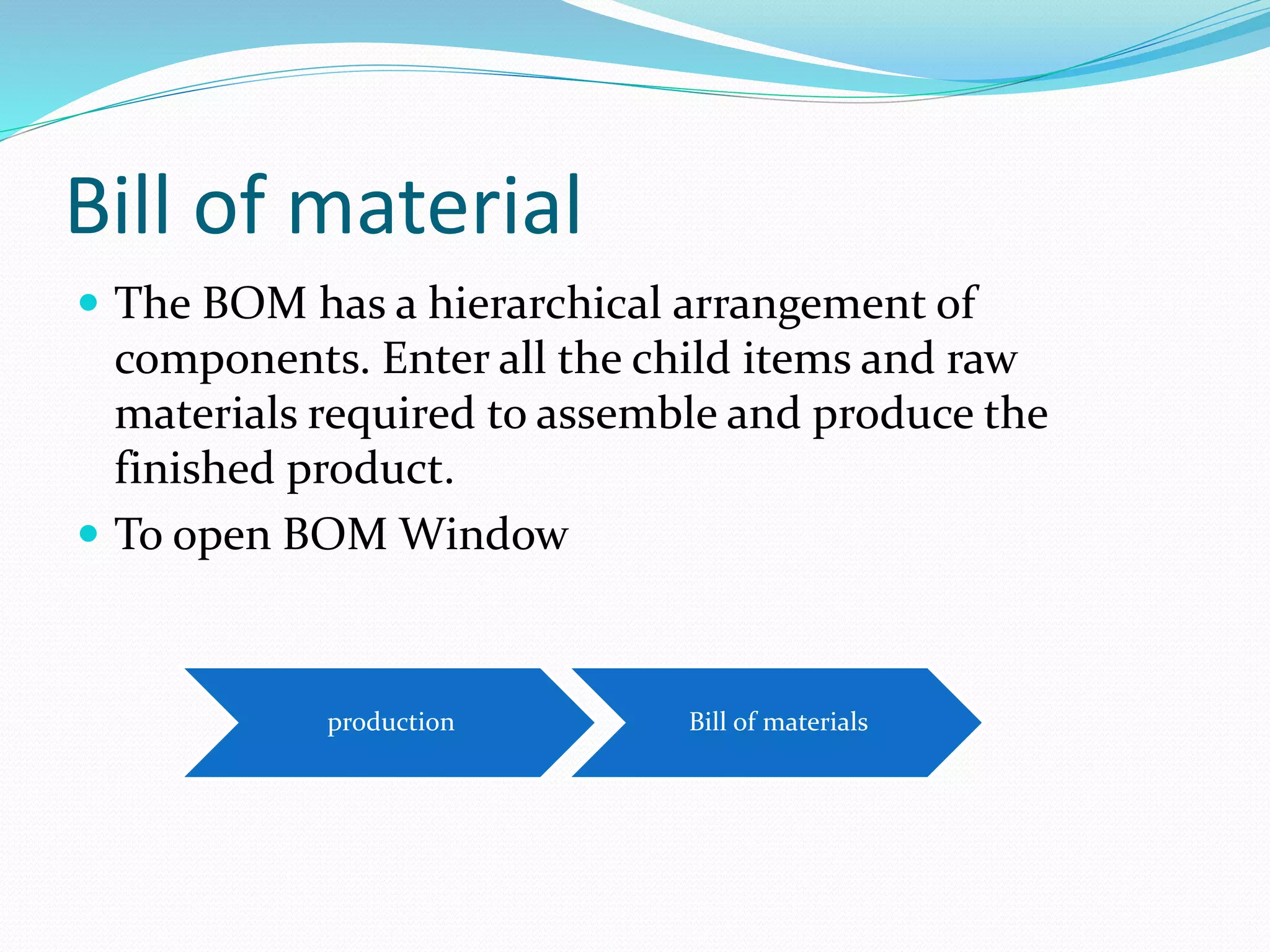
Bill of material
 The BOM has a hierarchical arrangement of
components. Enter all the child items and raw
materials required to assemble and produce the
finished product.
 To open BOM Window
production Bill of materials
Production BOM
Main menu >>production >>bill of material
ACTIVE ADD MODE
SELECT
/CREATE
PRODUCT
BOM TYPE.
SELCT
PRODUCTI
ON
X
QUAN
TIY
WAREHOUSE
PRESS
THE
NEW
BUTTON
Remove strike
from purchase
ITEM MASTER
DATA
ADD DIFFERENT INVENTORY COMPONENTS (INGREDIENTS)FOR PRODUCTION
Item’s for production
Back flush/manual
Back flush:- child items are automatically issued to production order, once
you report the completion of parent item
Manual:- child item are manually issued to the production order
PRODUCTION ORDER
 Select Type of Production Order.
Their are 3 types of Production Order
I> STANDARD
Based on BOM and used to produce a regular production item
II> SPECIAL
Used to produce and repair items or to perform activities that
are not necessarily BOM items
III>DIS-ASSEMBLY
Used to dismantle a parent item of the regular product into its child
items
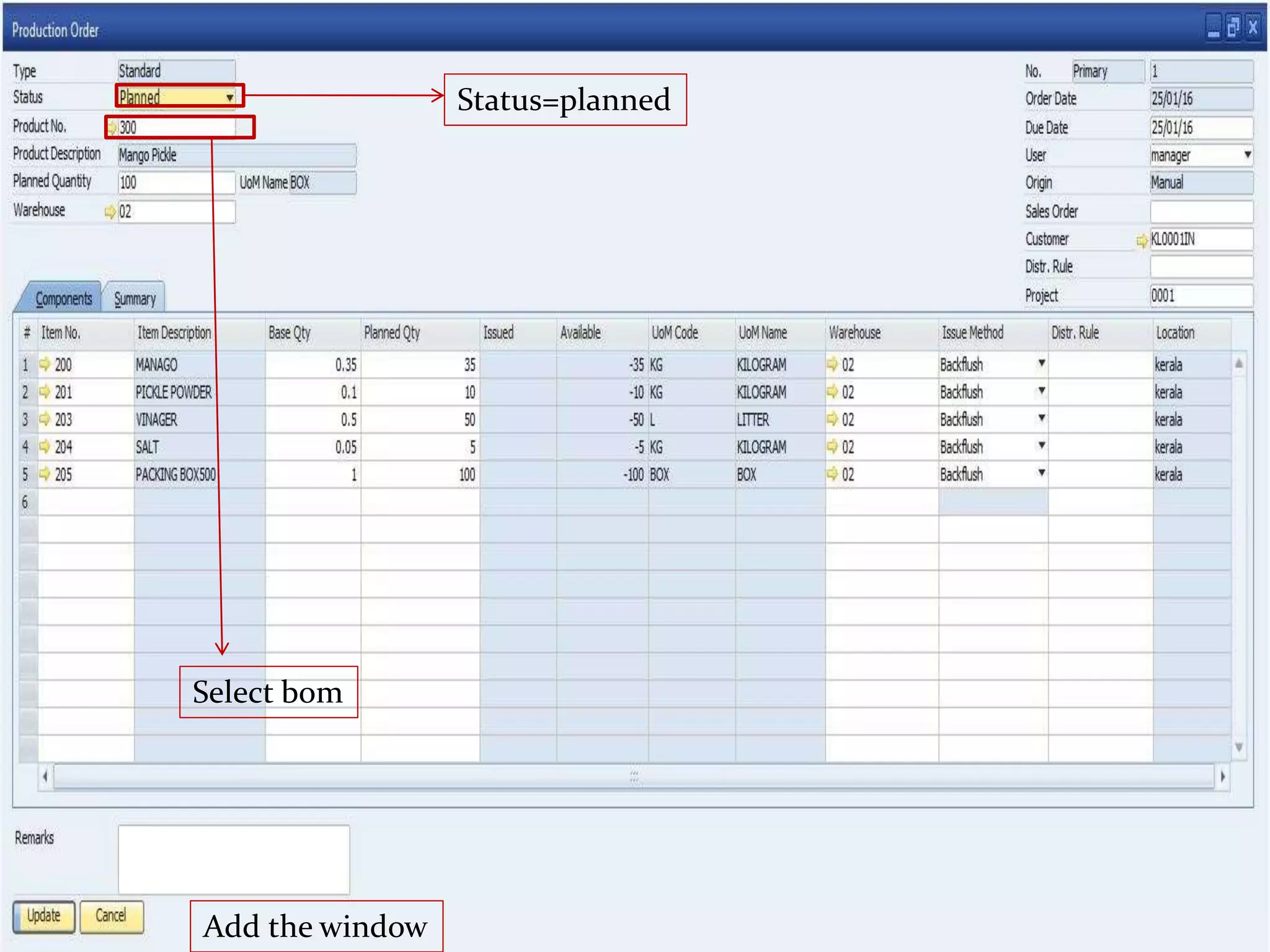
 Select Finish good (Product No.) from list. Default BOM set for
that item will display in production order row level.& Fill Planned Quantity
i.e. production quantity of that item
Main menu production
Production
order
Production order path:-
Status=planned
Add the window
Select bom
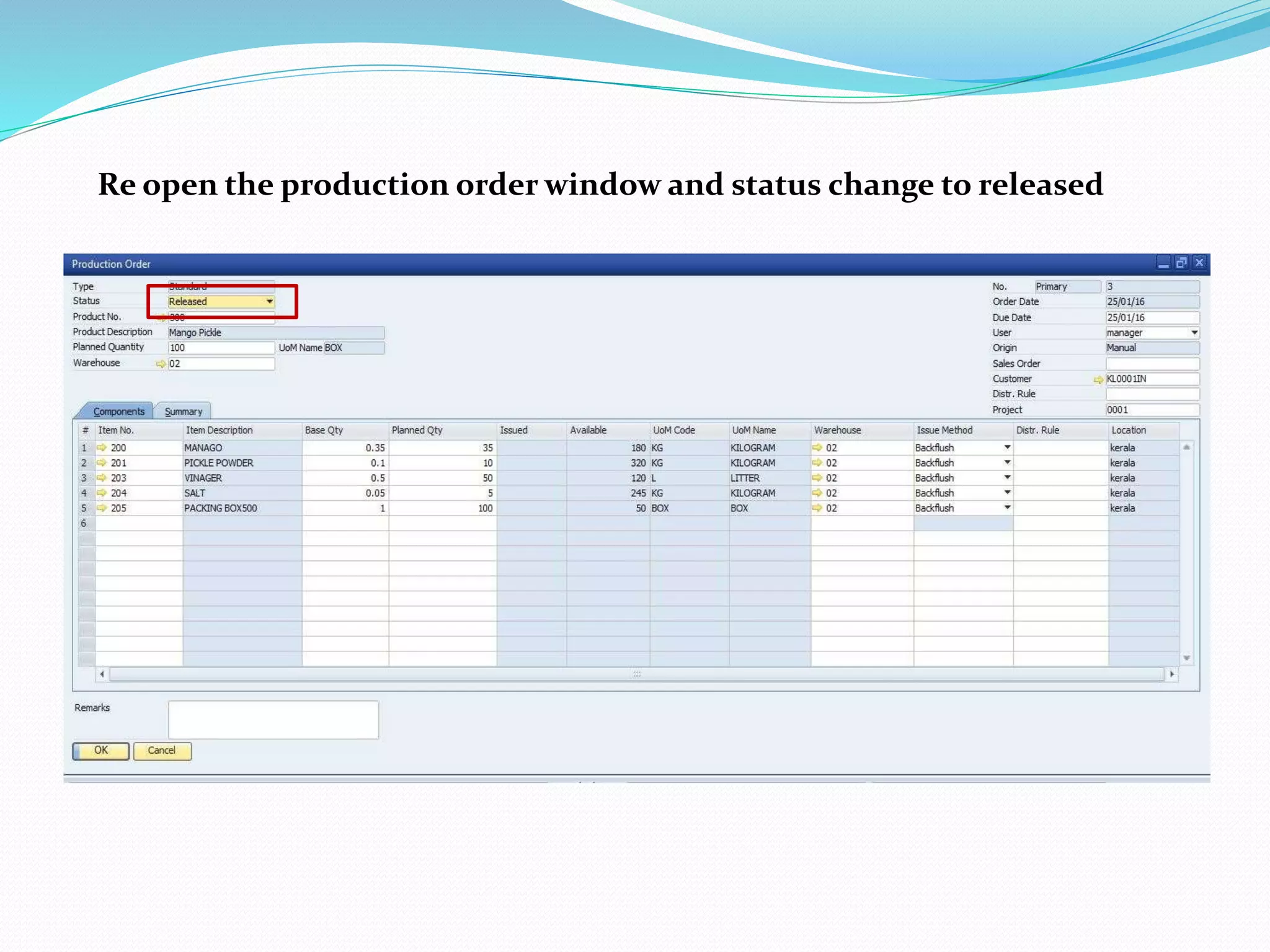
Re open the production order window and status change to released
RECEIPT FROM PRODUCTION
Main menu production
Receipt from
production
Select production order
DISASSEMBLY
MAIN MAEU PRODUCTION
PRODUCTION
ORDER
DISASSEBLY
STATUS CHANGE TO = RELEASE
ISSUE FOR PRODUCTION
SELECT
FROM
DISASSEM
BLY
SALES BOM
The sales BOM represent a finished product assembled at the sales stages
that is the finished product is composed of its component items only when
the parent product is actually sold
MAIN MENU PRODUCTION BOM
SELECT SALES
Select item master data>
Strike
on
sales
item
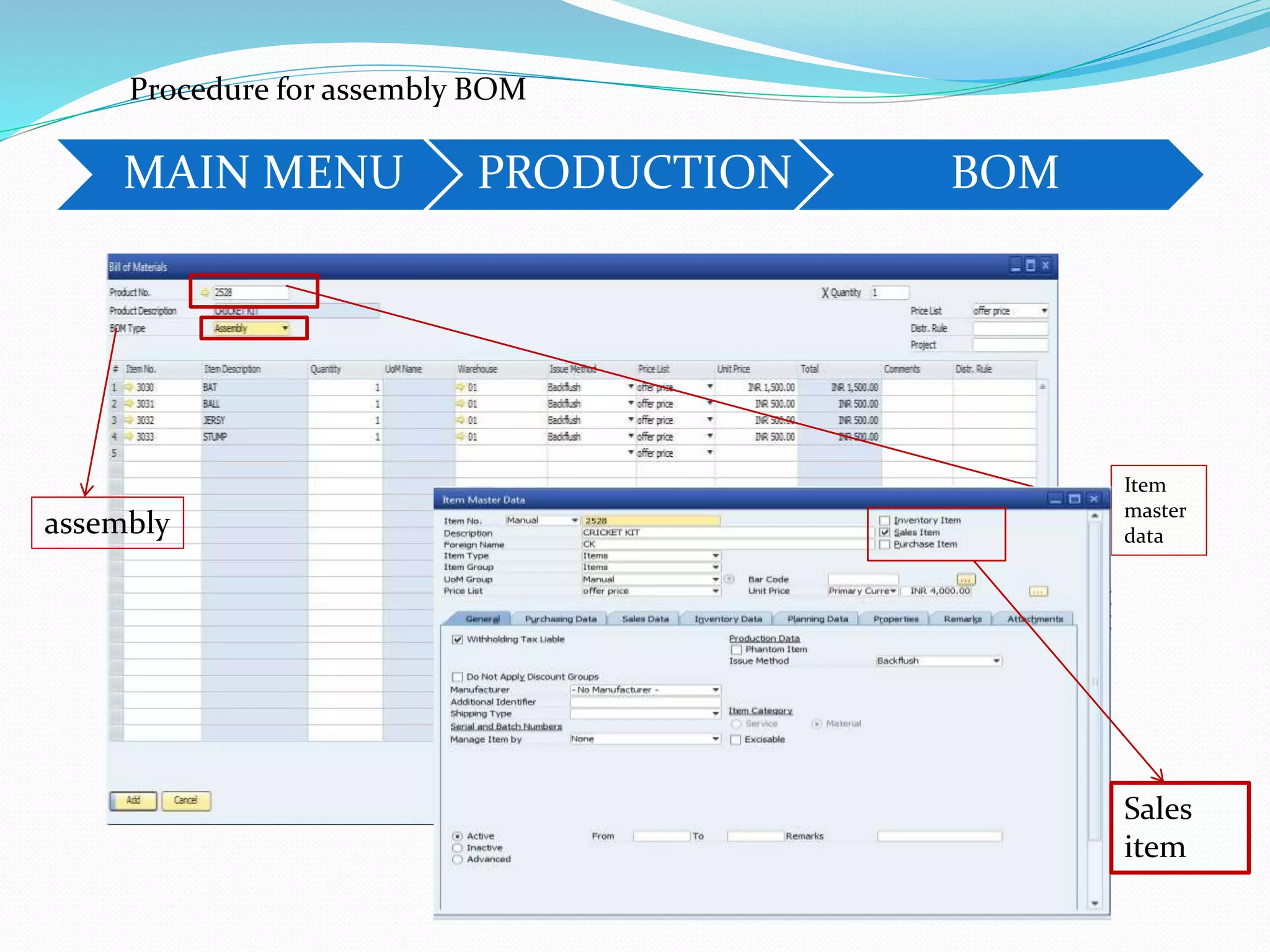
ASSEMBLY BOM
In an assembly BOM , if you add or remove items, or update
quintiles for existing items .Sap business one automatically updates
open sales orders and resave invoices.
The committed Quantity for items that you remove/ add is reduced/is
increased accordingly. These changes Are also reflected in open
purchase orders, for example, if purchase orders were created for
The components in the assembly BOM.
MAIN MENU PRODUCTION BOM
Procedure for assembly BOM
assembly
Item
master
data
Sales
item
The template BOM is a bundle of items where the parent product is
the first item on the list. It does not act as a BOM once it is added to the
sales document, but rather as a list of items brought together at the same
time. You can update the quantity of those items swap items, or delete item
in the BOM or the sales order.
TEMPLATE BOM
MAIN MENU PRODUCTION BOM
Procedure for template BOM
template
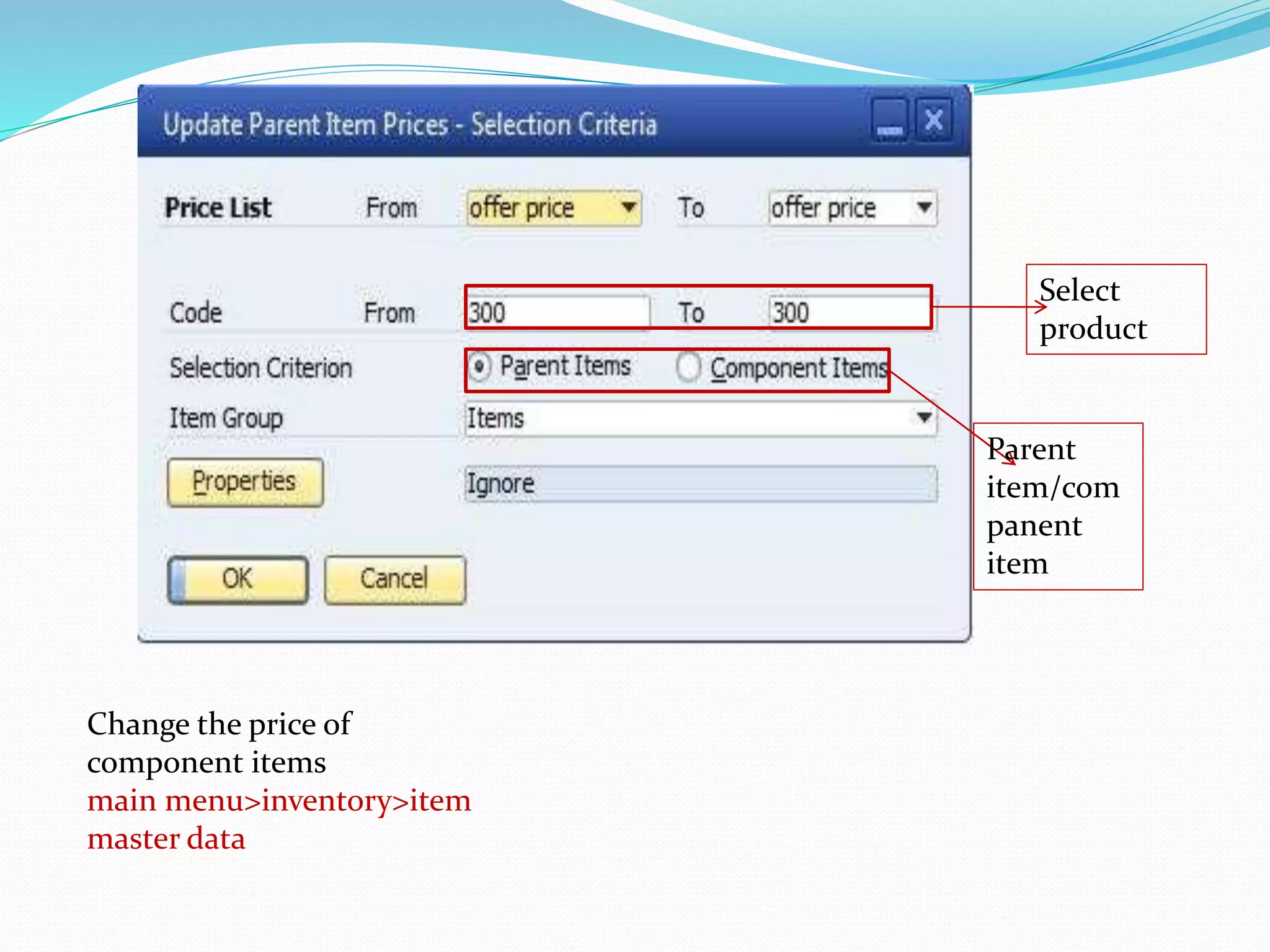
UPDATE PARENT ITEM GLOBALLY
use this window to update prices of parent items
according to changes in child item prices
Main
menu
production Update parent price globally
Select
product
Parent
item/com
panent
item
Change the price of
component items
main menu>inventory>item
master data
PRODUCTION REPORTS
•Bill of material reports
•Open item list
BILL OF MATERIAL REPORT
This reports provides the detailed list of all the bills of the material that
you have created
production
Production
reports
Bill of
material
report
Bom report
OPEN ITEM LIST
This reports let us you track the status of your sales and purchasing documents.
You can find the customers that still need to pay for their orders and vendors
that have not provided the items you ordered and you can track your missing
items in stock
User reports to view the following document types
Open sales and purchasing documents, including AP and AR
reserve invoices that are not yet fully paid or fully delivered
Document that were partially copied to a target document
Main menu Production
Production
report
Open item
list
Procedure for open item list
1. FAISAL MK
2. FAIZ C
3. JASMAL KP
4. JOBY THOMAS

sap b one production module

  • 1.
  • 2.
    SAP business oneis a complete and customizable software solution to manage small and midsize businesses, including accounting & finance, sales & service, reporting & administration, inventory & distribution, and purchasing & operations.
  • 3.
  • 4.
    SAP Business One(production) Benefits for management  SIMPLIFICATION – SAP Business One simplifies definition and management of production, assembly, sales, and template bills-of-materials (BOM)  GAIN EFFICIENCY – by automating processes and using integrated production functionality  IMPROVE CUSTOMER SERVICE – with on-time delivery and fewer shortages and stock-outs  REDUCE INVENTORY COSTS – with improved inventory control and materials planning in SAP Business One
  • 5.
    PODUCTION IN SAPB 1 Use the SAP Business One Production module to create and maintain the following:  Bill of Materials (BOMs) - specifies the quantities of components that make up a product.  Production Orders - a set of instructions for planning and assembling a production item. It tracks all the material transactions and costs involved in the production process, as well as additional costs, such as labor overhead.  SAP Business One supports the following types of production orders:  Standard - used for regular production. Components are copied from the item BOM.  Special - used to produce items or perform activities on the shop floor that are not based on theStandard BOM.  Disassembly - used to report the disassembly of an item with a production BOM. Components are copied from the item BOM.  A finished product may be the result of an entire production process, or a collection of items that are sold as a unit, but are not the output of a production or assembly process.
  • 6.
    Bill of material The BOM has a hierarchical arrangement of components. Enter all the child items and raw materials required to assemble and produce the finished product.  To open BOM Window production Bill of materials
  • 7.
    Production BOM Main menu>>production >>bill of material ACTIVE ADD MODE SELECT /CREATE PRODUCT BOM TYPE. SELCT PRODUCTI ON X QUAN TIY WAREHOUSE
  • 8.
  • 9.
    ADD DIFFERENT INVENTORYCOMPONENTS (INGREDIENTS)FOR PRODUCTION Item’s for production Back flush/manual
  • 10.
    Back flush:- childitems are automatically issued to production order, once you report the completion of parent item Manual:- child item are manually issued to the production order
  • 11.
    PRODUCTION ORDER  SelectType of Production Order. Their are 3 types of Production Order I> STANDARD Based on BOM and used to produce a regular production item II> SPECIAL Used to produce and repair items or to perform activities that are not necessarily BOM items III>DIS-ASSEMBLY Used to dismantle a parent item of the regular product into its child items
  • 12.
     Select Finishgood (Product No.) from list. Default BOM set for that item will display in production order row level.& Fill Planned Quantity i.e. production quantity of that item Main menu production Production order Production order path:-
  • 13.
  • 14.
    Re open theproduction order window and status change to released
  • 15.
    RECEIPT FROM PRODUCTION Mainmenu production Receipt from production Select production order
  • 16.
  • 17.
  • 18.
  • 19.
    SALES BOM The salesBOM represent a finished product assembled at the sales stages that is the finished product is composed of its component items only when the parent product is actually sold MAIN MENU PRODUCTION BOM
  • 20.
    SELECT SALES Select itemmaster data> Strike on sales item
  • 21.
    ASSEMBLY BOM In anassembly BOM , if you add or remove items, or update quintiles for existing items .Sap business one automatically updates open sales orders and resave invoices. The committed Quantity for items that you remove/ add is reduced/is increased accordingly. These changes Are also reflected in open purchase orders, for example, if purchase orders were created for The components in the assembly BOM.
  • 22.
    MAIN MENU PRODUCTIONBOM Procedure for assembly BOM assembly Item master data Sales item
  • 23.
    The template BOMis a bundle of items where the parent product is the first item on the list. It does not act as a BOM once it is added to the sales document, but rather as a list of items brought together at the same time. You can update the quantity of those items swap items, or delete item in the BOM or the sales order. TEMPLATE BOM
  • 24.
    MAIN MENU PRODUCTIONBOM Procedure for template BOM template
  • 25.
    UPDATE PARENT ITEMGLOBALLY use this window to update prices of parent items according to changes in child item prices Main menu production Update parent price globally
  • 26.
    Select product Parent item/com panent item Change the priceof component items main menu>inventory>item master data
  • 27.
    PRODUCTION REPORTS •Bill ofmaterial reports •Open item list BILL OF MATERIAL REPORT This reports provides the detailed list of all the bills of the material that you have created production Production reports Bill of material report
  • 28.
  • 29.
    OPEN ITEM LIST Thisreports let us you track the status of your sales and purchasing documents. You can find the customers that still need to pay for their orders and vendors that have not provided the items you ordered and you can track your missing items in stock User reports to view the following document types Open sales and purchasing documents, including AP and AR reserve invoices that are not yet fully paid or fully delivered Document that were partially copied to a target document
  • 30.
    Main menu Production Production report Openitem list Procedure for open item list
  • 31.
    1. FAISAL MK 2.FAIZ C 3. JASMAL KP 4. JOBY THOMAS