Social Media Campaign Template
Client’s Name Here

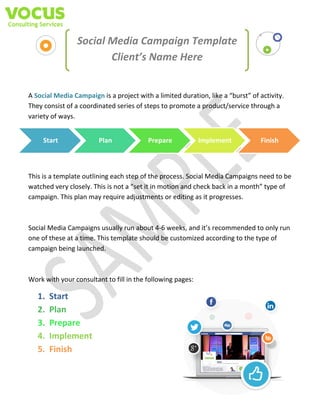
A Social Media Campaign is a project with a limited duration, like a “burst” of activity.
They consist of a coordinated series of steps to promote a product/service through a
variety of ways.
Start

Plan

Prepare

Implement

Finish

This is a template outlining each step of the process. Social Media Campaigns need to be
watched very closely. This is not a “set it in motion and check back in a month” type of
campaign. This plan may require adjustments or editing as it progresses.

Social Media Campaigns usually run about 4-6 weeks, and it’s recommended to only run
one of these at a time. This template should be customized according to the type of
campaign being launched.

Work with your consultant to fill in the following pages:

1.
2.
3.
4.
5.

Start
Plan
Prepare
Implement
Finish
Start
Campaign	Title (Even if it’s the name of the month, it’s important to distinguish this campaign
from the others done throughout the year.)

Campaign	Description (In your own words, briefly tell us about this campaign.)
Purpose (How will you benefit the end-user’s life by conducting this campaign? What do you hope
to achieve in return?)

Why	Now? (Campaigns tied to a timely event, season, or National Holiday, ie, an occasion
outside the company’s own calendar/agenda, tend to perform better.)

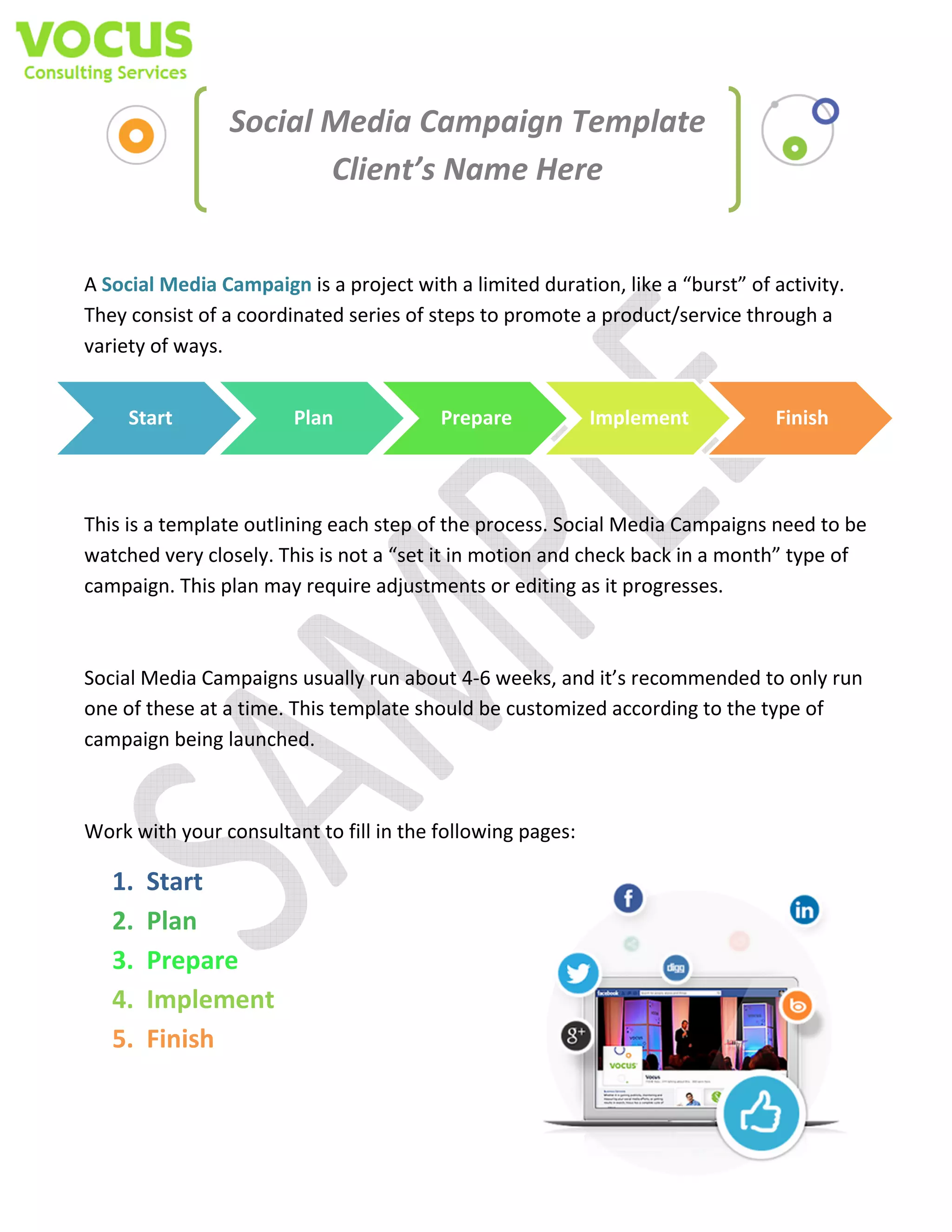
Goals	(This table will be repeated at the conclusion to complete the campaign report. These are
numerical goals. Here are some ideas to get you started….)

Goals

Desired Value

Metric

Increase Social Media
Engagement

30%

Twitter Followers, Retweets. Facebook Likes,
Shares, Comments. Pinterest Repins, Comments

Increase Brand
Awareness

20%

Traditional Media Coverage, Blogger Coverage,
Organic Backlinks

Increase Website
Traffic

40%

Unique page views

Gain new email
addresses

200

New emails added to subscriber list

Attendees/Sales

1,000

In person attendees
or Increased revenue during campaign
Plan
Determine the nature of the campaign and decide which resources will be needed. Make sure you know what
you’re doing, why you’re doing it, who is doing what, where it’s being done, when it’s being done and how often
it’s being done, before you get started.

Type	of	Campaign (Campaigns can take the form of Sweepstakes, Coupons, Give-aways,
Sales, Events, etc. The type of campaign you’re doing will affect the tactics you choose.)

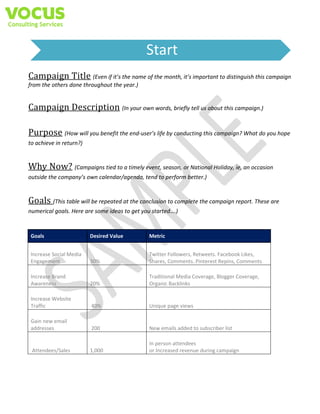
Target	Audience (Who are you trying to reach? Potential customers? Existing customers?
Friends of your customers? How old are they? (This might determine which social media platform you
select. Use more than 1 chart if needed for segmenting.)

Gender
Age
Home Value
or Business Role
Education

Target Region/Industry

Likes/Dislikes
Preferred Communication
Method
Favorite Social Platform

Pain Points
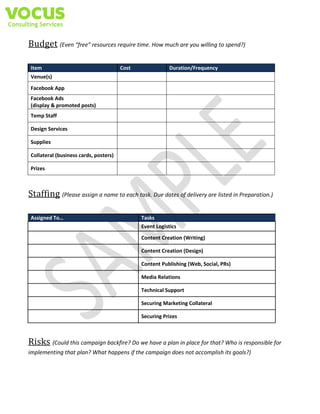
Budget (Even “free” resources require time. How much are you willing to spend?)
Item

Cost

Duration/Frequency

Venue(s)
Facebook App
Facebook Ads
(display & promoted posts)
Temp Staff
Design Services
Supplies
Collateral (business cards, posters)
Prizes

Staffing (Please assign a name to each task. Due dates of delivery are listed in Preparation.)
Assigned To…

Tasks
Event Logistics
Content Creation (Writing)
Content Creation (Design)
Content Publishing (Web, Social, PRs)
Media Relations
Technical Support
Securing Marketing Collateral
Securing Prizes

Risks (Could this campaign backfire? Do we have a plan in place for that? Who is responsible for
implementing that plan? What happens if the campaign does not accomplish its goals?)
Prepare
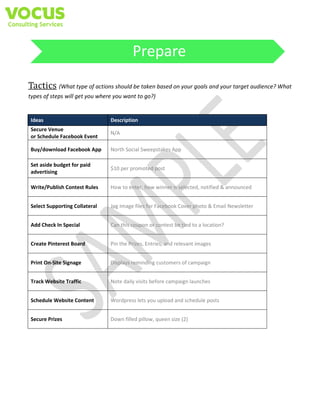
Tactics (What type of actions should be taken based on your goals and your target audience? What
types of steps will get you where you want to go?)

Ideas

Description

Secure Venue
or Schedule Facebook Event

N/A

Buy/download Facebook App

North Social Sweepstakes App

Set aside budget for paid
advertising

$10 per promoted post

Write/Publish Contest Rules

How to enter, how winner is selected, notified & announced

Select Supporting Collateral

Jpg Image files for Facebook Cover photo & Email Newsletter

Add Check In Special

Can this coupon or contest be tied to a location?

Create Pinterest Board

Pin the Prizes, Entries, and relevant images

Print On-Site Signage

Displays reminding customers of campaign

Track Website Traffic

Note daily visits before campaign launches

Schedule Website Content

Wordpress lets you upload and schedule posts

Secure Prizes

Down filled pillow, queen size (2)
Implement
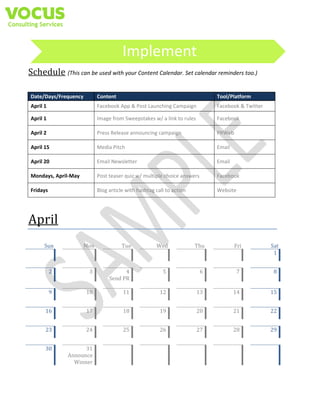
Schedule (This can be used with your Content Calendar. Set calendar reminders too.)
Date/Days/Frequency

Content

Tool/Platform

April 1

Facebook App & Post Launching Campaign

Facebook & Twitter

April 1

Image from Sweepstakes w/ a link to rules

Facebook

April 2

Press Release announcing campaign

PRWeb

April 15

Media Pitch

Email

April 20

Email Newsletter

Email

Mondays, April-May

Post teaser quiz w/ multiple choice answers

Facebook

Fridays

Blog article with hashtag call to action

Website

April		
Sun	 	
	 	

Mon	 	


2	


3	


9	


10	

	
16	


23	
	
30	

Tue	 	
	 	

Wed	 	
	 	

Thu	 	
	 	

Fri	 	
	 	

Sat	
1	


5	


6	


7	


8	


4	
Send	PR	
	
11	


12	


13	


14	


15	

	
17	


18	


19	


20	


21	


22	


24	


25	


26	


27	


28	


29	


31	
Announce	
Winner
Finish
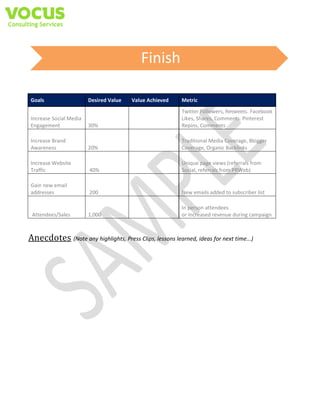
Goals

Desired Value

Value Achieved

Metric

Increase Social Media
Engagement

30%

Twitter Followers, Retweets. Facebook
Likes, Shares, Comments. Pinterest
Repins, Comments

Increase Brand
Awareness

20%

Traditional Media Coverage, Blogger
Coverage, Organic Backlinks

Increase Website
Traffic

40%

Unique page views (referrals from
Social, referrals from PRWeb)

Gain new email
addresses

200

New emails added to subscriber list

Attendees/Sales

1,000

In person attendees
or Increased revenue during campaign

Anecdotes (Note any highlights, Press Clips, lessons learned, ideas for next time...)

Sample Social Media Campaign Templates

  • 1.
    Social Media CampaignTemplate Client’s Name Here A Social Media Campaign is a project with a limited duration, like a “burst” of activity. They consist of a coordinated series of steps to promote a product/service through a variety of ways. Start Plan Prepare Implement Finish This is a template outlining each step of the process. Social Media Campaigns need to be watched very closely. This is not a “set it in motion and check back in a month” type of campaign. This plan may require adjustments or editing as it progresses. Social Media Campaigns usually run about 4-6 weeks, and it’s recommended to only run one of these at a time. This template should be customized according to the type of campaign being launched. Work with your consultant to fill in the following pages: 1. 2. 3. 4. 5. Start Plan Prepare Implement Finish
  • 2.
    Start Campaign Title (Even ifit’s the name of the month, it’s important to distinguish this campaign from the others done throughout the year.) Campaign Description (In your own words, briefly tell us about this campaign.) Purpose (How will you benefit the end-user’s life by conducting this campaign? What do you hope to achieve in return?) Why Now? (Campaigns tied to a timely event, season, or National Holiday, ie, an occasion outside the company’s own calendar/agenda, tend to perform better.) Goals (This table will be repeated at the conclusion to complete the campaign report. These are numerical goals. Here are some ideas to get you started….) Goals Desired Value Metric Increase Social Media Engagement 30% Twitter Followers, Retweets. Facebook Likes, Shares, Comments. Pinterest Repins, Comments Increase Brand Awareness 20% Traditional Media Coverage, Blogger Coverage, Organic Backlinks Increase Website Traffic 40% Unique page views Gain new email addresses 200 New emails added to subscriber list Attendees/Sales 1,000 In person attendees or Increased revenue during campaign
  • 3.
    Plan Determine the natureof the campaign and decide which resources will be needed. Make sure you know what you’re doing, why you’re doing it, who is doing what, where it’s being done, when it’s being done and how often it’s being done, before you get started. Type of Campaign (Campaigns can take the form of Sweepstakes, Coupons, Give-aways, Sales, Events, etc. The type of campaign you’re doing will affect the tactics you choose.) Target Audience (Who are you trying to reach? Potential customers? Existing customers? Friends of your customers? How old are they? (This might determine which social media platform you select. Use more than 1 chart if needed for segmenting.) Gender Age Home Value or Business Role Education Target Region/Industry Likes/Dislikes Preferred Communication Method Favorite Social Platform Pain Points
  • 4.
    Budget (Even “free”resources require time. How much are you willing to spend?) Item Cost Duration/Frequency Venue(s) Facebook App Facebook Ads (display & promoted posts) Temp Staff Design Services Supplies Collateral (business cards, posters) Prizes Staffing (Please assign a name to each task. Due dates of delivery are listed in Preparation.) Assigned To… Tasks Event Logistics Content Creation (Writing) Content Creation (Design) Content Publishing (Web, Social, PRs) Media Relations Technical Support Securing Marketing Collateral Securing Prizes Risks (Could this campaign backfire? Do we have a plan in place for that? Who is responsible for implementing that plan? What happens if the campaign does not accomplish its goals?)
  • 5.
    Prepare Tactics (What typeof actions should be taken based on your goals and your target audience? What types of steps will get you where you want to go?) Ideas Description Secure Venue or Schedule Facebook Event N/A Buy/download Facebook App North Social Sweepstakes App Set aside budget for paid advertising $10 per promoted post Write/Publish Contest Rules How to enter, how winner is selected, notified & announced Select Supporting Collateral Jpg Image files for Facebook Cover photo & Email Newsletter Add Check In Special Can this coupon or contest be tied to a location? Create Pinterest Board Pin the Prizes, Entries, and relevant images Print On-Site Signage Displays reminding customers of campaign Track Website Traffic Note daily visits before campaign launches Schedule Website Content Wordpress lets you upload and schedule posts Secure Prizes Down filled pillow, queen size (2)
  • 6.
    Implement Schedule (This canbe used with your Content Calendar. Set calendar reminders too.) Date/Days/Frequency Content Tool/Platform April 1 Facebook App & Post Launching Campaign Facebook & Twitter April 1 Image from Sweepstakes w/ a link to rules Facebook April 2 Press Release announcing campaign PRWeb April 15 Media Pitch Email April 20 Email Newsletter Email Mondays, April-May Post teaser quiz w/ multiple choice answers Facebook Fridays Blog article with hashtag call to action Website April Sun Mon 2 3 9 10 16 23 30 Tue Wed Thu Fri Sat 1 5 6 7 8 4 Send PR 11 12 13 14 15 17 18 19 20 21 22 24 25 26 27 28 29 31 Announce Winner
  • 7.
    Finish Goals Desired Value Value Achieved Metric IncreaseSocial Media Engagement 30% Twitter Followers, Retweets. Facebook Likes, Shares, Comments. Pinterest Repins, Comments Increase Brand Awareness 20% Traditional Media Coverage, Blogger Coverage, Organic Backlinks Increase Website Traffic 40% Unique page views (referrals from Social, referrals from PRWeb) Gain new email addresses 200 New emails added to subscriber list Attendees/Sales 1,000 In person attendees or Increased revenue during campaign Anecdotes (Note any highlights, Press Clips, lessons learned, ideas for next time...)