Unit I:
INTRODUCTION TO COMPUTER
APPLICATION AND BUSINESS
SOFTWARE
Salient Features of Computerized
accounting
1. Fast, Powerful, Simple and Integrated
 Computerized accounting is designed to automate and integrate all the business operations,
such as sales, finance, purchase, inventory and manufacturing.
 With Computerized accounting, accurate, up-to-date business information is literally at the
fingertips.
2. Complete Visibility
• Computerized accountings giving the company sufficient time to plan,
increase the customer base, and enhance customer satisfaction. With
Computerized accounting the company will have greater visibility into the
day-to-day business operations and access to vital information.
3. Enhanced User Experience
• Computerized accounting allows the company to enter data in a variety of
ways which makes work a pleasure. Adapting to the specific business needs is
possible.
4. Accuracy, Speed
• Computerized accounting has User-definable templates which provides fast,
accurate data entry of the transactions; thereafter all documents and reports
can be generated automatically, at the press of a button.
5. Scalability
• Computerized accounting adapts to the current and future needs of the
business, irrespective of its size or style.
6. Power
• Computerized accounting has the ability to handle huge volumes of
transactions without compromising on speed or efficiency.
7. For Improved Business Performance
• Computerized accounting is a highly integrated application that transforms
the business processes with its performance enhancing features which
encompass accounting, inventory, reporting and statutory processes. This
helps the company access information faster, and takes quicker decisions.
Computerized accounting also guarantees real-time optimization of
operations and enhanced communication.
8. Quick Decision Making
• Generates real-time, comprehensive MIS reports and ensures access to
complete and critical information, instantly.
9. Complete Reliability
• Computerized accounting makes sure that the critical financial information is
accurate, controlled and safe from data corruption.
Advantages of Computerized accounting
• Automation of tedious clerical jobs
• Speed and accuracy
• Low cost of packages
• Automatic generation of standard reports
• Redundant data storage permits efficient generations of some reports
• Increase revenue while lowering operating costs and enhancing competitive
advantage of the company.
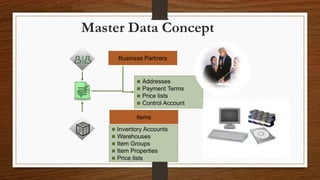
MASTER DATA
• Master data refers to the key information that describes your
customers, vendors, and leads as well as items that your company buys
and sells.
Master Data Concept
Business Partners
Items
 Addresses
 Payment Terms
 Price lists
 Control Account
 Inventory Accounts
 Warehouses
 Item Groups
 Item Properties
 Price lists
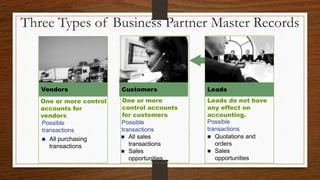
Three Types of Business Partner Master Records
 All purchasing
transactions
 All sales
transactions
 Sales
opportunities
 Quotations and
orders
 Sales
opportunities
One or more control
accounts for
vendors
Possible
transactions
One or more
control accounts
for customers
Possible
transactions
Leads do not have
any effect on
accounting.
Possible
transactions
Vendors Customers Leads
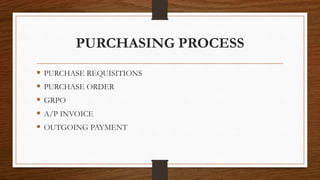
PURCHASING PROCESS
 PURCHASE REQUISITIONS
 PURCHASE ORDER
 GRPO
 A/P INVOICE
 OUTGOING PAYMENT
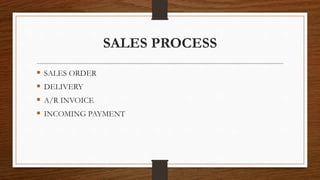
SALES PROCESS
 SALES ORDER
 DELIVERY
 A/R INVOICE
 INCOMING PAYMENT
PRODUCTION
• Production is the process of making or manufacturing goods and
products from raw materials or components.
• In other words, production takes inputs and uses them to create an output
which is fit for consumption – a good or product which has value to an end-
user or customer.
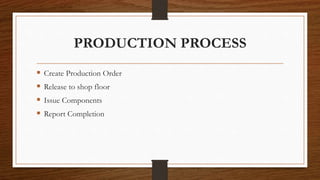
PRODUCTION PROCESS
 Create Production Order
 Release to shop floor
 Issue Components
 Report Completion
BILL OF MATERIALS (BOM)
• A production bill of materials represents an item to be produced.
• The sub-items in the bill of materials are items that will be needed to
produce the top-level item. The sub-items can either be items that are
purchased or made.
• These are typically physical items that are stored in inventory.
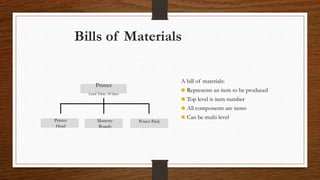
Bills of Materials
Printer
Lead Time: 10 days
Memory
Boards
Power Pack
Printer
Head
A bill of materials:
 Represents an item to be produced
 Top level is item number
 All components are items
 Can be multi-level
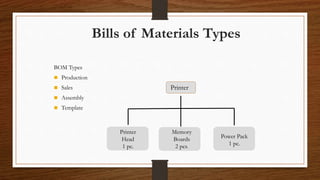
Bills of Materials Types
Printer
Printer
Head
1 pc.
Power Pack
1 pc.
Memory
Boards
2 pcs.
BOM Types
 Production
 Sales
 Assembly
 Template
PHANTOM ITEM
• A phantom item is a sub-assembly in the BOM that does not actually exist in
inventory.
• It is used to simplify the BOM. Although the phantom item appears in the BOM,
the Production Order will show the components needed to make the phantom item
rather than the phantom item itself.
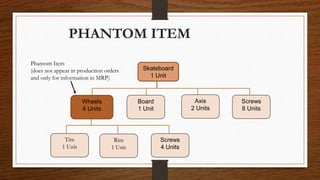
PHANTOM ITEM
Board
1 Unit
Axis
2 Units
Screws
8 Units
Wheels
4 Units
Tire
1 Unit
Rim
1 Unit
Screws
4 Units
Skateboard
1 Unit
Phantom Item
(does not appear in production orders
and only for information in MRP)
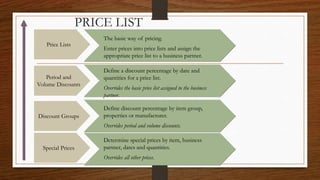
PRICE LIST
PRICE LIST
The basic way of pricing.
Enter prices into price lists and assign the
appropriate price list to a business partner.
Special Prices
Discount Groups
Period and
Volume Discounts
Price Lists
Define discount percentage by item group,
properties or manufacturer.
Overrides period and volume discounts.
Determine special prices by item, business
partner, dates and quantities.
Overrides all other prices.
Define a discount percentage by date and
quantities for a price list.
Overrides the basic price list assigned to the business
partner.
Title: Lesson 1: Introducing
QuickBooks Pro
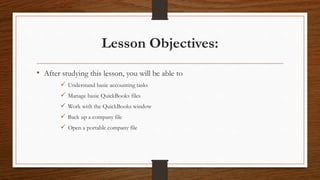
Lesson Objectives:
• After studying this lesson, you will be able to
 Understand basic accounting tasks
 Manage basic QuickBooks files
 Work with the QuickBooks window
 Back up a company file
 Open a portable company file
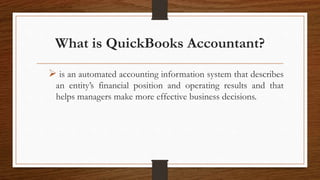
What is QuickBooks Accountant?
 is an automated accounting information system that describes
an entity’s financial position and operating results and that
helps managers make more effective business decisions.
What Can QuickBooks Do For You?
Track customers, vendors,
employees, etc.
Process sales transactions and cash
receipts
Process purchase transactions and
payments to
vendors
Run payroll
Track and sell inventory
Track assets (what you own) and
liabilities (what you owe)
Keep track of bank accounts
4 Basic Features of QuickBooks
Accountant
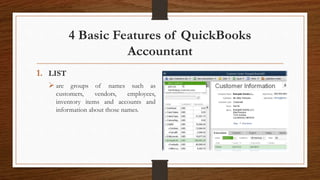
1. LIST
 are groups of names such as
customers, vendors, employees,
inventory items and accounts and
information about those names.
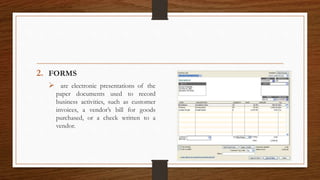
2. FORMS
 are electronic presentations of the
paper documents used to record
business activities, such as customer
invoices, a vendor’s bill for goods
purchased, or a check written to a
vendor.
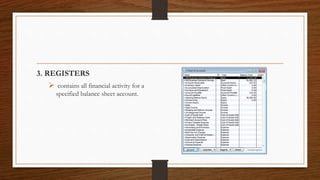
3. REGISTERS
 contains all financial activity for a
specified balance sheet account.
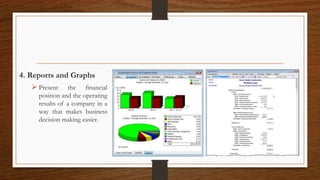
4. Reports and Graphs
 Present the financial
position and the operating
results of a company in a
way that makes business
decision making easier.

Salient Features of Computerized Accounting

  • 1.
    Unit I: INTRODUCTION TOCOMPUTER APPLICATION AND BUSINESS SOFTWARE
  • 2.
    Salient Features ofComputerized accounting 1. Fast, Powerful, Simple and Integrated  Computerized accounting is designed to automate and integrate all the business operations, such as sales, finance, purchase, inventory and manufacturing.  With Computerized accounting, accurate, up-to-date business information is literally at the fingertips.
  • 3.
    2. Complete Visibility •Computerized accountings giving the company sufficient time to plan, increase the customer base, and enhance customer satisfaction. With Computerized accounting the company will have greater visibility into the day-to-day business operations and access to vital information.
  • 4.
    3. Enhanced UserExperience • Computerized accounting allows the company to enter data in a variety of ways which makes work a pleasure. Adapting to the specific business needs is possible.
  • 5.
    4. Accuracy, Speed •Computerized accounting has User-definable templates which provides fast, accurate data entry of the transactions; thereafter all documents and reports can be generated automatically, at the press of a button.
  • 6.
    5. Scalability • Computerizedaccounting adapts to the current and future needs of the business, irrespective of its size or style.
  • 7.
    6. Power • Computerizedaccounting has the ability to handle huge volumes of transactions without compromising on speed or efficiency.
  • 8.
    7. For ImprovedBusiness Performance • Computerized accounting is a highly integrated application that transforms the business processes with its performance enhancing features which encompass accounting, inventory, reporting and statutory processes. This helps the company access information faster, and takes quicker decisions. Computerized accounting also guarantees real-time optimization of operations and enhanced communication.
  • 9.
    8. Quick DecisionMaking • Generates real-time, comprehensive MIS reports and ensures access to complete and critical information, instantly.
  • 10.
    9. Complete Reliability •Computerized accounting makes sure that the critical financial information is accurate, controlled and safe from data corruption.
  • 11.
    Advantages of Computerizedaccounting • Automation of tedious clerical jobs • Speed and accuracy • Low cost of packages • Automatic generation of standard reports • Redundant data storage permits efficient generations of some reports • Increase revenue while lowering operating costs and enhancing competitive advantage of the company.
  • 12.
    MASTER DATA • Masterdata refers to the key information that describes your customers, vendors, and leads as well as items that your company buys and sells.
  • 13.
    Master Data Concept BusinessPartners Items  Addresses  Payment Terms  Price lists  Control Account  Inventory Accounts  Warehouses  Item Groups  Item Properties  Price lists
  • 14.
    Three Types ofBusiness Partner Master Records  All purchasing transactions  All sales transactions  Sales opportunities  Quotations and orders  Sales opportunities One or more control accounts for vendors Possible transactions One or more control accounts for customers Possible transactions Leads do not have any effect on accounting. Possible transactions Vendors Customers Leads
  • 15.
    PURCHASING PROCESS  PURCHASEREQUISITIONS  PURCHASE ORDER  GRPO  A/P INVOICE  OUTGOING PAYMENT
  • 16.
    SALES PROCESS  SALESORDER  DELIVERY  A/R INVOICE  INCOMING PAYMENT
  • 17.
    PRODUCTION • Production isthe process of making or manufacturing goods and products from raw materials or components. • In other words, production takes inputs and uses them to create an output which is fit for consumption – a good or product which has value to an end- user or customer.
  • 18.
    PRODUCTION PROCESS  CreateProduction Order  Release to shop floor  Issue Components  Report Completion
  • 19.
    BILL OF MATERIALS(BOM) • A production bill of materials represents an item to be produced. • The sub-items in the bill of materials are items that will be needed to produce the top-level item. The sub-items can either be items that are purchased or made. • These are typically physical items that are stored in inventory.
  • 20.
    Bills of Materials Printer LeadTime: 10 days Memory Boards Power Pack Printer Head A bill of materials:  Represents an item to be produced  Top level is item number  All components are items  Can be multi-level
  • 21.
    Bills of MaterialsTypes Printer Printer Head 1 pc. Power Pack 1 pc. Memory Boards 2 pcs. BOM Types  Production  Sales  Assembly  Template
  • 22.
    PHANTOM ITEM • Aphantom item is a sub-assembly in the BOM that does not actually exist in inventory. • It is used to simplify the BOM. Although the phantom item appears in the BOM, the Production Order will show the components needed to make the phantom item rather than the phantom item itself.
  • 23.
    PHANTOM ITEM Board 1 Unit Axis 2Units Screws 8 Units Wheels 4 Units Tire 1 Unit Rim 1 Unit Screws 4 Units Skateboard 1 Unit Phantom Item (does not appear in production orders and only for information in MRP)
  • 24.
  • 25.
    PRICE LIST The basicway of pricing. Enter prices into price lists and assign the appropriate price list to a business partner. Special Prices Discount Groups Period and Volume Discounts Price Lists Define discount percentage by item group, properties or manufacturer. Overrides period and volume discounts. Determine special prices by item, business partner, dates and quantities. Overrides all other prices. Define a discount percentage by date and quantities for a price list. Overrides the basic price list assigned to the business partner.
  • 26.
    Title: Lesson 1:Introducing QuickBooks Pro
  • 27.
    Lesson Objectives: • Afterstudying this lesson, you will be able to  Understand basic accounting tasks  Manage basic QuickBooks files  Work with the QuickBooks window  Back up a company file  Open a portable company file
  • 28.
    What is QuickBooksAccountant?  is an automated accounting information system that describes an entity’s financial position and operating results and that helps managers make more effective business decisions.
  • 29.
    What Can QuickBooksDo For You? Track customers, vendors, employees, etc. Process sales transactions and cash receipts Process purchase transactions and payments to vendors Run payroll Track and sell inventory Track assets (what you own) and liabilities (what you owe) Keep track of bank accounts
  • 30.
    4 Basic Featuresof QuickBooks Accountant 1. LIST  are groups of names such as customers, vendors, employees, inventory items and accounts and information about those names.
  • 31.
    2. FORMS  areelectronic presentations of the paper documents used to record business activities, such as customer invoices, a vendor’s bill for goods purchased, or a check written to a vendor.
  • 32.
    3. REGISTERS  containsall financial activity for a specified balance sheet account.
  • 33.
    4. Reports andGraphs  Present the financial position and the operating results of a company in a way that makes business decision making easier.