Salesforce Release Webinar
Spring 22 Highlights
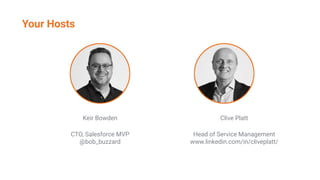
Your Hosts
Keir Bowden
CTO, Salesforce MVP
@bob_buzzard
Clive Platt
Head of Service Management
www.linkedin.com/in/cliveplatt/
• General Updates
• Mobile
• Analytics
• Customisation
• Einstein Automate
• Sales
• Pardot
• Service
• Experiences
• Fond Farewells
• Beta Features
Agenda
General Updates
Lightning Experience
• Latest stable Edge Chromium, Chrome, Firefox, Safari
Classic
• Internet Explorer 11
• Latest stable Edge Chromium, Chrome, Firefox, Safari
Tableau CRM
• Latest stable Edge Chromium, Chrome, Firefox - not Safari
sforce.co/3qNTYVB
Browsers
Two pieces of evidence (factors)
● Something you know (password)
● Something you have (authenticator app)
Required for all internal user access
● Feb 1 2022
● Direct login and Single Sign On
● Not sandboxes (yet)
Multi-Factor Assistant in Setup (Lightning Experience)
Multi-Factor Authentication Rollout Pack : sforce.co/3EZTIrI
Multi-Factor Authentication
On by default in Lighting Experience
Natural Language Search for tasks
• "My tasks this week"
• "Tasks with status not started"
Instant results show profile images for supported records
• Default - People and Groups
• Enable - Social Accounts, Contacts and Leads for Twitter
Einstein Search
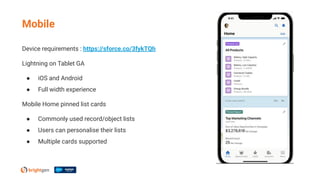
Mobile
Device requirements : https://sforce.co/3fykTQh
Lightning on Tablet GA
● iOS and Android
● Full width experience
Mobile Home pinned list cards
● Commonly used record/object lists
● Users can personalise their lists
● Multiple cards supported
Mobile
Analytics
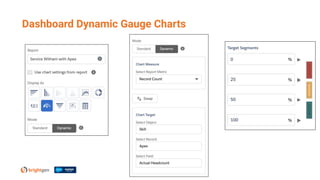
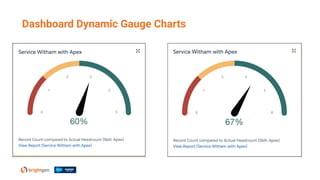
Dashboard Dynamic Gauge Charts
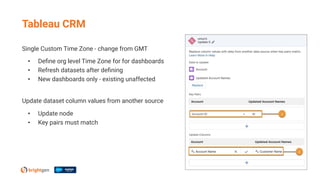
Single Custom Time Zone - change from GMT
• Define org level Time Zone for for dashboards

• Refresh datasets after defining
• New dashboards only - existing unaffected
Update dataset column values from another source
• Update node
• Key pairs must match
Tableau CRM
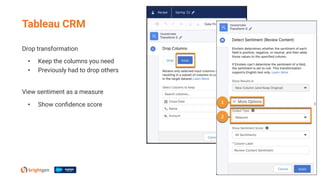
Drop transformation
• Keep the columns you need
• Previously had to drop others
View sentiment as a measure
• Show confidence score
Tableau CRM
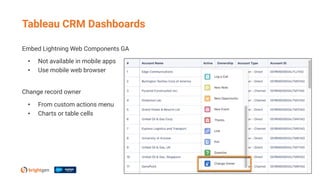
Embed Lightning Web Components GA
• Not available in mobile apps
• Use mobile web browser
Change record owner
• From custom actions menu
• Charts or table cells
Tableau CRM Dashboards
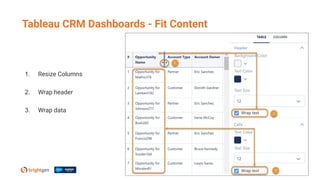
Tableau CRM Dashboards - Fit Content
1. Resize Columns
2. Wrap header
3. Wrap data
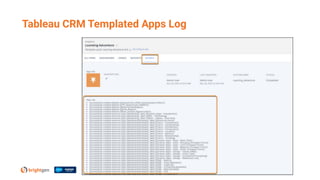
Tableau CRM Templated Apps Log
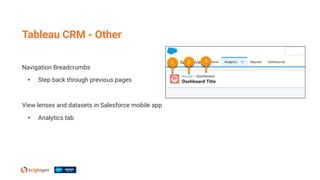
Navigation Breadcrumbs
• Step back through previous pages
View lenses and datasets in Salesforce mobile app
• Analytics tab
Tableau CRM - Other
New version - 14.2
• Bug fixes and usability enhancements
iOS
• Sort tables in dashboards by tapping column headers
Android
• Save data explorations as a lens
• One tap actions
• Pivot tables, including formatting and multiple measures
Tableau CRM Mobile App
Customisation
Enhanced Personal Information Management
New permission
● Hides information from external users
● Default 30 fields, e.g. Address, Extension, Manager
● Configure fields in PersonalInfo_EPIM field set
● Replaces Hide Personal Information setting
● Release update - enforced Winter 23
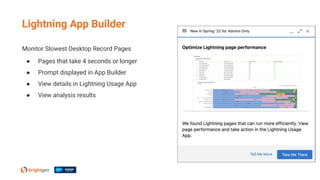
Lightning App Builder
Monitor Slowest Desktop Record Pages
● Pages that take 4 seconds or longer
● Prompt displayed in App Builder
● View details in Lightning Usage App
● View analysis results
Replaces Locker Service for LWC
● Locker Service still applies to Aura
Not Enabled by default
● Will be enabled on a rolling basis from Spring 22
● Orgs with custom LWC only
● Affected orgs will receive an email 1 month in advance
Expected not to require code changes!
Lightning Web Security GA
Professional Services + Unlimited with Signature/Premier Priority Support required
Show users a subset of the records they have access to
● E.g. primary service management customer accounts
● Users can still access all records
Custom objects
Standard Objects - Account, Case, Contact, Event, Lead, Opportunity, Task
Scoping Rules
Scoping Rules
Applied to
● List views
● Lookups
● Reports
● Search
● SOQL
● SOSL
Einstein Automate
Automate record at various points of lifecycle
• Multiple people
• Multiple stages
• Multiple flows (steps)
Assigned flows displayed on record pages
• Use Orchestrator Work Guide lightning web component
Apply logic to orchestration
• Decision Elements
• Stage Exit Conditions
• Step Entry/Exit Conditions
• Evaluation Flows
Orchestrator GA
Assign interactive steps to groups/queues
• Avoid bottlenecks
• All members notified when work item created
• First user to complete step "wins"
• Users must have access to record page
Process background steps asynchronously
Trigger from custom code
• Apex
• API
• Same mechanism as used for flows
Orchestrator
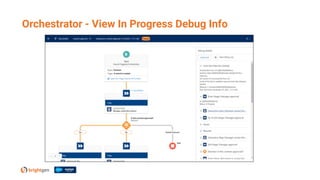
Orchestrator - View In Progress Debug Info
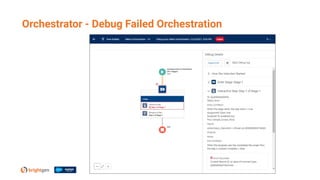
Orchestrator - Debug Failed Orchestration
Package Orchestrations
• Cannot assign specific usernames for steps
• Assign constants
• Update after deployment
Change Sets
• Deploy flows first and activate
• Deploy orchestration next
Orchestrator - Deployment
Orchestration Work Items List View
• View all assigned work items
• Reassign incomplete work items
All Orchestrations Runs List View
• In Progress
• Completed
• Cancelled
• Cancel In Progress runs
Orchestrator - Other
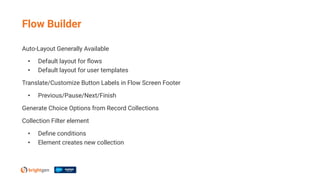
Auto-Layout Generally Available
• Default layout for flows
• Default layout for user templates
Translate/Customize Button Labels in Flow Screen Footer
• Previous/Pause/Next/Finish
Generate Choice Options from Record Collections
Collection Filter element
• Define conditions
• Element creates new collection
Flow Builder
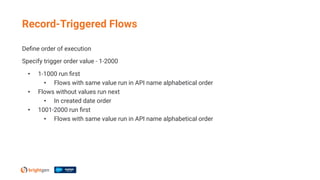
Define order of execution
Specify trigger order value - 1-2000
• 1-1000 run first
• Flows with same value run in API name alphabetical order
• Flows without values run next
• In created date order
• 1001-2000 run first
• Flows with same value run in API name alphabetical order
Record-Triggered Flows
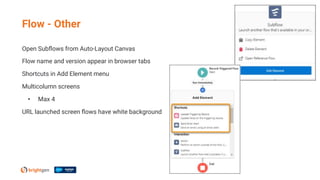
Open Subflows from Auto-Layout Canvas
Flow name and version appear in browser tabs
Shortcuts in Add Element menu
Multicolumn screens
• Max 4
URL launched screen flows have white background
Flow - Other
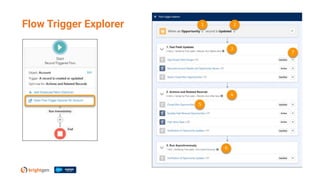
Flow Trigger Explorer
Sales
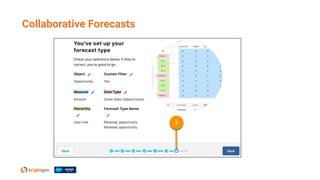
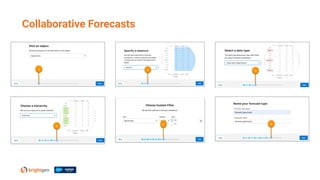
Collaborative Forecasts
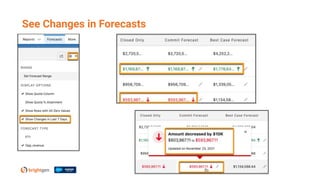
See Changes in Forecasts
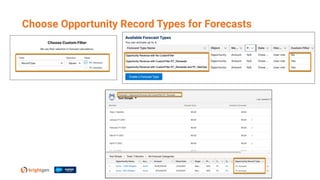
Choose Opportunity Record Types for Forecasts
Org-wide sharing for products
● Release update - enforced in Summer 22
● Internal and external users
Guest User Sharing Rules
● Release update - enforced in Summer 22
● Default is no access
Test in sandbox!
Products
List Email custom report
Verify Email Address to continue sending emails
● Unverified send will be blocked by Winter 23
Use custom lightning web components in email builder
● Define lightning__StaticEmail target
Sort past activities by Completed Date
● Previously Due Date
Sales Other
Pardot
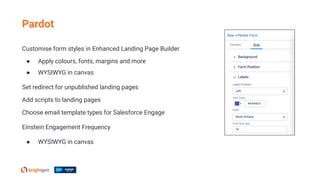
Customise form styles in Enhanced Landing Page Builder
● Apply colours, fonts, margins and more
● WYSIWYG in canvas
Set redirect for unpublished landing pages
Add scripts to landing pages
Choose email template types for Salesforce Engage
Einstein Engagement Frequency
● WYSIWYG in canvas
Pardot
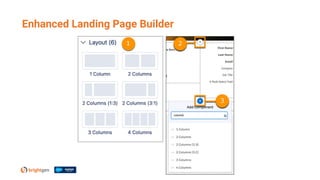
Enhanced Landing Page Builder
Automation emails from Lightning Experience available for
● Automation rules
● Completion actions
Specify tracker domains for automated emails from Lightning Experience
Metrics Guard has improved bot click filtering thresholds
Visitor filters applied retroactively
● Up to 90 days before creation of filter
Pardot
Service
Route calls with Omni-Channel Flows
Supervisor Call Monitoring
● One call
● Agent is notified, not customer
Universal Call Recording
● Any Salesforce user
● Any contact center they have access to
Match callers to records
Voice
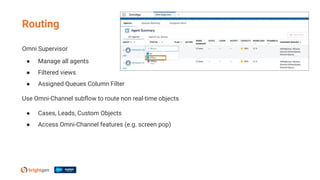
Omni Supervisor
● Manage all agents
● Filtered views
● Assigned Queues Column Filter
Use Omni-Channel subflow to route non real-time objects
● Cases, Leads, Custom Objects
● Access Omni-Channel features (e.g. screen pop)
Routing
Single bot can support multiple languages
Generate Completed Goal Log action
● Identify when customer completed goal
● Report on metric
New standard reports
● Engaged Sesssions, Articles Chosen, Articles Positive Feedback, Escalations, NLP Intent Calls
Bots now have ISO and SOC2 Type 2 compliance
Bots
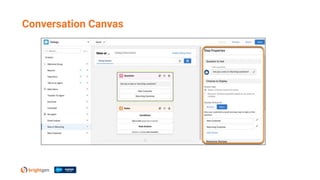
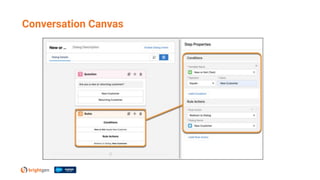
Conversation Canvas
Conversation Canvas
Copy link to latest version
● Even if article updated
Click article image for full-size view
● Via pop-up window
Accurate Article View Counts
● No more double counting
Knowledge
Experiences
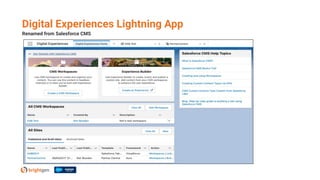
Digital Experiences Lightning App
Renamed from Salesforce CMS
URL unavailable to all users
● Including admins
Users see in maintenance page
Can archive up to 100 sites
● Do not count against Salesforce limit
Can unarchive to restore site
Contact customer support to enable
Archive Experience Cloud Sites
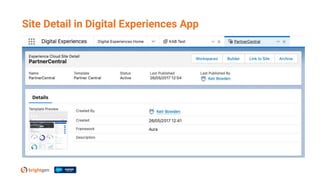
Site Detail in Digital Experiences App
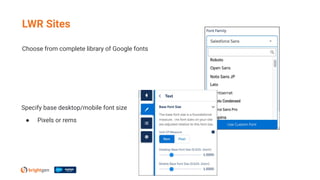
Choose from complete library of Google fonts
LWR Sites
Specify base desktop/mobile font size
● Pixels or rems
Account Role Optimization on by Default
● New sites
● Role based licenses
Switch from shared to single certificate
● Salesforce CDN only
● No downtime
SSO with Slack Credentials
Include High Volume and System User records in Criteria-Based sharing
Experiences - Other
Fond Farewells
Sleeping with the Fishes
Legacy Work.com Spring 22
Legacy APIs versions 7.0 - 20.0 deprecated
• Available until Summer 22
• After which will error
Legacy Tablet Apps retiring Spring 23
• Single column tablet app
• Salesforce1
• Switch to Lightning on tablet
Salesforce for Outlook retiring June 2023
• Move to Outlook Integration/Einstein Activity Capture
16 years at BrightGen
30 webinars
100+ questions
1000s of bad jokes
Clive Platt
Beta Features
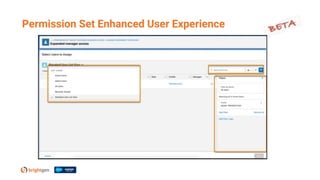
Permission Set Enhanced User Experience
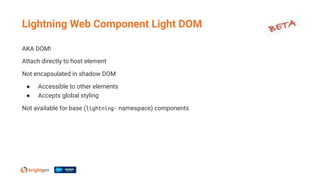
AKA DOM!
Attach directly to host element
Not encapsulated in shadow DOM
● Accessible to other elements
● Accepts global styling
Not available for base (lightning- namespace) components
Lightning Web Component Light DOM
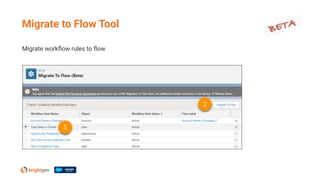
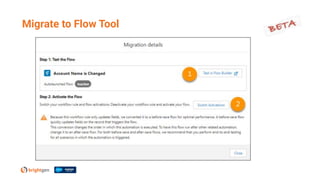
Migrate workflow rules to flow
Migrate to Flow Tool
Fin
sforce.co/34KldZY
• Release in a Box
• Release Notes
• Demo videos
Trailhead badge - sforce.co/3Gg4afa
Release Readiness
Thank you

Salesforce Spring 22 Webinar

  • 1.
  • 2.
    Your Hosts Keir Bowden CTO,Salesforce MVP @bob_buzzard Clive Platt Head of Service Management www.linkedin.com/in/cliveplatt/
  • 3.
    • General Updates •Mobile • Analytics • Customisation • Einstein Automate • Sales • Pardot • Service • Experiences • Fond Farewells • Beta Features Agenda
  • 4.
  • 5.
    Lightning Experience • Lateststable Edge Chromium, Chrome, Firefox, Safari Classic • Internet Explorer 11 • Latest stable Edge Chromium, Chrome, Firefox, Safari Tableau CRM • Latest stable Edge Chromium, Chrome, Firefox - not Safari sforce.co/3qNTYVB Browsers
  • 6.
    Two pieces ofevidence (factors) ● Something you know (password) ● Something you have (authenticator app) Required for all internal user access ● Feb 1 2022 ● Direct login and Single Sign On ● Not sandboxes (yet) Multi-Factor Assistant in Setup (Lightning Experience) Multi-Factor Authentication Rollout Pack : sforce.co/3EZTIrI Multi-Factor Authentication
  • 7.
    On by defaultin Lighting Experience Natural Language Search for tasks • "My tasks this week" • "Tasks with status not started" Instant results show profile images for supported records • Default - People and Groups • Enable - Social Accounts, Contacts and Leads for Twitter Einstein Search
  • 8.
  • 9.
    Device requirements :https://sforce.co/3fykTQh Lightning on Tablet GA ● iOS and Android ● Full width experience Mobile Home pinned list cards ● Commonly used record/object lists ● Users can personalise their lists ● Multiple cards supported Mobile
  • 10.
  • 11.
  • 12.
  • 13.
    Single Custom TimeZone - change from GMT • Define org level Time Zone for for dashboards • Refresh datasets after defining • New dashboards only - existing unaffected Update dataset column values from another source • Update node • Key pairs must match Tableau CRM
  • 14.
    Drop transformation • Keepthe columns you need • Previously had to drop others View sentiment as a measure • Show confidence score Tableau CRM
  • 15.
    Embed Lightning WebComponents GA • Not available in mobile apps • Use mobile web browser Change record owner • From custom actions menu • Charts or table cells Tableau CRM Dashboards
  • 16.
    Tableau CRM Dashboards- Fit Content 1. Resize Columns 2. Wrap header 3. Wrap data
  • 17.
  • 18.
    Navigation Breadcrumbs • Stepback through previous pages View lenses and datasets in Salesforce mobile app • Analytics tab Tableau CRM - Other
  • 19.
    New version -14.2 • Bug fixes and usability enhancements iOS • Sort tables in dashboards by tapping column headers Android • Save data explorations as a lens • One tap actions • Pivot tables, including formatting and multiple measures Tableau CRM Mobile App
  • 20.
  • 21.
    Enhanced Personal InformationManagement New permission ● Hides information from external users ● Default 30 fields, e.g. Address, Extension, Manager ● Configure fields in PersonalInfo_EPIM field set ● Replaces Hide Personal Information setting ● Release update - enforced Winter 23
  • 22.
    Lightning App Builder MonitorSlowest Desktop Record Pages ● Pages that take 4 seconds or longer ● Prompt displayed in App Builder ● View details in Lightning Usage App ● View analysis results
  • 23.
    Replaces Locker Servicefor LWC ● Locker Service still applies to Aura Not Enabled by default ● Will be enabled on a rolling basis from Spring 22 ● Orgs with custom LWC only ● Affected orgs will receive an email 1 month in advance Expected not to require code changes! Lightning Web Security GA
  • 24.
    Professional Services +Unlimited with Signature/Premier Priority Support required Show users a subset of the records they have access to ● E.g. primary service management customer accounts ● Users can still access all records Custom objects Standard Objects - Account, Case, Contact, Event, Lead, Opportunity, Task Scoping Rules
  • 25.
    Scoping Rules Applied to ●List views ● Lookups ● Reports ● Search ● SOQL ● SOSL
  • 26.
  • 27.
    Automate record atvarious points of lifecycle • Multiple people • Multiple stages • Multiple flows (steps) Assigned flows displayed on record pages • Use Orchestrator Work Guide lightning web component Apply logic to orchestration • Decision Elements • Stage Exit Conditions • Step Entry/Exit Conditions • Evaluation Flows Orchestrator GA
  • 28.
    Assign interactive stepsto groups/queues • Avoid bottlenecks • All members notified when work item created • First user to complete step "wins" • Users must have access to record page Process background steps asynchronously Trigger from custom code • Apex • API • Same mechanism as used for flows Orchestrator
  • 29.
    Orchestrator - ViewIn Progress Debug Info
  • 30.
    Orchestrator - DebugFailed Orchestration
  • 31.
    Package Orchestrations • Cannotassign specific usernames for steps • Assign constants • Update after deployment Change Sets • Deploy flows first and activate • Deploy orchestration next Orchestrator - Deployment
  • 32.
    Orchestration Work ItemsList View • View all assigned work items • Reassign incomplete work items All Orchestrations Runs List View • In Progress • Completed • Cancelled • Cancel In Progress runs Orchestrator - Other
  • 33.
    Auto-Layout Generally Available •Default layout for flows • Default layout for user templates Translate/Customize Button Labels in Flow Screen Footer • Previous/Pause/Next/Finish Generate Choice Options from Record Collections Collection Filter element • Define conditions • Element creates new collection Flow Builder
  • 34.
    Define order ofexecution Specify trigger order value - 1-2000 • 1-1000 run first • Flows with same value run in API name alphabetical order • Flows without values run next • In created date order • 1001-2000 run first • Flows with same value run in API name alphabetical order Record-Triggered Flows
  • 35.
    Open Subflows fromAuto-Layout Canvas Flow name and version appear in browser tabs Shortcuts in Add Element menu Multicolumn screens • Max 4 URL launched screen flows have white background Flow - Other
  • 36.
  • 37.
  • 38.
  • 39.
  • 40.
    See Changes inForecasts
  • 41.
    Choose Opportunity RecordTypes for Forecasts
  • 42.
    Org-wide sharing forproducts ● Release update - enforced in Summer 22 ● Internal and external users Guest User Sharing Rules ● Release update - enforced in Summer 22 ● Default is no access Test in sandbox! Products
  • 43.
    List Email customreport Verify Email Address to continue sending emails ● Unverified send will be blocked by Winter 23 Use custom lightning web components in email builder ● Define lightning__StaticEmail target Sort past activities by Completed Date ● Previously Due Date Sales Other
  • 44.
  • 45.
    Customise form stylesin Enhanced Landing Page Builder ● Apply colours, fonts, margins and more ● WYSIWYG in canvas Set redirect for unpublished landing pages Add scripts to landing pages Choose email template types for Salesforce Engage Einstein Engagement Frequency ● WYSIWYG in canvas Pardot
  • 46.
  • 47.
    Automation emails fromLightning Experience available for ● Automation rules ● Completion actions Specify tracker domains for automated emails from Lightning Experience Metrics Guard has improved bot click filtering thresholds Visitor filters applied retroactively ● Up to 90 days before creation of filter Pardot
  • 48.
  • 49.
    Route calls withOmni-Channel Flows Supervisor Call Monitoring ● One call ● Agent is notified, not customer Universal Call Recording ● Any Salesforce user ● Any contact center they have access to Match callers to records Voice
  • 50.
    Omni Supervisor ● Manageall agents ● Filtered views ● Assigned Queues Column Filter Use Omni-Channel subflow to route non real-time objects ● Cases, Leads, Custom Objects ● Access Omni-Channel features (e.g. screen pop) Routing
  • 51.
    Single bot cansupport multiple languages Generate Completed Goal Log action ● Identify when customer completed goal ● Report on metric New standard reports ● Engaged Sesssions, Articles Chosen, Articles Positive Feedback, Escalations, NLP Intent Calls Bots now have ISO and SOC2 Type 2 compliance Bots
  • 52.
  • 53.
  • 54.
    Copy link tolatest version ● Even if article updated Click article image for full-size view ● Via pop-up window Accurate Article View Counts ● No more double counting Knowledge
  • 55.
  • 56.
    Digital Experiences LightningApp Renamed from Salesforce CMS
  • 57.
    URL unavailable toall users ● Including admins Users see in maintenance page Can archive up to 100 sites ● Do not count against Salesforce limit Can unarchive to restore site Contact customer support to enable Archive Experience Cloud Sites
  • 58.
    Site Detail inDigital Experiences App
  • 59.
    Choose from completelibrary of Google fonts LWR Sites Specify base desktop/mobile font size ● Pixels or rems
  • 60.
    Account Role Optimizationon by Default ● New sites ● Role based licenses Switch from shared to single certificate ● Salesforce CDN only ● No downtime SSO with Slack Credentials Include High Volume and System User records in Criteria-Based sharing Experiences - Other
  • 61.
  • 62.
    Sleeping with theFishes Legacy Work.com Spring 22 Legacy APIs versions 7.0 - 20.0 deprecated • Available until Summer 22 • After which will error Legacy Tablet Apps retiring Spring 23 • Single column tablet app • Salesforce1 • Switch to Lightning on tablet Salesforce for Outlook retiring June 2023 • Move to Outlook Integration/Einstein Activity Capture
  • 63.
    16 years atBrightGen 30 webinars 100+ questions 1000s of bad jokes Clive Platt
  • 64.
  • 65.
    Permission Set EnhancedUser Experience
  • 66.
    AKA DOM! Attach directlyto host element Not encapsulated in shadow DOM ● Accessible to other elements ● Accepts global styling Not available for base (lightning- namespace) components Lightning Web Component Light DOM
  • 67.
    Migrate workflow rulesto flow Migrate to Flow Tool
  • 68.
  • 69.
  • 70.
    sforce.co/34KldZY • Release ina Box • Release Notes • Demo videos Trailhead badge - sforce.co/3Gg4afa Release Readiness
  • 71.