Salesforce Release Webinar 
Winter 15 
Clive Platt,Service Manager 
www.linkedin.com/in/cliveplatt 
Keir Bowden, Chief Technical Officer 
www.linkedin.com/in/keirbowden 
@bob_buzzard 
Problems with the webinar software? 
Email cliveplatt@brightgen.com
Agenda 
• Salesforce Winter 15 Release 
– API Access Change 
– Salesforce1 
– Chatter 
– Communities 
– Sales Cloud 
– Service Cloud 
– Platform 
• Q&A
Winter 15 Release
API Access Change 
http://sforce.co/1uybCLC
API Access Change 
• “API Enabled” profile permission 
• MUST be enabled for connected apps 
– Salesforce1 iOS/Android 
– Salesforce for Outlook 
– Connect for Outlook 
– Connect for Office 
– Chatter Desktop/Messenger 
• Partner Apps - 
http://sforce.co/1nDyVBS
Salesforce1
HTML5 Application
Action Bar 
Click to 
view all
Work in Lists 
Swipe entry 
Inline action 
bar
Search Enhancements 
Click to 
search 
Choose 
sobject type
Downloadable Application
Downloadable App 
• Convert leads to contacts 
• Add products to opportunities 
• Drill to matrix report from dashboard 
• Approvals in navigation (iOS only)
Offline Access 
• Read only 
• 5 most recent dashboards 
• Events 
• Recent objects 
• More info : http://sforce.co/1DDa2Lj
Switch Accounts 
Click to 
switch 
Click and enter 
credentials
Chatter
Unlisted Groups 
• Private groups 
• Don’t appear in search results 
• Invitation only 
• Requires setup
Other 
• Files connect 
– Access Sharepoint files 
• Report on shared links to files 
• Include attachments when emailing 
post to group
Communities
Communities 
• Override standard pages 
– Login 
– Logout 
– Self-registration 
• Custom https domains 
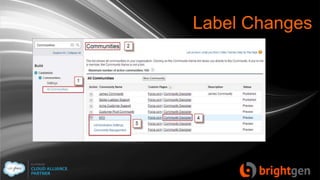
• Community management page 
– New name for Engagement Console
Label Changes
Other 
• New features in community metrics 
package 
– Self Service dashboard 
– Topics dashboard 
– Moderation dashboard
Sales Cloud
Duplicate Management 
• Beta 
• Block duplicate creation 
• Requires activation 
• Requires setup
Duplicates
Forecasting 
• Custom field forecasting GA 
– Forecast on custom currency fields 
– Requires setup 
• Forecast managers add notes 
– Add context to adjustment 
– Up to 140 characters 
– Do not appear in reports
Activities 
• Custom lookups on activities 
– Beta 
– Requires activation 
• Control task notifications 
– Users decide whether to receive 
emails 
– Can be disabled
Service Cloud
Knowledge 
• Monitor article performance 
– Knowledge Search Activity sobject 
– Use in custom report type 
– Actionable data 
• # searches per channel 
• Keywords searched for 
• Average results/articles 
• Average clicks/unique users
Enter Search Highlights 
keywords 
Highlighted 
in results
Knowledge 
• Promoted knowledge results 
– Additional keywords per article 
– Related list on published article 
• Appear in search results
Chatter Questions 
• Now generally available 
• Ask questions inside feed 
• Suggested results 
– Duplicate answers 
– Knowledge articles 
• Asker selects best answer
Platform
Platform 
• Custom permissions 
• Hover links for feed based layout
Platform 
• Delegated admins assign permission 
sets 
– Specify role/subordinate role 
– Add/remove only, no edit 
• Per-profile security 
– Session timeout 
– Password policies
Platform 
• Event log files 
– System usage 
– User behaviour 
– Read only 
– Accessed via SOAP/REST API 
– Delayed generation
Platform 
• Login flows 
– Built using Visual Flow 
– Assigned to profile 
– Post authentication processes 
• Capture additional information 
• Accept Terms 
• Deploy classes with scheduled jobs
Rich Text Editor Old 
format 
New format
More Information 
• http://sforce.co/1u92mLq 
• Release Notes 
• Feature Videos 
• Training
Questions
Contact Us 
www.brightgen.com 
sales@brightgen.com 
01376 520578 
@brightgen 
facebook.com/BrightGen

Winter15 Release Webinar Deck

  • 1.
    Salesforce Release Webinar Winter 15 Clive Platt,Service Manager www.linkedin.com/in/cliveplatt Keir Bowden, Chief Technical Officer www.linkedin.com/in/keirbowden @bob_buzzard Problems with the webinar software? Email cliveplatt@brightgen.com
  • 2.
    Agenda • SalesforceWinter 15 Release – API Access Change – Salesforce1 – Chatter – Communities – Sales Cloud – Service Cloud – Platform • Q&A
  • 3.
  • 4.
    API Access Change http://sforce.co/1uybCLC
  • 5.
    API Access Change • “API Enabled” profile permission • MUST be enabled for connected apps – Salesforce1 iOS/Android – Salesforce for Outlook – Connect for Outlook – Connect for Office – Chatter Desktop/Messenger • Partner Apps - http://sforce.co/1nDyVBS
  • 6.
  • 7.
  • 8.
    Action Bar Clickto view all
  • 9.
    Work in Lists Swipe entry Inline action bar
  • 10.
    Search Enhancements Clickto search Choose sobject type
  • 11.
  • 12.
    Downloadable App •Convert leads to contacts • Add products to opportunities • Drill to matrix report from dashboard • Approvals in navigation (iOS only)
  • 13.
    Offline Access •Read only • 5 most recent dashboards • Events • Recent objects • More info : http://sforce.co/1DDa2Lj
  • 14.
    Switch Accounts Clickto switch Click and enter credentials
  • 15.
  • 16.
    Unlisted Groups •Private groups • Don’t appear in search results • Invitation only • Requires setup
  • 17.
    Other • Filesconnect – Access Sharepoint files • Report on shared links to files • Include attachments when emailing post to group
  • 18.
  • 19.
    Communities • Overridestandard pages – Login – Logout – Self-registration • Custom https domains • Community management page – New name for Engagement Console
  • 20.
  • 21.
    Other • Newfeatures in community metrics package – Self Service dashboard – Topics dashboard – Moderation dashboard
  • 22.
  • 23.
    Duplicate Management •Beta • Block duplicate creation • Requires activation • Requires setup
  • 24.
  • 25.
    Forecasting • Customfield forecasting GA – Forecast on custom currency fields – Requires setup • Forecast managers add notes – Add context to adjustment – Up to 140 characters – Do not appear in reports
  • 26.
    Activities • Customlookups on activities – Beta – Requires activation • Control task notifications – Users decide whether to receive emails – Can be disabled
  • 27.
  • 28.
    Knowledge • Monitorarticle performance – Knowledge Search Activity sobject – Use in custom report type – Actionable data • # searches per channel • Keywords searched for • Average results/articles • Average clicks/unique users
  • 29.
    Enter Search Highlights keywords Highlighted in results
  • 30.
    Knowledge • Promotedknowledge results – Additional keywords per article – Related list on published article • Appear in search results
  • 31.
    Chatter Questions •Now generally available • Ask questions inside feed • Suggested results – Duplicate answers – Knowledge articles • Asker selects best answer
  • 32.
  • 33.
    Platform • Custompermissions • Hover links for feed based layout
  • 34.
    Platform • Delegatedadmins assign permission sets – Specify role/subordinate role – Add/remove only, no edit • Per-profile security – Session timeout – Password policies
  • 35.
    Platform • Eventlog files – System usage – User behaviour – Read only – Accessed via SOAP/REST API – Delayed generation
  • 36.
    Platform • Loginflows – Built using Visual Flow – Assigned to profile – Post authentication processes • Capture additional information • Accept Terms • Deploy classes with scheduled jobs
  • 37.
    Rich Text EditorOld format New format
  • 38.
    More Information •http://sforce.co/1u92mLq • Release Notes • Feature Videos • Training
  • 39.
  • 40.
    Contact Us www.brightgen.com sales@brightgen.com 01376 520578 @brightgen facebook.com/BrightGen